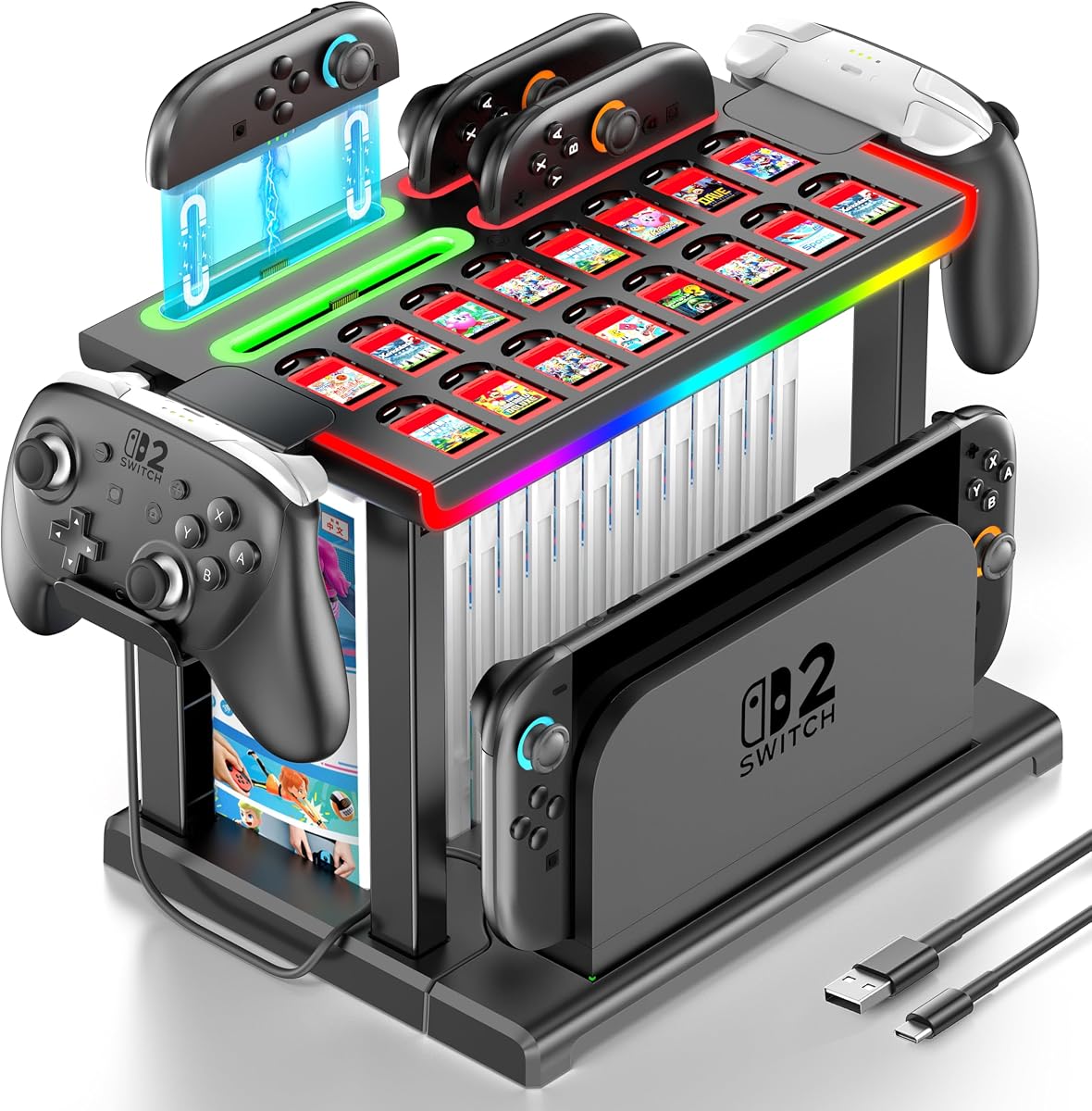
Switch 2 RGB Organizer Station
4.6Editor score
Holds sixteen game cases and cards
Dual-color RGB breathing light modes
Supports full TV dock storage
This guide compares the top ten controller charging docks for Switch 2, evaluating features, compatibility, charging speed, and design to help you find the
Finding the right controller charging dock for Switch 2 is essential for any serious gamer. A good station keeps your controllers powered and organized, ensuring you never miss a beat during intense gaming sessions or multiplayer marathons at home.
We have carefully compared ten leading options available on the market today. Our analysis focuses on charging speed, compatibility with Joy-Cons and Pro Controllers, build quality, and additional features like RGB lighting and storage capacity.
Each pick below highlights key strengths and potential trade-offs to help you decide. Remember that prices and availability can change frequently, so always check the current listing before making your final purchase decision for your setup.
4.6Editor score

4.7Editor score

4.0Editor score
Here is a side-by-side comparison of all ten products to help you quickly identify the best fit for your specific gaming needs and budget constraints.


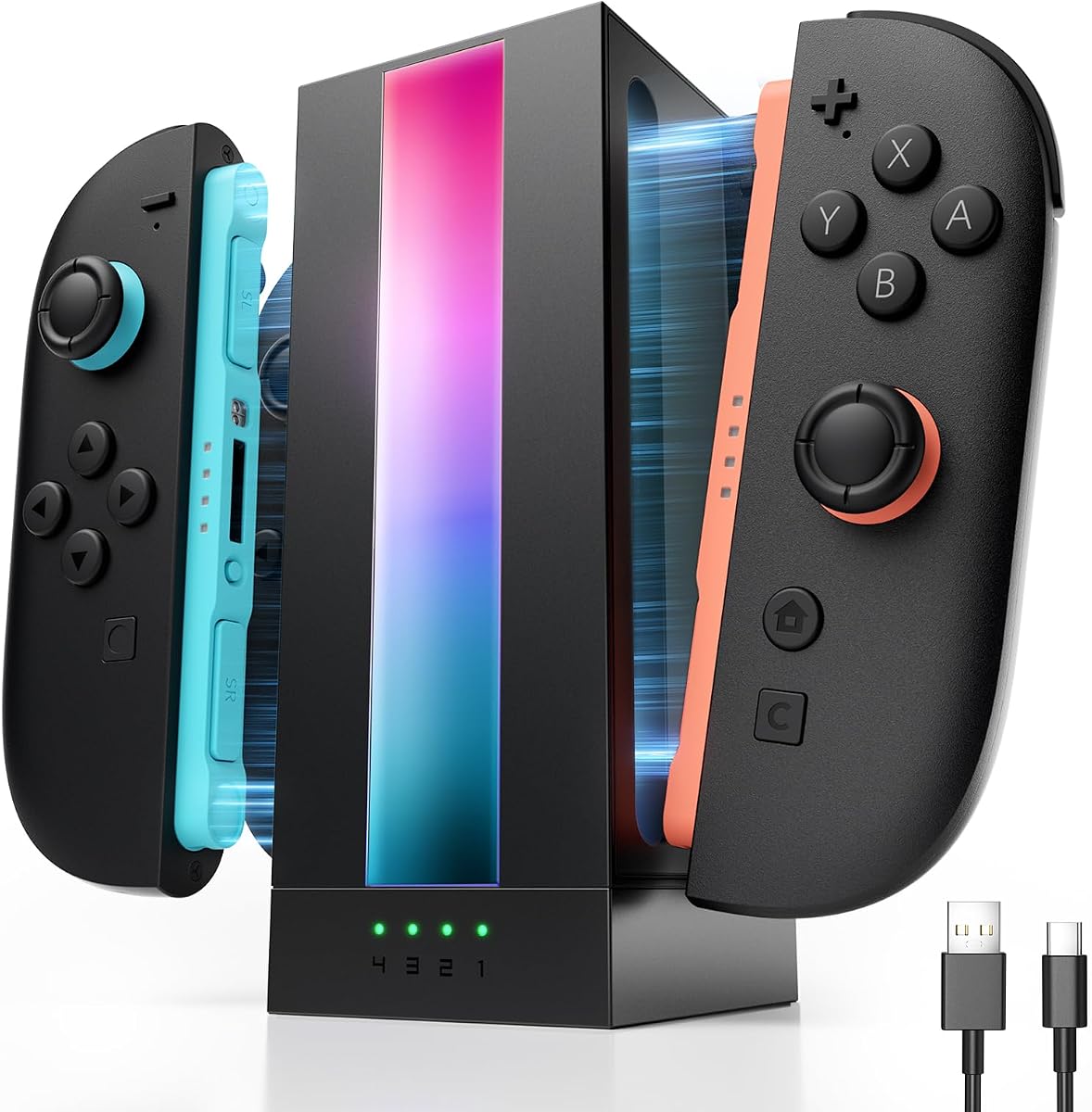
This FASTSNAIL Charging Dock is designed exclusively for the Nintendo Switch 2 Joy-Con controllers. It stands out with its dual-direction magnetic fast charging station that eliminates the need to distinguish between plus and minus joypads.
We may earn a commission when you buy through this link, at no additional cost to you.
The standout feature is the magnetic alignment which securely holds controllers in place while preventing damage from repeated plugging. It charges up to four controllers simultaneously, ensuring you never run out of battery during multiplayer nights.
Trade-offs include the requirement for a separate power adapter to achieve full speed, and the RGB lights might be too bright for some bedroom setups. However, the sleep-friendly touch controls allow you to easily turn off indicators when needed.
This dock is perfect for gamers who want convenience and a clean setup. Its ability to charge four controllers at once makes it ideal for families or multiplayer sessions where multiple controllers are in constant rotation.
The magnetic design ensures effortless alignment and prevents wear on the controller ports over time.
Nine vivid lighting modes let you match the dock to your gaming ambiance or mood.
We may earn a commission when you buy through this link, at no additional cost to you.
The Switch 2 RGB Organizer Station is more than just a charger; it is a comprehensive storage solution. It boasts powerful storage space capable of holding sixteen game cards, sixteen game cases, and two pro controllers simultaneously.
We may earn a commission when you buy through this link, at no additional cost to you.
Its primary strength lies in its organizational capabilities. You can keep your entire gaming area neat with a single unit that charges four Joy-Cons at once and holds your TV dock. The RGB lighting adds a dazzling aesthetic touch.
The only significant limitation is that the Switch 2 TV dock itself is not included, so you must have one separately. Also, the large size might not fit smaller desks, but the non-slip pads ensure it stays stable where placed.
This station is the best premium choice for serious Switch 2 enthusiasts who value order and aesthetics. It makes a perfect gift for family and friends, prioritizing customer experience with responsive support.
Holds sixteen game cases and sixteen cards to keep your library accessible.
Seven single-color and two multi-color modes enhance your gaming rhythm.
We may earn a commission when you buy through this link, at no additional cost to you.
This controller charging dock offers an affordable entry point for those needing a reliable charging station. It supports dual controller charging for Switch Pro and Switch 2 Pro controllers as well as PS5 and Xbox Series controllers.
We may earn a commission when you buy through this link, at no additional cost to you.
Its strength is the removable USB-C adapters which reduce wear on the controller charging port. The smart chip protection ensures stable charging when used with a recommended 5V2A wall adapter, making it versatile across multiple platforms.
Note that it does not support PowerA or third-party controllers, so confirm your model before buying. The budget price means fewer extras like RGB, but it delivers exactly what is needed for reliable charging.
Ideal for gamers who want a no-fuss solution without breaking the bank. The compact design fits neatly on desks, and the LED indicators let you know when your controllers are fully charged and ready to go.
Compatible with Switch 2, PS5, and Xbox Series X controllers for wide utility.
Removable adapters prevent physical damage to controller charging ports.
We may earn a commission when you buy through this link, at no additional cost to you.
This charging station focuses on simplicity and core functionality for Switch 2 Pro Controllers. It allows you to charge two controllers simultaneously with convenient LED indicators to show charging status at a glance.
We may earn a commission when you buy through this link, at no additional cost to you.
The key strength is the fast and stable 5V/2A charging performance which reduces waiting time. It includes smart protection features to prevent overcharging and overheating, keeping your valuable controllers safe during the process.
However, with only two slots, it is less versatile for households with multiple players. The lower rating suggests potential inconsistencies, so it is a good pick only if you strictly need a basic two-slot solution.
Choose this if you want a compact stand that combines charging and storage neatly. It keeps your setup organized while providing quick access to your Pro Controllers whenever you are ready to play.
Intelligent protection helps prevent overcurrent and short circuits effectively.
We may earn a commission when you buy through this link, at no additional cost to you.
PowerA is a trusted brand in the gaming accessories space, and this charging base reflects that quality. It is fully compatible with Nintendo Switch Pro Controllers and all PowerA Wireless Nintendo Switch Controllers.
We may earn a commission when you buy through this link, at no additional cost to you.
Its main advantage is the official brand reliability which gives peace of mind for many users. The bold, eye-catching design looks great with any gaming setup, and LED lights indicate when controllers are fully charged.
A limitation is that it may not work with third-party controllers outside the PowerA line. Also, it charges Joy-Cons and wireless controllers simultaneously, which might not suit those needing dedicated Pro Controller slots.
Buy this if you already own PowerA wireless controllers and want a cohesive setup. It simplifies your charging routine while adding a stylish touch to your desk with its sleek and functional design.
Official PowerA brand ensures consistent quality and compatibility standards.
We may earn a commission when you buy through this link, at no additional cost to you.
This six-in-one charging station offers exceptional versatility for multi-platform gamers. It supports charging four Joycons and two Nintendo Pro controllers at the same time, and even accommodates two PS5 controllers.
We may earn a commission when you buy through this link, at no additional cost to you.
The standout feature is the fireproof panel design which ensures safe charging for all connected devices. Built-in protection IC chips guard against over-charging and short circuits, making it a reliable choice for daily use.
One thing to note is that no joycons or controllers are included in the package, so you must have your own. The design imitates official tracks which makes plug and play setup simple and intuitive.
This is the best choice if you own controllers across different systems like Switch and PlayStation. It saves space by combining multiple charging needs into one compact and safe unit on your desk.
Handles Nintendo Switch and PS5 controllers in a single station.
Fireproof panel and smart IC chips protect against electrical hazards.
We may earn a commission when you buy through this link, at no additional cost to you.
The HEATFUN charger is designed for wide compatibility with official USB-C controllers. It supports Switch 2 Pro controllers as well as PS5 and Xbox Series X|S Elite 2 controllers in a dual USB-C port setup.
We may earn a commission when you buy through this link, at no additional cost to you.
Its key benefit is reducing downtime by charging two controllers together. The USB-C adapters included help reduce wear on the controller charging port, allowing for convenient dock-and-charge use without constant plugging.
Note that lower-power USB ports may lead to slower charging speeds, so a dedicated adapter is recommended. Also, it excludes some third-party controllers like PowerA or Luna, so check before purchasing.
This dock is ideal for those with mixed console setups who want a compact solution. The low-standby design fits neatly on TV stands, keeping your gaming area organized without taking up extra space.
Included USB-C adapters extend controller charging port lifespan significantly.
We may earn a commission when you buy through this link, at no additional cost to you.
SUPCASE offers a specialized dock designed to charge up to four Joy-Con controllers simultaneously. It features dual-side charging, meaning you can place JoyCons in either direction and still get a stable connection.
We may earn a commission when you buy through this link, at no additional cost to you.
The magnetic design ensures easy alignment and secure placement, reducing wear and tear on the ports. Built-in smart chip technology automatically detects status and stops charging once fully charged to prevent overheating.
While it is a strong performer, the price point is higher than some basic options. Additionally, JoyCons are not included in the package, so you will need to have your own to use this dock.
Select this dock if you prioritize convenience and safety for your Joy-Cons. The space-saving design keeps your area neat, and the real-time LED indicators show charging status for each individual slot clearly.
Charges reliably no matter which way the JoyCon is placed.
Magnetic alignment prevents loose connections during charging.
We may earn a commission when you buy through this link, at no additional cost to you.
This FASTSNAIL dock is specially designed for Nintendo Switch 2, 1, and OLED models. It supports charging up to 4 JoyCons and 2 Pro controllers simultaneously, offering a versatile solution for mixed controller setups.
We may earn a commission when you buy through this link, at no additional cost to you.
Its strength is the inclusion of a Y-Type cable recommended for connection to the official dock as a power source. The dock features two extra USB 2.0 ports for data transfer or charging additional devices beyond controllers.
However, it is not compatible with third-party controllers, so stick to official hardware. The RGB modes are customizable and include a memory function, though the design requires specific power management for best results.
This station is perfect for households with multiple Switch generations and controllers. It organizes your desktop effectively and provides a reliable charging experience with clear LED indicators for each slot.
Works with Switch 2, Switch 1, and OLED models for broad use.
We may earn a commission when you buy through this link, at no additional cost to you.
JSAUX EnergyFlow is designed exclusively for the 2025 Switch 2 JoyCon controllers. It can charge two pairs of JoyCons simultaneously at high speed, significantly reducing waiting time compared to previous models.
We may earn a commission when you buy through this link, at no additional cost to you.
The dock features independent LED indicators for each port, flashing green when charging and solid when fully charged. This visual feedback helps you monitor status clearly without needing to check the console.
Important to note is that it does not work with the older 2017 or OLED versions of the JoyCon, so ensure you have the 2025 model. Power adapter is not included, so you will need to provide one.
Choose this dock if speed and precision are your top priorities for your new Switch 2. The smart safety protection ensures your controllers are safe while keeping the setup stylish with its dynamic RGB light bar.
Up to 30 percent more efficient than previous models for quick charging.
Each port has its own LED to show individual charging status.
We may earn a commission when you buy through this link, at no additional cost to you.
Choosing the right charging dock involves evaluating several key factors to ensure compatibility and convenience for your gaming setup.
Always verify that the dock supports your specific Joy-Con or Pro Controller models. Some docks are designed exclusively for Switch 2 2025 models and may not work with older OLED or 2017 controllers.
Check the product specifications for explicit mentions of supported devices to avoid purchasing an incompatible accessory that cannot charge your hardware.
Determine how many controllers you need to charge at once based on your household needs. Multiplayer households benefit from docks with four slots for Joy-Cons plus slots for Pro controllers.
More ports provide convenience but may increase size and cost. Consider if you need dedicated Pro controller slots or just Joy-Con charging capacity.
Look for docks that support 5V/2A power input for efficient charging. Lower power adapters may lead to slow or intermittent charging which delays game sessions.
Fast charging docks reduce waiting time significantly, especially if you rely on multiple controllers during long gaming nights or multiplayer events.
Some docks require a wall adapter which may not be included in the box. Others can be powered via USB from your console or a hub which saves on extra cables.
Check if the product includes a power adapter or Y-Type cable as specified in the package contents to ensure you have all necessary components.
A sturdy dock prevents slipping and protects your controllers from falling. Look for non-slip pads and fireproof materials to ensure safe daily use on your desk or TV stand.
Quality materials also mean a longer lifespan for the dock, protecting your investment against wear and tear over time.
Many docks offer RGB lighting or storage slots for game cases. These extras enhance aesthetics and organization but may not be necessary for basic charging needs.
Consider if features like magnetic alignment or dual-side charging add value to your workflow before paying a premium for advanced functionality.
Prices vary widely from basic two-port docks to multi-functional organizer stations. Decide on a price range that fits your budget while still meeting essential requirements.
Higher prices often bring more ports or better design, but cheaper options can still offer reliable charging if you verify compatibility and power specs.
Smart chips inside the dock help prevent overcharging and overheating which protects your controllers battery health. Look for mentions of short-circuit or over-voltage protection.
Safety features are critical to ensure that the charging process remains secure and does not damage your expensive gaming accessories over time.
First ensure that your power adapter matches the recommended voltage and amperage for the dock to function correctly. Using the wrong adapter might result in slow charging or device instability during use.
Second align your controllers carefully with the dock slots using any magnetic or guide features to ensure proper connection. This helps prevent damage to the charging pins inside the controllers and dock.
Third keep the dock clean and free of dust or debris to maintain good electrical contact over time. Wipe the surface occasionally with a dry cloth to avoid buildup that could interfere with charging.
Many docks are designed specifically for Switch 2 2025 models and may not support the 2017 or OLED versions. Always check the product compatibility details before purchasing to ensure it matches your console generation.
Most controllers do not include a wall power adapter. You may need to use your own 5V/2A adapter or power the dock via your console's USB port depending on the specific product instructions.
Some docks support mixed charging for Pro Controllers and Joy-Cons simultaneously while others are dedicated to one type. Review the product specifications to confirm multi-controller capabilities.
Most modern docks include smart chips that stop charging once the battery is full to prevent overcharging. This helps extend the lifespan of your controller batteries over time.
RGB lights are typically separate from the power circuit and do not interfere with charging speeds. You can usually turn them off via a button to save power or reduce light.
Many docks come with non-slip pads or rubber feet to protect your desk surface and prevent sliding. Check the product description to confirm protective features are included.
Charging time varies by dock but typically ranges from two to three hours for a full charge. Faster docks can reduce this time significantly for quicker turnaround.
Some docks are designed only for official Nintendo controllers and may not support third-party brands. Verify the compatibility list to ensure your specific controller brand is supported.
In conclusion the FASTSNAIL Magnetic Dock stands out as our top pick for its convenience and versatility. It balances performance with modern features to suit most gaming needs effectively.
When choosing a dock prioritize compatibility and charging speed to ensure a smooth experience. Look for docks with solid build quality and safety protections to keep your hardware safe.
Prices and availability fluctuate so always verify current listings before buying. Taking time to choose the right dock will improve your gaming setup significantly.