
Creality Falcon 10W Laser Engraver Machine
4.2Editor score
72W effective power output
0.06mm high precision
15.7 by 16.3 workspace
Choosing the right laser engraver can transform your creative projects into professional-grade products. Creality has established itself as a leading brand in the DIY and professional manufacturing space with a wide range of reliable machines.
We compared ten top models based on speed, power output, safety features, ease of use, and software compatibility. Our analysis focuses on real-world performance metrics and user feedback to ensure you get the most value.
Each pick highlights specific strengths like speed or precision. Note that prices change frequently on Amazon and other retailers so always check the current listing before you make your final purchasing decision for your workshop.
4.2Editor score

4.1Editor score

4.2Editor score
As an Amazon Associate we earn from qualifying purchases.
This table compares all ten models side by side to highlight key specifications like laser power, workspace dimensions, and unique features such as auto focus or camera systems.



The Falcon A1 10W is the top overall pick for users seeking a balance of power and safety. With its fully enclosed Class 1 design and smart material recognition, it is ideal for beginners and professionals alike.
We may earn a commission when you buy through this link, at no additional cost to you.
Its CoreXY system enables speeds up to 600mm/s while maintaining high precision. The smart camera auto positioning simplifies setup, letting you place materials and start engraving without manual calibration.
While it is not compatible with all honeycomb panels and cannot engrave reflective materials, these are standard trade-offs for enclosed diode lasers. The convenience of assembly-free operation outweighs these limitations for most users.
This model is best for makers who prioritize safety and ease of use. Its robust performance and intuitive software make it a standout choice for creating detailed designs on wood and metal.
The fully enclosed design blocks 99% of laser light, eliminating the need for safety goggles and keeping your workspace clean and noise-free.
Built-in AI automatically applies optimal settings to your material, saving you time on trial and error while ensuring consistent high-quality results.
We may earn a commission when you buy through this link, at no additional cost to you.
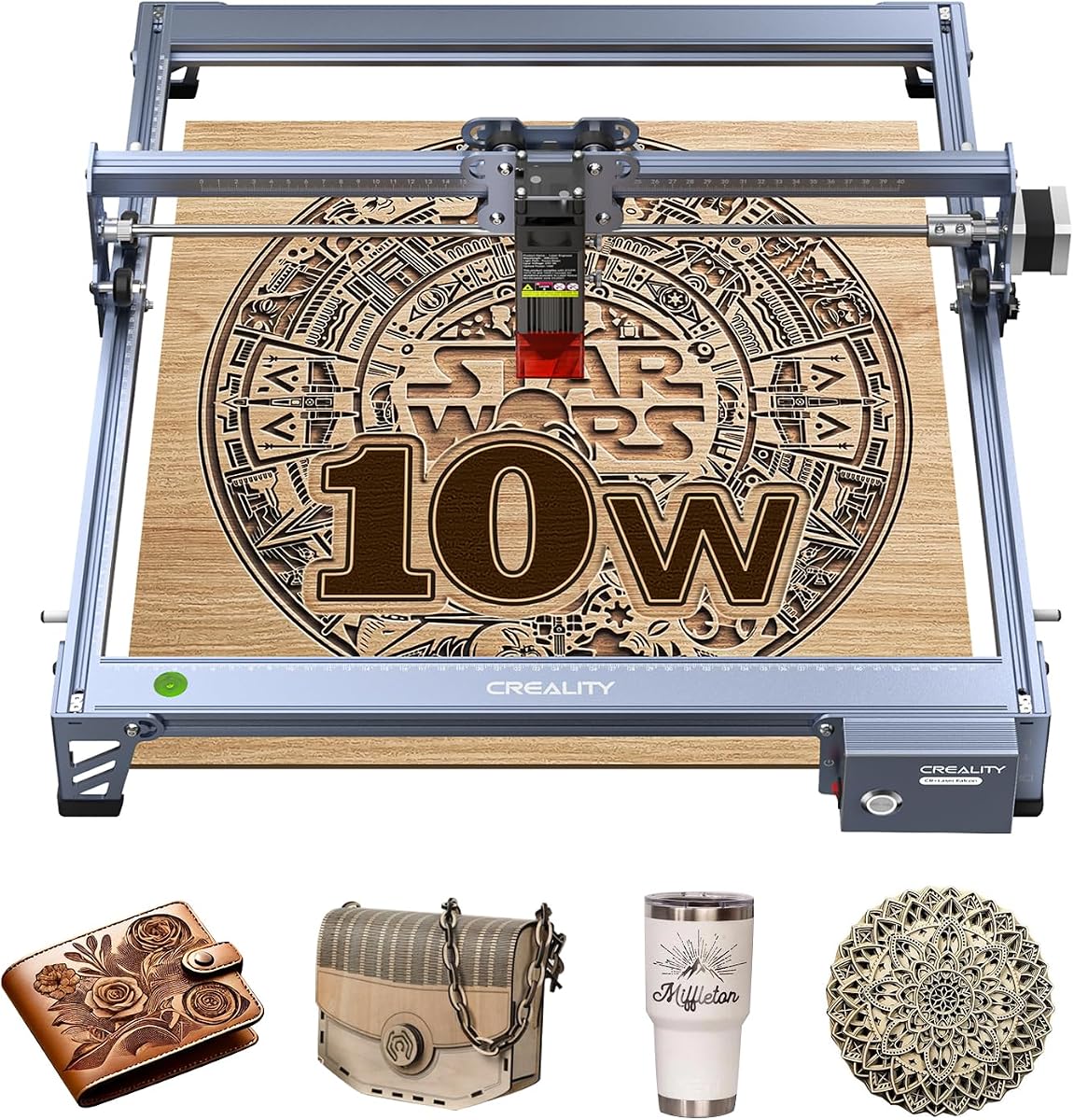
This Falcon 10W model offers excellent value for hobbyists needing a powerful cutter. It delivers 72W of effective power and high precision, making it capable of cutting through thick materials in single passes.
We may earn a commission when you buy through this link, at no additional cost to you.
Its 15.7 by 16.3 inch workspace provides ample room for diverse projects. The machine supports both Windows and Mac systems and includes offline SD card functionality for flexible workflow options.
While it requires assembly and has a less robust enclosure than premium models, it includes necessary safety features like UV filters and goggles. This makes it a great starting point for those on a budget.
It is perfect for users willing to set up their machine for significant savings. The versatility to handle over 200 materials makes it a strong contender for home and small business use.
The 32-bit chip and compressed spot laser module ensure accuracy within 0.004 inches, allowing precise cuts on 12mm wood and 5mm black acrylic.
It works with LightBurn and LaserGRBL across various operating systems, plus offline SD card support lets you start projects anywhere without a PC.
We may earn a commission when you buy through this link, at no additional cost to you.
The A1 Pro 20W delivers professional-grade performance with 180W output and a smart touchscreen interface. It combines high speed with advanced automation features like camera autofocus for flawless precision every time.
We may earn a commission when you buy through this link, at no additional cost to you.
Its ability to switch between blue and optional infrared lasers adds immense versatility for jewelry and fine detail work. The app control allows you to monitor projects from anywhere in your home or office.
The main trade-off is the price, and you must buy the infrared module separately for metal work. However, the efficiency gains and convenience of the touch screen justify the investment for serious makers.
This machine is ideal for those ready to scale up production. Its 600mm/s speed and automated workflows make it a powerhouse for batch processing intricate designs.
Auto focus and high-definition camera enable precise positioning and measurement accuracy within 0.012 inches, simplifying complex workflow.
A smartphone-style touchscreen allows cable-free operation and easy file access, keeping your workspace tidy and your workflow uninterrupted.
We may earn a commission when you buy through this link, at no additional cost to you.
This model highlights speed and convenience with its CoreXY motion system and air assist. It reaches 600mm/s speeds and features smart camera positioning to streamline the creative workflow significantly.
We may earn a commission when you buy through this link, at no additional cost to you.
The inclusion of air assist helps improve cut quality by removing debris from the material surface. Its self-developed software offers graphic outline extraction to convert patterns into engraving paths easily.
The working area is smaller than some models, and it lacks pre-assembly, which may be a drawback for users seeking quick setup. However, the speed and safety features make up for these shortcomings.
It is best for users who prioritize speed and cut quality. The air assist ensures clean edges on wood and acrylic, making it a great tool for production-oriented projects.
Air assist helps blow away smoke and debris during engraving, resulting in cleaner cuts and better visibility throughout the process.
This feature captures and converts design patterns into detailed engraving paths, allowing you to transform artistic ideas into unique results.
We may earn a commission when you buy through this link, at no additional cost to you.
This machine combines a robust aluminum structure with high precision focusing. It cuts 5mm wood in one pass and supports multiple connectivity options for easy data transfer between devices.
We may earn a commission when you buy through this link, at no additional cost to you.
The high-quality build includes strong belt tension adjustments and a fine spot focus for precise results. It also offers excellent after-sales service with one-year free parts and permanent technical support.
While it requires assembly and lacks advanced smart features, its reliable hardware and support make it a safe choice. The spacious workspace allows for larger projects without needing multiple setups.
It is best for users who want reliability and durability. The aluminum structure ensures long-term stability, making it a great option for workshops that need consistent performance.
Made from all aluminum alloy with steel shaft guide rails, this machine ensures stability and precision over long hours of operation.
Transfer data via Wi-Fi, USB, or SD card, allowing you to start and manage your projects anytime and anywhere with ease.
We may earn a commission when you buy through this link, at no additional cost to you.
The Falcon2 Pro S brings industrial power with 22W optical output and comprehensive safety features. It is designed for professionals who need reliable batch production and high-speed cutting capabilities.
We may earn a commission when you buy through this link, at no additional cost to you.
It includes a built-in flame detector and debris drawer, ensuring safety and cleanliness during long production runs. The integrated enclosure protects against smoke and noise effectively.
Some users may find the setup complex compared to plug-and-play models. However, the advanced features like auto cut-through make it ideal for high-volume environments requiring consistent results.
This model is best for professional studios needing reliability. Its auto-focus and safety systems reduce manual intervention and ensure secure operations around the clock.
Built-in flame detection and a debris drawer protect your workspace from fire hazards and keep it clean by collecting cutting residue automatically.
With speeds up to 600mm/s and auto cut-through compensation, it handles large batches efficiently without sacrificing detail or quality.
We may earn a commission when you buy through this link, at no additional cost to you.
The A1C brings AI-driven tools to desktop engraving, simplifying design and layout tasks. Its interchangeable platform allows you to switch laser heads easily as your project needs evolve.
We may earn a commission when you buy through this link, at no additional cost to you.
With AI background removal and smart layout tools, beginners can create professional results quickly. The compact design makes it easy to move between classrooms, studios, or home workshops.
While its workspace is smaller, the speed and AI integration make up for it. The auto focus ensures precision without manual adjustments, letting you focus on creativity rather than calibration.
This machine is ideal for educators and students. Its portability and smart features make it a safe and easy way to introduce engraving technology into classrooms.
AI One-Tap Engraving converts photos to artwork, while background removal and smart fill streamline the design process for beginners.
Switch between 5W, 10W, and 1.2W laser modules easily, allowing your machine to grow with your creative needs over time.
We may earn a commission when you buy through this link, at no additional cost to you.
This version of the A1 Pro emphasizes user convenience with a smart touchscreen and auto focus. It provides a cleaner working environment with its enclosed design and air assist system.
We may earn a commission when you buy through this link, at no additional cost to you.
The touchscreen simplifies access to history files and previews, eliminating the need for cable management. Air assist helps maintain clean cuts on acrylic and wood with minimal residue.
While it shares similar specs with other premium models, its focus on user interface and cleanliness stands out. It is designed to be a hassle-free experience for home and small shop use.
It is best for users who value a tidy workspace. The closed design blocks 99% of radiation and ensures a quiet, smoke-free operation while you create.
Transparent covers and effective blocking of smoke keep your workspace clean and quiet, allowing you to focus on your work.
Access history files with a single tap and preview work in real time for precise engraving without re-importing or reconfiguring.
We may earn a commission when you buy through this link, at no additional cost to you.
The A1C Mini offers a unique modular design allowing module swaps in seconds. This flexibility lets you adapt to various materials without needing multiple machines in your shop.
We may earn a commission when you buy through this link, at no additional cost to you.
It comes with advanced AI software that helps with image generation and material recognition. The flame detection and auto focus ensure safe operation and precision even for beginners.
Its workspace is small, but its speed of 15,000mm/min allows for rapid production of small items. The lightweight design makes it easy to carry to maker fairs or classroom workshops.
It is best for educators and makers needing versatility. The quick-swap system lets you switch between detailed and power-focused projects easily.
Change laser modules in 15 seconds without tools, giving one machine the flexibility to cut and engrave a wide range of materials.
Falcon Design Space offers AI image generation and visual positioning, simplifying every step from design to engraving for any skill level.
We may earn a commission when you buy through this link, at no additional cost to you.
This model focuses on accessibility with zero assembly and intuitive software. It offers precise engraving with a spot size of 0.06 by 0.08mm for sharp detail on various materials.
We may earn a commission when you buy through this link, at no additional cost to you.
It includes six safety protections such as smoke extraction and laser leak protection, ensuring safe operation. The compact design takes up less space than similar models while maintaining high performance.
Although it lacks advanced camera auto focus, its speed and precision make up for it. The three-step operation simplifies the workflow so you can start creative projects immediately.
It is best for beginners and hobbyists. The compact footprint and safety features make it a safe and easy choice for home studios and small workshops.
Zero assembly and intuitive three-step operation make engraving simple, allowing you to start creating immediately after unboxing.
Class 1 compliance, eye-protection cover, and emergency stop button ensure a safe and controlled environment for your projects.
We may earn a commission when you buy through this link, at no additional cost to you.
Selecting the right engraver depends on your needs, budget, and workspace. We have compiled the key factors to consider before making a purchase.
Laser power determines how quickly you can cut materials. Higher wattage like 20W or 22W allows for faster cuts through thick wood and acrylic, while 10W is ideal for detailed engraving.
Choose power based on material thickness. For hobbyists, 10W to 20W offers a balance of speed and detail without being too expensive.
Workspace size limits the maximum dimensions of projects you can create. Larger benches like 16 by 20 inches are better for bigger projects, while smaller models fit on desktops.
Measure your available area. Ensure your chosen model accommodates the average size of your typical projects.
Safety is critical when using lasers. Enclosed designs with Class 1 certification protect eyes from exposure, while flame detectors prevent fire hazards.
Prioritize models with covers and emergency stops. These features ensure a safe environment especially if you have children or pets nearby.
Software determines how easily you can design and operate your machine. Compatible software like LightBurn or LaserGRBL supports various formats and operating systems.
Check if the machine supports your OS. Also look for apps that allow remote monitoring and simple design tools for beginners.
Assembly requirements vary by model. Pre-assembled units save time and frustration for those who want to start engraving immediately after delivery.
Choose a machine with user-friendly software if you are new to lasers. Auto-focus and smart settings simplify setup and reduce trial and error.
Smart cameras provide visual previews of your workspace and automate positioning. This saves time on manual measurements and improves alignment accuracy.
Look for HD cameras with auto-positioning if precision matters to you. This feature is especially useful for repetitive batch production tasks.
Different lasers cut different materials effectively. Diode lasers are great for wood and leather, while infrared modules are needed for metals and plastics.
Consider future material needs. Some models allow head swapping so you can upgrade functionality without buying a new machine.
Prices range from affordable entry-level models to professional machines. Higher cost often brings better safety, speed, and convenience features.
Balance your needs with your budget. Entry-level models are perfect for hobbyists while premium options suit small businesses needing productivity.
Always start by setting up your engraver on a stable surface away from flammable materials. Ensure the room is well-ventilated and all safety covers are in place before powering on.
Use the provided software to import your design and adjust power settings based on the material thickness. Use test cuts to verify settings before running the full engraving job.
Clean your lens and mirror regularly with a soft lint-free cloth to maintain sharp focus. Inspect the machine for debris after every job to ensure safety and performance longevity.
Creality engravers can cut wood, leather, acrylic, paper, and some metals. Diode lasers work best on non-reflective materials while infrared modules are needed for metals and plastics.
Most models like the Falcon A1 are Class 1 enclosed which blocks light so goggles are not needed. However, open models require proper eyewear to protect your eyes from UV rays.
Yes, most Creality models support LightBurn along with LaserGRBL. Check compatibility for your specific OS and model to ensure full feature access.
Pre-assembled models take zero assembly time. Others may take 10 to 20 minutes. Follow the manual carefully to ensure correct alignment and safety.
Typically laser heads last thousands of hours. Proper ventilation and cleaning extend their life. Check manufacturer warranty for specific guarantees.
Standard diode lasers do not engrave bare metal well. You need an infrared module or use coating sprays. Check your model supports IR modules.
Yes enclosed Class 1 models are safe for home use. Ensure proper ventilation and follow all safety guidelines to prevent hazards or smoke issues.
Use a soft lint-free cloth with optical lens cleaner. Gently wipe the lens and mirrors to avoid scratches. Clean after every few hours of use.
We reviewed ten top models ranging from budget to premium options. The Falcon A1 stands out for safety and ease while the Falcon 10W offers great value for beginners.
If you need speed and power for batch work consider the A1 Pro 20W or Falcon2 Pro S. For educators and students the AI features of the A1C make learning easier and safer.
Remember that prices change frequently on Amazon so always check current listings before buying. Choose the model that best fits your budget and project needs.