
VEIKK VK1200 V2
4.3Editor score
Full-laminated anti-glare glass
60-degree tilt recognition support
Compact stylish all-metal body
Finding a cheap drawing tablet with screen can transform your creative workflow without breaking the bank. These devices offer direct drawing on a display, making digital art more intuitive and natural for beginners and professionals alike.
We evaluated ten top-rated models based on screen quality, pressure sensitivity, compatibility, and overall value. Our goal is to highlight affordable options that deliver professional-grade performance for artists, students, and remote workers seeking accessibility.
Each pick below details specific strengths, limitations, and ideal use cases to guide your decision. Note that pricing and availability fluctuate frequently, so verify current deals before purchasing to ensure you get the best value for your investment.
4.3Editor score

4.4Editor score

4.5Editor score
As an Amazon Associate we earn from qualifying purchases.
This side-by-side comparison highlights the key specifications and unique features of each model. Use this table to quickly identify which device aligns best with your specific artistic needs and budget constraints.




The XP-PEN Artist12 stands out as the Editor's Choice for those seeking an affordable entry into digital art with a screen. Its 11.6-inch HD IPS display delivers vibrant colors and sharp detail, making it ideal for sketching, photo editing, and online education tasks.
We may earn a commission when you buy through this link, at no additional cost to you.
This tablet excels with its 8192 levels of pressure sensitivity and a battery-free stylus that feels natural to hold. The customizable shortcut keys and programmable touch bar allow for a highly efficient workflow, adapting to your specific drawing or note-taking habits without extra accessories.
While it lacks tilt recognition and requires a connected computer, these trade-offs are acceptable given the price. The anti-reflective screen protector is pre-installed, reducing glare immediately. It remains a reliable tool for students and professionals needing a second display for creative work.
If you want a balanced mix of performance and value, the XP-PEN Artist12 is the top recommendation. It offers enough features to grow into while remaining accessible for beginners starting their digital art journey on a strict budget.
The display covers 72% NTSC and 100% SRGB color gamut, ensuring your artwork appears true to life on screen.
It supports HDMI and USB-A connections, making it adaptable to various laptops and desktop setups.
We may earn a commission when you buy through this link, at no additional cost to you.
The VEIKK VK1200 V2 is our pick for the best budget option, offering full-laminated technology that reduces parallax for precise cursor positioning. This feature is rare at this price point, ensuring your pen tip aligns perfectly with the cursor on screen for accurate drawing.
We may earn a commission when you buy through this link, at no additional cost to you.
It features a battery-free pen with tilt recognition and 8192 pressure levels, giving you control over line width and shading. The all-metal body provides durability while keeping the device lightweight enough to carry to classes or client meetings easily.
Setup is simplified with single-cable USB-C connectivity for supported devices, reducing desk clutter. While it lacks advanced driver features compared to higher-end models, the included 28 replacement nibs and artist glove add significant value for daily use.
For beginners or students needing a reliable and portable tool without overspending, this model delivers exceptional value. Its anti-glare glass mimics paper texture, making the transition from traditional to digital art smoother and more comfortable.
Full-lamination fuses glass and screen closely, eliminating the gap that causes misalignment between pen and cursor.
The compact frame and lightweight design make it easy to store in a backpack for creative sessions on the go.
We may earn a commission when you buy through this link, at no additional cost to you.
The HUION Kamvas 13 (Gen 3) represents the premium end of this list with advanced PenTech 4.0 technology offering 16384 pressure levels. This extra sensitivity allows for finer control in detailed illustration work, distinguishing it from standard 8192-level models in this category.
We may earn a commission when you buy through this link, at no additional cost to you.
Its Canvas Glass 2.0 surface significantly reduces glare and sparkle, creating a more natural paper-like feel. The factory calibration ensures color accuracy with an average Delta E of less than 1.5, which is crucial for designers needing reliable color reproduction across different devices.
Two custom dial buttons provide quick access to zoom and brush size adjustments, streamlining your workflow during complex projects. While it commands a higher price, the build quality and advanced features make it a worthy investment for serious illustrators and graphic designers.
If you require professional-grade color accuracy and pressure sensitivity, this is the model to consider. It bridges the gap between consumer and prosumer devices, offering high-end performance without the exorbitant cost of flagship brands.
Factory calibration reports guarantee that your display matches industry standards, saving time on manual color correction.
Dual dials allow for quick adjustments without reaching for software menus, keeping your creative focus uninterrupted.
We may earn a commission when you buy through this link, at no additional cost to you.
The GAOMON PD1161 offers a solid middle ground with eight customizable press keys on the side, giving users extensive shortcut options directly on the device. This feature is particularly beneficial for those using complex software like Photoshop or Krita where frequent tool switching is necessary.
We may earn a commission when you buy through this link, at no additional cost to you.
Its matte pre-installed film provides a paper-like feel and reduces reflections effectively, enhancing comfort during long drawing sessions. The battery-free stylus supports tilt functions, allowing for natural shading techniques without needing to recharge the pen during your workflow.
While the driver software is relatively basic compared to competitors, it covers essential functions needed for standard creative work. Compatibility is broad, supporting Windows, Mac, and various creative applications, making it a versatile choice for mixed operating system environments.
For artists who prioritize physical shortcuts and a matte screen experience, this tablet is a strong contender. It provides enough functionality for daily design tasks while maintaining an accessible price point for hobbyists and learners.
Eight dedicated keys allow for muscle memory development, speeding up your editing process significantly over time.
The film texture prevents fingerprints and glare, ensuring a clear view of your work in bright environments.
We may earn a commission when you buy through this link, at no additional cost to you.
The Artisul D16 provides a rare 15.6-inch workspace at an accessible price point, thanks to its refurbished status. A larger screen area means less frequent panning and zooming, allowing for more natural strokes and detailed compositions that smaller displays restrict.
We may earn a commission when you buy through this link, at no additional cost to you.
It includes a full-laminated screen to reduce parallax and a quick dial for intuitive navigation and tool selection. The adjustable stand offers multiple angles for comfortable viewing, which is essential for maintaining good posture during extended drawing or animation sessions.
While refurbished products may carry slight wear risks, the high user rating here indicates strong quality control. The inclusion of a dial and stand adds value, making this a comprehensive package for those who need a larger canvas without buying a professional display.
Choose this model if screen real estate is your priority and you are comfortable with refurbished electronics. It offers a professional viewing experience at a fraction of the cost of new large-format displays from major brands.
The 15.6-inch screen reduces eye strain by displaying more of your canvas at once without constant zooming.
The included stand allows for angled viewing, reducing wrist strain and mimicking traditional drawing desk setups.
We may earn a commission when you buy through this link, at no additional cost to you.
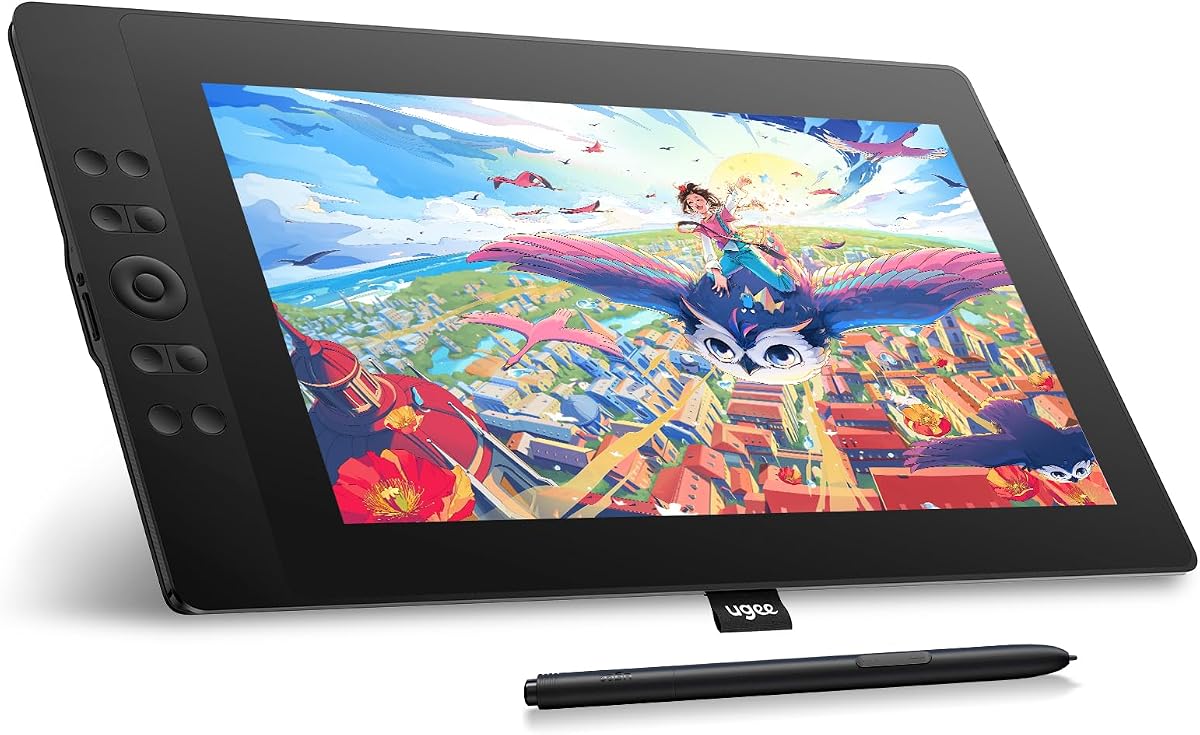
The UGEE UE16 boasts an impressive 143% sRGB color gamut, offering vibrant and accurate color reproduction that exceeds many competitors in this price range. This makes it ideal for digital painters and designers who rely on precise color representation in their final outputs.
We may earn a commission when you buy through this link, at no additional cost to you.
Its 16K pressure sensitivity ensures smooth transitions in line weight and opacity, enhancing expressive capabilities. The tablet also supports Android devices, adding versatility for mobile creators who need a larger display interface for their work on the go.
A physical scroll wheel allows for quick adjustments, while the full-laminated screen minimizes parallax for better accuracy. While the driver software can be complex for new users, the hardware features justify the learning curve for those needing specific color and pressure performance.
If accurate color and high pressure sensitivity are your top priorities, this model delivers impressive hardware performance. Its Android compatibility also opens up possibilities for mobile professionals seeking a robust drawing solution outside a traditional desktop environment.
The wide color gamut ensures your digital art looks vibrant and true to life when viewed on other devices.
Android support allows connection to compatible phones or tablets, extending its use beyond just computers.
We may earn a commission when you buy through this link, at no additional cost to you.
The VEIKK VK1200 is tailored for beginners with a simple interface and generous accessory package including two pens and 28 nibs. This ensures that even if a pen tip wears out, you have replacements ready, reducing downtime during critical creative sessions.
We may earn a commission when you buy through this link, at no additional cost to you.
It features a standard 11.6-inch LED display with tilt function and six shortcut keys, covering essential needs without overwhelming new users. The included artist glove helps keep hands clean and reduces friction, making the initial learning curve smoother and more comfortable.
Driver software is straightforward, focusing on core settings rather than advanced customization. While it lacks some premium features found in higher-end models, it performs reliably for basic illustration, note-taking, and casual drawing tasks effectively.
For students or hobbyists just starting their digital journey, this model provides a complete kit at an affordable cost. The focus on usability and essential accessories makes it an excellent starting point for entering the world of digital art.
Inclusion of multiple pens and nibs ensures you have everything needed to start drawing immediately without extra purchases.
Six dedicated keys prevent clutter, helping new users focus on drawing skills rather than complex configuration.
We may earn a commission when you buy through this link, at no additional cost to you.
The RubensTab T11 Pro stands out as the only true standalone tablet in this list, requiring no computer connection to function. This makes it uniquely portable for students or professionals who need to sketch ideas anywhere without carrying a laptop or desktop setup.
We may earn a commission when you buy through this link, at no additional cost to you.
Its built-in 5800mAh battery supports up to five hours of continuous use, allowing for productive sessions at cafes or libraries. Pre-installed drawing apps simplify the initial experience, making it accessible for immediate use out of the box without complex driver installations.
While the screen is smaller than most 11.6-inch monitors, the convenience of independence compensates for this limitation. Wi-Fi connectivity allows cloud access, enabling you to save and share work directly from the device to other platforms seamlessly.
Choose this if mobility and independence are more important than screen size or advanced software capabilities. It is perfect for quick sketches, classroom notes, or travelers who want a dedicated drawing device without technical dependencies.
This device works without a PC, freeing you to create anywhere without needing extra cables or desktops.
Internal battery and USB-C charging mean you can keep drawing throughout the day without hunting for outlets.
We may earn a commission when you buy through this link, at no additional cost to you.
The VEIKK VK1200V2 offers an upgraded experience with 16384 pressure levels, doubling the sensitivity of standard 8192 models. This upgrade provides significantly better control for professional-level drawing tasks, allowing subtle variations in brush strokes without expensive high-end hardware.
We may earn a commission when you buy through this link, at no additional cost to you.
Its full-laminated screen ensures accurate cursor positioning, while 120% sRGB color coverage delivers richer visuals. The lightweight metal body enhances portability, and the inclusion of two pens ensures you always have a backup for uninterrupted workflow during critical projects.
Although driver support is standard, the hardware performance exceeds typical budget expectations. It is ideal for intermediate users looking to upgrade their pressure sensitivity without jumping to significantly more expensive models from major brands.
If you need better sensitivity and color accuracy on a budget, this model delivers high-end specs at a lower price. It bridges the gap between entry-level and professional devices, making it a smart choice for growing artists.
16384 pressure levels capture subtle pressure changes, offering finer control over line weight and opacity.
The 120% sRGB coverage ensures your colors look vibrant and accurate on screen for print or web design.
We may earn a commission when you buy through this link, at no additional cost to you.
The XPPen Artist 12 Pro Lite features a unique red dial for quick brush adjustments, adding a layer of customization often found in pricier models. This dedicated hardware control streamlines your workflow, allowing faster transitions without interrupting your creative flow with mouse clicks.
We may earn a commission when you buy through this link, at no additional cost to you.
It includes a convenient 3-in-1 cable that eliminates the need for extra adapters on most devices. The full-laminated display and 60-degree tilt support ensure precise control and natural shading, making it a compact yet powerful tool for travel and small workspaces.
While it maintains the standard 8192 pressure levels, the ergonomic design and red dial make it stand out for usability. The compact form factor is ideal for those with limited desk space who still want a professional drawing experience.
For users valuing specific customization like the red dial and easy connectivity, this model offers strong utility. It balances essential features with ergonomic design, making it a practical choice for daily creative work on the go.
The customizable red dial gives you quick access to brush size or zoom, improving workflow speed significantly.
The 3-in-1 cable reduces cable clutter and adapters, simplifying setup for various computer ports.
We may earn a commission when you buy through this link, at no additional cost to you.
Selecting the right tablet involves balancing screen size, pressure sensitivity, and connectivity to match your workflow. We break down the critical factors to ensure you invest in a device that grows with your skills.
Screen size affects your drawing comfort and workspace. While 11.6 inches is standard for budget tablets, larger 13 to 16-inch options offer more room for detailed work. Resolution should be at least 1920×1080 to ensure sharp lines and clear visibility of your art.
Look for Full HD displays to avoid pixelation. A larger screen is beneficial for professional tasks, but a compact size is better for portability. Consider your desk space and how often you need to move the device.
Pressure sensitivity determines how well the pen captures line variation based on how hard you press. Standard 8192 levels are sufficient for most users, but 16384 offers finer control for advanced illustration. Tilt support allows natural shading effects by angling the pen.
Ensure the device supports tilt if you want realistic brush strokes. This feature mimics real pencils or brushes, adding depth to your artwork. Verify that your preferred software recognizes tilt before purchasing.
Battery-free styluses are preferred as they eliminate charging downtime. Passive pens are reliable and durable for daily use. Check if the pen includes an eraser at the end, which speeds up editing by allowing easy corrections.
Choose a pen that feels comfortable in your hand. Ergonomic grip shapes reduce fatigue during long sessions. Additional nibs in the package are a valuable bonus that ensures you can continue working without interruption.
Color gamut coverage like 72% NTSC or 100% SRGB is critical for design and photo editing. Wider coverage ensures that colors on screen match your final output accurately. Full-laminated screens also improve clarity and reduce glare.
For illustrators needing precise hues, look for factory calibration reports. This guarantees color consistency right out of the box. High accuracy saves time on manual color adjustments later in your workflow.
Verify that the tablet works with your operating system such as Windows, Mac, Linux, or Android. Most devices require a computer connection, but standalone models offer flexibility. Check driver support for the software you intend to use like Photoshop or Krita.
Ensure your computer has the necessary HDMI or USB-C ports. If not, you may need adapters which add cost. Broad software compatibility ensures the device remains useful as your workflow evolves.
Single-cable USB-C connectivity simplifies setup by combining power and data. Some models support HDMI plus USB-A which provides broader compatibility for older laptops. Check if a 3-in-1 cable is included to avoid buying adapters separately.
Flexible connectivity options make setup easier across different devices. If you travel often, a single cable reduces clutter and weight. This convenience improves your overall user experience significantly.
Physical shortcut keys or dials allow quick access to common commands like undo, zoom, or brush size. This reduces reliance on keyboard shortcuts and speeds up your workflow. Look for programmable keys that you can map to your favorite tools.
A dedicated dial is particularly useful for smooth adjustments without menu clicks. Customizable inputs help build muscle memory, making your creative process more efficient over time.
Durability is key for long-term value. Metal bodies are sturdier than plastic and resist wear better. Check if artist gloves or cleaning cloths are included, as these improve hygiene and reduce smudges.
Good accessories save money and enhance usability. A comfortable design ensures the device is a joy to use. Reliable build quality protects your investment for years of creative work.
Start by installing the latest drivers from the manufacturer's website to ensure all functions like tilt and pressure work correctly. Connect the device via HDMI or USB-C to your computer and set the display mode to extend rather than mirror.
Adjust the pen sensitivity in the driver settings to match your drawing style. Keep the screen clean with a microfiber cloth to avoid scratches. Avoid using harsh chemicals that could damage the anti-glare coating.
Store the pen in a safe place to prevent damage to the nibs. Regularly update the drivers for better compatibility with new software versions. Proper maintenance extends the lifespan of the tablet significantly.
Most models require a computer, but some support Android devices with USB-C OTG. Standalone tablets like the RubensTab work independently without any external hardware needed. Always check the product specs for specific mobile compatibility.
Yes, 8192 levels are sufficient for most artists and students. Advanced users may prefer 16384 for finer control, but beginners find 8192 responsive and smooth. It is rare to notice a major difference in daily tasks.
Only standalone models like the RubensTab function without a computer. Most pen displays require a connection to a PC or Mac to process data. Check for standalone features if portability is your priority.
Yes, most tablets in this guide support macOS 10.12 or later. Ensure you download the correct Mac drivers from the manufacturer's site. Compatibility is a standard feature across major brands.
You can use any mainstream creative software like Photoshop, Illustrator, and Krita. Online platforms like Zoom and Google Meet also work for teaching. Verify that the software supports external pen displays.
Use a dry microfiber cloth to remove fingerprints and dust. Avoid liquids or cleaning sprays to protect the anti-reflective coating. Gentle wiping ensures the screen stays clear without damage.
Yes, drivers are necessary to configure pressure sensitivity and shortcut keys properly. Without them, the pen may act as a simple mouse. Always install the latest version from the official website.
The XP-PEN Artist12, VEIKK VK1200 V2, and HUION Kamvas 13 (Gen 3) stand out as the top choices for value and performance. Whether you need budget-friendly basics or advanced features, there is a model for every skill level.
Prioritize features like full-lamination and color accuracy if you work on professional projects. For beginners, simplicity and accessory bundles offer the best entry experience. Choose based on your specific workflow needs and comfort.
Remember that prices and availability can change frequently online. Always check current deals and read recent user reviews before buying to ensure you are getting the best value today. Happy creating with your new digital tool.