
The Braille Store Full-Page Slate
4.0Editor score
Full letter-size writing area
Quiet plastic construction
Includes embossing guides
Durable and affordable
This guide compares the top 10 braille displays for blind users, covering refreshable units, slates, keyboards, and learning tools to help you choose the right
Navigating the digital world requires reliable tools for blind users who depend on tactile feedback. Braille displays convert text into raised dots, enabling independent reading and writing across various devices. Choosing the right model depends on your specific needs, budget, and the devices you use daily.
We evaluated ten distinct products ranging from premium refreshable displays to traditional slates and input devices. Each item was assessed based on portability, connectivity, build quality, and compatibility with screen readers. Our goal is to provide a comprehensive overview to simplify your decision-making process.
Every recommendation includes detailed specs, pros, cons, and real-world usage scenarios. While prices fluctuate over time, the core features remain consistent. Check current listings for the most up-to-date pricing and availability before making your final purchase decision today.
4.0Editor score

5.0Editor score

4.5Editor score
This comparison table lists all ten products side by side. It highlights key specifications and unique features to help you quickly identify which device matches your accessibility requirements and lifestyle needs.




The Brailliant BI 40X Braille Display stands out as a top-tier option for blind users seeking a robust and reliable reading device. With a perfect rating from users, it delivers exceptional performance across multiple platforms. Its 40-cell display provides ample space for reading long documents without frequent scrolling, making it ideal for students and professionals.
We may earn a commission when you buy through this link, at no additional cost to you.
Key strengths include its seamless multi-device connection capabilities. You can link up to five Bluetooth devices and one USB device simultaneously, allowing smooth transitions between phones, tablets, and computers. The onboard KeySoft Lite apps offer essential tools like editors, calculators, and access to online libraries such as Bookshare and NLS BARD, enhancing functionality beyond simple text display.
While the device offers premium features, its weight and size might be considered drawbacks for those prioritizing extreme portability. Additionally, the investment is significant compared to basic slates or simpler displays. However, for users who need a powerful, all-in-one solution for daily reading and writing, these trade-offs are well justified by the performance and reliability it provides.
This display is best suited for blind users who require a comprehensive tool for work or study. It excels in environments where stability and connectivity are paramount. If you value a large reading area and integrated apps, the Brailliant BI 40X is a highly recommended choice that supports independence and productivity effectively.
The device supports up to five Bluetooth and one USB connection simultaneously. This flexibility ensures you can switch between your phone, tablet, and computer without re-pairing, saving time and reducing friction in your workflow.
Onboard apps like Victor Reader and Online Libraries support direct access to Bookshare and NLS BARD. This integration means you can download and read books directly on the device without needing a separate computer, streamlining your reading experience significantly.
We may earn a commission when you buy through this link, at no additional cost to you.
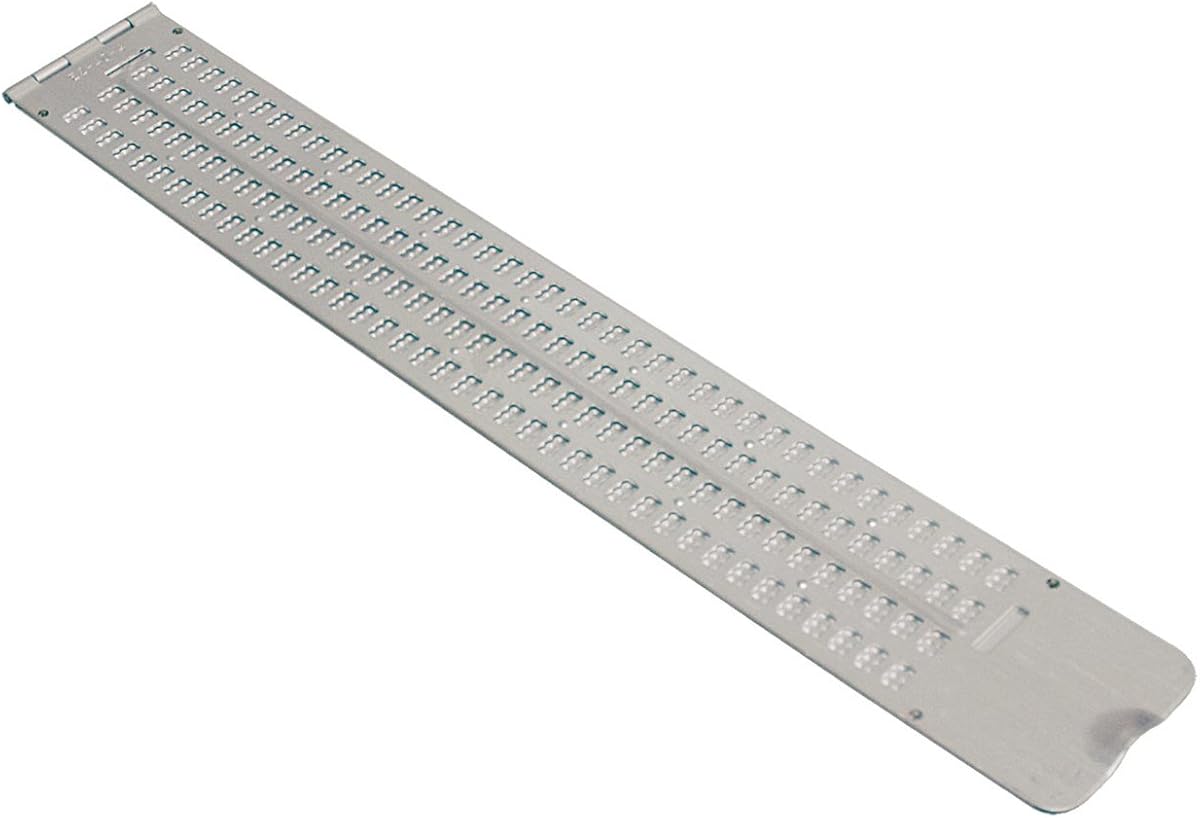
The Braille Store Full-Page Slate offers an affordable and practical solution for those who prefer traditional braille writing methods. Rated 4.0 stars, this slate allows users to write directly onto standard letter-size paper without moving the device. It is particularly useful for students, teachers, or anyone needing to create braille notes quickly and quietly.
We may earn a commission when you buy through this link, at no additional cost to you.
Its primary advantage lies in its design, which accommodates an entire sheet of paper. This eliminates the need to constantly slide the slate down, reducing interruptions during writing. The thick, durable plastic construction ensures it produces less noise than metal slates, making it considerate for use in shared spaces like classrooms or offices.
As a purely manual tool, it lacks electronic features like connectivity or refreshable text. Users must emboss dots manually, which requires physical effort and practice. However, for tasks focused on creating static documents, labels, or notes, the simplicity and low cost make it a highly effective choice that avoids complex setup or maintenance.
This slate is ideal for beginners learning braille or those needing a backup writing tool. It supports literacy development by allowing tactile engagement with the writing process. If you need a reliable, quiet, and economical way to write braille on paper, this full-page slate is a straightforward and effective option.
Designed specifically for North American letter-size paper, this slate holds the sheet securely. You can leave your paper inside the slate without wrinkling, allowing you to resume writing exactly where you left off at any time.
The plastic material ensures that embossing is significantly quieter than metal alternatives. This feature is especially valuable in classrooms or libraries where noise levels need to be kept low for everyone's comfort.
We may earn a commission when you buy through this link, at no additional cost to you.
The Brailliant BI 20X Braille Display is designed for users who prioritize portability without sacrificing functionality. With a rating of 4.5 stars, it offers a compact 20-cell refreshable display that fits easily into bags or pockets. It serves as a daily companion for blind users who need access to text on the go.
We may earn a commission when you buy through this link, at no additional cost to you.
Key strengths include its ability to connect to multiple devices simultaneously. You can pair up to five Bluetooth devices and one USB device at once, making switching between smartphones, tablets, and computers seamless. Onboard KeySoft Lite apps provide utilities like an editor, calculator, and access to libraries like Bookshare, expanding its utility beyond a simple display.
The compact size means a smaller reading area, which may require more scrolling for long texts compared to 40-cell models. Additionally, the price reflects its premium features, making it a significant investment. However, for users valuing mobility and integrated tools, these constraints are acceptable trade-offs for the freedom of carrying a powerful reading tool everywhere.
This display is best suited for students, professionals, or travelers who need reliable access to digital text. It balances performance with size effectively. If you want a lightweight yet capable device that supports complex tasks and multiple devices, the Brailliant BI 20X is an excellent premium choice for everyday use.
With 20 hours of battery life and USB-C charging, this device is ready for all-day use. The HumanWare thumb keys and Perkins keyboard style make input intuitive, ensuring you can type and read comfortably wherever you are.
Onboard apps allow direct access to online libraries and terminals. This means you can manage your reading and writing tasks without needing a separate computer, keeping your workflow self-contained and efficient.
We may earn a commission when you buy through this link, at no additional cost to you.
The Braille Slate- 13 Lines offers a compact manual option for writing braille on paper. While it holds a lower rating of 3.4 stars, it provides a specific set of dimensions that may suit certain users. Measuring 6.5 by 11.25 inches, it offers 13 lines of 36 cells each for writing notes or lists.
We may earn a commission when you buy through this link, at no additional cost to you.
Key strengths include its durable aluminum construction and thumb notch for easy opening. The included free stylus allows you to start writing immediately. However, the pins down design means the pins are facing up, which requires careful handling to avoid accidental damage to your fingers or the pins themselves.
The lower rating may reflect user feedback regarding durability or handling. Since it lacks any electronic components, it relies entirely on manual effort for embossing. For those who need a simple, metal-built slate for occasional use or travel where electronics might be impractical, this slate remains a viable, low-tech option.
This slate is best for users who prefer a manual tool for occasional note-taking or short documents. If you want a lightweight, metal device that fits in a bag and provides a decent writing area, this slate offers a straightforward way to engage with braille writing without complex features.
Made of durable aluminum, this slate withstands regular use. The thumb notch makes opening and closing effortless, ensuring you can access your paper quickly when needed without fumbling with hinges.
The included stylus means you do not need to buy extra tools. You can start writing braille immediately after unboxing, making it a convenient choice for impromptu writing sessions or classroom tasks.
We may earn a commission when you buy through this link, at no additional cost to you.
The Braille Store Business Card Slate is a specialized tool designed for embossing short messages on business cards or labels. With an impressive rating of 4.9 stars, it is highly regarded for its simplicity and utility. It measures just 4 by 2-1/2 inches, making it easy to carry in a wallet or pocket.
We may earn a commission when you buy through this link, at no additional cost to you.
Key strengths include the built-in signature guide, which helps you write your name perfectly straight. It produces 4 lines of 12 cells each, which is perfect for business cards or small labels. The ultra-thin aluminum construction ensures durability without adding bulk. It comes with a durable classic stylus to get you started.
The limited space means it is not suitable for long documents or complex notes. It is designed specifically for short bursts of writing. However, if you need a reliable way to label items, create simple tags, or sign business cards in braille, this slate offers high-quality performance at a very reasonable cost.
This slate is ideal for anyone needing to create small braille items frequently. It is also a great starter tool for children or beginners learning how to emboss. If you want a precise, compact tool for labeling and short signatures, this business card slate is a practical and highly rated choice.
The built-in signature guide ensures your name is embossed straight every time. This feature is invaluable for professional use on business cards where presentation and clarity are key.
Measuring just 4 by 2-1/2 inches, this slate fits anywhere. Whether you are organizing your home or preparing gifts, this lightweight tool makes creating braille labels quick and hassle-free.
We may earn a commission when you buy through this link, at no additional cost to you.
The Braille Slate- Pocket is designed for portability, fitting easily into a briefcase or backpack. It holds a solid rating of 4.4 stars from users who appreciate its practicality. Measuring 11-7/8 by 1-3/4 inches, it offers 4 lines of 40 cells each, allowing for moderate writing capacity without bulk.
We may earn a commission when you buy through this link, at no additional cost to you.
Key strengths include its lightweight aluminum construction and pins up design. This configuration means the pins are accessible for reading or writing. While it lacks electronic features, its durability and compact shape make it ideal for field work or travel where digital devices might not be practical or available.
The manual nature of this slate requires physical effort to emboss, which can be tiring for long sessions. It is not suitable for digital reading. However, for creating temporary notes or lists that need to be carried physically, the slate provides a reliable, no-battery solution that has served users well for years.
This slate is best for professionals or students who need a backup writing tool. If you value a device that survives rough handling and fits into tight spaces, this pocket slate offers a straightforward way to write braille. It is a functional, durable choice for practical tasks.
The aluminum build ensures longevity while keeping weight low. You can carry it in a briefcase or backpack without feeling the extra load, making it a great addition to your daily travel kit.
With pins facing up, you can read the dots you emboss easily. This layout is intuitive for writing and reading notes, ensuring you can check your work without flipping the slate.
We may earn a commission when you buy through this link, at no additional cost to you.
The Hable One Portable Braille Keyboard is a unique input device that enhances smartphone accessibility. With a high rating of 4.8 stars, it is praised for its intuitive design and privacy features. It connects to both iOS and Android devices, allowing you to type with tactile feedback while keeping your phone in your pocket.
We may earn a commission when you buy through this link, at no additional cost to you.
Key strengths include its lack of requirement for prior braille knowledge. New users can learn quickly with free tutorials provided. The device features 8 tactile buttons for accurate typing and offers seamless voice control. Its private nature means you can access sensitive information without others seeing your screen, adding a layer of privacy.
Since it is a keyboard and not a display, it does not output text to your fingers. You rely on voice output from your phone. This means it is not a reading tool, but rather a writing aid. For users who primarily need to type and communicate, the keyboard provides a secure and convenient solution.
This keyboard is best for blind users who need reliable text input on the go. If you want to communicate privately or access your phone without touching its screen, this device is highly recommended. Its long battery life and intuitive learning path make it a valuable accessory for daily tech use.
Type with your phone securely in your pocket or bag. This feature ensures privacy when handling sensitive information, allowing you to control your device discreetly without drawing attention.
You do not need prior braille knowledge to start. Free onboarding calls and tutorials help you master the device quickly, ensuring you can be productive and confident in using it for typing.
We may earn a commission when you buy through this link, at no additional cost to you.
The Handheld Label-Maker is a specialized tool designed for organizing and marking items with braille. With a rating of 4.4 stars, it offers a practical solution for those who need to label household items or office supplies. It embosses on vinyl tape, allowing labels to be peeled and stuck on various surfaces easily.
We may earn a commission when you buy through this link, at no additional cost to you.
Key strengths include the easy spin dial to select letters. You can simply spin to choose a character, squeeze the trigger to emboss, and then cut and stick. It supports 3/8 and 1/2 inch tape, providing versatility. The device comes with a roll of tape, so you can start using it right away without buying extra supplies.
As a dedicated labeling tool, it does not offer general text writing capabilities. It is limited to short labels and tags. However, for its intended purpose, it is highly efficient. The durable plastic construction ensures it lasts. If you need to organize your pantry, cabinets, or office, this tool streamlines the process significantly.
This label-maker is best for anyone needing to organize their space with braille. It is useful for blind users, sighted caregivers, or educators. If you want a simple way to create durable, tactile labels for your home or office, this label-maker is a straightforward and effective choice.
The spin dial and squeeze trigger design makes embossing easy. You can create clear labels without complex steps, ensuring anyone can use it to organize their space quickly.
With vinyl tape included, you can start organizing immediately. The labels stick well to various surfaces, helping you identify items by touch, which is essential for daily independence.
We may earn a commission when you buy through this link, at no additional cost to you.
The Transparent Braille Keyboard Overlays Stickers are an economical solution for creating a bilingual keyboard for blind or low vision users. With a rating of 4.1 stars, these stickers stick easily onto existing keyboards. They are made from Lexan material and use 3M adhesive that does not slip or curl over time, ensuring longevity.
We may earn a commission when you buy through this link, at no additional cost to you.
Key strengths include their transparency. You can see the original key legends through them, which helps if you know the layout but need braille. installation is a simple peel-and-stick process, making setup easy. This is an ideal option for users who want to upgrade their current keyboard without buying a new device.
The overlays do not add any electronic feedback, so typing is entirely manual. They are best suited for touch typists who need a visual or tactile reference. Since they rely on the existing keyboard mechanism, the experience depends on the quality of your computer keyboard. However, the low cost makes them a low-risk upgrade.
These overlays are best for users who want to keep their current keyboard but add braille support. If you need to type in braille but cannot change your hardware, this is a practical and affordable solution. They are a helpful tool for those learning to type without sight.
The Lexan material ensures that original legends show through. This allows for a bilingual layout, helping you maintain visual access to standard keys while adding braille dots for tactile guidance.
The 3M adhesive ensures the stickers stay in place. They do not ooze or curl, keeping your workspace clean and ensuring the braille remains aligned for accurate typing.
We may earn a commission when you buy through this link, at no additional cost to you.
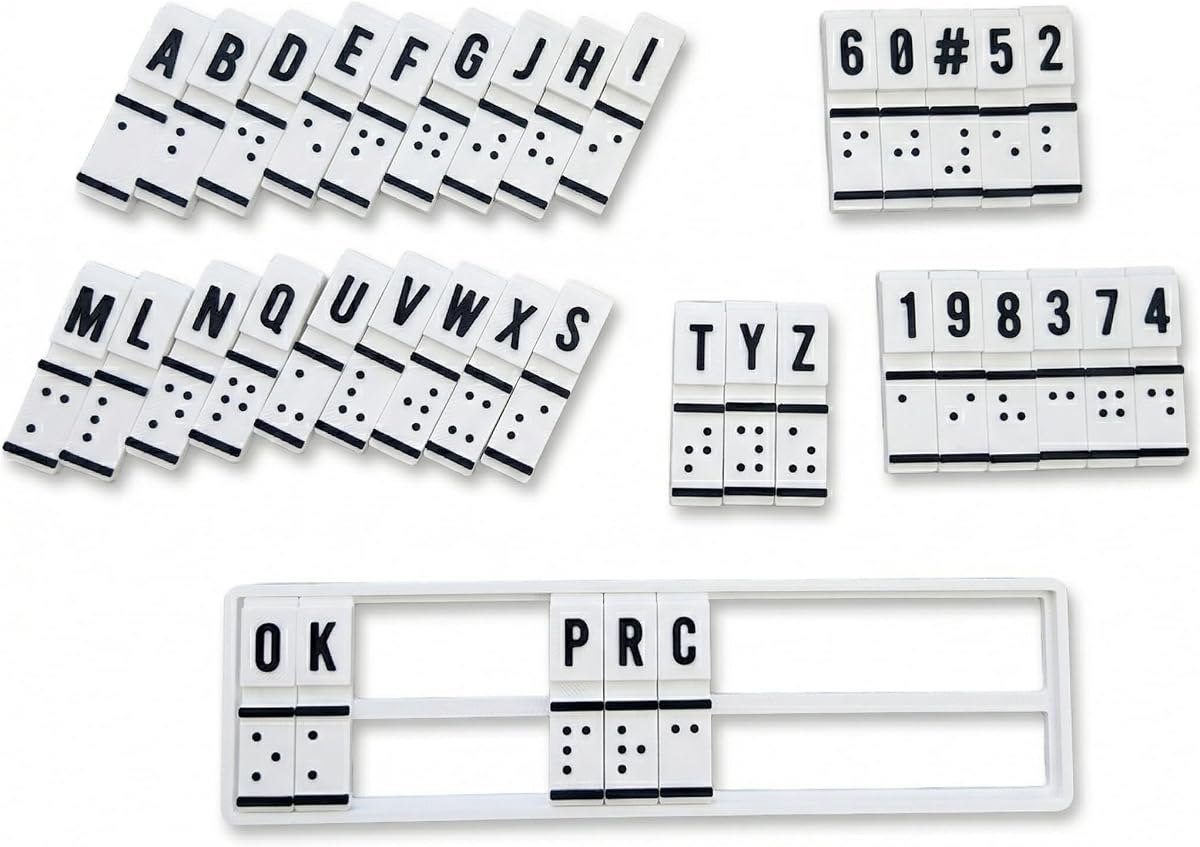
The Braille Learning Training Translation Machine is an interactive device designed for beginners and educators learning braille. It combines training and translation functions in one compact unit. While it holds a lower rating of 2.0 stars, it offers unique tactile features that help build muscle memory. It allows users to feel, create, and read braille without relying on electronics.
We may earn a commission when you buy through this link, at no additional cost to you.
Key strengths include its interactive design. Users can input text physically to see braille conversion, bridging the gap between sighted and non-sighted communication. This makes it valuable for self-study or classroom settings. The durable build ensures it can withstand repeated use in homes or therapy sessions.
The lower rating may reflect mechanical simplicity or specific user experiences. It is not a high-tech solution. However, for those who want to understand braille patterns through physical interaction, this tool provides a hands-on approach. It is best for educational contexts rather than daily digital reading tasks.
This machine is best for students, teachers, or rehabilitation specialists teaching braille literacy. If you need a physical tool to demonstrate patterns or practice reading, it offers a straightforward way to learn. It is a practical choice for building foundational skills and understanding the mechanics of braille.
Features raised cells for manual input and output. This allows users to feel the conversion process, making it easier to memorize patterns and build confidence in reading skills.
Designed for schools and homes. It bridges sighted and non-sighted communication by allowing easy conversion, making it a useful resource for teachers and parents helping learners.
We may earn a commission when you buy through this link, at no additional cost to you.
Selecting the right braille display depends on several factors including your daily tasks, budget, and preferred reading environment. This guide explains key considerations to help you find the perfect device.
Braille displays come in various sizes, typically 20, 40, or 80 cells. A 20-cell display is compact and suitable for short texts or quick reference. A 40-cell display offers a better balance for reading standard documents. Larger displays provide more context but may be bulkier and more expensive.
Consider the type of text you read. If you read code or long documents, a larger cell count reduces scrolling and improves reading speed.
Modern displays support Bluetooth and USB connections. Check if the device allows multiple simultaneous connections to switch between your phone, tablet, and computer seamlessly. Reliable wireless technology is essential for mobility and convenience.
Ensure compatibility with your operating system. Whether you use Windows, macOS, Android, or iOS, confirm that the device works with your preferred screen reader.
Battery life can range from 8 to 24 hours. For all-day use, look for a device that offers at least 20 hours on a single charge. Quick charging via USB-C is also a valuable feature for modern workflows.
If you travel frequently, a longer battery life ensures you won't run out of power during critical reading or writing sessions.
Weight and dimensions are crucial if you carry your device daily. Compact models fit easily into bags or pockets. For users with active lifestyles, lightweight aluminum or plastic builds are preferred over heavy units.
Consider how much weight you can comfortably carry. A portable device encourages consistent use and independence in various environments.
Some displays include onboard apps like editors, calculators, or book readers. These features can save you from needing separate software or devices. Check if the device supports specific formats like DAISY or audio playback.
Integrated apps enhance the device's utility. If you need more than just text display, choose a model with a robust software ecosystem.
Braille displays are precision instruments. Look for models with sturdy construction to withstand daily wear and tear. Rubberized edges and reinforced casings add protection against drops.
Durable devices offer better long-term value. If your device survives regular use, you save money on repairs and replacements.
Manual slates are inexpensive and do not require batteries. They are great for short notes or learning. However, refreshable electronic displays are essential for reading digital text. Decide based on your primary task.
Electronic displays offer speed and accessibility. Manual slates offer simplicity and cost savings. Often, having both can cover all your needs.
Prices vary widely from affordable slates to premium displays. While premium models offer advanced features, they require a larger investment. Consider your budget and the specific tasks you need to perform daily.
Value is determined by how often you use the device. If it becomes your primary tool for work or study, investing in a higher-end model is often justified.
To use a refreshable braille display, connect it to your device via Bluetooth or USB. Install the necessary drivers or ensure your screen reader recognizes the device. Adjust the font and contrast settings to match your needs. Test the display with a simple text file to confirm all cells refresh correctly.
For manual slates, place your paper inside the frame. Use the stylus to press dots into the paper. Press from top to bottom to avoid smudging. Keep the paper flat and aligned with the guides to ensure consistent dot placement. Practice on scrap paper before creating final documents.
Clean your devices regularly with a soft, dry cloth to remove dust and oils. Avoid liquids near electronic components. Store devices in a protective case when not in use to prevent scratches or damage. Replace styluses or batteries as needed to maintain optimal performance.
A 20-cell display is more compact and portable, ideal for quick reference or short tasks. A 40-cell display provides more context for reading full sentences or documents, reducing the need to scroll. Choose based on your reading habits and portability needs.
Yes, most modern braille displays connect to smartphones via Bluetooth. They work with screen readers like VoiceOver on iOS and TalkBack on Android. Ensure your device is compatible before purchasing.
Battery life varies by model, typically ranging from 8 to 24 hours. Many high-end displays offer up to 20 hours of continuous use. Check the specifications for exact battery details.
Yes, manual slates are great for learning, quick notes, or labeling. They require no power and are affordable. They complement digital displays by providing a tactile way to write on paper.
Yes, braille literacy helps you use the device effectively. However, some devices support uncontracted braille which is easier to learn. Many manufacturers provide free tutorials to help beginners get started.
Most displays come with a charging cable and a carrying case. Some slates include a stylus. Always check the product details to see what is included before buying.
In summary, the Brailliant BI 40X offers the best balance of performance and features for most users. For budget-conscious buyers, the Full-Page Slate is an excellent manual alternative. The Hable One and manual slates provide specialized solutions for typing and labeling needs.
When choosing, prioritize connectivity and display size based on your daily tasks. Consider how portable the device needs to be and ensure it fits your ecosystem. A device that matches your workflow will be used more often and provide greater independence.
Prices and availability can change, so check current listings for the most accurate information. We hope this guide has helped you identify the right braille display for your needs. Stay connected and empowered with the right tools.