
MEGATEK Region-Free DVD Player
4.4Editor score
1080p HDMI upscaling
Region-free disc playback
USB and MP3 support
This guide compares the top DVD players for projectors based on HDMI connectivity, upscaling quality, region freedom, and playback speed for home theater
Finding the right DVD player for projectors ensures your home movie nights shine with crisp visuals and reliable playback. Modern projectors often lack built-in disc drives, so an external player is essential for enjoying physical media collections on a big screen.
We compared ten top-rated DVD players focusing on HDMI output, 1080p upscaling, region compatibility, and ease of setup. Each model was evaluated for its ability to connect seamlessly to projectors while delivering smooth audio and video performance without lag.
Every pick highlights unique strengths like compact design, USB support, or premium build quality. Note that prices and availability change frequently, so verify current offers before purchasing. This list helps you choose the best fit for your projector and media needs.
4.4Editor score

4.3Editor score

4.4Editor score
This table compares key specs across all ten DVD players to help you quickly identify models with the right video output, compatibility, and features for your projector setup.


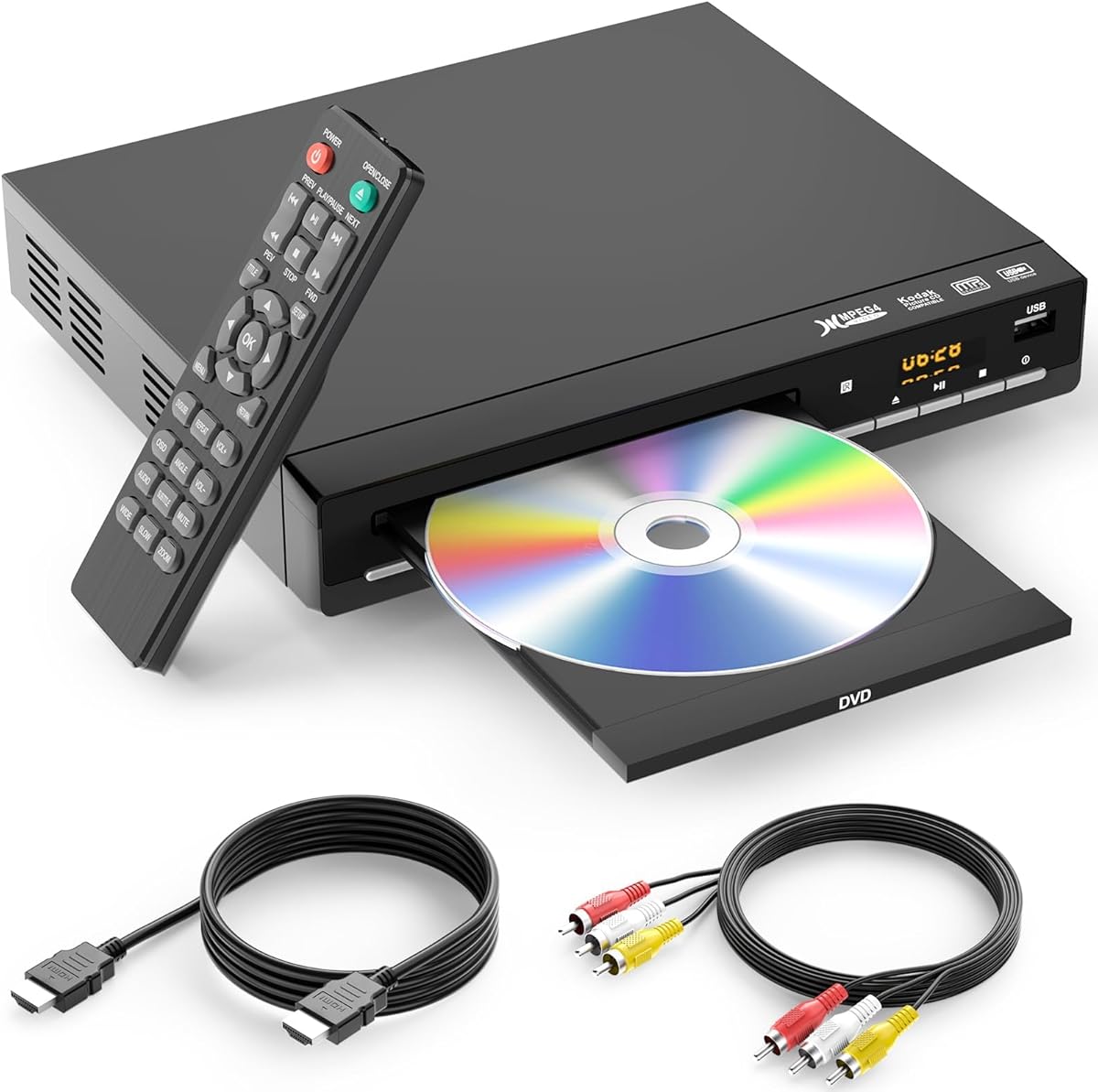


This MEGATEK DVD player delivers solid performance for projector setups without breaking the bank. With a 4.4 rating, it handles standard DVDs and upscales content to 1080p for sharper visuals on large screens.
We may earn a commission when you buy through this link, at no additional cost to you.
Its region-free playback ensures you can play discs from anywhere, while the HDMI output connects directly to most projectors. The metal housing aids cooling and reduces noise during extended movie sessions.
It lacks Blu-ray capability and USB support for exFAT drives, but these are minor trade-offs for budget-conscious buyers. The included cables make setup straightforward even for non-tech-savvy users.
Buy this if you need a reliable, cost-effective player for DVD collections and projector viewing. It balances essential features with affordability for home theater use.
Simply connect the HDMI cable to your projector and power the unit. The single-cable setup simplifies video and audio delivery for instant playback.
Imported or travel-bought DVDs work without code locks. This universal compatibility expands your movie library beyond local store limitations.
We may earn a commission when you buy through this link, at no additional cost to you.
The DESOBRY Mini DVD Player excels for space-constrained projector setups. Weighing just 1.1 lbs, its tiny size fits easily on slim shelves or travel kits while delivering 1080p upscaled video.
We may earn a commission when you buy through this link, at no additional cost to you.
Features like breakpoint memory let you resume playback from where you left off, and noise cancellation keeps loading silent. The drive reads discs quickly even if they show minor wear.
It does not support MP4 files via USB, limiting digital video options. The plastic casing might lack premium heft, but functionality remains reliable for standard media needs.
Choose this for portable projector use or dorm rooms where space is limited. It offers essential features in a compact form factor.
Carry this unit in a bag for on-the-go movie nights. Its low weight and small dimensions make transport effortless.
Breakpoint memory remembers your last stop on discs. Restart exactly where you paused without rewinding manually.
We may earn a commission when you buy through this link, at no additional cost to you.
Sony's BDP-S1700U earns Editor's Choice by combining Blu-ray and DVD playback with strong upscaling. Rated 4.3, it delivers crisp visuals on projectors when playing high-definition or standard discs.
We may earn a commission when you buy through this link, at no additional cost to you.
Boot times under one second mean no delays before viewing. The user-friendly interface simplifies navigation, and HDMI setup is straightforward with the included cable.
Region restrictions limit international disc use, and the price exceeds basic DVD-only options. However, its quality and versatility justify the investment for home theater enthusiasts.
This is ideal for projector owners who want Blu-ray access without premium pricing. It balances performance and ease of use well.
Play both Blu-ray and DVD discs in one device. This dual compatibility future-proofs your setup against format changes.
Super quick start mode reduces wait times. Jump into movies faster than with traditional boot sequences.
We may earn a commission when you buy through this link, at no additional cost to you.
The MAJORITY DVD 2026 Model offers quick loading speeds and region-free playback for projector connections. With a 4.1 rating, it handles DVDs and CDs while upscaling video for better projector visuals.
We may earn a commission when you buy through this link, at no additional cost to you.
An LCD screen shows status info, and the remote supports zoom and slow-motion features. The included cables simplify setup without needing extras.
The build feels entry-level and lacks coaxial or optical audio outputs. Still, for casual viewing, it delivers reliable performance at a low cost.
Select this for simple projector movie nights without extra audio gear. It meets core needs efficiently.
Fast reading technology minimizes load delays. Get to your movie faster with optimized drive mechanics.
Remote includes zoom and slow-motion buttons. Adjust viewing experience without menu diving.
We may earn a commission when you buy through this link, at no additional cost to you.
This generic HDMI DVD player supports a broad range of formats with strong upscaling. Rated 4.3, it handles CDs, DVDs, and USB media for diverse projector entertainment options.
We may earn a commission when you buy through this link, at no additional cost to you.
An imported movement drive improves reading speed and reduces skips on scratched discs. The USB port accepts large drives for photo or audio files.
It does not play Blu-rays and restricts USB formats slightly, but its versatility suits most media collections. Customer support and warranty add peace of mind.
Choose for projector setups needing flexible media input. It balances compatibility with solid hardware.
Supports CD, DVD, VCD, and JPEG. Enjoy photos and music alongside movies without extra gear.
12-month warranty and 24-hour support. Get help quickly if issues arise with the unit.
We may earn a commission when you buy through this link, at no additional cost to you.
The Sony DVPSR510H stands out for energy efficiency and slim design. With a 4.4 rating, it delivers strong HDMI upscaling for projectors while using minimal power in standby.
We may earn a commission when you buy through this link, at no additional cost to you.
Multi-disc resume lets you jump between discs easily. The compact size fits well in entertainment centers, and the upscaling sharpens DVD visuals.
Region locking and lack of wireless connectivity limit flexibility. Yet for standard DVD playback on projectors, it remains a reliable choice.
Buy this for energy-conscious projector users. It combines efficiency with performance.
Energy Star rating reduces electricity costs. Standby power stays under half a watt.
New mid-size design saves shelf space. Fits neatly under screens or on cabinets.
We may earn a commission when you buy through this link, at no additional cost to you.
This mini DVD player adds a unique headphone jack for private audio. Rated 4.0, it works well with projectors while offering portable music playback directly from CDs.
We may earn a commission when you buy through this link, at no additional cost to you.
The headphone output lets you listen without speakers, and CD-to-USB copying converts discs to digital files. Upscaling ensures sharp visuals on large projector screens.
H.264 files on USB won't play, and the remote works within ten feet. These limits suit basic use cases well.
Pick this for quiet projector sessions or travel. It offers audio flexibility rare in standard players.
Plug headphones directly into the player. Enjoy movies without disturbing others nearby.
Copy CDs to USB drives without a PC. Create portable digital music libraries easily.
We may earn a commission when you buy through this link, at no additional cost to you.
The Sony UBP-X700U tops the list with 4K Ultra HD capability. Rated 4.4, it offers dual HDMI outputs for clean A/V separation and upscaling up to 60p for smooth projector motion.
We may earn a commission when you buy through this link, at no additional cost to you.
It handles almost any disc and file type, making it versatile for mixed media libraries. The premium hardware ensures consistent performance even with demanding content.
The cost is significantly higher than basic players, and region locks apply. Still, for 4K projector setups, this delivers top-tier picture quality.
Invest in this for high-end home theaters. It maximizes projector potential with 4K performance.
Separate video and audio to receivers. Improves sound clarity and video processing.
Smooth motion handling for fast scenes. Reduces artifacts during action sequences.
We may earn a commission when you buy through this link, at no additional cost to you.
Sony's DVP-NS90V uses Precision Drive 3 to manage warped discs smoothly. Rated 4.2, it upscales to 1080i for crisp projector images and supports SACD audio discs.
We may earn a commission when you buy through this link, at no additional cost to you.
Pixel-level optimization reduces motion artifacts, ensuring clean backgrounds during action. The advanced correction handles scratches well for reliable playback.
It lacks modern 4K features and costs more than basic units. However, its optical quality suits audiophiles or collectors.
Choose this for premium audio needs with projector visuals. It balances optical precision with format flexibility.
Lens adjustment corrects warps instantly. Maintains playback stability on damaged discs.
Pixel-level optimization cleans motion blur. Delivers sharp imagery even in complex scenes.
We may earn a commission when you buy through this link, at no additional cost to you.
The Toshiba HD-A35 supports the legacy HD DVD format alongside standard DVDs. Rated 3.8, it offers HDMI CEC control and Deep Color for rich projector imagery.
We may earn a commission when you buy through this link, at no additional cost to you.
Its 1080p output delivers crisp visuals, and HDMI CEC simplifies remote control with compatible projectors. Deep Color enhances color depth significantly.
HD DVDs are hard to find now, limiting practicality. Still, collectors or retro setups will appreciate its unique compatibility.
Buy for HD DVD collections or niche uses. It preserves access to a discontinued format.
Plays HD DVDs unavailable elsewhere. Keeps old media collections accessible on projectors.
Control projector power via HDMI. Simplifies home theater operation without extra remotes.
We may earn a commission when you buy through this link, at no additional cost to you.
Selecting the right DVD player for projectors requires evaluating video output, compatibility, and additional features to ensure smooth integration with your home theater setup.
Look for HDMI ports that support at least 1080p resolution to match projector capabilities. Upscaling technology enhances standard DVDs to near HD quality for clearer images on large screens.
Prioritize models with dedicated upscaling features to maximize visual clarity when projecting discs.
Region-free players allow discs from any country to play, expanding your movie library without code restrictions. This flexibility is vital for collectors or travelers.
Choose region-free models unless you only use local discs to avoid playback errors.
Ensure the player includes HDMI cables and supports both HDMI and RCA outputs. HDMI provides digital audio and video while RCA serves older setups.
Check for USB ports if you need media playback beyond physical discs.
Compact and lightweight players fit easily on slim shelves or travel kits. Metal housings improve cooling and reduce operational noise during long sessions.
Select a size that matches your available space and portability needs.
Verify support for DVD, DVD+R, and CD formats. Advanced error correction handles scratched discs smoothly for uninterrupted playback.
Opt for drives with anti-shock technology to maintain stability during operation.
Models with headphone jacks allow private listening, while coaxial or optical outputs connect to surround systems. These options enhance audio flexibility.
Match audio outputs to your existing speaker setup or preference.
A full-function remote with zoom, slow-motion, and playback controls simplifies operation. Ensure range and sensor positioning work well with your seating.
Prioritize intuitive remotes to navigate menus efficiently.
Choose brands offering warranties and responsive customer service to protect your investment. Longer terms indicate confidence in product reliability.
Check support channels for quick troubleshooting assistance.
Connect the player to your projector using an HDMI cable for the best digital video and audio quality. Secure the connection and plug the power cord into an outlet to complete setup.
Place the player in a well-ventilated area to prevent overheating. Avoid dust buildup by wiping the exterior with a soft cloth regularly.
Handle discs by their edges to prevent fingerprints and scratches. Clean lenses with a soft brush if playback issues arise due to dust.
Most modern projectors have HDMI inputs that work with DVD players. For older projectors without HDMI, use an RCA adapter. Ensure both devices support compatible resolutions for optimal viewing.
Not necessarily, but region-free players offer more flexibility for imported discs. If your projector only connects to local players, standard region-locked models will suffice for domestic media.
Yes, upscaling converts standard DVD resolution to match higher projector capabilities like 1080p. This reduces pixelation and creates sharper images on large screens.
No, DVD players only play physical discs and local USB files. For wireless streaming, use a media streamer or projector with built-in Wi-Fi capabilities alongside your DVD player.
Skipping often results from scratched discs or weak laser read. Clean the disc and lens, or try a player with advanced error correction and anti-shock features for stability.
Most players include HDMI cables, but check package details. You may need adapters for VGA projectors or optical audio outputs depending on your equipment.
The MEGATEK, Sony BDP-S1700U, and Sony UBP-X700U lead our list with strong upscaling, compatibility, and versatile media support. Each suits different budgets and projector needs.
Prioritize HDMI connectivity, region freedom, and upscaling quality to ensure smooth playback. Match additional features like USB or headphone jacks to your specific viewing habits.
Prices fluctuate often, so verify current offers and stock before purchasing. These guides help you invest wisely in reliable project for your home theater.