
Crucial P310 1TB SSD
4.7Editor score
Up to 7100MB/s read speed
Compatible with laptops and desktops
Includes Acronis data recovery software
This guide compares the top 10 Crucial Internal NVME SSD models for 2026, analyzing speed, capacity, and features to help you find the perfect storage upgrade.
Choosing the right internal NVME SSD can transform your computer performance significantly. Crucial offers a wide range of options tailored for gamers, creators, and everyday users who demand reliable storage.
We evaluated each model based on speed, compatibility, warranty, and real-world performance metrics. Our goal is to provide a clear comparison so you can make an informed decision without technical confusion.
Each pick highlights specific strengths and ideal use cases for different needs. Please note that prices and availability fluctuate frequently, so check the linked pages for current deals before purchasing.
4.7Editor score
4.8Editor score

4.6Editor score
Here is a side-by-side comparison of the top 10 Crucial Internal NVME SSD models available today. This table helps you quickly identify specifications and key differences across the lineup.


The Crucial P310 1TB SSD stands out as a top budget choice for users seeking fast storage without breaking the bank. It holds a strong 4.7 rating from users who appreciate its balance of speed and affordability.
We may earn a commission when you buy through this link, at no additional cost to you.
This drive delivers up to 7,100MB/s read speeds, making it significantly faster than older Gen3 drives. It works seamlessly with laptops, desktops, and handheld gaming consoles like the ROG Ally X.
While it lacks a built-in heatsink and uses QLC NAND which may impact sustained writes, these trade-offs are acceptable for casual gamers and general home users.
If you need reliable daily performance for booting Windows and loading apps quickly, this is an ideal choice. We recommend it for anyone upgrading a standard laptop or desktop on a budget.
Experience quicker bootups and multitasking with Gen4 speeds that beat previous generations by up to 2x.
This SSD works with laptops, desktops, and handheld consoles, offering flexible upgrade paths for various devices.
We may earn a commission when you buy through this link, at no additional cost to you.
The Crucial P310 1TB PS5 SSD is specifically designed to meet Sony's strict requirements for console storage expansion. It maintains a solid 4.7 rating from PS5 owners who want reliable game storage.
We may earn a commission when you buy through this link, at no additional cost to you.
This drive includes a built-in heatsink to manage thermal output during long gaming sessions. It offers the same fast Gen4 speeds as the desktop variant but with added cooling for console use.
While the QLC NAND may not be ideal for heavy professional writing workloads, it is perfectly suitable for storing and running AAA game titles on the PlayStation 5.
If you own a PS5 and need more storage space, this is a ready-to-install solution that saves you the hassle of finding a separate heatsink. It is the best budget pick for console gamers.
This model meets PlayStation 5 specifications and includes a heatsink for thermal stability during intense gameplay.
Enjoy quicker game load times and smooth multitasking thanks to standard Gen4 NVMe performance speeds.
We may earn a commission when you buy through this link, at no additional cost to you.
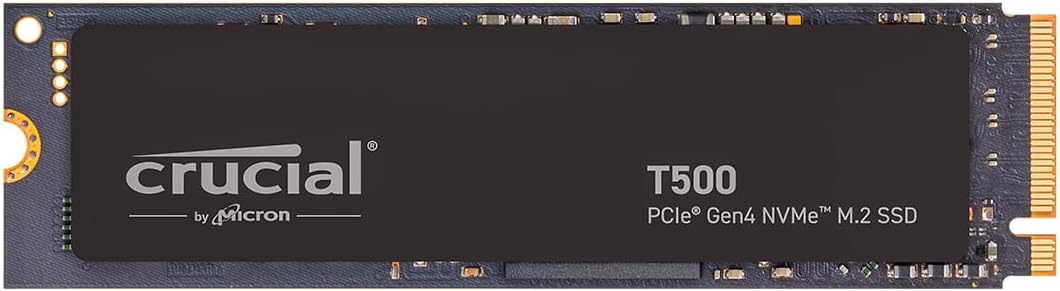
The Crucial T500 1TB SSD earns our Editor's Choice award for its exceptional balance of speed and creative utility. It holds a high 4.8 rating from users who need dependable storage for demanding tasks.
We may earn a commission when you buy through this link, at no additional cost to you.
This drive features TLC NAND and delivers up to 7,300MB/s read speeds. It also includes one month of free Adobe Creative Cloud access, making it a valuable bundle for designers and video editors.
The inclusion of Microsoft DirectStorage means games can load faster on supported systems, while the high IOPS improves application startup times significantly compared to older drives.
If you are a creator or a gamer who values performance and software value, this drive is a standout choice. It offers the best all-around experience for professionals seeking an upgrade.
Boost creative apps by up to 42% for faster rendering and multitasking thanks to high-speed Gen4 performance.
Get one month of free Adobe Creative Cloud access and Acronis cloning software included in the package.
We may earn a commission when you buy through this link, at no additional cost to you.
The Crucial P310 2TB SSD provides a massive amount of storage for users with extensive media libraries. It holds a solid 4.7 rating from users who prioritize capacity without sacrificing modern speed standards.
We may earn a commission when you buy through this link, at no additional cost to you.
With 2TB of space, this drive can hold thousands of games, movies, and documents. It maintains the same Gen4 performance profile as the 1TB version, ensuring fast access to large files.
While QLC NAND might not be ideal for constant heavy writing, it is perfectly sufficient for storing and accessing large game libraries or archived media files without performance concerns.
If you need ample space for your digital life, this drive offers excellent value. It is the ideal choice for those who need to store large volumes of data reliably.
Store AAA games, apps, and media with 2TB of space using standard Gen4 NVMe performance for daily tasks.
Enjoy quick access to large files with Gen4 speeds that ensure smooth multitasking and boot times.
We may earn a commission when you buy through this link, at no additional cost to you.
The Crucial P510 1TB SSD brings cutting-edge Gen5 performance at an accessible price point for early adopters. It has a strong 4.7 rating from tech enthusiasts looking to push storage speed boundaries.
We may earn a commission when you buy through this link, at no additional cost to you.
This drive delivers up to 11,000MB/s read speeds, which is nearly double the speed of top Gen4 drives. It also includes Adobe software bundles and Acronis cloning tools to add extra value to the purchase.
While Gen5 drives can get hot and may require a separate heatsink for sustained loads, this model offers exceptional value for those ready to upgrade to the latest platform standards.
If you have a modern Gen5 motherboard and want the fastest storage possible, this drive is a great entry point. It balances premium speeds with a price that makes sense for most buyers.
Delivers up to 11,000MB/s read speeds for quicker game load times and smooth multitasking on supported systems.
Backward compatibility with Gen4 systems makes upgrades simple while preparing for future high-speed workflows.
We may earn a commission when you buy through this link, at no additional cost to you.
The Crucial T710 1TB SSD represents the pinnacle of consumer storage performance available today. It holds a high 4.6 rating from enthusiasts who prioritize raw speed and data security above all else.
We may earn a commission when you buy through this link, at no additional cost to you.
With read speeds up to 14,900MB/s, this drive is unmatched in its class. It also features AES-256-bit hardware encryption to protect sensitive data, making it ideal for professionals handling confidential files.
While the premium price and strict platform requirements may not suit everyone, those needing the highest possible throughput will find this drive delivers exceptional results for rendering and gaming.
If you are a hardcore gamer or professional editor with a Gen5 system, this is the best high-end option. It offers the ultimate combination of speed, security, and reliability for demanding users.
Delivers up to 14,900 MB/s read speeds for quicker game load times and smooth multitasking on supported systems.
Features AES-256-bit hardware encryption to help protect sensitive data and keep your files secure.
We may earn a commission when you buy through this link, at no additional cost to you.
The Crucial E100 480GB SSD is an excellent option for users with space constraints or budget needs. It holds a strong 4.5 rating from users looking for an easy upgrade from older storage solutions.
We may earn a commission when you buy through this link, at no additional cost to you.
This drive delivers up to 4,700MB/s read speeds, making it eight times faster than traditional SATA SSDs. Its compact M.2 form factor fits easily into ultrabooks and small form factor desktops.
While it offers lower speeds than the P310 series and smaller capacities, it remains a durable and dependable upgrade that improves boot times and application loading significantly.
If you need a reliable small-capacity drive for a laptop or mini PC, this is a smart choice. It provides a massive performance jump from SATA SSDs or hard drives at an accessible price.
Gen4 performance at 4,700MB/s is 8x faster than SATA and 33x faster than hard disk drives for general use.
More durable and dependable than hard drives while generating less noise and heat for quieter operation.
We may earn a commission when you buy through this link, at no additional cost to you.
The Crucial P310 1TB QLC SSD offers a cost-effective way to upgrade your system storage. It holds a solid 4.6 rating from users who want modern performance without premium costs.
We may earn a commission when you buy through this link, at no additional cost to you.
This drive uses 232L Micron QLC NAND to deliver high capacity in a compact form. While it may have different write behaviors compared to TLC, it performs well for general daily tasks and gaming.
While heavy professional writing workloads might see slower sustained speeds, typical home users will rarely notice the difference. It provides excellent value for storing games, photos, and media.
If you are looking for a high-capacity upgrade at a great price, this is a strong contender. It brings modern Gen4 speeds to budget-conscious users who need reliable storage for everyday use.
Uses 232L Micron QLC NAND to provide high capacity in a compact M.2 internal SSD form factor.
Delivers solid Gen4 performance and trusted Micron quality for users seeking affordable storage upgrades.
We may earn a commission when you buy through this link, at no additional cost to you.
The Crucial T500 1TB PS5 SSD delivers the fastest and most reliable storage expansion for PlayStation 5 owners. It holds a high 4.8 rating from console gamers who want top performance.
We may earn a commission when you buy through this link, at no additional cost to you.
This drive meets all PS5 specifications and includes a built-in heatsink to ensure stable operation during long gaming sessions. The inclusion of TLC NAND ensures consistent speeds for demanding games.
While it is more expensive than the P310 variant, the added performance and included software bundle make it worth the investment for serious gamers and creative console users.
If you want the best possible experience on your PS5 and value creative software, this is the premium choice. It ensures your console runs at peak speed without thermal throttling.
Meets PlayStation 5 specs and installs easily in desktops, laptops, and consoles with M.2 slots.
Built-in heatsink ensures silent, stable operation under heavy gaming sessions and creative workloads.
We may earn a commission when you buy through this link, at no additional cost to you.
The Crucial T700 1TB SSD is designed for users who demand the fastest storage available today. It holds a strong 4.6 rating from enthusiasts looking to maximize their system performance.
We may earn a commission when you buy through this link, at no additional cost to you.
This drive delivers up to 11,700MB/s read speeds using PCIe 5.0 technology. It is compatible with both Intel 13th/14th Gen and AMD Ryzen 7000 platforms, making it versatile for high-end rigs.
While this drive requires a Gen5 motherboard and a proper heatsink to avoid throttling, those who invest in the hardware will see immediate benefits in data transfers and application speeds.
If you are building a top-tier gaming or creative workstation, this drive offers unmatched speed. It ensures your storage never becomes a bottleneck in your high-performance setup.
Store AAA titles, 8K+ video, and creative assets with blazing-fast Gen5 NVMe throughput.
Designed for Intel 13th/14th Gen and AMD Ryzen 7000 in M.2 Gen5 slots for optimal performance.
We may earn a commission when you buy through this link, at no additional cost to you.
Choosing the right Crucial Internal NVME SSD involves understanding your specific needs. This guide breaks down the key factors to help you make the right choice.
PCIe generations define the maximum potential speed of your SSD. Gen4 drives offer up to 7,000MB/s while Gen5 drives can reach over 14,000MB/s. Ensure your motherboard supports the generation you choose.
Always check your system compatibility before buying Gen5 drives since many older systems only support Gen4.
Capacity depends on your storage needs. A 500GB drive suits basic tasks but games require 1TB or more. Larger capacities like 2TB are better for extensive media libraries.
Choose at least 1TB for gaming and content creation to avoid constant file management.
NAND type affects performance and endurance. TLC offers faster sustained speeds than QLC. QLC is cheaper but better for storage rather than frequent heavy writing.
Prefer TLC for professional workloads and QLC for general consumer storage to balance cost and performance.
Most NVMe SSDs come in M.2 2280 form factor. Verify your device slot size is correct. Some devices require 2242 or 2260 sizes which are less common.
Always check your device manual to confirm the supported M.2 slot dimensions before purchasing.
High-speed SSDs generate heat which can cause throttling. Some drives include built-in heatsinks. Others require separate cooling solutions for sustained performance.
Use a heatsink if your system lacks airflow or if you plan long gaming sessions.
Warranty terms vary by model. Most Crucial drives offer 3 to 5 years of coverage. A longer warranty often indicates better build quality and reliability.
Prioritize drives with at least a 3-year warranty to protect your investment.
Some models include software bundles like Adobe Creative Cloud or cloning tools. These add significant value for creators and system migrators.
Check if the included software matches your needs before paying extra for the bundle version.
Compatibility ensures the drive fits your device. Check for PS5 support if expanding console storage. Laptops and desktops have different requirements.
Always verify specific compatibility lists for consoles and handheld devices before buying.
Install the SSD into the M.2 slot on your motherboard securely. Ensure the slot matches the drive size such as 2280. Use the screw provided to keep it fixed in place.
Update your BIOS and drivers after installation. This ensures your system recognizes the new drive correctly. Use tools like Acronis True Image to clone your existing drive easily.
Avoid filling the drive completely to maintain performance. Leave at least 10 to 20 percent free space. Keep the area around the SSD clear for better airflow and cooling.
Yes some models like the T500 and P310 with Heatsink are designed for PS5 expansion. They meet Sony's speed and form factor requirements for seamless integration.
Not all require a heatsink but high-end Gen5 models benefit from one. Standard Gen4 drives can operate without it in well-ventilated cases.
TLC NAND stores three bits per cell and offers better endurance and speed. QLC stores four bits per cell and is more affordable but slower for sustained writes.
Many Crucial drives support backward compatibility with PCIe Gen3 slots. You should check your motherboard manual to ensure M.2 slots are available and supported.
The bundle includes one month of Adobe Creative Cloud and cloning tools. For creators this adds value but it may not be necessary for casual users.
Most models come with 3 to 5 year warranties. Typical lifespans depend on usage but they are durable enough for years of daily home or gaming tasks.
In most games the difference is minimal since load times are already fast with Gen4. Gen5 shines in large file transfers and professional creative workflows.
We hope this guide helped you compare the top Crucial Internal NVME SSD models effectively. The P310 offers great value for most users while the T500 and T710 provide superior speed for creators.
Consider your primary use case when making a decision. Gamers should look at capacity and compatibility while professionals may prefer the speed of Gen5 drives.
Prices and availability can change quickly so check the links provided for the latest deals. Choosing the right drive now will ensure smooth performance for years to come.