
NZXT H5 Flow
4.6Editor score
Perforated PSU Shroud
Ultra-fine Mesh Panels
Two Quiet Fans Included
This guide compares ten top cooling computer case models for airflow and thermal performance to help you choose the right chassis for your gaming or workstation
Choosing the right cooling computer case is essential for maintaining optimal temperatures during intense gaming sessions or heavy workstation tasks. A well-designed chassis ensures efficient airflow and prevents thermal throttling of critical components like your CPU and GPU.
We evaluated ten leading models based on airflow design, fan inclusion, build quality, and compatibility with modern hardware standards. Each case was analyzed for its ability to support radiators, manage cables, and provide long-term durability for demanding users.
Each pick highlights unique strengths such as modular flexibility or superior ventilation. Please note that availability and stock levels may change frequently so check current listings before making your final decision.
4.6Editor score

4.7Editor score

4.6Editor score
The following table provides a side-by-side look at the key specifications of each model to help you quickly identify the best fit for your hardware needs.


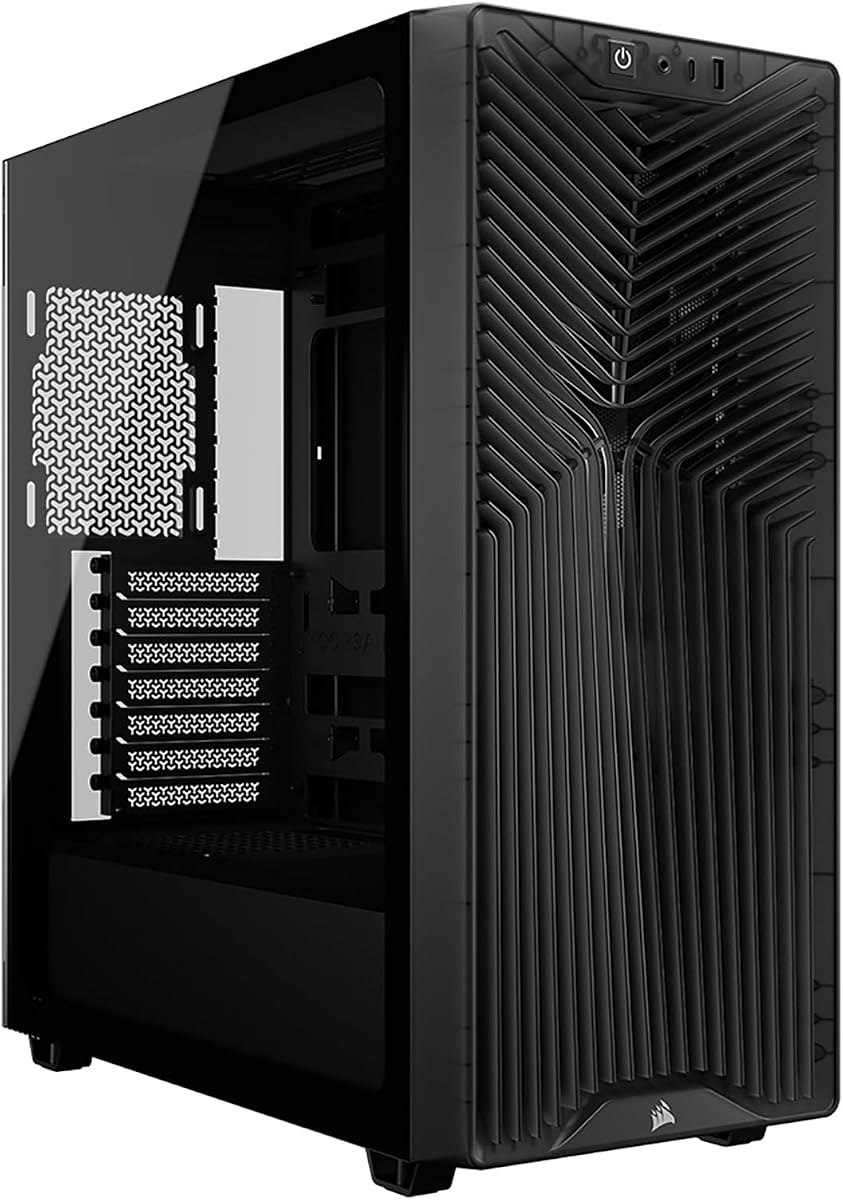


The CORSAIR 4000D RS ARGB stands out as a top choice for builders seeking a balance between airflow and customization. With a 4.7 rating from users, it delivers reliable thermal performance right out of the box.
We may earn a commission when you buy through this link, at no additional cost to you.
Its FRAME system revolutionizes case design by letting you swap trays and panels to match your specific needs. The InfiniRail system makes mounting fans easy anywhere along the front and roof for targeted cooling.
While it lacks a USB-C port on the front which some newer boards need, the included fans and airflow design make up for it with efficient thermal management during heavy workloads.
Buy this if you value flexibility and high airflow in a sleek chassis. It is ideal for mid-range to high-end builds needing room to grow and maintain cool temperatures.
The FRAME system allows you to customize motherboard trays and front panels to match your exact upgrade path or aesthetic preference.
The 3D Y-pattern panel directs air efficiently to components while minimizing obstruction for cooler operation under load.
We may earn a commission when you buy through this link, at no additional cost to you.
The NZXT H5 Flow is a strong budget option that does not compromise on airflow. Users praise its compact design and the perforated PSU shroud that helps bring in fresh air from below.
We may earn a commission when you buy through this link, at no additional cost to you.
It supports large radiators up to 360mm in the front which is rare in compact cases. The ultra-fine mesh panels also help filter dust while keeping air moving freely through the chassis.
Some users note that fan options can vary by region so check what comes included before buying. Even so the included fans run quietly and keep noise levels low during normal use.
Choose this if you want reliable cooling without paying premium prices. It is a great entry point for builders who need efficient thermal management on a budget.
The perforated PSU shroud enables optimal intake to two 120mm fans directly below the GPU for better thermal performance.
Wide channels and hooks make routing cables simple to keep the interior tidy and airflow unobstructed.
We may earn a commission when you buy through this link, at no additional cost to you.
The CORSAIR AIR 5400 RS delivers premium cooling through its triple-chamber design that separates CPU GPU and PSU zones. This isolation prevents heat overlap and keeps components running at lower temperatures.
We may earn a commission when you buy through this link, at no additional cost to you.
Innovative airflow ducts on the bottom fan array speed up air velocity without raising fan noise which is a smart engineering touch. Users love the panoramic glass panels that showcase their high-end builds beautifully.
While the price is higher than average the advanced cooling design justifies the cost for power users. It supports large radiators and keeps cable clutter hidden in the PSU storage chamber.
Pick this if you want top-tier cooling and a showpiece build. It is ideal for enthusiasts building powerful systems that demand the best thermal separation available.
Isolated CPU cooling chamber ensures none of the heat generated affects other components for stable performance.
An innovative duct accelerates airflow into a narrow channel increasing cooling power without added noise.
We may earn a commission when you buy through this link, at no additional cost to you.
The Antec Flux Pro brings full tower power with six PWM fans included for exceptional airflow. It supports E-ATX boards and uses a unique multi-directional vent design to maximize thermal efficiency.
We may earn a commission when you buy through this link, at no additional cost to you.
Its iShift PSU mount allows 90-degree rotation to improve cable management and airflow paths. The dual temperature display for CPU and GPU is a rare feature that helps monitor thermal health easily.
The build combines metal glass and wood for a high-quality look. The panels are removable to adapt cooling brackets on the top front and PSU shroud for custom setups.
Buy this if you need a large chassis with strong cooling out of the box. It suits workstation users or gamers with big hardware that requires maximum space and ventilation.
Supports up to twelve fans simultaneously for customizable airflow paths tailored to your component layout.
Innovative iShift PSU mount and CPU GPU dual temperature display help monitor system health easily.
We may earn a commission when you buy through this link, at no additional cost to you.
The Lian Li V100RX offers great value with four pre-installed PWM ARGB fans and an integrated LED strip. It holds a high 4.8 rating for its ease of use and strong airflow performance.
We may earn a commission when you buy through this link, at no additional cost to you.
Its tool-less side panels make accessing components fast and easy which is great for quick upgrades. The case supports back-connect ATX motherboards for cleaner routing and flexible modern builds.
While the fans can be noisy at maximum speed they stay quiet at lower loads with zero RPM mode. The ARGB lighting adds visual flair without needing extra purchases.
Choose this if you want a complete cooling and lighting package without extra costs. It is perfect for builders who want a fast setup with solid thermal performance.
Comes with four PWM-controlled fans ensuring adaptable airflow and vibrant lighting with daisy-chain connectivity.
Each side panel features tool-less mounting for easy access to internal components streamlining the build process.
We may earn a commission when you buy through this link, at no additional cost to you.
The Cooler Master HAF II 500 focuses on raw airflow with oversized 220mm and 180mm fans to cool even the hottest systems. It uses a low resistance design to improve throughput across the whole chassis.
We may earn a commission when you buy through this link, at no additional cost to you.
Its split-level cable management creates room for oversized rear exhaust which keeps intake and exhaust paths clear. The dual-mode GPU holder adds stability for heavy cards up to 3.6 slots thick.
While it lacks RGB lighting the cooling performance is top-tier. The flexible storage cage adapts to PSU length so you can position drives without blocking airflow paths.
Buy this if you prioritize pure cooling power over aesthetics. It suits users with powerful components who need maximum air throughput to maintain stability.
Oversized Mighty40 cooling system with two 220mm fans and one 180mm fan improves airflow throughput.
Dual-mode GPU holder clamps a single GPU for added stability or supports two GPUs up to 3.6 slots thick.
We may earn a commission when you buy through this link, at no additional cost to you.
The MSI MAG Forge 321R targets gamers who want striking ARGB lighting right out of the box. It includes a 1 to 6 LED control board for more ways to decorate your gaming rig.
We may earn a commission when you buy through this link, at no additional cost to you.
With support for up to 11 fans the case offers massive ventilation for better system stability. The magnetic dust filter on top makes cleaning easy without tools.
Users can sync lighting via Mystic Light software to match other MSI components. The tempered glass side panel adds a premium look while keeping components visible.
Choose this if you want vibrant lighting and strong cooling together. It is ideal for gamers who value visual flair and flexible fan expansion.
Bundle with 1 to 6 ARGB LED control board that gives you more ways to decorate your gaming rig.
Magnetic dust filter on top is designed to give users an easy un-installing and cleaning experience.
We may earn a commission when you buy through this link, at no additional cost to you.
The CORSAIR 3200D RS offers strong cooling options with support for nine 120mm fans and includes three RS120 ARGB fans. Its smoke finish gives it a sleek modern look that fits many setups.
We may earn a commission when you buy through this link, at no additional cost to you.
It supports the latest technology with USB-C on the front and reverse connector motherboard compatibility. The built-in GPU anti-sag arm helps support super-heavy graphics cards.
Room for a 360mm radiator on top allows efficient cooling for powerful CPUs. Cable management is easy thanks to a built-in shroud and generous tie-down locations.
Buy this if you want a stylish case with strong cooling and modern ports. It suits builders who need reverse support and room for large radiators.
Fully compatible with reverse-connector motherboards includes GPU anti-sag arm and USB Type-C on front I/O panel.
Powerful cooling options include room for nine 120mm fans with three RS120 ARGB fans included for airflow.
We may earn a commission when you buy through this link, at no additional cost to you.
The CORSAIR AIR 5400 LX builds on the premium RS model with RGB lighting and panoramic glass panels. It uses a triple-chamber design to isolate CPU GPU and PSU zones for better thermal separation.
We may earn a commission when you buy through this link, at no additional cost to you.
Airflow ducts increase velocity without added noise to keep your system quiet during heavy workloads. The GPU and motherboard chamber offers massive vertical airflow to cool components thoroughly.
This model keeps all the advantages of the RS version while adding vibrant RGB effects for a showcase build. The dedicated PSU chamber hides cables and storage to reduce clutter.
Buy this if you want premium cooling with full RGB flair. It suits enthusiasts who need isolation and want their build to look impressive.
Central chamber offers massive vertical airflow to cool all components thoroughly and exhaust hot air.
Panoramic glass panels let you showcase your hardware with RGB lighting and keep components visible.
We may earn a commission when you buy through this link, at no additional cost to you.
The MONTECH XR Panoramic turns your rig into a showcase with panoramic glass panels and wood-grain I/O. It includes three ARGB PWM fans including side-mounted reverse-blade fans for a cleaner interior look.
We may earn a commission when you buy through this link, at no additional cost to you.
Reverse blades present illuminated faces toward the interior instead of frames which gives builds a polished appearance. It supports up to nine fans and a top 360mm radiator for scalable cooling.
Clearance fits high-end hardware with 420mm GPU support. USB-C and USB 3.0 ports keep peripherals within reach for daily use and cleaning is easy with magnetic filters.
Choose this if you want a showcase case at a friendly price. It is perfect for gamers who value clean looks and strong airflow.
Panoramic front and side tempered-glass panels keep GPU cooling and lighting in view with wood accent.
Two side-mounted reverse-blade ARGB PWM fans present illuminated faces toward the interior for a cleaner showcase.
We may earn a commission when you buy through this link, at no additional cost to you.
Selecting the right cooling computer case requires balancing thermal performance build quality and budget. This guide outlines key factors to consider for an informed choice.
Look for mesh panels perforated sections and minimal obstructions to ensure air moves freely from intake to exhaust. Good airflow prevents heat buildup during intensive tasks.
Prioritize cases with front or bottom intakes and rear or top exhausts for balanced thermal performance.
Check how many fans the case supports and whether they are included. More fans can mean better cooling but may increase noise.
Aim for pre-installed fans with PWM control for quiet and efficient performance.
If you plan to use liquid cooling confirm the case supports your desired radiator size. Larger radiators need more space especially on top or front.
Choose a case with at least 360mm radiator support for future-proofing.
Ensure the case matches your motherboard size whether ATX Micro-ATX or Mini-ITX. Full towers offer more room but take up more desk space.
Pick a size that fits your desk while allowing room for large hardware.
Good cable routing channels and tie points keep wires hidden to improve airflow and aesthetics. A tidy interior helps hot air escape faster.
Look for wide space and grommets that make routing cables simple.
Modern cases often include USB-C ports for faster connectivity. Confirm you have the right ports for your peripherals and motherboard.
USB-C on the front adds convenience for current devices.
Steel and aluminum frames offer sturdiness to protect components. Tempered glass panels look great but may be fragile if mishandled.
Choose durable materials that fit your usage and style.
Dust filters on the front top and bottom reduce buildup which can hamper cooling. Magnetic filters make cleaning easier.
Select cases with filters on major intake points for long-term maintenance.
Keep the case in a well-ventilated spot away from walls or cabinets to allow free airflow around the intake vents. This prevents hot air from recirculating and raising internal temperatures.
Clean dust filters regularly using compressed air or a soft cloth to maintain optimal airflow. Clogged filters can block air paths and increase heat buildup over time.
Check fan operation during startup and ensure they spin freely without obstruction. Replace worn fans promptly to avoid thermal throttling during heavy workloads.
An effective case balances high airflow with low noise. Look for mesh panels, included fans, and ample radiator support to ensure heat exits quickly. Proper cable management also helps keep air paths clear.
Even with liquid cooling adding case fans helps exhaust warm air from inside the chassis. A front intake and rear exhaust combo can improve overall thermal performance and component longevity.
A 360mm radiator typically requires a top or front panel about 380mm wide. Check internal depth too to ensure the radiator and fans do not clash with your motherboard or GPU.
Tempered glass offers a clear view of components but is heavier and more fragile. Choose if you value looks over utility and handle the case with care during moves.
Most cooling computer cases allow adding fans to empty mounts on front top or sides. Check fan size support like 120mm or 140mm before buying replacements or extra units.
A balanced setup pushes cool air in from the front and pulls hot air out the back or top. This creates positive pressure that reduces dust buildup and keeps temps stable.
The CORSAIR 4000D RS ARGB NZXT H5 Flow and CORSAIR AIR 5400 RS lead the list for overall value performance and premium cooling respectively. Each offers strong airflow and flexibility for modern builds.
Focus on airflow design fan support and build size when comparing options. A well-ventilated case with proper cable management will protect your hardware and ensure stable operation.
Always check current availability and specifications before purchasing since models may change. These picks give you a solid starting point to find the right cooling computer case for your system.