
Fosmon Fast Charging
4.5Editor score
5280mWh Battery Life
SGS Certified Safety
Limited Lifetime Warranty
This guide compares the top controller charging station for Xbox options to help you find the best docking solution for your gaming setup.
Every serious Xbox player knows the frustration of a dead controller during a critical match. A reliable controller charging station for Xbox ensures your gamepad is always ready to go without interrupting your immersion in the game world.
We evaluated ten top-rated docking solutions based on battery capacity, charging speed, safety features, and overall build quality. Our analysis covers everything from budget-friendly dual docks to premium single stands with advanced RGB lighting.
Each product selection highlights unique strengths like long-lasting battery life or sleek design that matches your console aesthetic. Please note that pricing and availability can change rapidly so check the latest details before purchasing.
4.5Editor score

4.6Editor score

4.6Editor score
Below is a side-by-side comparison of the ten most popular charging docks available today. We highlight key specifications like battery capacity and compatibility to help you decide quickly.

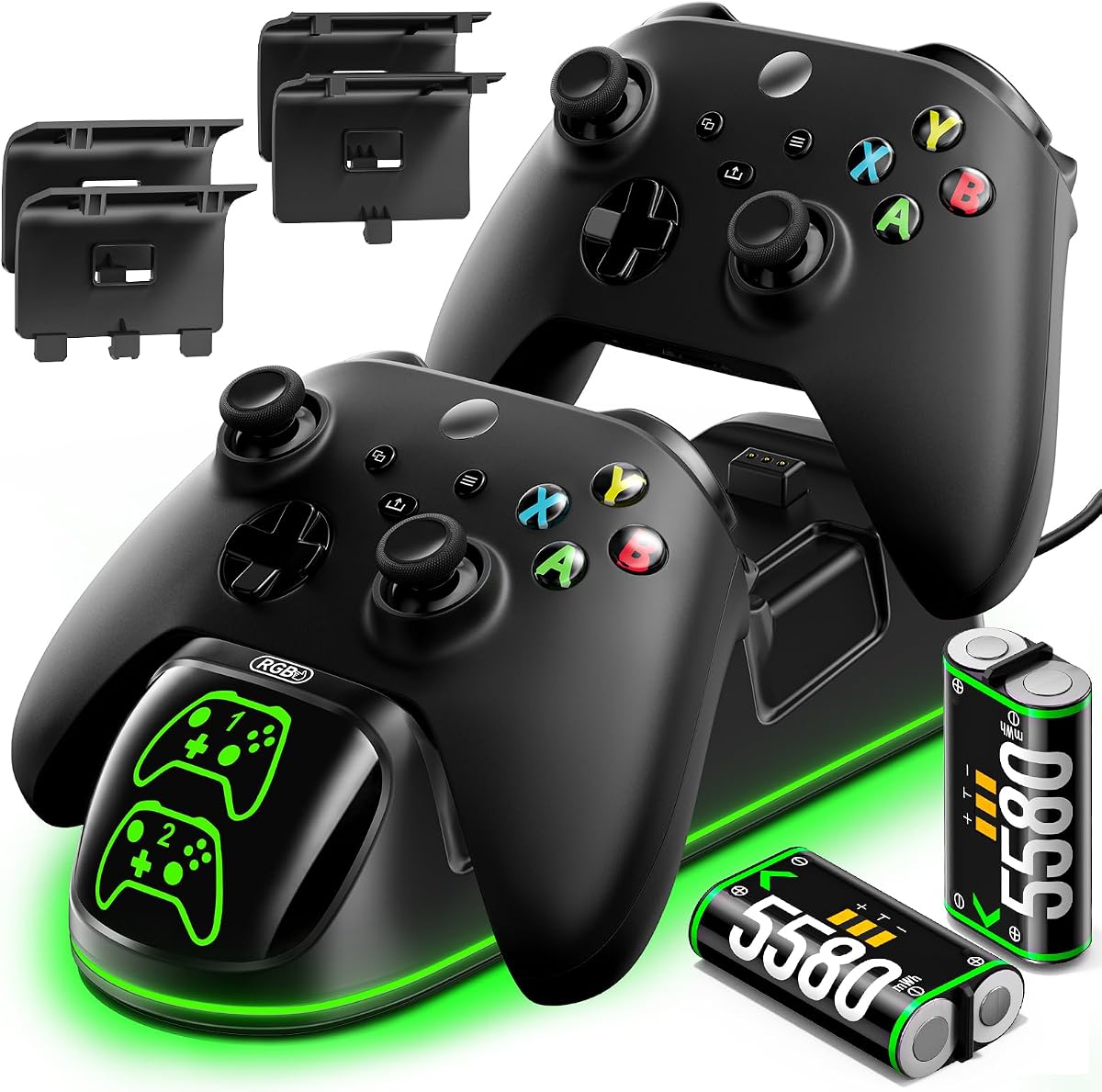


The Upgraded Controller Charger Station ranks as the top choice due to its exceptional battery capacity and thoughtful design features. It offers a robust solution for players who demand uninterrupted gaming without worrying about power levels.
We may earn a commission when you buy through this link, at no additional cost to you.
Its standout feature is the massive 6200mWh capacity in each pack which delivers up to twenty five hours of playtime. The unique X shaped LED indicators provide clear visual feedback without disturbing your gameplay experience in dark rooms.
While the batteries sit at the bottom of the dock which might seem unusual initially it keeps the charging contacts secure. The exclusion of third party controller support ensures optimal performance for official Xbox hardware only.
This station is perfect for hardcore gamers who need reliability during long sessions. Its high safety ratings and long battery life make it the most practical investment for your Xbox setup.
The 6200mWh capacity ensures you can play for days on a single charge cycle without needing to swap out power sources.
The X shaped LED lights glow softly to show charging status but are dim enough not to bother your focus during night gaming.
We may earn a commission when you buy through this link, at no additional cost to you.
The Fosmon Fast Charging station provides excellent value for budget conscious shoppers who still need high performance. It balances cost with durability through certified safety features that ensure long term reliability for your controllers.
We may earn a commission when you buy through this link, at no additional cost to you.
Its 5280mWh batteries offer up to forty five hours of play which is impressive for the price. The SGS certification gives peace of mind regarding overheating and short circuit protection during overnight charging sessions.
Users should note the incompatibility with Elite 2 controllers which limits utility for premium hardware owners. However the lifetime warranty reflects strong manufacturer confidence in the product quality.
This dock is ideal for families or casual gamers who want a set and forget solution. It effectively removes the hassle of disposable batteries while keeping costs low.
SGS certification ensures the charging board meets strict safety standards for overheating and short circuit protection.
Fosmon backs this dock with a limited lifetime warranty which is rare in the budget accessory market.
We may earn a commission when you buy through this link, at no additional cost to you.
The Controller Gear Pulse Red stand offers a premium aesthetic experience for owners of specific color limited edition controllers. It combines official licensing with superior build quality to deliver a seamless look for your console setup.
We may earn a commission when you buy through this link, at no additional cost to you.
Its magnetic contact system ensures the controller stays firmly in place during charging and navigation. This feature allows players to browse dashboards or check messages without removing the device from the dock.
While it only charges one controller at a time the high quality materials justify the higher cost for enthusiasts. The one hand navigation feature adds significant convenience for quick menu checks.
This stand is perfect for players who want their accessories to look like a cohesive part of the console design. It blends functionality with high end style effectively.
The magnetic system ensures a solid connection that prevents accidental dislodging during intense gaming moments.
Ergonomic design lets you navigate the Xbox interface without taking the controller off the charging stand.
We may earn a commission when you buy through this link, at no additional cost to you.
The PowerA Solo Charging Stand serves as a reliable official option for single controller charging needs. It provides a tidy way to store and charge your Xbox wireless controller without needing extra cables cluttering your desk.
We may earn a commission when you buy through this link, at no additional cost to you.
Its 1100 mAh battery is standard for this class but sufficient for typical play sessions. The inclusion of battery doors and a USB cable means you have everything needed for immediate setup out of the box.
The two year warranty offers better coverage than many third party competitors which adds value to the purchase. The compact design makes it easy to fit into any entertainment center or desk space.
This stand is recommended for casual players who prefer official accessories and minimal setup. It is a solid choice for maintaining a neat and organized gaming area.
Being officially licensed ensures compatibility and performance standards meet Microsoft requirements.
Its small footprint fits easily on crowded desks while still allowing display of the controller when not in use.
We may earn a commission when you buy through this link, at no additional cost to you.
The OlVO XSX Controller Charger stands out with a perfect 5.0 star rating and extremely fast charging speeds. Users report reliable performance that minimizes downtime between gaming sessions effectively.
We may earn a commission when you buy through this link, at no additional cost to you.
Its ability to charge fully in just two and a half hours is faster than most competitors in this category. The high cycle life of the batteries ensures long term value over years of use.
Installation requires careful attention to polarity which might be tricky for less technical users. The lack of visible LED indicators means you must rely on time estimates for full charges.
This charger is ideal for competitive gamers who need rapid turnaround times for their equipment. The high user rating suggests consistent quality control and satisfaction.
Two and a half hour charging gets you back to the game much faster than standard overnight options.
With over 3000 recharge cycles you can expect years of daily use without significant capacity loss.
We may earn a commission when you buy through this link, at no additional cost to you.
The 8BitDo Charging Dock offers a seamless and sleek design that matches Xbox aesthetics perfectly. Its magnetic charging system provides a secure connection that ensures reliable charging every time.
We may earn a commission when you buy through this link, at no additional cost to you.
The amber and white LED indicators are easy to read and clearly show when the controller is charged. The official licensing gives confidence that it will work flawlessly with your current hardware.
While it only charges one controller at a time the compact design saves valuable desk space. The magnetic mechanism is intuitive and allows for easy one handed placement of the device.
This dock is perfect for those who value design and simplicity in their setup. It is an excellent choice for users who prioritize a clean look.
The magnetic system holds the controller firmly preventing accidental disconnection during active charging.
Official licensing ensures the dock matches the color and texture of official Xbox hardware perfectly.
We may earn a commission when you buy through this link, at no additional cost to you.
This Charger Station brings a unique robot helmet aesthetic to your gaming setup. It offers high capacity batteries and fast USB-C charging to ensure your controllers stay ready for action.
We may earn a commission when you buy through this link, at no additional cost to you.
The built-in storage compartment at the bottom is a clever feature for keeping spare batteries organized. This prevents losing small items and keeps your gaming area tidy and clutter-free.
The LED indicators have a dedicated switch which lets you turn off lights when not needed. This feature helps avoid light pollution in dark room gaming environments.
This dock is ideal for gamers who want a distinctive look without sacrificing performance. Its storage design offers practical utility for keeping accessories organized.
The robot helmet inspired design adds a bit of superhero momentum to your gaming atmosphere.
The bottom compartment ensures you never misplace spare batteries for your controllers.
We may earn a commission when you buy through this link, at no additional cost to you.
The Nyko Charging Station provides a straightforward dual charging solution for your Xbox controllers. It includes an extra USB port which adds utility for charging other small devices on your desk.
We may earn a commission when you buy through this link, at no additional cost to you.
Its drop and charge design is intuitive making it easy to set the controller down and start charging immediately. The LED lights provide clear visual feedback so you know when charging is complete.
While the battery capacity is standard the inclusion of an extra USB port adds value for users who have multiple devices. The brand has been around for decades which suggests general reliability.
This station is suitable for users who need a simple dual dock without extra frills. It offers a practical way to keep two controllers ready for multiplayer sessions.
The extra USB port allows you to charge other accessories like headsets or phones simultaneously.
No cable alignment is needed just place the controller on the stand and it begins charging automatically.
We may earn a commission when you buy through this link, at no additional cost to you.
The Razer Universal Quick Stand delivers fast charging speeds and universal compatibility for all Xbox controllers. It features a magnetic system that keeps your device secure while you browse the dashboard.
We may earn a commission when you buy through this link, at no additional cost to you.
Its ability to fully charge in under three hours makes it a great choice for busy gamers. The build quality matches high-end gaming peripherals and aligns with Razer brand standards.
While it is expensive compared to others the one handed navigation feature adds significant convenience. You can interact with the system without removing the controller from the dock.
This stand is ideal for users who want premium quality and speed without compromise. It is a solid investment for those with high-end setups.
Under three hour charge times ensure you are never stuck waiting long for power during a match.
Razer manufacturing standards ensure the dock is durable and aesthetically pleasing for any desk.
We may earn a commission when you buy through this link, at no additional cost to you.
This Controller Charger Station offers extensive customization through its 9 RGB lighting modes. It combines high capacity batteries with a storage stand function to keep your gaming area organized.
We may earn a commission when you buy through this link, at no additional cost to you.
The 6200mWh batteries provide up to thirty hours of consistent use which is ideal for long gaming sessions. The safety system auto-adjusts power to prevent overheating or overcharging risks.
RGB lighting enthusiasts will appreciate the touch switch and multiple color options. However those preferring a minimal look may find the lights too bright at night.
This dock is perfect for gamers who want to add a vibrant touch to their setup. It balances visual appeal with strong technical performance.
Nine lighting modes include single colors and cycling options to match your gaming mood.
Up to thirty hours playtime means you rarely need to recharge during casual play.
We may earn a commission when you buy through this link, at no additional cost to you.
Selecting the right dock involves considering battery life, charging speed, and compatibility. This guide breaks down the key factors to help you find the perfect fit.
Battery capacity is measured in milliampere-hours (mAh) or milliwatt-hours (mWh). Higher capacity means longer playtime per charge which is crucial for marathon sessions. Look for docks with at least 5000mWh for extended use without interruptions.
Prioritize high capacity batteries if you often play for many hours a day.
Charging speed determines how quickly your controllers return to full power. Some docks offer fast charging in under three hours while others take longer. Faster charging minimizes downtime between games.
Choose a station with fast charging if you have multiple users or play daily.
Safety features like overcharge and short circuit protection protect your expensive controllers. Certified docks often include intelligent boards that stop charging when full to prevent battery degradation. Always verify these features.
Look for SGS certification or multi-protection systems for peace of mind.
Ensure the dock supports your specific Xbox model. Some docks work with Series X|S and One but not Elite controllers. Always check the product details before purchasing.
Verify compatibility with your current hardware to avoid wasted purchases.
Design plays a big role in how the dock fits into your setup. You might want a sleek single stand or a colorful dual dock with RGB. Match the look to your console style for a cohesive setup.
Pick a design that complements your gaming desk or entertainment center.
A good warranty protects you from manufacturing defects. Some brands offer limited lifetime warranties which are a strong sign of quality. Check the terms before buying to ensure long term support.
Prioritize brands with strong warranty policies for better after sales service.
Single docks save space but dual docks are better for multiplayer gaming. If you often play with friends a dual slot station is practical. Consider your usual gaming habits when choosing.
Select a dual slot dock if you frequently play local multiplayer.
LED indicators help you see when your controllers are fully charged. Bright lights can be distracting so look for dimmable options. Some docks have touch switches to turn off lights.
Check LED visibility options to match your room lighting preferences.
To start using your new charging station, plug the USB cable into a power source or your console and ensure the dock is stable. Remove the battery covers from your controllers and slide the batteries in securely before placing the controllers onto the stand.
When charging is complete the LED lights will change color or turn off depending on the model. You can leave your controllers on the dock as a display stand when not in use to keep them organized and ready for the next game.
For long term care clean the contacts on the batteries and dock regularly to prevent dust buildup. Store spare batteries in a cool dry place and avoid exposing them to extreme temperatures to maintain their lifespan.
Some docks support one handed navigation which lets you use the controller while it is docked. This is useful for checking messages or browsing menus without unplug. However not all models support this feature.
Not all stations are compatible with Elite 2 controllers because of their unique shape. Check the product specifications before buying to ensure support. Many standard docks do not work with Elite 2 models.
Rechargeable batteries can last up to 3000 cycles with proper care. This means years of daily use before capacity drops significantly. Avoid overcharging to extend their overall lifespan.
Yes most modern docks include safety chips that stop charging when the batteries are full. This prevents overheating or damage so leaving them on the dock overnight is generally safe.
You do not need to remove the batteries to play as they are designed to power the controller directly. Simply slide them into the controller back and you are ready to go.
Many docks are designed to work with official batteries or specific third party models. Using incompatible batteries might lead to poor contact or charging issues so stick to recommended brands.
Dual docks charge each controller independently so one can be charged while the other is full. The LED lights will show the status for each slot separately to avoid confusion.
Most stations use LED indicators that change from red to green when fully charged. Some models will turn off the light completely to signal the end of the cycle.
We highlighted ten top options ranging from the Upgraded Controller Charger Station for high capacity to the Fosmon Fast Charging for budget value. Each offers distinct advantages depending on your playstyle and hardware.
Prioritize battery capacity and safety features to ensure reliability during long gaming sessions. If you value design look for official licensed docks that match your controller colors perfectly.
Always check the latest pricing and availability on the official store pages. Accessories can change so verifying details ensures you get the best current deal for your needs.