
Macally Compact Wireless Keyboard
4.4Editor score
2.4G wireless USB
78-key layout
Plug and play setup
This guide compares the top ten compact editing keyboards for creators and professionals offering portability speed and efficiency for your workflow needs.
Finding the right compact editing keyboard can transform your creative workflow significantly. These devices offer essential keys in a small form factor perfect for mobile workspaces and tight desks. We evaluated the best options available to help you find the ideal match for your specific editing tasks.
Our team analyzed ten top-rated models based on build quality connectivity and ergonomic design. We looked at how well each device handles shortcuts and multimedia functions essential for video and graphic editors. The list covers various price points and form factors to suit different user preferences and budgets.
Each pick highlights unique strengths such as wireless freedom programmable keys or durable construction. You will see detailed breakdowns of features pros and cons to make an informed decision easily. Please note that product availability and pricing can change over time so check current listings before purchasing.
4.4Editor score

4.7Editor score

4.4Editor score
This side-by-side comparison highlights the key specifications of each compact editing keyboard to help you decide which model fits your workspace and editing requirements best.



The Blackmagic Design Davinci Resolve Speed Editor stands out as a professional tool tailored for video editors. With a 4.7 rating it delivers specialized functions that generic keyboards cannot match for specific software workflows.
We may earn a commission when you buy through this link, at no additional cost to you.
Its standout feature is the built-in search dial which speeds up media location significantly. The keyboard shortcuts match edit functions exactly reducing the learning curve and increasing speed in complex timelines.
While the price is higher than standard keyboards it includes a DaVinci Resolve Studio activation card which adds substantial value. The limitation is that it works best with this specific software rather than general typing.
This keyboard is ideal for professionals using DaVinci Resolve who want physical controls for faster editing. It combines portability with specialized features that justify the investment for serious video creators.
The layout matches common video editing commands allowing you to execute complex tasks with single keystrokes.
The search dial lets you navigate timelines and scrub through footage with a tactile control feel.
We may earn a commission when you buy through this link, at no additional cost to you.
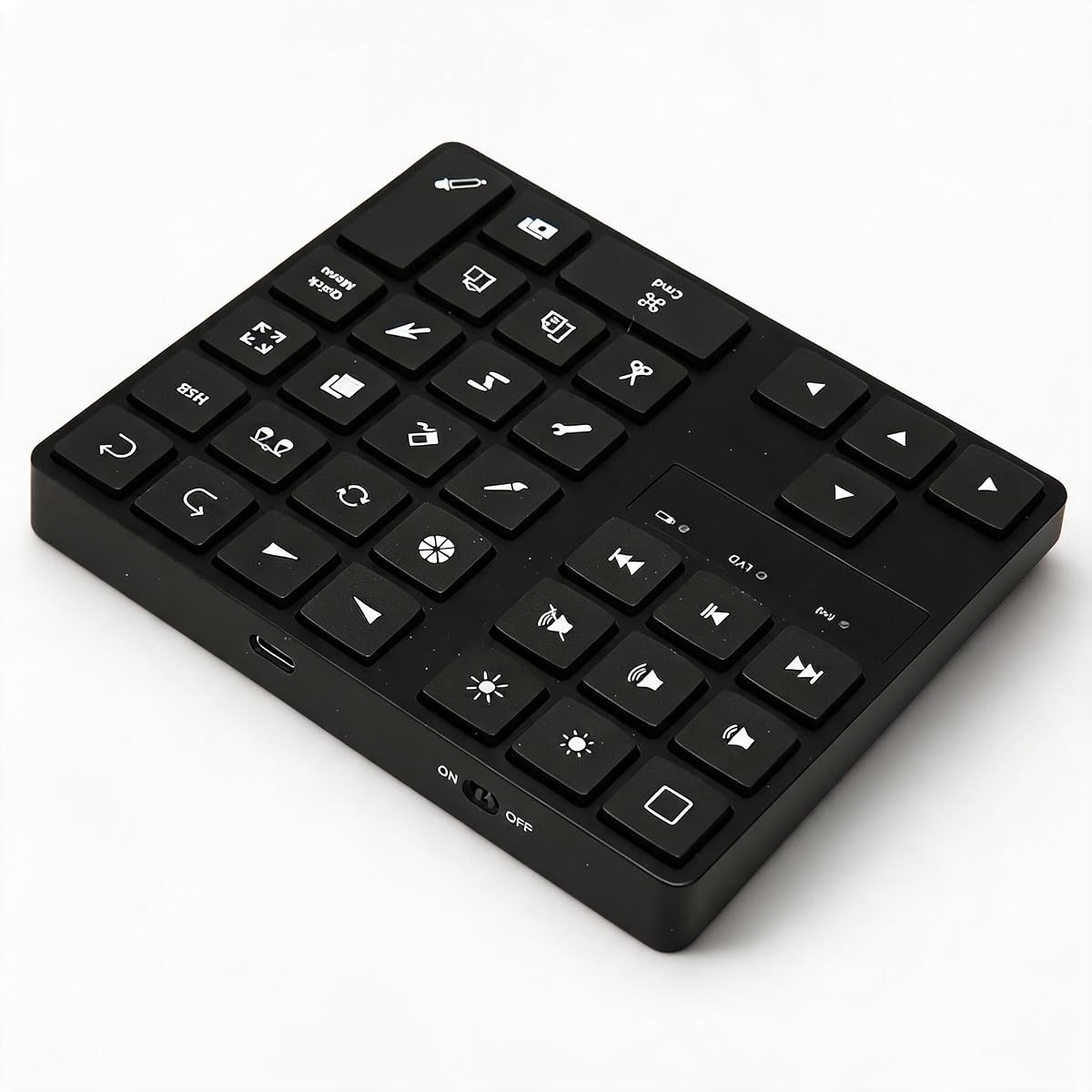
The Macally Compact Wireless Keyboard offers excellent value for users needing a small and reliable input device. It achieves a 4.4 rating due to its simplicity and immediate usability without software hassles.
We may earn a commission when you buy through this link, at no additional cost to you.
Its 2.4G wireless connection via USB dongle ensures stable performance on most computers. The compact 78-key layout saves desk space while keeping essential keys accessible for daily editing tasks.
Although it lacks Bluetooth the wired dongle connection provides consistent responsiveness. The price point makes it accessible for beginners or secondary setups where budget is a primary concern.
Buy this if you need a no-fuss compact keyboard for basic editing or travel. It provides the essentials without extra cost making it a smart choice for cost-conscious users.
The plug-and-play design means you can start typing and editing immediately after inserting the USB receiver.
Removing the number pad creates a smaller footprint allowing better mouse positioning in tight spaces.
We may earn a commission when you buy through this link, at no additional cost to you.
The Logitech MX Keys Mini brings premium features to a compact form factor ideal for professional use. With a 4.4 rating it balances design and functionality effectively for creative professionals.
We may earn a commission when you buy through this link, at no additional cost to you.
Its smart illumination lights up when your hands approach which is useful in dim editing environments. The ability to switch between three devices seamlessly enhances workflow when using multiple computers.
While the price is higher it offers long-term value through rechargeable battery and durable construction. The lack of a number pad may be a drawback for heavy data entry tasks.
This model is perfect for those wanting a high-end typing experience without clutter. It combines aesthetics with utility making it a top choice for premium portable setups.
The keys adjust brightness based on ambient light to save battery and improve visibility automatically.
Switch between devices with a button press reducing cable clutter and increasing productivity.
We may earn a commission when you buy through this link, at no additional cost to you.
The ProtoArc XK04 focuses on extreme portability with a unique folding mechanism. It scores a 4.5 rating for its ability to fit easily into small bags for mobile creators.
We may earn a commission when you buy through this link, at no additional cost to you.
Its two-fold design reduces size significantly when closed and the PU leather cover protects the keys. This makes it ideal for travelers who need typing capability on tablets or phones.
While excellent for mobile work the folding hinge may limit stability compared to solid boards. The battery life is strong allowing long periods of use between charges.
Choose this if you prioritize travel and minimalism over desk permanence. It is a specialized tool for on-the-go editing and messaging.
Keys are sized to match tablet screens making it a natural extension for touch devices.
The cover acts as a case saving you from needing extra protection when carrying.
We may earn a commission when you buy through this link, at no additional cost to you.
The Logitech Pebble Keys 2 K380s offers a stylish and sustainable approach to compact typing. With a 4.3 rating it appeals to users who value eco-friendly design and aesthetics.
We may earn a commission when you buy through this link, at no additional cost to you.
Its 3-year battery life means you rarely need to change batteries which is convenient for long term use. The Easy-Switch buttons allow quick transitions between phone tablet and desktop devices.
While the round keys look nice they may require a short adjustment period if you prefer standard square caps. The lack of backlight limits use in dark environments.
This keyboard is great for those seeking a clean desk look and long battery life. It balances eco-conscious manufacturing with reliable performance for daily tasks.
Made with recycled plastic to reduce environmental impact without compromising on durability.
The efficient design ensures years of use on a single battery charge.
We may earn a commission when you buy through this link, at no additional cost to you.
The XPPen Mini Keydial ACK05 is designed for digital artists and editors needing quick access to shortcuts. It earns a 4.3 rating for its versatile programmability and compact control layout.
We may earn a commission when you buy through this link, at no additional cost to you.
Its rotary dial allows precise adjustments like zooming or brush size changes without reaching for mouse tools. The ten keys can be customized to trigger complex commands in various creative software.
Note that full customization requires downloading specific drivers which may be a hurdle for some users. The anti-ghosting feature ensures that multiple simultaneous key presses work reliably.
Select this if you work with drawing tablets or editing suites often. It acts as a specialized accelerator for creative tools rather than a standard input device.
The dial provides tactile feedback for smooth scrolling and precise value adjustments in software.
Program up to forty shortcuts across four sets for different applications and projects.
We may earn a commission when you buy through this link, at no additional cost to you.
The Logitech K250 offers a compact layout that still retains a number pad for data entry tasks. With a 4.2 rating it provides a balance between size and functional completeness.
We may earn a commission when you buy through this link, at no additional cost to you.
Its spill-resistant design adds durability for casual office or home use where accidents might occur. The Bluetooth connection keeps things wireless and simple without needing a USB dongle.
While it is slightly larger than full mini keyboards the inclusion of a number pad makes it versatile. The price remains competitive for those needing both typing and number capabilities.
Buy this if you need a number pad but want to save space. It is a practical choice for general work and light editing tasks.
Keeps essential number keys for data entry without requiring a full size keyboard.
Protection against minor spills extends the lifespan in everyday environments.
We may earn a commission when you buy through this link, at no additional cost to you.
The Microsoft Designer Compact Keyboard delivers a clean and efficient typing experience for Windows users. It holds a 4.3 rating for its ergonomic design and specialized expressive input key.
We may earn a commission when you buy through this link, at no additional cost to you.
Its optimized key spacing reduces hand fatigue during long editing sessions. The expressive input key offers quick access to symbols and emojis which can speed up text heavy workflows.
While it supports three devices it relies solely on Bluetooth which may limit stability for some users. The low profile design complements modern setups well without taking up much height.
Choose this if you use Windows and value a sleek ergonomic design. It provides a streamlined interface for daily input needs.
Dedicated access to symbols and emojis simplifies communication and text creation.
Layout design reduces strain by placing keys within natural reach zones.
We may earn a commission when you buy through this link, at no additional cost to you.
The One-Handed Ergonomic Keyboard focuses on wrist relief and rapid command execution. With a 4.0 rating it caters to users who suffer from repetitive strain or need macro-heavy workflows.
We may earn a commission when you buy through this link, at no additional cost to you.
Its one-handed design keeps your hand in a neutral position while the mouse is available for the other. The thirty-five programmable shortcuts allow you to automate complex editing tasks instantly.
The wired connection ensures zero latency which is critical for real-time editing. However adopting a one-handed layout requires adaptation and may slow down traditional typing tasks.
Use this as a secondary device specifically for creative work. It is an investment in health and efficiency for heavy design users.
Angled sculpted keys keep your wrist straight to reduce fatigue during long sessions.
Assign complex sequences to single keys to speed up repetitive editing actions.
We may earn a commission when you buy through this link, at no additional cost to you.
The Cherry Stream Wired Keyboard provides a quiet and stable typing experience in a compact form. It achieves a 4.3 rating for its reliable performance and high-quality build standards.
We may earn a commission when you buy through this link, at no additional cost to you.
Its TKL layout removes the number pad while keeping essential navigation keys for better mouse access. The whisper-quiet keys are ideal for shared workspaces where noise reduction is valued.
While it is a wired device this ensures consistent power and connection without battery worries. The metal plate adds rigidity preventing flex during intense typing sessions.
Opt for this if you prefer wired simplicity and quiet operation. It delivers solid performance for professional environments needing reliability.
Keys are designed to minimize sound making them suitable for quiet offices.
Removal of number pad allows for a compact and stable structure with metal reinforcement.
We may earn a commission when you buy through this link, at no additional cost to you.
Choosing the right compact editing keyboard involves balancing portability features and budget to suit your workflow.
Evaluate whether you need Bluetooth for wireless freedom or a wired connection for zero lag. Bluetooth 5.0 offers better range and battery life compared to older standards.
Ensure the connection method supports your specific devices whether PC Mac or mobile tablets.
Decide if you need a full number pad or a tenkeyless design for more mouse space. Tenkeyless layouts save desk space without sacrificing essential arrow keys.
Look for optimized key spacing that supports comfortable typing for long editing sessions.
For editors having customizable keys can significantly speed up common tasks like saving or undoing. Check if software support is needed to program these keys effectively.
Macros allow complex commands to be executed with a single keystroke for efficiency.
High-quality materials like aluminum or durable plastics ensure longevity. Spill resistance adds a layer of protection for daily use in varied environments.
Look for anti-slip feet or rubber pads to keep the keyboard stable during use.
Wireless models should offer long battery life to reduce maintenance. USB-C rechargeable models are increasingly common and reduce waste from disposable batteries.
Consider standby features that conserve power when the device is not in active use.
If you travel often weight and foldability become critical factors. Check dimensions to ensure it fits comfortably in your bag or laptop case.
Slim profiles help maintain a clean desk while allowing for portable workflows.
Typing comfort affects productivity so choose a key height and angle that suits your posture. One-handed options may reduce strain for creative work that requires mouse use.
Adjustable tilt legs can help you find a position that minimizes wrist pain.
Some keyboards offer unique tools like dials for timeline scrubbing or dedicated app keys. Identify if these features align with the software you use most often.
Specialized keys for video or photo editing can provide a significant advantage over generic inputs.
To maximize performance start by pairing your device carefully. For Bluetooth models ensure the keyboard is in pairing mode before connecting to your computer.
Clean the keys regularly with compressed air to remove dust and debris. Avoid harsh chemicals that might damage the keycaps or protective coatings.
Store your keyboard in a protective case when traveling to prevent scratches. This maintains the look and functionality over time especially for portable models.
Most compact keyboards support both Mac and Windows through Bluetooth or USB. Check the product details for specific OS compatibility before purchasing to ensure seamless operation.
Yes many compact models are optimized for tablets and phones. Ensure they support the OS of your tablet such as iPadOS or Android for full functionality.
Yes many programmable keyboards can map Adobe shortcuts. You may need to install driver software to assign keys to specific functions in Photoshop or Premiere.
Look for models with dedicated transport keys or media controls. Shortcuts that map to common editing tasks like trimming or syncing can significantly speed up your workflow.
Modern Bluetooth 5.0 models generally have negligible lag. For real-time editing wired options or those with dongles are preferred to ensure instant response.
Battery life varies from weeks to years depending on features. Models with backlighting use more power so check specifications for expected usage time between charges.
Yes but check for anti-ghosting support. Some editing-focused models may not handle multiple key presses simultaneously as well as gaming keyboards.
We explored ten top compact editing keyboards ranging from specialized video tools to versatile wireless options. Each model offers unique benefits tailored to different needs and budgets.
Prioritize features like programmable shortcuts and build quality to ensure the device supports your workflow. Portability matters if you frequently move between workspaces.
Prices and availability can fluctuate so review current listings before finalizing your decision. This guide helps you choose confidently based on proven performance and user feedback.