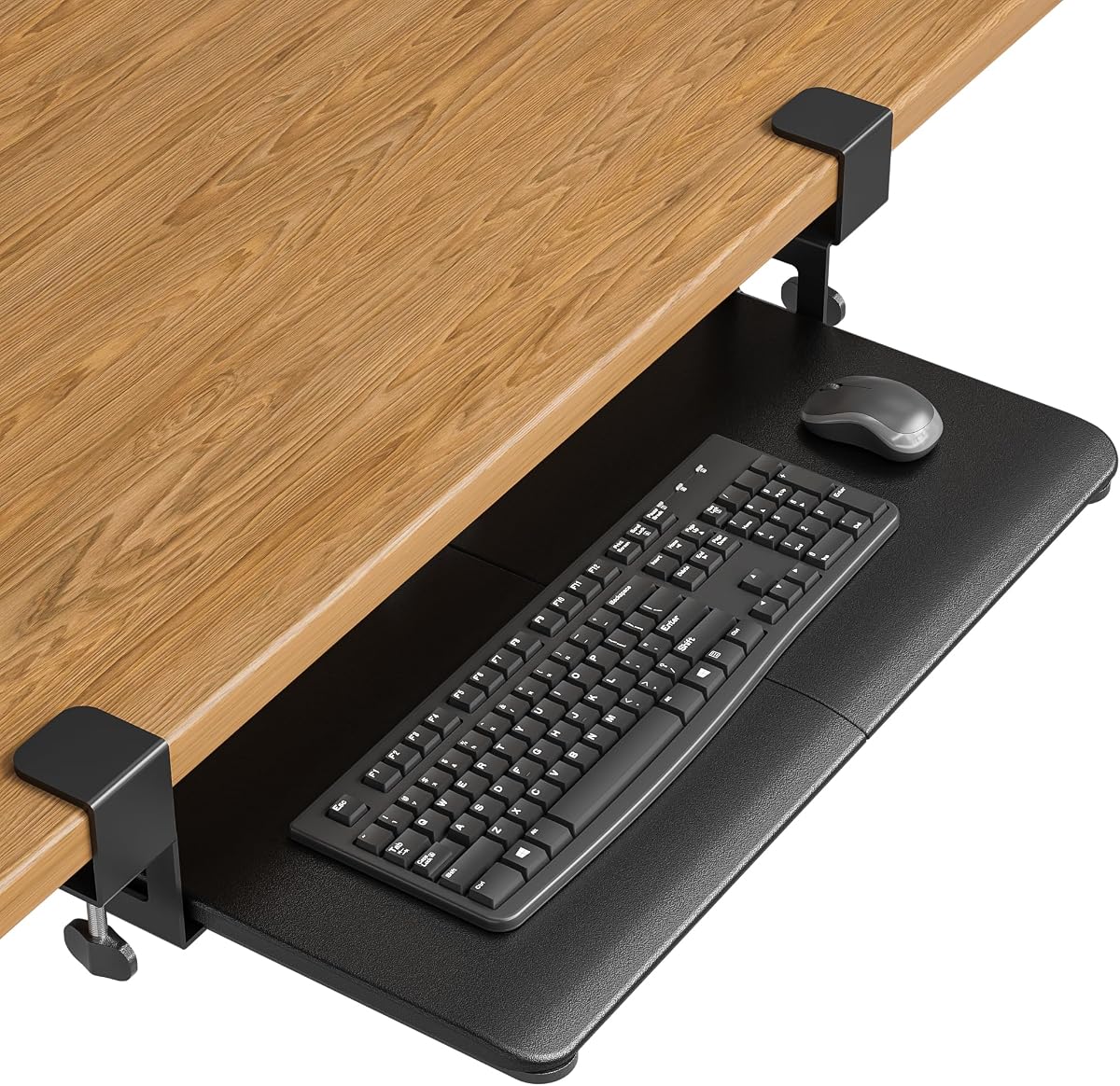
BONTEC Under Desk Keyboard Tray
4.4Editor score
No-drill C-clamp installation
Spacious 25.6 x 11.8 inch platform
Supports up to 11 lbs load
Finding the right clamp on keyboard tray can transform your workspace into a more ergonomic and productive environment. These under-desk solutions free up valuable surface area while promoting healthier typing postures for long work sessions. Whether you work from home or in a busy office, the right tray reduces strain on your wrists and shoulders significantly.
We evaluated ten top-rated clamp on keyboard trays based on build quality, ease of installation, and ergonomic features. Our comparison focuses on desk compatibility, tray dimensions, and user feedback to ensure you choose a model that fits your specific setup. Each option offers unique benefits for different desk types and typing preferences.
This guide highlights the standout features of each product so you can make an informed decision quickly. We include detailed reviews, pros and cons, and buying advice to help you narrow down your choices. Keep in mind that prices and availability may change, so verify current details before purchasing your new tray.
4.4Editor score

4.4Editor score

4.3Editor score
As an Amazon Associate we earn from qualifying purchases.
This side-by-side comparison helps you quickly identify which clamp on keyboard tray matches your desk dimensions and ergonomic needs. We list key specifications for all ten models so you can see differences in size, weight capacity, and adjustment features at a glance.


The VIVO Black Clamp-on Tray stands out as the top choice for most users seeking reliable ergonomics. With a solid 4.4 rating from thousands of buyers, it balances quality and affordability perfectly. The under-desk design keeps your keyboard and mouse organized while freeing up desktop space for other work items.
We may earn a commission when you buy through this link, at no additional cost to you.
Its standout feature is the smooth sliding mechanism that extends up to 8.5 inches from the desk edge. The C-clamps secure tightly to desks up to 1.25 inches thick without causing damage. You get ergonomic typing angles that reduce wrist strain during long sessions, making it ideal for office workers and writers alike.
However, this model does require a flat desktop edge, so it will not fit beveled or lipped surfaces. The width is fixed at 27 inches which may be tight for very large dual monitor setups. These trade-offs are acceptable given the price and the stability it provides for standard keyboards.
Anyone looking for a straightforward clamp on keyboard tray will love this VIVO model. It is perfect for home offices and shared workspaces where setup speed matters. We recommend checking your desk thickness before purchasing to ensure a seamless fit and long-term satisfaction.
The tray promotes a neutral wrist position that reduces fatigue during extended computer use.
Moving your input devices below the desktop creates more room for monitors and documents.
We may earn a commission when you buy through this link, at no additional cost to you.
The BONTEC Under Desk Keyboard Tray offers excellent value for budget-conscious shoppers needing ergonomic support. Its 4.4 rating reflects consistent performance across various desk setups without breaking the bank. The pull-out platform is designed to hold standard keyboards and mice securely under your main work surface.
We may earn a commission when you buy through this link, at no additional cost to you.
You get a generous 25.6 x 11.8 inch surface that accommodates most full-size keyboards easily. The C-clamps adjust to desks up to 1.97 inches thick and include protective pads to prevent scratches. Installation is straightforward with all hardware provided, and the slide mechanism works smoothly without sticking or wobbling.
One limitation is the lack of tilt adjustment which limits customization for specific wrist preferences. You also need to ensure your desk has a flat underside without crossbars for proper clamp fit. Despite these points, the price and size make it a strong contender for basic needs.
We suggest this tray for users who want a clean look without spending too much. It fits well in home offices where space efficiency is key. Check your desk dimensions carefully to avoid fitment issues before finalizing your order.
This model brings ergonomic benefits to users who need an affordable solution.
No-drill setup means you can install it quickly without tools or modifications.
We may earn a commission when you buy through this link, at no additional cost to you.
The VIVO Premium Black Clamp-on Tray delivers advanced adjustability for users who demand precise ergonomics. Its 4.3 rating highlights the quality of its nine different tilt settings that lock securely into place. This level of customization helps you find the exact typing angle that feels most comfortable for your posture.
We may earn a commission when you buy through this link, at no additional cost to you.
You can adjust the brackets to clear desks up to 3.4 inches thick which is much higher than most models. The swivel clamps rotate 90 degrees independently to fit corner desks or angled workstations. This flexibility makes it a premium option for diverse office environments and challenging setups.
The main trade-off is the higher cost compared to standard trays which may not suit tight budgets. You also need to ensure you have enough space on your desk for the 34-inch total clamp length. These details are worth the investment if you need maximum comfort and fit.
We recommend this tray for professionals who spend hours typing and need tailored support. It is ideal for corner desks where standard trays fail to fit well. Verify your desk width before purchasing to ensure the clamp system matches your needs.
Nine tilt settings let you fine-tune wrist alignment for long-term comfort.
Swivel clamps adapt to L-shaped desks for versatile placement options.
We may earn a commission when you buy through this link, at no additional cost to you.
The VIVO Rotating Keyboard Tray offers unique flexibility for users who need to pivot their input area quickly. Its 4.0 rating points to a solid build that allows full 360-degree rotation around a single clamp. This feature is perfect for shared desks where multiple users need different angles.
We may earn a commission when you buy through this link, at no additional cost to you.
You can rotate the tray under the desktop when not in use to win back valuable workspace. The single clamp is easier to install than dual-clamp systems but needs at least 32 inches of clearance for full movement. It holds up to 11 lbs which covers most standard keyboards and mice.
The typing area is slightly smaller at 22.8 x 9.8 inches which might feel tight for large layouts. You also need to measure your desk space carefully to allow for the rotation path. These limits are acceptable if you prioritize flexibility over raw surface area.
We suggest this tray for collaborative offices or small desks where space is limited. It helps keep the desktop clear when the tray is hidden underneath. Check your circumference needs before purchasing to ensure the rotation does not hit obstacles.
Pivot the tray 360 degrees for customized placement or hidden storage.
Rotate the tray under the desk to clear space when not actively typing.
We may earn a commission when you buy through this link, at no additional cost to you.
The VIVO Adjustable Keyboard Tray provides wide flexibility for users who need to customize the width and height. Its 4.3 rating reflects the versatility of its two-part design that allows for varied placement. This model includes wrist pads which add comfort during long typing sessions without extra cost.
We may earn a commission when you buy through this link, at no additional cost to you.
You can adjust the width from 8.8 to 10 inches from the desk edge to fit your mouse needs. The tray height has five set points with 2.4 inches of total adjustment for ergonomic alignment. It supports desks up to 3.4 inches thick which is ideal for thick industrial tables.
The installation involves more steps due to the split design which might take longer than basic models. The weight is higher which is good for stability but makes moving it harder. These factors are worth considering if you need this level of adjustability.
We recommend this tray for users with thick desks or variable input needs. It works well for gamers or designers who need extra room for mouse movement. Check the desk thickness and space requirements before buying to ensure a proper fit.
Adjust the tray width to fit your mouse and keyboard layout perfectly.
Five height points let you find the right typing posture for your body.
We may earn a commission when you buy through this link, at no additional cost to you.
The VIVO Corner Desk Keyboard Tray is specifically built for L-shaped workstations where standard trays struggle. Its 4.2 rating shows users appreciate the swiveling clamps that secure to the corner edge. The design keeps your typing area centered in the corner to maximize desk efficiency.
We may earn a commission when you buy through this link, at no additional cost to you.
You get 26.8 x 11 inches of surface space which is generous for most standard keyboards. The clamps rotate 90 degrees independently so you can place them exactly where you need on the corner. It is simple to install with provided hardware and instructions for all users.
This tray only fits desks up to 1.25 inches thick which might exclude thicker modern desks. Also note that it is not compatible with beveled edges which are common on some furniture. These limits ensure stability but require careful measurement before you buy.
We suggest this tray for anyone with a corner desk setup needing a dedicated input zone. It helps keep the workspace tidy by moving equipment under the desk. Measure your corner thickness and edge shape to confirm compatibility first.
Designed specifically for L-shaped desks to utilize corner space effectively.
Swiveling clamps let you secure the tray at the exact corner angle.
We may earn a commission when you buy through this link, at no additional cost to you.
The VIVO Keyboard Tray with Pencil Drawer adds functional storage to your ergonomic setup. Its 4.4 rating reflects the value of the integrated drawer that holds small office supplies securely. This helps keep your workspace organized by reducing items on the main desktop surface.
We may earn a commission when you buy through this link, at no additional cost to you.
You get the standard 26.8 x 11 inch typing platform plus a 17 inch drawer for pens and cables. The drawer extends smoothly and holds its own weight without wobbling during use. The clamps are sturdy and attach to desks up to 1.25 inches thick easily.
One trade-off is that the drawer adds a bit of height which may limit clearance under the desk. You also need to ensure you have enough desk width for the 32.5 inch total clamp length. These are minor issues given the added utility of the storage.
We recommend this tray for users who need both ergonomics and extra storage in one unit. It is perfect for workspaces where desk space is very limited. Check your desk thickness to ensure the clamps fit properly before purchasing.
The 17 inch drawer keeps small items organized under the desk.
Enjoy typing comfort and storage in a single integrated tray design.
We may earn a commission when you buy through this link, at no additional cost to you.
The Ergonomic Mouse and Keyboard Tray features a robust design that keeps your keyboard securely in place. Its 4.4 rating highlights the stability provided by the back baffle that prevents sliding. The dual C-clamp system ensures a solid hold on various desk thicknesses without damage.
We may earn a commission when you buy through this link, at no additional cost to you.
You get a surface of 20 x 11.8 inches which works well for standard keyboards but might feel tight for large split models. The clamp system supports desks up to 2.76 inches thick which is very generous for most setups. Non-slip pads protect your desk surface during clamping.
The main trade-off is that the shorter length may not fit extra-long or mechanical keyboards well. Also it does not offer tilt adjustments which limits ergonomic customization. These points are acceptable if you prioritize stability and desk protection.
We suggest this tray for users with thick desks or who need a stable base. It is ideal for setups where keyboard slip is a common issue. Measure your keyboard length carefully to ensure it fits on the board.
A built-in baffle stops your keyboard from sliding during intense typing.
The dual clamps handle desks up to 2.76 inches thick easily.
We may earn a commission when you buy through this link, at no additional cost to you.
The VIVO Desk Extender serves as both a keyboard tray and a platform for other items like printers. Its 4.2 rating reflects its sturdy K-shaped brackets that support up to 44 lbs reliably. The foldable design lets you store it out of the way when you do not need it.
We may earn a commission when you buy through this link, at no additional cost to you.
You can use this 23.7 x 11.7 inch surface as a keyboard tray or a printer stand. The clamps fit desks from 0.5 to 3.5 inches thick which is very versatile for various furniture types. It comes with a limited 3-year manufacturer warranty for added peace of mind.
The main trade-off is that it does not slide out like a typical tray so it uses more space when in use. Also it is not compatible with beveled edges which limits some desk types. These details are worth the versatility it offers for multi-purpose setups.
We recommend this extender for users who need a flexible platform beyond just typing. It is great for small offices where space needs to be adaptable. Check your desk thickness before purchasing to ensure the clamps fit.
The 90-degree folding design saves space when the tray is not needed.
Use it as a keyboard tray or a stand for speakers and printers.
We may earn a commission when you buy through this link, at no additional cost to you.
The Mount-It! Keyboard Tray stands out with its lifetime warranty and US-based product support. Its 4.4 rating shows users trust its sturdy construction and reliable sliding motion daily. This model is ideal for renters who need a no-drill solution to secure their setup temporarily.
We may earn a commission when you buy through this link, at no additional cost to you.
You get a wide 27 x 11 inch platform that provides ample room for full-size keyboards and mouse movement. The clamp system fits desks up to 2.2 inches thick and attaches without drilling or permanent modifications. You can adjust the position easily to align your wrists naturally.
The main trade-off is the higher price point compared to basic models which may not suit tight budgets. Also note that it is not compatible with glass desks which limits some modern office setups. These points are acceptable given the long-term warranty coverage.
We recommend this tray for anyone who wants long-term support and peace of mind. It is perfect for home offices where you plan to keep the setup for years. Verify your desk material and thickness before finalizing your purchase.
Enjoy long-term peace of mind with a full lifetime warranty on the product.
Renter-friendly clamps secure the tray without any drilling or damage.
We may earn a commission when you buy through this link, at no additional cost to you.
Choosing the right clamp on keyboard tray requires understanding your desk dimensions and ergonomic needs. This guide outlines the key factors to consider so you can select a model that fits perfectly.
Check how thick your desk is before buying a tray because clamps have specific limits. Some trays only fit desks up to 1.25 inches while others handle up to 3.4 inches. Measure your surface carefully to avoid compatibility issues later.
Ensure the clamp system supports your desk thickness for a secure and stable installation.
Measure the width and depth of your keyboard and mouse to ensure the tray is large enough. Standard trays range from 20 inches to 27 inches wide which affects how much space you have. Larger trays offer more room but require more clearance under the desk.
Pick a tray size that fits your input devices without feeling too cramped during typing.
Most clamp on trays require a flat edge to secure properly and avoid damage. If your desk has beveled or rounded edges you may need a different installation method. Always check the product description for edge compatibility warnings before purchasing.
Verify your desk edge is flat and unobstructed to ensure a secure clamp fit.
Look for height tilt or swivel adjustments if you need custom ergonomic positioning. Some trays offer multiple tilt settings while others have fixed angles that cannot be changed. Adjustable options help you find the most comfortable typing posture for your body.
Choose a model with the right level of adjustability for your posture needs.
Ensure the tray can support the combined weight of your keyboard mouse and accessories. Most models support up to 11 lbs which is enough for standard equipment but heavier gear needs more. Check the max weight rating to prevent sagging or instability during use.
Confirm the tray weight limit matches your setup to maintain stability over time.
Most trays use no-drill C-clamps that are easy to install and remove without tools. Some models come with all hardware and instructions which simplifies the setup process. Ensure the clamps have protective pads to prevent scratching your desk surface.
Select a tray with simple hardware that avoids drilling or permanent desk changes.
A good warranty shows the manufacturer stands behind their product quality and durability. Look for options with at least a 3-year warranty or a lifetime guarantee for long-term peace. US-based support can also help resolve any issues quickly if they arise.
Prioritize products with strong warranty coverage and accessible customer support channels.
Prices vary significantly between basic models and those with premium features like tilt adjustments. Set a budget that balances cost with the ergonomic benefits you need for daily use. Read user reviews to ensure you get value for money with each potential purchase.
Balance the price against the features that matter most for your specific workflow.
To install your tray start by loosening the clamp screws to fit them around your desk edge. Slide the clamps into position and tighten them securely without overtightening which might damage the surface. Ensure the tray slides smoothly before you begin typing on it.
For best ergonomics position your keyboard so your wrists are straight and elbows are at a 90 degree angle. Adjust the height or tilt if your tray allows to maintain a neutral posture during long sessions. Keep your mouse close to your keyboard to minimize reaching and strain.
Clean the tray regularly with a soft dry cloth to remove dust and debris that can affect smoothness. Inspect the clamps periodically to ensure they remain tight and do not loosen with daily vibration use. If the slide feels stiff check for debris or lubricate the rails carefully as needed.
Most clamp on trays are not designed for glass desks because the clamps may slip or crack the surface. It is better to use a model specifically rated for glass or find a different mounting method for glass tables. Always check the compatibility notes in the product description before purchasing.
Desk thickness limits vary by model ranging from 1.25 inches to 3.5 inches depending on the clamp design. Always measure your desk before buying to ensure the clamps will fit your thickness properly. Using a tray on a thicker desk than supported can lead to instability.
Most standard clamp on trays require flat unbeveled edges to secure tightly and avoid damage. If your desk has a beveled edge you may need a specialized model or a different installation method. Check the product details for specific edge compatibility before purchasing.
You typically need at least 11 to 12 inches of depth and about 32 inches of width for the clamp span. Ensure there are no crossbars or obstacles that would block the clamps from attaching properly. Measure your under-desk area to avoid fitment issues before ordering.
Yes many trays are easy to install and adjust which makes them ideal for shared desks or offices. Some models even allow rotation or quick release so different users can customize the position. Just be sure to label your settings if multiple people use the same desk.
Most standard clamp on keyboard trays support up to 11 pounds which is enough for keyboards and mice. Some heavy-duty models support more weight for larger equipment like printers or dual setups. Always check the specific weight rating before adding extra accessories to the tray.
We have highlighted the top 10 clamp on keyboard trays available for November 2026 with detailed comparisons of their features and benefits. Each model offers unique advantages from basic affordability to premium ergonomic adjustability depending on your needs. The VIVO MOUNT-KB05E and BONTEC Under Desk stand out as strong contenders for most buyers.
When choosing a tray focus on your desk thickness and edge type to ensure a secure fit first. Then consider how much adjustability and storage you need to support your daily workflow comfortably. The right tray can significantly reduce strain and improve your overall workspace organization.
Remember that prices and stock availability may change so verify the current details before completing your purchase. Check user reviews for recent feedback to ensure you are making an informed choice. Investing in the right keyboard tray will pay off in better ergonomics and productivity long term.