
MELOGAGA RGB Computer Speakers
4.2Editor score
Dual 3W high-fidelity drivers
Seven color RGB backlighting
Inline rotary volume control
This guide compares the top ten cheap PC speakers for desktop and laptop setups, evaluating sound quality, connectivity options, and build design to help you
Finding affordable audio solutions for your workstation does not mean sacrificing clarity or volume. Cheap PC speakers today offer impressive performance with USB power and compact designs that fit any desk space without clutter.
We analyzed ten highly rated models based on user feedback, technical specifications, and real world performance metrics. Our comparison highlights power output, driver size, connectivity types, and unique features like RGB lighting or monitor clipping.
Each pick below showcases distinct strengths tailored to different needs such as gaming, office work, or media consumption. Please note that product availability and pricing fluctuate frequently so verify current details before purchasing your next audio upgrade.
4.2Editor score

4.4Editor score

4.6Editor score
This side-by-side comparison breaks down the key specifications and unique selling points of every model on our list to help you make an informed decision based on your specific audio requirements.





The Amazon Basics Stereo 2.0 Speakers stand out as a reliable choice for users seeking straightforward audio enhancement without breaking the budget. With a solid 4.4 star rating from thousands of verified purchasers, these speakers deliver consistent performance for everyday tasks ranging from video conferences to casual music listening.
We may earn a commission when you buy through this link, at no additional cost to you.
These speakers utilize USB power to eliminate the need for wall outlets making desk organization cleaner and simpler. The internal bottom radiator helps produce springy bass notes that add depth to movies and games despite the small enclosure size. Users frequently praise the in-line volume control for allowing quick adjustments without interrupting workflow.
While they do not offer wireless connectivity or advanced equalizer settings, the trade-off results in a lower price point and fewer potential points of failure. The volume control is located on the wire which some find less convenient than a knob on the speaker body but it functions effectively for most users.
This model is ideal for students and office workers who need dependable audio for presentations and media consumption. The sturdy build and minimal design ensure they blend into any environment while providing clear sound output that exceeds expectations for their class.
If you prioritize ease of use and budget-friendly pricing over high-end audiophile features these speakers are an excellent starting point for upgrading laptop or desktop sound systems.
These speakers require no driver installation or software configuration ensuring immediate audio output upon connecting to a USB port.
A dedicated bottom radiator vibrates to enhance low frequencies providing richer sound than typical compact speakers at this price level.
We may earn a commission when you buy through this link, at no additional cost to you.
MELOGAGA RGB Computer Speakers bring a stylish gaming aesthetic to budget setups while delivering respectable audio performance for their size. Users appreciate the dynamic seven color LED lighting that cycles through mesmerizing patterns to enhance visual engagement during gameplay or media consumption.
We may earn a commission when you buy through this link, at no additional cost to you.
The dual 3W high-fidelity drivers produce crisp balanced sound with deep bass characteristics that fill a small room effectively. An inline rotary knob allows for precise volume adjustments without cluttering the desk surface or requiring software controls. The slim form factor fits easily under monitors or in tight corners.
Some users note that maximum system volume settings may be necessary to achieve optimal loudness but this is common for passive USB speakers. The lack of surround sound features means these are best suited for stereo content rather than immersive cinematic experiences requiring multi-channel audio.
Gamers and streamers looking to add visual flair to their desk without spending heavily on lighting strips will find these speakers appealing. The combination of functional audio and ambient lighting makes them a versatile choice for personal workspaces.
For those prioritizing aesthetics alongside utility this model offers a compelling entry into the world of RGB-enabled PC peripherals at an accessible cost.
The built-in RGB backlighting cycles through seven colors to create an immersive atmosphere that complements gaming and entertainment activities.
The slim profile ensures these speakers save valuable desk space while maintaining sufficient power output for typical home office environments.
We may earn a commission when you buy through this link, at no additional cost to you.
The Creative Pebble 2.0 earns its reputation as a premium pick through its innovative design and superior audio engineering. With a 4.6 star rating these speakers offer far-field drivers that project sound directly to the user for an immersive personal listening experience.
We may earn a commission when you buy through this link, at no additional cost to you.
The 45 degree upward tilt ensures audio is directed towards the ears rather than the desk surface improving clarity and reducing distortion. A single USB cable handles both power and audio input simplifying cable management significantly. The custom tuned drivers deliver a wide frequency range with crisp highs and robust bass.
While the volume control is conveniently located on the front the lack of remote or inline control may limit accessibility for some users. The design is intentionally minimalist which appeals to modern aesthetic preferences but leaves little room for customization regarding color or lighting.
These speakers are perfect for professionals who value clean design and high fidelity audio in office or home environments. The build quality suggests longevity and the sound performance often exceeds expectations for devices in this price category.
Investing in the Creative Pebble 2.0 provides a blend of style and substance that elevates your audio setup without compromising on desk space or power requirements.
Custom-tuned drivers and passive radiators work together to enhance bass reproduction and ensure clear audio at various listening distances.
A single USB connection eliminates the need for separate power adapters or complex wiring setups for a cleaner workspace.
We may earn a commission when you buy through this link, at no additional cost to you.
These generic desktop computer speakers offer a no-frills solution for users needing basic audio enhancement without excessive cost. The compact column-shaped design saves significant desk space making them suitable for crowded workstations or smaller tables where footprint matters.
We may earn a commission when you buy through this link, at no additional cost to you.
Users report crisp distortion-free Hi-Fi sound suitable for watching movies and listening to music. The USB plug-and-play setup ensures immediate functionality without driver installation. Matte metal panels provide a sleek look that fits modern office environments seamlessly.
The trade-off for such a small size is reduced bass response compared to larger speaker systems with dedicated subwoofers. Volume control is handled via system settings or an inline cable knob which may not be as precise as physical knobs on the unit itself.
Ideal for users who prioritize desk real estate over deep bass these speakers provide reliable performance for daily tasks. The anti-slip foot pads keep them stable during use ensuring consistent audio positioning.
For tight budgets and limited space this model delivers essential audio capabilities without sacrificing usability or aesthetic appeal on a modern desk.
The unique column shape allows these speakers to fit into tight corners or under monitors without obstructing keyboard or mouse movement.
High quality plastics and matte metal panels ensure durability and a premium look that complements contemporary workspace designs.
We may earn a commission when you buy through this link, at no additional cost to you.
The FUNLOGY Speaker delivers impressive 14W total output despite its palm-sized design providing clear mids crisp highs and punchy bass. Designed by a trusted Japanese brand this model has earned the VGP 2024 award for outstanding build quality and audio performance.
We may earn a commission when you buy through this link, at no additional cost to you.
A smart 30 degree upward tilt optimizes sound delivery directly to your ears creating an immersive listening experience. The premium audio components and gold-plated AUX input minimize signal noise ensuring consistently clear rich sound even during PC startup or shutdown.
Some users find the volume dial slightly stiff to turn which may require two hands for adjustment. The cables provided are adequate but may not reach distant setups without extension which could be a limitation for larger desks.
This speaker is perfect for audiophiles on a budget who demand powerful sound without sacrificing design or build integrity. The tilt design reduces the need for manual positioning after setup.
If you need a compact speaker that delivers high volume and fidelity without taking up desk space this model is a top contender in its category.
FUNLOGY speakers are recognized for their meticulous design and reliable customer support ensuring long-term satisfaction and performance consistency.
The 30 degree upward facing layout directs sound to the listener naturally improving clarity and immersion during extended listening sessions.
We may earn a commission when you buy through this link, at no additional cost to you.
This innovative soundbar clips directly to the top or bottom of your monitor effectively eliminating speaker footprint from your desk surface. The patented clamp design allows for smooth placement on desks as well making it versatile for different setups.
We may earn a commission when you buy through this link, at no additional cost to you.
Adaptive-channel-switching with a G-sensor ensures left and right sound channels remain correctly positioned regardless of how the speaker is mounted. Touch intuitive touch buttons allow for easy muting and volume adjustment without reaching for cables or software.
Users should note that this device is incompatible with standalone TVs or projectors relying on USB power and specific audio card drivers. The USB-C adapter broadens compatibility to include modern devices like MacBook and Android tablets ensuring broader usability.
Ideal for gamers and multitaskers who need every inch of desk real estate this soundbar combines functionality with efficient design. The loud sound and deep bass features provide ample audio performance for a wide variety of tasks.
When desktop space is at a premium this monitor-mounted solution offers a practical way to enjoy rich audio without cluttering your workspace.
The clip-on mounting system secures speakers to your monitor freeing up valuable desk space while keeping audio positioned close to the source.
Internal sensors automatically adjust channel orientation so left and right audio remain accurate whether mounted on top or bottom of monitor.
We may earn a commission when you buy through this link, at no additional cost to you.
These portable USB-powered speakers offer straightforward audio enhancement for travelers and laptop users needing sound on the go. With a simple plug-and-play setup they work instantly with any computer or laptop having a USB port and 3.5mm jack.
We may earn a commission when you buy through this link, at no additional cost to you.
The front volume control includes an On/Standby function for quick adjustments. The compact design ensures these speakers are easy to pack and transport without adding significant weight to a laptop bag or backpack.
With 2.2 watts of total RMS power the volume and bass are limited compared to larger desktop units but sufficient for personal use. The headphone jack allows users to connect headphones directly to the speakers for private listening if needed.
Perfect for students or professionals who frequently move between home office and co-working spaces these speakers prioritize convenience and simplicity over high fidelity.
If portability and ease of use are your primary concerns this model provides a reliable solution for keeping audio accessible wherever you work.
Weighing approximately 1.4 pounds these speakers are easy to carry and fit neatly in bags without taking up excessive room.
Volume and power are controlled via a single knob on the front allowing quick access without navigating system settings.
We may earn a commission when you buy through this link, at no additional cost to you.
This upgraded mini PC sound bar offers excellent compatibility across Windows macOS Linux and Chrome OS making it a versatile choice for diverse tech environments. Dual 3W high-excursion drivers provide louder sound with greater dynamic range and lower distortion.
We may earn a commission when you buy through this link, at no additional cost to you.
The single USB cable handles both audio and power eliminating the need for 3.5mm AUX jacks and reducing cable clutter significantly. Users report impressive bass enhancement that outperforms typical budget speakers in this category.
MacOS users may need to install the latest audio driver for optimal performance though setup remains straightforward. The soundbar form factor may protrude beyond monitor edges on very small desks requiring careful placement.
Ideal for users working across multiple operating systems this speaker ensures consistent audio quality regardless of the device being used. The enhanced bass adds depth to media consumption without requiring external subwoofers.
For those seeking universal compatibility and simplified wiring this soundbar delivers robust performance that adapts to various technical requirements seamlessly.
Compatible with major operating systems ensuring you can switch between Windows and Mac without buying different audio peripherals.
A single USB connection reduces desk clutter by combining power and audio transmission into one convenient cable.
We may earn a commission when you buy through this link, at no additional cost to you.
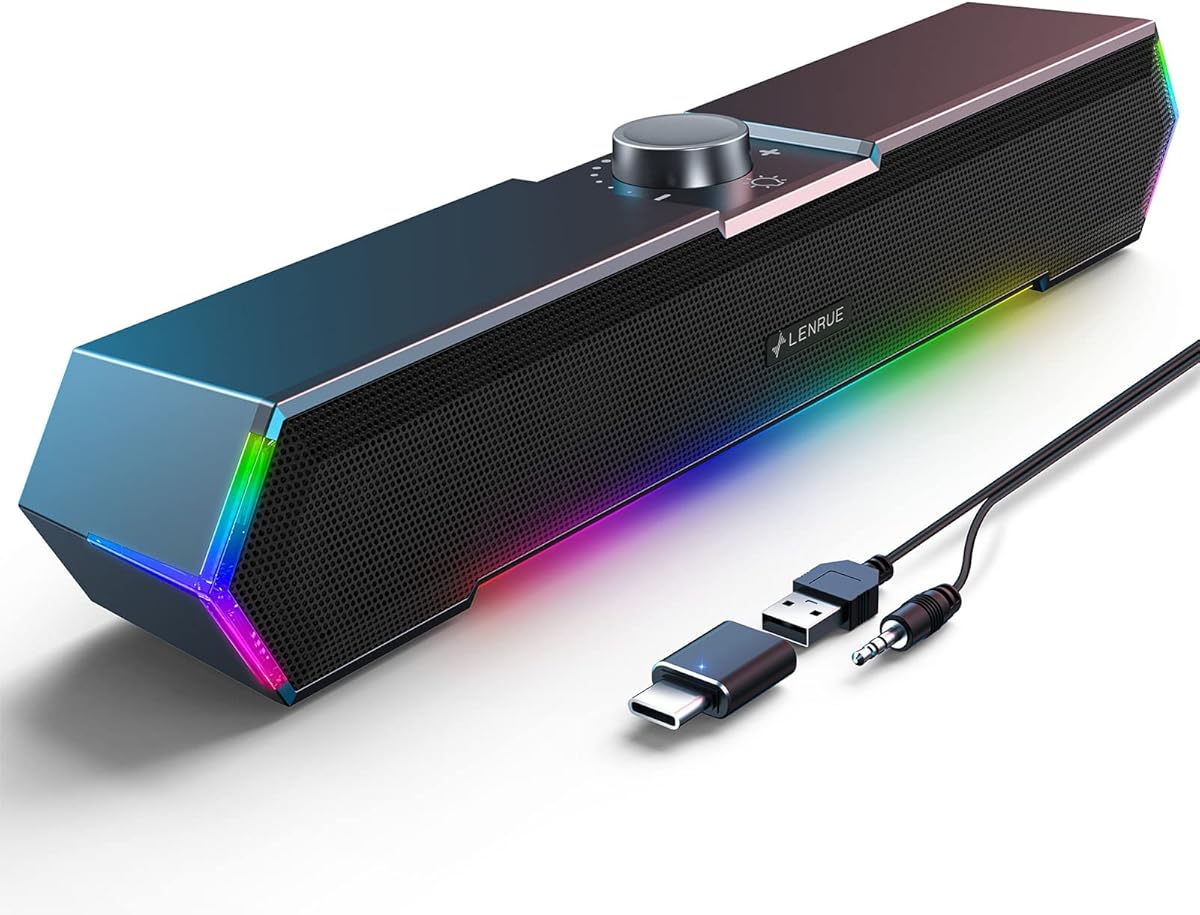
LENRUE G11 speakers combine surge stereo sound with unique dynamic angular game atmosphere lighting to enhance your gaming setup. Four large amplifier IC horns ensure distortion-free noiseless audio suitable for immersive cinema effects during movies and music.
We may earn a commission when you buy through this link, at no additional cost to you.
The unique touch light design allows users to turn lights on or off with one touch avoiding cumbersome button presses. The compact form fits neatly under any desktop monitor taking up minimal extra space while keeping cables glued together to avoid clutter.
Users should note the absence of Bluetooth connectivity headphone ports or microphones limiting the speaker to audio output only. The top volume knob allows for easy adjustments but the lack of extra input options may not suit all setups.
Perfect for gamers who want a visually engaging experience without spending on separate LED strips this model integrates lighting directly into the speaker system.
If you value aesthetic atmosphere alongside reliable sound quality these speakers offer a practical way to bring lighting effects into your desk setup.
The four large amplifier IC horns produce clear noiseless sound that enhances immersion during gaming sessions and media viewing.
A simple touch activates or deactivates the dynamic lighting allowing quick customization without interrupting your workflow.
We may earn a commission when you buy through this link, at no additional cost to you.
Uakinat Desktop Speaker utilizes upgraded 2x3W technology to deliver loud crisp and distortion-free Hi-Fi sound in a small package. The package includes a generous 60-day money-back guarantee and 18-month warranty ensuring peace of mind for new buyers.
We may earn a commission when you buy through this link, at no additional cost to you.
Cables are glued together to avoid desktop clutter and the anti-slip foot pads keep the speakers stable on any surface. The compact design fits any desktop computer without taking up extra space making it ideal for modern offices.
The inline volume control allows for easy adjustment while the cables reach up to 31.5 inches between speakers for flexible placement. Some users may find the plastic build less premium than metal options but it remains functional and durable.
This model is a strong candidate for anyone seeking a balance between price and performance without compromising on warranty support or setup simplicity.
For users prioritizing value and customer service this speaker provides reliable audio that meets everyday needs effectively.
A 60-day money-back guarantee and 18-month warranty demonstrate confidence in product quality and provide buyers with significant security.
Cables are glued together to prevent tangling and keep the workspace tidy without requiring additional clips or ties.
We may earn a commission when you buy through this link, at no additional cost to you.
Selecting the right pair of budget PC speakers involves evaluating several critical factors to ensure they meet your audio needs and desk requirements.
Power output measured in watts determines how loud your speakers can play without distortion. Look for dual drivers and passive radiators which enhance bass response and overall volume clarity for a better listening experience.
Higher wattage generally correlates with better volume and bass depth but ensure your USB port can supply enough power for optimal performance.
Most cheap PC speakers use USB for power and a 3.5mm aux cable for audio input. Some models include USB-C adapters for modern laptops making compatibility broader across different device types.
Choose USB-powered speakers if you want a clutter-free setup without needing a wall outlet. Avoid models that require complex software installation if you prefer plug-and-play functionality.
Space-saving designs such as soundbars or column-shaped units free up valuable desk real estate. Consider the height and width to ensure speakers fit under monitors or beside keyboards without obstruction.
Compact speakers are ideal for small desks but verify they still provide sufficient volume for your room size to avoid needing to max out settings constantly.
Materials like metal finishes and matte panels offer durability and a premium look compared to basic plastic enclosures. Anti-slip foot pads and padded bases keep speakers stable during use.
Investing in sturdier build materials often results in longer product lifespan and better resistance to accidental bumps or spills on your desk.
In-line volume knobs or touch buttons on the speaker front allow for quick adjustments without reaching for system settings. Some models offer dedicated mute functions for privacy during work or calls.
Prioritize speakers with physical controls if you need frequent volume changes throughout the day to maintain workflow efficiency.
Features like RGB lighting or tilt designs add visual flair and ergonomic benefits to your workspace. These features may come with a slightly higher price but enhance personalization and immersion.
Decide if visual elements like lighting are necessary for your setup or if you prefer minimalist designs that blend into the background.
Adequate warranty periods such as one year or more provide protection against defects and ensure manufacturer support is available. Look for brands with positive customer service reviews to minimize hassle in case of issues.
Verify return policies before purchasing to ensure you can test the speakers and get a refund if they do not meet your expectations.
Begin by connecting the USB cable to your computer for power and the 3.5mm audio cable to your device's audio output. Ensure your system is set to recognize the speakers as the default playback device before playing any sound.
Adjust the volume using the inline knob or speaker controls to a comfortable level and avoid keeping maximum volume for extended periods to prevent potential distortion or speaker damage.
Keep the speakers clean by wiping dust off the mesh and surfaces with a soft dry cloth regularly. Avoid placing liquids near the speakers and ensure cables are not bent or frayed to maintain safe operation.
Most affordable PC speakers draw power directly from your computer's USB port eliminating the need for wall outlets. However models with higher wattage may require USB wall adapters if the computer port does not supply enough current.
Yes many USB powered speakers work with tablets and phones if they have USB-C or micro USB ports that support audio or if you use an adapter. Ensure the device can supply power to the speakers for proper function.
Check if your system recognizes the speakers in sound settings. Ensure volume is not muted and both USB and aux cables are firmly connected. Restarting the audio service may also resolve detection issues.
Yes most USB speakers work with Macs via plug and play functionality. Some may require you to select the USB output in sound settings or update audio drivers for optimal performance.
Most budget models deliver stereo sound and lack true surround sound capabilities. Virtual surround features depend on your computer's audio software rather than the speakers themselves.
Use a soft dry cloth or a gentle brush to remove dust from the grilles. Avoid using water or cleaning chemicals directly on the speaker surfaces to prevent damage to internal components.
Distortion at high volume may indicate insufficient power or limitations in the driver size. Try lowering the volume slightly or check your system balance to ensure both channels are working correctly.
Most USB speakers are designed for PC use but some may work with consoles that support USB audio. Check the console's compatibility with external audio devices before connecting to ensure functionality.
This guide highlights ten top options that balance affordability with performance and features. From the Creative Pebble 2.0 for build quality to the MELOGAGA for visual appeal there is a choice for every user.
Prioritize factors such as power output size and connectivity based on your specific desk setup and listening habits. A model that fits well physically will provide better long-term satisfaction than one with better specs that is awkward to place.
Prices and availability are subject to change so always verify current details on the product pages before making a purchase decision. Investing in the right speakers improves both productivity and entertainment in your daily computing routine.