
HP Chromebook 14 Laptop
4.3Editor score
Intel Celeron N4120 Processor
Up to 14 Hours Battery
Chrome OS Secure System
Finding a cheap laptop for everyday use can be challenging with so many options available today. You need a machine that handles web browsing, streaming, and basic productivity without breaking the bank.
We compared ten affordable models based on processor speed, memory, storage, and display quality. Our list includes Chromebooks and Windows laptops designed for reliability and value.
Each pick shows key specs and ideal use cases to help you decide quickly. Prices and availability change frequently, so check the latest deals before you purchase your new device.
4.3Editor score

4.8Editor score
4.2Editor score
As an Amazon Associate we earn from qualifying purchases.
This side-by-side comparison helps you see the key differences between each model at a glance, focusing on specs that matter for daily tasks.


The HP Chromebook 14 is a top choice for anyone seeking a cheap laptop for everyday use. With a solid 4.3 rating, it delivers reliable performance for students and home users on a tight budget.
We may earn a commission when you buy through this link, at no additional cost to you.
Its quad-core Intel Celeron N4120 processor handles web browsing and video streaming smoothly. The long battery life ensures you can work through the day without needing to search for an outlet constantly.
Trade-offs include limited 64GB storage and a standard HD display. However, cloud storage options in Chrome OS mitigate the storage issue, making it acceptable for most daily tasks.
Buy this if you need a portable, affordable device for basic tasks. It is ideal for students, remote workers, or anyone who values simplicity and battery life over raw power.
The Intel Celeron N4120 provides just enough power for web browsing, document editing, and streaming content without unnecessary bloat.
With up to 14 hours of battery life, this Chromebook keeps you connected from morning commute to evening relaxation without frequent recharging.
We may earn a commission when you buy through this link, at no additional cost to you.
This Amzboy laptop offers a compelling mix of price and features for everyday computing. Its 4.8 rating highlights satisfaction with its performance and display quality for basic users.
We may earn a commission when you buy through this link, at no additional cost to you.
The 15.6-inch Full HD screen provides clear visuals for work and entertainment. Windows 11 ensures compatibility with a wide range of desktop applications and tools.
While the fanless design keeps it quiet, it may slow down under heavy workloads. The 4GB RAM is sufficient for light multitasking but could struggle with many open tabs.
Buy this if you want a Windows laptop with a large screen at a low price. It is great for students, home office users, and anyone needing basic productivity tools.
The 1920×1080 resolution offers sharper text and images than HD displays, reducing eye strain during long sessions.
External slots support TF cards up to 1TB, allowing you to store more files without internal storage limitations.
We may earn a commission when you buy through this link, at no additional cost to you.
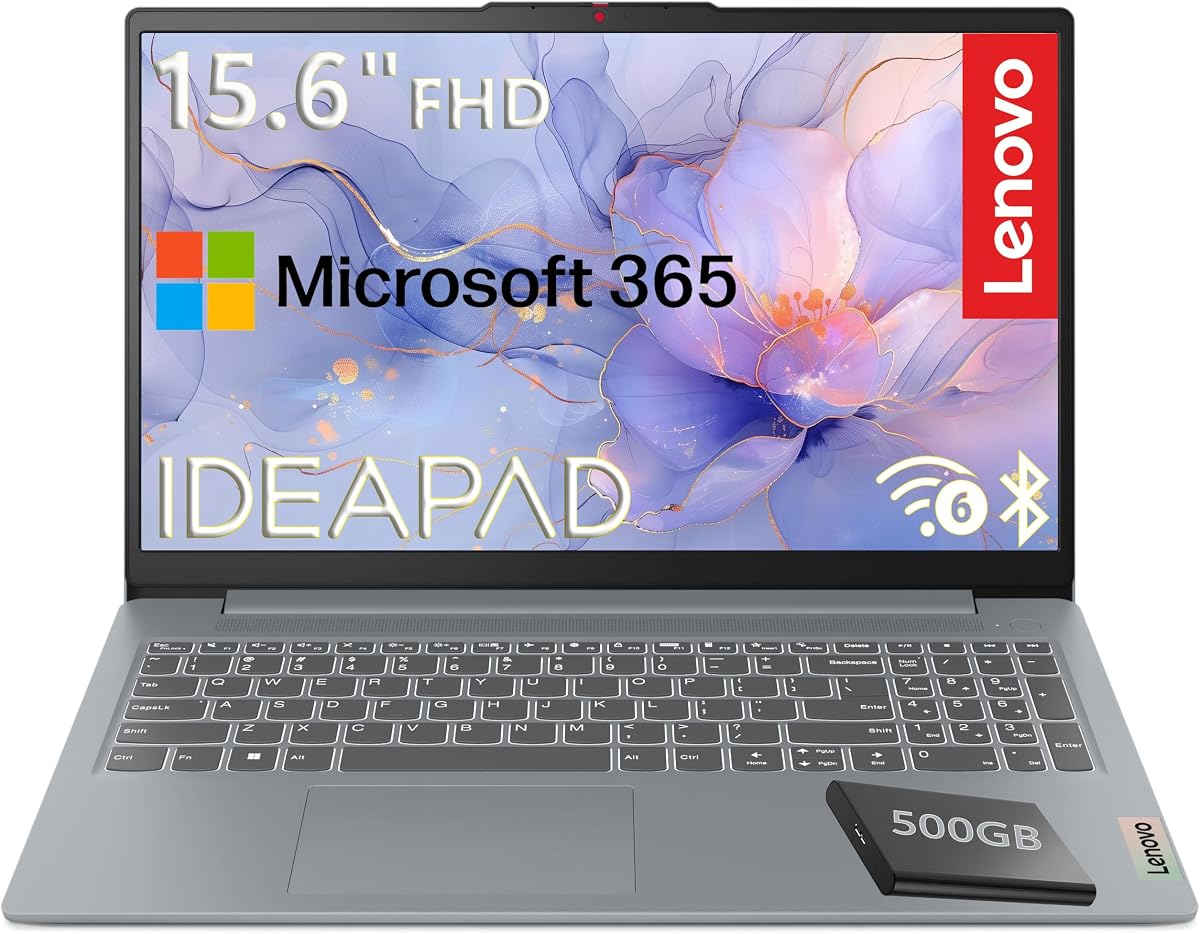
The Lenovo 15.6 Laptop stands out by including a 500GB external hard drive for extra storage. This makes it a top choice for those needing space for media and files.
We may earn a commission when you buy through this link, at no additional cost to you.
Its Intel N100 processor offers solid multitasking capabilities. The durable military-grade build ensures it withstands travel and daily use without damage.
Carrying the external drive adds weight but provides significant storage flexibility. The TN display is bright but has narrower viewing angles compared to IPS screens.
Buy this if you need storage space and durability on a budget. It suits families, students with large file needs, and anyone requiring a tough, reliable machine.
Firmware TPM 2.0 and a camera privacy shutter protect your data and privacy during remote work or online classes.
Wi-Fi 6 and Bluetooth 5.2 ensure fast wireless speeds and stable connections for modern peripherals and streaming devices.
We may earn a commission when you buy through this link, at no additional cost to you.
This HP Everyday Laptop targets students with its clean design and included Microsoft 365 subscription. It provides a modern Windows 11 experience tailored for school and home tasks.
We may earn a commission when you buy through this link, at no additional cost to you.
The Intel N150 processor handles document editing and web research efficiently. The 128GB SSD ensures fast boot times and snappy application launches for daily use.
The anti-glare HD display is comfortable but lacks Full HD sharpness. However, the long battery life and lightweight design make it easy to carry to class.
Buy this if you need a portable student laptop with essential software. It is perfect for coursework, note-taking, and online learning on a budget.
Copilot AI integration helps with research and summaries, streamlining workflows for students and professionals alike.
The anti-glare technology reduces eye strain during long study sessions or video calls in various lighting conditions.
We may earn a commission when you buy through this link, at no additional cost to you.
This Chromebook offers an upgrade in RAM to 8GB, which is rare at this price point. The faster UFS storage further enhances performance for web apps and multitasking.
We may earn a commission when you buy through this link, at no additional cost to you.
The Intel N100 processor provides efficient power for daily tasks like browsing and streaming. Chrome OS ensures automatic updates and virus protection without extra software.
The HD display is bright but less sharp than Full HD options. However, the extra RAM and storage make it more capable than typical budget Chromebooks.
Buy this if you need better multitasking on a Chromebook. It suits power users who rely heavily on web apps and want smoother performance than standard models.
With 8GB RAM, you can keep multiple tabs and applications open without noticeable lag or slowdowns during use.
Chrome OS automatically updates and protects against threats, keeping your device secure and running smoothly without maintenance.
We may earn a commission when you buy through this link, at no additional cost to you.
The Lenovo S330 is one of the most affordable Chromebooks available for basic tasks. It offers a simple, secure experience for browsing and light work without complexity.
We may earn a commission when you buy through this link, at no additional cost to you.
Its MediaTek processor handles standard apps well. The 100GB cloud storage included via Google Drive helps compensate for limited internal 32GB eMMC storage.
The older processor may struggle with many open tabs. However, the long battery life and slim design make it a great choice for casual users or kids.
Buy this if you need the cheapest reliable Chromebook. It is perfect for basic web browsing, email, and media consumption at home or school.
Two years of 100GB Google Drive cloud storage allows you to save files online and access them from any device.
Up to 10 hours of battery life keeps you productive throughout the day without needing to plug in frequently.
We may earn a commission when you buy through this link, at no additional cost to you.
This model focuses on productivity by including a full year of Microsoft 365. It is designed for office tasks and remote work with essential modern features.
We may earn a commission when you buy through this link, at no additional cost to you.
The Intel N150 and UFS storage offer responsive performance for documents and emails. The dedicated Copilot key provides quick access to AI assistance for work tasks.
Limited 4GB RAM may slow down with many apps open. However, the included software and fast storage make it a strong value for professional basic users.
Buy this if you need a laptop for work tasks with Office tools. It suits professionals, small business owners, and students who rely on Word and Excel.
Copilot AI and noise reduction filters help streamline meetings and tasks by managing background sounds and summarizing research.
Multiple USB ports and HDMI allow easy connection to monitors and peripherals for a flexible home office setup.
We may earn a commission when you buy through this link, at no additional cost to you.
This Chromebook offers a rare touchscreen experience at a budget price. The Full HD display provides vivid colors and sharp visuals for interactive apps and media.
We may earn a commission when you buy through this link, at no additional cost to you.
The MediaTek Kompanio 520 offers strong performance for an 8-Core chip. It handles multitasking well within the Chrome OS environment for daily use.
The touchscreen is responsive but can drain battery if used constantly. However, it adds versatility for note-taking or navigating apps that support touch.
Buy this if you want a touchscreen Chromebook for interaction. It is ideal for students using tablets and laptops, or anyone who prefers touch navigation.
Finger touch on the Full HD screen makes navigating apps and browsing more intuitive and engaging than traditional trackpad use.
The 8-Core MediaTek chip ensures smooth performance for web apps and streaming, outperforming older single-core processors.
We may earn a commission when you buy through this link, at no additional cost to you.
The HP Slim Laptop offers a light chassis with modern DDR5 RAM for speed. It is designed for portability and all-day use for students or travelers.
We may earn a commission when you buy through this link, at no additional cost to you.
Its Intel N150 processor and SSD ensure responsive performance. The long battery life means you can work remotely without needing a charger nearby.
The 4GB RAM and HD display are standard budget limits. However, the lightweight design and modern internals make it a strong contender for on-the-go use.
Buy this if you need a portable Windows laptop. It suits travelers, students, and anyone who moves frequently and needs reliable battery life.
DDR5 RAM provides faster data access than older standards, resulting in quicker app launches and smoother system responsiveness.
With up to 11 hours of video playback, the laptop supports long travel days or work sessions without needing constant recharging.
We may earn a commission when you buy through this link, at no additional cost to you.
This laptop stands out with 12GB RAM, which is exceptional for its price range. The IPS display offers better color and viewing angles than TN panels.
We may earn a commission when you buy through this link, at no additional cost to you.
The Pentium Gold 6500Y handles basic tasks well. The 128GB SSD and 12GB RAM combination allows for smoother multitasking than typical 4GB laptops.
The processor is not for heavy workloads but suits web browsing and media. The IPS screen ensures comfort for long viewing sessions and better visual quality.
Buy this if you need more RAM on a budget. It is suitable for students, home users, and anyone who wants smoother multitasking and better screen quality.
With 12GB RAM, you can run many applications and browser tabs simultaneously without the slowdowns common in 4GB systems.
Full HD IPS technology delivers better colors and wider viewing angles, making it ideal for media and collaborative work.
We may earn a commission when you buy through this link, at no additional cost to you.
Choosing a cheap laptop for everyday use requires balancing budget with the right specs. This guide helps you understand key factors to consider before buying.
The processor determines how fast your laptop runs. For everyday use, look for Intel N100 or better. Quad-core processors handle multitasking better than dual-core ones.
Choose a newer processor to ensure longevity and smooth performance for web browsing and video streaming.
RAM helps your laptop handle multiple open programs. Aim for at least 4GB for basic use. 8GB or more provides better performance if you open many browser tabs.
Higher RAM prevents lag when switching between apps and keeps the system responsive during daily tasks.
SSD storage is faster than traditional HDD. Look for 128GB or more if you save files locally. SSDs ensure quick boot times and snappy apps.
Prioritize SSD over HDD for daily use to avoid slow performance and frustration when loading files.
A larger display improves visibility for work and entertainment. Full HD (1080p) is better than HD (720p). IPS panels offer better colors and viewing angles.
Choose a 14 to 15.6-inch screen with Full HD resolution for clear text and vibrant images.
Battery life matters if you work away from power outlets. Look for models offering 8 to 14 hours. Light weight under 4 lbs helps you carry it easily.
Check battery reviews to ensure the laptop lasts through your school or work day without frequent charging.
Windows offers more apps and flexibility for desktop tasks. Chrome OS is simpler, secure, and faster on basic hardware. Pick based on your software needs.
Choose Windows if you need specific desktop software. Choose Chrome OS if you want simplicity and long battery life.
USB ports, HDMI, and SD card readers help you connect peripherals. Wi-Fi 6 ensures fast internet speeds. Bluetooth allows for wireless mice and keyboards.
Check ports to ensure you can connect all your devices without needing extra adapters or hubs.
Durable materials like magnesium alloy or military-grade certification ensure the laptop lasts. A sturdy hinge and keyboard improve typing comfort.
Look for laptops with sturdy construction if you plan to carry the device frequently in a backpack.
Keep your laptop on hard surfaces to prevent overheating. Avoid soft surfaces like blankets or laps that trap heat and damage internal components over time.
Regularly update your operating system and software. Security patches and updates ensure your device remains safe from threats and runs efficiently.
Clean the screen with a soft microfiber cloth and avoid harsh chemicals. Dust ports with compressed air to maintain good airflow and connection quality.
Many budget models offer decent durability if handled carefully. Look for military-grade certifications and sturdy build materials to ensure they withstand daily transport and use.
Chromebooks are better for simplicity and battery life. Windows laptops are better if you need specific desktop apps like Word or Excel. Choose based on your software needs.
Most budget laptops have soldered RAM that cannot be upgraded. Check the product specs before buying to ensure the RAM is sufficient for your future needs.
128GB SSD is usually enough for basic use. If you store many photos or videos, consider models with external storage options or cloud backup services to expand capacity.
Yes, most models come with 720p cameras and microphones. Ensure the laptop has good Wi-Fi to maintain clear connections during remote meetings and calls.
Battery life typically ranges from 8 to 14 hours depending on usage. Light tasks like web browsing extend battery life, while streaming or heavy multitasking may drain it faster.
These laptops are designed for basic tasks not gaming. You can play lightweight browser games but expect limited performance on demanding modern titles or graphics-heavy software.
Yes, they are ideal for schoolwork and research. Lightweight designs and long battery life make them easy to carry between classes while handling essential study tools.
We reviewed 10 models offering the best balance of price and performance. The HP Chromebook 14 leads for budget shoppers, while the Amzboy 15.6 offers great Windows value.
Prioritize SSD storage, at least 4GB RAM, and a Full HD display for comfort. Battery life and portability are key if you move frequently for work or school.
Prices and specs change frequently so verify current deals before buying. Check for bundle offers or student discounts to get the most value for your money.