
Canon MegaTank G3270
4.1Editor score
Up to 2 years ink included
Wireless print copy and scan
High page yield per set
Finding the right printing solution can be challenging when traditional ink cartridges drain your budget quickly. Cartridge free printers offer a sustainable alternative by using refillable ink tanks that last much longer than standard boxes.
We analyzed ten top-rated models from leading brands to identify the best options for various needs. Our comparison focuses on ink capacity, print speed, connectivity features, and overall reliability for daily use.
Each selection highlights unique strengths to help you match a device to your specific workflow. Please note that product availability and pricing may change, so verify details before making your final purchase decision.
4.1Editor score

4.3Editor score

3.9Editor score
As an Amazon Associate we earn from qualifying purchases.
This side-by-side comparison highlights the key specifications and capabilities of the ten leading cartridge free printer models available in the market today.





The HP Smart Tank 5003 stands out as a reliable choice for households needing consistent high-volume printing. It boasts a rating that reflects user satisfaction with its ink capacity and ease of use.
We may earn a commission when you buy through this link, at no additional cost to you.
Its standout quality is the mess-free refill system that allows users to replenish ink without spills or complications. This design significantly reduces waste and simplifies maintenance compared to traditional cartridge models.
While setup might require some patience, the long-term benefits of reduced ink costs make it a worthwhile investment. The AI capabilities also offer modern conveniences that streamline document handling tasks.
This model is ideal for families or small offices looking for a balance of performance and cost-efficiency. We recommend it for those who prioritize ink longevity and ease of maintenance.
The included ink supply lasts up to three years, saving users significant money over time compared to buying cartridges.
The refill system is designed to prevent spills, making it easier to maintain clean workspace environments during ink changes.
We may earn a commission when you buy through this link, at no additional cost to you.
The Epson EcoTank ET-2803 is designed for users seeking straightforward wireless printing without the hassle of cartridges. Its rating highlights reliability for everyday home document tasks.
We may earn a commission when you buy through this link, at no additional cost to you.
Key strengths include the ability to print thousands of pages on a single ink set, reducing the frequency of replacements. Voice-activated printing adds a layer of convenience for smart home integration.
However, print speeds are modest compared to newer models, which might be a limitation for large batches. The display is functional but lacks the advanced navigation found in higher-end units.
This printer suits users who value simplicity and cost savings over rapid throughput. It is a solid choice for standard home office tasks like bills and school assignments.
Hands-free voice printing allows users to send jobs quickly without needing to physically interact with the device.
Each ink bottle set replaces about eighty individual cartridges, offering substantial savings for regular printers.
We may earn a commission when you buy through this link, at no additional cost to you.
The Epson EcoTank ET-2903 offers a compelling blend of speed and ink capacity for demanding home users. Its high rating reflects satisfaction with its performance and build quality.
We may earn a commission when you buy through this link, at no additional cost to you.
It features a color display for easier navigation and supports print speeds that handle moderate workloads efficiently. The included ink supply lasts up to three years, minimizing interruptions for refills.
While the upfront investment is higher than basic models, the long-term savings on ink justify the expense. The physical size is larger, which requires adequate desk space in your office.
We recommend this model for users who print frequently and want a balance of speed and convenience. It is an excellent upgrade for growing households needing consistent output.
The color screen provides intuitive menus that make setting up scans and prints more accessible for all users.
Micro Piezo Heat-Free technology reduces heat generation, contributing to the printer's reliability and energy efficiency.
We may earn a commission when you buy through this link, at no additional cost to you.
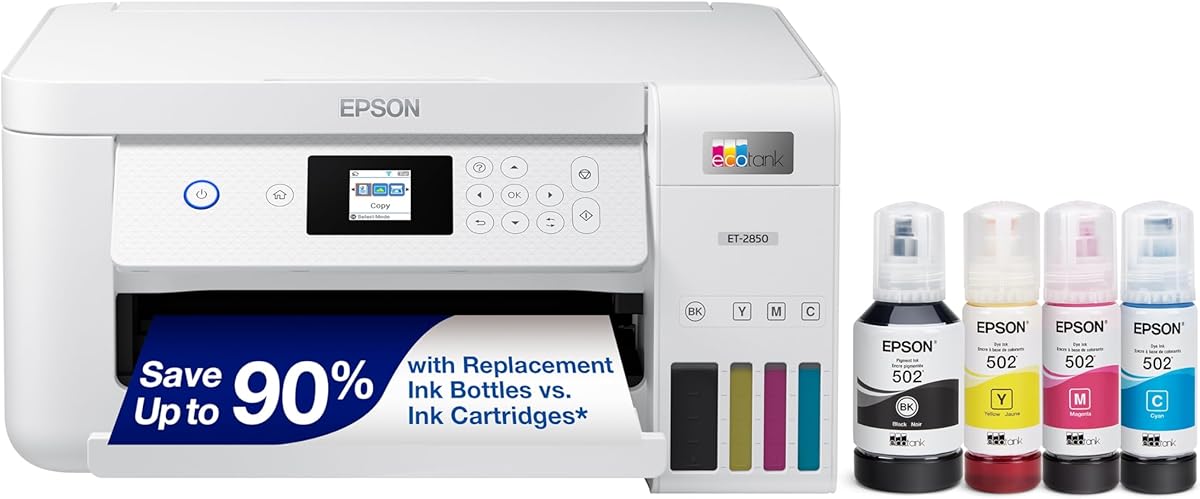
The Epson EcoTank ET-2850 distinguishes itself with auto 2-sided printing, which saves paper and enhances professional document appearance. Its rating indicates strong performance for typical office use.
We may earn a commission when you buy through this link, at no additional cost to you.
Pigment black ink ensures sharp text that resists fading, making it suitable for important reports or contracts. The ink capacity supports extended use without frequent maintenance interruptions.
However, it lacks an automatic document feeder, requiring manual page flipping for multi-page scans. Connectivity options are standard but may not support all smart home ecosystems seamlessly.
This model is best for users who prioritize paper savings and text quality. It is a great option for home offices where environmental impact is a consideration.
Automatic duplex printing allows users to print on both sides of the sheet, reducing paper waste significantly.
The pigment black ink delivers crisp characters that are ideal for professional documents and reports.
We may earn a commission when you buy through this link, at no additional cost to you.
The Epson EcoTank ET-4800 offers robust connectivity and high capacity tanks for users needing frequent access. Its rating reflects mixed feedback but solid core performance for home tasks.
We may earn a commission when you buy through this link, at no additional cost to you.
It supports wireless printing and scanning from devices, making it versatile for mobile workflows. The Micro Piezo technology ensures consistent print quality across various media types.
Users may find the printing speed somewhat slow for large jobs, and initial setup can be complex. These factors should be weighed against the benefits of reduced ink costs.
We suggest this model for users who prioritize convenience and ink longevity. It is suitable for environments where high-volume printing is occasional rather than daily.
Wireless capabilities allow users to print from smartphones and tablets, supporting flexible work arrangements.
Refillable tanks reduce plastic waste compared to disposable cartridges, contributing to a greener printing solution.
We may earn a commission when you buy through this link, at no additional cost to you.
The Canon MegaTank G3270 is an excellent entry-level option for users seeking cartridge-free printing on a budget. Its rating highlights its value and reliability for basic home needs.
We may earn a commission when you buy through this link, at no additional cost to you.
It offers a high page yield per ink set, ensuring long-term savings that offset the initial investment. The simple LCD interface makes operation straightforward for all family members.
While it lacks automatic duplex printing, manual flipping remains an option for occasional double-sided jobs. The controls are basic, which may limit advanced customization for power users.
We recommend this printer for budget-conscious buyers who need reliable output. It is perfect for home offices prioritizing cost efficiency over advanced features.
With a high page yield, this printer reduces the cost per page significantly compared to traditional inkjet models.
The simple LCD display ensures that basic users can navigate settings without confusion or technical barriers.
We may earn a commission when you buy through this link, at no additional cost to you.
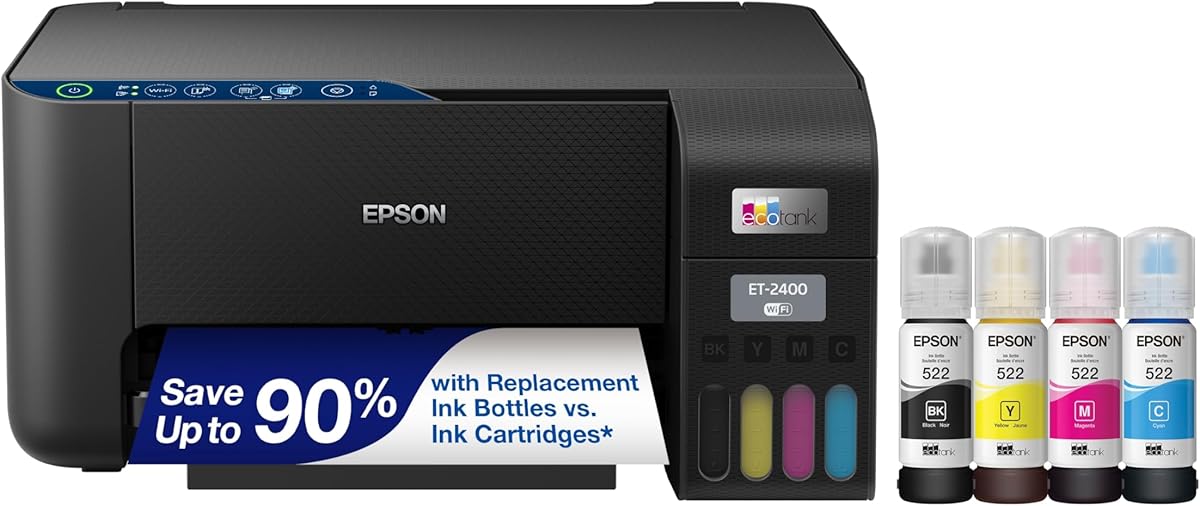
The Epson EcoTank ET-2400 is a streamlined model designed for general home use with a focus on ink efficiency. Its rating suggests consistent performance for daily document printing tasks.
We may earn a commission when you buy through this link, at no additional cost to you.
The EcoFit bottles are uniquely keyed to prevent mix-ups during refills, adding a layer of safety and ease. Wireless features allow for flexible placement within the home environment.
Paper capacity is somewhat limited, requiring frequent loading for larger print jobs. Speeds are adequate for home use but not optimized for heavy commercial workloads.
This model is a good fit for users who print intermittently and value simplicity. It is a reliable choice for students and small home offices needing basic functionality.
Keyed EcoFit bottles ensure that users can refill ink without worrying about using the wrong color type.
Wireless connectivity allows the printer to be placed anywhere in the home without cable constraints.
We may earn a commission when you buy through this link, at no additional cost to you.
The Epson EcoTank ET-2800 is a compact solution for users with limited space who still need reliable color output. Its rating reflects its balance of size and performance.
We may earn a commission when you buy through this link, at no additional cost to you.
It offers a respectable print speed for its size, making it suitable for small home offices. The Micro Piezo Heat-Free technology ensures reliable operation without overheating issues.
While it lacks automatic duplex printing, manual options exist for two-sided jobs. The interface is functional but lacks some modern features found in newer generations.
This model is ideal for space-constrained environments needing standard home office capabilities. It provides a solid foundation for users entering the cartridge-free ecosystem.
The compact footprint allows this printer to fit into small home offices without overwhelming the available workspace.
Heat-free technology reduces energy consumption, contributing to a more sustainable printing experience for users.
We may earn a commission when you buy through this link, at no additional cost to you.
The Epson EcoTank ET-2980 offers high capacity ink options for users needing long-term sustainability. Its rating indicates good performance for users managing significant document volumes.
We may earn a commission when you buy through this link, at no additional cost to you.
The app support enhances mobile printing capabilities, allowing seamless integration with modern devices. The high page yield ensures that refills are infrequent even with regular use.
Higher initial costs may be a barrier for some users, but long-term savings often compensate. Tray options are limited, which may require manual loading for large jobs.
We recommend this model for users prioritizing ink longevity and mobile convenience. It is an excellent choice for busy households with multiple users.
The Smart Panel app simplifies scanning and printing tasks from smartphones, enhancing user accessibility.
High page yields per set reduce the overall frequency of purchasing replacement ink bottles for users.
We may earn a commission when you buy through this link, at no additional cost to you.
The Epson EcoTank ET-2988 offers premium productivity features like fast speeds and auto duplexing for demanding home office needs. Its rating reflects value despite being a renewed unit.
We may earn a commission when you buy through this link, at no additional cost to you.
It features a color screen for intuitive navigation and supports high-speed black printing for efficient document workflows. The ink capacity ensures minimal interruptions during busy periods.
As a renewed unit, conditions may vary, so buyers should verify physical state before use. While priced higher, the feature set often justifies the investment for power users.
We recommend this model for users needing advanced features at a competitive price point. It is an excellent choice for those who value speed and paper savings.
Fast print speeds and duplex capabilities ensure that larger document jobs are completed quickly and efficiently.
Renewed units offer high-quality performance at lower costs compared to brand new models with similar specifications.
We may earn a commission when you buy through this link, at no additional cost to you.
Selecting the right cartridge free printer involves understanding key features that impact performance and cost efficiency for your specific needs.
Ink capacity is the primary differentiator between cartridge-free models. Look for printers with high-capacity tanks that offer hundreds or thousands of pages per fill to reduce refilling frequency.
High capacity tanks ensure fewer interruptions and lower long-term costs for frequent printing.
Print speed affects how quickly documents are output. For busy home offices, look for models with at least 10 pages per minute to handle larger batches efficiently.
Faster speeds help maintain productivity during peak usage times.
Modern printers should offer wireless connectivity to allow printing from various devices. Check for compatibility with AirPrint or mobile apps for seamless integration into your tech ecosystem.
Wireless connectivity allows flexible placement and easy access from multiple devices.
Auto duplex printing automatically prints on both sides of the page, reducing paper usage. This feature is essential for eco-friendly users and those wanting professional-looking documents.
Automatic double-sided printing saves paper and enhances document professionalism.
An all-in-one printer typically includes a scanner. Consider resolution and whether it includes an automatic document feeder for efficient handling of multi-page tasks.
Integrated scanning capabilities streamline document digitization workflows.
A color display or touchscreen makes navigation easier compared to basic buttons. Look for intuitive interfaces that simplify tasks like copying or scanning settings.
Intuitive interfaces reduce the time needed to complete printing tasks.
Established brands often provide better support and software updates. Researching brand reputation can help ensure you choose a model with consistent reliability over time.
Reliable brands ensure better long-term support and software maintenance.
While upfront costs vary, calculate total cost of ownership. Models with higher initial prices might save money long-term due to superior ink efficiency and durability.
Long-term savings often justify higher upfront costs.
To ensure optimal performance, keep your printer in a cool, dry place away from direct sunlight. Dust can accumulate on external parts, so wipe it down regularly with a soft cloth to maintain hygiene.
Follow the manufacturer's instructions when refilling ink to prevent air bubbles or misalignment. Proper alignment ensures clean prints and prevents waste of valuable ink supplies during operation.
Run test prints periodically even if you do not print frequently. This keeps the printheads clean and prevents clogs that can occur from ink drying out during long periods of inactivity.
Yes, they are generally cheaper over time because the ink capacity is significantly higher. While the upfront cost may be higher, the savings on ink cartridges quickly offset this difference for active users.
Most models provide enough ink to last between two to three years for average home use. This depends heavily on your printing volume and the specific capacity of the printer's ink tanks.
It is generally recommended to use genuine ink to avoid damage or voiding warranties. Using non-genuine ink may cause clogging or print quality issues that are not covered by support.
Yes, many models support photo printing with high color fidelity. However, dedicated photo printers may offer better resolution for professional-grade image quality compared to all-in-one units.
Most printers have a cleaning utility in their software menu. Access this through the printer settings to run a cleaning cycle, which clears dried ink from the nozzles automatically.
Yes, most models support stable wireless connections via Wi-Fi. Ensure your network is secure and within range to prevent connection drops or slow data transfer speeds during jobs.
The printer will usually display a notification when ink levels are low. You can continue printing until it stops, at which point you simply refill the tank to resume operations.
We have reviewed ten top models ranging from budget-friendly options to premium performers. Each offers unique strengths in ink capacity, speed, and connectivity to suit diverse needs.
Prioritize features that align with your specific workflow, such as speed for large jobs or duplexing for paper savings. Understanding your needs helps in narrowing down the best choice effectively.
Remember to check current availability and verify warranty terms before purchasing. Prices and stock fluctuate frequently, so confirming details ensures you get the best value available today.