
VIVO Black Adjustable Single Laptop Car Mount, MOUNT-CAR01
3.9Editor score
Three mounting feet for cars
Ventilated surface for airflow
Quick disconnect mechanism included
Mobile professionals need reliable workspaces inside their vehicles. A quality car truck and van laptop mount transforms the passenger seat into a stable desk. It keeps your device secure while you work on reports or diagnostics between stops.
We evaluated ten top-rated mounts based on build quality, adjustability, and cooling features. Our analysis focuses on no-drill installation, weight capacity, and how well each unit protects your laptop from heat and vibration during daily use.
Each pick highlights specific strengths like rugged materials or unique folding designs. Prices fluctuate often, so verify current listings before buying. Choose the model that fits your vehicle bolts and workspace needs for maximum productivity on the road.
3.9Editor score

4.0Editor score

5.0Editor score
As an Amazon Associate we earn from qualifying purchases.
This side-by-side comparison highlights key specifications for all ten selected mounts. We focus on weight limits, installation methods, and unique features like cooling fans or folding arms to help you decide quickly.


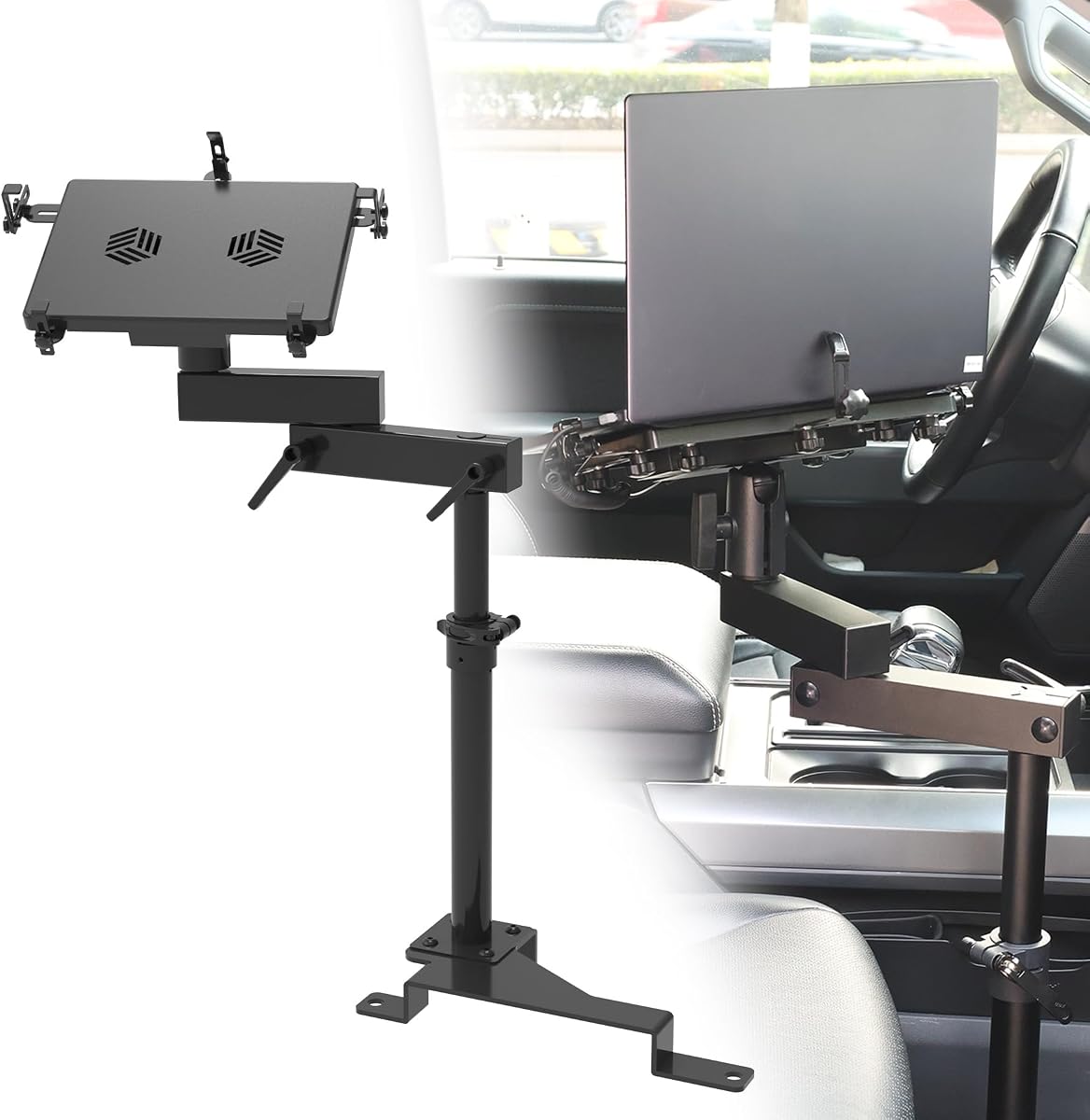


This mount leads the category with a triangular 3-point base that limits movement when parked. Its 4-star rating reflects reliable performance for fleet operations and field service work. The design focuses heavily on reducing device shifting during transport.
We may earn a commission when you buy through this link, at no additional cost to you.
It offers 5 adjustable clamps and a 59-inch strap to secure devices up to 11 pounds. Two built-in fans increase airflow to reduce heat buildup during extended parked work sessions. The articulating arms provide up to 13 inches of reach for optimal positioning.
While the build is rugged with a 3mm steel base, it may be overkill for casual users. The quick no-drill fit check is essential before ordering to verify bolt types and clearance. It is not designed for hook-style seat mounts which limits some vehicle compatibility.
Ideal for technicians who need a permanent workstation in a truck or van, this unit delivers stability and cooling. Choose it if you prioritize a secure base over portability. The detachable upper workstation helps reduce passenger-side obstruction when not in use.
Dual USB cooling fans actively increase airflow under the tray to prevent overheating during long sessions.
The triangular 3-point base limits movement when parked better than single-clamp designs found in cheaper models.
We may earn a commission when you buy through this link, at no additional cost to you.
The VIVO mount offers a solid entry point for mobile workers seeking affordability without sacrificing core functionality. It holds laptops up to 17 inches and 11 pounds with a ventilated surface for airflow. Its 3.9-star rating indicates good value for standard needs.
We may earn a commission when you buy through this link, at no additional cost to you.
Designed for vehicles with exposed floor seat bolts, it includes three different mounting feet for wide compatibility. The telescopic pole adjusts from 18.5 to 26.3 inches to suit different seat heights. A quick disconnect mechanism allows the stand to detach by removing thumb screws easily.
While it lacks active cooling fans, the ventilated tray helps maintain some airflow. Users note that the heavy-duty base securely anchors to angled seat bolts on the passenger side effectively. However, it may require more adjustments to find the perfect ergonomic angle.
Best for those with budget constraints or occasional use, this mount balances cost and utility well. It returns the seat to a functional passenger area quickly. Ensure your seat bolts match the included feet before purchasing to avoid fit issues.
A ventilated surface increases airflow for sufficient cooling without requiring additional power or fans.
Includes three different mounting feet to fit wide compatibility in trucks, vans, cars, and SUVs.
We may earn a commission when you buy through this link, at no additional cost to you.
This 2026 upgrade stands out with a unique without base structure that takes up less interior space. It boasts a perfect 5-star rating reflecting exceptional user satisfaction regarding installation and daily usage. The design brings more flexible installation spots for activity room.
We may earn a commission when you buy through this link, at no additional cost to you.
Full motion adjustable design allows height adjustment, 360-degree rotation and angle tilting to match most notebooks within 17 inches. Premium solid material builds a stable overall structure with good shock resistance for daily driving scenarios. Anti-scratch flexible side clips hold the laptop steadily and avoid surface abrasion.
While it costs more than basic models, the hollow ventilation layout aids natural heat dissipation during long time running without power. It attaches to original seat bolts without cutting or drilling on vehicle body for easy assembly and disassembly. Users appreciate how it leaves more activity room for passengers compared to bulkier units.
Perfect for shared vehicles where passenger space is critical, this mount offers a premium experience. It ensures your laptop stays secure without permanent modification. Verify your seat bolts match the no-drill requirements before ordering to maximize this design's potential.
The base-free structure leaves more activity room for passengers compared to traditional bulky base models.
Hollow ventilation layout aids natural heat dissipation during long time running without needing external fans.
We may earn a commission when you buy through this link, at no additional cost to you.
MELIPRON targets rough conditions with a heavy-duty aluminum and steel build that stays stable even on bumpy roads. Its 4.3-star rating highlights reliability for fleet and leased vehicles. The computer stand for car includes built-in fans preventing your laptop from overheating.
We may earn a commission when you buy through this link, at no additional cost to you.
The laptop holder can be easily adjusted height, tilt and rotation for perfect viewing angle to help reduce neck, shoulder, and wrist strain. A quick-release telescopic pole of car laptop stand allows easy removal when not in use to maintain a clear passenger area. It preserves 80 percent passenger space for shared vehicles.
Installation attaches directly to the passenger seat rail bolts with no drilling required. This keeps your car's structure intact and avoids leaks or damage associated with permanent fixtures. Users benefit from professional support and a 2-year warranty with free replacement parts for missing or damaged components.
Best for delivery drivers or field techs facing tough terrain, this mount offers durability and cooling. The ergonomic adjustments help during long hours in the vehicle. Ensure your vehicle has accessible rail bolts before purchasing to leverage this heavy-duty design.
Built-in fans prevent your laptop from overheating during long hours in the vehicle.
Preserves 80 percent passenger space with a quick-release telescopic pole that allows easy removal.
We may earn a commission when you buy through this link, at no additional cost to you.
Mount-It! provides exceptional peace of mind with a lifetime manufacturer warranty and US-based product support. It turns a parked seat into a workspace for reports, scheduling, and digital tasks between stops. The 4-star rating reflects solid performance for everyday laptops.
We may earn a commission when you buy through this link, at no additional cost to you.
Sized for everyday laptops, not oversized ones, it fits 12 to 15.4 inch laptops up to 9 lbs securely. The arm adjusts height from 23 to 35 inches with full swivel and tilt. Integrated hook-and-loop straps hold the laptop securely within its rated weight to reduce wobble.
An open airflow design underneath the laptop helps reduce heat buildup during longer parked work sessions. Users can remove it in seconds with a quick-release lever when needing the passenger seat back. Check your seat and airbag clearance first to ensure safety and compatibility.
Ideal for standard work laptops and Chromebooks, this mount prioritizes warranty and support. It is perfect for those who prioritize long-term reliability over maximum size capacity. Ensure your device is under 9 pounds to avoid strain on the joints over time.
Backed for as long as you own it with a lifetime manufacturer warranty and US-based support.
Integrated hook-and-loop straps hold the laptop securely within its rated weight to reduce wobble.
We may earn a commission when you buy through this link, at no additional cost to you.
This mount is specifically compatible with Ford F-Series trucks from 2015 to 2026 for a tailored fit. It integrates two built-in cooling fans to ensure your device stays cool and functional on long trips. The 4.1-star rating highlights reliability for specific Ford vehicle owners.
We may earn a commission when you buy through this link, at no additional cost to you.
Dual swing arms offer extended reach for comfortable use alongside adjustable height and a 360-degree rotatable tray. The quick-release structure allows fast detachment and reattachment while the sturdy aluminum and steel build provides rock-solid stability. A patented design ensures unparalleled comfort and durability for Ford owners.
Installation attaches directly to the seat rail bolts with no drilling required. The support team provides professional pre-sale and after-sale support for fitment questions. You receive a 2-year warranty and free replacement parts for missing or damaged components if needed.
Perfect for Ford F150 or Super Duty owners, this unit removes guesswork about bolt fitment. Check the Vehicle Compatibility image for the complete model and year list before purchasing. It enhances laptop longevity in hot vehicle environments with active cooling.
Tailored for Ford F-Series trucks ensuring a perfect fit without needing universal adapters.
Two built-in cooling fans prevent overheating ensuring your device stays cool on long trips.
We may earn a commission when you buy through this link, at no additional cost to you.
Mobotron offers a classic heavy-duty design with a sure-grip laptop deck that secures laptops from 10 to 17 inches. The 4-star rating indicates consistent performance for general automotive use. No drilling is required if the passenger seat rail is flat and the bolt is easily accessible.
We may earn a commission when you buy through this link, at no additional cost to you.
A heavy-duty telescoping aluminum tube of 30mm can be easily adjusted from 14 to 21 inches. Fully adjustable features allow you to adjust tray vertically 180 degrees and horizontally 360 degrees. Quick lock-in and release levers allow you to install or uninstall in seconds.
While it lacks modern cooling fans, the mechanical adjustability is robust for heavy equipment. The design prioritizes secure mounting over extra features like fans. It is ideal for those who prefer a simple and sturdy solution over complex electronic parts.
Best for technicians needing a reliable universal mount, this unit focuses on mechanical strength. Ensure your seat rail is flat and the bolt is visible before buying. It provides a solid base for laptops up to 17 inches.
Telescoping aluminum tube easily adjusted from 14 to 21 inches for versatile height needs.
Quick lock-in and release levers allow you to install and uninstall the mount in seconds.
We may earn a commission when you buy through this link, at no additional cost to you.
This Mount-It! version adds a stabilizer to secure laptops and tablets up to 17 inches firmly. The 4-star rating reflects strong performance in keeping devices stable. Active and passive cooling work together to move heat away during long parked sessions.
We may earn a commission when you buy through this link, at no additional cost to you.
The arm swivels a full 360 degrees and tilts 135 degrees at the upper joint. The pole reaches from 14 to 22.25 inches with toothed locking segments holding each position exactly where you set it. A ventilated tray and USB-powered fan both move heat away from your laptop.
When the workday ends, the arm collapses toward the seat instead of staying extended. It keeps the passenger seat usable again in seconds with no permanent laptop perch. Check your seat bolt before you buy to ensure it matches the three available bracket configurations.
Best for daily drivers who need reliable cooling without manual setup, this unit offers great flexibility. Folds away when the workday ends to avoid permanent space usage. Verify your weight limit since 6.6 lbs is the rated capacity for this model.
A ventilated tray and a USB-powered fan both move heat away from your laptop during long parked sessions.
When the workday ends, the arm collapses toward the seat instead of staying extended.
We may earn a commission when you buy through this link, at no additional cost to you.
This Mount-It! model prioritizes stability by hooking the base plate onto the seat rail at the rear. The 4.1-star rating highlights its secure foundation. Stability starts at the base not the arm with up to eight bolts and a leveling foot.
We may earn a commission when you buy through this link, at no additional cost to you.
The pole adjusts from 10.6 to 18.4 inches with 90 degrees of tilt and 90 degrees of swivel. A ventilated cooling tray promotes airflow underneath your laptop and extendable side grips hold the device securely in place. It keeps your device cooler during long parked sessions effectively.
Installation may require checking your seat bolts before you buy since brackets are secured with multiple bolts. Check your seat bolts before you buy to ensure accessibility. It provides a stable surface for reports, routing, and paperwork without balancing on dash.
Best for users who prioritize stability over speed of installation, this base design is superior. Turns a parked vehicle into a workspace for field technicians and delivery drivers. Ensure your seat bolts match the bracket styles before purchasing.
Base plate hooks onto your seat rail at the rear and bolts to the bracket up front with up to eight bolts.
Dial in the exact position with 90 degrees of tilt and 90 degrees of swivel.
We may earn a commission when you buy through this link, at no additional cost to you.
The Mobotron MS-526B includes a complete accessory package to increase stiffness and hold screens in place. It secures most laptops from 6 to 17 inches and tablets from 6 inches and up. The 4.1-star rating reflects high satisfaction with the included bundle features.
We may earn a commission when you buy through this link, at no additional cost to you.
This mount features a universal mounting base with a no drilling solution. In some cases the mounts can be installed in less than 10 minutes. It allows for easy adjustment to provide the most ergonomic viewing angle for the driver or passenger.
The accessories bundle includes a support brace to increase the mounts stiffness. A pair of screen stabilizers holds the screen in place and a USB powered cooling fan is preinstalled. This bundle offers comprehensive coverage for various laptop sizes and cooling needs.
Best for users seeking an all-in-one solution, this bundle provides added stability accessories. Universal mounting ensures it fits many vehicle types without modification. Ensure your passenger seat rail is flat and the bolt is easily accessible for the best experience.
Includes a support brace, screen stabilizers, and a USB powered cooling fan preinstalled.
In some cases our mounts can be installed in less than 10 minutes.
We may earn a commission when you buy through this link, at no additional cost to you.
Selecting the right mount involves understanding your vehicle type and workspace needs. We break down the key factors to ensure you choose a unit that offers stability, cooling, and compatibility.
Most mounts require specific passenger seat rail bolts. Check if your vehicle has exposed floor bolts or standard rail connections. Some models are designed specifically for Ford F-Series trucks to guarantee fit.
Always verify bolt type and clearance before ordering to avoid fit issues with seat rails.
Mounts typically support laptops up to 17 inches and 11 pounds. Ensure your device weight fits within this limit for long-term stability. Overloading can strain joints and reduce the lifespan of the mount.
Choose a unit rated for your device weight to prevent mechanical failure over time.
Vented trays or USB fans prevent overheating during long parked sessions. Heat buildup can damage laptops and reduce performance. Active cooling is essential for hot climates or heavy usage.
Prioritize mounts with fans or large air gaps if you work for hours at a time.
Look for designs with triangular bases or multiple bolt points for maximum stability. A solid base prevents wobble when typing. Some models fold away to improve space but may lack base stability.
Select a base design that matches your need for either space saving or rock solid stability.
Full motion arms allow height adjustment, tilt, and rotation to reduce neck strain. Good ergonomics are critical for health during long workdays. A 360-degree swivel helps align the screen with your face.
Ensure the mount offers full motion adjustability to maintain a healthy posture while working.
Quick release mechanisms allow you to remove the stand when passengers need the seat. No-drill designs preserve the vehicle structure and keep warranties intact. Check how long installation takes before committing.
Choose a mount that balances secure installation with the ability to remove it quickly.
Steel bases and aluminum bodies offer better shock resistance than plastic. Heavy-duty materials are vital for vehicles that drive on rough roads. A rugged build protects your expensive laptop from bumps.
Opt for steel and aluminum constructions to ensure the mount lasts through years of use.
Look for lifetime warranties or long-term support to protect your investment. US-based product support can help with fitment questions. A good warranty reflects the manufacturer's confidence in their product.
Prioritize brands offering lifetime warranties to ensure you are covered if parts fail.
Begin by identifying the passenger seat rail bolts in your vehicle. Ensure these bolts are accessible and not obstructed by seat mechanisms. If your seat has unique brackets, consult the installation guide to verify fit before purchasing.
Once installed, secure your laptop with straps or clips to prevent sliding during stops. Adjust the arm height so the screen is at eye level to maintain proper posture. Use the cooling fans if available to keep your laptop running smoothly.
When not working, release the quick mechanism or collapse the arm to save space. This ensures the passenger seat remains usable for friends or cargo. Wipe down the tray and clips regularly to remove dust and prevent scratches on your device.
No, you should not use a laptop mount while driving. These mounts are designed for use only when the vehicle is parked to ensure safety. Using them while moving can distract the driver and cause injury if the device falls.
No, most models use no-drill installation. They attach directly to the existing seat rail bolts without modifying the vehicle body. Always check your vehicle compatibility before ordering to confirm bolt access.
Yes, many of these mounts support devices up to 17 inches. Check the specific weight limit and width specifications to ensure your laptop fits securely on the tray.
Look for models with ventilated trays or built-in USB cooling fans. These features help airflow under the device. Ensure you do not block vents on the laptop itself while using the mount.
Yes, most mounts feature a quick-release mechanism. This allows you to detach the upper workstation and restore the seat to its original function. It is ideal for shared vehicles.
If bolts are hidden, check if the mount includes brackets to extend reach. Some models are not compatible with hidden bolts. Verify your seat structure before buying to avoid compatibility issues.
We highlighted ten top mounts including the No-Drill Car Laptop Mount for stability and the VIVO Mount for budget buyers. Each model offers unique features like cooling fans or space-saving designs to suit different workflows. Choosing the right one depends on your vehicle type and daily needs.
Prioritize stability and cooling if you work long hours in hot vehicles. If you need to save space, opt for base-free or folding designs. Ensure the unit matches your laptop weight and size to protect your device.
Verify current prices and availability before purchasing as they may fluctuate often. Double-check seat bolt compatibility to ensure a smooth installation. With the right mount, your vehicle becomes a productive and safe workspace.