
Clarity AltoPlus Amplified Phone
4.0Editor score
53dB amplification with boost
100dB ringer with visual cue
Talking keypad and large font
Compare the top captioned telephones for hearing impaired users featuring real-time text, amplified sound, and accessibility features for clearer communication
Finding the right communication device is essential for those with hearing loss. Captioned telephones for hearing impaired users bridge the gap between audio and text, ensuring no words are missed during important calls with family or professionals.
We evaluated ten leading models based on caption accuracy, sound amplification, ease of use, and connectivity features. Our analysis covers both corded and cordless options, ensuring you find a solution that fits your specific hearing needs and home setup perfectly.
Each product listing highlights key specifications, pros, cons, and real-world performance insights to help you decide quickly. Please note that prices and availability change frequently, so verify current details before making your final purchase decision online today.
4.0Editor score

4.3Editor score
4.3Editor score
This side-by-side comparison highlights the unique strengths of each model, from real-time captioning to amplified sound and large buttons, helping you identify the best fit for your daily communication needs.


The Hamilton CapTel 2400iSPNBT stands out as a top choice for those needing captioned telephones for hearing impaired users. With its large touchscreen displaying real-time captions, it ensures you never miss a word during calls. Its 4.3 rating reflects strong user satisfaction across various communication scenarios.
We may earn a commission when you buy through this link, at no additional cost to you.
This device excels by combining audio and visual cues seamlessly. The ability to choose between auto or assisted captions offers flexibility, while the 40dB amplified gain supports users with significant hearing loss. Hearing aid compatibility further enhances its versatility for daily use.
While the requirement for high-speed internet might limit some users, the service ensures reliability for US residents. The learning curve for setting up captions is minimal, making it accessible for seniors or those new to technology.
Ideal for individuals seeking confidence in every call, this model provides clarity and convenience. It is especially recommended for households where clear communication is paramount, ensuring loved ones stay connected without frustration or confusion.
Captions appear instantly on the large touchscreen, allowing users to read conversations while listening to audio for full comprehension.
With up to 40dB of amplified gain and customizable tone settings, users can tailor volume levels to their specific hearing comfort needs.
We may earn a commission when you buy through this link, at no additional cost to you.
The Geemarc Ampli550 is designed for hard-of-hearing individuals who prioritize volume and visual alerts over text captions. Its 95dB ringer ensures incoming calls are never missed, while the talking keypad aids those with vision impairments. A solid option for traditional landline users.
We may earn a commission when you buy through this link, at no additional cost to you.
This phone provides up to 55dB of TrueSound amplification, making voice conversations clear and understandable. The inclusion of a visual strobe light adds a critical layer of notification, particularly useful in noisy environments or for those who are deeply asleep.
Compatibility with neckloops and headsets via 2.5mm and 3.5mm jacks extends its utility. However, without captioning capabilities, it may not suit users who need text support to fully grasp conversations compared to other specialized models.
Best for those needing high-volume auditory support and visual cues, this device offers robust reliability. It is a practical choice for seniors who need a straightforward, loud phone without the complexity of internet-based services.
The ultra-loud 95dB ringer paired with a bright flashing strobe ensures that incoming calls are noticed even in loud or dark environments.
Voice feedback on keys helps users dial accurately without relying on sight, making it easier for those with visual impairments to navigate.
We may earn a commission when you buy through this link, at no additional cost to you.
The Captel MDL 200 offers a straightforward solution for basic communication needs without complex digital features. It is tailored specifically for the hearing impaired, providing essential amplification and ease of use for those who prefer a traditional telephone experience.
We may earn a commission when you buy through this link, at no additional cost to you.
As a corded model, it ensures reliability during power outages and avoids issues with battery charging. The focus on simplicity makes it accessible for seniors or individuals who do not need advanced captioning or internet connectivity features for their daily calls.
While it lacks the sophisticated text capabilities of newer models, its core functionality supports clear audio transmission. Users seeking a no-fuss device might find this basic approach beneficial for staying connected with family members and friends easily.
This phone is a suitable choice for households seeking reliability and affordability. It bridges the gap between standard phones and specialized equipment, ensuring that basic communication remains clear and accessible for all users.
The device provides essential sound amplification to help users hear incoming conversations more clearly without requiring complex setup.
With straightforward buttons and a simple interface, users can operate the phone without needing technical knowledge or extensive training.
We may earn a commission when you buy through this link, at no additional cost to you.
The Clarity AltoPlus is an excellent choice for those seeking amplified sound without the cost of advanced captioning systems. It delivers up to 53dB of amplification and includes a talking keypad to assist with navigation and dialing for users with low vision.
We may earn a commission when you buy through this link, at no additional cost to you.
Its 100dB ringer ensures that users are alerted to incoming calls effectively. The device is TIA-4953 certified for mild to severe hearing loss, making it a versatile option for various levels of auditory needs in a home environment.
While it does not offer real-time text captions, the visual ringer and speaking interface provide robust support for auditory communication. Battery backup is not included, which may be a consideration during power outages for some users.
Best for users prioritizing sound amplification and accessibility features, this model offers strong value. It serves as a practical alternative for those who need high-volume clarity but do not require written transcription of conversations.
The talking keypad and caller ID provide auditory feedback that helps users navigate the phone and dial numbers with confidence.
A bright visual indicator on the display ensures that incoming calls are noticed even when the ringer volume is lowered for quiet times.
We may earn a commission when you buy through this link, at no additional cost to you.
The Serene Innovations SI-CL-65 offers a cordless solution for seniors who need mobility and clarity. Its HD audio quality aims to deliver crisp conversations, while the talking caller ID helps users identify incoming calls without looking at the screen.
We may earn a commission when you buy through this link, at no additional cost to you.
Designed with senior-friendly interfaces in mind, it features large buttons and straightforward navigation. This makes it easier for users with arthritis or limited dexterity to handle calls effectively. It is a great addition for those needing freedom of movement at home.
While specific amplification levels are not detailed, the focus on high-definition audio suggests a quality of sound designed to minimize effort. It is particularly useful for users who want a reliable phone without the tether of a corded system.
Ideal for households needing both mobility and accessibility, this model balances convenience with clear communication. It is best suited for those who prioritize ease of use and modern cordless features in their daily phone routine.
High-definition audio processing helps reduce static and background noise, ensuring that speech sounds clear and natural to the listener.
The system announces the name of the caller verbally, allowing users to know who is calling without needing to read the display.
We may earn a commission when you buy through this link, at no additional cost to you.
The VTech SN5147 combines the reliability of a corded base with the mobility of a cordless handset, making it a versatile hybrid. It offers significant volume boosts up to 50dB and a 90dB ringer with visual alerts to ensure no calls are missed.
We may earn a commission when you buy through this link, at no additional cost to you.
Features like photo speed dial allow users to dial loved ones by pressing a picture, which is helpful for those with memory or vision challenges. The smart call blocker helps prevent unwanted robocalls, adding peace of mind for seniors.
While it lacks captioning capabilities, its focus on volume and ease of use suits many seniors well. The answering machine supports slow playback, aiding users who process spoken information at a slower pace during message review.
Best for families needing flexible communication options, this model offers robust features for seniors and hard of hearing individuals. It balances modern conveniences with essential accessibility tools to keep users connected and safe at home.
Four photo speed dial slots let users assign pictures to contacts, enabling one-touch dialing without needing to memorize or find numbers.
Flashing visual ringer alerts ensure users are notified of incoming calls even in noisy environments or when the ringer volume is low.
We may earn a commission when you buy through this link, at no additional cost to you.
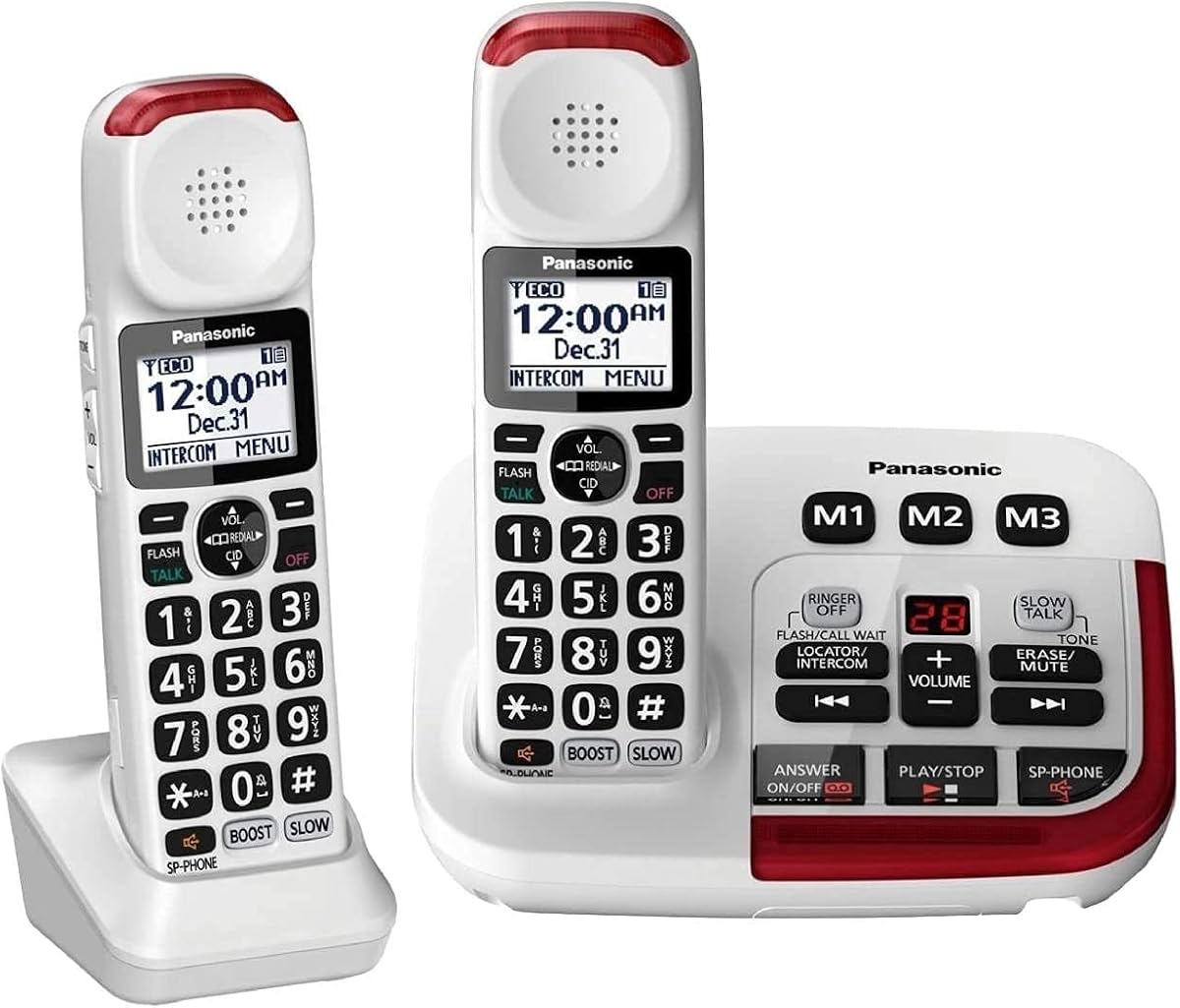
The Panasonic KX-TGM420W stands out with its voice volume booster and noise reduction features, delivering clear and loud conversations. With a 4.3 rating, it is a highly rated choice for households needing reliable cordless performance with extra clarity.
We may earn a commission when you buy through this link, at no additional cost to you.
Its noise reduction suppresses background interference, which is crucial for users struggling to hear in busy environments. The slow talk feature allows users to understand every word by slowing speech during calls or voice messages, adding significant accessibility value.
The system is expandable to six handsets, making it ideal for larger homes. While the cost is higher, the advanced features like talking caller ID and LED visual ringers justify the investment for those prioritizing high-quality communication tools.
Best for tech-savvy households needing robust features, this model offers top-tier sound quality and flexibility. It is particularly recommended for those who want advanced audio controls and reliable cordless performance without compromising on clarity or ease of use.
Background noise is suppressed to ensure that voice conversations remain clear and understandable even in noisy home environments.
This unique feature slows down speech in real time during calls and messages, making it easier to process information clearly.
We may earn a commission when you buy through this link, at no additional cost to you.
The SWISSVOICE Big Button Phone focuses on visual accessibility with extra-large dialing keys and photo memory buttons. It is ideal for the visually impaired or those with unsteady hands who need to see who they are calling clearly.
We may earn a commission when you buy through this link, at no additional cost to you.
With an adjustable ringer volume up to 90dB, it ensures users never miss an important call. The inclusion of an SOS button adds a layer of safety, allowing quick access to emergency contacts in urgent situations.
While the user rating is lower than other models, its specialized design offers practical benefits for specific needs. The hearing aid compatibility ensures that users can get the most out of their devices during conversations without feedback or noise issues.
Best for users prioritizing visual and physical accessibility, this phone simplifies dialing and contact management. It is a thoughtful choice for seniors who need large, clear inputs to communicate effectively with family and emergency services.
Large buttons display photos and numbers, allowing users to recognize and dial contacts by sight with ease and confidence.
The SOS button provides a quick way to reach emergency contacts, ensuring safety and immediate assistance when needed most.
We may earn a commission when you buy through this link, at no additional cost to you.
The dual-handset version of the Panasonic KX-TGM420W offers expanded flexibility for larger homes. With two handsets included, family members can communicate from different rooms while benefiting from the same 40dB volume boost and noise reduction technology.
We may earn a commission when you buy through this link, at no additional cost to you.
Like the single-handset model, it includes slow talk for clear message processing and visual LED ringers to alert users to incoming calls. The expandability to six handsets makes it a scalable solution for growing or multi-level households.
While it comes at a higher price point, the added convenience of multiple handsets ensures everyone stays connected. It is a practical choice for families wanting consistent audio quality and accessibility features throughout their entire living space.
Best for households needing multiple phones, this model delivers reliable performance and accessibility. It is recommended for those who want to ensure every family member has access to clear, amplified communication tools without purchasing separate systems.
With two handsets included, users can answer calls from different locations while maintaining consistent audio quality across the home.
The system can support up to six handsets, allowing seamless communication for large families without needing multiple base units.
We may earn a commission when you buy through this link, at no additional cost to you.
The Amplified Landline Phone offers robust features for seniors needing simple, loud communication tools. Its 100dB ringer and photo speed dial buttons make it especially helpful for individuals with memory loss who rely on visual cues to connect with family.
We may earn a commission when you buy through this link, at no additional cost to you.
With up to 80dB receiver gain and hearing aid compatibility, it supports mild to moderate hearing loss effectively. The LED flashing call alert ensures that incoming calls are noticed visually, which is crucial in low-light conditions or for those sensitive to sound.
While not designed for profound hearing loss, it serves well as a desktop telephone for daily use. The sturdy design and hands-free speakerphone functionality add to its reliability and ease of operation for seniors at home.
Best for caregivers seeking a straightforward tool for seniors with memory or vision challenges, this model simplifies connection. It is a practical option for those needing large buttons and clear alerts to maintain independence and stay connected safely.
Three picture buttons allow users to store and dial numbers by pressing a familiar image, reducing the need to remember digits.
A bright LED light flashes when a call arrives, ensuring users never miss a call even in noisy environments or low light.
We may earn a commission when you buy through this link, at no additional cost to you.
Selecting the right phone involves considering sound amplification, captioning features, and ease of use.
Captioned telephones offer real-time text display of conversations, which is essential for users who need visual reinforcement to understand speech fully. Ensure the model you choose offers reliable captioning services, either via internet connection or assisted operators, to avoid missing words during calls.
Check whether the system supports both incoming and outgoing calls, and verify any registration or service requirements before purchasing.
Amplified phones boost volume levels significantly, ranging from 40dB to over 100dB ringer intensity. Select a model that matches the severity of your hearing loss to ensure conversations are clear and audible without distortion or feedback.
Look for adjustable gain settings and hearing aid compatibility to tailor sound levels to your specific needs.
Large screens with high contrast and adjustable text sizes make reading captions easier for users with vision issues. Visual ringers and strobe lights are also vital for alerting users to incoming calls when sound alone is insufficient.
Opt for backlit displays and large fonts if visual accessibility is a priority in your daily routine.
Some models require high-speed internet to function fully, while others work on standard phone lines. Consider your home setup and whether you have reliable internet access before choosing a captioned phone model.
Verify if professional installation is needed or if the device can be set up independently by the user.
Features like photo speed dial, talking keypads, and slow speech playback further enhance usability for seniors or those with cognitive challenges. These tools help simplify dialing and message checking without requiring technical skills.
Prioritize models that include these extras if memory or dexterity is a concern for the primary user.
Phones with TIA compatibility or neckloop jacks ensure seamless integration with hearing aids, preventing feedback and improving clarity. This feature is essential for users who rely on hearing devices for everyday listening.
Check if the device supports 2.5mm or 3.5mm jacks for connecting headsets or loops.
Smart call blockers prevent unwanted robocalls, while SOS buttons provide quick access to emergency contacts. These features add peace of mind for seniors living alone or in high-risk environments.
Look for systems with visual indicators and speed dial options to ensure quick response times.
Corded phones offer reliability during power outages, while cordless models provide mobility around the home. Hybrid systems combine both benefits, ensuring uninterrupted service without compromising on movement.
Choose based on your household layout and whether constant accessibility is required across multiple rooms.
Keep the screen clean and dry to maintain visibility of captions and display information. Regularly check for firmware updates to ensure optimal performance and compatibility with new network standards over time.
Not all captioned phones require internet, but most modern models do for real-time captioning. Basic amplified phones operate without internet, relying solely on voice amplification and visual alerts for clarity.
Many captioned phones are designed to be compatible with hearing aids via specific jacks or wireless standards. Always verify TIA-4953 certification or neckloop support before purchase to ensure seamless integration.
Yes, most captioned phone systems provide text display for both incoming and outgoing calls. This ensures you know exactly what you are saying and what the other person is responding during conversations.
Most federal captioning services in the US are provided free of charge through FCC-approved providers. However, check your specific plan or model requirements to confirm ongoing service eligibility.
Corded phones generally work during outages as long as your telephone line has power. Cordless models may fail without backup, so consider hybrid options with battery backups for reliability.
Programming speed dial usually involves entering the contact number, selecting a memory slot, and saving it. Follow your specific model's manual instructions for photo or numeric speed dial setup.
Yes, many models support headsets via 2.5mm or 3.5mm jacks. This allows for private conversations and better sound isolation in noisy environments.
Captioned phones are ideal for users who need both sound and text support. However, those who are totally deaf may prefer specialized video relay services or TTY devices instead.
Remember to check current pricing and availability as these details may change frequently online. Selecting the right device today means better communication and peace of mind for yourself and your loved ones in the long run.