
JADENS Portable US Letter Thermal Printer
4.6Editor score
No ink required
Bluetooth connectivity
Rechargeable battery
In today's mobile world, having a reliable way to print documents on the go is essential. Battery powered portable printers offer the freedom to produce hard copies anywhere without needing a power outlet. These devices range from thermal models to full inkjet solutions, each designed for specific needs and workflows.
We have analyzed ten leading models to find the best options available this month. Our comparison looks closely at battery longevity, print resolution, connectivity options, and overall build quality. We also consider how easily each printer fits into a standard backpack or travel bag for true mobility.
Each pick in this list highlights key strengths and potential trade-offs to help you decide. Whether you need color photos or black and white contracts, there is a device here for your scenario. Keep in mind that availability and pricing can shift quickly, so check current details before purchasing.
4.6Editor score

4.4Editor score
4.5Editor score
As an Amazon Associate we earn from qualifying purchases.
This table provides a side-by-side view of all ten models we reviewed to help you compare their core specifications quickly. Look at the connectivity options, paper sizes, and print technology to see which model aligns best with your daily printing requirements.



The HP OfficeJet 200 stands out as a robust solution for professionals needing color capabilities on the road. It comes with a battery included, ensuring you can print immediately without hunting for power sources. The mobile app is intuitive and allows for seamless connectivity with smartphones and tablets.
We may earn a commission when you buy through this link, at no additional cost to you.
This model supports a wide range of paper sizes, from standard letter to envelopes and photos. Its fast charge feature lets you power up quickly during breaks, minimizing downtime. The print quality is sharp and vibrant, making it suitable for client-facing documents and presentations.
While it offers excellent performance, it is heavier than thermal-only models. The reliance on cartridges also means ongoing supply costs, which can add up over time. However, the convenience of full color in a portable unit often outweighs these minor inconveniences for many business users.
If you need reliable color printing without being tethered to a wall, this is a top choice. It balances portability with functionality better than most competitors in its class. Consider it for field work, sales visits, or travel where document presentation matters.
The included battery provides significant freedom, allowing you to print dozens of pages before needing to recharge.
Auto wireless connect simplifies setup so you can start printing right out of the box.
We may earn a commission when you buy through this link, at no additional cost to you.
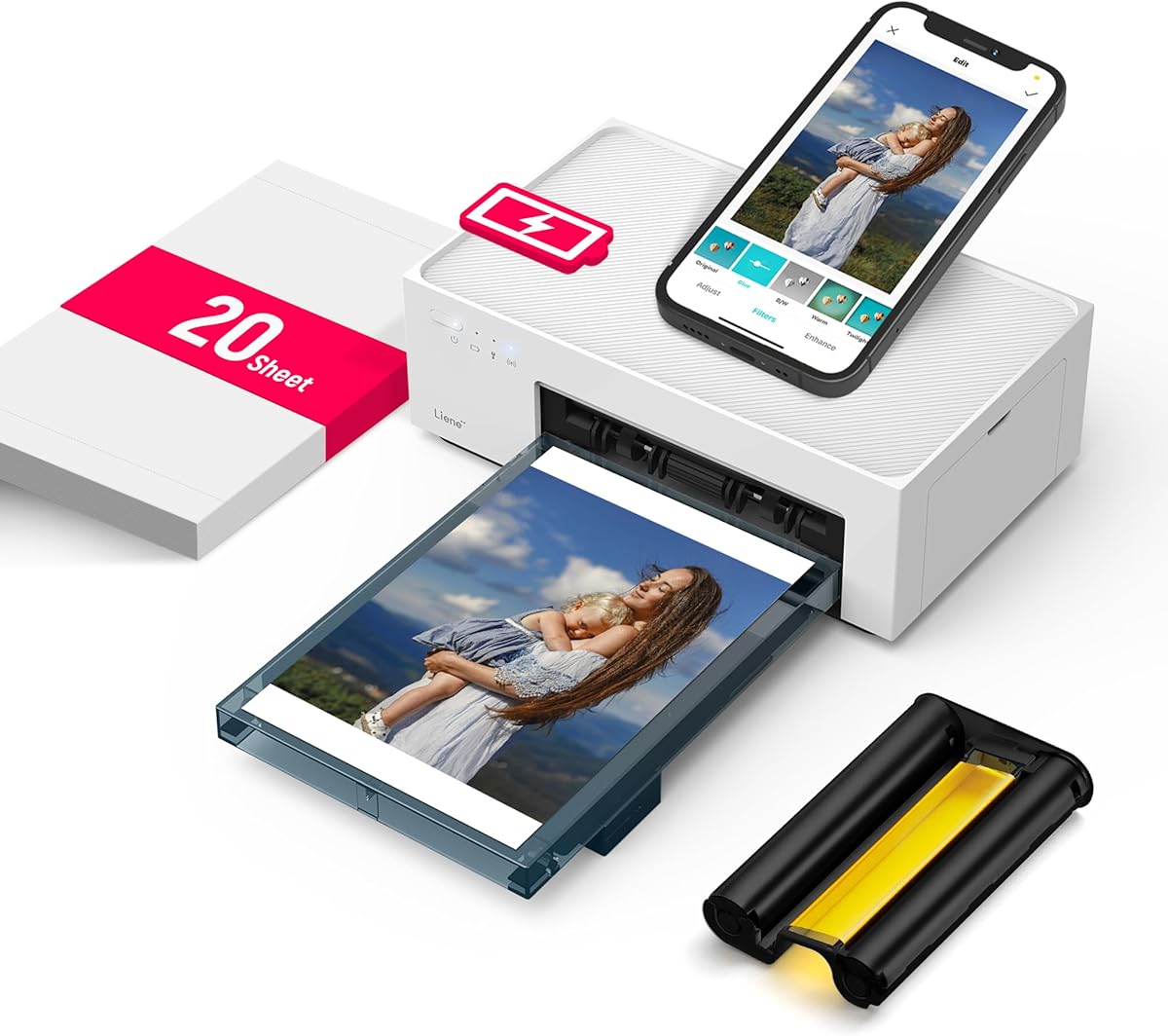
The Liene M200 is a specialized device designed for high-quality photo prints on the go. It uses dye sublimation technology to produce vibrant images that are protected against water and fading. This makes it ideal for travelers who want physical memories without carrying bulky equipment.
We may earn a commission when you buy through this link, at no additional cost to you.
Its built-in battery allows for approximately 40 prints per charge, which is ample for most personal trips. The WiFi hotspot feature ensures a stable connection even when local networks are unreliable. Users can connect via the app to edit photos before sending them to print.
Since it is limited to 4×6 inches, it is not suitable for document printing. The cost per print is higher than standard inkjets due to the specialized ink and paper system. However, the image quality and durability justify the expense for photo enthusiasts and gift-givers.
This printer is perfect for capturing moments during vacations or events. If you prioritize image quality over document versatility, this model delivers exceptional results. It is a thoughtful gift for anyone who loves printing photos from their phone.
Dye sublimation penetrates paper layers for crisp, fade-resistant images that last longer than standard prints.
The built-in WiFi hotspot allows quick connection without relying on public or home networks.
We may earn a commission when you buy through this link, at no additional cost to you.
The JADENS Portable printer offers an affordable way to print documents without the hassle of ink cartridges. It uses thermal technology to produce sharp black-and-white text suitable for forms, worksheets, and notes. The lack of ink means there are no spills or clogging issues to manage.
We may earn a commission when you buy through this link, at no additional cost to you.
It features a built-in battery that supports up to three hours of continuous use. Bluetooth connectivity allows easy pairing with phones and tablets via a dedicated app. This setup is convenient for quick printing tasks while traveling or working from a coffee shop.
Keep in mind that this printer only supports specific thermal paper rolls, so you cannot use standard copy paper. The prints may fade over time if exposed to heat or sunlight. For temporary documents and personal use, this limitation is often acceptable for the savings it provides.
If you need a lightweight solution for text-only printing, this is a strong candidate. It is easy to carry and maintain, making it great for students or light office work. Check the paper compatibility before buying to ensure it fits your workflow.
With no ink or toner needed, you save money on consumables and avoid messy replacements.
Local printing keeps your documents private without uploading them to cloud services first.
We may earn a commission when you buy through this link, at no additional cost to you.
The Canon PIXMA TR160 brings vibrant color printing to a small footprint. It features a 5-color hybrid ink system that produces detailed text and photos. The device is lightweight enough to fit into a backpack, making it ideal for casual users who need occasional prints.
We may earn a commission when you buy through this link, at no additional cost to you.
Connectivity is straightforward with support for AirPrint and the Canon PRINT app. You can print directly from your phone without needing a router. The OLED display makes it easy to check ink levels and status settings quickly without guessing.
While excellent for portability, verify power options before purchase. It is designed for mobility but may rely on adapters or external battery packs in some configurations. For travel where weight matters most, this model offers a great balance of size and performance.
Choose this if you value color fidelity in a tiny package. It suits home offices that need flexibility or travelers who occasionally need a hard copy. Ensure you have a power source planned for your specific travel needs.
The 5-color ink system delivers sharp black text and vivid colors for professional results.
Wireless Direct Mode lets you connect devices directly without a router.
We may earn a commission when you buy through this link, at no additional cost to you.
The HP OfficeJet 250 is a full all-in-one machine that scans, copies, and prints on the go. It includes a battery, so you can operate it without an outlet for extended periods. This makes it a powerful tool for mobile professionals who need complete document services.
We may earn a commission when you buy through this link, at no additional cost to you.
It supports legal size paper, which is rare for portable units and useful for contracts or larger forms. The fast charge capability ensures you can quickly top up power during a quick stop. The HP app provides a user interface for managing tasks easily.
Because of its many functions, it is heavier than single-purpose printers. Setup might require more steps compared to simpler thermal models. If you need scanning and copying capabilities while traveling, the extra weight is a reasonable trade-off.
This printer is excellent for business travelers who handle physical paperwork regularly. It replaces the need for separate scanners in your bag. Look into power requirements carefully to ensure you can recharge it conveniently.
Supports legal and letter sizes so you can handle most business documents anywhere.
Fast charge allows you to plug in during idle time and get back to work quickly.
We may earn a commission when you buy through this link, at no additional cost to you.
The Epson Workforce WF-110 delivers color printing with the freedom of Wi-Fi Direct. It is designed to be portable, fitting easily into travel bags. You can choose from various charging options, including AC and USB, to keep it running throughout the day.
We may earn a commission when you buy through this link, at no additional cost to you.
It uses Epson genuine cartridges to ensure quality and protect the device. An external accessory battery is available for those who need longer runs without plugging in. This modularity gives you control over how you manage power while traveling.
The need to manage cartridges can be a downside if you want simplicity. Thermal models are often easier to maintain. However, if color is a must, this unit offers a solid mobile inkjet solution. Check battery specs before buying to match your needs.
This is a great choice for sales reps or creatives who need color on the road. It offers a good balance of tech and portability. Ensure you have the right accessories for your specific power requirements.
Choose USB or AC adapter to keep printing when access to outlets varies.
Wi-Fi Direct lets you print without needing a router or network access.
We may earn a commission when you buy through this link, at no additional cost to you.
The Gloryang Inkless Portable Printer arrives with everything you need to start printing right away. It comes with a carry case and multiple rolls of thermal paper. This setup makes it perfect for gifts or for those who want a quick solution without buying extras.
We may earn a commission when you buy through this link, at no additional cost to you.
It connects via Bluetooth to iOS and Android devices, supporting various document types. The built-in paper bin helps keep your space tidy while printing. It is compact enough to slip into a backpack for daily commutes or travel.
Keep in mind that it works only with thermal paper, not standard copy paper. You must download drivers for computer use, which might be an extra step. For mobile-only users, this is rarely an issue. It is a practical tool for quick needs.
Choose this if you want a ready-to-go solution without hassle. It is light and easy to use for basic documents. Verify compatibility with your devices before purchasing to avoid any setup issues.
The included case and paper rolls make it a convenient gift or quick start option.
Built-in paper bin keeps your desk clean and saves space on the go.
We may earn a commission when you buy through this link, at no additional cost to you.
The A285M supports a wide range of thermal paper widths, making it versatile for labels or documents. It is small enough to fit in a briefcase or pocket. The USB-C option allows you to connect to laptops if you have drivers installed.
We may earn a commission when you buy through this link, at no additional cost to you.
This unit is lightweight and designed for those who work outside frequently. It avoids ink costs, which keeps long-term expenses low. The Bluetooth connection simplifies mobile printing without extra cables. It is useful for truck drivers or notaries.
Be aware that laptop support requires installing a driver, which can be tricky for some users. Print quality is functional but not designed for photo-like detail. If you need a workhorse for basic needs, it fits the bill well.
Select this for its flexibility in paper sizes. It works well for various industries. Ensure your computer systems can handle the driver before relying on it for work.
Supports five different widths so you can print receipts or full pages easily.
Use USB-C for laptops to ensure a stable connection for larger files.
We may earn a commission when you buy through this link, at no additional cost to you.
The D90E is designed to be simple and ready to use out of the box. It includes a travel case, making it a great gift for students or professionals. The Labelnize app streamlines the pairing process so you can print immediately.
We may earn a commission when you buy through this link, at no additional cost to you.
It features a simple fix for paper jams, allowing you to eject paper easily. The unit is light and fits in backpacks without adding bulk. It supports 8.5×11 thermal paper, which is standard for most document needs.
Be aware that it works with regular copy paper. You need to buy thermal rolls to use it. The app requirement might be a hurdle for those who prefer direct printing. However, the convenience is high for mobile tasks.
This model is ideal for casual users who want simplicity. It works well for home office or school projects. Ensure you stock up on compatible paper to avoid delays in usage.
Includes a case and guide so it arrives ready to use for any occasion.
Simple button press helps eject paper if jammed, keeping printing smooth.
We may earn a commission when you buy through this link, at no additional cost to you.
The N80 is a compact thermal printer that supports standard documents and tattoo transfer paper. It has a built-in battery to keep you printing during long hours. The high DPI ensures sharp text and clean lines for detailed patterns.
We may earn a commission when you buy through this link, at no additional cost to you.
It is affordable and easy to carry, making it a budget-friendly choice. The USB-C option allows connection to computers for file transfers. This model suits artists or travelers who need specific print formats on the go.
Prints are black and white only, which limits its use for photos. Battery life is decent but may need frequent charging for heavy use. For specialized needs like tattoos or forms, it offers good value.
Pick this if you need a cost-effective tool for specific tasks. It works well for home use or small business. Verify paper compatibility to ensure it supports your specific print needs.
203 DPI resolution ensures clear and detailed prints for text and designs.
Supports tattoo transfer paper so artists can prepare designs anywhere.
We may earn a commission when you buy through this link, at no additional cost to you.
Choosing the right portable printer depends on your specific needs and how you plan to use it. Understanding the differences between technologies and features will help you find the best match.
Most portable printers fall into two categories: inkjet and thermal. Inkjet models offer color printing but often require cartridges and more maintenance. Thermal printers are inkless and cheaper to run but usually produce only black and white text.
Decide if color is essential for your work or if black and white is sufficient.
Battery capacity determines how many pages you can print before recharging. Look for models that specify page counts or hours of use. Some devices allow fast charging, which is useful if you have access to power for short periods.
Ensure the battery life matches your typical travel duration.
Check how the printer connects to your devices. Bluetooth is common for mobile printing, while USB-C is useful for laptops. Some models offer Wi-Fi Direct or hotspot features to bypass network issues.
Choose connectivity that fits your existing devices.
Not all portable printers handle standard letter or legal paper. Some only print receipts or 4×6 photos. Verify the maximum paper size supported to ensure it meets your document needs.
Look for support of standard sizes if you print regular documents.
Since you are carrying this device, weight and size matter. Compact units are easier to slip into bags. Consider if you need additional accessories like external batteries that might add bulk.
Prioritize lightweight designs for frequent travel.
Most mobile printers require a specific app to work. Check if the app is available for your phone's operating system. Some models also need drivers for computer use, which can be a hurdle.
Verify software support before buying to avoid frustration.
Thermal printers save money on ink but require special paper. Inkjets are versatile but have higher ongoing costs. Calculate the cost per page based on consumables to see long-term value.
Compare total costs beyond the initial purchase price.
Portable devices face more wear and tear. Look for sturdy construction and protective cases. Check if the manufacturer offers warranties to cover potential hardware issues during travel.
Opt for models with durable builds for long-term use.
To start using your portable printer, ensure it is fully charged before leaving home. Install the recommended app or drivers on your device, then pair via Bluetooth or Wi-Fi. Once connected, select your document and print settings before sending the job.
Proper maintenance can extend the life of your device. For inkjet models, keep the printhead clean by running cleaning cycles. For thermal printers, use high-quality paper to prevent jams. Always store the printer in a dry, cool place when not in use.
Managing battery health is crucial for longevity. Avoid letting the battery drain completely often, and unplug it once fully charged. If you won't use the printer for weeks, charge it to about 50 percent before storing to protect the internal battery.
Yes, if you need to print on the go regularly. They save you from carrying documents to print shops and offer convenience. The upfront cost is often offset by the time saved during business travel.
Some models do support color printing, especially inkjet types. However, these are heavier and require cartridges. If you prioritize color, ensure the model has good battery life for extended use.
Battery life varies by model and usage. Some provide 40 prints per charge, while others last up to 3 hours. Always check the specs for page counts to match your needs.
Yes, many connect via Bluetooth or direct Wi-Fi modes. This means you do not need a router to print from your phone. It is very useful in areas with poor internet access.
Thermal printers use special thermal paper that reacts to heat. They do not use ink. This paper is cheaper but can fade over time if exposed to heat or sunlight.
Only inkjet models use regular copy paper. Thermal printers require special rolls. Check the product specs to see which paper types are supported before buying.
We reviewed ten models ranging from inkjet to thermal to find the best portable options. The HP OfficeJet 200 offers color versatility while the JADENS provides a cost-effective solution for text. The Liene M200 stands out for photo lovers.
When choosing, consider whether color or portability matters more. Also factor in battery life and the types of paper you need. Selecting the right model ensures you stay productive while traveling or working remotely.
Prices and availability can change quickly, so double-check current offers before purchasing. Look for deals that match your needs and budget. With the right printer, you can print anywhere with confidence.