
Ostrich Charger Compatible with Dell Laptop Computer 65W 45W Round Tip Power Adapter
4.5Editor score
65W output supports most Dell models
Includes safety certifications
Comes with converter cables
Discover the top battery backup solutions for Dell laptops. This guide compares portable power banks, UPS units, and chargers to keep your device running
Finding a reliable battery backup for Dell laptop users is essential for maintaining productivity during power outages or while traveling. These devices ensure your workstation stays active when access to wall outlets is limited or unavailable for extended periods of time.
We compared ten top-rated products ranging from portable power banks to uninterruptible power supplies. Each option was evaluated on capacity, compatibility, charging speed, and safety features to help you find the right solution for your specific Dell model and usage needs.
Each pick shows key specifications, pros, cons, and detailed usage scenarios. Please note that product availability and pricing may change over time. Always verify current compatibility with your specific Dell laptop model before making a final purchasing decision today.
4.5Editor score

4.3Editor score

4.4Editor score
This comparison table lists all ten products side by side with their key specifications. Use this overview to quickly identify which backup solution matches your Dell laptop's power requirements and portability needs.




The CyberPower EC850LCD is a robust UPS solution designed to protect desktop setups and laptops during outages. With a rating of 4.4, it stands out for its comprehensive protection and clear status display.
We may earn a commission when you buy through this link, at no additional cost to you.
This unit features 12 outlets with six providing battery backup and surge protection. The multifunction LCD panel displays immediate details on battery and power conditions. The ECO mode automatically cuts power to peripherals when the computer is off, reducing energy costs.
While it is not portable for on-the-go use, it ensures your Dell laptop remains protected at a fixed workstation. The 3-year warranty includes the battery, offering long-term reliability for critical computing needs.
Buy this if you need stable power for a home office or studio where a UPS is feasible. It provides peace of mind against surges and sudden power loss for your Dell system.
The LCD panel offers real-time data on load and battery status, allowing you to manage power efficiently during blackouts.
ECO mode outlets save energy by turning off connected devices when the main PC is in sleep or off mode.
We may earn a commission when you buy through this link, at no additional cost to you.
The Ostrich Charger is a cost-effective AC adapter that serves as a reliable power source for Dell laptops with round tips. Its 4.5 rating reflects strong safety and compatibility for budget-conscious users.
We may earn a commission when you buy through this link, at no additional cost to you.
This charger outputs 65W at 19.5V 3.34A, suitable for 65W and 45W laptops. It includes a converter cable for 7.4mm connectors, broadening its use. Safety mechanisms protect against short circuits and overheating.
While it does not provide battery backup power, it ensures your device stays charged during long sessions if you have access to an outlet. The lifetime exchange policy adds value for a low-cost item.
Choose this if you need a spare or replacement charger without breaking the bank. It is a solid choice for Dell Inspiron, XPS, and Vostro series needing standard 65W power.
Supports 65W and 45W Dell laptops with round connectors, covering most mid-range models in the Inspiron and XPS lines.
Tested by leading consumer labs for electrical safety, reducing risks associated with inferior third-party chargers.
We may earn a commission when you buy through this link, at no additional cost to you.
The UGREEN Power Bank is a high-performance portable charger capable of delivering 145W total output to charge laptops on the go. Its 4.3 rating highlights strong performance for users needing serious mobile power.
We may earn a commission when you buy through this link, at no additional cost to you.
With 25,000mAh capacity, it can recharge a laptop up to 1.3 times. The USB-C1 port delivers up to 140W, charging devices quickly. A digital display shows remaining battery life at a glance for better planning.
Though it requires a 65W charger to recharge itself, its speed and capacity make it ideal for travel or remote work. It supports a wide range of devices beyond Dell, including MacBook and iPad.
Buy this if you need a premium power bank that can fully charge a Dell XPS multiple times. It is the top pick for professionals who work away from desks for extended periods.
Delivers 140W through a single USB-C port, enabling rapid charging for high-power laptops in minutes.
Bi-directional technology allows simultaneous fast charging of devices while recharging the power bank itself.
We may earn a commission when you buy through this link, at no additional cost to you.
The Omni 20C+ is a versatile power bank that doubles as a USB hub for connecting peripherals while charging. With a 4.2 rating, it offers a unique mix of features for tech-savvy Dell users.
We may earn a commission when you buy through this link, at no additional cost to you.
It provides 100W via USB-C, powering most smart devices and laptops. The USB Hub Mode lets you connect USB devices through the power bank while connected to your laptop. Wireless charging adds convenience for smartphones.
While the wall charger is not included, its functionality as a hub makes it useful for travel setups. The pass-through charging allows continuous use without draining the battery.
Select this if you want to consolidate charging and connectivity in one device. It is a great companion for Dell users who need extra ports and power while on the move.
Serves as both a charger and a USB hub, letting you expand ports on your laptop while keeping it powered.
Includes overcharge protection to ensure safety during long charging sessions with connected devices.
We may earn a commission when you buy through this link, at no additional cost to you.
This genuine Dell charger ensures your Latitude models receive the exact power specification designed by the manufacturer. Its 4.0 rating reflects solid performance for those seeking an official replacement.
We may earn a commission when you buy through this link, at no additional cost to you.
Output includes 65W, 45W, and 27W profiles with USB Type-C tip. It fits models like Latitude 7340 and XPS 13. As a genuine part, it avoids compatibility issues common with third-party adapters.
While it lacks flexible PD negotiation, it is perfect for systems requiring specific Dell charging protocols. The 3ft cord provides enough reach for typical desk use.
Buy this if you need a safe and certified charger for your Dell Latitude or XPS. It is the safest choice to ensure your warranty remains valid and your device charges correctly.
As a genuine Dell adapter, it matches factory specifications exactly, reducing risks of damage to your device.
Compatible with a wide range of Dell Latitude and XPS models, ensuring you find the right fit for your hardware.
We may earn a commission when you buy through this link, at no additional cost to you.
The Dell External USB Slim DVD RW Drive is a legacy device designed for optical media handling. While not a battery backup, its 4.5 rating indicates reliable performance for specific use cases.
We may earn a commission when you buy through this link, at no additional cost to you.
It connects via USB to your notebook and is powered by it, requiring no extra power source. Pre-loaded CyberLink Media Suite helps you play or burn discs easily. Its slim 14mm profile fits easily in bags.
Since it is powered by the laptop, it consumes battery power when in use. This means it is not suitable for extending battery life but rather for accessing optical media when needed.
Choose this if you have Dell to burn or read DVDs and your Dell laptop lacks an internal drive. It is a reliable add-on for users needing optical media capabilities on the go.
Operates directly from the USB port, simplifying setup but drawing from your laptop's battery during operation.
Capable of playing and burning DVDs and CDs, making it useful for legacy software installations or media playback.
We may earn a commission when you buy through this link, at no additional cost to you.
This 65W AC charger is tailored for Dell Inspiron laptops with specific pin requirements. Its 4.4 rating confirms it is a dependable choice for users needing a reliable replacement for their old adapter.
We may earn a commission when you buy through this link, at no additional cost to you.
It supports 19.5V 3.34A output and fits both 4.5×3.0mm and 7.4×5.0mm sockets. The 8.8ft cord offers great reach for flexible workspace arrangements. FCC safety certificates ensure it meets regulatory standards.
As a standard AC adapter, it relies on a wall outlet to function. It does not provide battery backup power but ensures your laptop stays charged during long usage sessions at home or office.
Select this if your Inspiron 11, 13, 15, or 17 series needs a new charger. It is a cost-effective solution that restores full charging capability without compromising on safety.
An 8.8ft cord length allows you to place your laptop further from outlets while still keeping it charged.
Compatible with two common pin sizes used by Dell Inspiron models, increasing the chance of fit for various generations.
We may earn a commission when you buy through this link, at no additional cost to you.
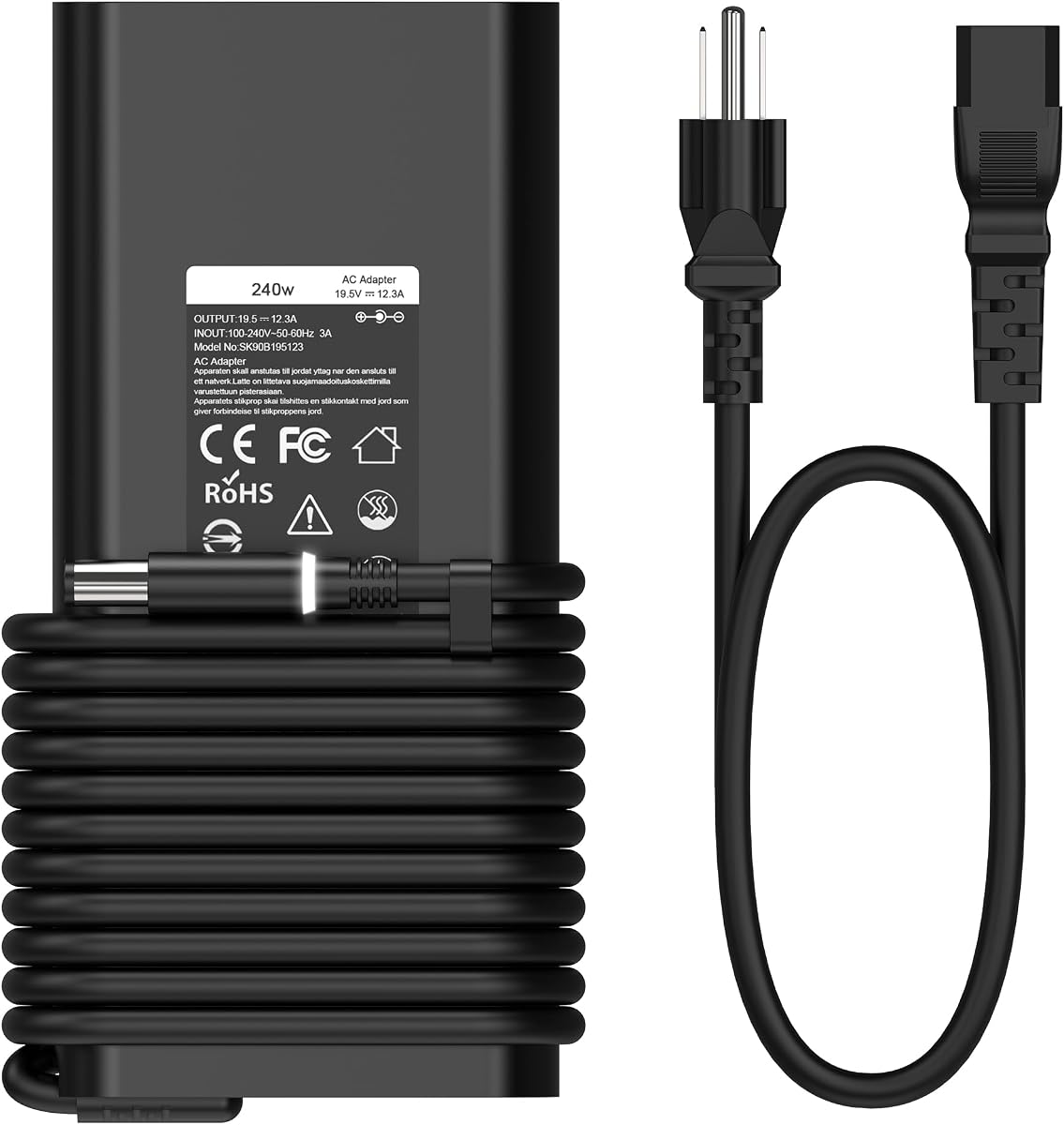
This 240W charger provides the high wattage needed for demanding Alienware and Precision laptops. Its 4.4 rating reflects strong performance for users with power-hungry hardware.
We may earn a commission when you buy through this link, at no additional cost to you.
Output is 19.5V 12.3A, compatible with 240W and 180W models. It fits a wide range of Alienware and Precision series. The slim design makes it easier to transport despite the high power rating.
While powerful, it still depends on a wall outlet. It ensures your laptop runs at full performance without throttling due to insufficient power. The 12 month warranty offers additional security.
Buy this if you own a high-end gaming or workstation Dell laptop. It is the right choice for models that require 240W to function properly without performance drops.
Delivers 240W to support demanding GPUs and CPUs in Alienware and Precision models, ensuring smooth performance.
Despite high wattage, the charger is designed slim to reduce bulk when traveling or commuting with your laptop.
We may earn a commission when you buy through this link, at no additional cost to you.
The 330W charger delivers stable power to the most powerful Alienware laptops, preventing thermal throttling. Its 4.7 rating indicates excellent performance for high-performance users.
We may earn a commission when you buy through this link, at no additional cost to you.
With 19.5V output and 7.4mm tip, it supports Alienware M16, M18, and X16. The extra power headroom reduces load on the adapter, keeping it cooler. It is backward compatible with 180W and 240W devices.
This is not a portable battery backup but a high-wattage AC adapter. It ensures your workstation runs at peak performance for gaming and rendering without power-related lags.
Select this if you own a top-tier Alienware that requires 330W. It is the safest choice to avoid thermal throttling and keep your system running smoothly under heavy loads.
The extra wattage headroom reduces continuous operating load, keeping the charger cooler and more efficient.
Eliminates frame drops and stuttering by providing stable, full-rated power to the GPU and CPU.
We may earn a commission when you buy through this link, at no additional cost to you.
This adapter kit converts USB-C PD power to DC tips, working with various laptop brands. Its 4.0 rating shows it is a practical solution for travelers with different hardware needs.
We may earn a commission when you buy through this link, at no additional cost to you.
It includes 15 DC connectors for Dell and other brands. The built-in PD chip ensures safe charging up to 100W. You need a PD source like a power bank to use it effectively.
It does not store power itself, relying on an external PD adapter. It helps you use universal chargers with Dell devices that have round tips, expanding your charging options.
Buy this if you want a versatile travel adapter for multiple devices. It is a smart add-on to your power bank setup, allowing you to charge Dell with universal PD sources.
Includes 15 common DC plug sizes, making it easy to match your specific laptop's charging port.
Built-in E-mark chip ensures current adjustment for safe charging without risking device damage.
We may earn a commission when you buy through this link, at no additional cost to you.
Selecting the right battery backup involves understanding your laptop's power needs and how you plan to use it. Consider capacity, portability, and connection types before making a decision.
Your Dell laptop model dictates the required wattage. Most standard models need 65W, while gaming units require 240W or more. Ensure your backup provides enough wattage to avoid throttling.
Check your original adapter specs to match output accurately.
Capacity measured in mAh or Wh determines runtime. Higher numbers mean longer backup time. For travel, 20,000mAh or more is recommended for laptops.
Choose capacity based on how long you need to work away from outlets.
Fast charging via PD protocols helps recharge both the device and backup quickly. Look for 100W or higher output for best speed.
Prioritize fast charge support if you switch frequently between usage and charging.
Lightweight options are better for frequent travelers. Heavy UPS units stay on desks, while power banks fit in bags easily.
Decide between desk use or mobile use to pick the right size.
Look for CE, FCC, or UL marks to ensure the device meets safety standards. Overvoltage and overheating protection are critical for laptop safety.
Never use uncertified chargers that could damage your Dell hardware.
Dell uses round tips and USB-C. Verify the tip matches your port size like 4.5mm or 7.4mm. Some adapters include tips for multiple sizes.
Match connectors to avoid connection issues and poor charging.
Extra ports allow charging multiple devices simultaneously. USB Hub modes let you expand connections while charging. LCD screens provide battery status.
Select models with features that match your specific workflow needs.
Reputable brands offer longer warranties for battery health. Check for exchange policies to protect your investment.
Prefer products with clear support channels for reliability.
Always check the wattage rating of your backup before connecting your laptop to ensure it matches the adapter requirements. This prevents damage to your battery or motherboard during usage.
Recharge the unit fully before first use to condition the battery cells. Store in a cool dry place to maintain health over time. Avoid letting it drain to zero frequently.
For AC adapters, unplug when not in use to save energy. For power banks, use original or certified cables to ensure safe current flow. Monitor for overheating signs during charging sessions.
Yes, if your Dell supports USB-C charging and the power bank offers sufficient wattage like 65W or more. Check your manual for PD requirements. Not all Dell models accept USB-C power input.
Runtime depends on usage intensity. For typical tasks, it may last 2 to 4 hours. High-performance gaming will drain it faster. Check your Dell's battery capacity to estimate run time accurately.
Precision models often require higher wattage like 130W or more. Ensure your charger matches the specific output rating. Using lower wattage may cause slow charging or throttling.
Third-party adapters are safe if they carry official safety certifications. Avoid cheap unbranded options that lack protection. Always verify voltage and current match your Dell specs.
Power banks under 100Wh are usually allowed on planes. UPS units are not portable. Check airline rules for carry-on limits to avoid issues during travel.
Use a dry cloth to wipe tips gently. Avoid liquids near the port. Ensure they are dry before reconnection to prevent short circuits during charging.
This guide highlighted top choices from the CyberPower EC850LCD to the UGREEN Power Bank. Each serves different needs ranging from stationary protection to mobile power.
Prioritize wattage and connector fit for your Dell model. Safety and capacity should drive your final decision to ensure reliable performance.
Please check current availability and pricing before buying. Prices change often, so verify details to ensure you get the best value for your setup.