
ASRock DeskMini X300 2.5G Series
4.2Editor score
Ultra-compact 1.92L size
Supports AM4 Ryzen CPUs
Triple display capability
Discover the top 10 Barebone Pcs with Amd for gaming and work. We compare performance, ports, and features to help you choose the right mini PC build.
Barebone PCs offer a flexible foundation for custom computing setups. These systems let you choose your own memory and storage, ensuring the machine matches your exact needs without paying for parts you might not use.
Our team analyzed the current market to find the most reliable AMD-based options. We looked at processor power, expansion capabilities, and cooling efficiency to ensure each pick delivers stable performance for demanding tasks.
Each review highlights key strengths and potential trade-offs you should consider. While prices fluctuate based on availability and promotions, the core features remain consistent. Always verify compatibility before purchasing memory or storage drives.
4.2Editor score

4.0Editor score

3.1Editor score
This table provides a side-by-side comparison of the top ten models available. Each entry highlights core specifications to help you quickly identify which model aligns with your specific performance and connectivity requirements.





The AOOSTAR MACO stands out as a powerful entry point for users seeking a versatile mini PC. It features the AMD Ryzen 7 PRO 8845HS processor which delivers robust multitasking capabilities. The system is designed to handle intensive workloads while maintaining a small footprint.
We may earn a commission when you buy through this link, at no additional cost to you.
Its standout feature is the OCuLink port which allows for external GPU connections with minimal latency. This makes it ideal for users who want to upgrade graphics performance later. The dual USB4 ports also support 8K displays which enhances creative workflows.
While it is a barebone unit requiring separate RAM and storage installation, the flexibility it offers is substantial. Users can tailor the memory and storage to their exact needs without paying for unnecessary components upfront. The build quality remains solid despite the compact design.
This model is perfect for enthusiasts and professionals who value expandability. It balances raw processing power with modern connectivity options. Whether for gaming or productivity, it provides a reliable foundation for custom builds.
The OCuLink port allows for external GPU connections that outperform standard USB4 options in bandwidth efficiency.
A vapor chamber cooling system ensures stable performance even during prolonged high-load sessions.
We may earn a commission when you buy through this link, at no additional cost to you.
The GEM12+ model is engineered to deliver high-end performance within a compact chassis. It uses the same powerful Ryzen 7 PRO 8845HS processor found in top-tier setups. This makes it highly capable of handling modern gaming titles and demanding creative software.
We may earn a commission when you buy through this link, at no additional cost to you.
A key advantage of this unit is its advanced cooling system. It utilizes a vapor chamber that spreads heat evenly across the surface. This prevents thermal throttling during extended usage sessions which ensures consistent frame rates and application stability.
While the lack of included RAM and storage means additional setup is required, the dual M.2 slots allow for significant storage expansion. The support for four 4K screens simultaneously makes it suitable for multi-monitor professional environments. The dedicated OCuLink port further enhances its graphics potential.
This mini PC is recommended for users who need both gaming capability and professional workstation features. It provides a robust platform that can grow with your needs over time. The energy-saving architecture also helps in reducing overall power consumption.
Supports four 4K displays via DP1.4 and HDMI 2.1 making it ideal for multi-monitor setups.
Adopts energy-saving VAT architecture which can save significant power compared to standard designs.
We may earn a commission when you buy through this link, at no additional cost to you.
The GEM12+ PRO adds a layer of security and convenience to the standard GEM12+ model. It includes a fingerprint sensor which allows for quick and secure login without needing a password. This feature is particularly useful for shared workspaces or personal security.
We may earn a commission when you buy through this link, at no additional cost to you.
Performance remains at the highest level with the Ryzen 7 PRO 8845HS. It delivers 16 TOPS of AI performance which is beneficial for tasks involving machine learning or advanced media processing. The system supports up to 128GB of RAM which is a massive ceiling for multitasking.
While the barebone nature requires users to install their own components, the flexibility is unmatched. The OCuLink port enables external graphics upgrades which future proofs the device. The vapor chamber cooling ensures that high performance does not come at the cost of overheating.
This model is tailored for business professionals who need secure and powerful desktop solutions. It handles complex office tasks and creative projects with ease. The ability to manage multiple screens further boosts productivity in professional environments.
Fingerprint recognition provides instant access while maintaining enterprise-grade security standards.
Dual M.2 slots support up to 8TB total storage allowing for extensive data archives.
We may earn a commission when you buy through this link, at no additional cost to you.
The ASRock DeskMeet X300 is unique because it offers a full expansion slot in a mini PC chassis. This allows users to install dedicated graphics cards or other PCIe devices which is rare in this form factor. It supports AMD AM4 Ryzen processors including 5000 series CPUs.
We may earn a commission when you buy through this link, at no additional cost to you.
One of its main advantages is the inclusion of a 500W power supply. Most barebone kits require users to source their own power units but this one provides it. This simplifies the build process significantly and ensures compatibility with higher performance components.
While the size is larger than some nano PCs, it still saves space compared to a traditional desktop tower. The support for four DDR4 slots allows for up to 128GB of memory which is excellent for heavy workloads. The dual M.2 slots add fast storage options as well.
This system is best for users who need a dedicated GPU but want a smaller footprint. It bridges the gap between mini PCs and full-size towers. The robust build quality and included PSU make it a reliable choice for custom desktop builds.
Includes a PCIe 3.0 x16 slot allowing for dedicated graphics cards and expansion cards.
Comes with a 500W power supply which removes the need to buy a separate unit.
We may earn a commission when you buy through this link, at no additional cost to you.
The MINISFORUM X1 Lite-255 offers a balanced mix of performance and connectivity. It features the Ryzen 7 255 processor which provides solid multi-threaded performance. The integrated Radeon 780M graphics are sufficient for light gaming and media consumption tasks.
We may earn a commission when you buy through this link, at no additional cost to you.
Connectivity is a major strength of this unit. It includes a full USB4 port that supports up to 40Gbps transfer speeds. There is also OCuLink support which allows users to attach external GPUs for more graphics power if needed in the future.
The cooling system uses phase-change material to manage heat effectively. This ensures that the CPU and GPU remain cool during extended usage. The triple display output allows for a multi-screen setup which is great for productivity and multitasking scenarios.
This model is suitable for home users who want a compact PC with modern features. It handles everyday computing tasks with ease. The support for Wi-Fi 6e ensures fast wireless connectivity for streaming and browsing.
Supports three independent displays via HDMI and USB4 for extensive workspace configurations.
Includes Wi-Fi 6e and 2.5G LAN for stable and fast network connections.
We may earn a commission when you buy through this link, at no additional cost to you.
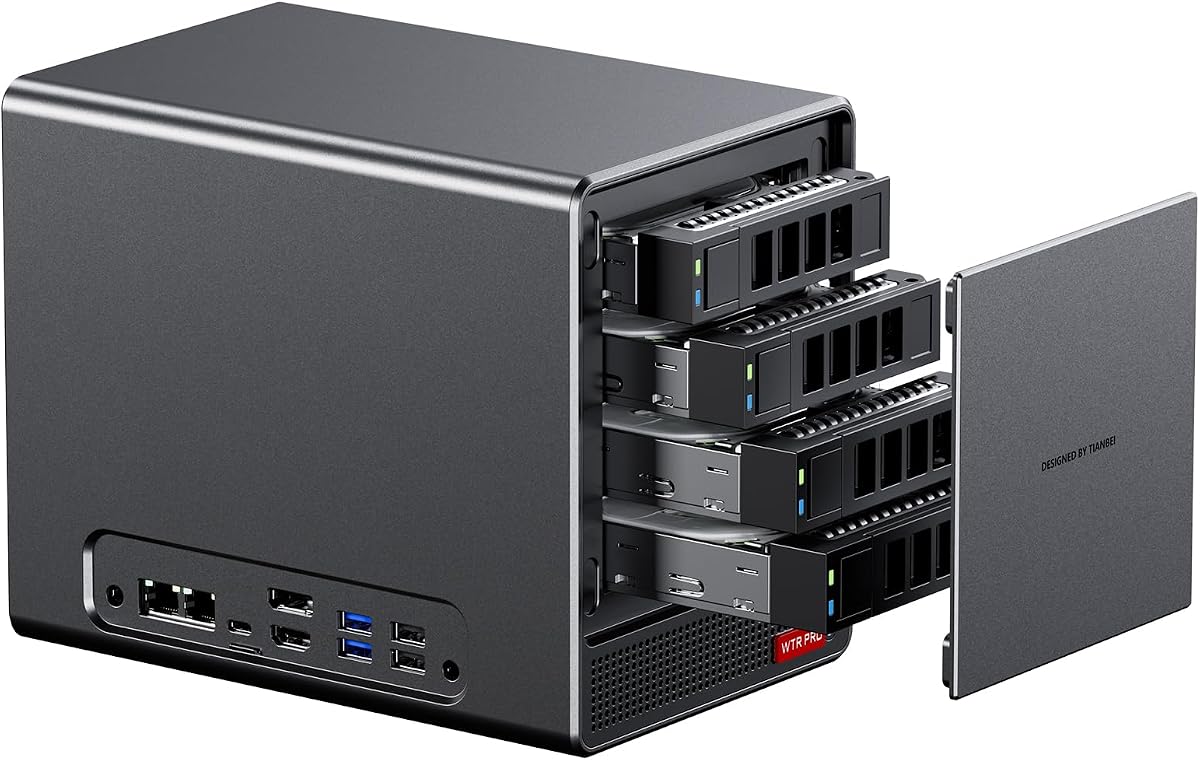
The AOOSTAR WTR PRO is designed specifically for users looking to build a home server or NAS. It supports four 3.5-inch hard drives and two M.2 NVMe slots. This configuration allows for significant storage expansion while keeping the footprint small.
We may earn a commission when you buy through this link, at no additional cost to you.
Performance is adequate for file serving and media streaming tasks. The Ryzen 7 5825U processor handles multiple connections efficiently. The system is built to run 24/7 which is essential for storage servers that need to be always on.
Cooling is handled by a large fan and through-the-wall construction. This ensures that the system stays silent while dissipating heat effectively. The power consumption is low which helps in reducing electricity costs over time.
This model is ideal for tech enthusiasts who want a self-hosted storage solution. It can run various operating systems for network storage and virtualization. The HDMI support also allows for local media playback if needed.
Supports up to 4 x 22TB drives offering massive storage potential for media libraries.
Designed for 24/7 operation with low power consumption to save energy costs.
We may earn a commission when you buy through this link, at no additional cost to you.
The ASRock DeskMini X300 is one of the smallest options available for desktop computing. It has a volume of just 1.92 liters which makes it incredibly portable. It supports AM4 Ryzen CPUs including the 5000 series which offers good performance for basic tasks.
We may earn a commission when you buy through this link, at no additional cost to you.
Networking is supported via a 2.5G LAN port which is faster than standard Gigabit connections. This helps with file transfers and streaming media from a local server. The triple display capability adds value for office use or secondary monitors.
As a barebone kit it requires separate purchases for RAM and storage. This keeps the initial cost low but requires more effort to set up. The design allows for easy installation of components which makes the DIY process straightforward.
This system is perfect for users on a budget who need a reliable office PC. It saves desk space and handles everyday applications efficiently. The wide CPU support ensures compatibility with many existing parts.
Measures just 1.92 liters which is significantly smaller than standard desktop cases.
Includes a 2.5G LAN port for faster wired network connections and file transfers.
We may earn a commission when you buy through this link, at no additional cost to you.
The ASUS ExpertCenter PN54 is built for high-end business environments. It features the Ryzen AI 300 Series processors which include an XDNA2 NPU for accelerated AI tasks. This makes it powerful for machine learning workloads and advanced content creation.
We may earn a commission when you buy through this link, at no additional cost to you.
Connectivity includes Wi-Fi 7 which offers the latest in wireless speeds and range. The design is incredibly thin at 0.6L which is ideal for space-constrained offices. The toolless design allows for easy component upgrades without needing screwdrivers.
This unit is backed by a three-year warranty which provides peace of mind for businesses. It is designed to run reliably 24/7 which is crucial for enterprise deployments. The four 4K display support enhances visual capabilities for designers.
This model is best suited for organizations that need reliability and top-tier performance. It handles demanding tasks with ease while maintaining a sleek look. The advanced connectivity options ensure it stays relevant for years to come.
Features XDNA2 NPU which delivers five times faster AI performance for dynamic computing.
Ultra-thin chassis is designed for 24/7 operation and eco-conscious durability.
We may earn a commission when you buy through this link, at no additional cost to you.
The WTR PRO 4+2 offers extensive storage options with six drive bays. Four are 3.5-inch SATA bays and two are M.2 NVMe slots. This allows for a large array of storage that can be configured for redundancy or speed.
We may earn a commission when you buy through this link, at no additional cost to you.
It supports virtualization technologies which makes it suitable for running multiple services on one device. The dual 2.5G LAN ports ensure that network bottlenecks are minimized. This is essential for data-intensive tasks like backup and streaming.
The chassis is built for quiet operation which is ideal for home offices. It can run on different operating systems like Windows or Linux. The triple 4K display output allows for local monitoring of the server environment.
This system is ideal for power users who need a dedicated home lab. It handles file storage and virtual machines with ease. The robust build ensures it can handle continuous operation without issues.
Supports VT-X and VT-D technology for running multiple virtual machines simultaneously.
Total of six bays allows for a mix of high capacity and high speed storage options.
We may earn a commission when you buy through this link, at no additional cost to you.
The PN54-S1 is a reliable barebone kit designed for professional environments. It supports Ryzen 200 Series processors which provide solid multitasking capabilities. The chassis is very slim at 34mm which makes it easy to mount or hide.
We may earn a commission when you buy through this link, at no additional cost to you.
Upgrades are made easy with the tool-free design. Users can access components quickly without needing specialized tools. This reduces downtime when maintenance or upgrades are needed. The dual 2.5G LAN ports offer robust network performance.
This model supports up to four 4K displays which is excellent for multi-monitor setups. The build quality is designed for long-term reliability. It is backed by a three-year warranty which is a strong guarantee for business use.
This system is best for businesses that need stable and reliable computing. It handles everyday tasks efficiently and offers good expandability. The slim design fits well in modern office environments.
Tool-free design allows for quick access and component upgrades without hassle.
Built for 24/7 operation with a durable chassis that stands up to heavy daily use.
We may earn a commission when you buy through this link, at no additional cost to you.
Choosing the right barebone PC involves understanding your specific needs for performance and expansion. Here are the key factors to consider before you make your purchase decision.
Most modern barebone PCs use AMD Ryzen processors. Look for Zen 4 or newer architectures for the best performance and efficiency. This ensures your system stays relevant as software requirements increase over time.
Always check the maximum TDP support of the chassis to ensure it matches your CPU choice.
Barebone kits usually do not include RAM. Check how many slots are available and the maximum capacity supported. DDR5 is becoming standard for new models offering faster speeds than DDR4.
Ensure the motherboard supports the speed and capacity of RAM you plan to install.
Look for multiple M.2 slots if you need fast storage. Some models also support SATA drives for larger capacities. Having both options allows you to balance speed and storage space effectively.
Verify the maximum supported storage capacity to avoid compatibility issues later on.
Ports like USB4 and HDMI 2.1 are crucial for high-resolution displays. Some models include OCuLink ports for external graphics which is a great future-proofing feature. Check if the LAN speed matches your internet needs.
Select a model with enough ports for all your peripherals to avoid using hubs constantly.
Efficient cooling is vital in small cases to prevent thermal throttling. Vapor chambers or large fans help maintain stable performance. A good cooling system ensures your PC runs quietly even under load.
Consider noise levels if you plan to use the PC in a quiet office or living room.
Chassis materials impact durability and heat dissipation. Aluminum cases often look better and handle heat well. A sturdy build protects your components and keeps the system safe during transport.
Look for reviews that mention build quality to ensure it meets your standards.
Some barebone kits come with an OS key while others do not. Verify if Windows or Linux is compatible with the hardware drivers. This affects your initial setup time and cost.
Always check the manufacturer support page for a list of supported operating systems.
A solid warranty protects your investment against defects. Look for models that offer at least a one-year guarantee. Good customer service can save you time if you face installation issues.
Extended warranties are often available and worth considering for business use.
When you receive your barebone PC start by installing the RAM and storage drives. Most models have clear instructions on how to access the slots safely. Ensure you ground yourself to avoid static damage to sensitive components.
Next install your operating system and drivers. Many manufacturers provide a utility to download the latest software. This ensures all components like audio and network work correctly.
Keep the exterior clean using a soft dry cloth. Avoid using liquids on the surface to prevent damage. Dust the vents regularly to maintain good airflow and cooling performance.
Most barebone PCs do not come with an operating system installed. You need to purchase and install your own OS license. However some models include a product key for Windows so check the product details.
Yes many AMD models support external GPUs via OCuLink ports. While integrated graphics handle light gaming adding a GPU makes them capable of AAA titles. Check the power and port specs before choosing a GPU.
Installing RAM is generally straightforward as most kits have clear access points. You simply align the notch and press until the clips lock. Follow the manual to ensure you use the correct slots.
Most current models support up to 128GB of RAM. This allows for heavy multitasking and professional workflows. Always verify the motherboard specs before buying memory modules.
Yes many models support up to four displays simultaneously. You can use HDMI and DisplayPort outputs to connect them. This is useful for productivity and creative work setups.
These units come with internal cooling fans designed for the case. Ensure you place the PC in a well-ventilated area. Keep the vents clear of dust to maintain performance.
We have reviewed ten top options ranging from compact office units to powerful gaming setups. Each model offers unique features that suit different needs and budgets. Your choice should depend on your specific use case.
Prioritize performance and connectivity based on your daily tasks. If you plan to add external hardware check for upgrade options like OCuLink. A well-chosen barebone PC can serve you for years.
Remember to check current pricing and availability before buying. Prices may vary based on region and stock levels. Always verify compatibility with your chosen components to ensure a smooth build experience.