
NetumScan USB 1D Barcode Scanner
4.4Editor score
Simple USB plug and play
Durable anti-shock design
Reads damaged barcodes accurately
This guide compares the top 10 barcode scanners for libraries in 2026, evaluating connectivity, durability, battery life, and compatibility to help you choose
Choosing the right barcode scanner for your library is essential for smooth operations. You need a device that reads ISBNs quickly, works with your existing software, and lasts through long shifts. The right scanner reduces errors and speeds up check-in and check-out processes for staff and patrons alike.
We evaluated ten top-rated scanners based on real-world library needs. Our comparison looks at wireless range, battery endurance, scan accuracy on worn spines, and ease of setup. Each model was reviewed for its ability to handle high-volume tasks without frustrating delays or connectivity drops during busy hours.
Each pick below highlights key strengths and ideal use cases for different library sizes. We include detailed specs, pros, cons, and practical advice. Prices may change over time, so check the latest offers before purchasing. Our goal is to help you find a reliable scanner that fits your budget and workflow needs.
4.4Editor score

4.4Editor score

4.3Editor score
The following table provides a side-by-side comparison of all ten scanners evaluated in this guide. You can quickly see key differences in connection type, battery capacity, scanning technology, and special features. This overview helps you narrow down options based on your specific library requirements and workflow preferences.




The NETUM Bluetooth Barcode Scanner stands out as a top choice for library environments. With a 4.4 rating, it balances performance and reliability well. Its ability to read ISBNs and other 1D codes quickly makes it ideal for cataloging and circulation tasks. The scanner handles worn or damaged book spines with ease.
We may earn a commission when you buy through this link, at no additional cost to you.
Its standout feature is the 2600mAh battery, which supports up to 200,000 scans on a single charge. This means staff can work through busy seasons without worrying about frequent recharging. The scanner also offers a mute mode for the buzzer, ensuring quiet operation during study hours. This is crucial for libraries where noise control is a priority.
While the NETUM scanner lacks 2D QR code scanning, it excels at its primary task of reading 1D barcodes. It can scan from screens and through plastic shrink wrap, which is helpful for checking in books with protective covers. The only limitation is incompatibility with certain POS systems like Square or Lightspeed, so verify your software before purchasing.
Librarians and library staff looking for a dependable, long-lasting scanner should consider this model. It is well-suited for medium to large libraries with high circulation volumes. The combination of long battery life, quiet operation, and robust scanning technology makes it a practical investment for improving daily workflow efficiency.
The upgraded 2600mAh battery ensures continuous scanning for up to 200,000 times. This reduces downtime and keeps staff focused on patrons rather than charging devices.
The programmable buzzer can be muted to allow for quiet operation. This is essential for libraries where maintaining a peaceful environment for readers is critical.
We may earn a commission when you buy through this link, at no additional cost to you.
The NetumScan USB 1D Barcode Scanner is an excellent choice for libraries on a tight budget. With a 4.4 rating, it delivers reliable performance at a fraction of the cost of wireless models. Its CCD sensor technology allows it to read damaged or deformed barcodes quickly. This is useful for older books with faded or smudged ISBNs.
We may earn a commission when you buy through this link, at no additional cost to you.
This scanner is designed for simplicity. It connects via USB and requires no additional software installation. The ergonomic design can withstand drops from up to 2 meters, making it durable for daily use by multiple staff members. The three scanning modes include auto-induction, which speeds up processing during high-volume check-ins.
The main trade-off is the lack of wireless connectivity. You are tethered to the computer by a USB cable, which limits mobility around the library. However, for fixed workstations like checkout desks, this is often sufficient. The stable connection ensures data is transferred without the risk of signal interference or dropouts.
Small libraries or those with fixed circulation desks will find this scanner highly effective. It offers essential features without unnecessary complexity. If your priority is cost-efficiency and reliability for stationary tasks, the NetumScan is a smart pick that provides great value for money.
Priced significantly lower than wireless options, this scanner provides essential 1D scanning capabilities. It is perfect for libraries with limited budgets needing reliable functionality.
Built with high-quality ABS material, this scanner can withstand repeated drops. This durability ensures longevity even in busy library environments with heavy daily use.
We may earn a commission when you buy through this link, at no additional cost to you.
The Tera Barcode Scanner with Screen offers a premium experience with unique features. It includes a built-in screen that lets you customize settings like language and volume directly on the device. This eliminates the need to scan configuration barcodes from a manual. Its 1D and 2D QR scanning capability makes it versatile for modern library tags.
We may earn a commission when you buy through this link, at no additional cost to you.
It comes with a charging cradle, which simplifies battery management. You can easily charge the scanner whenever it is not in use. The 2500mAh battery supports all-day operation. The cradle also houses the 2.4G receiver, so you do not need a separate USB dongle. This reduces clutter on your desk.
The scanner supports many 1D and 2D formats, including PDF417 on driver licenses. This can be useful for libraries that offer ID scanning services. However, the price is higher than basic models. For libraries needing advanced features like QR scanning and easy settings management, the extra cost is justified.
Larger libraries or those with diverse scanning needs will appreciate the flexibility of this model. The screen and cradle add convenience for staff. If you want a professional tool with easy setup and modern scanning capabilities, this Tera model is a strong premium choice for your library.
The built-in screen lets you adjust settings like language and volume without external tools. This streamlines setup and allows quick adjustments on the fly.
The charging cradle keeps the scanner ready and charges it conveniently. It also houses the wireless receiver, reducing cable clutter and ensuring a tidy workspace.
We may earn a commission when you buy through this link, at no additional cost to you.
The Eyoyo Mini 1D Bluetooth Barcode Scanner is designed for portability. At just 35 grams, it is one of the lightest scanners available. This makes it easy for staff to carry during shelf auditing or mobile book checks. Its 10-day standby life means less frequent charging. The vibration mode allows quiet feedback during scans.
We may earn a commission when you buy through this link, at no additional cost to you.
It supports 3-in-1 connections, including 2.4G wireless and Bluetooth. This flexibility allows you to switch between devices as needed. The scanner can read damaged and distorted barcodes, which is helpful for worn library materials. It is compatible with most operating systems, ensuring broad integration with library software systems.
The main drawback is the lack of 2D QR support. If your library uses QR codes for digital resources, this scanner will not read them. Additionally, there is no screen for settings, so configuration requires scanning barcodes from a manual. These are minor trade-offs for a highly portable device.
Staff members who move around the library frequently will benefit from this scanner's small size. It is ideal for inventory checks in aisles where mobility is key. If you need a lightweight tool for mobile scanning tasks, the Eyoyo Mini is a reliable choice that prioritizes convenience.
Weighing only 35 grams, this scanner reduces hand fatigue during long scanning sessions. It is perfect for staff moving around the library for mobile tasks.
The vibration mode offers silent feedback, allowing staff to confirm scans without noise. This is useful for maintaining a quiet atmosphere in study areas.
We may earn a commission when you buy through this link, at no additional cost to you.
The Tera Barcode Scanner with Battery Indicator is notable for its visual battery management. The unique indicator light shows the remaining battery level, reducing anxiety about sudden power loss. Its IP54 dust resistance makes it suitable for dusty storage areas. The curved handle and silicone cover provide a secure grip and protection against drops.
We may earn a commission when you buy through this link, at no additional cost to you.
It offers a wireless range of up to 328 feet in open environments. This allows staff to scan books far from the checkout desk. The scanner reads all common 1D barcodes, including ISBNs and UPCs. It handles damaged, fuzzy, or reflective codes well. Plug and play setup makes it easy to start using immediately.
While it does not support 2D codes, its 1D performance is strong. The purple color adds a distinct look, though other color options may not be available for this specific model. The main limitation is the lack of advanced features like a screen, but its durability and battery transparency are valuable.
Libraries looking for a rugged scanner with clear battery status will appreciate this model. The battery light helps staff manage shifts effectively. If you need a reliable wireless tool with extra durability features, the Tera 5100 is a solid choice for your library operations.
The built-in battery light provides a clear visual of remaining power. This helps staff avoid unexpected downtime and manage charging schedules proactively.
With IP54 protection and a silicone cover, the scanner resists dust and shocks. This durability ensures it performs well in varied library environments.
We may earn a commission when you buy through this link, at no additional cost to you.
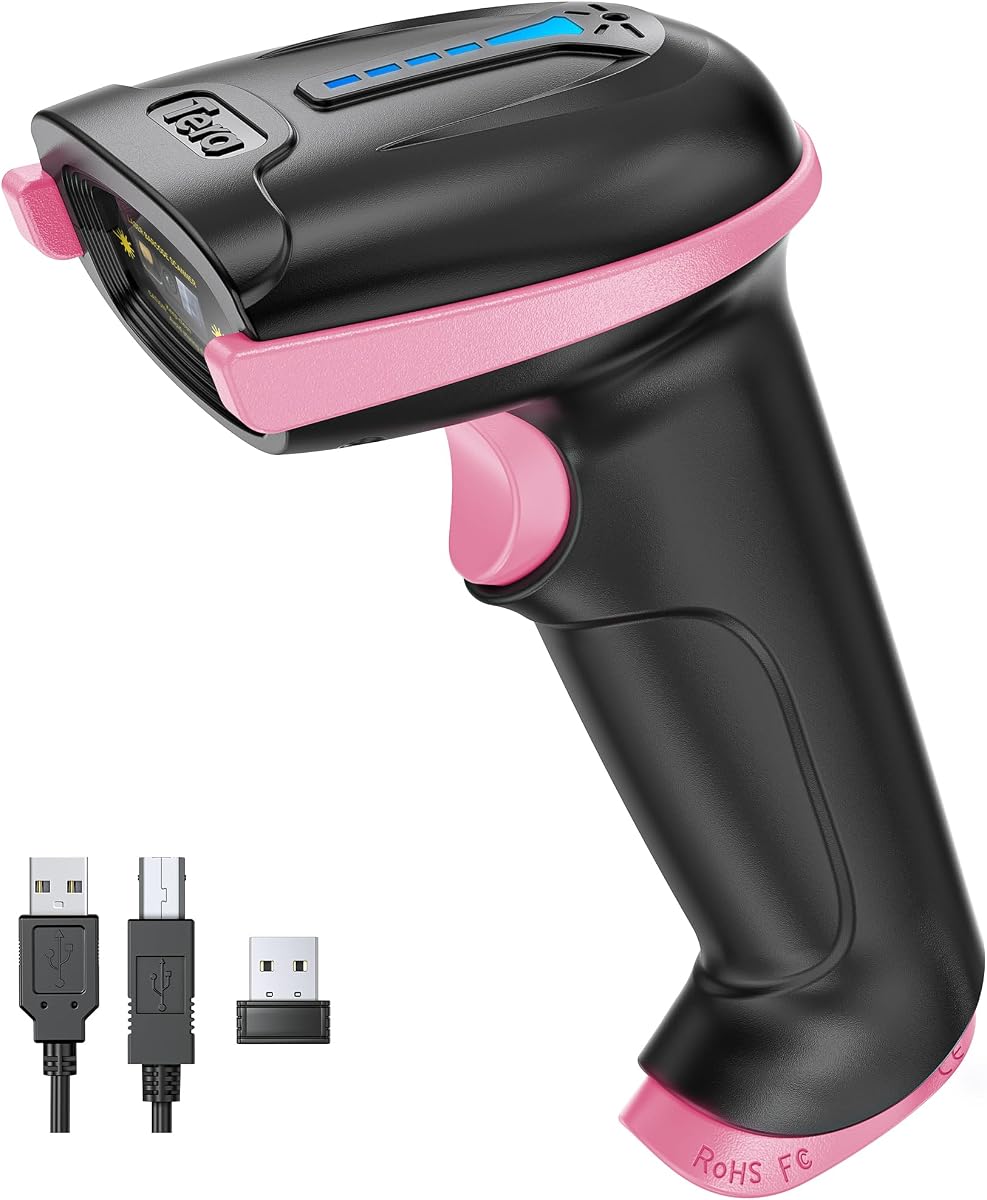
The Tera Barcode Scanner in Pink is similar to the purple version but offers a brighter aesthetic option. It features the same battery indicator light, ensuring staff can monitor power levels easily. Its IP54 rating and silicone cover provide the same durability against dust and drops. The pink color can help identify specific scanners in a pool of devices.
We may earn a commission when you buy through this link, at no additional cost to you.
Wireless performance matches other Tera models with up to 328 feet range. It supports all common 1D codes and reads damaged barcodes accurately. Plug and play setup via USB receiver or cable is straightforward. The ergonomic design ensures comfortable use during extended shifts. It is a great fit for libraries wanting a distinct tool.
While it does not support 2D codes, its 1D capabilities are robust. The pink color is a unique feature that might appeal to smaller libraries looking for something different. The only downside is limited color options, but the performance remains consistent. It is a reliable wireless option for various library tasks.
Staff who prefer a visually distinct scanner will find this model appealing. It combines style with practical features like battery monitoring and durability. If you need a reliable wireless tool with a unique look, the pink Tera 5100 is a strong consideration for your library.
The bright pink color helps identify this scanner among others. It can reduce confusion and ensure the right device is used for specific tasks.
Despite the color difference, the scanner matches the purple version in performance. It offers the same reliability and features for daily library operations.
We may earn a commission when you buy through this link, at no additional cost to you.
The WoneNice USB Laser Barcode Scanner uses laser technology for fast scanning. It delivers 200 scans per second, which speeds up circulation tasks. The visible laser is suitable for 1D codes like ISBNs. It is compatible with Windows, Mac, and Linux, and works with common software. Plug and play setup makes it easy to install.
We may earn a commission when you buy through this link, at no additional cost to you.
You can configure 300 options, including prefixes and suffixes. This flexibility helps tailor the scanner to specific library needs. The ergonomic design and straight cable provide comfort. It reads standard codes accurately and handles typical wear. This scanner is well-suited for fixed workstations where speed is key.
The laser does not read 2D codes or screen barcodes. If your library uses QR codes or digital displays, this limits its use. The wired connection also restricts mobility. However, for traditional 1D scanning at a desk, its speed and reliability are excellent. It is a classic choice for basic needs.
Libraries with standard barcode systems will find this scanner efficient. It balances speed and ease of use well. If you need a fast, reliable scanner for a fixed checkout desk, the WoneNice laser scanner is a dependable option that supports high-volume processing effectively.
The laser technology enables 200 scans per second. This speed is beneficial for busy libraries needing quick processing at the circulation desk.
With 300 configurable options, you can customize how data is output. This allows the scanner to fit specific software workflows easily.
We may earn a commission when you buy through this link, at no additional cost to you.
The Symcode Wireless Barcode Scanner is designed for environments with multiple users. It supports one-to-many network mode, allowing several scanners to connect to one receiver. This is useful for teams working simultaneously. The 2.4G wireless offers up to 100m indoor range. It also stores up to 100,000 barcodes offline for later upload.
We may earn a commission when you buy through this link, at no additional cost to you.
It comes with a Mini USB receiver and cable for flexibility. The battery lasts over a week with continuous scanning. The laser technology ensures fast 1D reading. Configuration is simple with automatic pairing. The scanner is not compatible with some POS systems, so check your software before buying.
While it does not support 2D codes, its 1D performance is reliable. The offline storage is a major benefit for areas with poor connectivity. The network mode makes it efficient for group tasks. If you need a scanner that can scale to multiple users, Symcode offers a practical solution.
Libraries with teams doing inventory or checks simultaneously will appreciate this model. The network mode and offline storage add versatility. If you need a wireless tool for multi-user scenarios, the Symcode scanner is a strong choice for collaborative library work.
The one-to-many mode allows multiple scanners to connect to one receiver. This supports team workflows and improves efficiency during busy times.
The scanner stores up to 100,000 codes offline. This ensures data is not lost if you move out of range, allowing later upload.
We may earn a commission when you buy through this link, at no additional cost to you.
The Eyoyo Portable Mini 1D Bluetooth Barcode Scanner in Pink combines style with function. It is lightweight and offers 3-in-1 connections for flexibility. The scanner reads all common 1D codes and handles damaged barcodes well. It connects to most devices and supports Windows, Mac, and Linux. The pink color makes it stand out.
We may earn a commission when you buy through this link, at no additional cost to you.
It comes with a 650mAh battery that supports hours of use. The vibration and sound settings allow for customizable feedback. You can adjust configurations easily using the manual barcodes. This scanner is designed for portability and ease of use in various environments. It is perfect for staff on the move.
While it does not support 2D codes, it is efficient for 1D tasks. The lack of a screen is a trade-off for size. However, the connection flexibility and battery life are strong points. If you want a portable scanner with a unique look, this model is appealing.
Small libraries or those needing mobile scanning will find this useful. It is lightweight and easy to carry around shelves. If you need a portable tool with color appeal, the Eyoyo Pink Mini is a practical choice for library staff.
The pink design adds a pleasant aesthetic to library tools. It is lightweight and easy to carry for mobile tasks around the library.
With 2.4G, Bluetooth, and USB modes, you can switch connections based on need. This versatility makes it adaptable to different devices.
We may earn a commission when you buy through this link, at no additional cost to you.
The Barcode Scanner with Stand offers a unique hands-free solution. It includes an adjustable stand for positioning the scanner at the right angle. The auto-sensing mode allows for hands-free operation, which is useful for busy desks. It supports both 1D and 2D QR codes, adding versatility. This is helpful for libraries using QR tags.
We may earn a commission when you buy through this link, at no additional cost to you.
It connects via USB and is compatible with many operating systems. The scanner is easy to set up and ready to work immediately. You can customize settings like prefixes and keyboard keys. The stand helps maintain a tidy desk and reduces cable clutter. It is a good choice for fixed workstations.
The scanner does not have a wireless battery, but the stand compensates by freeing up hands. The 2D support is a plus for modern needs. The auto-sensing feature speeds up scanning. If you want a scanner that works in a stand, this model is practical.
Libraries needing a hands-free setup will appreciate the stand feature. It helps streamline circulation tasks. If you want a versatile tool with 2D support and a stand, this scanner is a solid option for your library desk.
The adjustable stand lets you position the scanner for optimal scanning. This allows hands-free operation during busy checkout times.
It supports 2D QR codes in addition to 1D. This versatility helps libraries manage both traditional and modern barcodes.
We may earn a commission when you buy through this link, at no additional cost to you.
Selecting the right barcode scanner depends on your library's specific needs. Factors like connectivity, scanning technology, battery life, and durability all play a role. This guide helps you understand what to look for.
Consider whether you need wireless or wired connectivity. Wireless offers mobility for shelf audits, while wired ensures stable performance at checkout desks. Bluetooth, 2.4G, and USB are common options. Choose based on your workflow needs.
Decide between wireless and wired based on your daily tasks.
CCD sensors read damaged or screen barcodes well, while lasers excel at speed for 1D codes. Ensure the scanner supports ISBNs and other library formats. This affects accuracy with worn book spines.
Match the sensor type to your most frequent scanning scenarios.
Look for a battery that lasts through shifts without frequent charging. Models with 2000mAh or higher are ideal for high-volume use. Battery indicators help manage power, reducing unexpected downtime.
Prioritize battery capacity for continuous operation.
Libraries need scanners that withstand drops and dust. IP54 rating and shockproof designs ensure longevity. Check if the scanner has a protective cover for added resilience against wear and tear.
Choose a durable build to handle daily library use.
Ensure the scanner works with your library management system. Check for driverless plug-and-play support. Verify compatibility with Windows, Mac, and Linux systems before buying to avoid setup issues.
Confirm compatibility with your existing software to ensure smooth integration.
Decide if you need 1D only or both 1D and 2D support. Most libraries use 1D ISBNs, but 2D QR codes are becoming common. Choose a scanner that matches your barcode types.
Select a scanner that supports all your required barcode formats.
A comfortable grip reduces hand fatigue during long shifts. Look for ergonomic designs with soft triggers. Lightweight options are better for mobile scanning tasks around the library.
Opt for ergonomic designs to ensure user comfort.
Programmable scanners let you customize prefixes or suffixes. This helps format output for your software. Quiet operation modes are crucial for study areas. Check if these features are available.
Look for customization features that fit your workflow needs.
To begin, connect the scanner to your computer or device via the recommended method. For wired scanners, plug into a USB port. For wireless models, insert the USB receiver or enable Bluetooth pairing. Ensure the scanner is powered on and set to the correct connection mode.
During use, point the scanner at the barcode with the laser beam aligned. Pull the trigger or place the item in auto-sensing mode if supported. Listen for the beep or feel for vibration to confirm a successful scan. If scans fail, clean the lens and adjust the angle.
For maintenance, store the scanner in a protective case when not in use. Keep it away from moisture and extreme temperatures. Charge the battery fully before storage. Regularly update firmware if available to maintain optimal performance.
For ISBN barcodes, a 1D scanner with CCD or laser technology is best. CCD sensors handle damaged or screen codes better, while lasers offer speed. Most models in this guide support ISBNs effectively. Choose based on your budget and mobility needs.
Wireless scanners offer mobility for shelf auditing and mobile checks. If you only check out at a fixed desk, a wired model works fine. Wireless is ideal if staff move around the library frequently. Consider your workflow before deciding.
Yes, many models like CCD scanners read damaged barcodes well. They handle worn, smudged, or reflective codes better than standard lasers. For old library materials, a CCD scanner is preferable to ensure accurate reading of degraded labels.
Battery life varies by model, ranging from 8 hours to 20 days standby. High-capacity batteries (2000mAh+) support continuous scanning for long shifts. Check the specific specs for your chosen model to match your daily usage requirements effectively.
Most models in this guide are compatible with Mac OS. Look for plug-and-play support to avoid driver issues. Ensure your library software works with Mac systems too. Compatibility is typically listed in the product specifications on the retailer site.
Only scanners with 2D support can read QR codes. Most models in this guide focus on 1D ISBNs. If your library uses QR tags, choose a 2D-capable scanner like the Tera Pro Version. Verify code support before purchasing to avoid limitations.
Most offer plug-and-play functionality without additional software. Just connect the scanner, and it acts as a keyboard input. This simplifies setup. Check specific model notes for any driver requirements for specialized configurations or POS compatibility.
Many models allow you to mute the buzzer or use vibration mode. Check the configuration manual to disable sounds. Quiet operation is vital for libraries to maintain a peaceful environment for readers and staff alike.
We reviewed ten barcode scanners suitable for library use in November 2026. The NETUM Bluetooth Scanner stands out as the best overall for its battery life and quiet operation. The NetumScan USB is the top budget pick, while the Tera Pro Version offers premium features.
When choosing, prioritize connectivity, durability, and battery life based on your specific workflow. If you need mobility, look for wireless models with long-range capabilities. For fixed desks, wired options may save costs. Match the scanner to your most common tasks.
Prices and availability may change over time. Check the latest offers on the provided links before purchasing. With the right tool, your library can streamline circulation and inventory processes efficiently. Thank you for reading our guide on library barcode scanners.