
X9 Large Print Backlit Computer Keyboard
4.5Editor score
Full size 107 key layout
Seven color backlight options
Plug and play USB connection
This guide compares the top backlit illuminated keyboards for visibility and comfort, reviewing ten wired and wireless models with LED lighting features.
Finding a keyboard that lights up can transform your typing experience. Whether you work late at night or have trouble seeing small keys, a backlit illuminated keyboard offers essential visibility and comfort for daily use.
We evaluated ten real products based on lighting quality, key size, durability, and connectivity. Each model was assessed for its ability to provide clear visibility in low light while maintaining a comfortable typing feel for extended sessions.
Every pick includes detailed specifications and user-focused insights to help you decide. Note that availability and pricing may change over time, so verify current details before making your final purchase decision online.
4.5Editor score

4.9Editor score

4.1Editor score
The following table provides a quick side-by-side comparison of all ten models evaluated in this guide. Use it to identify key differences in lighting features, connectivity, and ergonomic design at a glance.





The TECURS Large Print Backlit Keyboard stands out as our top choice for those seeking clarity and comfort. It combines oversized fonts with a versatile lighting system to ensure you can type confidently in any environment.
We may earn a commission when you buy through this link, at no additional cost to you.
Its four times larger print makes characters instantly recognizable. The seven adjustable brightness levels let you tune the light to your surroundings while the silent membrane switch minimizes noise during typing sessions.
While it lacks wireless options, the Type C and USB combo ensures broad compatibility across modern and older devices. The spill resistant design adds peace of mind for daily office or home use.
If you prioritize visibility and quiet operation, this keyboard delivers exceptional value. It is a practical solution for seniors students or anyone who struggles with standard key sizes.
The oversized lettering and bright backlight work together to eliminate eye strain during long typing sessions.
Soft key travel and low collapse action create a quiet typing experience that respects shared workspaces.
We may earn a commission when you buy through this link, at no additional cost to you.
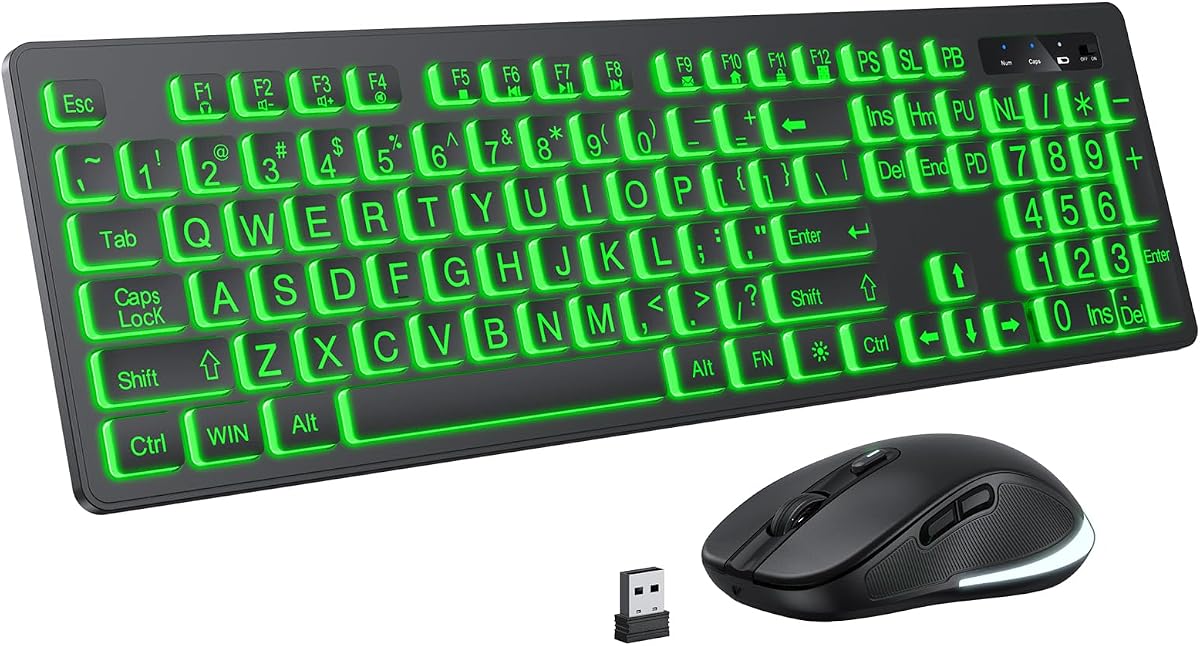
The X9 Large Print Backlit Computer Keyboard offers excellent value for budget conscious buyers who need visibility. Its oversized keys and colorful lighting make it a standout choice for late night typing.
We may earn a commission when you buy through this link, at no additional cost to you.
You can cycle through seven different LED colors to match your desk style. The full size layout ensures you have access to all standard keys including a dedicated number pad for data entry.
Although it does not offer wireless freedom, the reliable USB connection ensures stable performance without battery worries. The sturdy construction suggests it will withstand regular daily use effectively.
This model is ideal for users who want a straightforward affordable solution. It combines essential lighting features with large print for a comfortable typing experience.
Choose from seven LED colors to personalize your desk setup while maintaining clear key visibility.
The USB wired design eliminates the need for charging and ensures consistent performance.
We may earn a commission when you buy through this link, at no additional cost to you.
The HP 400 Backlit Wired Keyboard brings premium features to a professional workspace. Its slim profile and sanitizable surface make it perfect for hybrid work environments and travel.
We may earn a commission when you buy through this link, at no additional cost to you.
With twelve programmable keys you can customize shortcuts to speed up common tasks. The warm white LED light provides comfortable illumination that minimizes eye fatigue during long hours.
While it lacks colorful LEDs the focus is on efficiency and hygiene. The spill resistant and sanitizable coating ensures the keyboard stays clean and functional in shared offices.
This model suits professionals who value build quality and customization. It is a solid investment for those who need a reliable tool for daily productivity.
Twelve programmable keys let you create shortcuts for your most used applications.
The sanitizable surface makes cleaning easy and essential in shared or public workspaces.
We may earn a commission when you buy through this link, at no additional cost to you.
The Arteck Backlit USB Wired Full Size Keyboard delivers a sleek typing experience for compact desks. Its low profile design is perfect for users who prefer a minimalist setup.
We may earn a commission when you buy through this link, at no additional cost to you.
The scissor X structure provides stable and quiet keystrokes that feel responsive. Full size keys ensure you do not miss any functionality despite the thin chassis.
Media hotkeys add convenience for controlling music and videos without leaving your keyboard. However the lighting is fixed which limits flexibility in varying light conditions.
This keyboard is a great fit for light users who value aesthetics. It balances thin design with essential full size functionality effectively.
The ultra thin profile reduces clutter and fits easily into laptop bags.
Scissor key structure ensures stable and quiet typing for quiet environments.
We may earn a commission when you buy through this link, at no additional cost to you.
The KOPJIPPOM Large Print Backlit Keyboard focuses on readability for users who struggle with small text. Its bold fonts and white lighting make keys easy to distinguish.
We may earn a commission when you buy through this link, at no additional cost to you.
Four times larger font size reduces errors and boosts confidence during typing. The white LED offers a clean and bright contrast that is easy on the eyes.
Durability is supported by a spill proof design that protects against accidental liquid damage. Adjustable feet allow you to set a comfortable typing angle for long sessions.
This keyboard is well suited for seniors and libraries. It provides clear visibility and robust protection for daily shared use.
White backlighting and large font ensure keys are clear even in very low light.
Spill proof design protects the keyboard from common accidents.
We may earn a commission when you buy through this link, at no additional cost to you.
The TECKNET Wired Keyboard brings dynamic RGB lighting to a silent typing platform. It is perfect for those who want style without noise in their workspace.
We may earn a commission when you buy through this link, at no additional cost to you.
You can choose from seven colors and two lighting modes to suit your mood. The silent membrane keys ensure your typing remains quiet even during late night sessions.
FN multimedia shortcuts provide quick access to volume and media functions. The spill resistant film adds a layer of protection against accidental spills.
This keyboard suits users who value aesthetics and quiet operation. It offers a balanced mix of features for daily use and gaming.
Seven colors and breathing or static modes let you personalize your desk aesthetic.
Low profile membrane keys reduce noise for a quiet and focused workspace.
We may earn a commission when you buy through this link, at no additional cost to you.
The Large Print Wireless Keyboard and Mouse combo offers freedom of movement with enhanced visibility. It is a great choice for users who want to declutter their desk.
We may earn a commission when you buy through this link, at no additional cost to you.
Oversized letters make typing easy and the seven color backlight adds visual appeal. The rechargeable battery provides up to two thousand hours of standby time.
Both devices share a single USB receiver for simplified setup. The silent typing and responsive connection ensure a smooth and comfortable user experience.
This combo is ideal for those who prefer wireless setups. It combines convenience with accessibility features for all users.
Wireless connection removes cables for a cleaner desk setup.
Rechargeable battery ensures long use between charges.
We may earn a commission when you buy through this link, at no additional cost to you.
The Perixx PERIBOARD-317 is built for durability and clear visibility. Its large print and reliable backlight make it a solid choice for daily office tasks.
We may earn a commission when you buy through this link, at no additional cost to you.
With a ten million keystroke rating the keyboard is built to last. The low profile keys reduce hand strain during extended use sessions.
White LED backlight provides even illumination for night typing. However note that scroll lock is disabled when the backlight is on.
This model is well suited for office and library settings. It offers practical features for users needing clear and reliable typing tools.
Durable switches rated for ten million keystrokes ensure long term reliability.
Slim profile helps reduce desk clutter while maintaining full size functionality.
We may earn a commission when you buy through this link, at no additional cost to you.
The Large Print Backlit Keyboard focuses on comfort and protection for users with visual needs. It includes a wrist rest and a protective cover for added utility.
We may earn a commission when you buy through this link, at no additional cost to you.
Oversized fonts ensure you can find keys easily. The white backlight offers clear contrast for low light conditions.
A foldable wrist rest supports your hands during long sessions. The included cover prevents dust and liquid from entering key gaps.
This keyboard is ideal for seniors and low vision users. It combines comfort features with visibility aids for a practical experience.
Foldable wrist rest supports your hands to reduce fatigue.
Keyboard cover helps keep dust and spills away from internal components.
We may earn a commission when you buy through this link, at no additional cost to you.
The Large Print Backlit Computer Keyboard combines ergonomic support with clear visibility. Its built in wrist rest and angle aim to reduce strain.
We may earn a commission when you buy through this link, at no additional cost to you.
You can choose from seven colors to match your preference. Oversized letters ensure you can type without guessing which key is which.
Soft touch keys keep noise down for shared spaces. However the fixed angle might not fit every typing style perfectly.
This model is great for users needing ergonomic comfort. It balances accessibility with customizable lighting for a versatile setup.
Seven degree typing angle and wrist rest help reduce hand strain.
Oversized keys and seven color backlight ensure keys are always clear.
We may earn a commission when you buy through this link, at no additional cost to you.
Choosing the right backlit illuminated keyboard depends on your specific needs for visibility, comfort, and connectivity. Consider these factors before making your decision.
Large print keys help users with low vision or seniors see characters more easily. Look for fonts that are at least four times larger than standard keys for maximum clarity.
Prioritize models with oversized letters if readability is your top concern.
Backlights can range from single color white to multi color RGB. Adjustable brightness levels let you control light intensity to avoid glare in dark rooms.
Select a keyboard with adjustable brightness to suit your lighting environment.
Wired keyboards offer stability and eliminate battery concerns while wireless models reduce cable clutter. Consider your desk space and need for mobility when choosing.
Match the connectivity to your workspace setup for optimal convenience.
Silent membrane keys are ideal for shared environments or late night typing. Clicky mechanical keys may disturb others in quiet offices.
Choose silent switches if you work in a quiet or shared space.
Wrist rests and adjustable feet help maintain a comfortable typing posture over time. Proper ergonomics can reduce hand fatigue during long work sessions.
Look for built in support to protect your wrists during extended use.
Spill resistant designs and covered membranes protect against accidental liquid damage. High quality key materials ensure long term performance.
Opt for spill resistant models if you drink at your desk regularly.
Ensure the keyboard works with your operating system such as Windows or Mac. Some multimedia keys may have limited functionality on macOS.
Check system compatibility before purchasing to avoid feature limitations.
Programmable keys and media shortcuts can enhance productivity by allowing quick access to common commands. Wrist rests and covers add convenience and protection.
Consider extra features that align with your daily workflow and needs.
To use your keyboard start by connecting the USB cable or wireless receiver to your computer. The device should be recognized automatically without needing driver installation.
Adjust the backlight by pressing the designated lighting button or key combination. Cycle through brightness and color options to find the most comfortable setting for your eyes.
Clean the keyboard regularly by gently wiping the keys with a soft dry cloth. Avoid using liquids directly on the surface to prevent internal damage to the lighting system.
Yes backlit keyboards are designed to illuminate keys so you can type in total darkness. The LED lights make key characters visible without needing external light sources.
Most backlit keyboards have a lifespan of millions of keystrokes. Quality LED components usually last for several years of daily use before showing wear.
Many models offer adjustable brightness levels via keyboard shortcuts. Check the product specifications to confirm if the keyboard supports dimming or brightening options.
Wireless backlit keyboards provide stable connections using modern wireless technology. Battery life may vary but rechargeable models often last for weeks between charges.
Large print keys make characters easier to distinguish which helps users with vision challenges. They reduce eye strain and improve typing accuracy significantly.
Use a soft brush or compressed air to remove dust between keys. Wipe the surface with a slightly damp cloth and ensure the device is powered off.
Most keyboards work with Mac but multimedia keys may have limited function. Always verify system compatibility before purchasing if you use macOS.
Some models include wrist rests while others do not. Check the product details to see if a wrist rest is part of the package.
The ten models reviewed provide a wide range of options for visibility comfort and style. From budget friendly large print options to premium programmable keyboards there is a choice for everyone.
Consider your primary needs such as wireless freedom ergonomic support or extra lighting features when narrowing down your selection. The right keyboard should make typing easier and more comfortable.
Prices and availability can change so please verify current details before making your purchase decision online.