
4K AI-Powered Conference Webcam with Microphones
4.1Editor score
120 degree wide angle lens
AI auto framing for groups
Physical lens cover for privacy
This expert guide compares the top auto tracking conference camera systems for 2026 to help you find the best video conferencing solution for your meeting room
Choosing the right auto tracking conference camera can transform how your team collaborates remotely. These intelligent devices follow speakers automatically ensuring remote participants always see the active presenter clearly without manual adjustments or complex setups.
We evaluated ten leading models based on video quality tracking accuracy audio performance and ease of use. Each product was analyzed for its ability to handle different room sizes meeting types and connectivity requirements to ensure reliable performance in professional settings.
Every pick includes detailed specs pros and cons to help you decide quickly. Prices and availability change frequently so check current listings before purchasing. Our goal is to simplify your search for a camera system that meets your specific conferencing demands.
4.1Editor score

4.8Editor score

4.6Editor score
The following comparison table summarizes key specifications across all ten models to help you identify the right fit for your space and budget at a glance.




This all-in-one system delivers exceptional video and audio quality for medium sized meeting rooms. It holds a strong rating from users who appreciate its ability to keep speakers centered without manual intervention.
We may earn a commission when you buy through this link, at no additional cost to you.
The camera uses advanced AI algorithms to detect faces and bodies ensuring the active presenter stays in focus even when moving across the room. The 3x optical zoom allows for detailed closeups during presentations while the 93 degree wide angle captures group discussions effectively. The included Bluetooth speakerphone provides clear audio pickup up to 16.4 feet which reduces the need for extra microphones.
While the system is powerful it requires a dedicated power outlet for the camera and the speakerphone battery may not last through extended all day sessions without recharging. The setup is straightforward but users should ensure their computer supports USB 3.0 for optimal 4K performance via USB.
This kit is ideal for organizations needing a complete conferencing solution quickly without technical complexity. If you prioritize reliable tracking and high resolution video for daily meetings this system offers excellent value and performance.
The improved tracking algorithm handles both facial and humanoid recognition to maintain a perfect view of the subject throughout movement.
Omnidirectional microphones in the speakerphone reduce noise and pick up voices clearly across the room for balanced audio.
We may earn a commission when you buy through this link, at no additional cost to you.
Designed for small conference spaces this webcam offers solid 4K performance at a competitive price. It is particularly suitable for teams needing quick deployment without IT involvement.
We may earn a commission when you buy through this link, at no additional cost to you.
The 120 degree wide angle lens ensures everyone in a small room fits in the frame without squeezing. AI auto framing detects attendees and adjusts the view automatically which is helpful for group meetings. Dual AI noise canceling microphones help clarify voices up to 5 meters away.
Audio performance is functional but lacks the depth of dedicated speakerphone units. Zoom zoom is limited which may require physical repositioning for closeups. The physical lens cover adds a valuable layer of privacy for shared office environments.
This model is best for small offices or home offices where budget is a priority. It delivers clear video and reliable connectivity making it a practical choice for standard video calls.
AI auto framing detects and frames all attendees making it ideal for team meetings and boardroom discussions.
Includes a physical lens cover for secure use in meeting rooms and shared office environments.
We may earn a commission when you buy through this link, at no additional cost to you.
This system prioritizes smooth motion with 60fps video output which is excellent for dynamic presentations. It combines a PTZ camera and Bluetooth speakerphone for a seamless conferencing experience.
We may earn a commission when you buy through this link, at no additional cost to you.
The 60fps refresh rate reduces motion blur making moving speakers appear natural. The AI tracks subjects precisely ensuring they remain centered during discussions. The full duplex microphone array with echo cancellation delivers clear sound within a 16.4 foot range.
While it supports 1080P instead of 4K the high frame rate compensates for fluidity. Note that the camera is wired while the speakerphone is wireless which may require cable management planning. The 2400mAh battery supports 6 to 8 hours of continuous use.
Choose this system if smooth video playback is critical for your meetings. It is well suited for training sessions and educational contexts where clear motion matters more than ultra high resolution.
Adopt 1/2.8 HD CMOS with 2.38 MP enhanced image sensor supports 60fps video for brilliantly smooth motion.
The conference microphone connects via USB Bluetooth or wireless dongle offering versatile setup options.
We may earn a commission when you buy through this link, at no additional cost to you.
This model introduces gesture control allowing you to start or stop tracking with hand signals. It adds an interactive layer to conferencing setups especially useful in hands free scenarios.
We may earn a commission when you buy through this link, at no additional cost to you.
The AI tracking works with both face and body recognition. Gestures like OK or V activate tracking modes while remote controls allow preset positions. The 5x digital zoom lets you focus on details though optical zoom would be sharper. The speakerphone offers full duplex audio and built in battery.
Gesture controls may take time to master and digital zoom can reduce image quality when magnified heavily. The 120 degree FOV is excellent for capturing the whole room without gaps.
Ideal for presenters who want intuitive control without touching devices. It is a strong choice for training environments where movement and interaction are frequent.
Gestures enable AI auto-tracking and zoom functions allowing quick changes without touching the camera or remote.
The MENU on the remote allows you to set PTZ camera parameters and control pan tilt and zoom easily.
We may earn a commission when you buy through this link, at no additional cost to you.
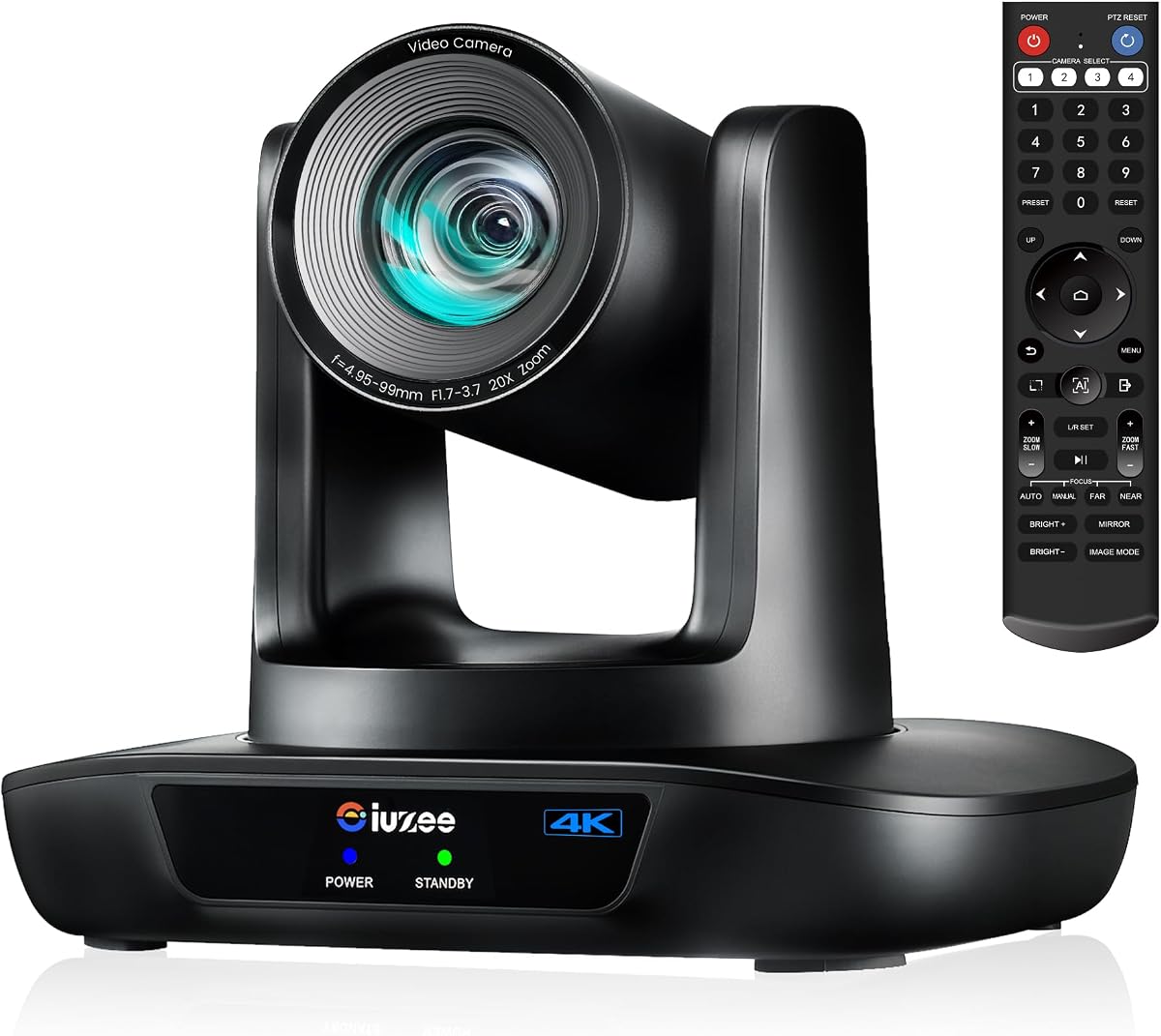
With 20x optical zoom this system excels in large venues like churches or auditoriums. It brings distant speakers close without loss of clarity while tracking them automatically.
We may earn a commission when you buy through this link, at no additional cost to you.
The AI follows pastors and presenters smoothly across the room. PoE support simplifies wiring by delivering power and data over one cable. The Bluetooth speakerphone ensures clear audio pickup up to 16.4 feet away.
The camera size is substantial and may require stable mounting. Price is higher than basic models but justified by zoom and PoE capabilities.
Choose this for large rooms where distance is a challenge. It ensures every participant sees and hears clearly regardless of seating position.
Easily capture clear close-ups from the back of large churches or conference rooms with 20x optical zoom.
LAN PoE support allows simple single-cable power and data transmission for cleaner installation.
We may earn a commission when you buy through this link, at no additional cost to you.
Designed for broadcast this camera offers simultaneous USB HDMI and LAN outputs. It supports streaming protocols like RTMP making it perfect for live events.
We may earn a commission when you buy through this link, at no additional cost to you.
The 20x zoom and AI tracking provide precise framing. Web browser control allows remote configuration. Noise reduction technologies enhance clarity in varied lighting.
Note that there is no built-in microphone so an external mic is necessary for audio. Setup via browser may require network knowledge.
Ideal for churches and events needing professional streaming without external switchers. The versatility in outputs makes it a powerful tool for producers.
Support for RTMP RTSP and SRT enables smooth performance even in low-bandwidth environments.
Continuous tracking function allows precise tracking even when the subject is temporarily obscured.
We may earn a commission when you buy through this link, at no additional cost to you.
This camera is built for broadcast professionals needing NDI integration without extra costs. It delivers 4K video via HDMI and USB with NDI streaming up to 1080P.
We may earn a commission when you buy through this link, at no additional cost to you.
The official NDI license simplifies setup with software like OBS and vMix. SDI output allows long cable runs without signal loss. AI tracking resumes when a face reappears after obstruction.
It is expensive and may be overkill for basic meetings. However for multi-camera productions it provides unparalleled flexibility.
Choose this if you run live streams or complex productions. It elevates your setup to professional studio levels.
Enjoy plug-and-play compatibility with popular software like OBS vMix and Streamlabs for effortless live streaming.
SDI output ideal for long cable runs up to 300ft without extra hardware thanks to reliable locking connectors.
We may earn a commission when you buy through this link, at no additional cost to you.
Perfect for classrooms this camera ensures clear views of instructors from any seat. The 20x zoom captures details on whiteboards easily.
We may earn a commission when you buy through this link, at no additional cost to you.
AI tracking keeps the teacher in focus automatically. Multiple presets allow quick views of groups or single speakers. USB HDMI LAN PoE options fit varied IT infrastructures.
You must add external microphones since none are built in. Resolution may need manual adjustment on some monitors.
Select this for schools and training centers needing reliable remote learning tools. It delivers stable performance for daily educational use.
Supports multiple presets for pulpit wide view or group shots making it easy to switch views during lessons.
Connect via HDMI USB LAN or PoE with no additional drivers needed for quick setup.
We may earn a commission when you buy through this link, at no additional cost to you.
This all-in-one solution combines camera microphones and speakers for medium to large rooms. It simplifies setup by reducing external devices.
We may earn a commission when you buy through this link, at no additional cost to you.
AI auto framing keeps all participants centered. The 4-mic array reduces noise while dual speakers ensure playback clarity. 5x zoom adds flexibility for focus.
It may not fit mobile setups due to its size. External audio inputs are limited compared to modular systems.
Ideal for permanent boardrooms where simplicity is key. It ensures everyone is seen and heard without complex cabling.
Built-in Dual Speakers provide clear playback eliminating the need for external audio devices in most meeting setups.
Intelligently follows the active speaker or presenter perfect for presentations and collaborative discussions.
We may earn a commission when you buy through this link, at no additional cost to you.
This portable webcam fits laptops and desks easily. It includes audio components making it ideal for personal office use.
We may earn a commission when you buy through this link, at no additional cost to you.
Three FOV modes let you tailor the view for group or solo calls. Privacy cover protects the lens when not in use. 5x digital zoom helps focus on documents.
Speaker volume is limited for large rooms. Digital zoom may reduce image sharpness when magnified.
Choose this for personal conferencing where space is limited. It offers convenience and clarity for individual users.
FOV keys of the IR remote control can easily switch between 118 degree 100 degree and 88 degree to perfect your view.
The USB webcam with privacy cover provides security and helps to protect the lens from dirt and debris.
We may earn a commission when you buy through this link, at no additional cost to you.
Selecting the right system depends on room size, technical needs, and budget. Below are key factors to consider before purchasing.
Higher resolution like 4K ensures clear images for remote participants. Optical zoom preserves quality better than digital zoom when magnifying distant subjects.
Look for 4K 30fps or higher with optical zoom of at least 3x for professional results.
AI tracking should detect both faces and bodies for smooth movement. Modes like presenter tracking and auto framing help adapt to different meeting types.
Ensure the system supports continuous tracking and recovers quickly if the subject is briefly blocked.
Built-in microphones and speakers reduce clutter. Full duplex audio and noise cancellation prevent feedback and echo during calls.
Check pickup range matches your room size to ensure all voices are heard clearly.
USB HDMI and LAN options fit various setups. PoE support simplifies installation by using one cable for power and data.
Choose interfaces compatible with your existing conferencing hardware to avoid extra adapters.
Ensure the camera works with Zoom Teams and other tools. Plug-and-play drivers save time and reduce IT workload.
Verify OS support like Windows and macOS to avoid installation issues.
Flexible mounting options like desk or wall mounts allow better placement. Portable models are useful for hybrid teams moving between rooms.
Check if wall mounts are included or if you need to purchase them separately.
Physical lens covers protect privacy when not in use. Firmware updates keep security protocols current against potential threats.
Prioritize models with hardware privacy switches for added peace of mind.
Extended warranties and responsive support teams ensure long-term reliability. Check response times and available training resources for setup.
A reliable support network reduces downtime and helps resolve technical issues quickly.
Begin by mounting the camera at eye level facing the main seating area. Connect power and video cables to your computer or video switcher securely.
Launch your conferencing software and select the camera as the video source. Enable AI tracking features in settings if they are not automatic by default.
Regularly clean the lens with a soft cloth and ensure firmware is updated for best performance and security.
Most advanced cameras support multi-person tracking or auto framing. However some switch focus to a single active speaker. Check the specs for group framing features if multiple participants speak at once.
Yes many models offer HDMI or LAN outputs suitable for streaming to platforms like YouTube. Some include NDI or RTMP support for professional broadcast workflows.
Small to medium rooms benefit most from 4K units. Larger spaces may require higher optical zoom or additional microphones to ensure all voices are captured clearly.
Some models support direct HDMI connection to smart TVs. However tracking software and updates usually require a PC or network device to function fully.
Blurry video often results from low light or high movement speed. Adjust lighting in the room and ensure your internet bandwidth supports high resolution streams.
Most modern tracking cameras support macOS via USB. Check product details for OS version compatibility to avoid driver issues.
Our top picks highlight systems balancing performance and value for varied needs. The Editor's Choice leads with all-in-one convenience while budget and premium options cater to specific requirements.
Prioritize tracking accuracy and audio quality when selecting a model. Ensure your room size and IT setup align with the camera's capabilities for seamless meetings.
Always check current pricing and availability since deals change regularly. With the right auto tracking conference camera your remote collaboration will be clearer and more professional.