
Focusrite Scarlett Solo 4th Gen USB-C Audio Interface
4.6Editor score
Studio quality sound conversion
Air mode for vocal presence
Includes recording software suite
This guide compares the top audio interfaces with built in Dsp for musicians and creators, evaluating DSP features, sound quality, and workflow efficiency.
Audio interfaces with built in Dsp offer musicians and creators a powerful way to process sound without taxing their computer CPU. These devices allow for real-time effects and monitoring while recording, ensuring a smooth workflow for professionals and hobbyists alike.
We compared ten leading models based on their DSP capabilities, audio conversion quality, connectivity options, and included software bundles. Our analysis focuses on how each interface handles latency, offers effects processing, and integrates with modern digital audio workstations.
Each pick highlights specific strengths such as portable design, advanced preamps, or extensive plugin libraries. While pricing fluctuates based on market demand, these selections represent the most reliable options for high-quality recording and live performance needs today.
4.6Editor score
4.7Editor score

4.0Editor score
This side-by-side comparison highlights the core specifications of each interface to help you decide which model best fits your recording environment and technical requirements.




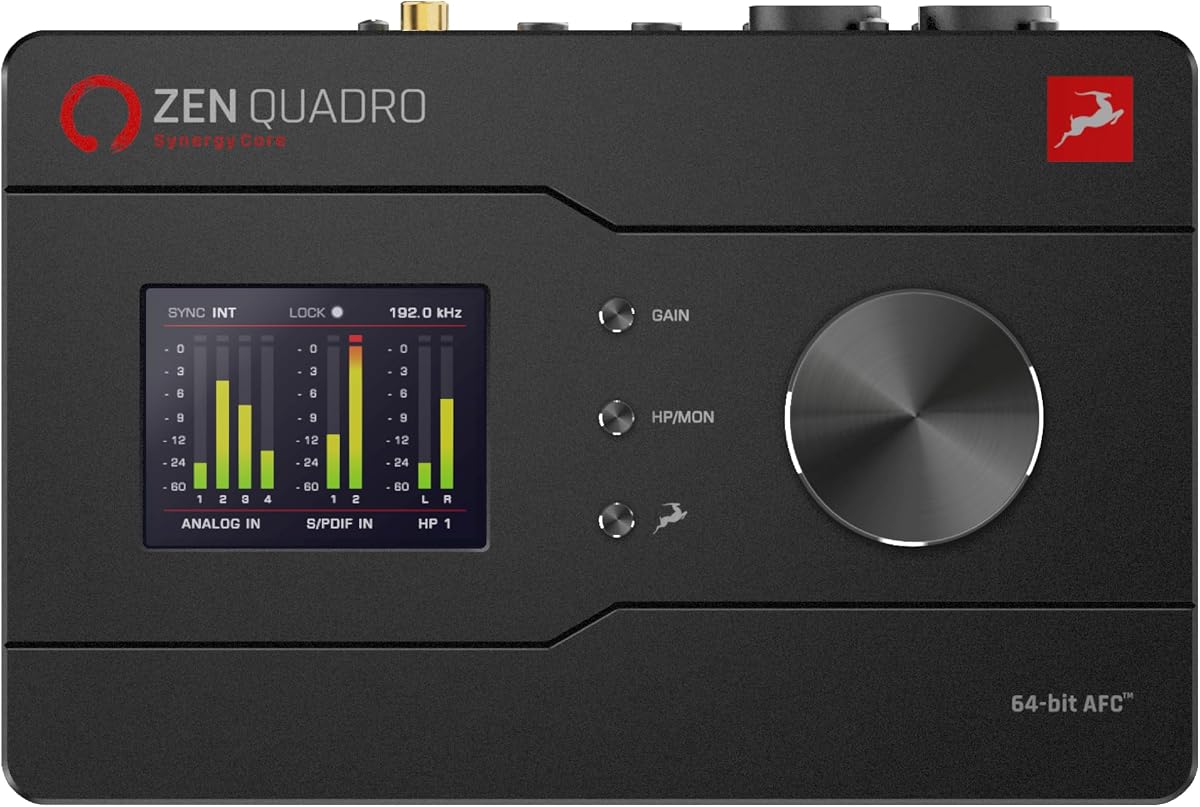
The Antelope Audio Zen Quadro stands out as a top-tier choice for users needing powerful DSP capabilities without overwhelming system resources. Its high rating reflects consistent performance in both studio recording and live monitoring scenarios.
We may earn a commission when you buy through this link, at no additional cost to you.
This interface excels with real-time Synergy Core FX that run on dedicated hardware, allowing users to process audio with compressors, EQs, and preamps without affecting host CPU load. The 130 dB dynamic range ensures pristine audio capture.
While the interface offers exceptional quality, the sheer number of options can be daunting for new users. Navigating the control software requires some time to master fully but provides deep customization once understood.
Professionals seeking a compact yet powerful solution will find this interface ideal for travel-friendly setups where audio quality cannot be compromised for size or convenience.
The dedicated DSP and FPGA hardware allow effects to run with near-zero latency, ensuring that performers hear themselves naturally during recording.
Dual USB-C ports enable connection to a computer and phone simultaneously, making it perfect for streaming and multi-device content creation workflows.
We may earn a commission when you buy through this link, at no additional cost to you.
The Focusrite Scarlett Solo 4th Gen brings big studio sound to home recording with its improved Air mode and huge dynamic range. It is highly rated for its simplicity and reliability among songwriters starting out.
We may earn a commission when you buy through this link, at no additional cost to you.
This interface uses the same converters as Focusrite's flagship units, providing professional sound quality. The Air mode adds presence and harmonic drive to vocals and guitars, making tracks stand out in the mix.
While it lacks built-in DSP effects, it compensates with a robust software bundle including Pro Tools and Ableton Live Lite. The lack of onboard processing means relying on your computer for effects processing.
Beginners and solo artists will appreciate how quickly they can plug in and start recording. The included software suite provides everything needed to start producing music immediately.
The 120dB dynamic range and flagship-level converters ensure that even home recordings maintain a professional quality and clarity.
Included plugins and DAWs offer a complete production environment without additional costs, ideal for beginners needing tools.
We may earn a commission when you buy through this link, at no additional cost to you.
The Elgato Wave XLR MK.2 is designed specifically for streamers and podcasters who need reliable DSP processing in a compact package. It offers ultra-low latency monitoring and powerful onboard effects for voice enhancement.
We may earn a commission when you buy through this link, at no additional cost to you.
Its Wave Link software unifies DSP effects and VST plugins into one chain, making it easy to tweak voice presence and compression. The touch controls provide immediate adjustments while recording or broadcasting.
While excellent for voice work, it lacks an instrument input for guitar recording. Users looking to record multiple sources might find the single channel limitation restrictive.
Creators focusing on streaming and vocals will find this interface intuitive and capable. The LED feedback system ensures levels are always visible during intense recording sessions.
The Wave Link app allows precise routing and effects management, ensuring your voice is polished and consistent across platforms.
Customizable LED lighting and touch controls make it easy to monitor levels at a glance during critical moments.
We may earn a commission when you buy through this link, at no additional cost to you.
The Universal Audio Apollo Twin X QUAD offers a massive library of UAD DSP plug-ins that emulate classic hardware gear. This makes it a favorite for producers who want analog tones with digital convenience.
We may earn a commission when you buy through this link, at no additional cost to you.
Unison preamps allow you to record through authentic emulations of famous mic preamps, changing the sound before it even hits the computer. This feature adds a layer of realism that is hard to replicate.
The high cost and requirement for Thunderbolt 3 may limit accessibility for some users. Additionally, managing a large plugin library requires organization to avoid confusion during sessions.
Producers needing a rich palette of tones will find the Quad version's four cores worth the investment. It remains a benchmark for high-fidelity audio conversion and processing.
Unison technology allows real-time emulation of classic gear, providing the saturation and character of vintage hardware.
Apollo Monitor Correction ensures accurate playback in any room, giving you confidence in your mix decisions.
We may earn a commission when you buy through this link, at no additional cost to you.
The Antelope Audio Zenith 2 combines the convenience of USB with powerful DSP features like a complete virtual guitar rig and smart vocal chains. Its high rating indicates strong performance across various content creation needs.
We may earn a commission when you buy through this link, at no additional cost to you.
You can transform your voice with professional DSP effects and monitor with dual independent headphone mixes. This feature is unique in its class and essential for collaborative recording sessions.
Although it is class-compliant for immediate use, accessing full control requires optional software which adds a step for power users. The interface is designed for simplicity but offers depth when needed.
Streamers and mobile creators will love the portability and included software bundle. It provides a complete solution for high-quality audio without a desktop workstation.
Dual independent headphone mixes allow each person in the room to hear their own balance, facilitating better collaboration.
The virtual guitar rig turns the interface into a full signal chain with amp simulations and effects for instant tones.
We may earn a commission when you buy through this link, at no additional cost to you.
The Universal Audio Apollo Twin X DUO offers the same high-end audio conversion and DSP features as the Quad but with dual cores. It supports a full library of UAD plug-ins for high-fidelity processing.
We may earn a commission when you buy through this link, at no additional cost to you.
Unison preamps enable real-time analog emulation, allowing you to record through famous gear sounds before the signal reaches your DAW. This capability is unmatched for vintage tones.
Bass management allows adding a subwoofer for better mix accuracy, a feature often overlooked. However, the reliance on Thunderbolt and higher cost might be barriers for some users.
Musicians needing powerful analog modeling will find the DUO a solid balance of features and performance. It is a strong choice for home studios focused on vocal and instrument tracking.
Authentic emulations of Neve and API preamps allow you to capture analog character during recording, not just post-production.
Apollo Monitor Correction and bass management ensure your studio monitors provide accurate sound in any environment.
We may earn a commission when you buy through this link, at no additional cost to you.
The Solid State Logic 2 MKII Plus brings the legendary SSL sound to home studios. It features high-quality conversion and analog enhancement that adds warmth and character to recordings.
We may earn a commission when you buy through this link, at no additional cost to you.
Its Legacy 4K analog enhancement adds harmonic richness, giving tracks a professional edge. The interface is bus-powered, making it highly portable without needing external power sources.
While it does not have dedicated DSP, it delivers excellent sound quality for those relying on software plugins. The lack of advanced DSP processing means higher CPU usage for complex sessions.
Producers looking for vintage SSL tones in a compact package will love this unit. It provides the sonic signature of a major console at a fraction of the cost and size.
Legacy 4K analog enhancement adds harmonic richness and detail to your recordings, emulating the famous console sound.
The included SSL Production Pack software offers essential tools to start recording immediately with professional results.
We may earn a commission when you buy through this link, at no additional cost to you.
The Yamaha UR22C offers DSP-powered monitoring with built-in effects like REV-X reverb and channel strip. This allows for real-time processing without needing software plugins during recording.
We may earn a commission when you buy through this link, at no additional cost to you.
Its rugged full-metal housing ensures durability for mobile use, while the Class-A preamps provide clean gain for various microphones. Cross-platform compatibility makes it easy to use across different operating systems.
While the DSP features are strong for this price range, the interface is limited to two inputs. Users needing more channels might need to upgrade to a larger model eventually.
Musicians wanting built-in effects for direct monitoring will find this a great value. The included software bundle supports full production workflows on multiple platforms.
DSP-powered monitoring ensures you hear your voice with effects instantly, crucial for maintaining pitch and timing.
A rugged metal housing protects the unit from bumps and drops, making it suitable for frequent travel.
We may earn a commission when you buy through this link, at no additional cost to you.
The MOTU UltraLite-mk5 offers up to 40 simultaneous audio channels and extensive connectivity. It is designed for complex sessions where multiple instruments and sources need to be recorded.
We may earn a commission when you buy through this link, at no additional cost to you.
DSP-driven monitor mixing allows creating unique mixes for each output pair without affecting the main recording. The high-resolution OLED display provides detailed metering for all inputs and outputs.
While powerful, the interface is larger and more expensive than portable options. It requires careful cable management for its full connectivity potential.
Live recording and multi-track producers will find this interface a robust tool. Its flexibility makes it suitable for small studios needing expandability.
DSP-driven monitoring allows six separate mix busses, ensuring each musician hears exactly what they need.
The OLED display lets you view signal activity for all I/O at a glance, simplifying troubleshooting.
We may earn a commission when you buy through this link, at no additional cost to you.
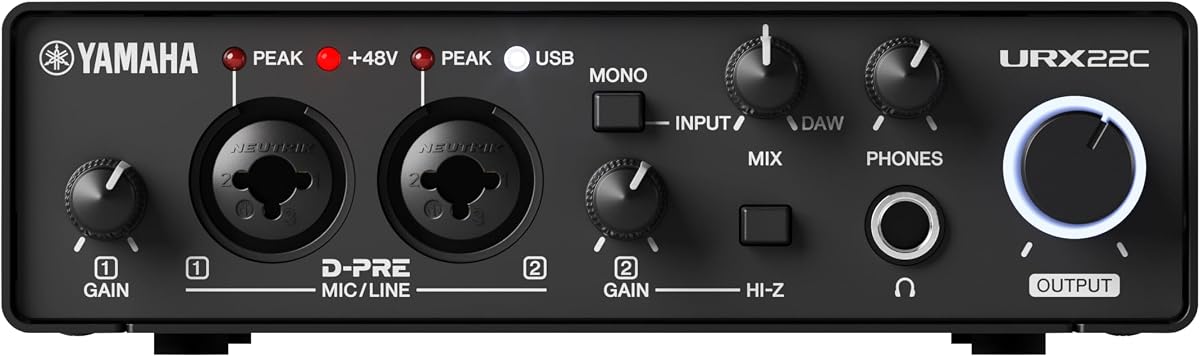
The Yamaha URX22 distinguishes itself with a large touchscreen and dual USB-C ports for versatile connectivity. It offers built-in DSP for professional sound and latency-free monitoring.
We may earn a commission when you buy through this link, at no additional cost to you.
The touchscreen allows for intuitive control of levels and parameters, simplifying the mixing process. This visual interface is particularly helpful for adjusting settings without navigating complex software menus.
While the touchscreen is innovative, it adds complexity to the interface that may require a learning period. Users must ensure drivers are correctly installed to utilize all features.
Producers seeking an intuitive visual workflow will appreciate the unique control system. It combines modern connectivity with robust audio quality for versatile recording.
The touchscreen display offers direct access to controls, making level adjustments and routing visually straightforward.
Dual USB-C ports support multi-stream drivers, allowing audio to be routed to multiple devices simultaneously.
We may earn a commission when you buy through this link, at no additional cost to you.
Choosing an audio interface requires evaluating its DSP capabilities, conversion quality, and input options to match your specific recording environment.
Look for interfaces that offer dedicated DSP hardware to handle effects without taxing your computer CPU. This ensures low latency monitoring which is essential for real-time recording.
A interface with robust DSP allows you to apply EQ, reverb, and compression instantly while tracking.
High dynamic range and sample rates like 192kHz ensure that your recordings capture the full detail of your sound source.
Always check the specifications for AD/DA converters to ensure they meet professional standards.
Consider how many inputs you need for microphones and instruments. Some interfaces offer only one channel while others support multiple inputs.
Additional outputs for studio monitors or separate headphone mixes can be vital for professional setups.
Clean gain without noise is crucial for capturing vocals and instruments clearly. Preamps with variable gain control offer flexibility for different microphone types.
High-quality preamps ensure your recordings start with a strong signal path.
Many interfaces come bundled with DAW software and effects plugins that add value to the purchase.
Check what is included to see if you need to buy additional tools for your workflow.
If you travel for sessions, look for bus-powered models that do not require external power adapters.
Compact designs reduce weight and take up less space in your gear bag.
USB-C and Thunderbolt interfaces offer high bandwidth and low latency compared to older standards.
Ensure your computer has the necessary ports to connect the interface efficiently.
Determine a budget that balances features with cost. Higher-end models offer more channels and processing power.
Invest in a model that grows with your skills rather than one you will outgrow quickly.
Always connect your audio interface to a power source or USB port before turning it on. Proper power sequencing prevents audio glitches and potential hardware damage.
Use high-quality XLR and TRS cables to connect your microphones and instruments. Ensure connections are secure to avoid signal dropouts during recording.
Keep the firmware of your interface updated to ensure compatibility with your operating system. Regular updates also bring performance improvements and bug fixes.
Built-in DSP allows you to process audio with effects and monitoring in real time without using your computer's CPU resources. This results in lower latency and a smoother recording experience.
Some interfaces include proprietary software for managing DSP effects, while others work with standard DAWs. Always check if specific control panels are required for full functionality.
Yes, many of these interfaces offer features like loopback and low latency that are ideal for streaming. Check for specific software support that simplifies streaming workflows.
Enable the direct monitoring feature on your interface or use the DSP mixer to route the input directly to the outputs. This ensures you hear your sound instantly.
Beginners benefit from built-in effects like EQ and reverb which can improve sound quality immediately. It reduces the complexity of managing plugins in a software environment.
You will typically need XLR cables for microphones and instrument cables for guitars. USB-C or Thunderbolt cables are required to connect to your computer.
Use a dry, soft cloth to wipe down the casing and avoid getting moisture into any input ports. Regular cleaning dust dust buildup that can cause connection issues.
Phantom power provides the necessary voltage for condenser microphones to operate. You must turn this on if you are using such microphones to ensure they receive power.
Our top picks like the Antelope Audio Zen Quadro and Universal Audio Apollo Twin X offer exceptional DSP features for professionals. Each interface brings unique strengths to the table depending on your specific needs.
Prioritize models with reliable low-latency monitoring and quality preamps to ensure your recordings start strong. The right interface can make a significant difference in your creative workflow.
Remember that current prices may vary depending on retailer and availability. Always verify the latest offers before making your final purchase decision.