
ASUS ROG Raikiri II Pro PC Controller
4.0Editor score
8K sampling rate tech
Hot-swappable TMR sticks
Customizable color display
Finding the right controller for your gaming setup is crucial for performance and comfort. The ASUS ROG Ally Controller series offers diverse options tailored for PC and handheld use with advanced features.
We compared ten models based on connectivity, build quality, and customization tools. Each entry provides unique benefits whether you prioritize low latency, programmable buttons, or display integration.
This guide details the strengths and weaknesses of each pick to help you decide. Prices and availability change frequently so always verify current listings before making a final purchase decision.
4.0Editor score

3.9Editor score

3.9Editor score
As an Amazon Associate we earn from qualifying purchases.
The following comparison table highlights key specifications across all ten models to help you quickly identify which device matches your specific gaming needs and platform requirements.


This controller stands out as a top choice for serious gamers seeking precision and versatility. Its robust feature set includes advanced connectivity and ergonomic enhancements designed for extended sessions.
We may earn a commission when you buy through this link, at no additional cost to you.
The TMR joysticks offer superior accuracy compared to standard potentiometers while reducing power consumption. You can switch between short travel micro-switch triggers and full travel TMR sensors effortlessly.
While the price point is high, the included accessories like the charging stand and case add significant value. The anti-slip grip ensures stability during intense gaming moments.
Buy this if you need professional-grade responsiveness and customization for PC or Xbox systems. It delivers a balanced experience that meets high-end performance standards.
Choose between low-latency 2.4GHz RF Bluetooth or wired USB-C depending on your setup needs and preferred gaming platform.
Seamless switching between micro-switch triggers for rapid fire and TMR sensors for precise control in racing or simulation games.
We may earn a commission when you buy through this link, at no additional cost to you.
This model represents the pinnacle of controller technology with its 8K sampling rate for extreme responsiveness. It offers a full color display to view stats and switch profiles on the fly.
We may earn a commission when you buy through this link, at no additional cost to you.
The hot-swappable TMR joysticks allow you to change modules without tools which extends the lifespan of the device. You get up to seventy nine hours of wireless play on a single charge.
The additional customizable buttons provide faster access to commands which is vital for competitive players. However the display consumes more power which may reduce battery life if used constantly.
This is the best choice for enthusiasts who demand every possible edge in performance and customization. It justifies its cost with features unavailable in standard controllers.
The 8K sampling rate with ROG SpeedNova technology ensures your inputs are registered faster than any competitor in the market.
View battery levels and current profile settings directly on the built-in full color display without leaving your game.
We may earn a commission when you buy through this link, at no additional cost to you.
This controller brings premium features like an OLED display and tri-mode connectivity at a more accessible price. It allows you to view status indicators and switch profiles seamlessly while gaming.
We may earn a commission when you buy through this link, at no additional cost to you.
You can program the four rear buttons to execute complex commands which adds significant depth to your control scheme. The selectable step triggers let you choose between short or full-range modes instantly.
The ESS DAC ensures immersive audio quality which enhances the overall experience without needing external gear. However the software setup for extensive customization takes some time to learn thoroughly.
If you want high-end features without the pro-tier price tag this model is an excellent compromise. It delivers a rich experience for both casual and competitive gamers alike.
The built-in ESS DAC delivers clear and immersive sound directly through the controller ensuring your game audio is precise and rich.
Use the OLED display to switch profiles on the fly so you can adapt to different games without pausing your session.
We may earn a commission when you buy through this link, at no additional cost to you.
Designed specifically for Android phones this controller offers console-grade control in a foldable form factor. It securely holds your phone in landscape orientation and supports a wide range of thicknesses.
We may earn a commission when you buy through this link, at no additional cost to you.
The mechanical switches for face buttons provide tactile feedback which improves response times. You can customize your experience with the ROG Button and Armoury Crate app for detailed control.
While it requires a wired connection this eliminates battery anxiety during long sessions. The RGB lighting adds style though some may find it distracting during competitive matches.
This is the ideal choice for mobile gamers who want precision input for titles like Call of Duty Warzone Mobile. It bridges the gap between mobile and console experiences effectively.
Easily folds for pocket-sized portability ensuring you can take your high-performance controller anywhere you go without bulk.
Enjoy uninterrupted gameplay with 18W pass-through charging which keeps your phone powered while you control the action.
We may earn a commission when you buy through this link, at no additional cost to you.
This controller offers a robust set of features including an OLED display and extensive customization tools. It supports low-latency 2.4GHz RF Bluetooth and wired USB-C connections for flexibility.
We may earn a commission when you buy through this link, at no additional cost to you.
The four rear buttons allow for programming commands or sensitivity shifts which enhances gameplay efficiency. The selectable step triggers cater to different game types from shooters to racing titles.
While some users report setup challenges the hardware quality remains strong. The ESS DAC provides immersive audio and the battery life ensures long sessions without frequent recharging needs.
It is a viable option if you prioritize audio quality and button customization over raw speed features. Ensure you are comfortable with the software setup before purchasing.
Switch between wired and wireless modes effortlessly to match your gaming environment and latency preferences.
Positioned for easy access the rear buttons allow quick command inputs without taking your thumbs off the sticks.
We may earn a commission when you buy through this link, at no additional cost to you.
This renewed option provides access to high-end features at a reduced cost without compromising core functionality. It comes certified to look and work like new with limited to no signs of wear.
We may earn a commission when you buy through this link, at no additional cost to you.
The 1.3-inch OLED display allows you to view status indicators and switch profiles on the fly. It includes the same connectivity and customization options as the new version.
You get a ninety day warranty which offers peace of mind for a refurbished unit. The packaging may be reused but the controller is inspected for functionality before shipping.
Consider this if you want to save money while still accessing premium features like OLED displays and customizable triggers. It is a smart choice for budget-conscious enthusiasts.
The refurbishing process includes rigorous functionality testing to ensure the controller meets the original performance standards.
Use the OLED display to create a unique look with customizable animations that match your personal gaming style.
We may earn a commission when you buy through this link, at no additional cost to you.
While not a standalone controller this handheld offers a complete Xbox experience with integrated controls. It brings the gaming legacy of Xbox to a portable device with premium hardware design.
We may earn a commission when you buy through this link, at no additional cost to you.
The 120Hz display with FreeSync Premium keeps motion smooth which is crucial for fast-paced games. You can access your full library of PC games via Windows 11 and Xbox Play Anywhere.
Its ergonomic chassis with contoured grips ensures comfort during extended play sessions. Fast charging allows thirty minutes to get you from zero to fifty percent battery life.
Invest in this if you want a dedicated handheld device rather than just a controller. It offers a superior all-in-one experience for those who prioritize portability and console integration.
Powered by the AMD Ryzen Z2 A processor this device delivers console-quality performance even away from a wall outlet.
Pick up right where you left off on your PC or Xbox thanks to Xbox Play Anywhere integration.
We may earn a commission when you buy through this link, at no additional cost to you.
This renewed model offers the same TMR joystick and connectivity benefits as the new version. It is certified to work like new and includes essential accessories like a travel case.
We may earn a commission when you buy through this link, at no additional cost to you.
The up to fifty hour battery life ensures you can play for extended periods without interruption. Web-based configuration allows you to manage settings easily without installing heavy software.
Anti-slip grip technology ensures the controller stays secure in your hands during intense moments. However availability and condition may vary since these are refurbished units.
Choose this if you want the standard Raikiri II features with the added convenience of a travel case. It is a practical option for gamers on the move who need reliability.
The included travel case supports charging the controller while inside ensuring it is always ready for your next session.
Enjoy ultra-low latency via 2.4GHz RF mode which enhances responsiveness for competitive gaming experiences.
We may earn a commission when you buy through this link, at no additional cost to you.
This controller provides a versatile alternative that works with Steam Deck ROG Ally and other platforms via Bluetooth. It features Hall Effect thumbsticks which guarantee precise control without stick drift.
We may earn a commission when you buy through this link, at no additional cost to you.
The collectible designs offer a unique aesthetic and you can pair with a mobile app to reveal unique product numbers. Adjustable trigger sensitivity allows you to fine tune the actuation point.
Re-mappable back buttons add versatility by letting you bind single or series of inputs for speed. Swappable stick tops allow for customization that keeps your controller looking fresh for longer.
Consider this if you need a wireless controller that supports multiple devices seamlessly. It is a strong choice for users who value anti-drift technology and customizability.
Hall Effect sensor thumbsticks eliminate the risk of stick drift ensuring long term durability and precise control.
Collectible designs and swappable tops let you express your personal style while maintaining top performance standards.
We may earn a commission when you buy through this link, at no additional cost to you.
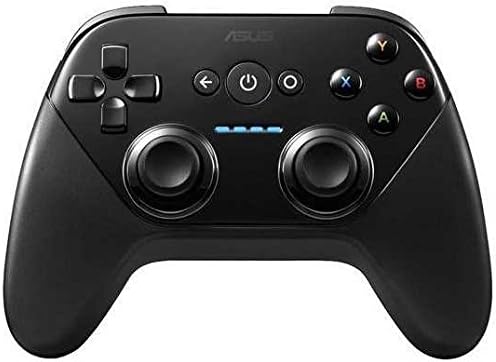
This classic gamepad is engineered for accurate control in Android TV and PC games. It supports older Android Lollipop systems and integrates well with Google Play Games for achievements.
We may earn a commission when you buy through this link, at no additional cost to you.
The controller allows you to play with friends or make new ones through the Google Play Games platform. It tracks your progress across devices which is useful for casual gamers.
While it lacks modern features like programmable paddles it offers reliable performance for standard mobile gaming. It is a straightforward solution for those who want simplicity and compatibility.
Choose this if you primarily play on Android TV and need a basic wireless option. It provides a solid foundation for casual gaming sessions without complex setup.
Track your progress and earn achievements across your Android phone tablet and TV seamlessly.
Designed for easy setup with Android operating systems ensuring quick access to your favorite mobile titles.
We may earn a commission when you buy through this link, at no additional cost to you.
Selecting the right controller depends on your specific needs. Here are key factors to consider when comparing models.
Look for controllers that support multiple modes such as wired USB-C 2.4GHz RF and Bluetooth. This flexibility ensures you can connect to PCs handhelds and consoles effortlessly.
Prioritize low-latency 2.4GHz or wired modes for competitive gaming.
Hall Effect or TMR joysticks prevent stick drift over time which is common in traditional potentiometers. These sensors use magnetism to detect position and last longer.
Choose TMR sticks for better anti-drift performance and power efficiency.
Dual-mode triggers allow you to switch between short travel for rapid inputs and full travel for precision. This is useful for switching between shooters and racing games.
Ensure triggers are customizable via software to suit your play style.
Rear paddles or buttons let you map inputs to reach complex commands without lifting thumbs from sticks. More buttons generally mean more control over the game.
Check if the device supports full remapping through a companion app.
Some models include OLED displays for viewing status and changing profiles. While cool this feature drains battery and adds complexity.
Decide if the visual feedback is worth the extra weight and cost.
Gaming sessions can last hours so look for controllers with long battery capacity. Models offering thirty hours or more are preferable for travel.
Wired modes or pass-through charging can bypass battery limits entirely.
Ergonomic grips and durable materials ensure comfort during extended use. Look for anti-slip textures and high quality switches.
A comfortable controller reduces hand fatigue significantly over long periods.
Verify that the controller works with your specific devices like PC Xbox Android or Steam Deck. Some models have restricted compatibility.
Universal controllers offer better value if you game on multiple systems.
Connect the controller to your device using the preferred method. For PC connect via USB-C or download the Armoury Crate software for configuration.
Keep the joysticks and buttons clean with a dry cloth. Avoid exposing the device to moisture or extreme heat which damages internal parts.
Update the firmware regularly to ensure optimal performance. Store the controller in a protective case when not in use to prevent scratches or damage.
Yes the ASUS ROG Raikiri models are certified for Xbox via USB-C or 2.4GHz RF. This allows you to use the full feature set on Xbox consoles and Windows PCs.
TMR or Tunneling Magnetoresistance joysticks use magnetism to detect stick position. They prevent drift and consume less power than traditional potentiometers.
Most models support wireless modes including Bluetooth and 2.4GHz RF. Wired USB-C is available for zero latency or charging during gameplay.
Use the Armoury Crate app or web-based configurator provided with the controller. This software allows full remapping of triggers and rear paddles.
Yes models like the Raikiri Pro allow switching between short travel micro switches and full travel TMR sensors. This adapts the controller to different game genres.
The OLED display helps you view battery status and switch profiles on the fly. It is useful for visual feedback but may reduce battery life slightly.
Battery life varies from thirty to seventy nine hours depending on the model and usage. Disabling RGB lighting can extend battery life significantly.
Yes many are designed specifically for handhelds like the ROG Ally or Steam Deck. Their compact design and programmable buttons suit mobile gaming perfectly.
This guide highlights top models from the ASUS ROG Raikiri series to CRKD alternatives. Each offers unique strengths whether you need OLED displays or simple Android connectivity.
Prioritize factors like joystick technology and trigger customization for competitive play. Comfort and battery life are key if you game for long periods.
Remember to check current availability and specifications before buying. The market evolves quickly so verify that the model meets your latest needs.