
MATX Case B2Pro Full Aluminum
5.0Editor score
Full aluminum construction
Compact Micro ATX size
Mesh side panels
This guide compares the top ten aluminum PC cases for performance, build quality, and airflow to help you choose the perfect chassis for your next custom PC
Aluminum PC cases offer a premium blend of durability, heat dissipation, and aesthetic appeal for enthusiasts. These chassis are engineered to protect sensitive components while providing superior thermal management through metal construction and smart airflow designs.
We evaluated ten leading aluminum cases based on compatibility, thermal performance, build quality, and user feedback. Each model was assessed for its ability to support modern hardware, ease of assembly, and overall value for different types of builders.
Every pick highlights unique strengths like modular layouts, compact footprints, or open-frame flexibility. Keep in mind that pricing and availability can fluctuate, so verify current details before purchasing to ensure you get the best deal available today.
5.0Editor score
4.4Editor score

4.7Editor score
This side-by-side comparison outlines the core specifications and unique features of each aluminum case to help you quickly identify the model that fits your hardware needs and budget constraints.





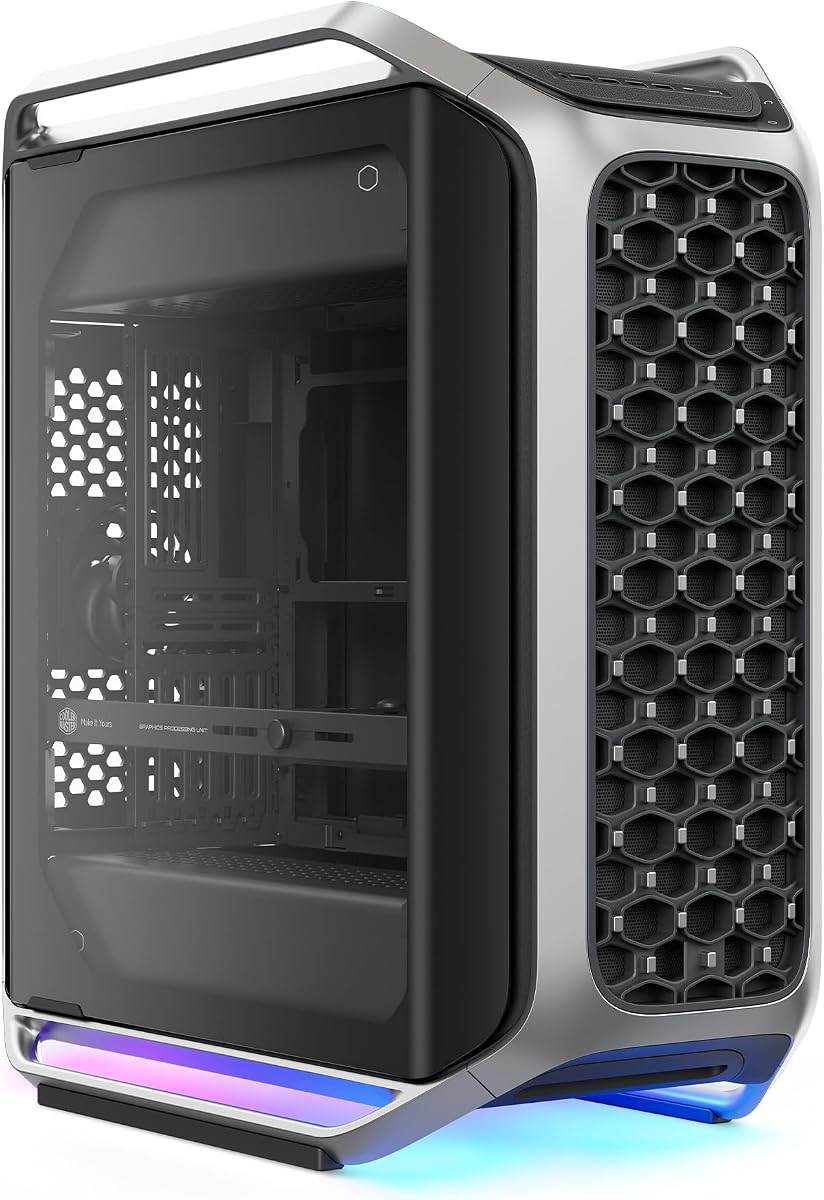
The Cooler Master Cosmos Alpha Full Tower represents the pinnacle of aluminum case design with its iconic curved frame and premium materials. It holds a strong rating for its ability to showcase high-end builds while maintaining excellent thermal performance for demanding hardware.
We may earn a commission when you buy through this link, at no additional cost to you.
Its FreeForm 2.0 rotatable layout allows builders to orient components for optimal airflow or visual impact. The case supports massive motherboards and GPUs up to 400mm while providing USB-C ports for fast data transfer and modern connectivity needs.
While the size demands a large desk space, the trade-off is unmatched customization. The sliding motherboard tray and modular components mean you can adjust cooling layouts without disassembling the entire system later.
This case is ideal for enthusiasts who want a flagship chassis that balances showpiece aesthetics with serious engineering. It is the top recommendation for those prioritizing build flexibility and premium material quality in a full tower.
Internal components can rotate left or right, allowing for custom airflow paths and better cable routing options during assembly.
The curved aluminum frame combined with full tempered glass creates a durable and visually striking enclosure for your PC components.
We may earn a commission when you buy through this link, at no additional cost to you.
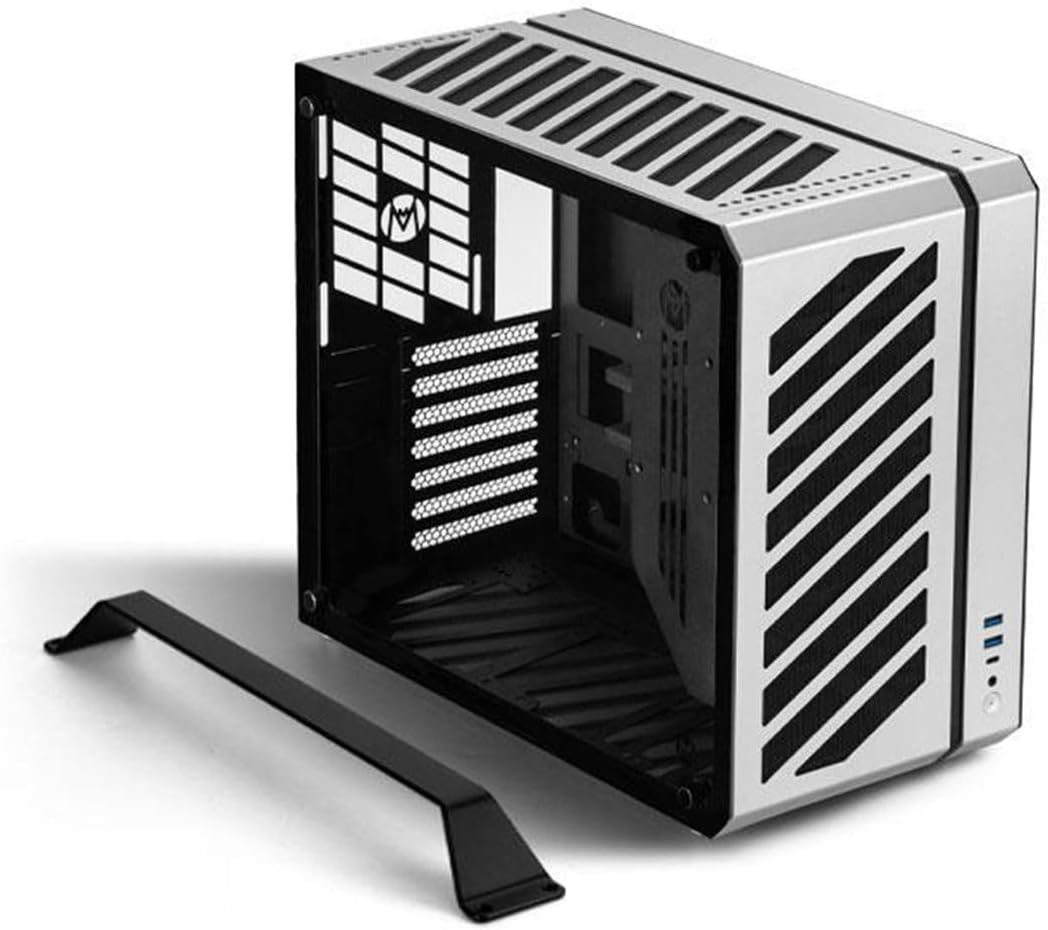
The MATX Case B2Pro delivers exceptional value with its full aluminum build at a budget-friendly price. It earns top marks for solid construction and efficient heat dissipation through its unique mesh side panel design.
We may earn a commission when you buy through this link, at no additional cost to you.
Built with 3mm aluminum thickness, this case offers rigidity and durability that often exceeds more expensive options. It fits Micro ATX boards and supports up to 3-slot GPUs while accommodating SFX or ATX power supplies for flexible layouts.
The only significant trade-off is its smaller form factor which limits expansion options compared to full towers. However, for compact builds focused on value and thermal performance, this case delivers premium feel without the premium cost.
Buyers looking for a reliable aluminum chassis on a budget will find this option hard to beat. It is perfect for small form factor enthusiasts who want quality materials without overspending on unnecessary features.
Mesh side panels provide perfect airflow through the chassis helping components stay cool during intensive tasks.
Exquisite foot stand and handle design make it convenient to stand and move on desktop setups easily.
We may earn a commission when you buy through this link, at no additional cost to you.
The Lian Li O11D EVO RGB is a showpiece chassis designed to highlight custom water cooling loops and high-end components. Its expanded size and structural design allow for a completely uninterrupted view of the internal hardware.
We may earn a commission when you buy through this link, at no additional cost to you.
Supporting 420mm radiators and GPUs up to 455mm, this case provides ample room for flagship hardware. The internal layout offers two height options for motherboard installation to optimize fan placement and CPU cooling configurations.
While it requires careful cable management planning, the dual-layered clips and protruding PSU bracket help tidy up wiring. The L-shaped RGB strips add a touch of customization to enhance the visual appeal of your build.
This case is the top pick for users who prioritize aesthetics and thermal expansion. If you want a premium aluminum chassis that supports massive cooling solutions while looking great, this model is the ideal choice.
Removing the front support pillar allows for a completely uninterrupted view of the internal chassis hardware.
Ample room facilitates large graphics cards and custom water loops with radiators up to 480mm in length.
We may earn a commission when you buy through this link, at no additional cost to you.
The Open Air Frame Computer Case provides a robust platform for stress testing and overclocking without enclosure restrictions. Made from aerospace magnesium aluminum alloy it ensures exceptional durability and thermal conductivity for high-performance setups.
We may earn a commission when you buy through this link, at no additional cost to you.
With an actual thickness of 8mm this chassis offers substantial protection for your hardware while supporting standard ATX power supplies and water cooling devices. The design allows installation of four hard drives alongside flexible motherboard mounting options.
The trade-off is the lack of physical enclosure which means dust control is more challenging and sound levels are higher. However for bench testing this openness ensures components never struggle with heat buildup even under extreme loads.
Enthusiasts who need easy access for frequent hardware changes will appreciate this open design. It is best suited for dedicated test benches or systems where maximum cooling performance outweighs the need for a traditional closed case.
Made of aerospace magnesium aluminum alloy with 8mm thickness to reduce corrosion and improve service life.
Supports integrated water-cooled installation with drainage options for 120 up to 360mm radiators.
We may earn a commission when you buy through this link, at no additional cost to you.
The Mechanic Master C34 combines compact dimensions with full ATX compatibility making it perfect for LAN events and mobile workstations. Its built-in carry handle allows you to transport your powerful desktop PC with ease.
We may earn a commission when you buy through this link, at no additional cost to you.
Despite its small form factor it supports full-size ATX power supplies and GPUs up to 335mm in length. The optimized interior layout simplifies installation and ensures efficient cable routing for a cleaner build experience.
Air cooling fits up to 162mm while liquid cooling accommodates a 240mm radiator though SFX power supplies are recommended for maximum cleanliness. The front metal I/O panel adds functionality with modern USB ports.
This case is ideal for builders who need mobility without sacrificing component power. If you frequently move your PC or need a space-saving tower with professional aluminum styling this option delivers excellent performance.
Built-in carry handle makes it easy to transport your powerful desktop PC to LAN events or workstations.
Internal layout simplifies installation process and using SFX power supply is recommended for cleanest cable management.
We may earn a commission when you buy through this link, at no additional cost to you.
The Cooler Master MasterFrame 500 features an open-frame aluminum exo-structure that enables unique build configurations and visual styles. It supports motherboards ranging from Mini-ITX to E-ATX offering great flexibility for various system builds.
We may earn a commission when you buy through this link, at no additional cost to you.
Dual 200mm intake fans come pre-installed to provide powerful airflow right out of the box. The design allows you to accommodate up to seven fans and 360mm radiators for reliable thermal performance during demanding tasks.
Interchangeable panels let you personalize the case to suit your preferences or modding projects. While the open design maximizes cooling it does require attention to dust management over time for optimal component health.
This case is best for builders who enjoy tinkering with layouts and prioritizing airflow above all else. If you want an aluminum chassis that can adapt to almost any cooling or hardware setup this model is a strong contender.
FreeForm 2.0 Aluminum Exo-structure enables flexible configurations and supports various installation scenarios.
Accommodates up to 7 fans and 360mm radiators to deliver strong and reliable thermal performance.
We may earn a commission when you buy through this link, at no additional cost to you.
The Mechanic Master C34Pro is engineered to fit flagship components into a portable compact chassis without compromising performance. It supports E-ATX motherboards and fits GPUs up to 420mm making it a powerhouse for mobile gaming rigs.
We may earn a commission when you buy through this link, at no additional cost to you.
Efficient thermal design includes multi-zone fan mounts and optimized airflow filters to ensure stable cooling under heavy loads. The 2mm aluminum shell paired with a steel frame provides durability for regular transport and setup changes.
Cable management space is generous at 18mm and includes a magnetic screwdriver kit to simplify assembly. The versatile PSU mounting options allow front bottom and side configurations to accommodate various build layouts.
If you need a high-performance aluminum case that travels well this model stands out. It is designed for gamers who require top-tier hardware support but still want the convenience of moving their PC between locations easily.
Supports ATX E-ATX boards and fits 360mm radiators 165mm coolers and 420mm GPUs for flagship builds.
Multiple power supply mounting positions including front bottom and side configurations for flexible layouts.
We may earn a commission when you buy through this link, at no additional cost to you.
The Fractal Design Define 7 XL combines brushed aluminum aesthetics with massive storage and silence focused engineering. It is built to accommodate up to 18 HDDs while maintaining a quiet environment through sound dampening materials.
We may earn a commission when you buy through this link, at no additional cost to you.
When converted to an open layout this tower provides room for custom water loops with large reservoirs and radiators up to 480mm. The versatile brackets allow you to repurpose fan positions for pumps or storage as needed.
While its size is significant the case offers exceptional flexibility for workstations needing both storage and silence. The reversible dual-handed hinges and magnetic latching add convenience to the door design.
This chassis is perfect for users who require extensive storage or silent operation in a premium aluminum housing. If you want a full tower that balances storage density with cooling potential and quiet performance this is a top choice.
Easily accommodates 18 HDDs alongside 5 SSDs mounts in the default storage layout.
Convert to open layout to get room for custom water loops with large reservoirs and radiators.
We may earn a commission when you buy through this link, at no additional cost to you.
The Lian Li V100 delivers excellent value with a solid aluminum build and extensive lighting out of the box. It supports ATX Micro-ATX and back-connect motherboards which helps reduce cable clutter and improves overall aesthetics.
We may earn a commission when you buy through this link, at no additional cost to you.
Four pre-installed PWM-controlled ARGB fans ensure adaptable airflow and vibrant lighting right away. The tool-less mounting mechanism on side panels streamlines your build process and allows fast access to internal components whenever needed.
Fits high-end hardware with support for GPUs up to 420mm and top radiators up to 360mm. While fan noise can be slightly higher the daisy-chain connectivity makes setup easy for most users.
This case is best for builders who want a premium look and lighting at a competitive price. If you need reliable aluminum construction with modern features and excellent compatibility this model is a smart investment.
Each side panel features a tool-less mounting mechanism for easy and fast access to internal components.
Supports back-connect ATX motherboards for cleaner routing and more flexible modern builds.
We may earn a commission when you buy through this link, at no additional cost to you.
The JOYJOM Mini ITX Case is an ultra compact solution for small form factor builds using standard ITX components. Its aluminum alloy body provides good heatsink performance and a clean aesthetic for desktop setups.
We may earn a commission when you buy through this link, at no additional cost to you.
Includes a 3.0 riser cable to enable GPU installation in such a tight chassis. It supports a FLEX power supply and graphics cards up to 17cm making it functional for light gaming or office use.
The case is only 4.3L capacity so component selection is strictly limited to low profile coolers and specific drives. The 2mm aluminum body helps with heat dissipation despite the small internal volume.
Ideal for travelers or anyone needing a tiny yet sturdy aluminum PC chassis. If you want a portable ITX build with basic gaming potential and a budget-friendly price this case offers a practical entry point.
PCIe 3.0 Riser Cable included for proper GPU installation in compact ITX layouts.
Body made of 2.0mm aluminum alloy providing good heatsink performance and beautiful appearance.
We may earn a commission when you buy through this link, at no additional cost to you.
Selecting the right aluminum PC case involves balancing performance, size, and build quality to meet your specific needs.
Ensure the case supports your motherboard size whether ITX ATX or E-ATX. Aluminum cases often come in specialized dimensions that may limit your hardware choices if not verified beforehand.
Always check the dimensions against your planned components to avoid fit issues.
Aluminum dissipates heat well but airflow design matters most. Look for mesh panels or open frames that maximize air movement around your CPU and GPU for sustained performance.
Prioritize cases with multiple fan mounts and radiator support for effective cooling.
Check the thickness of the aluminum panels to gauge rigidity and durability. Cases with thicker gauges like 3mm provide better protection and less vibration noise during operation.
Thicker aluminum is preferable for portable builds or high-end components.
If you plan to transport your PC frequently look for built-in handles or compact footprints. Aluminum cases are lighter than steel but weight still adds up with heavy hardware installed.
Choose models with sturdy handles and balanced weight distribution for safety.
Adequate space behind the motherboard tray helps keep cables organized and improves airflow. Aluminum cases often have sleeker internal designs so ensure there is room for your specific connectors.
Look for rubber grommets and velcro straps included in the package.
Consider how many drives and expansion slots you need for your use case. Some aluminum cases focus on minimalism while others offer extensive support for multiple HDDs or SSDs.
Verify drive cage options before purchasing to match your storage goals.
Aluminum offers a premium look but styles vary from brushed finishes to curved frames. Decide if you prefer a traditional boxy shape or an open frame for showcasing your components.
Ensure the design matches your desk setup and lighting preferences.
Price ranges vary significantly based on features like RGB lighting or advanced cooling mounts. Determine which features are essential to you to find the best value within your budget.
Invest in quality construction that lasts longer than cheaper alternatives.
Install your motherboard onto the tray first to simplify the process of routing cables through the frame. Use the provided standoffs to prevent any electrical shorts between the board and metal chassis.
Mount your cooling radiators securely using screws provided and ensure fans are oriented correctly for intake or exhaust. Regularly check that rubber grommets and brackets are tightened to reduce vibration noise.
Clean dust from mesh panels and filters every few months using compressed air to maintain optimal airflow. Wipe down the aluminum exterior with a soft microfiber cloth to keep the finish looking new.
Aluminum cases are lighter and dissipate heat more efficiently than steel. They often feature premium finishes and better corrosion resistance but may be slightly more expensive and less impact resistant.
No but many aluminum cases favor SFX or SFX-L power supplies to save space. Always verify the case's PSU support length and mounting options before buying your power unit.
Use high quality dust filters on all intake areas and clean them regularly. Keeping intake fans slightly pressurized also helps prevent dust from accumulating inside the chassis.
Most aluminum cases support modern GPUs but check the maximum length clearance. Vertical mounting requires specific bracket support which is not included in all models.
Yes because there is no enclosure to contain accidental shorts. Keep liquids away and ensure all components are grounded properly to prevent hardware damage.
Assembly depends on the model but most use standard tools and screws. Tool-less designs make panel access easy though tight spaces can require patience during cable management.
Curved aluminum frames offer unique aesthetics and better structural rigidity. They can also reduce cable strain and allow better airflow around corners.
Often yes because metal absorbs more vibration than thin plastic. Sound dampening features and high quality fans further reduce operational noise levels significantly.
We explored ten exceptional aluminum cases ranging from compact ITX builds to massive E-ATX towers. Each model offers distinct advantages for cooling, portability, or aesthetic appeal.
Prioritize your specific needs such as size, cooling, or budget before deciding. The best case is one that supports your components while matching your usage environment.
Prices change frequently so always verify current offers and stock levels before ordering. Investing in a quality aluminum chassis ensures long-term durability for your PC build.