
Monport 60W Fiber Laser
4.5Editor score
100000 hour laser lifespan
LightBurn software compatible
Precision metal marking focus
Choosing a powerful laser machine can transform your workspace into a production hub capable of handling diverse materials with precision. The 60W laser engraver category offers a sweet spot between hobbyist tools and industrial equipment, enabling you to cut thicker materials and engrave faster than lower-powered options. Whether you are a small business owner or an advanced maker, finding the right balance of safety, software compatibility, and raw power is essential for consistent results.
We evaluated ten leading models based on their laser technology, safety certifications, workspace size, and software ecosystem. Our analysis focuses on how each machine handles common materials like wood, acrylic, and metal, while also considering ease of setup and long-term reliability. By looking at real-world performance metrics and user feedback, we identified which units deliver the best value and capabilities for serious engraving tasks.
Each pick below highlights specific strengths such as dual laser systems, enclosed safety designs, or specialized fiber optics for metal marking. You will find detailed breakdowns of features like autofocus, camera integration, and exhaust management to help you match a machine to your specific workflow needs. Please note that availability and pricing can change frequently, so verify current details before making your final purchase decision.
4.5Editor score

4.8Editor score

4.2Editor score
As an Amazon Associate we earn from qualifying purchases.
The following table provides a side by side comparison of all ten selected models to help you quickly identify key specifications and capabilities for your specific needs.




The Creality Falcon2 Pro 60W Laser Engraver & Cutter stands out as a top tier choice for serious makers and small businesses. With a strong rating and commercial grade specifications, it offers a robust solution for cutting and engraving across various materials. The combination of high power and advanced safety features makes it a reliable investment for those needing consistent production quality.
We may earn a commission when you buy through this link, at no additional cost to you.
This machine features a powerful 60W laser with adjustable levels to suit different tasks efficiently. The dual laser system includes a 1.6W module for precise positioning, enhancing workflow speed and accuracy. An integrated HD camera allows for easy alignment and batch processing, reducing setup time significantly. Safety is prioritized with a fully enclosed Class 1 design that minimizes exposure and contains smoke effectively.
While the unit is expensive, the productivity gains justify the cost for professional environments. The large workspace and broad material compatibility mean you can handle diverse projects without swapping machines. Some users might find the physical size requires dedicated space, but the performance benefits outweigh this limitation for most commercial applications.
Buy this if you need a professional tool that balances power, safety, and precision. It is ideal for workshops producing signs, gifts, or custom parts regularly. The software compatibility ensures you can integrate it into existing design workflows without friction. Overall, it delivers the reliability and features required for sustained high quality output.
The combination of a high power cutting laser and a low power positioning laser allows for seamless transitions between rough cuts and detailed engraving without manual adjustment.
The fully enclosed structure not only protects users from direct laser exposure but also directs fumes through an efficient exhaust system, keeping the workspace clean and safe.
We may earn a commission when you buy through this link, at no additional cost to you.
This version of the Creality Falcon2 Pro emphasizes speed and efficiency for batch processing tasks. It is designed to help professional players and sole traders achieve mass production capabilities with a desktop footprint. The integrated enclosure and intelligent features aim to streamline the workflow for high volume orders.
We may earn a commission when you buy through this link, at no additional cost to you.
With an output up to 240000mW, this machine cuts through materials like stainless steel and acrylic quickly. The engraving speed exceeds 500mm/s which significantly reduces processing time compared to standard models. Built in camera and intelligent focus features allow for intuitive operation without manual measurements, improving success rates for creations.
However, the rating suggests potential learning curves or variability in user experiences. The safety features are robust with multiple detectors and locks, but the complexity might require careful setup. Cleaning is facilitated by a drawer system for debris, which is convenient for small studios needing minimal downtime.
Consider this model if speed is your primary concern and you can manage the setup carefully. It fits well for those focused on throughput rather than intricate detail work. Ensure you have the technical comfort to leverage the advanced safety and automation features effectively for best results.
The ability to engrave at over 500mm/s makes this unit particularly suitable for batch production where time efficiency directly impacts profitability and workflow speed.
We may earn a commission when you buy through this link, at no additional cost to you.
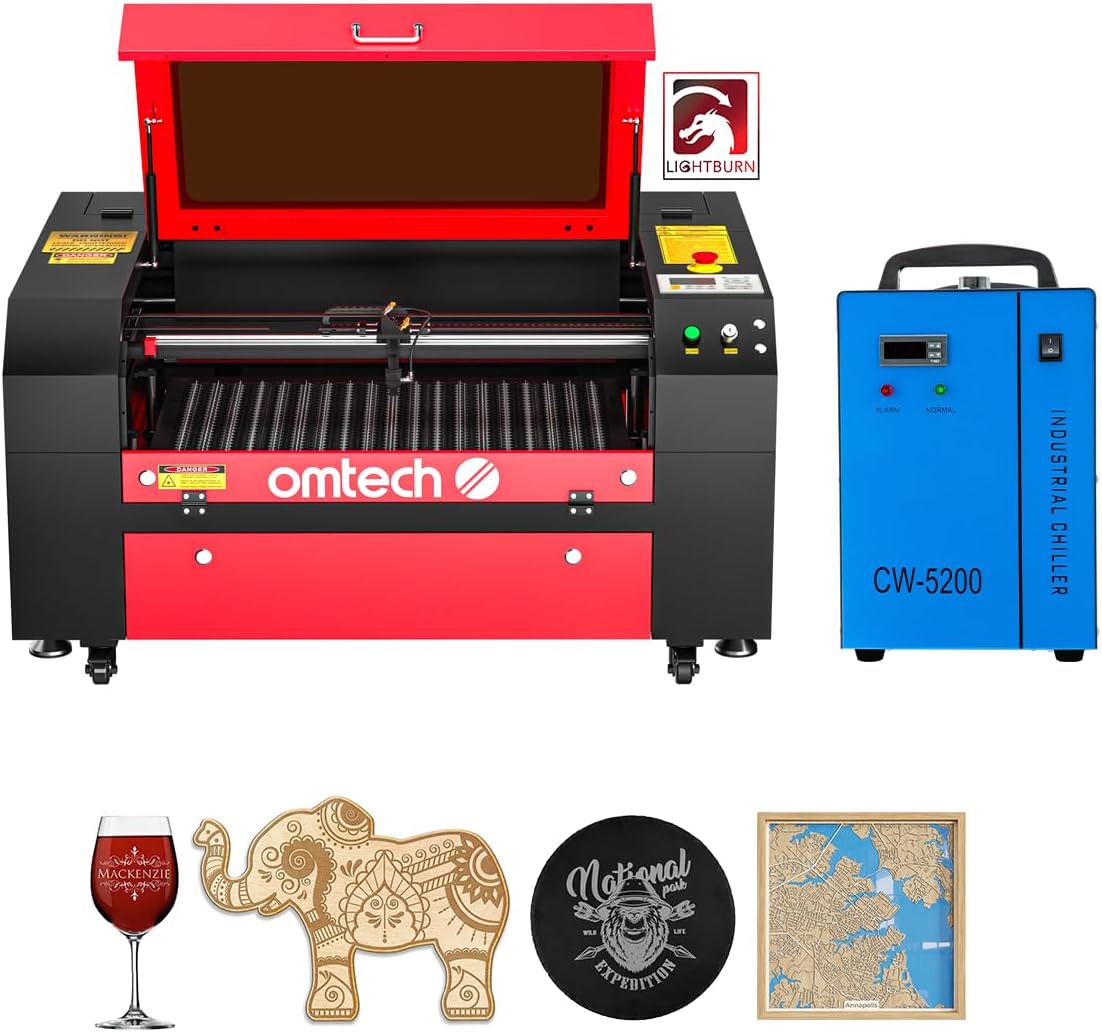
The OMTech Maker 60W CO2 Laser Engraver offers a robust commercial bundle with essential accessories included. It is designed to provide consistent performance and intuitive navigation for various work types. The combination of CO2 technology and a water chiller ensures stable operation during long sessions.
We may earn a commission when you buy through this link, at no additional cost to you.
This unit features an autofocus system that simplifies setup by automatically finding the right focal distance. The work area supports large items with pass through doors, making it versatile for bigger projects. Safety is addressed with a flame retardant viewing window and efficient air assist to protect lenses and mirrors.
The main consideration is the requirement for water cooling which adds maintenance compared to diode units. However, the stability and clarity of CO2 cuts on non metal materials often justify this trade off. The large workspace allows for handling sheets of material without frequent repositioning.
This is a strong choice for those who prefer traditional CO2 precision for wood and acrylic work. It suits businesses needing a reliable machine for detailed cuts and engravings. The included software and hardware bundle reduces initial configuration hurdles significantly.
The ability to adjust the workbed automatically with a single button press saves time and ensures consistent focus depth across different materials and thicknesses.
We may earn a commission when you buy through this link, at no additional cost to you.
This Creality model highlights smart camera features to enhance visualized operations and batch processing efficiency. It prioritizes safety with a Class 1 certification and metal enclosure suitable for various skill levels. The integrated auto stop function adds an extra layer of protection when the enclosure is accessed.
We may earn a commission when you buy through this link, at no additional cost to you.
The machine can cut through substantial thicknesses of wood and acrylic in single passes. An extra 1.6W light module offers precise engraving outcomes alongside the main cutting laser. Connectivity to LightBurn allows for advanced software features and pattern extraction from surface objects.
While the features are impressive, users must ensure their software setup is compatible to unlock full potential. The exhaust system effectively filters smoke which contributes to a more comfortable working environment. Technical support and warranty options are provided to assist with long term use.
Select this if you value camera assisted positioning and safety certifications. It serves small businesses looking to expand capabilities with professional features. The balance of power and safety makes it a viable option for diverse material processing tasks.
The high resolution camera enables users to visualize procedures and align designs accurately without physical measurements, streamlining the production workflow effectively.
We may earn a commission when you buy through this link, at no additional cost to you.
The xTool F2 Ultra combines a 60W MOPA fiber laser with a 40W diode to master diverse materials effortlessly. It targets advanced users who need to work on metals, wood, and acrylic with high precision. This dual laser system allows for tasks like color engraving and deep 3D detailing in one machine.
We may earn a commission when you buy through this link, at no additional cost to you.
With speeds up to 15000mm/s, productivity is industrial grade compared to standard fiber lasers. The AI powered cameras increase positioning accuracy and simplify material detection for one-click focus. It supports over 100 consistent colors on metal which is a standout feature for customization.
The cost is significant and the desktop workspace is smaller than larger benchtop models. However, the ability to expand with a conveyor and handle metal welding makes it a unique all-in-one solution. The precision and color options justify the investment for specialized high value projects.
Buy this if you require advanced metal marking and color capabilities alongside standard cutting. It is best for professionals needing versatility without buying multiple dedicated machines. The automation features reduce manual steps and increase accuracy for complex designs.
The MOPA laser technology allows for precise calibration to produce vibrant colors on metal surfaces without coatings or paints.
Operating at 15000mm/s significantly reduces job times compared to older fiber lasers making batch processing much faster and more efficient.
We may earn a commission when you buy through this link, at no additional cost to you.
The Monport 60W Fiber Laser Engraver is designed specifically for precise metal etching and marking. It features a lightweight integrated mini design with a long lifespan of up to 100000 hours. This makes it a durable choice for industrial or commercial metal marking tasks.
We may earn a commission when you buy through this link, at no additional cost to you.
With a customized galvanometer system, it achieves high accuracy of 0.01mm and speeds up to 10000mm/s. The working area is optimized for small to medium batches ensuring quality without distortion. It supports LightBurn software for flexibility in design control and management.
The small working area limits its use for large non-metal projects but is ideal for jewelry or component marking. The speed and accuracy are superior for metals compared to other laser types. The included software adds value for immediate usability.
Choose this if your primary focus is metal marking with high precision. It fits well for workshops producing custom tags, tools, or jewelry. The reliability and speed ensure consistent results for repetitive industrial tasks.
The customized silicon material reflectors enable high accuracy and speed which are critical for detailed metal marking tasks.
We may earn a commission when you buy through this link, at no additional cost to you.
This VEVOR CO2 laser engraver offers a spacious 24×16 inch workbed at a competitive price. It is designed to handle larger projects like leather goods and wooden decor efficiently. The four-way pass-through design allows for accommodating longer materials without cutting them to size.
We may earn a commission when you buy through this link, at no additional cost to you.
It reaches speeds up to 600mm/s for efficient engraving and cutting of non-metal materials. The simple manual focusing mechanism allows for adjustments using a control panel knob. Compatible with multiple software options it fits various design workflows easily.
The lack of a water chiller and manual focus are trade-offs compared to automated bundles. However, the reliable operation and clean results make it a strong value option. Air assist keeps dust clear for better quality edges.
Buy this if you need a larger workspace for custom decor or small production runs. It is suitable for beginners to intermediates who prefer straightforward operation. The high rating suggests reliable performance for the given specifications.
Four-way pass through doors allow for longer materials to pass through the machine enabling work on items longer than the bed size.
We may earn a commission when you buy through this link, at no additional cost to you.
The OMTech 60W CO2 laser engraver features a large 28×20 inch area and a motorized workbed lift. This commercial bundle includes a water chiller and LightBurn software for comprehensive operation. It is designed to handle large items and high volume engraving tasks efficiently.
We may earn a commission when you buy through this link, at no additional cost to you.
The autolift system simplifies height adjustments without manual guesswork. It reaches speeds of 600mm/s and cuts up to 10mm deep in nonmetallic materials. The four-way pass-through doors facilitate easy feeding of larger or longer items for production.
While the price is higher than basic models the included accessories and large area offer good value. The motorized adjustments save significant time over repeated setups. Stability and performance are consistent for commercial use cases.
This machine is ideal for businesses needing a large workspace and reliable commercial features. The inclusion of water cooling ensures tube longevity for long run jobs. It suits those who want a turnkey solution for professional engraving.
The motorized workbed can be adjusted up and down at the touch of a button saving time on manual height adjustments.
We may earn a commission when you buy through this link, at no additional cost to you.
The Aliencell X1 Lite offers a massive 26×21 inch bed for small businesses and hobbyists working on large projects. It features a Class 1 enclosed design with rigorous safety certifications including SGS testing. The acceleration and frequency ensure clean sharp results even at high speeds.
We may earn a commission when you buy through this link, at no additional cost to you.
Its preview feature simulates engraving to reduce waste and guesswork significantly. The intelligent auto-focus locks onto material instantly for absolute freedom in focal depth. This makes it ideal for high-volume production and wide material ranges including wood and leather.
The high price point is justified by the safety and bed size. Users must ensure they have the technical comfort to use the advanced software tools. The local shipping and warranty support add peace of mind for commercial buyers.
Buy this if you need large format engraving with top safety standards. It is excellent for businesses producing large signs or decor. The reliability and speed make it a solid investment for growth-oriented users.
The preview feature simulates engraving to reduce waste and guesswork significantly.
We may earn a commission when you buy through this link, at no additional cost to you.
This Cloudray model uses a JPT MOPA fiber laser source for precise metal engraving and marking. It is designed for metal fabrication and offers the ability to produce over 100 color markings. The unit is portable and lightweight for easy transport and setup.
We may earn a commission when you buy through this link, at no additional cost to you.
It achieves speeds up to 10000mm/s with two working areas supported by manual lift columns. The safety and certifications ensure reliable performance for intricate designs and small text. The deep engraving capability adds value for detailed industrial parts.
While limited to metal and small sizes, the color options make it unique for branding. The manual adjustment requires patience but allows for customization. It is a specialized tool for metal finishers or jewelers.
Select this if you specialize in metal marking and need color variety. It is ideal for portable industrial use or specific jewelry applications. The speed and precision support high-quality detailed output.
The MOPA technology enables over 100 color markings on metals without requiring additional coatings or paints.
We may earn a commission when you buy through this link, at no additional cost to you.
Choosing the right laser engraver involves balancing technical specs with safety and workflow needs. This section outlines the most critical factors to evaluate before purchase.
60W laser engravers come in diode, CO2, and fiber variations which dictate what materials they cut efficiently. Diode lasers are versatile for wood and acrylic while fiber units excel at marking metals with precision. Ensure the power output matches your primary material needs to avoid underpowered machines for thick cuts.
Prioritize the laser type that aligns with your main production materials for best results.
Class 1 enclosed models are highly recommended for safety as they contain harmful laser radiation and smoke effectively. Look for features like emergency stop buttons flame detectors and fire resistant materials to protect users during operation. Open frame machines require strict safety protocols and goggles which may not suit all workshop environments.
Always choose an enclosed unit if safety compliance is a priority for your workspace.
Support for popular software like LightBurn ensures you can use professional design tools without limitations. Some machines come with proprietary software that may be restrictive so verify compatibility with your existing design stack. Compatibility with common file types and plugins adds flexibility to your workflow.
Confirm that the machine supports industry standard software like LightBurn for ease of use.
The size of the engraving bed determines the maximum object dimensions you can process without repositioning. Larger beds are essential for large batch production or working with wide sheets of material like leather or wood. Consider the physical footprint of the machine to ensure it fits your available floor space comfortably.
Select a bed size that accommodates your typical workpieces to minimize setup changes.
Higher engraving speeds reduce processing time which is critical for commercial applications. Acceleration capabilities affect how well the machine handles sharp corners and intricate details at high speed. Machines with faster speeds like 500mm/s or more offer significant productivity gains for batch jobs.
Look for high speed specs to maximize throughput if volume is a key goal.
Manual focus requires physical adjustments which can slow down workflow compared to motorized or autofocus systems. Smart cameras and auto-focus sensors help ensure precise depth every time reducing the risk of errors. These features are valuable for maintaining consistency across large batches of identical items.
Opt for autofocus or camera-assisted systems to improve accuracy and save time.
Laser tubes have different lifespans and some fiber sources last up to 100000 hours compared to standard diodes. Regular maintenance such as cleaning lenses and checking exhaust fans keeps the machine running safely. A robust warranty and accessible technical support are vital for long term operational reliability.
Check the laser lifespan and warranty terms to ensure long term value and support.
Air assist systems blow away debris and fumes during cutting to ensure clean edges and protect lenses. Efficient exhaust management prevents smoke buildup which can harm health and reduce visibility during engraving. Proper smoke extraction is essential for safe and consistent engraving results.
Ensure the unit includes a strong air assist and exhaust system for clean operation.
Begin by reading the safety manual thoroughly and wearing appropriate eye protection if the machine is not fully enclosed. Secure your material on the bed and use the focus mechanism to set the correct distance for your chosen material type. Run a test cut on a scrap piece to verify power settings before starting a full job.
During operation monitor the machine for any unexpected noises or smoke levels to prevent fire hazards. Use the built-in software to preview your designs and avoid cutting beyond the intended area. Keep a fire extinguisher nearby and do not leave the machine unattended while it is running.
After use turn off the laser and allow the exhaust system to clear remaining fumes. Clean the lens and mirrors with appropriate swabs to maintain engraving quality. Regularly empty debris trays and check cables for wear to ensure safety and longevity of the unit.
A 60W diode or CO2 laser can only mark coated metals or cut thin non-ferrous metals like aluminum foil. For substantial metal cutting or engraving you need a 60W fiber laser or MOPA system designed specifically for metal absorption. Always check the material compatibility chart provided by the manufacturer.
A Class 1 enclosure is highly recommended as it protects users from harmful laser radiation by design. It also contains smoke and reduces noise making the workspace safer and cleaner. Without it you must rely heavily on protective eyewear and manual safety measures.
Most professional models support LightBurn which is a powerful and intuitive design software for lasers. Some include proprietary tools but LightBurn compatibility allows for better control and community support. Always verify the software license requirements before purchasing.
CO2 laser tubes typically last around 5000 hours while fiber sources can exceed 100000 hours depending on usage. Regular maintenance and proper cooling extend these lifespans significantly. Check manufacturer specs for expected maintenance intervals.
Yes 60W lasers are excellent for cutting and engraving cast acrylic with high precision and clean edges. Polished acrylic may require slower speeds to achieve frosted engraving effects. Ensure you use adequate exhaust to manage fumes during the process.
Diode lasers are better suited for wood leather and acrylic while fiber lasers are optimized for metal marking and engraving. Fiber lasers are generally faster and more durable for metal applications but cost more than diodes. Choose based on your primary material focus.
Regularly test emergency stops and flame detectors according to the manufacturer manual. Keep sensors clean of dust and debris to ensure they function correctly in emergencies. Replace faulty sensors immediately to maintain Class 1 safety standards.
Yes a water chiller is essential for CO2 laser tubes to prevent overheating and maintain consistent power output. Without cooling the tube can fail quickly leading to expensive replacements. Some models include one but verify this before purchase.
We have explored ten top models that offer a range of features from dual laser systems to advanced safety enclosures. The Creality Falcon2 Pro 60W stands out as a strong all-rounder for its versatility and professional capabilities. For specialized metal work the xTool F2 Ultra and Cloudray MOPA options provide unmatched color and precision.
Prioritize safety features like Class 1 enclosures and smoke management to protect your health and workspace. Software compatibility and workflow automation also play major roles in long term productivity. Evaluate your material needs to choose between diode CO2 and fiber technologies.
Verify current availability and pricing before purchasing as these figures change frequently. Investing in the right machine will pay dividends in speed quality and safety for your projects. We hope this guide helps you find the perfect tool for your creative or business goals.