
TiVo Stream 4K
4.2Editor score
Centralized App Search
Dolby Vision HDR Support
Integrated Google Assistant
This guide compares the top 4K Android Box streaming devices for performance, features, and value to help you choose the right smart home entertainment system.
Choosing a quality 4K Android Box transforms your TV into a powerful smart hub with access to endless content. You need reliable hardware that supports high resolution audio formats and smooth navigation for daily use.
We evaluated ten top models based on their processing power, connectivity options, and user experience. Each product offers unique strengths ranging from budget-friendly simplicity to premium performance capabilities for media enthusiasts.
Read our detailed breakdown to see how each device performs in real-world scenarios. Prices and availability change frequently so check the links for the most current information before purchasing your new streaming box.
4.2Editor score
4.4Editor score

4.1Editor score
The following table provides a side-by-side overview of key specifications across all ten models to help you quickly identify which device meets your specific needs.


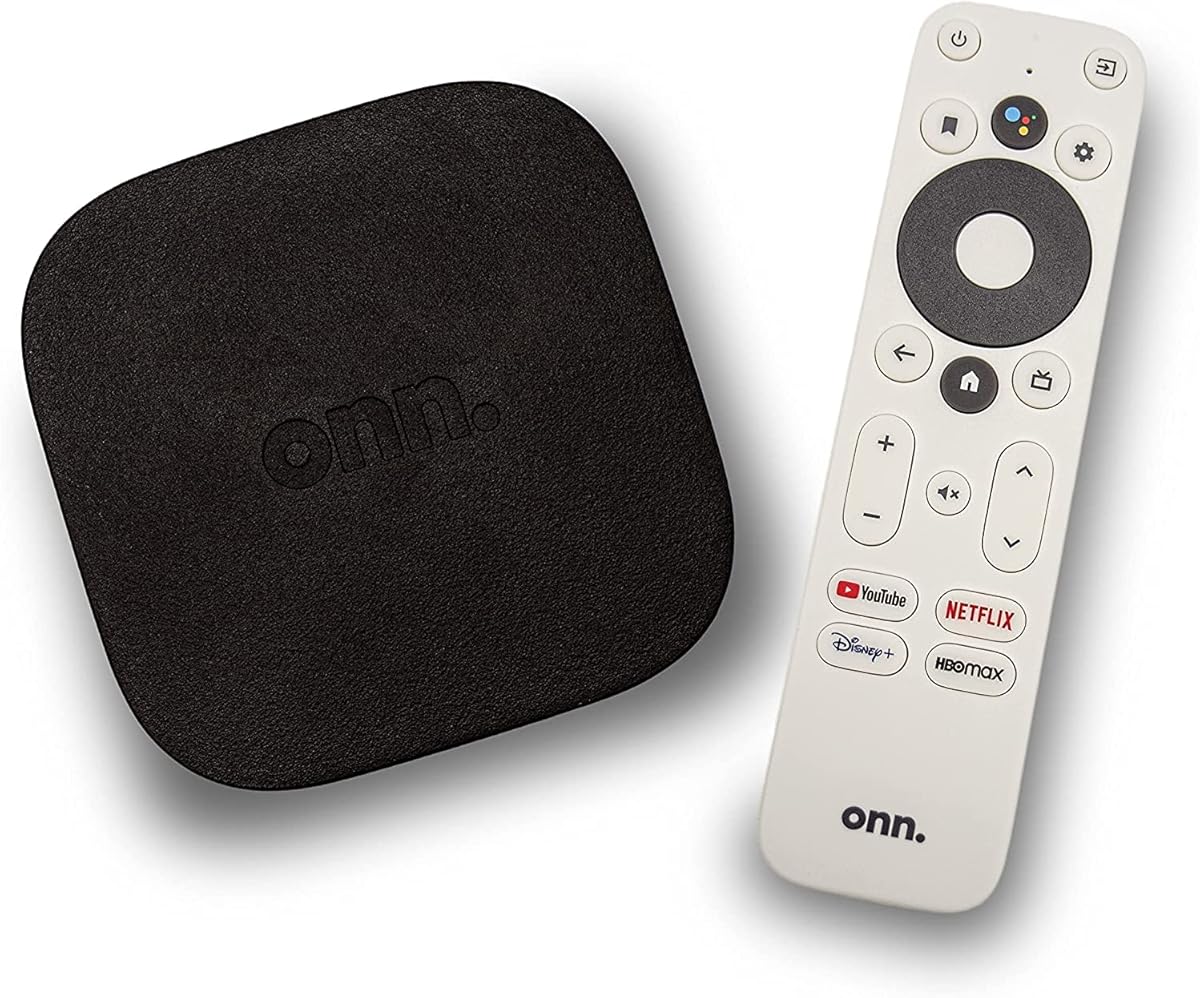
The ONN Android TV 4K UHD stands out as a top performer with its strong 4K resolution and intuitive Google TV platform. Users consistently praise its clarity and ease of setup for everyday streaming needs.
We may earn a commission when you buy through this link, at no additional cost to you.
Its voice remote with Google Assistant makes finding content effortless while Chromecast built-in allows seamless phone to TV casting. The included HDMI cable ensures immediate use without extra purchases.
While storage is limited compared to premium models the device handles daily apps smoothly. The lack of a backlit remote can be inconvenient in dark rooms but does not hinder core functionality.
This device is ideal for households seeking a reliable smart TV experience at a fair price. It delivers clear visuals and solid performance making it our top recommendation for general users.
Google TV organizes your favorite apps into one place for easier browsing across services.
Improved audio processing provides clear dialogue and balanced volume for a complete viewing setup.
We may earn a commission when you buy through this link, at no additional cost to you.
The TiVo Stream 4K offers an affordable entry into high quality streaming with strong 4K UHD and Dolby Vision capabilities. It focuses on simplifying your viewing experience through unified search features.
We may earn a commission when you buy through this link, at no additional cost to you.
Its ability to recommend content across all apps reduces app switching friction significantly. Google Assistant integration allows quick voice commands for launching shows or controlling smart home devices easily.
Some users report minor lag when navigating large app libraries due to hardware limits. The remote lacks advanced features but covers essential functions needed for standard streaming tasks effectively.
Choose this box if you want premium visual formats without spending a lot. It balances cost and performance well for casual viewers looking to upgrade older TVs.
Personalized suggestions help you discover new shows based on your watching habits across all apps.
Dolby Atmos creates a multidimensional audio experience that enhances movies and sports viewing.
We may earn a commission when you buy through this link, at no additional cost to you.
The Xiaomi Android Google TV Box S delivers premium performance with Wi-Fi 6 and HDMI 2.1 for future ready connectivity. Its powerful hardware ensures smooth playback of high bitrate 4K content without stuttering.
We may earn a commission when you buy through this link, at no additional cost to you.
Enjoy cinematic visuals with Dolby Vision and immersive sound via Dolby Atmos and DTS:X. The generous storage allows installing more apps and storing local media for offline viewing comfortably.
While it costs more than basic models the advanced features justify the investment for home theater enthusiasts. Some users note setup variations but overall performance remains consistent for demanding streaming tasks.
This device is best for users who want top tier specs and reliable long term performance. Its comprehensive feature set makes it a strong choice for dedicated media rooms.
Wi-Fi 6 and HDMI 2.1 provide faster speeds and better bandwidth for next generation devices.
A 360 degree Bluetooth remote allows voice control and casting from any angle in the room.
We may earn a commission when you buy through this link, at no additional cost to you.
The Xiaomi TV Box S 3rd Gen offers smooth streaming with 4K 60FPS decoding and a modern Google TV interface. Its compact form factor fits discreetly behind any television without obstructing air flow.
We may earn a commission when you buy through this link, at no additional cost to you.
Performance is solid thanks to a quad core CPU and 2GB RAM ensuring apps load quickly. Users appreciate the seamless integration of personalized content recommendations across their favorite subscriptions.
While USB connectivity is limited it covers most standard streaming needs. Battery life on the included remote varies by usage but it remains responsive for typical daily interactions.
Ideal for those needing a reliable and fast streaming solution for their living room. It balances modern features with simplicity making it a versatile option for most users.
Personalized home screens help you find shows faster by learning your viewing habits over time.
Small design ensures easy placement behind TVs or in media cabinets without taking up space.
We may earn a commission when you buy through this link, at no additional cost to you.
This Android TV Box delivers strong multitasking power with 4GB RAM and 32GB ROM for extensive app usage. It supports H.265 decoding for efficient high resolution playback with reduced bandwidth usage.
We may earn a commission when you buy through this link, at no additional cost to you.
Dual band WiFi ensures stable connectivity even in crowded networks while Bluetooth 5.0 allows easy pairing with peripherals. Setup is simple requiring just an HDMI connection to get started quickly.
The interface may differ from standard Google TV which can confuse some users initially. App support is broad but not all services are optimized for this specific Android build.
Choose this if you need extra RAM for complex home entertainment needs. Its performance and connectivity make it a solid choice for power users.
4GB RAM allows switching between apps smoothly without slowing down system performance.
H.265 decoding reduces file sizes while maintaining high visual quality for better streaming.
We may earn a commission when you buy through this link, at no additional cost to you.
The onn 4K Pro offers a mix of premium visual quality and reliable connectivity with an Ethernet port. Its 3GB RAM provides ample power for running multiple apps without performance dips.
We may earn a commission when you buy through this link, at no additional cost to you.
Find My Remote functionality and a backlit remote enhance usability in low light environments. Dolby Vision and Atmos support ensure your movie nights have sharp contrast and immersive sound.
Some users report inconsistencies with Gemini integration though standard Google features work well. The price is higher than basic options but justified by the hardware extras provided.
Recommended for those who need wired stability and smart controls. It delivers a robust streaming experience for varied home setups.
An Ethernet port guarantees consistent speed for 4K streaming without wireless interference issues.
Backlit buttons and locate functionality reduce frustration when searching for your remote in the dark.
We may earn a commission when you buy through this link, at no additional cost to you.
This Xiaomi model delivers fast streaming through Wi-Fi 6 ensuring smooth playback even in congested networks. Its 4K UHD output and Dolby Atmos support provide a cinematic feel for movies and shows.
We may earn a commission when you buy through this link, at no additional cost to you.
Setup is straightforward with clear prompts guiding you through Google account configuration. Voice search makes finding content easy without typing on a keyboard or scrolling extensively.
Users note that storage can fill up with large apps but remains sufficient for most streaming needs. Remote range is adequate for standard living rooms but may struggle in very large spaces.
A strong choice for those needing wireless speed and reliable picture quality. It offers a balanced experience for daily entertainment usage.
Wi-Fi 6 technology reduces latency and increases bandwidth for smoother high definition streaming.
Voice control simplifies navigation and search making it easy to find shows quickly.
We may earn a commission when you buy through this link, at no additional cost to you.
The KP1 Android TV Box is Google Certified ensuring reliable access to apps and services without restrictions. It runs Android 14 which provides enhanced security and modern interface elements for users.
We may earn a commission when you buy through this link, at no additional cost to you.
Chromecast built-in allows easy screen mirroring from phones and tablets for shared viewing. The quad core processor handles navigation smoothly despite the compact hardware footprint.
Storage is limited at 16GB which may require external expansion for large media libraries. The remote works well for basic tasks but lacks premium build quality.
Ideal for those prioritizing official app support and updated security. It delivers a stable and compliant streaming solution for daily use.
Google certification ensures all major streaming apps work correctly without compatibility issues.
Cast content from your phone to the TV instantly for a larger viewing experience.
We may earn a commission when you buy through this link, at no additional cost to you.
With a high user rating this Xiaomi box offers a powerful and compact solution for home theater needs. It supports over 3000 channels and apps ensuring you have plenty of content to explore.
We may earn a commission when you buy through this link, at no additional cost to you.
The 4K HDR capability provides vivid colors and contrast for a more engaging viewing experience. Voice Assistant integration makes basic controls like volume and playback easy to manage.
While it runs an older OS version it remains stable and responsive for standard streaming. Customization options are limited compared to newer models but core functionality is reliable.
This model is great for users who value performance and content variety over latest OS updates. It balances power and simplicity well for average households.
Access thousands of channels and apps to find entertainment that matches your interests easily.
Built-in voice search helps you find specific movies without typing or scrolling manually.
We may earn a commission when you buy through this link, at no additional cost to you.
This LEFFOT model runs Android 14 providing access to the latest security and app compatibility. It supports 4K 60FPS video and Wi-Fi 6 for modern streaming performance.
We may earn a commission when you buy through this link, at no additional cost to you.
Multiple ports including USB and LAN allow flexible connections for peripherals and wired internet. Voice search and casting features make interacting with the device straightforward.
User reviews are mixed suggesting quality control may vary. Setup can be complex for beginners but offers flexibility for those who like to tweak settings.
Best for advanced users needing the newest OS features. It is a feature-rich option but requires careful consideration before purchase.
Android 14 provides improved security features to protect your data and accounts.
Multiple input options allow you to connect USB drives and wired internet easily.
We may earn a commission when you buy through this link, at no additional cost to you.
Selecting the right device depends on your specific needs and current TV setup. Consider these key factors to make an informed decision.
Ensure the device supports 4K resolution and formats like HDR10 or Dolby Vision for better picture quality. High dynamic range adds contrast and color depth that standard HD cannot match.
Look for 4K 60FPS support if you watch fast motion content like sports or gaming.
At least 2GB of RAM ensures smooth navigation and app switching without lag. A quad-core processor handles high bitrate video decoding efficiently.
More RAM helps future proof your device as apps become more demanding over time.
Dual band Wi-Fi is essential for stable streaming in crowded networks. Look for HDMI 2.1 ports if you need enhanced bandwidth for next-gen content.
Ethernet ports provide the most reliable connection if your TV setup allows wired access.
Google TV or Android TV OS offers the largest library of verified apps. Check that the device is certified for services like Netflix or Disney+.
Certified devices ensure security and compatibility with major streaming platforms.
Internal storage should be at least 16GB to install your favorite apps comfortably. Expandable storage via USB is a bonus for local media files.
More storage prevents constant app management and keeps your interface clutter free.
Support for Dolby Atmos or DTS:X provides immersive sound when paired with a soundbar. Good audio decoding makes a huge difference in home theater setups.
Check if the device passes through audio formats you already have equipment for.
A Bluetooth remote allows control without pointing directly at the box. Voice search is a useful feature for finding content quickly.
Backlit buttons are helpful if you often use the TV in dark rooms.
Compare features against price to find the best value for your budget. A solid warranty protects your investment against defects.
Look for brands with good customer support if technical issues arise.
Connect the box to your TV via HDMI and power it on. Follow the on-screen setup to log in to your Google account and connect to Wi-Fi.
Use the remote to install apps from the Play Store. Sign into your streaming services to start watching your favorite content.
Keep the device in a well ventilated area to prevent overheating. Restart occasionally to clear cache and maintain smooth performance.
Yes. any TV with an HDMI port can become smart with a 4K Android Box. It handles all the processing so your display just shows the video signal.
Google TV is a newer layer on top of Android TV that focuses on content discovery. It organizes apps by content rather than by app icon which many find more intuitive.
Yes. Streaming 4K content usually requires at least 25 Mbps for stable playback. A dual band router helps ensure consistent speeds during peak times.
Most models include Chromecast built-in which allows easy casting from Android and iOS devices. This feature lets you share photos and videos directly to the TV.
Updates happen automatically if enabled in settings. You can also check manually under device settings. system info to see if a new version is available.
Basic streaming boxes handle casual games but not high end console gaming. Models with more RAM and better GPUs offer a better experience for Android games.
We found that the ONN Android TV 4K UHD leads the pack with balanced performance and value. The TiVo Stream 4K offers great budget options while the Xiaomi Box S excels in premium features.
Prioritize connectivity and app support when making your final selection. Ensure the device matches your internet speed and content preferences for the best results.
Remember to check current pricing and availability before buying. Models can change quickly so always verify details with the seller.