
Nektar SE49
4.5Editor score
Great value for money
Full size velocity keys
DAW integration included
Compare the top 49 key MIDI keyboards for music production. We review features, integration, and value to help you choose the right controller for your studio.
Finding the right MIDI controller is crucial for modern music production. A 49 key keyboard offers the perfect balance between portability and playable range. It allows you to play melodies and chords comfortably without taking up too much desk space in your home studio setup.
We evaluated ten leading models based on key feel, software integration, and included bundles. Our analysis covers budget options to premium workstations. Each pick reflects real-world usability for producers, composers, and live performers seeking reliable tactile control.
Every product listing shows key specs and verified user ratings. Prices fluctuate often so check current deals before buying. We focus on lasting value and how well each unit integrates with your digital audio workstation for seamless creative workflows.
4.5Editor score

4.5Editor score

4.4Editor score
The following table breaks down the core specifications and features of each model to help you compare them side by side quickly.




The M-AUDIO Keystation 49 MK3 stands out as a reliable standard for entry to mid level producers. It holds a 4.5 rating from users who appreciate its simplicity. The full size keys feel natural under the fingers making it a strong choice for pianists.
We may earn a commission when you buy through this link, at no additional cost to you.
Its standout feature is the immediate connectivity without needing drivers. You can start making music right away on Mac or PC. The included software like MPC Beats and Ableton Live Lite adds significant value to the purchase. Controls are straightforward for transport and volume.
While it lacks faders and knobs for deep mixing control the focus here is purely on playing notes. This trade off makes it cheaper and less cluttered on your desk. Users find this acceptable since they often use software for mixing anyway.
If you need a straightforward controller that gets out of your way the this unit is ideal. It suits beginners and pros who just want to record MIDI data. The price point reflects its solid build without unnecessary extras.
Connection is instant via USB to Mac or PC so you can start recording without installing drivers or plugging in power adapters.
The compact layout fits any desk or stage setup allowing you to focus on performance rather than fiddling with complex menus.
We may earn a commission when you buy through this link, at no additional cost to you.
The Novation Launchkey 49 MK4 delivers premium control with a high rating of 4.7. It excels at integrating deeply with major DAWs like Ableton Live and Logic. This makes it a favorite for producers who want hardware to mirror their software workflow.
We may earn a commission when you buy through this link, at no additional cost to you.
The 16 responsive pads support polyphonic aftertouch which is rare in this class. You can use them for drumming or launching clips with precision. The scale mode ensures you never hit a wrong note helping with composition when you lack formal theory knowledge.
While the cost is higher than budget models the included software and features justify the investment. There is a learning curve to master all the DAW mappings but it pays off in speed. Users love how it brings mixer controls to the hardware.
Choose this if you spend hours mixing tracks and want tactile knobs and pads. It is built for serious production where speed and control matter most. The NKS ready feature expands compatibility with Native Instruments sounds effectively.
Launchkey works with all major DAWs offering intuitive workflows for Ableton Live Logic Cubase and more without needing complex setup.
Scale mode prevents wrong notes while chord triggers allow lush harmonies with a single touch making songwriting faster.
We may earn a commission when you buy through this link, at no additional cost to you.
The Nektar SE49 is a top contender for budget conscious buyers seeking full size keys. It rates 4.5 for offering essential controls without a high price tag. This model proves you do not need to spend much to start producing music effectively.
We may earn a commission when you buy through this link, at no additional cost to you.
Key features include DAW integration for popular software which saves time setting up mappings. It is compatible with Mac PC and iOS devices easily. The included Studio 8 track DAW and sound content package adds immediate value to your setup.
Build quality is functional though primarily plastic which fits the price point. It lacks advanced features like aftertouch or RGB pads but covers all basics. For beginners starting out this is an excellent low risk entry point.
If your priority is affordable access to 49 keys this unit is perfect. It gets the job done for practice and recording without frustration. Users appreciate that it works reliably right out of the box.
This controller delivers all essential features and expressive control you need to start making music at an amazing price.
It is fully compatible with Mac PC and iOS systems ensuring you can connect easily regardless of your main device.
We may earn a commission when you buy through this link, at no additional cost to you.
The M-AUDIO Oxygen 49 MKV is a robust tool for those who want physical faders and knobs. With a 4.6 rating it is praised for its tactile control surface. The layout supports mixing and parameter tweaking directly from the keyboard.
We may earn a commission when you buy through this link, at no additional cost to you.
It features 8 assignable knobs and 9 assignable faders giving you hands on control over DAW parameters. NKS integration allows instant browsing of Native Instruments presets. The auto mapping feature simplifies setup by handling assignments automatically for you.
While it has more features than simple keyboards it may feel complex for absolute beginners. However for producers wanting physical faders this model offers great utility. The included software package covers most needs for production and beat making.
Choose this if mixing and parameter tweaking are part of your workflow. It bridges the gap between a simple controller and a production station. The build quality supports regular use in home studios effectively.
Eight knobs and nine faders provide tactile control over synth parameters plugins and DAW controls for a complete production experience.
Auto mapping handles DAW controls and plugin parameters so you can start tweaking immediately without manual configuration.
We may earn a commission when you buy through this link, at no additional cost to you.
The Arturia KeyLab Essential mk3 comes with an extensive library of sounds via Analog Lab V. It rates 4.5 for the sheer variety it offers composers. The presets cover vintage to modern synth sounds making it versatile for any genre.
We may earn a commission when you buy through this link, at no additional cost to you.
Features like Scale Mode and Chord Mode simplify complex harmony creation. The RGB backlit pads and LCD screen provide clear visual feedback. Custom scripts enable deeper integration with DAWs like Ableton Live and Logic Pro X.
You do need to install the software to access full features which adds steps to setup. However the included subscriptions to Loopcloud and Melodics add value. Users appreciate the modern feel and responsiveness of the keys.
If you need diverse sounds without buying extra plugins this unit is strong. It caters to those who want a complete package in one box. The visual feedback on pads helps with performance confidence.
Scale Mode Chord Mode and Arpeggiator make composition and songwriting intuitive so you can focus on the music.
The bright LCD screen and RGB pads give real time feedback to help you navigate sounds and settings quickly.
We may earn a commission when you buy through this link, at no additional cost to you.
This compact controller focuses on basic utility and space saving. It has no current rating which suggests it is a newer listing. The ABS construction makes it durable and easy to move around your workspace.
We may earn a commission when you buy through this link, at no additional cost to you.
Measuring roughly 66 cm wide it fits on tight desktops without crowding. It is designed for melody practice and simple recording tasks. The black finish is neutral and blends into most home studio setups effectively.
Given the lack of detailed reviews caution is advised when selecting this model. It may suit temporary needs or casual use where budget is key. Serious producers might find it lacking in advanced control options.
Use this as a spare keyboard for travel or tight spaces. It offers a low barrier to entry for basic MIDI tasks. Ensure you check compatibility with your specific software before purchase.
The small dimensions make it convenient to arrange on a desktop or in a creative workspace without taking much room.
It is suitable for melody practice and composition preparation for those needing a simple portable tool.
We may earn a commission when you buy through this link, at no additional cost to you.
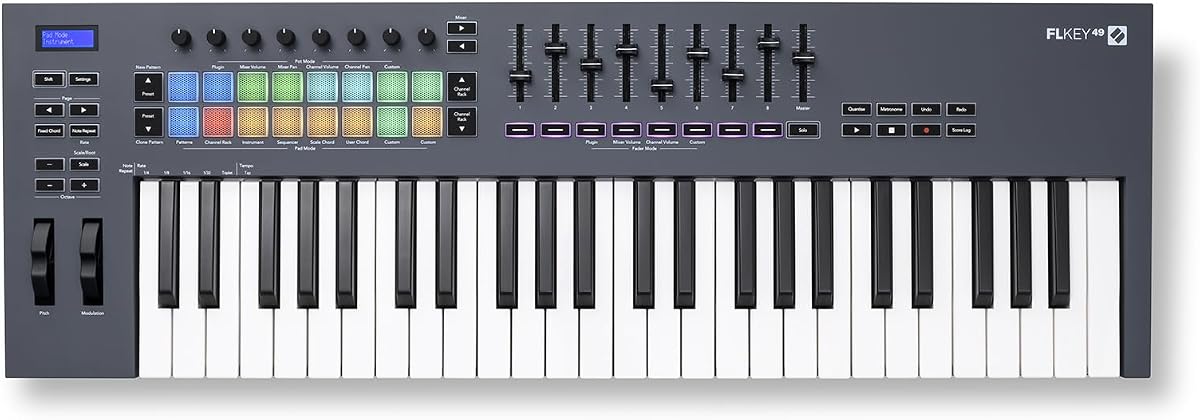
The Novation FLkey 49 is designed specifically for users of FL Studio software. It rates 4.6 for its seamless integration which eliminates manual mapping. This controller puts mixer and channel rack controls directly in your hands.
We may earn a commission when you buy through this link, at no additional cost to you.
You can program beats fast using the sequencer mode which maps pads to the step sequencer. Essential buttons let you control transport and quantize without touching the mouse. This keeps you in the flow during production sessions.
While it works with other DAWs the main value is in FL Studio support. If you do not use FL Studio you might prefer a more generic option. However for dedicated FL users this unit is unmatched in convenience.
Choose this if FL Studio is your primary tool for creating beats and songs. The direct control over channels saves significant time. The build quality supports frequent use in production workflows.
Bring FL Studio mixer and channel rack controls off the screen into your hands to tweak volumes on the fly.
Map pads to FL Studio step sequencer for programming beats fast and changing patterns directly without a mouse.
We may earn a commission when you buy through this link, at no additional cost to you.
The M-AUDIO Oxygen Pro 49 offers professional features including aftertouch and MIDI out. It holds a 4.5 rating for its comprehensive feature set. The semi weighted keys give a more piano-like experience than lighter options.
We may earn a commission when you buy through this link, at no additional cost to you.
You get 16 RGB backlit pads for clip launching and drumming with precision. The 5 pin MIDI output allows connection to external hardware synthesizers directly. Smart Chord and Smart Scale modes help with melodic creativity.
The higher price reflects these advanced capabilities which are standard in pro gear. It is heavier than compact models but sturdy for regular use. This is a complete production tool for serious composers.
If you need aftertouch and external MIDI connectivity this model is ideal. It bridges computer and hardware effectively. The included software supports a full production cycle from idea to final track.
Semi weighted keys with aftertouch and assignable zones deliver a natural response that gets the best from plugins.
Eight knobs and nine faders provide tactile control for virtual instruments plugins and DAW controls efficiently.
We may earn a commission when you buy through this link, at no additional cost to you.
The midiplus AK490 is a straightforward option for beginners. It has a 4.3 rating for doing what it promises simply. The layout includes standard wheels and octave buttons for basic control needs.
We may earn a commission when you buy through this link, at no additional cost to you.
One unique feature is the MIDI out Din Jack which allows connecting to hardware gear. This adds flexibility if you have vintage synths. However it lacks a USB cable in the box which you must source separately.
Build is simple and functional with a focus on utility. It is a good choice if you just need to send notes to a DAW without extra knobs. Users find it reliable for daily practice.
If you prefer minimalism and need a DIN connection this fits well. It gets out of the way and lets you focus on music. Just ensure you have a USB cable before starting.
It features a MIDI out Din Jack for connecting to external hardware gear alongside standard USB functionality.
Octave buttons and pitch mod wheels provide standard controls to navigate the keyboard range easily.
We may earn a commission when you buy through this link, at no additional cost to you.
The Arturia KeyLab mk3 represents the premium end of the range. It rates 4.4 for exceptional build quality and finish. The white version adds a stylish aesthetic to any studio environment.
We may earn a commission when you buy through this link, at no additional cost to you.
It includes 12 pressure sensitive pads and 9 encoders for deep control. Aftertouch keys add expression to your playing. USB-C power ensures modern compatibility and stable connections with laptops.
The cost is high but justified for professional needs and longevity. This unit feels like a long term investment. The integration with Arturia software ensures you get the most out of the hardware.
Choose this if you value design and high end features. It suits studios where appearance matters as much as function. The tactile experience supports expressive performance effectively.
12 pressure sensitive pads and 9 encoders provide deep control for mixing sound selection and effects.
USB-C power ensures modern compatibility and a stable connection to your computer without extra adapters.
We may earn a commission when you buy through this link, at no additional cost to you.
Selecting the right controller depends on your specific workflow and budget constraints.
A 49 key keyboard strikes a balance between portability and range. It offers four octaves which is sufficient for most melodies and chords. Consider your desk space as larger units may not fit in small rooms.
If you play complex piano parts you might prefer more keys but 49 is standard for production.
Velocity sensitive keys respond to how hard you press them adding expression. Some models offer semi weighted keys which mimic a piano feel. Unweighted keys are lighter and better for fast synth lines.
Try to test the keys in person to ensure they feel comfortable for your style.
Deep integration allows hardware controls to map to your software automatically. Brands like Novation and M-Audio offer specific support for common DAWs. This saves time during mixing and arranging.
Check if the controller supports your main DAW to avoid manual mapping later.
Many units come with DAWs and virtual instruments which can save money. Look for licenses for tools like Ableton Live Lite or MPC Beats. This adds immediate value to the hardware purchase.
Ensure you are eligible for the software and read the licensing terms carefully.
Faders knobs and pads allow tactile control over mixing and drum patterns. If you mix often physical faders are essential. Pads are great for beat makers and clip launching.
Decide which control types match your workflow to avoid paying for features you will not use.
USB is standard but MIDI DIN out allows connection to hardware synthesizers. Some units have dedicated sustain pedal inputs. Consider your current gear setup for connection compatibility.
Ensure the ports match your needs for expanding your studio setup later.
Sturdy construction ensures longevity if you move gear often. Plastic bodies are lighter but less durable than metal ones. Check user feedback for reliability and wear over time.
Prioritize build quality if you plan to use the controller on stage or travel.
Prices vary from entry level to professional models. Higher costs often mean better keys and more features. Determine your budget but consider total value including software.
Sometimes a slightly higher price buys better software that saves you money elsewhere.
Connect your keyboard to your computer via USB first. Install any required drivers if your model needs them. Most modern controllers work instantly without extra software.
Open your DAW and configure MIDI inputs. Assign any needed macros using the software provided. Test keys and pads to ensure they send signals correctly.
Keep your keyboard clean by wiping dust with a soft cloth. Avoid placing drinks near the unit to prevent spills. Store it in a case if you transport it regularly.
No. a MIDI keyboard does not produce sound on its own. It sends note data to your computer. Your computer generates sound using a DAW and plugins. You do need audio outputs like speakers or headphones.
Velocity measures how hard you press a key. Pressure or aftertouch measures how hard you press while holding a key. Both add expression to your performance. Velocity is standard on most keyboards.
Yes but you often need a USB adapter like a Lightning to USB Camera Adapter. Some tablets support USB directly. Ensure your software on the device supports MIDI input.
MIDI integration allows hardware knobs and faders to control software parameters. This speeds up mixing and automation. It gives you physical feedback which is often faster than clicking with a mouse.
If you come from acoustic piano a weighted feel is better. For producers making electronic music unweighted keys are faster. It depends on your playing style and comfort.
Visit the manufacturer website and download their update tool. Connect your keyboard and run the tool. Follow instructions carefully to avoid issues.
Included bundles like Ableton Live Lite are worth it. They save hundreds of dollars. Check if the software meets your production needs.
Check your USB cable and try a different port. Restart your DAW and computer. Ensure MIDI inputs are enabled in your software settings.
We reviewed ten models ranging from budget options to professional workstations. Top picks like the M-AUDIO Keystation 49 MK3 and Novation Launchkey 49 MK4 excel in their categories.
Prioritize integration and key feel when making your decision. The right controller should inspire you rather than get in the way. Consider your main DAW for best results.
Check current prices as deals change frequently. Buying during sales can save money on higher end models. Invest wisely to match your current needs and future plans.