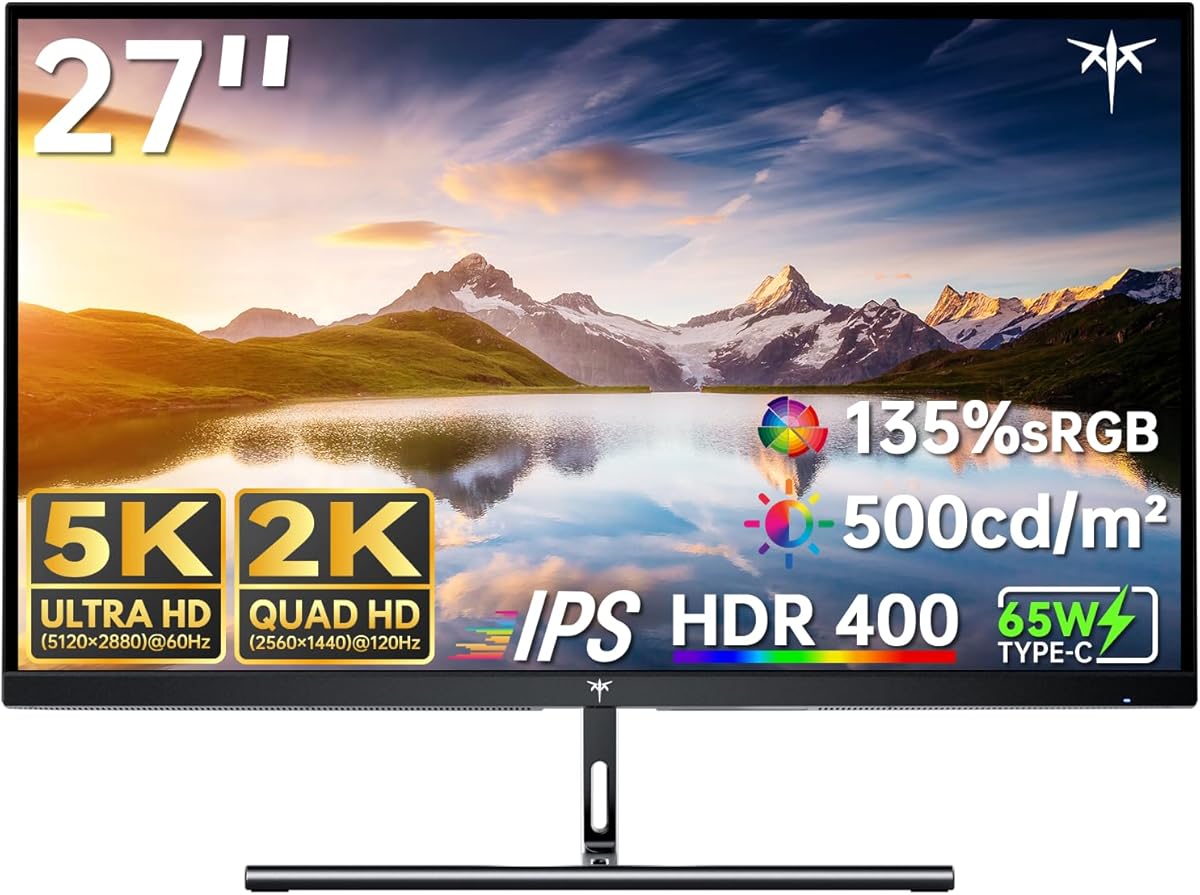
KTC 5K Monitor 27 Inch
4.4Editor score
Dual Mode 5K and 2K
65W USB Type C Port
99% DCI P3 Coverage
Finding the right display can transform your workflow significantly. A 27 Inch 5K Monitor offers exceptional clarity and pixel density that standard screens simply cannot match. This resolution provides ample workspace for detailed design work and immersive gaming experiences alike.
We evaluated ten leading models based on panel technology color accuracy and connectivity options. Our analysis focuses on how each screen handles professional creative tasks and high performance gaming demands equally. We considered user feedback and technical specifications to ensure comprehensive coverage.
Each selection highlights unique strengths for different user needs and budgets. Whether you need precise color rendering or high refresh rates this list covers the essential choices. Please note that specific features and availability may vary by region and time.
4.4Editor score

3.6Editor score

3.7Editor score
As an Amazon Associate we earn from qualifying purchases.
The following table provides a side by side overview of all ten selected models. It highlights key specifications like resolution panel type and connectivity to help you compare features at a glance.




The ASUS ProArt PA27JCV stands out as a top choice for professionals seeking reliable color accuracy. With a rating that reflects user satisfaction it delivers stunning visuals suited for creative workflows. Its high resolution ensures every detail is visible without pixelation or blurring.
We may earn a commission when you buy through this link, at no additional cost to you.
This monitor features factory pre-calibration ensuring Delta E<2 accuracy right out of the box. The 99% DCI-P3 and 100% sRGB coverage provide vibrant and precise colors essential for design work. Intelligent brightness adjustment maintains consistency across different lighting environments throughout your day.
While it excels in professional tasks it may lack the refresh rates needed for competitive gaming. The focus on color fidelity and ergonomics means trade-offs in high speed performance. These compromises are acceptable for users prioritizing visual precision over frame rates.
Anyone involved in photo editing or graphic design will find this monitor invaluable. The included Adobe Creative Cloud subscription adds extra value for creators. For those needing a dependable display for Mac or PC it is a strong recommendation.
Calman Verified accuracy ensures your work looks exactly as intended across all devices.
A single USB-C cable handles video data and power delivery for a clean workspace.
We may earn a commission when you buy through this link, at no additional cost to you.
The BenQ PD2730S offers a premium experience tailored for Mac users and serious creatives. Its high pixel density delivers a retina like viewing experience that reveals fine details easily. The build quality supports long hours of work with minimal eye strain.
We may earn a commission when you buy through this link, at no additional cost to you.
Features like Thunderbolt 4 connectivity enable fast data transfers and reliable video signals. The Nano Matte Panel reduces glare significantly making it suitable for bright studios. Color uniformity across the screen ensures consistency which is critical for professional grading tasks.
The main drawback is the price which places it in a higher bracket than many competitors. You may also need specific certified cables to utilize the full Thunderbolt functionality. These costs are justified by the level of performance and integration provided.
Ideal for 3D artists and VFX animators this monitor supports demanding workflows effectively. The KVM switch allows easy management of multiple systems without switching peripherals. If you need top tier color accuracy this model is worth the investment.
Thunderbolt 4 connectivity ensures seamless pairing with MacBooks and Mac Studios for maximum efficiency.
The matte coating diffuses reflections allowing comfortable viewing even under direct lighting conditions.
We may earn a commission when you buy through this link, at no additional cost to you.
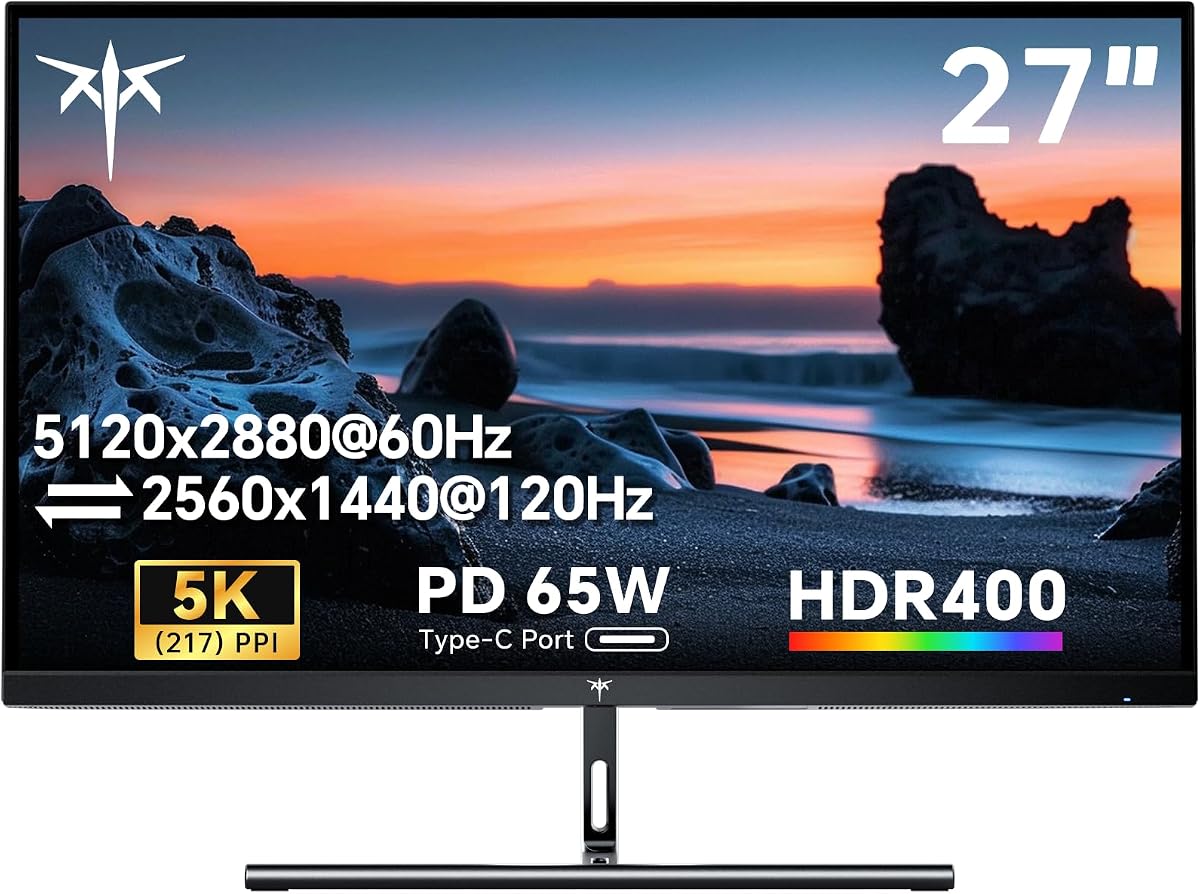
The KTC 5K Monitor delivers exceptional value by bringing high resolution to a lower price point. It maintains professional features like accurate color reproduction without the premium cost. Many users appreciate its versatility for both creative tasks and general multimedia consumption.
We may earn a commission when you buy through this link, at no additional cost to you.
Dual mode functionality allows switching between 5K for clarity and 2K for faster refresh rates. This flexibility means you can optimize performance based on your current task needs. The color coverage supports design work ensuring that visuals remain true to life on screen.
While the panel quality is strong the physical build feels less robust than high end models. Ports are sufficient for most setups but lack the expandability of more expensive units. These factors are minor given the overall performance and affordability of the device.
Students and freelancers looking for a capable screen without overspending should consider this option. It integrates well with Mac Mini systems and standard PCs alike. For those on a tight budget it is the best choice for high resolution viewing.
Switching between resolutions lets you balance visual detail with fluidity for different software needs.
Simple setup with essential ports ensures you can start using it immediately without extra hardware.
We may earn a commission when you buy through this link, at no additional cost to you.
Samsung's Odyssey G8 brings high resolution visuals to the gaming arena effectively. It combines a 5K resolution with fast refresh rates for a smooth interactive experience. Gamers will appreciate the balance of detail and motion handling provided by this panel.
We may earn a commission when you buy through this link, at no additional cost to you.
The Dual Mode feature lets you toggle between high resolution for immersion and high speed for competitive play. Fast IPS technology ensures colors remain vivid even when moving quickly across the screen. Support for G-Sync and FreeSync minimizes tearing during intense sessions.
Color accuracy is not the primary focus here compared to professional monitors. Menus and settings can be complex to navigate for new users initially. However these issues are minor when the goal is high performance visual output in games.
This monitor is perfect for enthusiasts who want sharp graphics without sacrificing speed. The ergonomic stand allows you to position the screen comfortably for long play. If gaming is your priority this model offers the best features in its class.
Toggle between high detail and high speed settings to match your favorite game genre perfectly.
Multiple HDMI and DP ports let you connect consoles and PCs simultaneously without hassle.
We may earn a commission when you buy through this link, at no additional cost to you.
This ROG model integrates AI tools to give competitive players an edge in matches. It delivers sharp visuals with a fast panel that keeps motion blur to a minimum. The design includes features specifically meant to enhance gameplay efficiency on screen.
We may earn a commission when you buy through this link, at no additional cost to you.
Dual mode switching provides options for clarity in single player games and speed in competitive matches. The low response time ensures that your inputs are reflected instantly without lag. HDR support adds depth to visuals making dark scenes more visible during exploration.
Some AI features may not work as effectively across all game titles yet. The pricing can vary depending on current market promotions and availability. These points are worth noting but do not diminish the core performance of the hardware.
Gamers seeking advanced tools alongside high resolution will find this monitor useful. The tripod socket adds unique utility for specific streaming or content setups. If you want a gaming monitor with extra smart features this is a top choice.
AI enhancements help improve visibility and targeting without changing the core gameplay experience.
HDR ensures that lighting effects pop while maintaining detail in the darkest parts of scenes.
We may earn a commission when you buy through this link, at no additional cost to you.
This KTC monitor is designed to work seamlessly with Mac Mini systems out of the box. It offers high pixel density that ensures text and images appear crisp and clear. The brightness level supports usage in well lit rooms without washing out colors.
We may earn a commission when you buy through this link, at no additional cost to you.
With an sRGB color area exceeding 100% it covers a wide range of standard web colors. Dual mode options let you choose between high resolution or faster refresh rates easily. Connectivity options include HDMI and DisplayPort alongside a robust Type-C connection for versatility.
The stand lacks full height adjustment which may require external risers for ergonomics. The design is functional but not particularly distinctive compared to higher end brands. These constraints are offset by the solid performance and warranty support offered by the manufacturer.
Home office users with Mac Mini hardware will find this monitor highly practical. It provides the resolution needed for productivity at an accessible price point. For those needing a reliable setup without extra cost it is an ideal match.
Compatible connections ensure plug and play setup with Apple Mac Mini computers effortlessly.
A three-year warranty gives peace of mind regarding long term reliability and service options.
We may earn a commission when you buy through this link, at no additional cost to you.
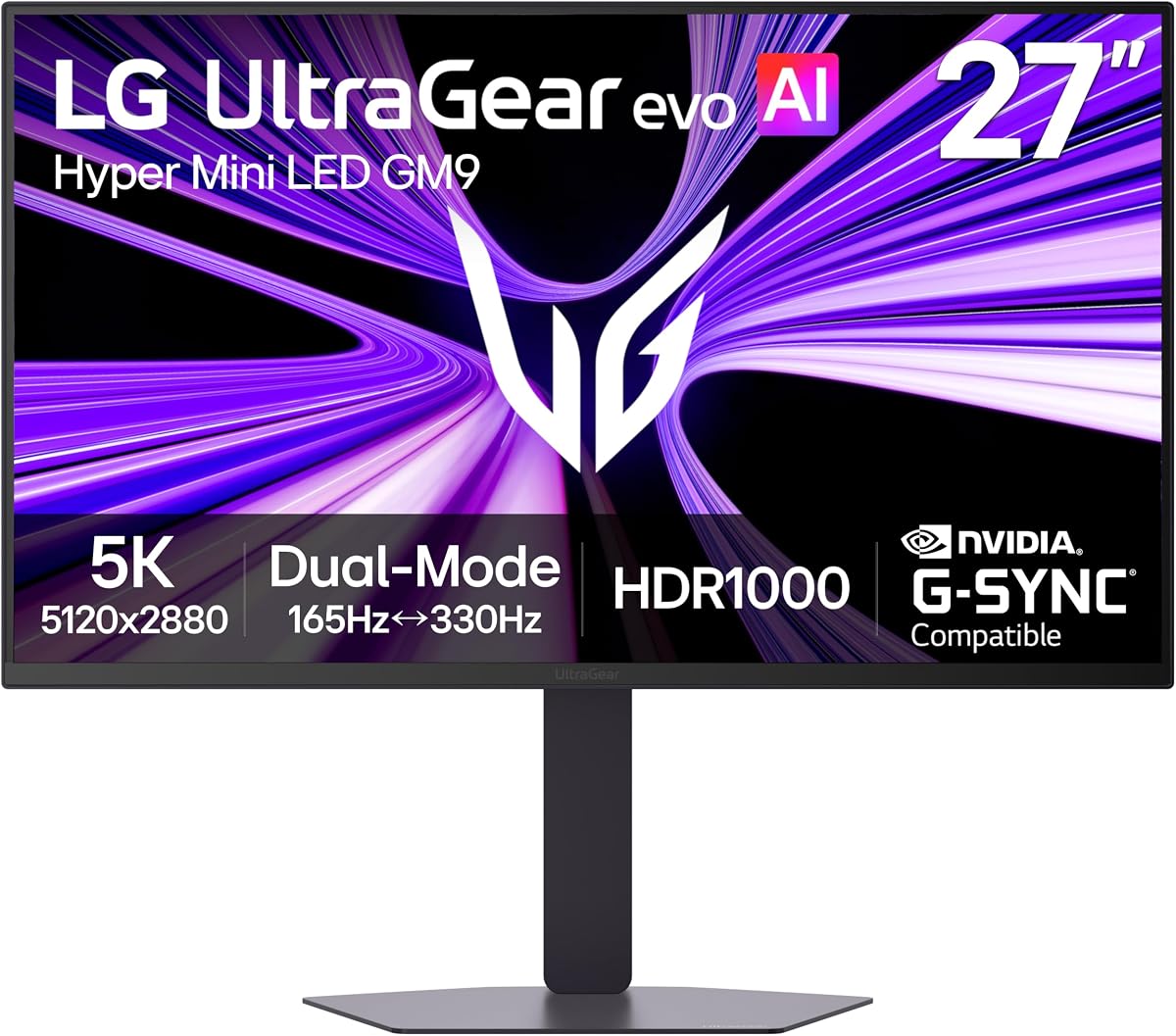
LG brings Mini-LED technology to this model for exceptional contrast and brightness levels. It stands out by delivering vivid highlights that standard screens cannot replicate. Gamers will notice the deep blacks and bright explosions enhance immersion in supported titles.
We may earn a commission when you buy through this link, at no additional cost to you.
AI Upscaling allows older content to look sharper without needing a new graphics card. The dual mode refresh rates adapt to game genres ensuring smooth performance everywhere. Connectivity includes DisplayPort 2.1 for future bandwidth needs beyond current standards.
Some users have reported firmware bugs that may require updates to fix issues. The high brightness also means higher power usage which can affect energy bills over time. These factors are manageable but should be considered before purchasing for general use.
This monitor suits those who want the best visual fidelity for HDR gaming setups. It delivers on brightness and color range better than most competitors. For high end gaming enthusiasts it provides a premium viewing experience.
Mini-LED local dimming creates deeper shadows and brighter lights for a more realistic picture.
DisplayPort 2.1 ensures the monitor can handle higher data rates for upcoming technology.
We may earn a commission when you buy through this link, at no additional cost to you.
Dell offers a reliable solution that balances performance and comfort for general use. It supports a 120Hz refresh rate which makes scrolling and gaming smooth and responsive. The display is easy on the eyes thanks to reduced blue light technology.
We may earn a commission when you buy through this link, at no additional cost to you.
Audio quality is improved with spacious sound that eliminates the need for external speakers. USB-C connectivity simplifies desk setup by allowing a single cable connection for video and data. The color accuracy supports standard work tasks effectively without professional calibration.
While not full 5K it still delivers sharp visuals for most productivity tasks well. It lacks power delivery over USB-C which means you still need a power adapter for laptops. These minor points make it less versatile than specialized premium models.
Office workers looking for a comfortable and sharp display will appreciate this choice. The combination of speed and eye care features is rare in this price range. For everyday productivity and light gaming it is a highly recommended option.
ComfortView Plus reduces harmful light to prevent fatigue during long work days easily.
Built-in speakers provide better sound than most standard monitors without extra setup cost.
We may earn a commission when you buy through this link, at no additional cost to you.
LG brings webOS to this monitor allowing direct streaming from the screen without a PC. It offers a versatile experience for media consumption alongside standard computing tasks. The color performance supports accurate rendering for both creative work and entertainment use.
We may earn a commission when you buy through this link, at no additional cost to you.
USB-C delivery up to 90W keeps laptops charged while providing video and data transfer. The built-in speakers deliver decent audio quality for casual viewing and meetings. Ergonomics are strong with a stand that allows for comfortable height adjustments easily.
It does not reach the full 5K resolution of top tier professional monitors. Setting up the streaming apps can be tricky for users unfamiliar with the platform. These downsides are balanced by the added convenience of an all-in-one entertainment hub.
Users who want a single display for work and media will find this very handy. It simplifies your setup by combining functions usually requiring separate devices. For home offices and living rooms it is a great dual purpose screen.
Direct access to streaming apps means no need for an external computer to watch shows.
90W power delivery ensures your laptop stays charged even under heavy usage loads.
We may earn a commission when you buy through this link, at no additional cost to you.
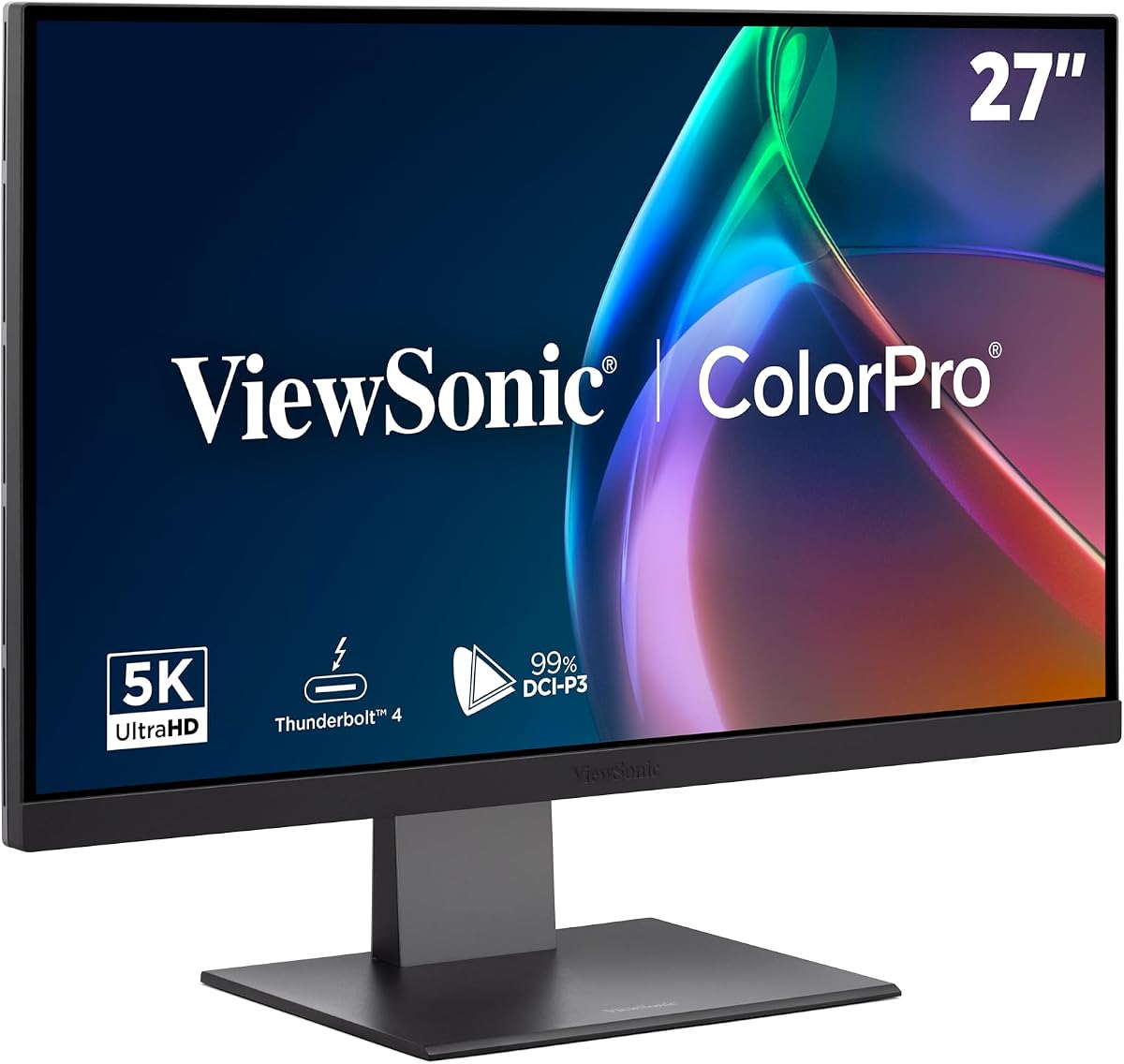
ViewSonic provides a display that aligns perfectly with Mac ecosystem standards. It is validated for Pantone color accuracy making it ideal for designers needing consistent hues. The hardware supports high power delivery ensuring your devices stay powered while connected.
We may earn a commission when you buy through this link, at no additional cost to you.
Daisy chain capability allows you to expand your workspace using a single cable run. The stand offers full adjustments to suit any physical setup or posture preference. This flexibility ensures you can position the screen to reduce physical strain effectively.
The price is on the higher side which may limit its accessibility for some users. Availability can sometimes be lower compared to other major brands on the market. These issues are offset by the precision and reliability needed for professional creative output.
Designers relying on exact color reproduction will value this validation highly. It removes guesswork and ensures print and digital outputs match your expectations. For professionals using Macs it is a reliable and high performance choice.
Pantone Validated ensures colors meet strict industry requirements for professional design work.
Daisy chain support allows multiple displays to connect efficiently for a wider workspace.
We may earn a commission when you buy through this link, at no additional cost to you.
Selecting the right monitor depends on your specific workflow and visual needs. This guide outlines the key factors to consider before making a purchase.
A 27 Inch 5K Monitor offers 5120×2880 pixels which provides exceptional sharpness. This density ensures text and images appear smooth without visible pixels. It is vital for design work where fine detail matters greatly.
Look for a screen with at least 200 PPI for the best clarity experience.
IPS panels are generally preferred for their color accuracy and wide viewing angles. Fast IPS variants are available for gaming which reduce motion blur significantly. Consider your primary use case when choosing the specific panel type.
IPS technology ensures consistent colors even when viewed from the side.
Professional work requires high coverage of color spaces like DCI-P3 or sRGB. Look for displays that cover 99% of these standards for reliable output. Calibration tools or factory calibration add value for precise color matching.
High color coverage ensures your work looks accurate across different devices.
Standard professional monitors run at 60Hz which is sufficient for most tasks. Gamers may prefer higher rates like 144Hz or more for smoother motion. Dual mode monitors let you switch between rates for different needs easily.
Higher refresh rates reduce motion blur during fast moving content.
USB-C with power delivery simplifies setup by handling video and charging in one cable. Thunderbolt support offers faster data transfer for external drives and networks. Ensure you have the right ports for your computer and peripherals.
A single cable solution keeps your desk organized and reduces clutter.
HDR standards like HDR400 or HDR600 enhance contrast and brightness in supported content. This adds depth to images making them appear more lifelike and dynamic. Not all software supports HDR so check your workflow needs first.
HDR support improves the visual impact of supported media content significantly.
A stand with height tilt and swivel adjustments helps maintain a healthy posture. VESA mount compatibility allows you to use third party arm mounts if preferred. Comfort during long sessions is as important as visual quality.
Adjustable stands reduce neck strain during long work days.
Look for brands that offer reliable warranty terms to protect your investment. Good customer support can resolve issues quickly if they arise. Check reviews for reliability to ensure long term durability.
Strong warranty coverage provides peace of mind for your purchase.
Start by connecting your monitor using the high bandwidth cable provided in the box. Ensure the power adapter is securely plugged in before turning it on. Follow the on-screen setup wizard to adjust language and resolution settings.
Clean the screen regularly with a microfiber cloth to remove dust and fingerprints. Avoid using harsh chemicals or paper towels as they can damage the coating. Light pressure is sufficient to keep the display clean without scratches.
Use the built-in tools to calibrate color if needed for your workflow. Adjust brightness based on ambient lighting to reduce eye strain over time. Proper placement away from direct sunlight ensures consistent color accuracy.
Yes it offers exceptional sharpness that makes text very easy to read. It provides ample workspace for multitasking with multiple windows on the screen. While it costs more the visual clarity improves productivity and comfort significantly.
Driving a 5K resolution at 60Hz requires a modern graphics card or processor. Older systems may struggle to render high resolution graphics smoothly. Check your hardware capabilities to ensure a smooth experience before buying.
Dual Mode lets you switch between high resolution for work and high speed for gaming. You get the best of both worlds without buying separate screens. It optimizes performance based on your current task needs easily.
Most models listed support USB-C or Thunderbolt which connect directly to MacBooks. You may need specific cables to get full 5K resolution and power. Check the product details to confirm Mac compatibility before purchasing.
Yes many models offer high refresh rates and low response times for gaming. However you need a powerful PC to achieve high frame rates at 5K. Gaming performance depends heavily on your graphics hardware capabilities.
Some high end models support daisy chaining via Thunderbolt 4 or USB-C. This lets you connect multiple displays using a single cable from your computer. Check the specs to confirm this feature is included in your model.
Use built-in blue light filters and adjust brightness to match your room. Follow the 20-20-20 rule to take breaks from looking at the screen. Proper height adjustment helps reduce neck and eye strain over time.
We have reviewed ten top options ranging from budget friendly to premium choices. Each model offers distinct strengths for professionals and gamers alike. The ASUS ProArt and BenQ models lead in color accuracy for creative work.
When choosing consider your primary use case and budget constraints. Ensure the monitor supports the necessary connectivity for your current setup. Prioritize ergonomics and color accuracy if you work long hours daily.
Prices and availability change frequently so check current offers before buying. Investing in a high quality display improves both productivity and enjoyment. Find the model that fits your needs best for a lasting upgrade.