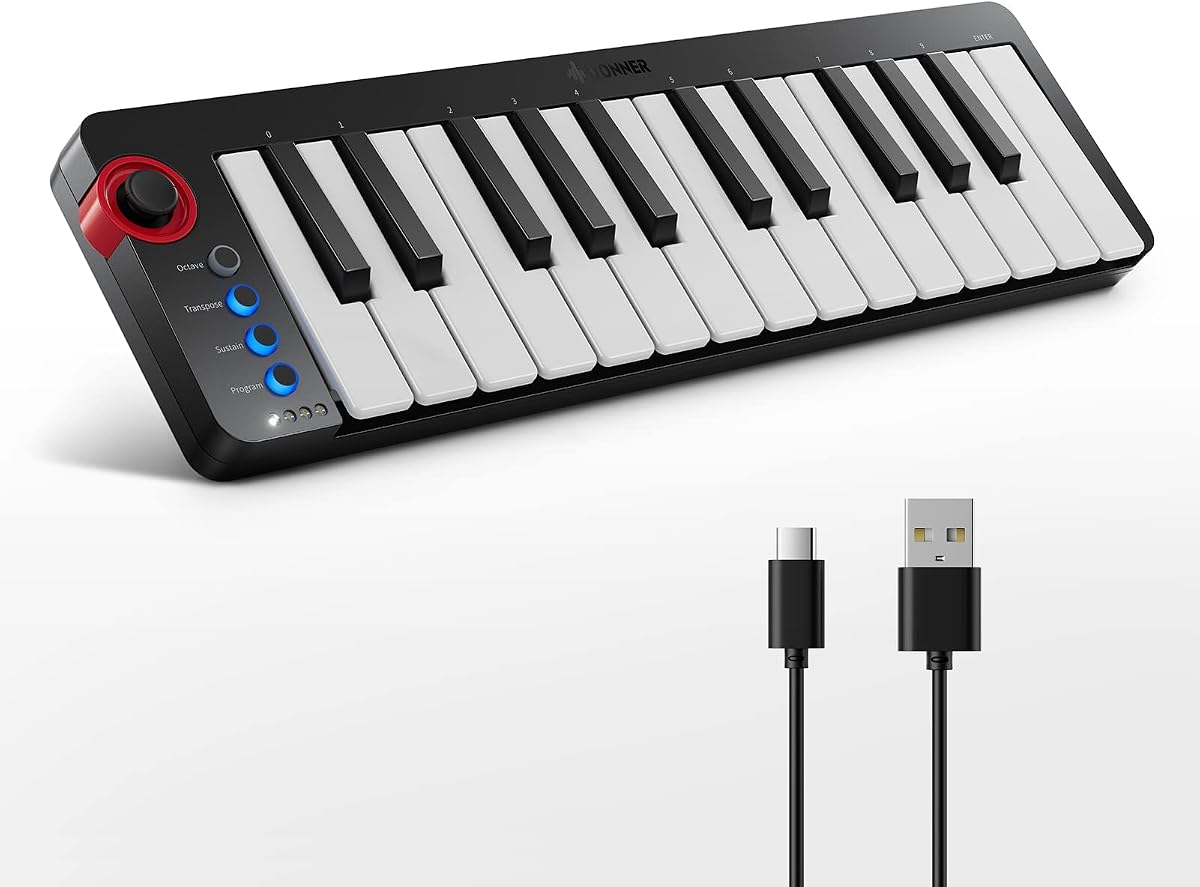
Donner Mini MIDI Keyboard N-25
4.1Editor score
Velocity sensitive keys
Includes 40 lessons
Light-up rocker buttons
Discover the top 25 key MIDI controllers for music production. This guide compares features, portability, and compatibility to help you choose the right
Finding the right 25 key MIDI controller can transform your music production workflow significantly. These compact devices offer portability without sacrificing essential controls for modern producers and composers.
We compared ten leading models based on build quality, key response, integration with popular digital audio workstations, and overall value for money to help you decide confidently.
Each pick highlights unique strengths and potential trade-offs so you can match your specific needs. Please note that pricing and availability may fluctuate over time on retail platforms.
4.1Editor score

4.6Editor score

4.6Editor score
The following table provides a side-by-side comparison of all ten models to help you evaluate their specific strengths and weaknesses quickly against each other.


The Akai Professional MPK Mini MK3 stands out as a top choice for producers seeking a reliable 25 key MIDI controller. With a rating of 4.6 stars, it balances professional features and portability effectively.
We may earn a commission when you buy through this link, at no additional cost to you.
Its standout qualities include eight backlit velocity-sensitive MPC-style pads and eight 360-degree knobs that offer precise control over your software instruments and effects.
The built-in arpeggiator and 4-way thumbstick provide dynamic modulation capabilities, while NKS integration ensures seamless operation with Native Instruments libraries for sound design.
While the keys are somewhat stiff, the robust construction and comprehensive software bundle including MPC Beats make this a worthwhile investment for serious music creators.
The velocity-sensitive MPC-style pads allow for expressive drum programming and sample triggering with reliable response to your playing dynamics.
NKS support means you can instantly browse and control sound libraries from Native Instruments directly through the controller interface.
We may earn a commission when you buy through this link, at no additional cost to you.
The Novation Launchkey Mini 25 MK4 offers premium features that justify its higher price point for serious producers. It combines high-quality materials with advanced features like polyphonic aftertouch and FSR pads.
We may earn a commission when you buy through this link, at no additional cost to you.
Its standout qualities include deep DAW integration that maps controls intuitively for Ableton Live and Logic Pro allowing rapid access to your digital audio workstation functions.
Scale Mode ensures you never hit a wrong note by restricting the keys to your chosen scale, which is incredibly helpful for improvisation and composition without deep music theory knowledge.
While the keys are closely spaced, the comprehensive bundle of software including Ableton Live Lite and free Melodics lessons makes this a complete production solution right out of the box.
Force Sensitive Resistive pads provide a more natural playing experience similar to traditional drum machines for better dynamic control.
Scale Mode helps beginners and experts alike play in key by lighting up and restricting notes to your selected scale range.
We may earn a commission when you buy through this link, at no additional cost to you.
The Donner Mini MIDI Keyboard N-25 is an excellent entry point for beginners who want a full music production experience without a significant financial commitment. It includes unique teaching features not found in competitors.
We may earn a commission when you buy through this link, at no additional cost to you.
Its standout qualities include 40 entertaining keyboard teaching courses designed to help novices learn arrangement essentials while they practice using the hardware controller directly.
The light-up buttons and rocker features add a fun visual element to your playing that makes learning melody and rhythm more engaging for young musicians or hobbyists.
While the build is simpler than premium models, the low cost and educational software make this a highly recommended option for those starting their music production journey today.
Included lessons cover arrangement essentials to help you progress from basic melody creation to more complex music structures effectively.
Light-up buttons provide visual cues for your notes and functions helping you learn rhythms and patterns faster than on dark interfaces.
We may earn a commission when you buy through this link, at no additional cost to you.
The Akai Professional LPK25 is designed for musicians who prioritize portability above all else without sacrificing essential performance controls. It offers a sleek design that fits easily into any bag.
We may earn a commission when you buy through this link, at no additional cost to you.
Its standout qualities include 8 programmable preset slots that allow you to instantly recall your mappings for different DAWs and virtual instruments when switching projects.
The built-in arpeggiator provides creative control over your sound sources like synthesizers and modular gear using just one USB cable connection to your computer or interface.
While it lacks pads for drumming, the dedicated octave buttons and sustain option ensure you can play melodies and bass lines expressively anywhere you need to compose on the go.
Eight programmable slots let you save settings for different software so you never have to remap your controller manually every time.
The built-in arpeggiator transforms simple melodies into complex patterns instantly enhancing your creativity without complex software setup.
We may earn a commission when you buy through this link, at no additional cost to you.
The Akai Professional APC Key 25 MK2 is tailored specifically for producers using Ableton Live as their primary digital audio workstation for music creation and live performance.
We may earn a commission when you buy through this link, at no additional cost to you.
Its standout qualities include a bright 5×8 RGB pad matrix that provides visual color feedback for launching clips which is essential for live performance workflows in Ableton.
The dedicated arrow buttons allow you to scroll through tracks and scenes quickly ensuring you can access loops and samples instantly without using your mouse constantly.
While it is optimized for Ableton which may limit flexibility elsewhere, the comprehensive virtual instrument pack and direct mapping make it a powerful tool for Ableton users.
The RGB pad matrix allows you to launch clips visually with color feedback helping you keep track of your arrangement during performance.
Pre-mapped controls ensure one-to-one integration with Ableton Live so you can start producing immediately without configuring your software.
We may earn a commission when you buy through this link, at no additional cost to you.
The M-VAVE 25 Key USB MIDI controller distinguishes itself with true wireless Bluetooth connectivity allowing you to produce music without cables connecting to your device directly.
We may earn a commission when you buy through this link, at no additional cost to you.
Its standout qualities include a built-in 2000 mAh battery that offers approximately 16 hours of use making it ideal for cafe sessions or travel without needing power access.
Two capacitive touch stripes provide pitch bend and modulation control giving you expressive playability even though the unit is designed for compact and easy transport everywhere.
While managing battery life adds a small step to your workflow, the freedom of wireless connection and included RGB pads make this a unique choice for mobile producers.
Bluetooth connection lets you create music away from your computer screen using a tablet or phone without any wires in your way.
Capacitive touch stripes allow for smooth pitch bends and modulation similar to traditional wheels but in a more space-efficient design.
We may earn a commission when you buy through this link, at no additional cost to you.
The Akai Professional MPK Mini Play MK3 offers a unique standalone capability that allows you to create music without being connected to a computer for a truly portable experience.
We may earn a commission when you buy through this link, at no additional cost to you.
Its standout qualities include a built-in speaker and internal sounds such as acoustic pianos and synth leads which lets you compose melodies directly on the keyboard.
You can power it up with batteries to take it on the go ensuring you never miss a creative moment even when you are traveling far from your studio setup.
While it offers less direct control over external DAWs when running standalone, the flexibility to work independently makes it an excellent choice for songwriters on the move.
Internal sounds and speaker mean you can produce music without a computer or software connection giving you total creative freedom.
Battery operation ensures you can create music anywhere without worrying about finding a power outlet near your creative space.
We may earn a commission when you buy through this link, at no additional cost to you.
The Rhymo 25 Key Controller brings modern connectivity options like USB-C and Bluetooth MIDI to the table for producers who want versatile connection methods for their mobile setup.
We may earn a commission when you buy through this link, at no additional cost to you.
Its standout qualities include an X-Y joystick for dynamic pitch and modulation control as well as a loop function that helps you create musical ideas instantly.
The slim and compact design powered directly via USB-C ensures a truly hassle-free on-the-go music production setup without needing additional adapters or power sources.
While it may lack the depth of professional knobs found on higher-end models, the loop function and modern connectivity make it a strong contender for casual and intermediate producers.
USB-C connectivity offers faster data transfer and power delivery ensuring reliable performance with modern computers and tablets.
The X-Y joystick gives you dual-axis control over pitch and modulation enhancing your expressive capability without extra buttons.
We may earn a commission when you buy through this link, at no additional cost to you.
The Arturia MiniLab 3 focuses on workflow fluidity allowing you to adapt your music creation process to your own style and needs with intuitive physical controls.
We may earn a commission when you buy through this link, at no additional cost to you.
Its standout qualities include four faders and drum pads that enable you to mute tracks and punch in drums quickly without needing to reach for your mouse constantly.
The premium velocity-sensitive keys provide a responsive playing experience that feels natural for melodies and chords helping you create expressive songs easily.
While it is priced higher than budget options the emphasis on flow and control customization makes it a powerful tool for producers who want a seamless and efficient workflow.
Four dedicated faders let you mix and adjust levels hands-on giving you real-time feedback and control over your project.
Mute and punch controls integrated into the keyboard allow for faster editing and arrangement decisions during your creative sessions.
We may earn a commission when you buy through this link, at no additional cost to you.
The Akai Professional MPK Mini Play MK3 Black Edition combines standard MPC-style performance with powerful software integration that delivers over 1500 sounds right out of the box for production.
We may earn a commission when you buy through this link, at no additional cost to you.
Its standout qualities include 8 backlit velocity-sensitive MPC-style MIDI beat pads that allow precise programming of drums and triggering samples with Note Repeat functionality.
The ability to customize knob and joystick mappings via the Editor software ensures you can tailor the controller to your specific software preferences effectively.
While it does not feature standalone battery operation like the Play MK3, the comprehensive starter kit and Splice access make it an excellent value for those focused on computer-based production.
Backlit pads provide visual feedback and precise velocity response essential for accurate rhythm programming and sample triggering.
Software editing tools let you assign controls to your favorite plugins ensuring your workflow is optimized for your specific style.
We may earn a commission when you buy through this link, at no additional cost to you.
Selecting the right controller depends on understanding your specific needs for portability, DAW integration, and control features.
Look for velocity-sensitive keys which respond to how hard you press allowing for dynamic expression in your music performance. Semi-weighted or weighted keys provide a piano-like feel but often increase size and cost.
For portable 25 key controllers, mini keys are standard but ensure they have enough travel distance to avoid accidental notes during vigorous playing.
Check if the controller offers pre-mapped controls for your specific Digital Audio Workstation to save setup time. Some models are optimized for Ableton Live or Logic Pro while others are universal.
Deep integration allows you to control transport functions and track parameters directly from the controller without manual configuration every session.
Consider the number and type of pads knobs and faders included as these determine your ability to manipulate sounds physically. Drum pads are essential for beat makers while knobs are vital for synth tweaking.
Having physical controls enhances your creative workflow by reducing reliance on the mouse which can interrupt your flow during production sessions.
USB-C and Bluetooth MIDI connectivity are becoming increasingly important for modern setups to ensure compatibility with tablets and phones. Traditional USB offers stable power while Bluetooth adds wireless flexibility.
Ensure the controller supports class-compliant operation on your device so you do not need to install extra drivers that can cause latency or compatibility issues.
Since 25 key controllers are often chosen for their compact size check the weight and durability if you plan to travel frequently. A sturdy chassis will withstand the rigors of travel better than plastic.
Power options such as battery capability can be a deciding factor if you want to produce music in locations without easy access to power outlets.
Many controllers come with bundled software such as DAW Lite versions or virtual instruments which add value to your purchase. Check which specific versions are included and their expiration dates.
Software bundles like Splice credits or educational courses can significantly enhance your learning curve and production capabilities right from the start.
Built-in arpeggiators allow you to create complex patterns from single notes instantly which is useful for electronic music and rapid idea generation. Look for adjustable resolution and range options.
Step sequencers or loop functions integrated into the controller let you record rhythmic ideas directly without needing to open your software interface immediately.
Determine your budget range and compare the features offered at that price point to ensure you get the best value. Higher prices often bring better build quality and more detailed control mappings.
Sometimes a lower-priced model with robust software support is better than a more expensive unit with limited features for your specific workflow needs.
Connect the controller to your computer or tablet using the provided USB cable to power it and establish data communication. Most models are class-compliant so they will be recognized automatically by your operating system.
Configure your MIDI settings in your DAW to ensure the device is mapped to the correct input channels. Use any included editor software to customize knobs and pads to your liking.
Keep the controller clean by wiping it with a soft dry cloth regularly to remove dust. Store it in a protective case when traveling to prevent damage to keys and knobs.
Most require a computer but some standalone models like the Akai MPK Mini Play MK3 have built-in sounds and speakers allowing them to function independently without a PC connection.
Yes many models support iOS via USB-C or Bluetooth MIDI but you may need an OTG adapter or specific Lightning to USB adapter to connect older devices properly.
Most controllers in this category feature velocity-sensitive keys meaning they detect how hard you press to change volume. Touch sensitivity refers to key surfaces which are less common on mini controllers.
They generally work with all major DAWs like Ableton Live Logic Pro and FL Studio. Some have specific pre-mapped layouts for Ableton or Native Instruments for enhanced functionality.
Most are class-compliant and work without drivers on modern Windows Mac and iOS systems. Check the product page if you use older OS versions to ensure compatibility without extra setup.
Yes the compact size and included software bundles make them ideal for beginners. Many come with educational courses to help learn music theory and basic production techniques quickly.
Check the USB connection first and try a different cable. If that fails reinstall the drivers or reset the device by holding the shift button while powering it on to restore factory settings.
Most 25 key controllers draw power directly from the USB port so no extra adapter is needed. Some advanced or standalone models have battery options for wireless use without a computer.
We have reviewed ten distinct models ranging from budget-friendly beginner options to premium professional units that offer advanced control surfaces and software bundles.
Prioritize controllers that offer deep integration with your preferred DAW and sufficient physical controls like pads or knobs to match your specific production style and needs.
Remember to verify current prices and availability before purchasing as retail values change frequently to ensure you get the best deal for your budget.