
Logitech Brio 101 Full HD
4.4Editor score
Auto-Light Balance RightLight boost
Privacy slide cover included
Plug-and-Play on Teams
This guide compares the top 1080p webcams for streaming, meetings, and video calls. Find the best model for your setup, budget, and performance needs today.
Choosing the right 1080p webcam ensures crisp video and reliable performance for every call or stream. Modern sensors and autofocus help you look sharp in any lighting condition without constant tweaks.
We evaluated ten popular models based on video clarity, audio quality, compatibility, and ease of setup. Each pick reflects real-world usage scenarios for professionals, creators, and home users alike.
Every selection highlights key strengths, trade-offs, and ideal use cases to help you decide quickly. Remember that availability and promotions change often, so check current listings before purchasing your next camera.
4.4Editor score

4.6Editor score

4.4Editor score
This table summarizes the key specs and standout features of each webcam in our top ten list. Use it to compare resolution, field of view, privacy options, and compatibility at a glance.




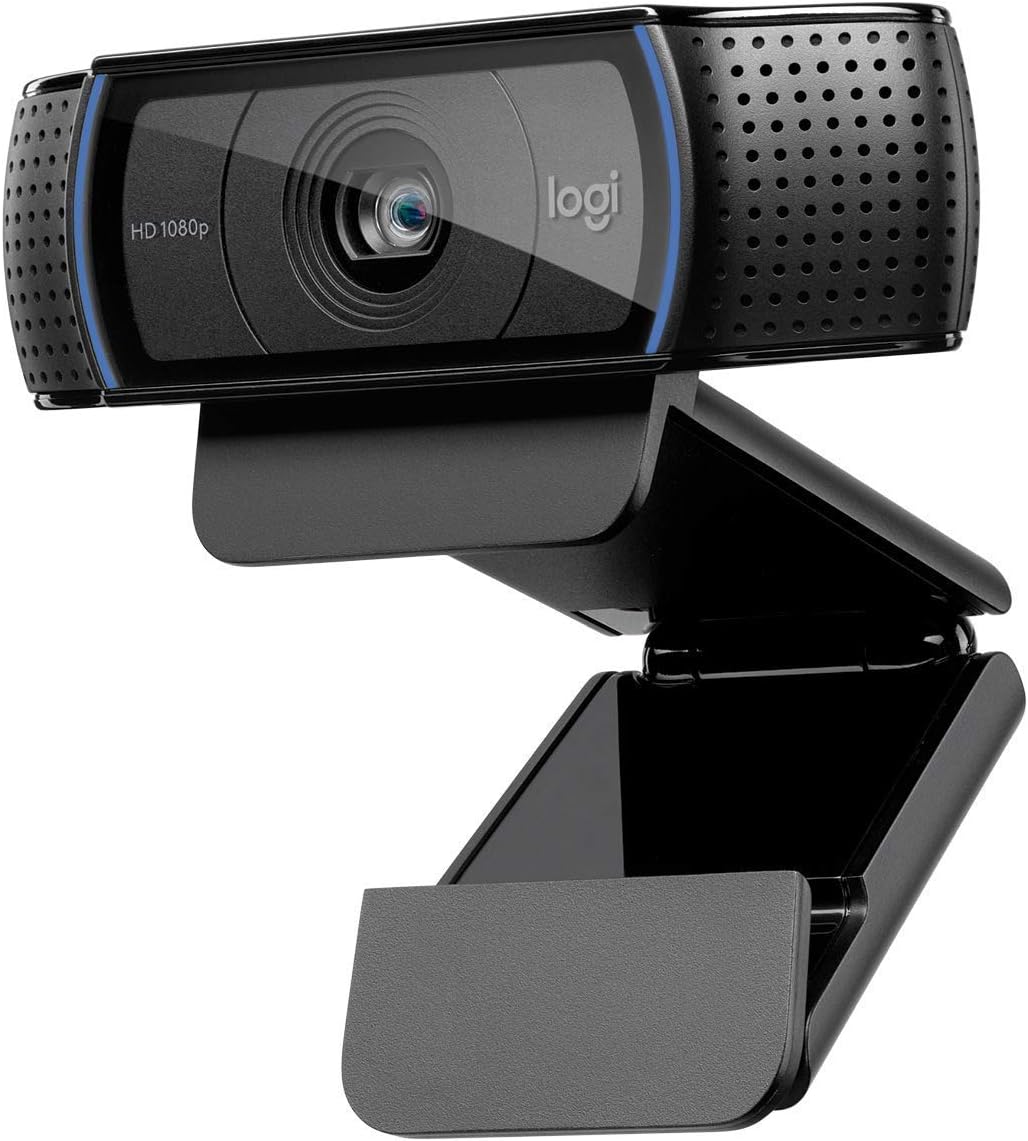


The Logitech C920x delivers strong Full HD video at 30fps with autofocus that keeps you sharp during long sessions. It holds a high rating thanks to consistent performance in calls and recordings.
We may earn a commission when you buy through this link, at no additional cost to you.
Its HD lighting adjustment compensates for uneven room conditions so your face stays visible without manual tweaks. The stereo audio from dual mics ensures your voice comes through clearly even in busy spaces.
While it lacks a built-in privacy shutter, the clarity and reliability make it a favorite for remote workers who prioritize picture quality. The software support lets you adjust settings for streaming or meetings.
This webcam suits anyone seeking a dependable 1080p camera for professional meetings or casual streaming. It remains a top pick because it balances cost with performance better than most rivals in its class.
Automatic light correction fine-tunes exposure in real time so you look natural in most indoor settings. The lens adjusts focus quickly when you move closer to the screen.
Dual omnidirectional mics reduce background noise and deliver balanced voice audio. Optional capture software helps you share clips or customize your video settings for content creation.
We may earn a commission when you buy through this link, at no additional cost to you.
The Brio 101 brings affordable Full HD video with RightLight technology that boosts brightness to reduce shadows. It offers a clean image for meetings without complex settings or drivers.
We may earn a commission when you buy through this link, at no additional cost to you.
Its slide privacy cover gives instant visual assurance when the camera is idle which matters for remote work. The built-in mic handles basic calls well and connects via USB A for reliability.
While it does not match higher-end microphones or optics, it keeps costs low while delivering clear visuals for daily tasks. Color options let you match your desk setup without sacrificing function.
Buy this if you need a reliable, affordable camera that works out of the box for Teams or Zoom. Its simplicity and privacy features make it a smart entry-level choice for home offices.
The slide cover ensures you control when the lens is exposed without adding bulk. It fits snugly and stays closed until you need to start a call.
It recognizes instantly on Windows and macOS without extra software. Works with Zoom, Teams, Google Meet, and major platforms so you start calling right away.
We may earn a commission when you buy through this link, at no additional cost to you.
The EMEET S600 stands out with a large Sony sensor that produces crisp images even at 1080p. Its PDAF autofocus locks onto subjects quickly and maintains focus during movement.
We may earn a commission when you buy through this link, at no additional cost to you.
Advanced light adjustment balances highlights and shadows so you remain visible in dim rooms. You can switch to 1080p at 60fps for smoother video if your stream setup supports it.
While it supports 4K, you may need compatible software to enable the highest resolution. The privacy cover and rugged build ensure durability for long-term use in studios or offices.
Choose this if you want premium optics and flexible settings for streaming or high-fidelity calls. Its focus speed and sensor quality justify the cost for users who demand top clarity.
The Phase Detection Autofocus technology finds subjects faster than standard contrast systems. This reduces blur when you move or adjust your position during calls.
Noise filtering in the mics keeps voice audio clear. Software lets you adjust field of view angles to frame yourself or include more of the room.
We may earn a commission when you buy through this link, at no additional cost to you.
The C920S mirrors the trusted C920 design but adds a sliding privacy shutter for added peace of mind. It captures Full HD video with a glass lens that resists glare and smudges.
We may earn a commission when you buy through this link, at no additional cost to you.
Light correction keeps colors accurate and exposure stable across different lighting setups. Dual mics handle voice pickup cleanly and pair well with most conferencing platforms.
It lacks the extra software license that older bundles offered, yet the core hardware remains robust for meetings and home streaming. The shutter makes it a strong pick for shared or public spaces.
Consider this model if you want proven reliability and built-in privacy without spending on higher tiers. It balances everyday needs and durability so you stay confident during any call.
The glass optical element maintains clarity over time and resists distortion. The sliding cover lets you quickly mask the lens when not in use.
Focus locks reliably and light correction smooths shadows. Works great with common apps and needs no drivers for quick plug-and-play.
We may earn a commission when you buy through this link, at no additional cost to you.
The C920e targets business users with official certification for Zoom and Microsoft Teams. Its 78 degree field of view keeps individuals centered while leaving room to share items on screen.
We may earn a commission when you buy through this link, at no additional cost to you.
Two omnidirectional mics capture clear voice up to one meter away. A flip-up privacy screen provides immediate confirmation when the lens is covered so users can trust their privacy.
Tripod threads add mounting flexibility for different setups. Sync management software helps IT teams keep devices updated across organizations which matters for large deployments.
This camera fits enterprises and remote professionals who need reliable, certified hardware. It emphasizes security and stability without sacrificing picture quality or ease of use in daily calls.
Certification ensures seamless integration with Teams and Zoom so features work as expected. It connects cleanly and avoids compatibility hiccups during busy workdays.
The flip privacy screen offers a visual cue that protects against accidental recording. The adjustable clip and tripod threads make it versatile for desktop or monitor mounts.
We may earn a commission when you buy through this link, at no additional cost to you.
The C960 uses a 90 degree wide angle lens to include more participants in frame without constant adjustments. It delivers Full HD video with fixed focus optimized for standard desk distances.
We may earn a commission when you buy through this link, at no additional cost to you.
Automatic exposure and color adjustment keep the image balanced in varying light. It connects with USB A and includes a C adapter so it works with older and newer laptops alike.
The removable cover gives privacy control and protects the lens from dust. While not as adjustable as higher models, it offers broad compatibility and a solid setup for small group calls.
Pick this when you need a simple, wide-coverage camera for collaborative meetings. It provides reliable image stability and flexible connection options without requiring extra software or drivers.
The 90 degree lens reduces the need to shift the camera when more people join. This helps keep everyone visible without extra adjustments during calls.
It works with major conferencing apps and includes a removable cover. The USB C adapter supports newer devices and keeps setup straightforward for most users.
We may earn a commission when you buy through this link, at no additional cost to you.
The NexiGo N60 offers sharp Full HD images at 30fps with a fixed-focus glass lens optimized for typical desk ranges. Its noise-cancelling mic helps reduce ambient sounds during calls.
We may earn a commission when you buy through this link, at no additional cost to you.
A built-in privacy cover adds security and peace of mind when the camera is idle. It supports broad OS compatibility including Linux and Chrome which expands its reach beyond Windows users.
While it lacks firmware auto-updates and advanced software tools, it delivers dependable quality for the price. It starts quickly and works with major video apps without extra configuration.
This webcam suits users seeking an affordable, reliable camera for online school or remote work. It balances core video and audio quality with essential privacy features for everyday use.
The noise-cancelling mic filters background sounds for cleaner voice output. The included privacy cover secures the lens without adding bulk or extra steps.
It works with Linux, Chrome OS, and macOS out of the box. Plug-and-play support ensures quick setup on most modern systems and browsers.
We may earn a commission when you buy through this link, at no additional cost to you.
The C920 remains a staple for clear Full HD video calling and recording. Its optics and autofocus keep subjects sharp while its built-in mic handles voice cleanly.
We may earn a commission when you buy through this link, at no additional cost to you.
It supports widespread compatibility across Windows and macOS and works with most major video platforms. The widescreen format suits recording tasks and streaming setups without extra software.
Compared to newer models it lacks a privacy shutter and advanced auto-correction. Yet its durability and consistent image quality make it a safe choice for basic meetings and lessons.
Choose this if you want a trusted camera that just works on most systems. It delivers reliable video and audio for everyday use and holds up well under daily wear.
Consistent autofocus and HD optics deliver stable picture quality in varied lighting. This reliability makes it easy to rely on for recurring meetings.
Plug-and-play setup and broad app support simplify installation. It works with major conferencing tools and streaming software with minimal configuration.
We may earn a commission when you buy through this link, at no additional cost to you.
The Brio 105 delivers clear Full HD video with RightLight 2 technology that improves exposure in poor lighting. It includes a privacy shutter to protect sensitive conversations at home or at work.
We may earn a commission when you buy through this link, at no additional cost to you.
Certified for Google Meet and supported on Chromebooks it fits well in school or enterprise environments. Logitech Sync lets administrators manage devices remotely for consistent setups across teams.
While it focuses on essential features, it offers solid build quality and dependable performance for daily calls. It avoids extra costs while ensuring employees and students look confident on camera.
Buy this when you need a straightforward business webcam with privacy and remote management. It keeps meetings professional and ensures consistent visual quality across different workspaces.
Sync remote deployment helps IT keep devices updated across many users. The privacy shutter ensures personal safety and compliance for remote workers.
RightLight 2 adjusts brightness and contrast automatically for clearer images. This helps maintain professionalism even when room lighting changes during the day.
We may earn a commission when you buy through this link, at no additional cost to you.
The Brio 100 provides Full HD video at 30fps with a clean plug-and-play experience. Its 58 degree field of view captures surroundings neatly without excessive distortion.
We may earn a commission when you buy through this link, at no additional cost to you.
As a renewed unit it offers a budget friendly path to reliable video calls. The built-in mic and USB connection ensure quick setup for anyone starting remote work or school.
Check the renewal terms for warranty details and expected cosmetic condition. For those seeking a compact, affordable camera this model delivers solid clarity and ease of use.
Choose this if you want to try a trusted brand without paying full price. It works well for individual calls and provides smooth video for typical home office needs.
Renewed units offer significant savings while maintaining core performance. Plug-and-play connection gets you into calls quickly without extra software.
The 1080p sensor produces clear frames at 30fps. The integrated mic delivers acceptable voice audio for casual meetings.
We may earn a commission when you buy through this link, at no additional cost to you.
Selecting the right webcam depends on your environment, connection options, and privacy needs. This guide explains the factors that most influence video quality and usability.
Full HD 1080p at 30fps offers crisp detail for most meetings and streaming tasks. Higher frame rates provide smoother motion for fast action or interactive sessions.
Aim for 1080p as the baseline for clear face-to-face communication.
Wider angles include more participants or workspace details without extra movement. Narrower views keep the frame tight on your face.
Choose 90 degrees for group calls and 58 to 78 degrees for solo meetings.
Auto exposure and light correction maintain visibility in variable indoor lighting. Fast autofocus keeps you sharp as you move or gesture during calls.
Look for models with light-adjustment tech and reliable phase detection focus.
Physical shutters or slide covers ensure the lens is masked when idle. This protects privacy in shared spaces and reduces accidental recording.
Always prefer a built-in privacy option for daily remote work.
Dual omnidirectional mics capture clearer voice and reduce background noise. Some models support software noise filtering to improve call clarity.
Select cameras with noise reduction if your environment is noisy.
Adjustable clips fit most monitors or laptops while tripod threads allow flexible positioning. USB Type-A and Type-C support ensures compatibility with older and newer systems.
Verify mount options and connector types match your desk and laptop ports.
Certified webcams work reliably with Zoom Teams and Meet without hiccups. Broad OS support ensures the camera functions on Windows Mac and Linux.
Pick models with official platform certifications for seamless meeting integration.
Sturdy construction resists daily wear and ensures stability during use. Premium models often include better optics and longer warranty terms.
Invest in durable materials if you plan to use the camera daily.
Connect the camera to a main USB port to avoid power or data issues. Use the included or recommended cable length and avoid long unpowered hubs.
Install any provided software to enable updates and advanced controls like field of view adjustments. Keep firmware current to maintain performance and security.
Clean the lens with a soft microfiber cloth and avoid harsh chemicals. Protect privacy by using the shutter when idle and position light sources behind you.
Yes, 1080p at 30fps or 60fps is sufficient for most streaming platforms. Higher resolution improves detail but may strain bandwidth and encoding hardware.
Autofocus keeps your face sharp when you move closer to the monitor. It prevents blur and maintains consistent quality throughout long meetings.
Most modern webcams have built-in mics, but audio quality varies. External microphones are recommended for professional recording or noisy environments.
Add front lighting like a ring light and use cameras with auto-light balance. Avoid strong backlighting so your face stays visible during calls.
A 90 degree wide-angle lens captures more participants without extra movement. It reduces the need to constantly reposition the camera.
Many models support Linux and Chrome OS without extra drivers. Check compatibility lists before buying to ensure seamless integration.
They provide immediate visual confirmation that the lens is covered. This prevents accidental recording and enhances security in shared spaces.
USB 3.0 ensures stable video delivery and sufficient power. Modern ports like USB-C offer greater flexibility and cleaner setup options.
Our top picks highlight reliable models that balance performance and price for most users. The C920x, Brio 101, and EMEET S600 lead in clarity and feature sets.
Prioritize lighting correction, autofocus, and privacy features to ensure professional video in varied conditions. Consider your connection ports and mounting needs for a smooth setup.
Prices and availability change regularly so verify current listings before deciding. With the right camera you'll look and sound confident on every call.