
Thrustmaster T-Flight Hotas X
4.4Editor score
Detachable throttle design
Programmable flight controls
Adjustable resistance
This guide compares the top 10 airplane controllers for PC flight simulators including joysticks throttles and yokes to help you find the perfect flight setup.
Finding the right airplane controllers for PC can transform your flight simulation experience from basic to professional. Whether you are simulating civil aviation or engaging in military combat maneuvers the right hardware makes all the difference in immersion and control precision.
We have compared ten top-rated flight simulation controllers ranging from entry-level joysticks to high-end yoke systems. Our analysis focuses on build quality programmability ease of setup and compatibility with popular flight sim titles available on Windows systems today.
Each pick highlights specific strengths like magnetic sensors ergonomic design or detachable throttles. Prices and availability may change so please check the latest details before purchasing to ensure you get the best value for your flight simulation investment.
4.4Editor score

4.0Editor score
4.6Editor score
The following table provides a side-by-side comparison of all ten airplane controllers for PC reviewed in this guide highlighting their key specifications and standout features to help you make an informed decision.





The Logitech G X56 H.O.T.A.S stands out as a premier choice for serious flight simulation enthusiasts. With a rating of 4.0 stars it offers military-grade precision and customizable options that aspiring combat pilots demand.
We may earn a commission when you buy through this link, at no additional cost to you.
This controller features over 189 programmable controls allowing you to map virtually every function to your fingertips. The hall-effect sensors ensure accurate movement without physical contact wear while the RGB backlighting helps you navigate controls in dim conditions.
While the software can be complex to configure initially the level of control you gain is unmatched. The adjustable stick force via the 4-spring system means you can tune resistance to your preference for different aircraft types.
Pilots seeking maximum immersion and control will find this system worth the investment. It is ideal for those who spend hours in flight simulators and need reliable precision across multiple gaming titles.
With 189 programmable controls you can create a cockpit tailored to your specific flight simulator needs.
The X56 places controls under your fingers with subtle distinctions to help navigate the control set with ease.
We may earn a commission when you buy through this link, at no additional cost to you.
The Logitech G PRO Flight Yoke System provides a realistic yoke experience ideal for new pilots building muscle memory. It scores a 4.3 rating for its robust stainless steel construction and smooth control accuracy.
We may earn a commission when you buy through this link, at no additional cost to you.
This setup includes a flight yoke and a separate throttle quadrant giving you comprehensive control over your virtual aircraft. The stainless steel shaft ensures durability while the desk clamps allow for flexible mounting on various surfaces.
Users may find the cable management a bit involved given the separate components and connectors. However the secure clamping force ensures your controls stay exactly where you need them during intense flight sessions.
Ideal for enthusiasts focusing on civil aviation this system bridges the gap between gaming and professional simulation. It is a solid choice for those who prefer a traditional yoke over a joystick.
The stainless steel yoke shaft offers robust smooth and accurate control of your virtual aircraft in simulators.
A two-position desk clamp provides mounting flexibility for a wide range of desks with secure force.
We may earn a commission when you buy through this link, at no additional cost to you.
The Thrustmaster T-Flight Hotas X delivers exceptional value with a 4.4 star rating. Its comfortable ergonomic design allows you to fly for hours without fatigue thanks to a wide hand rest.
We may earn a commission when you buy through this link, at no additional cost to you.
You can customize all 12 action buttons and 5 axes to match your preferred flight sim setup. The detachable throttle offers flexibility allowing you to create your ideal cockpit configuration or keep it compact for your desk.
Some users might find the plastic build less premium than higher-end models. However the adjustable resistance dial and plug and play functionality make it an excellent entry point for new pilots.
This controller is perfect for budget-conscious gamers who still want immersive flight simulation experiences. It supports both civil aviation and military combat maneuvers with ease.
The detachable full-size throttle allows you to create your ideal flight sim cockpit mount configuration.
Skip complicated configuration and start flying immediately with preconfigured controls and built-in memory.
We may earn a commission when you buy through this link, at no additional cost to you.
The Logitech G Saitek X52 Pro offers an intuitive experience with its illuminated buttons and LCD multi-function display. It holds a 3.8 rating reflecting its legacy as a reliable combat flight controller.
We may earn a commission when you buy through this link, at no additional cost to you.
The progressive throttle with resistance adjustment and detents allows for precise management of afterburner and idle settings. Non-contact technology on the axes ensures consistent accuracy over time without physical wear.
While the design is older the control mechanism remains effective for many titles. You must use the smart technology software to program controls which adds a step to setup but enables deep customization.
This system suits pilots who appreciate detailed control without a complex throttle quadrant. It is a strong contender for those focusing on tactical combat simulations.
The illuminated buttons and LCD multi-function display enhance gameplay with intuitive visual feedback.
The precision centering mechanism and no contact technology improve control on the X and Y axes.
We may earn a commission when you buy through this link, at no additional cost to you.
The PXN 2113PRO Joystick is designed for PC users seeking an affordable flight simulation experience with a 3.6 rating. It supports Windows 7 through 11 and offers vibration features to enhance immersion.
We may earn a commission when you buy through this link, at no additional cost to you.
With 12 programmable buttons and 4 axes you can customize your controls to suit various flight simulator titles. The solid and smooth feeling grip ensures comfort during longer sessions.
Users should note that vibration may require setting driver strength to 50 percent or higher. The suction cups at the bottom help fix the joystick firmly on smooth tables during use.
This joystick is suitable for beginners or casual players who want basic flight controls without breaking the bank. It supports popular titles like World of Warplanes and Microsoft Flight Simulator.
The vibration function provides a realistic fly experience when configured correctly in the driver settings.
Four power-grip suction cups at the bottom fix the joystick firmly on smooth tables.
We may earn a commission when you buy through this link, at no additional cost to you.
The Logitech G X52 Flight Control System boasts a 4.3 rating for its magnetic non-contact sensors and multifunction LCD display. It provides pinpoint accuracy for your flight maneuvers.
We may earn a commission when you buy through this link, at no additional cost to you.
You can access over 282 programmable commands across three modes which is excellent for complex simulations. The 3D twist with rudder lock allows you to disable axis movement when using pedals.
The 5-position grip system helps maintain ergonomic comfort without stretching to reach buttons. Some users may prefer a separate throttle for full simulation setups but this stick works well standalone.
This controller is a reliable choice for pilots who want longevity and precision. It supports titles like Elite Dangerous and Star Citizen with a high degree of command flexibility.
Magnetic non-contact X and Y axis sensors provide enhanced longevity and pinpoint accuracy.
The multifunction LCD Display allows you to check programmed commands before activating them.
We may earn a commission when you buy through this link, at no additional cost to you.
The Thrustmaster TCA Yoke Boeing Edition brings the thrill of a real airplane simulator home with a 4.4 rating. It is a 1:1 scale replica inspired by the Boeing 787 airliner.
We may earn a commission when you buy through this link, at no additional cost to you.
The pendulum mechanism replicates the movement of a Dreamliner delivering smooth responsive control. The yoke is crafted with a 100 percent metal internal structure ensuring durability and a premium feel.
Users will appreciate the 35 action buttons and extra axes for total control over maneuvers. The included throttle quadrant features the iconic Boeing autopilot function for managing altitude and speed.
This pack is perfect for aviation enthusiasts who prioritize realism and build quality. It transforms your PC or Xbox setup into a true flight simulator cockpit.
The pendulum mechanism replicates the pendular movement of a Dreamliner for fluid control.
Yoke crafted with a 100 percent metal internal structure ensures durability and balanced weight.
We may earn a commission when you buy through this link, at no additional cost to you.
The Thrustmaster TCA Sidestick Airbus Edition offers an authentic Airbus cockpit experience with a 4.3 rating. It is a 1:1 scale replica of the iconic Airbus A320 sidestick.
We may earn a commission when you buy through this link, at no additional cost to you.
Drift free magnetic precision ensures flawless accuracy on every maneuver. The contactless magnetic sensor technology eliminates potentiometer wear giving this joystick an unlimited lifespan.
It includes an integrated throttle axis and rudder control which saves space. The braille style button identification helps you command functions effortlessly without looking down.
This controller is ideal for those who prefer a sidestick setup for commercial aviation. It is fully customizable and supports plug and play for seamless setup.
Contactless magnetic sensor technology eliminates wear ensuring inputs stay perfectly calibrated for years.
Eliminate need for extra peripherals with integrated throttle axis and intuitive rudder control.
We may earn a commission when you buy through this link, at no additional cost to you.
The Turtle Beach VelocityOne Flightstick supports Xbox and PC with high-precision non-contact main axes. It holds a 4.2 rating for its comprehensive universal controller design.
We may earn a commission when you buy through this link, at no additional cost to you.
Features include an OLED flight management display and a touchpad navigation sensor for full cursor control. The customizable throttle and flap levers add depth to your simulation setup.
While it includes 27 programmable buttons and 8 axes some users might find the software settings intricate. However the adjustable RGB lighting and intuitive flight configuration wheel enhance the experience.
This controller is great for gamers switching between console and PC flight sims. Its ambidextrous design makes it comfortable for all hand sizes.
The OLED flight management display provides key flight data directly on the controller.
A touchpad navigation sensor allows full cursor control for managing menus easily.
We may earn a commission when you buy through this link, at no additional cost to you.
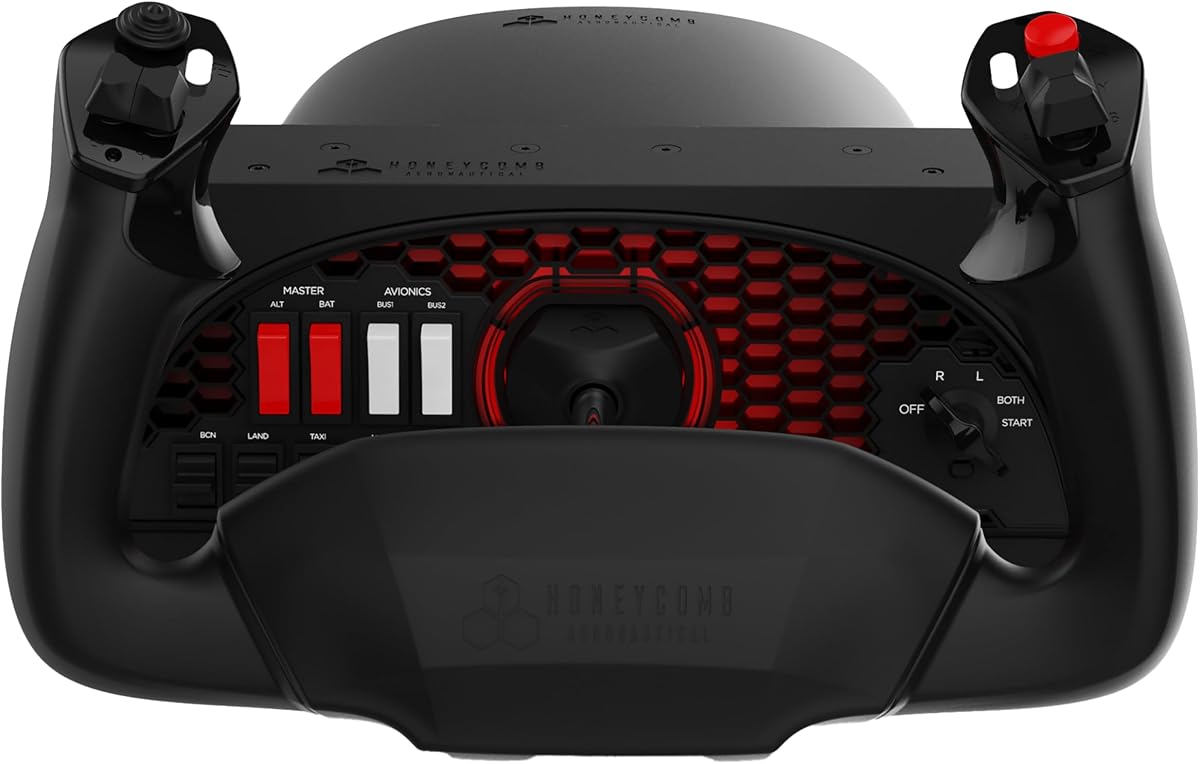
The Honeycomb Alpha Flight Controls Yoke delivers true-to-life flight control with a 4.6 rating. It is designed by pilots and aerospace engineers for immersive simulation.
We may earn a commission when you buy through this link, at no additional cost to you.
The solid steel shaft with linear ball bearings ensures smooth control and responsiveness. An integrated switch panel adds main alternator and avionics switches for realistic night flights.
Users may find the price high compared to entry level options but the durability and precision justify the investment. The clamp mounting solution ensures the yoke stays secure during maneuvers.
This premium choice is ideal for serious flight sim enthusiasts who value engineering and realism. It is trusted by aviation enthusiasts since 2017 for consistent performance.
A solid steel shaft with two linear ball bearings ensures smooth control during every maneuver.
The switch panel features main alternator avionics and light switches for a complete cockpit setup.
We may earn a commission when you buy through this link, at no additional cost to you.
Selecting the right airplane controller involves understanding your simulation needs and budget. This guide outlines key factors to consider before making a purchase.
Decide between a joystick yoke or sidestick based on your preferred aircraft type. Yokes are better for commercial aviation while joysticks suit combat or general aviation.
Choose the controller type that matches your primary simulation focus for the best experience.
Look for metal construction or durable materials that can withstand frequent use. High-end models often feature stainless steel shafts and ball bearings for smooth operation.
Prioritize build quality to ensure longevity and consistent performance over time.
Ensure the controller has enough programmable buttons and axes to map your flight functions. Advanced systems offer hundreds of commands for detailed cockpit control.
Check that the software supports your specific flight simulator for seamless mapping.
Consider how the controller feels in your hands during extended sessions. Adjustable grips and proper weight distribution reduce fatigue.
Choose a design that fits your hand size and preferred holding position.
Verify that the controller supports your operating system and flight simulation software. Some devices require specific drivers or software to function correctly.
Ensure compatibility with your PC and favorite flight sim titles before buying.
Look for features like vibration feedback RGB lighting or integrated displays. These extras can enhance immersion and provide useful flight data.
Weigh these features against your budget to avoid unnecessary costs.
Determine your spending limit as prices range from budget options to high-end setups. Entry level controllers are affordable while premium ones offer superior realism.
Balance cost with the features you truly need for your simulation setup.
Check if the controller includes clamps or suction cups for securing to desks. Some yokes may require sturdy surfaces for stable mounting.
Ensure your desk or setup can support the mounting requirements of the controller.
Install the necessary drivers and software before connecting the controller to your PC. Follow the manufacturer guidelines to ensure proper recognition by your system.
Use the software provided to map buttons and axes to your flight simulator controls. Save multiple profiles for different aircraft types to streamline your setup.
Clean the controller regularly with a soft dry cloth to remove dust. Store it in a dry place to maintain the integrity of internal components.
The Thrustmaster T-Flight Hotas X is recommended for beginners due to its affordable price and easy plug and play setup. It offers ergonomic design and detachable throttle flexibility for new pilots.
Most controllers support popular titles like Microsoft Flight Simulator and X-Plane. Always check compatibility lists on the product page to ensure it works with your specific software.
Yokes are better for simulating commercial aircraft while joysticks suit general aviation or combat. Your choice depends on the type of flying you enjoy most in simulation.
Some controllers like the VelocityOne support both PC and Xbox. Others are PC only so check the product specifications for console compatibility before purchasing.
Controller drift often results from worn potentiometers. Magnetic sensors found in some models prevent this. Replacing parts may be necessary if the controller uses standard components.
Rudder pedals enhance realism but many controllers include twist rudder features. You can start with the controller alone and add pedals later for more precise control.
The Logitech G X56 H.O.T.A.S and Honeycomb Alpha Yoke stand out for their precision and build quality. The Thrustmaster T-Flight Hotas X offers excellent value for budget-conscious buyers.
Prioritize controller type and build quality to ensure you get a device that meets your simulation goals. Compatibility with your favorite flight simulator is also essential for a seamless experience.
Prices and availability may vary so verify current details on retailer pages before purchasing. Choosing the right airplane controllers for PC will elevate your flight simulation hobby significantly.