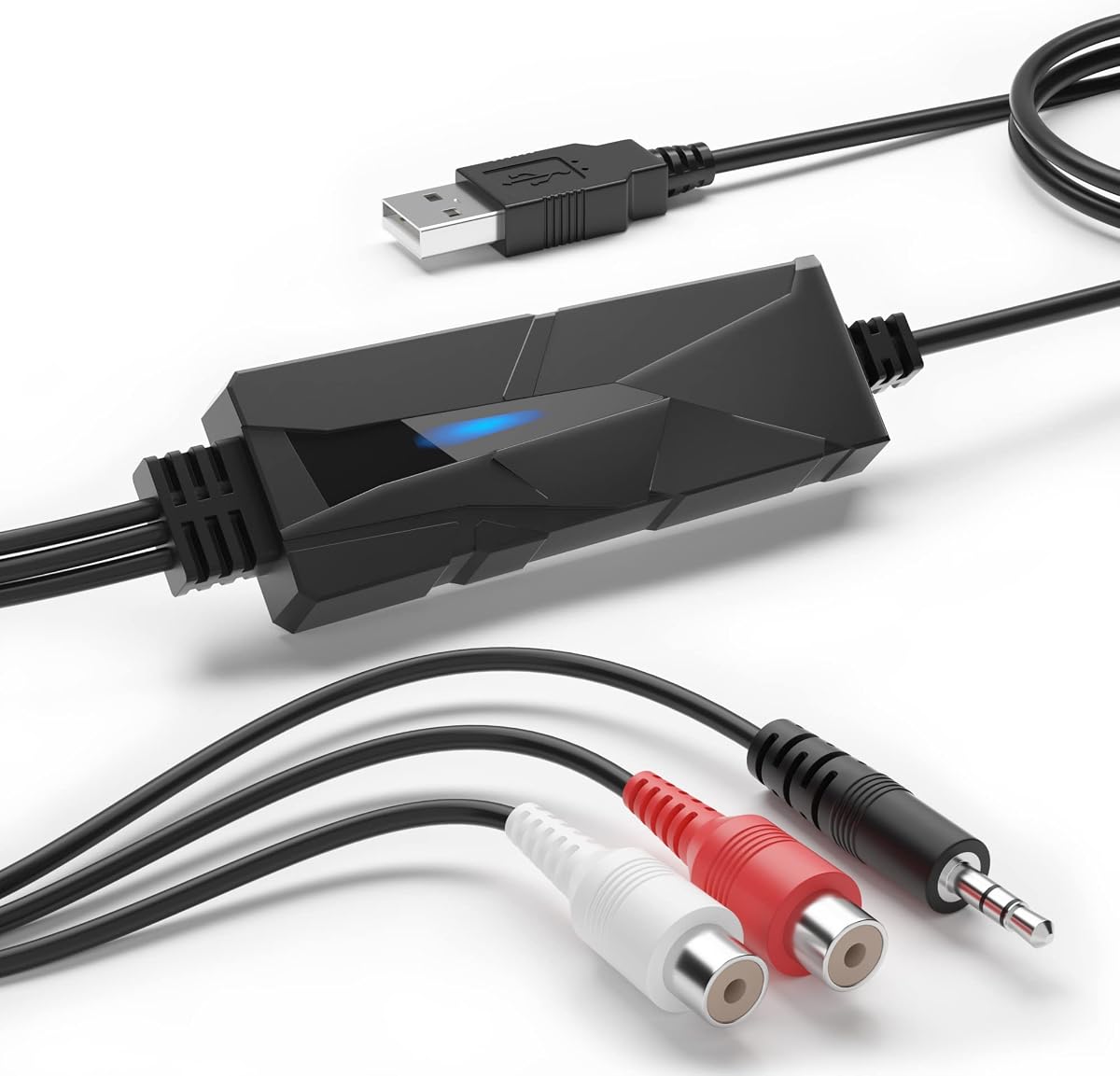
DriverGenius AudioXfer USB Audio Capture Card Device
4.2Editor score
Analog to digital conversion
Plug and play operation
Compatible with macOS 15
This comprehensive guide compares the top 10 audio converters for Mac users, evaluating sound quality, compatibility, features, and value to help you find the
Finding the right audio converter for your Mac can significantly enhance your listening experience by bridging the gap between digital sources and analog outputs. These devices are essential for audiophiles, content creators, and anyone seeking higher fidelity sound than built-in Mac ports provide. They offer improved clarity, reduced noise, and often support high-resolution audio formats that native hardware cannot handle effectively.
We evaluated ten top-rated audio converters based on performance, build quality, connectivity options, and compatibility with macOS systems. Our analysis focused on devices that deliver reliable conversion from digital signals to analog audio while maintaining minimal distortion and jitter. We considered factors like sample rate support, input and output versatility, and user feedback to ensure each pick meets diverse needs.
Each product in this list offers unique strengths whether you need a compact dongle for travel or a desktop unit for home theater. Prices and availability fluctuate so check current listings before purchasing to ensure you get the best deal. This guide aims to simplify your decision-making process by highlighting key features and potential trade-offs for every option considered.
4.2Editor score

4.6Editor score

4.5Editor score
This table provides a side-by-side overview of all ten audio converters tested, highlighting key specifications and compatibility details to help you compare them quickly and choose the device that best fits your specific audio requirements and Mac setup.


The Fosi Audio Q6 Mini Desktop DAC stands out as a top choice for Mac users seeking high-fidelity audio conversion. It combines modern processing power with robust build quality to deliver exceptional sound clarity. This device is ideal for those who want to upgrade their Mac's audio output without complicating their setup.
We may earn a commission when you buy through this link, at no additional cost to you.
Its AK4493S DAC chip ensures precise signal conversion with minimal distortion. The support for PCM up to 32bit/768kHz and DSD512 means you can enjoy lossless audio from streaming services and local files. Multiple inputs including USB-C, optical, and coaxial make it easy to connect various sources to your Mac or audio system.
While it lacks a built-in headphone jack, its RCA and Sub-Out outputs are perfect for connecting to external amplifiers or active speakers. The design prioritizes signal purity and versatility over all-in-one convenience. This trade-off is acceptable for users who already have a dedicated audio chain and want to enhance its performance.
For Mac users serious about audio quality who the Q6 offers a reliable upgrade path. It handles high-res files effortlessly and integrates seamlessly with macOS audio settings. We recommend it for anyone looking to maximize the potential of their home stereo or desktop audio setup with minimal fuss.
The Q6 supports PCM up to 32bit/768kHz and DSD512 ensuring you get the full fidelity from your high-resolution audio files without compromise or degradation during conversion.
With USB-C, optical, and coaxial inputs plus RCA and Sub-Out outputs this DAC offers flexible connection options for various Mac configurations and external audio equipment.
We may earn a commission when you buy through this link, at no additional cost to you.
The DriverGenius AudioXfer offers an affordable entry point for Mac users looking to digitize analog audio sources. It is perfect for converting cassette tapes vinyl records or other legacy media into digital formats like MP3 or WAV. This device is particularly useful for preserving old recordings without investing in expensive equipment.
We may earn a commission when you buy through this link, at no additional cost to you.
Its 3.5mm and RCA inputs allow you to connect various analog devices easily. The plug and play design means you do not need complex software installation on your Mac. Audacity is included or available online for editing and saving your captured audio files in the format you prefer.
While it supports 44.1 and 48kHz sample rates which are standard for YouTube and general use it may not meet audiophile demands for higher fidelity. Additionally macOS compatibility is noted for version 15 but users on newer versions should test carefully. The limitation is acceptable for basic digitization tasks.
We recommend this device for hobbyists or anyone wanting to preserve memories without spending much. It delivers solid performance for its price and makes analog conversion accessible. For casual users needing a simple solution this capture card is a practical and cost-effective choice.
Convert cassette tapes vinyl records and other analog sources to digital formats effortlessly preserving your audio memories for modern playback and sharing.
This device offers a budget-friendly way to add analog capture capabilities to your Mac setup without requiring expensive hardware or professional tools.
We may earn a commission when you buy through this link, at no additional cost to you.
The Fosi Audio K5 Pro combines a DAC with a headphone amplifier making it a versatile choice for Mac users. It supports USB-C optical and coaxial inputs providing flexibility for connecting various audio sources. The addition of a microphone input makes it suitable for gaming and communication tasks alongside music listening.
We may earn a commission when you buy through this link, at no additional cost to you.
Its Texas Instruments op-amp delivers clean sound with low distortion enhancing the listening experience on headphones. The volume button combined with the power switch simplifies operation for daily use. Mac users will appreciate the plug and play functionality which avoids driver installation hassles on macOS systems.
While it does not support ultra-high sample rates like 768kHz it covers the standard 24bit/192kHz range which is sufficient for most users. The microphone input has some limitations with specific devices but works well for general voice communication. This trade-off is reasonable given the price and feature set.
We recommend the K5 Pro for gamers or casual listeners who want an all-in-one solution for their Mac. It balances performance and convenience well offering decent sound quality and connectivity. For those prioritizing audio fidelity over extra features it remains a solid practical option.
Combining DAC and headphone amp functions this device simplifies your setup by reducing cable clutter and needing extra components for audio playback.
Multiple input options including USB-C optical and coaxial ensure compatibility with diverse audio sources from your Mac gaming console or media player.
We may earn a commission when you buy through this link, at no additional cost to you.
The PROZOR 192KHz Digital to Analog Audio Converter offers a straightforward solution for converting digital optical signals to analog audio on Mac systems. It supports high sample rates up to 192kHz and 24bit depth ensuring quality sound reproduction for music and media. The aluminum housing provides durability and effective heat dissipation.
We may earn a commission when you buy through this link, at no additional cost to you.
Its optical and coaxial inputs allow connection to devices like Apple TV or gaming consoles while outputs include both RCA and 3.5mm jack for versatility. The detachable RCA connectors simplify cable management and upgrades without replacing the whole unit. This design is thoughtful for long-term use and setup flexibility.
The device requires an external 5V power supply which is not included in the box so you must source a compatible adapter separately. There is no volume control meaning output levels depend on your source device settings. These minor drawbacks do not undermine its core function of reliable digital-to-analog conversion.
We recommend this DAC for users needing a simple and robust converter for analog devices. Its performance is reliable and it handles high-resolution audio well. For those wanting a plug and play option without software hassles this device meets the need effectively and affordably.
Supporting up to 192kHz sample rates and 24bit depth this DAC delivers clear audio fidelity suitable for high-quality media playback and streaming.
The aluminum alloy housing ensures long-lasting performance and better heat management compared to plastic alternatives common in budget audio converters.
We may earn a commission when you buy through this link, at no additional cost to you.
The Douk Audio U2PRO USB to Optical Adapter converts USB audio signals to optical and coaxial outputs making it useful for Mac users with external DACs. It features the XMOS XU316 chip ensuring stable and jitter-free transmission for high-resolution audio. The device supports PCM up to 32bit/768kHz and DSD512 for demanding audiophile applications.
We may earn a commission when you buy through this link, at no additional cost to you.
Its UAC mode switch allows switching between driver-free plug and play and high-resolution modes for advanced playback needs. The real-time PCM/DSD indicators help monitor active sample rates which is helpful for tuning setups. This level of detail is appreciated by users who prioritize precise audio signal quality.
Note that this adapter outputs digital signals not analog so you must connect it to a separate DAC for listening. The lack of a headphone jack limits direct use with headphones but fits well in a dedicated audio chain. This distinction is important when selecting based on your setup requirements.
We recommend the U2PRO for Mac users looking to upgrade their digital signal path to external equipment. It provides a stable high-fidelity connection that enhances overall sound quality. For those with existing DACs this adapter is a reliable upgrade to improve signal integrity and compatibility.
Convert USB digital signals to optical and coaxial outputs to reduce jitter and improve signal integrity for your external DAC or amplifier setup.
Support for up to 32bit/768kHz and DSD512 ensures compatibility with lossless audio files and streaming services demanding higher resolution.
We may earn a commission when you buy through this link, at no additional cost to you.
The SMSL SU-1 Audio Decoder specializes in MQA decoding making it ideal for Mac users who subscribe to MQA-enabled streaming services. It uses the AKM AK4493S chip to deliver low distortion and accurate sound reproduction. This device ensures you hear audio as intended by the original studio masters without compression artifacts.
We may earn a commission when you buy through this link, at no additional cost to you.
Its USB input works seamlessly with macOS which does not require additional drivers for operation. The device supports high-resolution PCM up to 768kHz and DSD512 providing extensive format flexibility. This combination of MQA support and high sample rates positions it as a strong choice for audiophiles seeking full fidelity.
While it lacks a headphone jack and relies on external outputs it excels at clean digital to analog conversion. Users should note Windows requires a driver while macOS is plug and play making Mac a more convenient platform. This slight asymmetry does not affect core audio performance on macOS systems.
We recommend the SU-1 for those focused on MQA content and high-fidelity playback. It offers precise decoding and low noise floors enhancing the listening experience. For Mac users prioritizing audio accuracy this converter provides a reliable solution for demanding music and media.
Native support for MQA decoding restores high-resolution audio from MQA-enabled sources delivering studio-quality sound directly to your system.
Works natively on macOS and Linux without drivers simplifying setup and ensuring plug and play convenience for open-source users.
We may earn a commission when you buy through this link, at no additional cost to you.
The SMSL PO100 PRO is a compact digital interface designed for Mac users needing portable high-resolution audio conversion. It features a Type-C USB input and supports MQA decoding natively without extra software. This makes it excellent for streaming MQA content directly to external DACs or amplifiers on the go.
We may earn a commission when you buy through this link, at no additional cost to you.
Its I2S and optical outputs provide flexible connection options for various audio chains. The XMOS XU316 chip ensures stable asynchronous transmission and supports up to 32bit/768kHz sample rates. Users can toggle between UAC and I2S modes to match their playback requirements accurately and efficiently.
The unit is small enough to fit in a bag which is ideal for travelers or those with limited desk space. However it lacks analog outputs so you need external equipment for playback. The absence of volume control means levels are managed on your Mac or source device which is standard for this form factor.
We recommend the PO100 PRO for portable high-fidelity needs and MQA enthusiasts. It balances performance and size well delivering reliable conversion without bulk. For Mac users who value mobility and audio quality this converter is a practical choice for modern streaming setups.
Enjoy native MQA playback anywhere with this compact device designed to restore high-resolution audio from MQA-enabled services on the go.
Small enough to slip into a bag this converter offers powerful performance without sacrificing desk space or travel convenience.
We may earn a commission when you buy through this link, at no additional cost to you.
The Sound Blaster Play! 3 USB Audio Adapter offers a no-fuss solution for Mac users needing basic audio output enhancement. It supports 24-bit 96kHz resolution and connects via USB for instant plug and play functionality. Compatible with all analog headsets it eliminates the need for Y-splitters or additional adapters.
We may earn a commission when you buy through this link, at no additional cost to you.
Its downloadable software provides audio enhancements and controls that allow customization of sound profiles. This flexibility is useful for users who want to tweak EQ or apply specific audio profiles without complex setup. Mac users benefit from the seamless integration with system audio settings.
While it does not support ultra-high sample rates like 768kHz it covers standard high-fidelity needs for music and video. The compact design makes it ideal for laptops where built-in ports are limited. This trade-off is acceptable for general use where simplicity and compatibility are key priorities.
We recommend the Play! 3 for casual users needing a reliable and simple audio adapter. It delivers clean sound and works out of the box without hassle. For those prioritizing ease of use and broad headset compatibility this adapter is a solid choice.
Instantly connect and enjoy audio without driver downloads or complex configuration saving time and reducing technical barriers.
Downloadable software offers audio enhancements and profile customization to tailor sound output to your specific preferences and needs.
We may earn a commission when you buy through this link, at no additional cost to you.
The iFi Audio Go Link Max is a premium portable DAC and headphone amp designed for Mac users seeking top-tier audio in a small package. It features dual ESS Sabre DAC chips and provides both balanced 4.4mm and unbalanced 3.5mm outputs. This flexibility supports high-end headphones with balanced connections.
We may earn a commission when you buy through this link, at no additional cost to you.
Its Dynamic Range Enhancement technology and THD compensation ensure clean and immersive sound even at low volumes. Supporting up to 384kHz PCM and DSD256 it handles lossless files with ease. The gold-plated connectors and silver-plated copper conductors minimize interference for signal purity.
While its compact size is convenient for travel it carries a higher price compared to similar dongles. The lack of optical inputs limits it to USB-C sources so you need a Mac with compatible ports. These considerations fit its niche as a premium mobile solution rather than a desktop centerpiece.
We recommend the Go Link Max for audiophiles who need portable high-fidelity audio. It delivers excellent power and clarity for demanding headphones. For Mac users who want the best possible mobile audio experience this dongle is a standout option worth considering.
Dual ESS Sabre DAC chips create a balanced circuit that improves channel separation and overall sound accuracy for a richer listening experience.
With up to 241mW output power this dongle drives high-impedance headphones effectively delivering full dynamics even from compact devices.
We may earn a commission when you buy through this link, at no additional cost to you.
The Shure MVX2U Gen 2 XLR-to-USB-C Audio Interface is designed for Mac users focused on podcasting streaming or recording. It accepts professional XLR microphones and includes onboard DSP for real-time denoising and pop filtering. This setup ensures clean consistent audio directly from your mic to your Mac without extra processing.
We may earn a commission when you buy through this link, at no additional cost to you.
Its Auto Level Mode adjusts gain automatically which is helpful for live streaming where manual control is difficult. The MOTIV app allows deeper customization of EQ and compression on desktop or mobile. For content creators this interface provides a seamless workflow that enhances audio quality on the fly.
While it does not serve as a general-purpose DAC for music playback it excels at voice capture. The higher price reflects its professional features and build quality. For users who prioritize content creation over music listening this trade-off is well justified by the performance and ease of use.
We recommend the MVX2U Gen 2 for podcasters and streamers needing reliable mic integration with their Mac. It delivers professional-grade sound and simplifies setup. For those focused on voice work this interface is a premium solution that delivers outstanding results.
Connect professional XLR microphones directly for superior audio quality without needing separate interfaces or additional adapters.
Built-in digital audio processing reduces noise and pops in real time ensuring clean output without complex post-production work.
We may earn a commission when you buy through this link, at no additional cost to you.
Selecting the right audio converter for your Mac requires considering your specific needs whether it be high-resolution music playback analog digitization or professional voice recording. This section explores key factors to help you make an informed decision.
Ensure the converter is explicitly listed as compatible with your macOS version to avoid driver issues. Many devices work plug and play but some may require specific software or drivers for full functionality on macOS.
Always check product listings for macOS support notes before purchasing to ensure seamless integration with your system.
Look for converters that support high-resolution formats like PCM 32bit/768kHz or DSD if you listen to lossless audio. For general use 24bit/192kHz is sufficient for most streaming and media files.
Matching the converter's capabilities with your source files ensures you get the best sound quality without bottlenecks.
Choose a converter with inputs that match your audio sources such as USB-C optical coaxial or RCA. Outputs should fit your speakers or headphones like RCA 3.5mm or balanced 4.4mm.
More versatile ports provide flexibility for future upgrades or different setups without needing multiple devices.
Aluminum alloy housings offer better heat dissipation and durability compared to plastic. This is particularly important for devices that run for long periods during media playback or recording.
Investing in a sturdier device can extend its lifespan and maintain signal integrity over time.
Some converters are bus-powered via USB which is convenient for laptops. Others require external power adapters which can be a hassle if not included in the package.
Check the power needs and ensure your Mac port provides enough power for bus-powered models to avoid performance issues.
Features like volume controls headphone amplifiers or microphone inputs add convenience but may not be necessary for all users. Evaluate if these extras align with your usage patterns.
Extra features can simplify workflows but may increase complexity and cost.
Choose products from reputable brands known for audio quality and customer support. Reviews and warranty terms are good indicators of reliability and post-purchase service.
A strong warranty can protect your investment and ensure peace of mind during use.
Audio converters range from budget-friendly options to high-end professional units. Determine your priorities and allocate funds accordingly balancing cost against essential features.
A mid-range converter often provides the best value without sacrificing core performance.
Connect the converter to your Mac using the appropriate cable such as USB-C or optical and power it if required. Ensure your audio output settings in System Preferences select the external device for playback.
Use compatible software like iTunes VLC or streaming apps to play audio through the converter. For recording capture analog sources use software like Audacity to digitize and edit audio files effectively.
Keep the device in a dry and dust-free environment to maintain its performance. Regularly check cables and connectors for wear and avoid bending or twisting them to prevent damage over time.
Most modern converters work plug and play without drivers but some may require specific software for advanced features. Always verify the manufacturer's macOS compatibility notes before purchase.
Yes many work with older models via USB adapters but ensure the port type matches the converter's connection. Some newer converters may not support very old hardware with limited USB versions.
A DAC converts digital signals to analog for speakers or headphones. A converter can also digitize analog signals like audio tapes for use on a Mac computer system.
Yes some high-impedance headphones require more power than standard ports provide. Look for DACs with built-in amplifiers if you plan to use such headphones directly.
You can connect multiple converters but macOS typically allows one audio output device at a time in settings. You must manually switch between them to use different ones.
Some models designed for recording like audio interfaces with XLR inputs are suitable for professional use. Standard DACs may lack necessary features like preamps or balanced inputs.
Check the manufacturer's website for firmware updates specific to your model. Follow provided instructions carefully to avoid issues during the update process.
Many include essential USB cables but power adapters or audio cables may be sold separately. Review the product package contents list before buying.
This guide has presented ten top audio converters for Mac ranging from budget capture cards to professional interfaces and high-fidelity DACs. Each option offers unique strengths tailored to different needs whether preserving old media or streaming high-resolution audio.
Prioritize your primary use case such as music quality voice recording or analog digitization when choosing. Ensure compatibility with your Mac version and consider extra features like headphone outputs that may enhance your experience.
Always verify current prices and availability before purchasing since these can fluctuate frequently. By selecting the right converter you can significantly improve your audio workflow and listening satisfaction.