
ASRock 970A-G/3.1
4.2Editor score
Supports AM3+ processors
Includes M.2 slot
Offers USB 3.1 ports
This guide compares the top ten Asrock AM3 Motherboard options to help you find the best fit for your legacy AMD build needs.
Choosing the right Asrock AM3 Motherboard is crucial for building a reliable system using legacy AMD processors. These boards support a wide range of Phenom and Athlon CPUs, offering solid performance for budget and retro builds.
We analyzed ten distinct models based on chipset features, expansion slots, connectivity options, and user feedback. Our comparison highlights the strengths and weaknesses of each board to guide your decision effectively.
Each pick showcases specific benefits like USB 3.0 support or overclocking capabilities. Note that pricing and availability change frequently, so verify current listings before making your final purchase decision.
4.2Editor score

5.0Editor score

3.8Editor score
The following table provides a side-by-side comparison of all ten Asrock AM3 Motherboard models to highlight their key specifications and differences at a glance.



This motherboard stands out as the top choice for enthusiasts using the AM3 platform. It features a robust AMD 890FX chipset that delivers high performance for demanding tasks and gaming.
We may earn a commission when you buy through this link, at no additional cost to you.
The board offers exceptional connectivity with six SATA3 ports and four USB 3.0 ports. This ensures fast data transfer and plenty of room for expansion peripherals without needing additional controllers.
While it supports Quad CrossFireX effectively, the older architecture limits modern upgrade paths. However, for legacy AMD builds, the power delivery and overclocking headroom are more than adequate.
If you need a high-end foundation for an AM3 system with maximum expansion, this is the definitive pick. Its reliability and feature set justify its position at the top of this list.
The board supports Quad CrossFireX configurations allowing users to run multiple graphics cards for enhanced rendering and gaming performance.
With six SATA3 ports onboard you can connect multiple high-speed SSDs for rapid load times and responsive system performance.
We may earn a commission when you buy through this link, at no additional cost to you.
This model is the best budget-friendly option for anyone looking to build a capable AM3 system. It brings modern connectivity like M.2 and USB 3.1 to an older socket platform.
We may earn a commission when you buy through this link, at no additional cost to you.
The AMD 970 chipset provides solid performance for gaming and productivity. It supports a wide range of Phenom II and Athlon processors making it versatile for different CPU choices.
While the VRMs are basic they are sufficient for stock operation and mild overclocking. The inclusion of M.2 is a significant advantage for boot drive speeds at this price.
For builders on a tight budget who still want modern storage options this board is an excellent choice. It balances cost and features better than any other entry-level AM3 board.
Having an M.2 slot allows for faster NVMe drives which significantly improves system responsiveness compared to traditional SATA storage.
The inclusion of USB 3.1 ports ensures compatibility with modern peripherals and fast external storage devices.
We may earn a commission when you buy through this link, at no additional cost to you.
This board represents the pinnacle of AM3 platform features with the powerful 990FX chipset. It is designed for enthusiasts who want maximum overclocking capability and multi-GPU support.
We may earn a commission when you buy through this link, at no additional cost to you.
The power delivery system can handle up to 140W CPUs ensuring stability under heavy loads. This makes it ideal for high-end Phenom II X6 processors that demand more power.
Users should note that availability might be limited as it is an older model. However for those who find it it offers unparalleled performance and expansion options for the AM3 socket.
If you are building a high-end legacy system and need the best performance this board is the only logical choice. It sets the benchmark for what the AM3 platform can achieve.
Supporting both Quad CrossFireX and Quad SLI gives you the flexibility to use AMD or NVIDIA graphics cards in multi-card setups.
The enhanced VRMs ensure that high-wattage processors receive stable power even when overclocking for peak performance.
We may earn a commission when you buy through this link, at no additional cost to you.
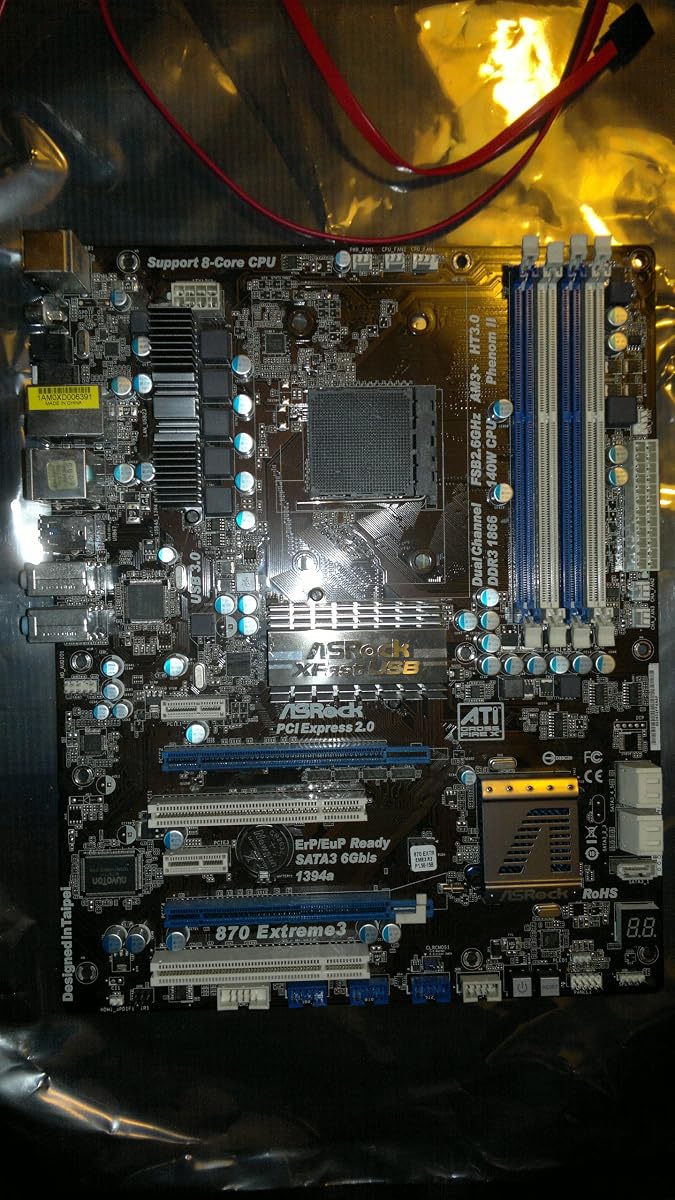
This model offers a reliable middle ground between budget and high-end boards. It features the AMD 870 chipset which provides excellent stability and performance for standard gaming setups.
We may earn a commission when you buy through this link, at no additional cost to you.
The board supports Quad CrossFireX which is a significant benefit for gamers looking to boost performance without breaking the bank. It also includes ample storage connectivity with five SATA3 ports.
While it lacks some of the ultra-premium features of the 990FX the reliability is solid. The audio and LAN controllers are standard and perform well for everyday usage scenarios.
For users who want a dependable board without paying top dollar this is a great option. It covers all the essential bases for a capable AM3 gaming system effectively.
With five SATA3 ports you can connect multiple hard drives and SSDs for expanded storage capacity and speed.
We may earn a commission when you buy through this link, at no additional cost to you.
This board is perfect for users who need a smaller footprint without sacrificing too much performance. The MicroATX form factor fits into many mid-tower and smaller cases easily.
We may earn a commission when you buy through this link, at no additional cost to you.
Despite the smaller size it still includes the AMD 970 chipset and support for Quad CrossFireX. This allows for powerful graphics configurations in compact build environments.
The connectivity is slightly reduced compared to full ATX boards but it remains sufficient for most users. It provides the essential SATA and USB ports needed for a functional PC.
If you are building a space-efficient gaming rig this is the ideal choice. It balances size and performance better than many other MicroATX options in this category.
The MicroATX layout ensures your case does not have to be large making for a cleaner desktop footprint.
We may earn a commission when you buy through this link, at no additional cost to you.
This model is one of the most affordable options available for the AM3 platform. It is designed for users who need a basic board for office work or light gaming.
We may earn a commission when you buy through this link, at no additional cost to you.
The 760G chipset is old but reliable. It supports a wide range of processors including the 125W models which is rare for entry-level boards of this era.
While it lacks USB 3.0 and SATA3 ports it is a perfect upgrade for old systems that do not need high-speed storage. The MicroATX size is a bonus for smaller cases.
If you are looking for a simple cheap board to get a system running this is the best choice. It offers great value for budget-conscious builders on a tight budget.
Supporting 125W CPUs allows you to run more powerful processors than typical budget boards allow.
We may earn a commission when you buy through this link, at no additional cost to you.
This board is notable for its storage connectivity. It provides five SATA3 ports plus an eSATA3 port which is excellent for connecting multiple fast drives simultaneously.
We may earn a commission when you buy through this link, at no additional cost to you.
The AMD 970 chipset ensures stable performance for gaming and general use. It supports high-speed DDR3 memory allowing for responsive system operation.
While the design is standard ATX it does not offer many modern amenities like M.2. However for legacy builds needing storage expansion this board excels.
For users who prioritize storage options this is a strong contender. It provides the necessary ports to build a fast and capable multi-drive system.
With five SATA3 ports and one eSATA3 port you can connect numerous drives without needing a PCIe expansion card.
We may earn a commission when you buy through this link, at no additional cost to you.
This board brings reliability with its solid capacitor design. It is designed to offer stable power delivery for Phenom II processors in a compact MicroATX form.
We may earn a commission when you buy through this link, at no additional cost to you.
The audio capabilities are good for an entry-level board with 5.1 channel support. This is beneficial for users who want decent sound without buying a separate sound card.
While it uses the older 760G chipset it supports 8-core CPUs which is a highlight for legacy users. This allows for multi-threaded performance on a budget.
If you need a solid reliable board for office or light media use this is a good pick. It combines durability and essential features effectively.
Solid capacitors ensure a stable power delivery system which improves longevity and system stability.
We may earn a commission when you buy through this link, at no additional cost to you.
This board focuses on simplicity and essential connectivity. It offers two SATA3 ports and USB 3.0 headers which provide decent speeds for a budget AM3 solution.
We may earn a commission when you buy through this link, at no additional cost to you.
The AMD 770 chipset is robust enough for most legacy tasks. It handles standard CPUs well without the need for complex overclocking features.
While it lacks advanced features it is perfect for users who just need a working platform. The design is straightforward making assembly easy for beginners.
For basic home or office PCs this board offers the best value. It covers the basics without unnecessary bells and whistles that add cost.
The layout prioritizes essential ports ensuring you get the most common interfaces without complexity.
We may earn a commission when you buy through this link, at no additional cost to you.
This model is designed for users who do not want a dedicated graphics card. It includes Radeon HD 4250 graphics which is sufficient for basic display output.
We may earn a commission when you buy through this link, at no additional cost to you.
The Hybrid CrossFireX allows for adding a low-end AMD GPU later. This can boost graphics performance slightly without major investment.
While the graphics are outdated compared to modern standards it is useful for budget office PCs. The USB 3.0 support ensures faster peripheral speeds.
For budget builds where a GPU is not needed this board provides a complete solution. It saves the cost of a dedicated graphics card.
The onboard GPU means you can get a working PC without buying a graphics card immediately.
We may earn a commission when you buy through this link, at no additional cost to you.
Selecting the right motherboard involves checking chipset, expansion, and power features to match your specific CPU and build goals.
The chipset determines features like USB version and SATA speed. Ensure you choose a board with a chipset that supports the CPU you plan to use.
Look for 890FX or 990FX for high performance or 760G for basic office needs.
ATX boards offer more expansion slots while MicroATX boards are smaller and cheaper. Verify your case supports the board size before purchasing.
Pick MicroATX for compact builds and ATX for maximum flexibility.
High wattage CPUs need strong VRMs to run reliably. Check if the board supports 125W or 140W CPUs for stable overclocking.
Ensure power delivery matches your CPU to prevent overheating.
SATA3 ports provide faster speeds than SATA2. Look for M.2 slots if you want modern NVMe boot drives.
Check the number of SATA ports to match your drive count.
If you plan to use multiple graphics cards check for CrossFireX or SLI support. This is a major feature for high-end gaming builds.
Ensure the board supports your GPU configuration properly.
Modern boards offer USB 3.0 or 3.1 for faster external devices. Older models may only have USB 2.0 which is slower.
Verify the rear I/O matches your peripheral needs.
Most boards have integrated audio and LAN. Higher-end models provide better audio codecs for gaming.
Check the onboard LAN speed to ensure gigabit connectivity.
Install your CPU carefully aligning the pins and apply thermal paste correctly before mounting the cooler. Connect your RAM to the primary slots for dual channel performance.
Plug your power supply cables firmly and connect front panel wires following the manual to avoid boot issues. Use a flat surface to prevent static discharge during installation.
Update the BIOS to the latest version to ensure CPU compatibility and stability. Keep the board clean by dusting it regularly to prevent overheating.
Yes these boards support Windows 10 but you may need to install drivers manually. Performance may be limited compared to newer platforms.
Most boards support these CPUs but check the power delivery. High-end models handle them better than entry-level options.
Yes they use DDR3 memory. Ensure you buy the correct speed supported by the chipset for stability.
Yes you can update the BIOS using the USB flash tool. This helps with CPU compatibility.
Availability varies. You may find new stock in small shops or used boards on the secondary market.
Yes they support SSDs via SATA3 ports. Performance is good but limited by the SATA standard.
It is worth it only for legacy builds or low budgets. Modern platforms offer better performance.
The top three picks offer the best balance of features and performance. The 890FX Deluxe4 stands out for enthusiasts needing maximum expansion and power.
Focus on your CPU needs and budget when selecting. Ensure the board has the necessary storage and USB options for your peripherals.
Always verify current pricing and availability before buying. Prices for older boards can fluctuate quickly in the market.