
Samsung 49 Inch Odyssey OLED G9
4.3Editor score
QD-OLED vibrant colors
0.03ms response time
144Hz fast refresh
Finding the right display for simulation racing requires deep immersion and precise visuals. A 49 inch ultrawide monitor offers a panoramic view that mimics real track surroundings better than standard screens.
We analyzed ten top models focusing on refresh rates, curvature, and color accuracy. Our comparison highlights performance features that matter most for racing simulators and competitive gameplay sessions.
Each pick below shows key specs and real-world advantages for drivers. Prices and availability change frequently so check current listings before making your final decision for your racing setup.
4.3Editor score

4.6Editor score
4.1Editor score
As an Amazon Associate we earn from qualifying purchases.
This side-by-side comparison examines all ten models to highlight critical differences in resolution, refresh rates, and connectivity options for serious sim racers.





The Raywego 49 inch monitor stands out as the top choice for sim racing enthusiasts seeking immersion. With a 4.6 rating, it delivers a seamless 32:9 viewing experience that wraps around your peripheral vision effectively.
We may earn a commission when you buy through this link, at no additional cost to you.
Its 165Hz refresh rate ensures smooth motion during high-speed turns while the 1ms response time reduces ghosting. The VA panel provides deep blacks and 127% sRGB color coverage making track details pop under varying lighting conditions.
While it lacks the premium OLED quality found in other models, the contrast and brightness are sufficient for most gaming setups. The stand offers basic adjustability but may limit precise ergonomic positioning compared to higher-end alternatives.
Drivers looking for a balance of price and performance will find this model ideal. It replaces two monitors without bezel distractions allowing for a dedicated cockpit feel essential for serious simulation training and competitive play.
The 49-inch super ultrawide format offers the workspace of two 27-inch screens without a center bezel to disrupt your focus on the track.
Adaptive Sync support reduces screen tearing and stuttering ensuring competitive edges during fast-paced action sequences.
We may earn a commission when you buy through this link, at no additional cost to you.
This Samsung Odyssey model sets the gold standard for premium sim racing displays. With a 4.3 rating, it combines QD-OLED technology with a wide color spectrum to captivate players in vivid racing environments.
We may earn a commission when you buy through this link, at no additional cost to you.
The 0.03ms response time eliminates motion blur completely ensuring you react instantly to track changes. Infinite black levels allow for superior shadow detail making night races and tunnel sections easier to navigate.
However, the cost is significantly higher than standard monitors and static elements like HUDs may require care to avoid burn-in. The thermal modulation system helps manage heat but long sessions should still include breaks.
Enthusiasts demanding the highest visual fidelity should invest in this screen. It offers a competitive edge through speed and clarity that justifies the premium for those seeking a professional-grade racing setup.
Content springs to life on the Dual QHD resolution screen with vibrant images that take gaming to new heights.
G-Sync and FreeSync Premium Pro sync the GPU and panel to reduce image tearing and lag for ultra-smooth scenes.
We may earn a commission when you buy through this link, at no additional cost to you.
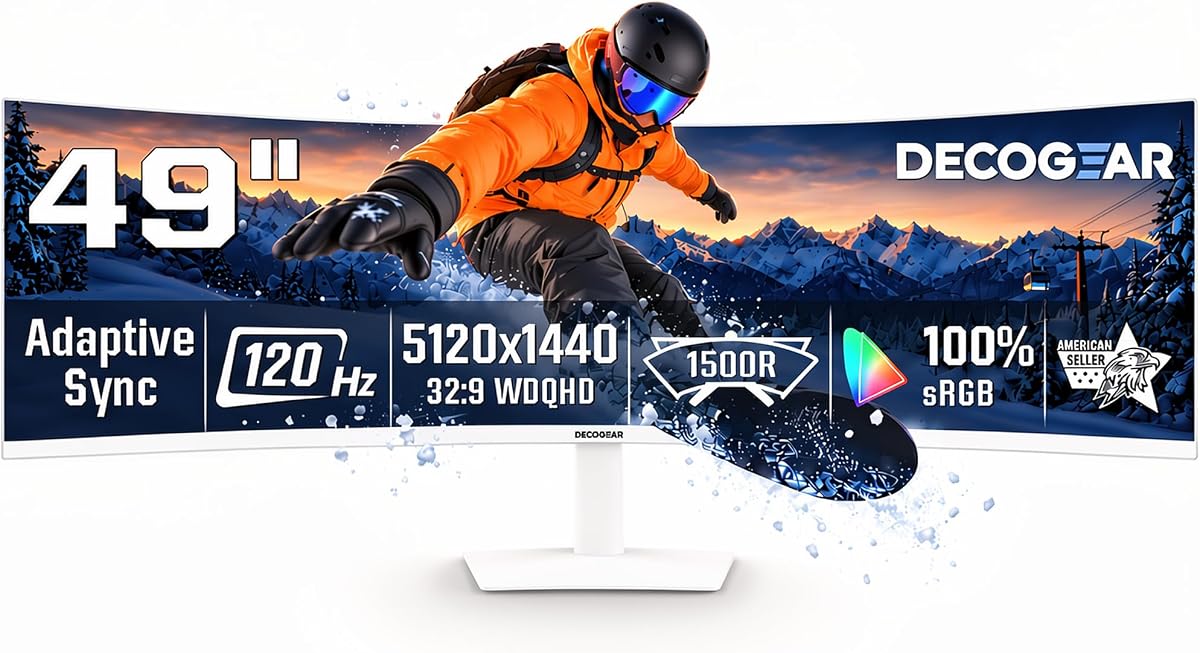
The Deco Gear monitor delivers a strong balance of features at a competitive price point for budget conscious buyers. It supports a 5120×1440 resolution that provides sharp track details without demanding excessive graphics power.
We may earn a commission when you buy through this link, at no additional cost to you.
With a 120Hz refresh rate and 1ms MPRT motion response it handles fast visuals smoothly. The R1500 curve helps office users and drivers view the screen naturally reducing eye strain during long practice sessions.
While it lacks the premium brightness of higher-end models the VA contrast ensures deep blacks and good color separation. The KVM switch allows control of two computers with one keyboard which is great for work and play.
Casual sim racers will appreciate the value and USB-C connectivity for easy laptop docking. It is an excellent starting point for building a cockpit without breaking the bank.
USB-C carries video and data plus up to 65W power for compatible laptops reducing cable clutter.
PIP and PBP help compare sources for research or monitoring while gaming on a single screen.
We may earn a commission when you buy through this link, at no additional cost to you.
INNOCN offers a compelling option with premium features like USB-C power delivery and built-in speakers. The 4.2 rating reflects satisfaction with its versatile connectivity and ergonomic adjustability for varied user heights.
We may earn a commission when you buy through this link, at no additional cost to you.
The 120Hz refresh rate paired with Adaptive-Sync ensures smooth gameplay without tearing. A 99% sRGB gamut delivers consistent colors for design work alongside gaming making it suitable for hybrid setups.
Eye fatigue is minimized by the 1800R curvature and flicker-free technology. However, the HDR performance is basic compared to high-end models so expectations for bright scenes should be managed.
This monitor suits users needing both creative tools and simulation performance in one screen. The adjustable stand adds comfort for long sessions without needing a third-party VESA mount.
Rich interfaces include DP 1.4 USB C 65W HDMI 2.1 and USB A for wide device compatibility.
The curved screen allows content to be viewed at a glance to limit eye strain effectively.
We may earn a commission when you buy through this link, at no additional cost to you.
This model targets competitive players needing the fastest possible refresh rates. With a 240Hz refresh rate and 1ms response time it minimizes lag to help you conquer enemies quickly.
We may earn a commission when you buy through this link, at no additional cost to you.
The 1000R curvature wraps deeply around your field of view drawing you into the game. 1000 nit peak brightness ensures enhanced color expression even in sun-scorched scenes.
CoreSync projects on-screen colors into your real world for better immersion but setup can be complex. The Hexa stand allows for full tilt and swivel adjustments to find the perfect winning position.
Enthusiasts seeking maximum speed will benefit from the variable refresh rate sync. It keeps action seamless without choppiness making it ideal for high-fidelity simulation racing.
CoreSync projects game colors into the real world to further immerse you into the setting.
Auto Source Switch plus instantly switches to new source signal when connected devices turn on.
We may earn a commission when you buy through this link, at no additional cost to you.
This 2025 model brings a refreshed ergonomic design and reliable performance. The 144Hz refresh rate paired with 1ms response time ensures ultra-smooth action and quick capture of moves.
We may earn a commission when you buy through this link, at no additional cost to you.
DisplayHDR 600 delivers deeper blacks and brighter whites so details shine with clarity in dark scenes. The 1000R curved display delivers a full view of enemies for strategic advantages.
Auto Connect instantly switches to the new source signal without flipping through inputs allowing faster access to games. The split-screen capability lets you team up with friends in new ways.
Drivers needing a balance of brightness and speed will find this a solid investment. The ergonomic stand supports comfort to maintain winning streaks during long racing sessions.
1000R curved display enables full peripheral vision and draws you in for greater detail.
Variable refresh rate syncs the GPU and panel to reduce choppiness screen lag and image tears.
We may earn a commission when you buy through this link, at no additional cost to you.
CRUA focuses on visual quality with impressive color coverage and contrast. The 4.4 rating highlights user satisfaction with its 120% sRGB wide color performance for graphic design and entertainment.
We may earn a commission when you buy through this link, at no additional cost to you.
A 165Hz refresh rate eliminates tearing ensuring responsive performance for esports. The 3000:1 contrast ratio helps black areas look deeper improving separation in dark scenes effectively.
The height-adjustable stand allows ergonomic comfort while wall mount compatibility offers clean setups. However, the lack of USB-C limits power delivery options for modern laptops.
Content creators and gamers seeking vibrant visuals will appreciate this display. It provides a reliable option for immersive experiences without sacrificing color accuracy.
With 330cd/m brightness and 120% sRGB coverage this monitor delivers accurate vibrant colors.
Wall mount compatibility offers a clean space-saving setup perfect for gaming rooms or studios.
We may earn a commission when you buy through this link, at no additional cost to you.
ASUS ROG brings unique gaming features to the 49 inch market. It offers FreeSync 2 HDR and DisplayHDR 400 for cinematic color performance that stands out in dim racing environments.
We may earn a commission when you buy through this link, at no additional cost to you.
The 144Hz refresh rate eliminates tearing while GamePlus overlays help get the most out of your game. Eye Care technology minimizes fatigue with flicker-free backlighting and blue light filters.
While the resolution is DFHD rather than DQHD the immersive 1800R curve wraps around your field of vision for enhanced engagement. The ergonomic stand allows marathon ready adjustability.
Gamers who value overlays and eye comfort will find this appealing. The included Adobe Creative Cloud subscription adds value for content creators using the same machine.
Exclusive GamePlus and GameVisual overlays and color modes let you get the most out of your game.
ASUS Eye Care technology minimizes eye fatigue and ailments with flicker-free backlighting.
We may earn a commission when you buy through this link, at no additional cost to you.
Z-Edge delivers high refresh performance suitable for competitive racing. With a 240Hz refresh rate and 1ms response it handles intense competitive scenarios with sensitive visual response.
We may earn a commission when you buy through this link, at no additional cost to you.
The 1800R curved design wraps your vision easing eye strain for comfortable long-hour usage. PIP floating window overlays allow tutorials or streams while main gameplay runs.
Delta E < 2 ensures accurate color reproduction ideal for photo editing. USB-C supports one-cable video transmission meeting office needs without frequent cable swapping.
Fast paced gamers looking for high Hz will find this a strong candidate. The multitasking features also help boost productivity when not on the track.
With an ultra-fast 240Hz refresh rate enjoy an unprecedentedly smooth picture in games.
99% sRGB delivers rich vivid colors ensuring ultra-accurate color reproduction for content creation.
We may earn a commission when you buy through this link, at no additional cost to you.
The G93SC combines OLED depth with high refresh speeds. With a 240Hz refresh rate and near instant reaction time it keeps you ahead of the competition effectively.
We may earn a commission when you buy through this link, at no additional cost to you.
True Black 400 delivers true blacks and rich dark tones without pixel light bleed. QD-OLED technology provides vibrant vistas that bring every game to life with stunning detail.
Auto Connect instantly switches to new source signals without flipping through inputs. The premium metal finish sets new design standards for racing stations seeking style.
Those seeking the ultimate contrast experience will love this panel. It offers unmatched color accuracy for a truly immersive view into the racing world.
Samsung OLED offers a brighter screen with deeper shades and more intense contrast.
0.03ms response time ensures you outmaneuver opponents with supreme speed on the track.
We may earn a commission when you buy through this link, at no additional cost to you.
Selecting the right monitor involves balancing resolution refresh rates and panel types to fit your cockpit space and performance needs.
Resolution defines how sharp the track and car details appear. DQHD or 5K2K (5120×1440) is ideal for 49 inch screens ensuring text and gauges are legible without needing scaling.
Higher refresh rates like 144Hz or 240Hz make movement fluid during high-speed turns. Response time measures how quickly pixels change color; lower values prevent ghosting in dark scenes.
Curvature is measured in R values; lower numbers mean more curve. A 1000R curve wraps closely to your eyes for max immersion while 1500R or 1800R offers a flatter feel.
VA panels offer good contrast for dark scenes while OLED provides infinite contrast and faster response. Consider brightness levels if you use the monitor in well-lit rooms.
Ensure the monitor has DisplayPort 1.4 or HDMI 2.1 to support full resolution and refresh rates. USB-C connectivity can power laptops reducing cable clutter in your racing desk.
Look for height tilt and swivel adjustments to align the screen with your seat. VESA mount compatibility allows for wall arms essential for tight cockpit spaces.
HDR support and sRGB coverage ensure realistic lighting and textures. Good color accuracy helps differentiate track conditions and tire marks effectively.
Prices vary based on panel type and features. Prioritize refresh rate and resolution first as these most impact racing simulation performance.
Start by connecting your PC via DisplayPort 1.4 or HDMI 2.1 to ensure full bandwidth for high refresh rates. Adjust the settings in your graphics control panel to match the native resolution and refresh speed.
Calibrate the stand or arm so the screen sits at eye level with a slight tilt for comfort. Use PIP or PBP modes if you need to run a phone or second PC for voice chat alongside racing.
Maintain the screen by using a soft microfiber cloth for dust and avoiding harsh cleaners. For OLED models enable screen savers or dimming to protect against burn-in during long sessions.
Measure your cockpit width and height before purchasing. These monitors often require a sturdy desk or wall mount due to their wide footprint. Ensure your VESA arm can support the weight.
Most modern 49 inch models support DQHD (5120×1440) or higher. Check the specs to confirm your GPU can handle the pixel count. DisplayPort 1.4 is recommended for full bandwidth.
Yes higher refresh rates make motion smoother which is vital for high-speed racing. Aim for at least 144Hz to reduce blur and ghosting during fast cornering.
Absolutely The wide aspect ratio offers the workspace of two monitors for productivity. Use PBP or PIP modes to multitask between spreadsheets and racing software effectively.
Many models include an adjustable stand but for cockpits a VESA wall mount is often better. Check the VESA standard compatibility before buying a third-party arm.
OLED offers the best contrast for dark scenes but VA is a solid budget choice. OLED eliminates backlight bleed providing true blacks that help see details in shadows.
Yes driving DQHD at high refresh rates requires a powerful GPU. If your PC is mid-range you may need to adjust settings to maintain smooth performance.
Use built-in pixel shift or screen dimming features. Avoid keeping static HUD elements on screen for too long. Take breaks during sessions to help prolong panel life.
The Raywego 49 inch model leads as the best overall for its balance of refresh rate and immersion. The Samsung OLED G9 shines for those seeking premium contrast and speed.
Prioritize refresh rate and resolution to ensure your racing simulation runs smoothly. Curvature and color accuracy are secondary factors that enhance the experience further.
Prices and stock change frequently so verify current listings before finalizing your choice. Investing in the right monitor transforms your cockpit into a professional racing environment.