
TP-Link Nano AC600
4.5Editor score
Nano size design for portability
Dual band 2.4G and 5G
2-year warranty and support
Compare the best 5GHz WiFi dongle options for desktops and laptops to find fast dual-band speeds, reliable connections, and strong signal range for your PC.
Choosing the right 5GHz WiFi dongle can transform your desktop or laptop experience by providing faster speeds and more stable connections. Modern wireless adapters support dual-band technology that reduces interference and boosts performance for streaming and gaming tasks.
We evaluated ten top-rated adapters based on real-world performance, compatibility, and features like USB 3.0 support and high-gain antennas. Each product was analyzed for signal strength, speed capabilities, and ease of setup across Windows systems to ensure reliability.
Each pick highlights specific strengths such as budget friendliness, premium features, or compact design to match your unique needs. Prices and availability change frequently so check current listings before purchasing to secure the best deal for your specific device.
4.5Editor score

4.4Editor score

4.1Editor score
This side-by-side comparison highlights key specifications and features across all ten selected adapters to help you identify which model delivers the speed and range you need for your home network setup.


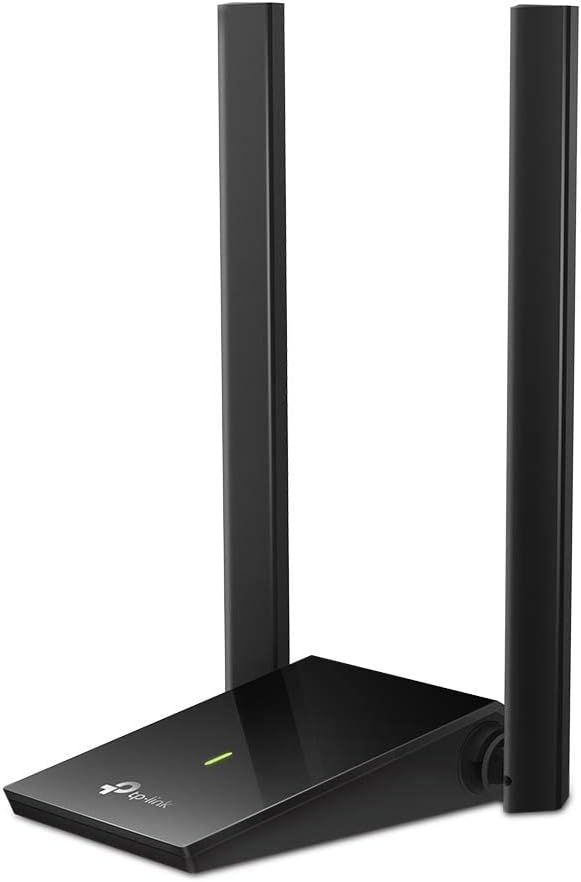


The TP-Link AC600 USB WiFi Adapter stands out as a top choice for users needing reliable wireless connectivity without breaking the bank. With a rating of 4.4 stars it offers a balanced mix of speed and range suitable for most home environments.
We may earn a commission when you buy through this link, at no additional cost to you.
Its standout quality is the adjustable high-gain antenna that lets you optimize signal strength by rotating it toward your router. This feature combined with dual-band support ensures smooth streaming and gaming on the 5GHz band with speeds up to 433 Mbps.
One trade-off is that it uses a USB 2.0 port which limits maximum throughput compared to newer 3.0 models. However for typical browsing and media use this limitation is negligible and the long-range performance compensates well.
This adapter is ideal for desktop owners or laptop users who need a simple plug-and-play upgrade to modern wireless standards. Its easy setup and broad Windows compatibility make it a solid recommendation for anyone seeking dependable Wi-Fi access.
The multi-directional antenna allows you to direct the signal toward your router for stronger reception and fewer dropouts.
Access both 2.4GHz and 5GHz bands to balance range and speed based on your current network load and distance.
We may earn a commission when you buy through this link, at no additional cost to you.
The TP-Link Nano AC600 is perfect for users who prioritize portability and simplicity over raw speed. With an impressive 4.5 rating it delivers consistent dual-band performance in a package small enough to stay plugged in permanently.
We may earn a commission when you buy through this link, at no additional cost to you.
Its key strength is the miniature design which allows you to plug it in and leave it attached to your laptop without blocking adjacent ports. This convenience combined with lag-free internet access makes it ideal for travel or tight desk setups.
The main compromise is the lack of an external antenna which may limit range in large homes with thick walls. However for typical urban or apartment living the internal antenna provides sufficient coverage for most daily online tasks.
This dongle is best for budget-conscious buyers who need a reliable upgrade from older wireless hardware. Its strong support reputation and straightforward installation make it a safe choice for anyone wanting basic wireless access without hassle.
The sleek miniature design allows the device to remain plugged in without obstructing other USB ports or space.
Users benefit from a two-year warranty and free 24/7 technical support to resolve any setup or performance questions quickly.
We may earn a commission when you buy through this link, at no additional cost to you.
The BrosTrend AX1800 is a powerhouse for users needing top-tier performance and range with the latest WiFi 6 technology. It earns a 4.1 rating by delivering speeds up to 1800 Mbps and exceptional signal reliability across multiple floors.
We may earn a commission when you buy through this link, at no additional cost to you.
Its standout features include two 5dBi high-gain antennas and a 3.3-foot USB 3.0 extension cable which let you position the adapter for optimal reception away from interference on your PC case. Beamforming technology further targets signals to your device for stable connections.
While the price is higher than other options the performance gains justify the cost for heavy users. The main trade-off is limited OS support since it does not work with Linux which may restrict its use in certain professional environments.
This adapter is designed for power users who stream in 4K or compete in online gaming where latency matters. Its ability to handle multiple devices efficiently via OFDMA and MU-MIMO makes it a premium choice for modern households.
The included extension cable allows flexible positioning to find the strongest signal spot away from USB port interference.
OFDMA and MU-MIMO enable efficient connections that handle multiple devices simultaneously with reduced buffering and lag.
We may earn a commission when you buy through this link, at no additional cost to you.
The TP-Link AC1300 offers a strong performance jump over older models thanks to its USB 3.0 interface and beamforming capabilities. It holds a 4.4 rating by delivering consistent dual-band speeds that improve overall network responsiveness for daily tasks.
We may earn a commission when you buy through this link, at no additional cost to you.
Key strengths include MU-MIMO technology which ensures your connection stays steady even when other devices are active on the network. The compact design means you can carry it easily between locations while benefiting from faster data transfer rates via USB 3.0.
A limitation is the lack of an external antenna which might reduce range in large spaces compared to models with detachable antennas. Drivers must be installed manually from the website but once set up the device works reliably with most Windows and Mac systems.
This adapter fits users who need a balance of speed and convenience without needing extra antenna hardware. It is a great choice for laptops or desktops requiring a simple yet effective upgrade to modern WiFi standards.
The USB 3.0 port provides faster data transfer rates compared to older USB 2.0 versions for improved network throughput.
Beamforming directs the wireless signal toward your device for better reliability and reduced interference in busy networks.
We may earn a commission when you buy through this link, at no additional cost to you.
The Nineplus Wireless USB Adapter provides an affordable route to dual-band performance with two external antennas for improved signal reception. It carries a 4.3 rating by offering stable connectivity and speeds up to 1300 Mbps for everyday computing needs.
We may earn a commission when you buy through this link, at no additional cost to you.
Its standout feature is the pair of 5dBi high-gain antennas which capture and transmit signals effectively even in rooms far from the router. This makes it a solid choice for users struggling with weak signal issues or needing coverage across a larger space.
One trade-off is limited compatibility since it does not support Mac OS or Linux systems. Additionally Windows 7 users must install drivers manually while newer versions detect them automatically which adds a small setup step for older hardware.
This adapter is ideal for budget users who need strong signal without spending on premium brands. The inclusion of two antennas and online support makes it a reliable option for desktops needing better wireless range and speed.
Dual 5dBi antennas enhance signal capture and transmission for stable connections over longer distances.
The company provides free online tech support and video call guidance to help with any installation issues.
We may earn a commission when you buy through this link, at no additional cost to you.
The UGREEN AX900 brings next-gen WiFi 6 technology to desktop users at a reasonable price. With a 4.2 rating it supports speeds up to 600 Mbps on 5GHz and features built-in drivers for quick setup on supported Windows systems.
We may earn a commission when you buy through this link, at no additional cost to you.
Its key strength is the ease of installation since the adapter comes with preloaded drivers that eliminate the need for discs or downloads. This makes getting online extremely fast and convenient for users upgrading to modern networking standards.
However compatibility is limited to Windows 10 and 11 which excludes older versions and other operating systems. Also the effective range is advised to be within 30 feet for optimal performance which may restrict placement options.
This adapter is best for users wanting modern WiFi 6 benefits without complex setup. Its secure encryption and low latency make it suitable for streaming and video calls when connected to a compatible router.
Built-in drivers for Windows 10 and 11 allow CD-free setup that saves time and avoids extra download steps.
WiFi 6 technology enables faster transmission and lower latency for smoother streaming and responsive network performance.
We may earn a commission when you buy through this link, at no additional cost to you.
The Tenda AX900 U11Pro combines modern WiFi 6 performance with an external antenna that significantly boosts signal range. Rated 4.3 stars it supports 600 Mbps on 5GHz and includes preloaded drivers for quick setup on most common Windows versions.
We may earn a commission when you buy through this link, at no additional cost to you.
Its standout feature is the external 6dBi omnidirectional antenna which improves reception in environments with interference. Additionally the AP Mode allows you to turn your PC into a hotspot for up to eight devices which adds networking flexibility.
One limitation is that AP Mode only works on the 5GHz band which restricts device support for some older phones. Also support is limited to specific Windows versions and does not extend to Mac or Linux systems.
This adapter is ideal for users needing both strong reception and hotspot capability from a single device. Its ease of setup and robust antenna make it a practical choice for home offices and flexible networking.
The 6dBi high-gain antenna provides improved signal reception and multi-dimensional rotation for better range and stability.
AP Mode transforms the adapter into a hotspot allowing up to eight devices to connect to your PC's internet.
We may earn a commission when you buy through this link, at no additional cost to you.
The TP-Link AC1300 Dual WiFi Adapter is designed for desktop users who need extended range and fast speeds. With a 4.4 rating it features two high-gain antennas and USB 3.0 support to ensure consistent performance for gaming and streaming.
We may earn a commission when you buy through this link, at no additional cost to you.
Its main advantage is the pair of adjustable multi-directional antennas that let you optimize signal quality for your specific room layout. This flexibility combined with 867 Mbps speeds on 5GHz delivers smooth data transfer and stable connectivity.
The adapter has a larger desktop footprint compared to compact models which might not suit tight spaces. However the performance benefits make it worth the space for users prioritizing range over portability.
This adapter is perfect for desktop owners needing a strong and reliable wireless connection. Its compatibility with macOS and Windows ensures it works across different systems making it a versatile choice.
Two high-gain antennas improve range and signal quality for better performance in larger spaces.
USB 3.0 provides ten times faster data transfer than USB 2.0 for more efficient network usage.
We may earn a commission when you buy through this link, at no additional cost to you.
The UGREEN AX1800 delivers blazing fast performance with 1201 Mbps on 5GHz and enhanced security. Rated 4.1 stars it supports MU-MIMO and OFDMA for efficient multi-device connectivity in crowded networks.
We may earn a commission when you buy through this link, at no additional cost to you.
Its standout quality is the robust security via WPA3-SAE encryption along with a ventilation design that prevents overheating during long sessions. These features ensure reliability and safety for users who spend hours online.
Compatibility remains limited to Windows 10 and 11 which restricts use on older or other systems. While powerful for those users it lacks the OS versatility found in some other adapters.
This adapter is best for security conscious users needing high speeds on modern Windows machines. Its dual mode and cooling design make it a reliable choice for heavy usage.
WPA3-SAE encryption provides superior online safety for secure browsing and data protection.
Back ventilation holes provide superior heat dissipation to maintain stable performance during long sessions.
We may earn a commission when you buy through this link, at no additional cost to you.
The BrosTrend AX900 Mini is one of the smallest WiFi 6 adapters available offering modern speed in a tiny form factor. With a 4.2 rating it delivers up to 600 Mbps on 5GHz and features preloaded drivers for easy installation.
We may earn a commission when you buy through this link, at no additional cost to you.
Its main strength is its size measuring only 1.4 by 0.7 by 0.3 inches which ensures it integrates seamlessly without cluttering your workspace. This portability is great for users who travel or need a discreet adapter.
The adapter uses USB 2.0 which limits max speed compared to 3.0 models but still suffices for most tasks. Additionally OS support is limited to Windows versions excluding Mac and Linux which may not suit everyone.
This adapter is ideal for travelers or those with limited USB space. Its compact design and modern WiFi 6 performance make it a handy and efficient choice for everyday connectivity.
The tiny size ensures clutter-free workspace while maintaining modern WiFi 6 performance for fast connectivity.
Preloaded drivers for Windows 11/10/7 eliminate the need for CD installation and allow quick plug-in setup.
We may earn a commission when you buy through this link, at no additional cost to you.
Selecting the right adapter depends on understanding key factors that affect performance and compatibility.
Dual-band adapters offer both 2.4GHz and 5GHz frequencies to balance range and speed. The 5GHz band is ideal for high-speed tasks like gaming and streaming due to less interference.
Choose an adapter that explicitly supports 5GHz if you want faster speeds and reduced congestion.
Look for AC or AX ratings such as AC1300 or AX900 to understand theoretical max throughput. Higher ratings generally mean better performance but real-world speeds depend on router capabilities.
Prioritize models with higher speed classes if you need to handle heavy data tasks regularly.
External high-gain antennas provide better range and signal stability compared to internal ones. Adjustable antennas allow you to orient the signal for optimal reception.
Opt for models with external antennas if you need to cover large spaces or overcome thick walls.
USB 3.0 ports offer faster data transfer than USB 2.0 ensuring the adapter reaches its full speed potential. Compatibility with USB 3.0 is crucial for high-speed WiFi 6 models.
Ensure your computer has USB 3.0 ports to avoid bottlenecks with modern adapters.
Check driver support for your specific OS like Windows 11/10 or macOS. Some modern adapters drop support for older systems or alternative platforms.
Verify compatibility with your system before buying to avoid installation issues or lack of support.
Modern adapters should support latest security standards like WPA3 for safer connections. Encryption ensures your data remains secure from unauthorized access.
Look for WPA3 or WPA2 support to ensure your connection remains secure against threats.
Some adapters offer plug-and-play or built-in drivers while others require CD or manual download. Ease of setup matters for users without technical expertise.
Prefer adapters with built-in drivers or easy setup guides to minimize installation hassle.
Prices vary widely based on features and brand. Budget options may lack advanced features but still provide reliable connectivity for basic use.
Decide how much you are willing to spend based on your specific speed and feature needs.
Insert the adapter into a USB port preferably USB 3.0 if available for best performance. Allow the system to install drivers automatically or use the provided disc and download if necessary.
Adjust the antenna direction to face your router for maximum signal strength. If the adapter has no antenna ensure it is placed in an open area away from thick walls or metal objects.
Keep the adapter cool by ensuring ventilation if it has external vents. Avoid bending the USB connector excessively to prevent breakage and check for updates periodically to maintain compatibility.
Yes a 5GHz dongle offers faster speeds and less interference than older 2.4GHz only models. It is ideal for high-bandwidth tasks like 4K streaming and online gaming that need stable connections.
No your router must support 5GHz bands to use these adapters. Most modern dual-band or tri-band routers work well but older single-band routers will only utilize the 2.4GHz band.
5GHz signals generally have shorter range than 2.4GHz due to higher frequencies. With high-gain antennas they can reach effectively within 30 to 50 feet through a few walls.
Some models support macOS but many newer ones focus on Windows compatibility. Check product specs carefully for Mac OS version support before purchasing.
External antennas provide better range and signal capture especially in larger homes. They allow you to adjust position for optimal reception reducing dropouts and dead zones.
Most modern adapters work with Windows 10 or 11 using built-in drivers. Some require manual downloads or discs for older systems so check requirements before installation.
Our top picks offer diverse options from compact budget choices to high-performance models with extra features. Each product brings strengths tailored to different needs whether you prioritize price speed or convenience.
Prioritize models that match your router capabilities and operating system to ensure compatibility. Also consider antenna design if you need extended range in a large or multi-story home.
Prices and stock can change frequently so reviewing current listings before buying ensures you get the best deal available. Choosing the right adapter can make a significant difference in your everyday online experience.