
Logitech G203 Wired Gaming Mouse – Black
4.6Editor score
8000 DPI optical sensor
Six button design layout
LIGHTSYNC RGB customization
This guide compares the top 10 analog gaming mice for precision tracking, customization, and comfort to help you find the perfect wired gaming mouse for your
Choosing the right analog gaming mouse is crucial for competitive play and daily comfort. These devices offer precise tracking and customizable buttons to enhance your gameplay experience significantly across various titles and genres.
We evaluated ten top models based on sensor accuracy, build quality, and ergonomic design. Our analysis covers wired options known for reliability and low latency in high-speed gaming scenarios requiring consistent input.
Each pick highlights unique strengths like programmable keys or adjustable weights. Prices and availability change frequently, so verify current listings before purchasing to ensure you get the best value for your specific needs.
4.6Editor score

4.6Editor score

4.6Editor score
This side-by-side comparison highlights the core specifications and unique selling points of each model to help you decide which wired mouse best fits your gaming style and hand size.




The Logitech G502 Hero stands out as a top tier choice for gamers seeking precision and control. It boasts a high rating for its reliable HERO sensor and extensive customization options through software.
We may earn a commission when you buy through this link, at no additional cost to you.
Its standout feature is the HERO Gaming Sensor which delivers up to 25600 DPI with zero smoothing. This ensures your movements are tracked accurately whether you are playing FPS or MOBA titles.
The 11 programmable buttons offer incredible flexibility for macros and key binds. However the weight of the mouse might be too much for those who prefer lighter peripherals during long sessions.
This mouse is ideal for players who want a robust tool that adapts to their style. The adjustable weights and mechanical switches make it a solid investment for competitive gaming.
The HERO sensor ensures your every move is recorded without delay or acceleration. This level of accuracy is critical for aiming and tracking in fast paced environments.
With 11 buttons and a dual mode scroll wheel you can tailor the device to your exact needs. This versatility supports complex gameplay strategies effectively.
We may earn a commission when you buy through this link, at no additional cost to you.
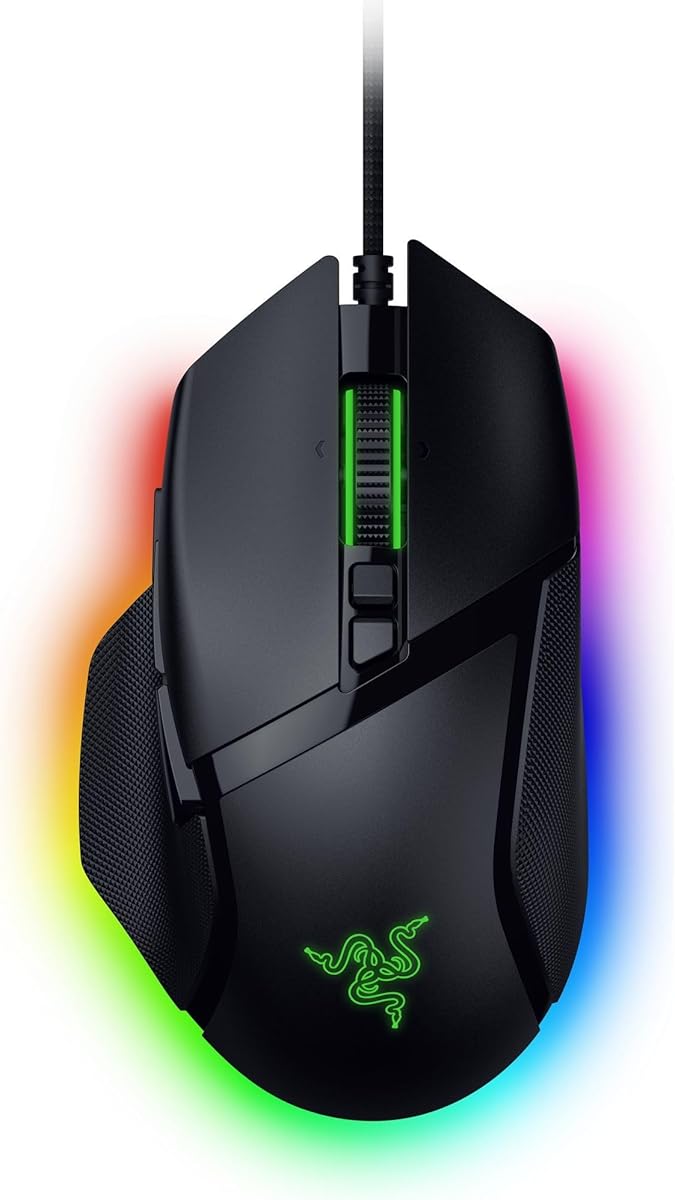
The Razer Basilisk V3 combines comfort with high performance features found in premium devices. It is designed to reduce strain during long gaming sessions while offering rapid response times.
We may earn a commission when you buy through this link, at no additional cost to you.
Its optical switches provide a blistering 0.2ms actuation speed which is vital for competitive play. The ergonomic thumb rest supports your hand naturally allowing for easier reach of side buttons.
The scroll wheel allows free spinning for fast navigation or tactile cycling for precision. While expensive the build quality and features justify the cost for dedicated gamers seeking top tier gear.
If you value comfort and speed this mouse is a strong contender. The Chroma lighting adds visual flair and the multi-function trigger offers unique control options not seen elsewhere.
Razer Optical Mouse Switches Gen-2 ensure your clicks are registered instantly. This reduces latency and prevents unintended misclicks during critical moments.
The HyperScroll wheel lets you choose between speed and tactile feedback. You can switch modes instantly to suit different in-game actions or general browsing.
We may earn a commission when you buy through this link, at no additional cost to you.
The Logitech G403 Hero delivers high performance in a lightweight form factor. It features a robust sensor and ergonomic shape designed for comfort during extended use.
We may earn a commission when you buy through this link, at no additional cost to you.
Its Hero 16K sensor ensures 1:1 tracking with speeds over 400 IPS. This makes it ideal for precise aiming where consistency is key to your gameplay success.
The adjustable weight allows you to tweak the balance to your preference. While it has fewer buttons than some rivals the build quality and grip design make up for it.
This model suits players who prioritize sensor accuracy and comfort over excessive programmability. It is a reliable choice for those who need a straightforward yet high-end gaming tool.
The contoured shape and rubber grips ensure a secure hold. This design reduces hand fatigue and improves control during intense gaming sessions.
Zero smoothing and filtering mean your cursor moves exactly as you intend. This fidelity is essential for maintaining accuracy in competitive shooters.
We may earn a commission when you buy through this link, at no additional cost to you.
The Logitech G203 is a fantastic option for those starting their gaming journey. It provides essential features like precision tracking and lighting without breaking the bank.
We may earn a commission when you buy through this link, at no additional cost to you.
It features an 8000 DPI optical sensor which is adequate for most standard setups. The mechanical buttons offer a crisp feel that is often lacking in cheaper alternatives.
RGB lighting adds a personal touch and you can sync it with other gear. The design is compact making it suitable for various hand sizes and grip styles.
For budget conscious buyers this mouse offers excellent value. It proves that you do not need to spend a fortune to get a reliable tool for daily gaming.
Despite its low cost it maintains the build quality expected from Logitech. The braided cable and tensioned switches ensure longevity over time.
You can customize DPI settings and RGB effects through G HUB. This flexibility allows you to tailor the experience to your specific needs easily.
We may earn a commission when you buy through this link, at no additional cost to you.
The Logitech G MX518 brings a classic design into modern gaming with a powerful sensor. It is known for its comfortable shape that fits many hand sizes perfectly.
We may earn a commission when you buy through this link, at no additional cost to you.
Its HERO 25K sensor matches top competitors ensuring precision tracking. The onboard memory saves profiles so you can use it on any PC without installing drivers.
Eight programmable buttons provide good control without being overwhelming. The lack of RGB might deter some but the focus on performance and ergonomics is clear.
This mouse is perfect for purists who want reliability and comfort. The legacy of the MX518 lives on with updated internals that meet today's gaming demands.
Save your settings directly to the mouse for instant portability. This feature is great for LAN parties or switching between multiple computers easily.
Updating the classic with HERO technology ensures it keeps pace with current standards. This means better tracking and reliability without sacrificing the beloved shape.
We may earn a commission when you buy through this link, at no additional cost to you.
The Corsair Scimitar RGB Elite is built specifically for complex gaming genres. It offers a massive number of buttons that can be mapped to complex macro commands.
We may earn a commission when you buy through this link, at no additional cost to you.
The key slider system allows you to move the side buttons to fit your thumb position. This customization ensures comfort and accessibility during long raiding or MOBA sessions.
With 17 programmable buttons you can control almost every aspect of your game. The build quality is robust with switches rated for 50 million clicks of use.
If you play games requiring many key bindings this is a top choice. The dedicated side panel makes it unique and highly effective for specific genre players.
Adjust the side buttons to align perfectly with your thumb. This reduces strain and ensures you can reach macros without shifting your grip.
The layout is designed specifically for games with complex skill bars. This specialization makes it a superior tool for dedicated fans of the genre.
We may earn a commission when you buy through this link, at no additional cost to you.
The Razer Basilisk V3 35K represents the pinnacle of wired gaming mouse engineering. It features advanced sensors and switches designed for the most competitive players.
We may earn a commission when you buy through this link, at no additional cost to you.
The Focus PRO 35K sensor offers granular aim control and works on various surfaces. This ensures you maintain precision even on glass or reflective desks common in modern setups.
Optical switches Gen-3 provide a longer life and faster actuation. The Speedflex cable reduces drag allowing for smooth movements without the weight of a thick cord.
This model is for those who demand the absolute best performance. It combines high-end specs with the ergonomic comfort expected from the Basilisk series.
The sensor tracks accurately on glass and other challenging surfaces. This removes the need for a dedicated mousepad in many cases.
Optical switches prevent double clicking and last longer. The 0.2ms actuation ensures your commands are executed instantly during combat.
We may earn a commission when you buy through this link, at no additional cost to you.
The Corsair NIGHTSWORD RGB stands out for its advanced weight tuning technology. It allows you to customize the balance and weight to suit your specific grip style.
We may earn a commission when you buy through this link, at no additional cost to you.
Its sensor provides high accuracy for FPS and MOBA games. The contoured shape fits naturally in your hand while the rubber grips prevent slipping during intense action.
With 120 weight configurations you can fine-tune the balance perfectly. This level of customization helps improve aim consistency and reduces fatigue over time.
This mouse is perfect for players who care about the weight and balance. It combines precision engineering with ergonomic design to support better gaming performance.
Adjust the center of gravity in real time for perfect balance. This system ensures the mouse feels exactly like you want it to.
Rubber grips inspired by sports equipment enhance hold and control. This design helps maintain stability even during rapid movements.
We may earn a commission when you buy through this link, at no additional cost to you.
The Corsair M65 RGB Ultra offers a distinct build with an aluminum frame. It is designed for players who want durability and high performance in a single package.
We may earn a commission when you buy through this link, at no additional cost to you.
The MARKSMAN sensor delivers up to 26000 DPI for extreme precision. The AXON technology ensures ultra-low latency so your inputs are registered instantly during gameplay.
Sensor Fusion Control combines gyro and accelerometer data for better tracking. This feature helps improve accuracy when repositioning the mouse quickly during combat.
This model is great for FPS players needing a sturdy and responsive tool. The weight adjustments and premium build make it a worthy investment for serious competitors.
Registers movements 8x faster than standard mice. This reduction in latency is critical for competitive shooter games.
The anodized aluminum ensures long term durability. This makes it resistant to wear and tear from daily heavy usage.
We may earn a commission when you buy through this link, at no additional cost to you.
The Razer Basilisk V3 Customizable RGB brings advanced lighting and ergonomics together. It is a versatile option for those who want both style and performance in their setup.
We may earn a commission when you buy through this link, at no additional cost to you.
Its Focus Plus sensor ensures precise tracking across different surfaces. The 11 Chroma RGB zones allow for deep customization to match your desk or game themes.
With 11 programmable buttons you have plenty of control over macros. The ergonomic design supports your hand making it comfortable for long hours of gaming.
This model suits players who value aesthetics without compromising on features. The balance of comfort speed and lighting makes it a strong contender in its category.
Create dynamic lighting effects that react to your gameplay. This immersion enhances the overall experience of your gaming sessions.
The built-in rest reduces strain on your thumb. This ergonomic feature helps prevent fatigue during extended play.
We may earn a commission when you buy through this link, at no additional cost to you.
Selecting the right mouse requires evaluating several factors to ensure it meets your specific gaming needs and ergonomic preferences.
The sensor is the heart of the mouse responsible for tracking movement. Look for models with high DPI and IPS ratings to ensure your cursor moves accurately even during fast flicks.
Prioritize sensors with zero acceleration and filtering for consistent performance.
Comfort is critical during long gaming sessions to prevent hand strain. Consider the size and shape of the mouse to ensure it fits your hand and grip style comfortably.
Models with thumb rests or contoured shapes often reduce fatigue significantly.
Different games require different numbers of inputs. MMO players may need many side buttons for macros while FPS players might prefer fewer keys for simplicity.
Choose a layout that offers enough buttons without cluttering the device.
Some players prefer lighter mice for faster movement while others like weight for stability. Adjustable weights allow you to fine tune the feel to your exact preference.
Consider both total weight and center of gravity when selecting a model.
Gaming mice are clicked frequently so durable switches are essential for longevity. Optical switches often offer faster response times and longer life than mechanical ones.
Look for switches rated for millions of clicks to ensure reliability.
A versatile scroll wheel can enhance navigation and weapon switching. Models with dual mode wheels offer both tactile and free-spin modes for different tasks.
Ensure the scroll wheel feels satisfying and precise for your needs.
While not essential for performance RGB lighting adds personal style to your setup. Look for models with extensive zones and sync options if aesthetics matter to you.
Software support is key for creating complex lighting effects and patterns.
Wired mice provide the most stable connection with minimal latency. Ensure the cable is flexible and durable to prevent drag during movement.
Consider the cable length and quality when evaluating wired options.
Always use mouse software to calibrate sensors and assign buttons. This ensures you get the most out of the hardware capabilities and custom macros.
Keep the sensor lens clean from dust and debris to maintain tracking accuracy. Use a soft cloth to wipe the surface occasionally and prevent build up.
Store your mouse in a dry and dust free environment when not in use. This helps preserve the switches and cable integrity for a longer lifespan.
Analog gaming mice use advanced sensors and higher polling rates for precise tracking. They often feature programmable buttons and ergonomic designs optimized for speed and comfort.
Wired mice generally offer lower latency and consistent power for competitive play. However modern wireless models have improved but wired options remain top for pure performance.
This depends on your game genre. FPS players typically need 4 to 7 buttons while MMO players often prefer 12 or more for complex macro commands and actions.
Higher DPI allows for faster cursor movement but accuracy matters more than raw numbers. A sensor with good 1:1 tracking at moderate DPI is often more effective.
Many premium gaming mice come with adjustable weights. You can add or remove these to change the feel and balance according to your personal preference.
Basic functions work without software but customization often requires driver tools. Software allows you to set DPI levels map buttons and configure RGB lighting easily.
Use a slightly damp cloth to wipe the exterior and a blower for the sensor. Avoid harsh chemicals that might damage the surface or internal components.
Most quality gaming mice last for several years with regular use. The switches usually handle millions of clicks so durability depends on maintenance and frequency of use.
These ten models cover a wide range of needs from budget friendly options to high-end specialized tools. Choosing the right one will significantly improve your precision and comfort.
Prioritize sensor accuracy and ergonomics first to ensure you have a solid foundation. Features like RGB lighting and button counts are secondary but still important for customization.
Always check current listings and reviews before making a final decision. Prices fluctuate and newer models may release so stay informed about the latest offerings.