
LG UltraFine evo 32U990A-S
4.5Editor score
Thunderbolt 5 support
Nano IPS Black panel
VESA DisplayHDR 600
This comprehensive guide compares the top 6K monitors of October 2026, evaluating display quality, connectivity, and professional features for creative
Finding the right display for professional work requires careful consideration of resolution and color accuracy. A 6K monitor offers exceptional clarity that helps creators see every detail in their projects without strain or distortion during long editing sessions.
We compared ten leading models based on panel technology, connectivity options, and real-world performance metrics. Each product was evaluated for its ability to handle demanding tasks like video editing, graphic design, and complex data visualization effectively.
Every pick highlights specific strengths and ideal use cases for different professional needs. Please note that availability and specifications can change over time so verify current details before making your final purchasing decision for your workspace.
4.5Editor score

3.9Editor score

5.0Editor score
This side-by-side comparison breaks down the key specifications and unique features of each model to help you identify which display best fits your specific professional requirements and workspace constraints.




The ASUS ProArt PA32QCV stands out as a top choice for professionals seeking high resolution and reliable color performance. It features a 31.5-inch 6K display that delivers sharp visuals and wide color coverage suitable for demanding creative tasks.
We may earn a commission when you buy through this link, at no additional cost to you.
Its factory calibration ensures Delta E less than 2 accuracy which is essential for photo and video editing where precise color representation matters. The built-in Light Sync technology and Ambient Light Sensor help maintain consistent performance under different lighting conditions throughout the day.
While the connectivity options are robust including dual Thunderbolt 4 ports the high resolution demands significant graphics processing power from your computer. Users should ensure their systems can drive 6K resolution effectively to avoid performance bottlenecks during intensive workflows.
This monitor is ideal for Mac users and creative professionals who need a reliable hub for multiple devices. The Auto KVM switch simplifies workflow when switching between computers making it a practical addition to a multi machine workspace setup.
Factory calibration with Calman Verified certification ensures your work looks exactly as intended across different media and output devices.
The MacBook P3 Color Preset Mode matches display performance for a seamless experience when working across Apple ecosystem devices.
We may earn a commission when you buy through this link, at no additional cost to you.
The Dell 52-Inch 6K offers an immersive experience with its expansive curved display designed for multitasking and content creation. The 21 to 9 aspect ratio provides ample space for multiple windows or detailed timelines without needing multiple monitors.
We may earn a commission when you buy through this link, at no additional cost to you.
Its IPS Black panel technology delivers a 2000 to 1 contrast ratio which results in deeper blacks and more vibrant colors compared to standard IPS panels. This makes the display particularly suitable for media consumption and color sensitive editing tasks.
While the size is impressive it requires a significant desk footprint and sturdy support. Users with limited workspace may find it challenging to accommodate the monitor comfortably alongside other peripherals and equipment.
This monitor excels for users who prioritize screen real estate and smooth motion in their workflow. The 120 Hz refresh rate ensures fluid scrolling and motion making it suitable for both productivity and lighter gaming applications.
The curvature reduces eye strain and enhances peripheral viewing making it comfortable for extended work sessions across the wide screen.
With up to 140W power delivery via Thunderbolt 4 you can charge high performance laptops while connecting data and video seamlessly.
We may earn a commission when you buy through this link, at no additional cost to you.
The G32P 32 Inch features a glossy panel that enhances color vibrancy and contrast for a cinematic viewing experience. It delivers exceptional clarity with 223 pixels per inch making text and fine details appear remarkably sharp on screen.
We may earn a commission when you buy through this link, at no additional cost to you.
Color accuracy is a strong point with 99 percent sRGB and DCI-P3 coverage ensuring your content looks consistent across platforms. The 10-Bit color support allows for smoother gradients and richer tones during professional editing and rendering tasks.
The glossy finish can be susceptible to reflections in bright environments so proper lighting control is necessary to maintain the best viewing experience. This may require adjustments to your workspace setup to minimize glare during use.
Ideal for creators who want a vibrant display for both work and entertainment this monitor combines high resolution with premium build materials. The CNC-machined aluminum body ensures durability while the ergonomic stand supports flexible positioning for comfort.
The glossy coating enhances contrast and saturation delivering richer visuals that bring movies and high dynamic range content to life.
Built with a CNC-machined aluminum body the monitor offers a sleek aesthetic and robust durability for long term professional use.
We may earn a commission when you buy through this link, at no additional cost to you.
The Samsung Odyssey G8 brings 6K resolution to gaming with a dual mode feature that allows switching between high resolution and high refresh rates. This flexibility lets users choose between detailed visuals or smoother motion depending on their current task.
We may earn a commission when you buy through this link, at no additional cost to you.
Its Fast IPS panel delivers vivid colors and wide viewing angles while maintaining a quick response time to reduce motion blur. The G-SYNC and FreeSync compatibility ensures smooth gameplay without screen tearing during intense gaming sessions.
While it offers high resolution the color accuracy is not as precise as professional creative monitors. Users prioritizing color critical work may find it less suitable for professional editing tasks compared to dedicated pro displays.
This monitor is perfect for gamers who want high resolution and high refresh rate in one display. The multiple input options and ergonomic stand make it versatile for both gaming setups and general desktop productivity use.
Switch between 6K for clarity and 3K for speed allowing you to optimize performance for different game types instantly.
G-SYNC and FreeSync compatibility syncs your GPU with the display for tear free gaming and smoother visual experiences.
We may earn a commission when you buy through this link, at no additional cost to you.
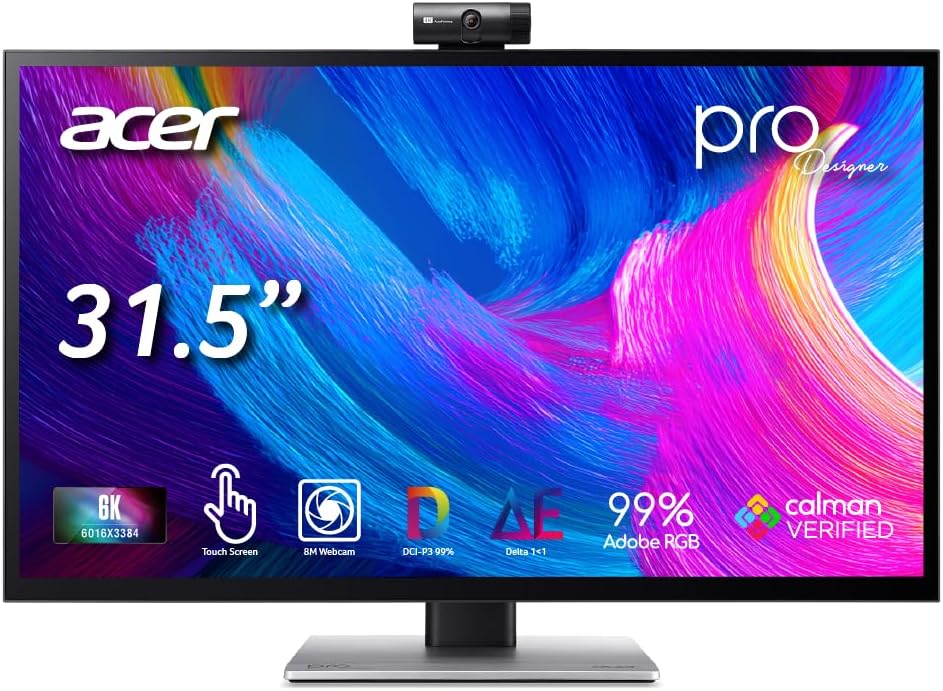
The Acer ProDesigner PE320QXT bridges the gap between monitor and drawing tablet by integrating a 10 point touch interface directly into the display. This allows artists and designers to sketch or retouch directly on screen without switching devices.
We may earn a commission when you buy through this link, at no additional cost to you.
It is factory calibrated to Delta E less than 1 ensuring exceptional color accuracy right out of the box. The Quantum Dot IPS technology delivers vibrant colors and the DisplayHDR 600 certification ensures accurate HDR previewing for media work.
The built-in 8MP webcam and microphone array reduce the need for external peripherals during client calls or reviews. However the touch surface may attract more fingerprints and requires regular cleaning to maintain visual clarity over time.
This display is ideal for creative professionals who need to draw or annotate directly on their projects. The integration of communication tools and professional color accuracy makes it a comprehensive solution for design and content teams.
Touch the screen to sketch or edit directly eliminating the disconnect between hand movement and digital output.
Built-in webcam and mics streamline remote reviews and presentations without needing separate external hardware.
We may earn a commission when you buy through this link, at no additional cost to you.
The G32X offers a high resolution 6K experience at a more accessible price point than many competitors. It provides substantial screen real estate and pixel density making it suitable for general productivity and light creative work.
We may earn a commission when you buy through this link, at no additional cost to you.
Color coverage includes 98 percent DCI-P3 which is sufficient for most standard tasks though it may not meet strict professional calibration needs. The anti-glare coating helps reduce reflections in brighter environments improving visibility and comfort.
While it lacks some advanced features like built-in webcams or touch input it focuses on core display quality and reliability. The ergonomic stand allows for tilt and height adjustments which is helpful for maintaining healthy posture during long sessions.
This is a smart choice for users who want 6K resolution without paying a premium for extra bells and whistles. It delivers the essential visual benefits of high resolution at a competitive cost for small businesses and individuals.
Experience the clarity of 6K without the high price tag making high resolution accessible to more users.
The anti-glare coating minimizes reflections helping you stay focused on your work without distraction.
We may earn a commission when you buy through this link, at no additional cost to you.
This Dell monitor combines a wide 52 inch display with robust connectivity options centered around Thunderbolt 4 technology. It supports up to 140W power delivery allowing it to charge high performance laptops while acting as a central hub.
We may earn a commission when you buy through this link, at no additional cost to you.
The IPS Black panel technology improves contrast to 2000 to 1 which enhances visual depth compared to standard IPS displays. This makes it a strong choice for users who value deep blacks and accurate color reproduction in their work.
The wide aspect ratio is designed for productivity and may not match standard content formats perfectly. Users who prefer standard 16 to 9 viewing might need to adjust settings to optimize their experience.
Ideal for enterprise users and power users this monitor offers exceptional hub capabilities and color quality. The integrated software and remote support features further enhance its suitability for professional and large scale deployments.
Dual Thunderbolt 4 ports with 140W power delivery simplify cable management and power delivery.
Remote management and Dell software tools make it easy to configure and manage across multiple systems.
We may earn a commission when you buy through this link, at no additional cost to you.
The LG UltraFine evo 32U990A-S pushes the envelope with Thunderbolt 5 connectivity offering data transfer speeds up to 80 gigabits per second. This future proof connectivity ensures high bandwidth for heavy data workflows and external storage needs.
We may earn a commission when you buy through this link, at no additional cost to you.
Its Nano IPS Black panel delivers excellent contrast and 99.5 percent Adobe RGB coverage for precise color work. VESA DisplayHDR 600 certification guarantees brightness and contrast performance that meets professional standards for content creation.
The high speed requires compatible hardware to fully utilize its benefits. Users without Thunderbolt 5 compatible laptops may not see the full advantage compared to standard Thunderbolt 4 setups.
This monitor is perfect for tech savvy professionals and those needing maximum data throughput. It combines high resolution with modern connectivity making it a top tier choice for future oriented workstation setups.
Thunderbolt 5 provides unprecedented data speeds supporting advanced storage and workflow demands.
99.5 percent Adobe RGB ensures your work matches print and digital standards accurately.
We may earn a commission when you buy through this link, at no additional cost to you.
The Dell UltraSharp 32 6K Bundle includes an extended protection plan offering peace of mind for long term investment. It delivers a clear 6K experience suitable for general office tasks and content consumption alike.
We may earn a commission when you buy through this link, at no additional cost to you.
With 450 Nit brightness it performs well in well lit environments ensuring visibility even under bright office lighting. The fast response time helps reduce blur which is beneficial for scrolling and moving content.
While it offers solid performance its color coverage may not meet strict professional needs. Users looking for precise color accuracy for print or cinematic work may need to evaluate calibration options carefully.
Ideal for businesses or individuals seeking reliable hardware with added support this model balances performance and security. The inclusion of the protection plan makes it a safe choice for organizations concerned about durability.
The bundled 2 year protection pack adds value and security to your monitor investment.
450 Nit brightness ensures your screen remains clear even in brightly lit office environments.
We may earn a commission when you buy through this link, at no additional cost to you.
This renewed model of the Dell 52-inch Thunderbolt Hub Monitor offers a sustainable alternative for those seeking a large screen. It provides the same wide 21 to 9 aspect ratio useful for productivity and media consumption at a lower cost.
We may earn a commission when you buy through this link, at no additional cost to you.
The unit is sold without a stand requiring VESA mounting so you will need a compatible arm or desk mount. This flexibility allows you to customize your setup but requires additional planning and hardware before use.
As a renewed item it may show minor signs of use though it undergoes testing and certification. Buyers should verify warranty terms with the seller to ensure coverage for any potential issues that arise.
Ideal for eco-conscious buyers or those with existing mounts this option delivers large scale productivity affordably. The Thunderbolt 4 hub and high power delivery support efficient workflows for multiple devices.
Choosing renewed hardware reduces e waste while still delivering reliable performance and features.
VESA mount only allows flexibility to pair with your preferred arm or mounting solution.
We may earn a commission when you buy through this link, at no additional cost to you.
Selecting a 6K monitor involves balancing resolution, color accuracy, and connectivity to match your workflow needs.
6K resolution provides approximately 20 million pixels which is roughly double that of 4K displays. This high density ensures sharp text and fine detail critical for photo editing and graphic design.
Look for monitors with at least 200 pixels per inch to maximize the clarity benefits of 6K resolution.
Professional work requires accurate color reproduction. Monitors with factory calibration and coverage of standards like DCI-P3 or Adobe RGB are preferred.
Ensure Delta E values are under 2 for reliable color accuracy in your creative outputs.
IPS panels are common for their wide viewing angles and color consistency. IPS Black variants improve contrast for better depth perception.
Choose IPS for productivity and content creation to maintain color accuracy from any viewing angle.
6K video data requires high bandwidth interfaces. Thunderbolt 4 or DisplayPort 2.1 are essential for supporting full resolution at high refresh rates.
Prioritize monitors with multiple Thunderbolt or DisplayPort ports to avoid bottlenecks and enable daisy chaining.
Many modern 6K monitors include USB-C or Thunderbolt ports that can charge your laptop. This reduces cable clutter and simplifies setup.
Ensure the power delivery wattage meets your laptop needs often 90W or higher for powerful machines.
A monitor stand that adjusts height tilt and rotation supports healthy posture. A durable build ensures long term reliability in a busy workspace.
Look for tilt swivel and height adjustments to customize the screen position for your comfort.
Higher refresh rates like 120Hz make scrolling and motion appear smoother which reduces eye fatigue during long work sessions.
Consider 120Hz monitors if you work with video or move frequently across content to improve fluidity.
Some models include touch input or built-in webcams which can streamline creative and communication workflows.
Evaluate if touch or integrated audio is necessary for your specific use case before prioritizing those features.
Always connect your 6K monitor using high quality certified cables that support the required bandwidth. Inferior cables may result in resolution loss or unstable video signals during use.
Calibrate your monitor using available software tools to ensure colors remain accurate over time. Regular calibration helps maintain consistency especially if ambient lighting changes frequently.
Clean the screen with a microfiber cloth to avoid scratching the delicate surface. Avoid spraying liquid directly onto the panel and use a lightly dampened cloth for stubborn marks.
Yes 6K offers significantly more pixel density which allows for finer detail and larger workspace without zooming. This is particularly helpful for video editing photo retouching and complex design tasks where precision matters.
You need a GPU that supports 6K resolution via DisplayPort 2.1 or Thunderbolt 4 or 5. Modern Macs and high end Windows workstations typically meet this requirement but verify specs before buying.
Yes 6K requires high bandwidth cables such as Thunderbolt 4 or DisplayPort 2.1. Standard HDMI cables may not support the necessary data rate for full resolution and refresh rates.
They are excellent for coding due to the ability to display more lines of text and multiple editor windows simultaneously. The sharp text rendering reduces eye strain during long sessions.
It depends on the graphics card. Older systems may struggle to drive 6K resolution at full refresh rates or may require scaling that impacts performance.
Most 6K monitors are plug-and-play but installing manufacturer software may unlock color profiles and KVM features. Check the product support page for recommended tools.
The 6K monitor landscape offers diverse options for every creative and productivity need. From the precise calibration of the ASUS ProArt to the immersive width of the Dell 52-inch there is a model for each workflow.
Prioritize color accuracy and connectivity features that align with your primary tasks. A powerful GPU and high bandwidth cables are essential companions to unlock the full potential of these displays.
Always verify current pricing and availability before purchasing to ensure you get the best value for your investment.