
QNAP TL-D1600S
4.5Editor score
PCIe SATA interface included
Supports 16 drives
Desktop storage enclosure
Choosing the right 16 bay NAS enclosure is critical for businesses needing massive storage capacity without sacrificing performance. These units offer room for extensive data growth while maintaining robust security features.
We evaluated ten top-rated options based on drive compatibility, cooling efficiency, network throughput, and expansion capabilities. Our analysis focuses on models that deliver reliability for demanding workloads.
Each selection highlights specific strengths like hot-swap support or redundant power. Remember that prices fluctuate frequently, so verify current availability before making your final investment decision today.
4.5Editor score
4.3Editor score

4.2Editor score
As an Amazon Associate we earn from qualifying purchases.
This side-by-side comparison highlights the key specifications and unique features of each enclosure to help you find the perfect match for your storage needs.


The QNAP TL-D1600S stands out as the most affordable option for users needing massive capacity without buying a full NAS unit. It offers a 16 bay storage enclosure with SATA 6Gbps speeds.
We may earn a commission when you buy through this link, at no additional cost to you.
Its standout feature is the included PCIe SATA interface card which simplifies installation on compatible systems. The enclosure supports hot swapping allowing you to add drives without shutting down.
While it lacks its own operating system this device relies on connecting to a separate NAS or server. This trade-off keeps costs low but requires you to already own compatible hardware.
Buy this if you need a simple expandable storage solution that is easy to install. It delivers reliable performance for desktop environments needing extra drive bays quickly.
The bundled QXP-1600eS card ensures compatibility with most motherboards reducing the need for extra purchases.
Drives can be added or removed while the system is running ensuring uninterrupted workflow for your data tasks.
We may earn a commission when you buy through this link, at no additional cost to you.
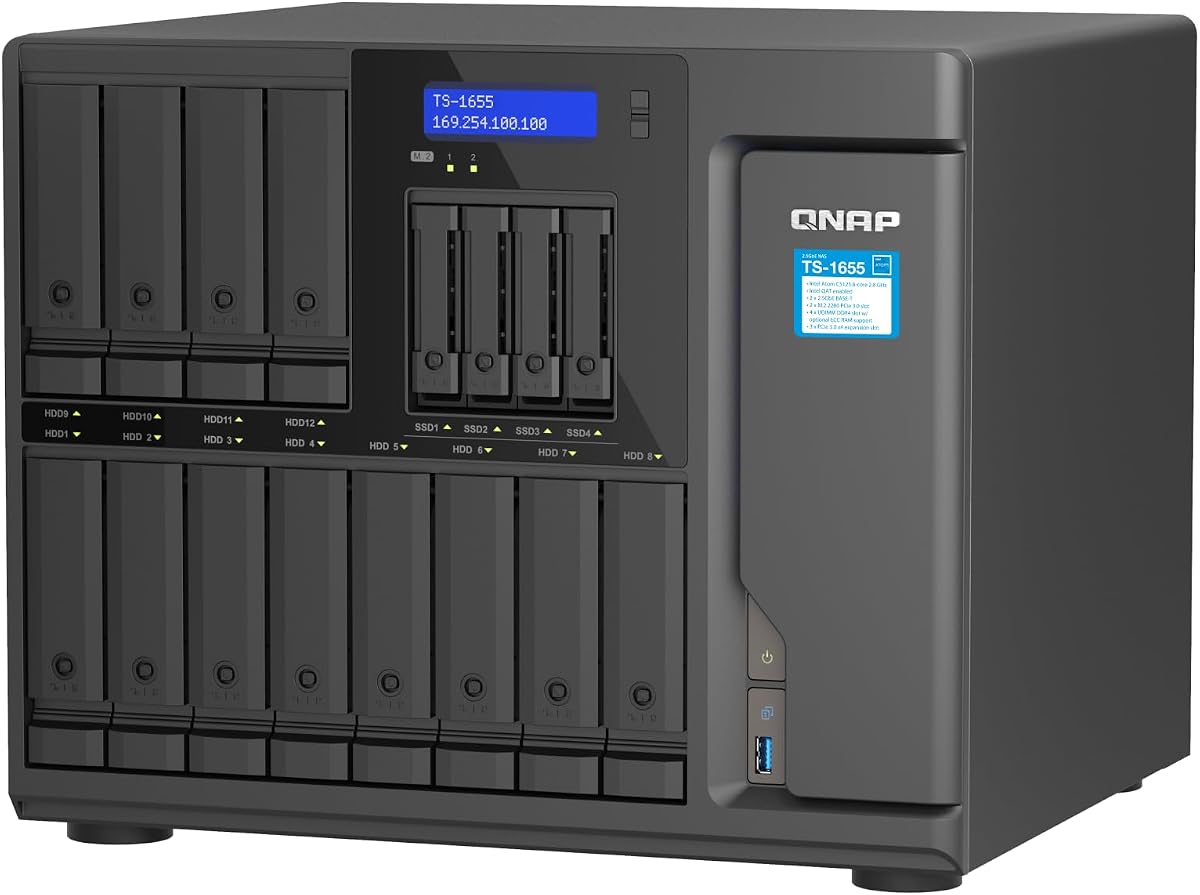
The QNAP TS-1655-8G-US delivers a powerful hybrid NAS solution for power users needing extensive storage flexibility. It supports 12 3.5 inch and 4 2.5 inch drives for massive capacity.
We may earn a commission when you buy through this link, at no additional cost to you.
Its key strength is the powerful Intel Atom processor paired with upgradable ECC RAM up to 128GB. This enables virtualization and heavy file handling tasks with ease.
Users must consider the complexity of setup and the higher cost compared to basic units. However the performance gains justify the investment for professional workloads and virtualization.
Choose this model if you require a robust system capable of handling databases and virtual machines. It offers excellent scalability for growing business needs.
The high RAM ceiling and strong CPU allow you to run multiple virtual machines simultaneously without performance drops.
Dual M.2 NVMe slots enable SSD caching which drastically speeds up access to frequently used data files.
We may earn a commission when you buy through this link, at no additional cost to you.
The Synology RS4021xs+ represents the pinnacle of enterprise NAS enclosures with incredible processing power and scalability. It delivers over 234000 random read IOPS for critical business tasks.
We may earn a commission when you buy through this link, at no additional cost to you.
Its main advantage lies in the redundant power supplies and PCIe expansion slots that ensure reliability and future growth. The unit can scale up to 40 drive bays with add on modules.
The high price tag and rackmount requirements mean this is strictly for businesses with dedicated server rooms. However the reliability and speed make it a worthwhile investment for continuity.
Select this unit if uptime is non negotiable and you need enterprise class performance. It is the top choice for businesses prioritizing data safety and speed.
Designed for standard racks this enclosure integrates easily into existing datacenter infrastructure without custom mounting solutions.
Dual power supplies ensure that if one fails your data remains accessible preventing costly downtime during business hours.
We may earn a commission when you buy through this link, at no additional cost to you.
The CENMATE Aluminum 12 Bay offers a robust DAS solution for those needing large storage without complex NAS software. It supports both 2.5 and 3.5 inch drives via USB 3.0.
We may earn a commission when you buy through this link, at no additional cost to you.
Its standout features include a sturdy aluminum body that aids cooling and daisy chain capabilities for expanding storage up to 720TB total. Hot swapping makes drive changes easy.
One trade-off is the fan noise which can be noticeable in quiet environments. Additionally lack of native RAID support means you must manage redundancy via software or external tools.
Buy this if you want a simple external storage box for high capacity needs. It works well for creators needing fast access to large media libraries.
Connect multiple units together to exponentially increase your total storage capacity without needing extra cables or ports.
The metal chassis dissipates heat effectively protecting your drives from overheating during long periods of data transfer.
We may earn a commission when you buy through this link, at no additional cost to you.
The QNAP TL-R1600PES-RP-US is a specialized rackmount JBOD designed for tight server cabinets. It holds 16 drives and features redundant power supplies for continuous operation.
We may earn a commission when you buy through this link, at no additional cost to you.
Key strengths are its short depth design which simplifies cabling and installation in small media cabinets. Mini-SAS HD ports provide high bandwidth for connecting to compatible servers.
Users should note that the rail kit is sold separately adding to the total cost. Also it requires a QNAP NAS to function so it is not a standalone device.
Choose this for datacenters where rack space is limited. It provides reliable storage expansion with enterprise level power redundancy for critical systems.
The short depth chassis reduces the footprint on your rack allowing you to fit more equipment in the same space.
High speed ports ensure your storage expansion does not bottleneck your server network performance.
We may earn a commission when you buy through this link, at no additional cost to you.
The QNAP TS-1655-8G-US offers a hybrid NAS design tailored for high performance and long-term stability. It features a powerful 8-core processor and supports up to 128GB RAM.
We may earn a commission when you buy through this link, at no additional cost to you.
Its standout quality is the promise of long-term availability which is crucial for businesses planning multi-year infrastructure projects. It also includes slots for NVMe caching to boost speeds.
The higher cost and complex setup process are trade-offs for this level of capability. You must ensure you need these advanced features before committing to the investment.
Select this unit if you require a system that will remain supported for years. It delivers high-end features for virtualization and heavy file transfer tasks.
Long-term availability ensures your hardware won't become obsolete quickly protecting your initial investment over time.
Combine fast SSDs with high capacity HDDs to optimize both speed and cost in a single system.
We may earn a commission when you buy through this link, at no additional cost to you.
The Synology DS3622xs+ is a scalable workstation NAS that can grow to 36 bays with expansion units. It features a strong 6-core Xeon processor for heavy multitasking.
We may earn a commission when you buy through this link, at no additional cost to you.
Its key advantage is the ability to host virtual machines and video management systems simultaneously. You can also add NVMe SSD cache for faster data access.
Note that this model natively supports 12 bays not 16 which may require expansion for your needs. The price reflects its high-end business capabilities.
Buy this if you need a system that can expand over time. It is perfect for offices needing reliable centralized storage and backup.
Expansion units allow you to add capacity as your data grows without replacing the entire main unit.
Optional support for high speed connections ensures your storage stays fast even under heavy network loads.
We may earn a commission when you buy through this link, at no additional cost to you.
The Asustor Lockerstor 10 Gen3 brings enterprise features to enthusiasts with powerful networking and RAM specs. It supports dual 10GbE ports and 16GB ECC DDR5 RAM for stability.
We may earn a commission when you buy through this link, at no additional cost to you.
Its standout feature is the USB4 40Gbps port which offers ultra-fast external storage expansion. This model excels in high resolution media workflows and AI applications.
While it only has 10 bays the performance justifies the choice for those prioritizing speed over raw drive count. Users needing 16 bays must look elsewhere for native capacity.
Select this for high speed media editing and virtualization. It offers top tier connectivity that future proofs your data center infrastructure.
USB4 connectivity allows you to attach external drives that match your internal storage performance without bottlenecks.
Optimized for AI tasks this NAS can handle local AI applications efficiently for creative professionals.
We may earn a commission when you buy through this link, at no additional cost to you.
The Synology DX1222 is a dedicated expansion unit designed to seamlessly integrate with selected Synology DiskStation units. It adds 12 bays and features unified management via DSM.
We may earn a commission when you buy through this link, at no additional cost to you.
Its key strength is the ease of configuration allowing you to add new storage in minutes using Synology tools. The build quality ensures it matches the main unit's reliability.
Keep in mind this works only with compatible Synology systems so verify your model before buying. It also lacks its own independent OS making it dependent on a main unit.
Choose this if you own a Synology NAS needing more space. It provides a reliable and simple way to expand your storage network.
Unified tools let you manage the expansion unit alongside your main storage without needing extra software.
A five-year warranty offers peace of mind ensuring your storage expansion remains covered for a long time.
We may earn a commission when you buy through this link, at no additional cost to you.
The Generic ZhenLoong Full Tower offers a DIY chassis for building custom NAS servers with massive drive capacity. It supports 15 hot swappable bays and various motherboard sizes.
We may earn a commission when you buy through this link, at no additional cost to you.
Its standout feature is the support for EATX boards and redundant PSU options which is rare for this price point. It also includes multiple PCIe slots for additional hardware.
Be aware that shipping can take 30 to 40 days and assembly is required. You will need to source your own drives and power supply to complete the build.
Buy this if you are a builder wanting full control over your hardware. It delivers enterprise features at a lower cost than prebuilt units.
Custom assembly allows you to pick components that fit your exact performance and budget needs.
Support for redundant power supplies ensures your custom build stays up even if one power unit fails.
We may earn a commission when you buy through this link, at no additional cost to you.
Selecting the right enclosure requires evaluating drive compatibility, network speed, and future scalability needs for your specific environment.
Ensure the enclosure supports your intended drive types such as 3.5 inch or 2.5 inch SSDs and HDDs. Verify the total maximum capacity to avoid hitting limits quickly.
Check that the enclosure supports your drive size and total capacity to ensure your needs are met.
High throughput requires at least 2.5GbE or 10GbE networking to handle large file transfers efficiently. USB 3.0 is good for DAS but slower than network options.
Prioritize high speed ports to prevent network bottlenecks during heavy data transfers and backups.
Look for units that support daisy chaining or additional expansion bays if you anticipate growing your storage needs. Some models allow up to 40 drives with add-ons.
Choose expandable models to protect your investment and accommodate future data growth.
Hot swap support allows you to change drives without powering down the system which is essential for uptime critical operations. Check if the enclosure supports this feature natively.
Hot swap ensures uninterrupted workflow by allowing drive changes while the system is running.
Redundant power supplies ensure your storage stays online even if one power unit fails. This is critical for businesses where downtime is costly.
Opt for redundant power in mission critical environments to prevent unexpected shutdowns.
Large enclosures generate significant heat so efficient cooling systems are necessary. Noise levels vary from whisper quiet to loud so consider your environment.
Select units with efficient cooling to protect drives and maintain low noise for your workspace.
Full NAS units come with an OS like DSM or QTS while DAS enclosures need an external server. Choose based on whether you want integrated management.
Decide between standalone NAS OS and external controller based on your management preferences.
Long warranties such as 5 years indicate manufacturer confidence in product reliability. Check support resources and availability for technical assistance.
Prioritize brands with strong warranty terms to ensure long term support and reliability.
Start by installing drives carefully ensuring they are securely locked into the bays. Power on the unit and follow the setup wizard to initialize storage pools.
Monitor drive health regularly using the built-in diagnostic tools to catch issues early. Keep the environment cool and dust free to prevent overheating.
Perform routine backups and firmware updates to maintain security and performance. Check cables periodically to ensure stable connectivity and prevent failures.
NAS enclosures come with a network operating system allowing file sharing and remote access over Ethernet. DAS enclosures connect via USB and act like external hard drives for direct computer access.
Most listings are diskless meaning you must purchase hard drives separately. Check the product details to confirm if it includes any drives before purchasing.
You can sometimes expand by adding an expansion unit like the Synology DX1222 to a compatible NAS. Ensure your main unit supports this expansion to reach higher counts.
Hot swap allows you to replace a failing drive without shutting down the system. This minimizes downtime and keeps data accessible during maintenance.
For general file storage 8GB to 16GB is usually enough. If you run virtual machines or heavy applications upgrade to 32GB or higher for stability.
RAID adds redundancy to protect against drive failure which is recommended for important data. However some DAS units lack RAID so check specifications before buying.
Our top picks range from budget friendly DAS units to enterprise class NAS systems with redundant power. Select the model that matches your capacity and performance requirements.
Prioritize network speed and cooling quality to ensure smooth operation. Consider future expansion options to avoid replacing hardware too soon.
Always check current availability and pricing before finalizing your purchase. This ensures you get the best value for your storage investment today.