
Digital Alarm Clock with Date and Day of Week for Dementia Seniors
4.7Editor score
Seven inch large digital screen
Voice announcement time function
Automatic dimming option
This guide compares ten top digital clocks with date and day of week features, focusing on readability, alarms, and senior-friendly designs for 2026.
Finding a clear timepiece is essential for daily routines. A digital clock with date and day of week helps everyone stay organized without confusion. These devices show full text for days and dates, making them ideal for seniors and busy families.
We evaluated ten models based on display size, alarm flexibility, and ease of use. Our comparison highlights units with large fonts, auto dimming, and multiple reminder options. Each pick serves different needs, from basic timekeeping to advanced memory support.
Read each review to see how these clocks perform in real homes. We highlight key strengths and honest trade-offs for every model. Prices fluctuate often, so check current listings before buying to ensure you get the best value for your space.
4.7Editor score

4.6Editor score

4.6Editor score
This side by side comparison reviews all ten selected models. We focus on display clarity, alarm options, and special features like voice output or photo playback to help you choose the right clock for your needs.


This model stands out for its expansive display that spells out full days and dates without abbreviations. With a rating of 4.6, it is highly regarded for its clarity and senior focused design. The large screen ensures visibility from across the room.
We may earn a commission when you buy through this link, at no additional cost to you.
The standout quality is the seven display modes that adapt to different needs like office or school use. It offers twelve customizable alarms to help users remember medication or appointments. The sun and moon icons provide visual context for time of day.
One trade-off is the need for a wall outlet, which limits placement options. However, the plug and play setup simplifies initial use. The auto DST feature removes the hassle of manual time changes twice a year.
It is ideal for seniors or families needing clear time and date info. The multiple languages make it accessible to non English speakers. We recommend this for its comprehensive features and large readable interface.
The clock divides the day into morning, afternoon, evening and night. Sun and moon icons reinforce these periods to reduce confusion.
Users can set up to twelve alarms for specific events. Reminders for medication or water intake support daily health routines effectively.
We may earn a commission when you buy through this link, at no additional cost to you.
This clock combines a clear display with a voice function for those with weak vision. It holds a 4.7 rating for its intuitive interface and helpful auditory features. The bold letters for week and date make reading simple.
We may earn a commission when you buy through this link, at no additional cost to you.
The voice timing function allows users to press a button for spoken time. This supports independence when eyesight is poor. Alarm reminders help manage medication schedules and daily tasks effectively.
The auto dimming adjusts brightness based on time of day. It brightens at seven am and darkens at seven pm. Some users may prefer manual control over brightness levels.
It suits elderly people needing extra assistance with time. The setup is straightforward even for those less tech savvy. We recommend it for voice support and clear visual design.
Pressing a button triggers spoken time in nine languages. This auditory cue helps users know the time without squinting.
The interface uses one click setup for easy operation. No complex settings are needed to start using the clock.
We may earn a commission when you buy through this link, at no additional cost to you.
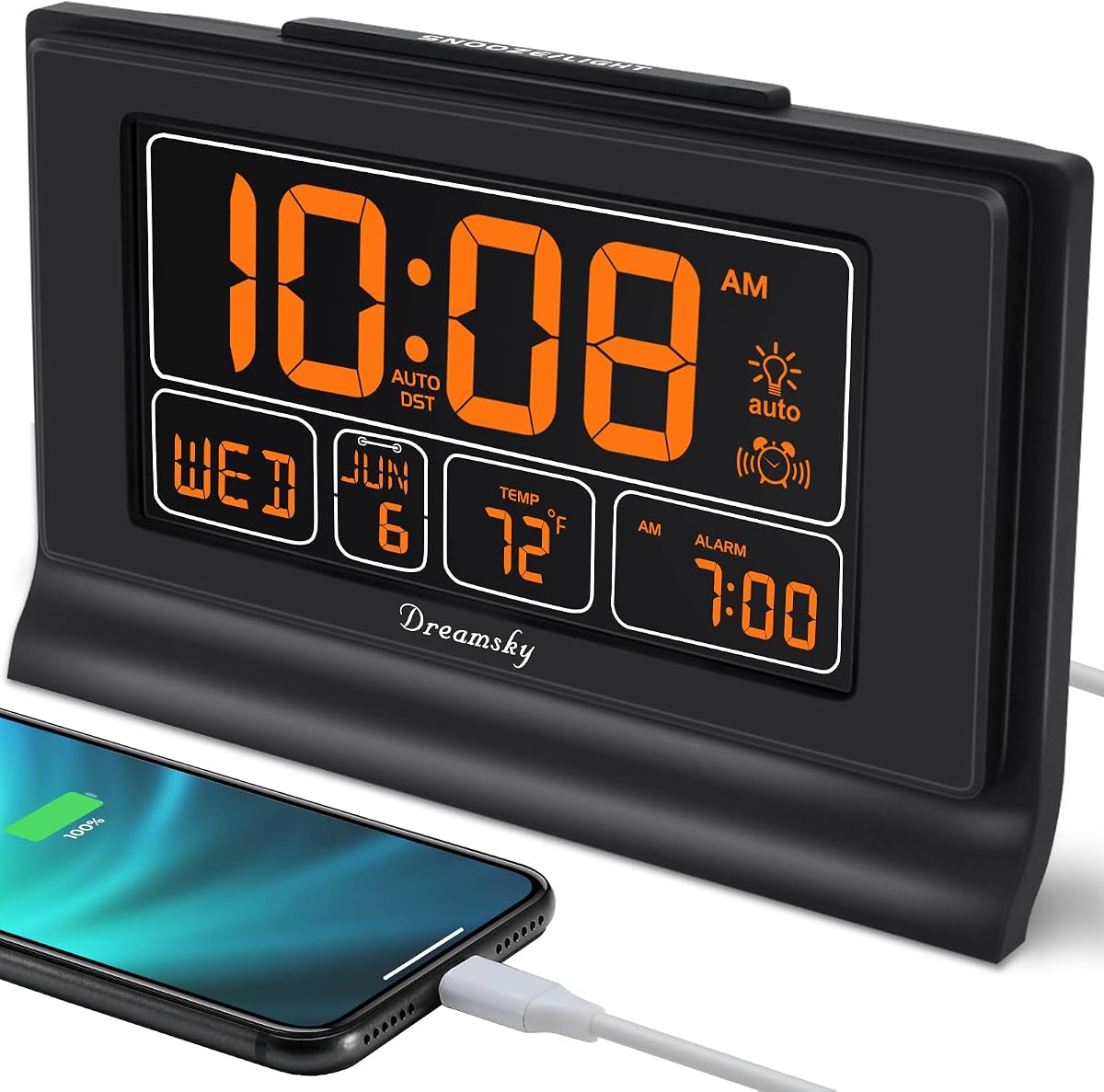
This clock provides a good balance of features and value. It displays time date day and indoor temperature clearly. The battery backup ensures time is retained during power outages. It is a reliable choice for daily use.
We may earn a commission when you buy through this link, at no additional cost to you.
The USB charging port adds convenience for bedside use. You can charge phones without extra outlets. The auto dimmer helps brightness at 1 at night to save sleep quality.
While the screen is smaller than some others it remains easy to read. The four level dimmer allows manual adjustments. Some may miss voice output for better accessibility.
It works well in bedrooms or offices. The compact size fits many spaces. We recommend it for its backup power and USB charging utility.
A built in USB port charges phones while you sleep. This reduces the need for extra adapters on your nightstand.
The backup battery keeps settings during power cuts. You won't need to reset time after an outage.
We may earn a commission when you buy through this link, at no additional cost to you.
This model offers unique photo playback and twenty alarm options. It uses an HD screen to show time and images clearly. The themes allow personalization of colors and fonts. It serves as both a clock and frame.
We may earn a commission when you buy through this link, at no additional cost to you.
The ability to display family photos adds emotional value. Reminders for medication or water are easy to set. Volume levels let you choose alarm loudness for heavy sleepers.
Setting up may take longer due to many options. Power is required for operation with no battery backup. But the display quality and features justify the effort.
It is great for memory care and home decoration. The themes support various vision needs. We recommend it for its multimedia and reminder capabilities.
Insert a USB drive to view family photos. This turns the clock into a cherished memory display.
Twelve themes and color options suit different preferences. This helps users with vision impairments find a comfortable view.
We may earn a commission when you buy through this link, at no additional cost to you.
This budget option delivers high value with a 4.7 rating. It features a large screen and voice time for accessibility. The setup is simple for seniors to manage daily. It offers essential functions without extra cost.
We may earn a commission when you buy through this link, at no additional cost to you.
The voice timing function helps those with weak vision. Large bold letters show week and date clearly. Multiple alarms support medication or appointment reminders effectively.
While brightness settings are basic they meet daily needs. The seven inch size may not suit all rooms. But it provides core features at a great price.
It is perfect for users needing affordability. The ease of use stands out. We recommend it for those seeking a simple accessible clock.
This clock offers essential features at a low cost. It remains easy to use for those on a budget.
Large font and voice output assist weak vision. These features make time reading simple and clear.
We may earn a commission when you buy through this link, at no additional cost to you.
This premium model offers quality materials and clear visibility. It holds a 4.6 rating for its reliable build. The high contrast display works well in low light. Custom alarms and auto dimming add daily convenience.
We may earn a commission when you buy through this link, at no additional cost to you.
The high contrast display ensures time is seen clearly. Five daily alarms help manage important events effectively. The auto dimming adapts brightness to room light.
The price reflects its quality and warranty. Some may prefer larger screens. But the compact size fits many home spaces.
It suits users seeking reliability and quality. The support from a US team adds trust. We recommend it for its durable and clear design.
The display ensures time is seen clearly in low light. This reduces strain and improves readability.
Well made components ensure daily durability. US based support provides reliable assistance if needed.
We may earn a commission when you buy through this link, at no additional cost to you.
This clock uses an IPS screen for clear viewing from any angle. It holds a 4.5 rating for its easy use and reminders. The 175 degree angle means no distortion. It shows time date and day clearly.
We may earn a commission when you buy through this link, at no additional cost to you.
The IPS screen allows viewing from different sides. Users can set alarms for tasks like gardening. The memory function restores time after power failure.
Manual input is needed for setup. No battery backup affects power cuts. But the display quality supports daily use well.
It fits desks and walls easily. The language options support diverse users. We recommend it for its wide viewing and ease.
The 175 degree viewing angle prevents distortion. You can read time from any side easily.
Keys allow easy setting of time and alarms. Users can manage reminders without difficulty.
We may earn a commission when you buy through this link, at no additional cost to you.
This clock offers dual alarms and a sleek style. It displays time date and temperature. The mirror design fits modern rooms. It provides basic functions for daily schedules.
We may earn a commission when you buy through this link, at no additional cost to you.
Dual alarms separate work from weekend times. The auto dimming adjusts brightness. Snooze allows short rest after ringing. Temperature shows indoor conditions.
The need for an adapter means no power backup. Some may prefer simpler designs. But the dual alarm is very useful.
It works well for shared rooms. The style is modern and simple. We recommend it for dual time needs.
Set separate times for work and weekends. This helps avoid confusion in shared spaces.
The clock shows room temperature for comfort. This adds value beyond just telling time.
We may earn a commission when you buy through this link, at no additional cost to you.
This clock features an oversized screen and volume control. It holds a 4.6 rating for visibility and usability. The screen shows time date and day together. USB ports add convenience for charging.
We may earn a commission when you buy through this link, at no additional cost to you.
The five volume levels suit various hearing. Auto DST updates time twice a year. The plug-in power keeps it running.
It lacks voice features for accessibility. Some prefer more brightness control. But the display size is excellent.
It suits bedrooms needing clear visibility. The USB port adds value. We recommend it for large display and sound.
The screen shows all key info at once. This allows easy viewing from across the room.
Five levels suit different hearing needs. You can pick a tone that wakes you gently.
We may earn a commission when you buy through this link, at no additional cost to you.
This clock auto sets time on plug in. It has a 4.6 rating for simplicity. Seven zones and full dimmer provide flexibility. The battery backup retains settings.
We may earn a commission when you buy through this link, at no additional cost to you.
Auto set saves manual time entry. Seven zones help travelers. Full dimmer gives brightness control. The ascending sound wakes naturally.
AAA batteries need periodic replacement. Some may prefer auto battery. But the convenience is high.
It suits users wanting simple setup. The zones support travel. We recommend it for auto set and backup.
Time sets automatically upon plugging in. This saves manual entry and reduces errors.
Six levels plus auto dim offer flexibility. This adjusts brightness to any room light.
We may earn a commission when you buy through this link, at no additional cost to you.
Choosing the right clock involves considering display size, ease of use, and special features. This guide explains key factors to help you find a model that meets your needs.
Display size affects readability. Larger screens help seniors read from a distance. Look for bold fonts without abbreviations.
Choose a screen large enough for your space.
Many models offer multiple alarms for tasks. Reminders help with medication or appointments. More alarms give better organization.
Pick a unit with enough alarms for your needs.
Dimming prevents light from disturbing sleep. Auto dimming adjusts brightness by time of day. Manual control adds flexibility.
Ensure the dimming suits your room light.
Most clocks require a power outlet. Some offer battery backup to retain settings. This avoids resetting after outages.
Look for backup options if power issues occur.
Voice output assists those with weak vision. Multiple language support broadens use. This adds accessibility and convenience.
Consider voice or language if needed.
Simple setup ensures quick use. Intuitive buttons help seniors. Avoid complex menus.
Choose models with clear instructions.
USB ports charge devices. Photo playback adds decor value. Extra features enhance utility.
We these features for added convenience.
A warranty provides peace of mind. Good support helps with issues. Check terms before buying.
Select brands with reliable support.
Place the clock on a stable surface near a power outlet. Connect the power cord to ensure it runs continuously. The clock should be visible but not in direct sunlight.
Set the time zone and date using the provided menu. Adjust brightness to suit your needs. Configure alarms for key times like waking or medication.
Keep the display clean with a soft dry cloth. Avoid water near the clock. Replace batteries for backup if required by the model.
Most models require a power outlet for main operation. Some units offer battery backup to retain settings during outages. Check the product details for power specifications before buying.
Use the menu or direction keys to access alarm settings. Select time and day options. Confirm to save. Some clocks offer multiple alarms for different tasks.
Many models include automatic DST adjustment. This changes time twice a year manually. Some units require manual activation of DST feature.
Some clocks offer voice announcement for time. This helps those with poor eyesight. Look for voice timing in product features.
Some models include indoor temperature displays. This adds comfort info. Check specs for temperature display before purchasing.
Battery life depends on the model. Typically they retain settings for several hours. Replace backup batteries as recommended.
Our top picks highlight the SSYA model for clarity and the budget clock for value. Each offers unique strengths like voice output or photo playback. These options suit various needs.
Prioritize display size and alarm features for daily use. Choose models with auto dimming to protect sleep. Ensure setup is simple for ease of use.
Check current prices and promotions before buying. These clocks change often. Finding the right one improves daily organization.