
Digital Calendar 10.1" Touchscreen, Smart Electronic Wall Organizer
4.4Editor score
Affordable price point with full features
Interactive chore list for kids
Automatic grocery list generation
Modern families struggle to coordinate schedules and meals in a busy world. A digital meal planning calendar offers a centralized hub to manage recipes, grocery lists, and family events seamlessly. These devices replace cluttered paper planners with smart technology that syncs across devices.
We evaluated ten top-rated digital calendars based on screen quality, syncing capabilities, and meal planning tools. Our analysis focuses on how well each device handles shared calendars, chore tracking, and grocery list generation. We prioritized models with no hidden subscription fees for long-term value.
Each pick in this list highlights specific strengths like large displays, voice control, or budget-friendly pricing. You will find detailed breakdowns of features to help you choose the right command center for your home. Note that product prices and availability change frequently on retail platforms.
4.4Editor score

4.6Editor score

4.4Editor score
As an Amazon Associate we earn from qualifying purchases.
This side-by-side comparison highlights the key specifications of each digital meal planning calendar to help you make an informed decision based on your specific household needs and budget constraints.





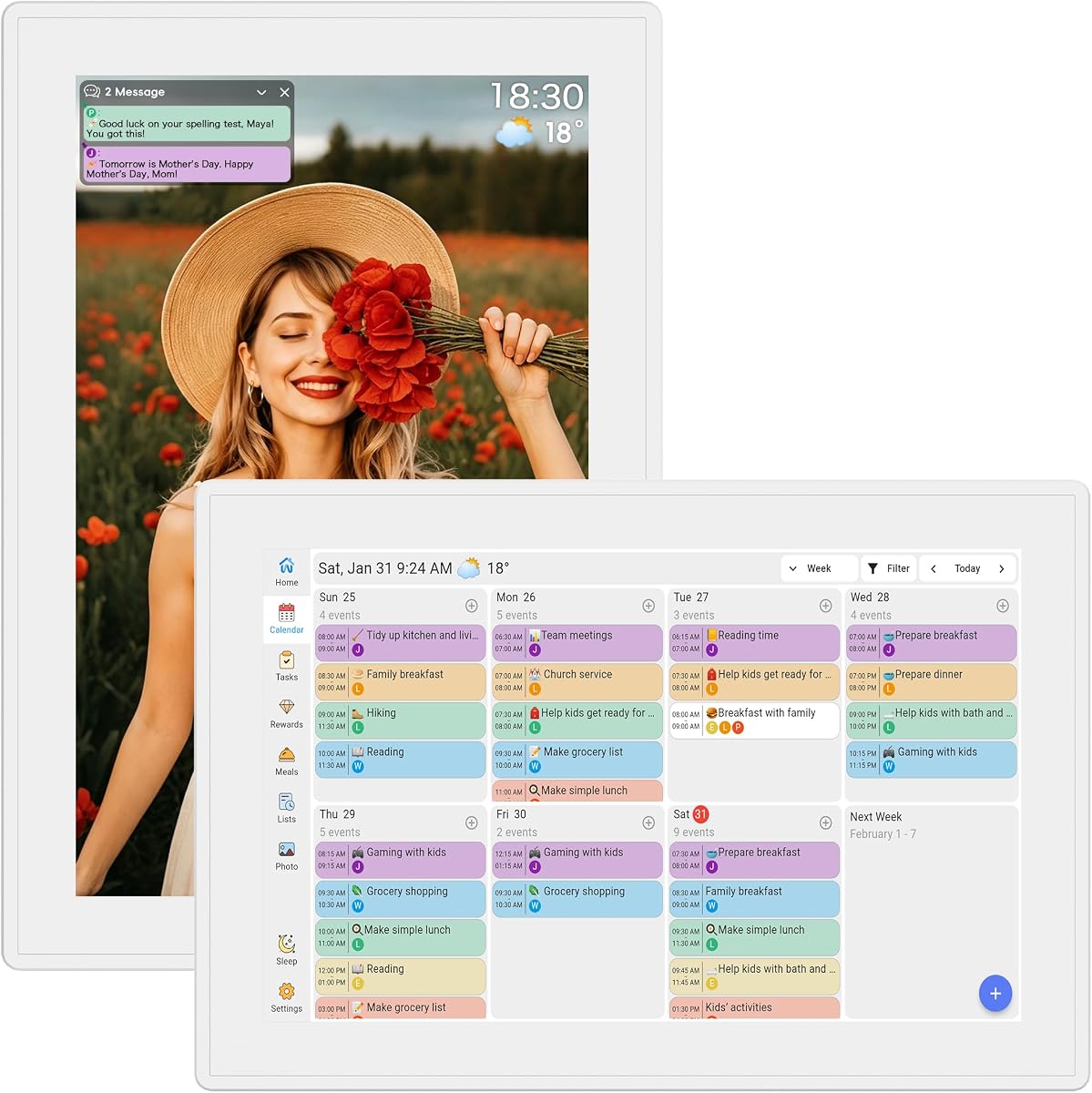

The EVERBLOG HomeCal stands out as the most comprehensive digital meal planning calendar on the market. With a rating of 4.6 stars, users praise its massive 21.5 inch screen that makes reading schedules effortless from across the kitchen. It transforms the standard calendar into a true command center by integrating fridge inventory tracking directly into the interface.
We may earn a commission when you buy through this link, at no additional cost to you.
Its standout feature is the AI fridge management system which allows you to track food items and generate recipes based on what you have available. This eliminates the guesswork of meal planning and reduces food waste significantly. The device also functions as a streaming hub where you can watch cooking videos on YouTube while preparing dinner.
While the price is higher than standard digital frames, the included features justify the investment for busy households. The lack of mandatory subscriptions is a major plus compared to competitors that lock basic features behind monthly fees. The large screen may require more space but ensures everyone in the family can see it clearly.
This device is ideal for families who want an all-in-one solution for organization and entertainment. If you need a central hub that handles meals chores and media consumption without extra costs, this is the top recommendation. It brings a premium tech experience to daily kitchen routines.
For users seeking high connectivity, the ability to sync with multiple calendar providers like Google and iCloud ensures no family is are missed. The interactive chore chart motivates children to participate in household tasks while earning rewards. This holistic approach to home management sets it apart from simpler planners.
This feature scans your pantry and freezer to suggest recipes based on available ingredients. It helps reduce waste by reminding you to use items before they expire.
Beyond planning, the screen hosts apps like Netflix and Spotify. You can follow recipes with video tutorials while the device plays music in the background.
We may earn a commission when you buy through this link, at no additional cost to you.
This digital calendar offers an exceptional value for families seeking organization without breaking the bank. With a rating of 4.4 stars, it delivers core functionalities like shared calendars and meal planning without hidden costs. The 10.1 inch screen is compact yet sufficient for viewing daily tasks and grocery lists clearly.
We may earn a commission when you buy through this link, at no additional cost to you.
The standout strength is the complete absence of subscription fees for any feature. Users can access meal planning, chore tracking, and photo framing immediately after setup. The weekly meal manager displays menus beautifully and helps eliminate the daily stress of deciding what to cook for dinner.
While the display is smaller than premium options, it fits perfectly on countertops or narrow walls. The interactive chore list turns daily tasks into a game for children which promotes responsibility and self-discipline. It effectively keeps the household organized without complex technical requirements.
Buyers looking for an entry-level smart home device will find this model highly satisfying. It balances functionality and cost effectively making it a top choice for budget-conscious households. The device acts as a central hub that keeps everyone on the same page regarding schedules.
Its versatility makes it an ideal gift for parents or grandparents who need help managing daily routines. The built-in photo frame mode adds a personal touch by displaying cherished family memories when not in use. Smart sleep modes ensure energy efficiency while keeping the device ready when needed.
This model proves you do not need to spend hundreds to get digital organization. It includes every essential tool needed for a functional family command center.
The reward system encourages children to complete chores independently. This feature helps parents spend less time nagging and more time relaxing.
We may earn a commission when you buy through this link, at no additional cost to you.
The Skylight Calendar represents a premium approach to family organization with its elegant design and intuitive interface. Rated at 4.4 stars, it focuses on seamless syncing and visual appeal making it a favorite for modern homes. The 15.4 inch touchscreen provides ample space for viewing complex schedules and meal plans clearly.
We may earn a commission when you buy through this link, at no additional cost to you.
Its unique Disney Mode adds a fun interactive layer for children using avatars and animations to motivate them. While core features are free, the optional Plus Plan unlocks advanced tools like magic import and enhanced photo screensavers. This flexibility allows families to choose the level of features they need.
The device excels at centralizing shared calendars from Google iCloud and Outlook into one view. Users appreciate the ability to assign personalized colors to each family member for quick identification of events. The white finish blends seamlessly into various kitchen and entryway decors.
Families looking for a stylish gadget that doubles as a digital frame will love this option. It is particularly well-suited for households where visual aesthetics matter alongside functionality. The lack of complex setup ensures it is ready to use immediately upon unboxing.
Despite the higher cost, the build quality and design justify the price for many buyers. It effectively reduces chaos by providing a single source of truth for family logistics. The interactive chore chart helps instill discipline in kids through positive reinforcement and tracking.
The white design fits well in minimalist or modern kitchens. It looks like a piece of art rather than just a functional device.
This feature brings classic characters to life on the screen. It turns mundane schedule checks into an engaging experience for children.
We may earn a commission when you buy through this link, at no additional cost to you.
This 15.6 inch digital calendar brings a large format solution to family organization. With a rating of 4.4 stars, it is praised for its clear visibility and ability to integrate multiple planning tools. The device serves as a command center that unifies meal planning and chore charts in one place.
We may earn a commission when you buy through this link, at no additional cost to you.
Its real-time sync ensures that all family members see updated schedules instantly on any device. The built-in motivational chore system gamifies daily routines for children which encourages independence. Parents can assign tasks and children earn points which fosters responsibility and good habits.
The device transforms into a vibrant photo frame when not in use which strengthens emotional connections. With expandable storage it can hold thousands of family memories. The HD touchscreen ensures crisp visibility even from across the room making it easy to read details.
Families needing a large wall-mounted display will find this model highly effective. The flexibility to mount on a wall or use as a desk calendar fits different home layouts. The two-year warranty provides peace of mind for long-term usage.
This option is perfect for multi-generational households where grandparents need to stay connected. The large screen ensures that everyone can read events without strain. It offers a modern approach to family coordination that replaces outdated paper calendars effectively.
The 15.6 inch screen offers wide viewing angles and sharp text. This makes it easy to read from the kitchen island or dining table.
Parents can assign specific tasks and track progress digitally. The reward points system makes chores more engaging for children.
We may earn a commission when you buy through this link, at no additional cost to you.
This compact digital calendar provides a straightforward solution for managing family tasks. Rated at 4.2 stars, it focuses on ease of use and quick setup. The 10.1 inch display is sufficient for viewing daily lists and syncs with major calendar apps like Google and iCloud.
We may earn a commission when you buy through this link, at no additional cost to you.
Its meal planning feature allows users to jot down grocery lists directly on the device. This helps eliminate guesswork at the store and reduces stress around dinner decisions. The sync capability ensures the whole family sees updates automatically without manual entry.
The device doubles as a photo frame showing favorite memories on a screensaver. Smart auto-sleep mode helps save energy when the device is not being viewed. Timely reminders ensure you never miss important events or appointments.
Ideal for smaller kitchens or entryways this model offers convenience without complexity. It is a suitable choice for those who want a basic digital organizer without advanced features. The wall mount capability ensures maximum visibility for all family members.
For budget-focused buyers this calendar offers essential tools for organization. It simplifies daily affairs and provides a central place for tasks and photos. The ease of setup makes it accessible for users with limited technical experience.
This calendar focuses on the basics of scheduling and lists. It avoids unnecessary complexity to ensure easy daily use.
The auto-sleep mode reduces power usage effectively. This feature is beneficial for devices that run continuously in the home.
We may earn a commission when you buy through this link, at no additional cost to you.
This smart digital calendar brings dual-band Wi-Fi connectivity to family organization. Rated 4.4 stars, it ensures instant updates across all connected devices. The color-coded profiles help distinguish each family member's plans quickly to avoid conflicts.
We may earn a commission when you buy through this link, at no additional cost to you.
Its integrated meal planner and to-do list allow mapping out menus in one central spot. The responsive touchscreen makes it easy for kids to check off completed tasks independently. This paperless approach manages household duties while keeping kids motivated.
The device serves as a digital photo frame cycling through cherished moments when idle. Uploads can be managed via the companion app from anywhere in the house. Its size fits perfectly on kitchen counters or desks without taking up too much space.
Ideal for busy households needing a versatile command center this model offers practical features. It makes a thoughtful gift for those who want to simplify their daily routine. The flexible setup options allow for either wall mounting or desk usage.
Families seeking a connected device that updates instantly will appreciate the dual-band Wi-Fi. It provides a stress-free way to organize and coordinate household events. The ability to manage chores and meals in one place improves overall home efficiency.
The dual-band Wi-Fi ensures fast and stable connections. This means schedules are always up to date across all devices.
The small footprint makes it suitable for limited spaces. It fits well on countertops without obstructing workflow.
We may earn a commission when you buy through this link, at no additional cost to you.
This calendar boasts a 4.7 rating which is one of the highest in the category. It features a Full HD touchscreen that displays schedules with exceptional clarity. The free Whale Framely App enables easy event management from any smartphone seamlessly.
We may earn a commission when you buy through this link, at no additional cost to you.
Its shared family calendar uses individual color profiles to distinguish members schedules at a glance. This visual organization simplifies managing work school and sports activities. The built-in meal planning and grocery lists reduce the mental load of daily routines.
Interactive chore tracking helps kids develop responsibility while making household duties fun. Visual and audible reminders ensure no important events are missed during busy days. The device transforms into a photo frame to showcase memories when not in use.
Families seeking high-quality visuals and reliable syncing will find this model ideal. The high resolution ensures text is sharp even from a distance. It offers a central hub for organizing life without hidden costs or complicated interfaces.
This device is recommended for households wanting a balance of style and utility. The flexibility to place it on a table or mount it on a wall fits diverse needs. It remains a solid choice for keeping everyone organized and informed.
The Full HD resolution makes text easy to read. This feature is essential for quick updates while cooking or entering.
Color-coded schedules help identify plans instantly. This reduces confusion and missed appointments in busy homes.
We may earn a commission when you buy through this link, at no additional cost to you.
This digital planner combines a unique wood-grain design with smart organization tools. Rated 4.5 stars, it offers a warm aesthetic that blends with home decor. The Magic Import feature allows voice or photo creation of events for quick updates.
We may earn a commission when you buy through this link, at no additional cost to you.
Its shared calendar syncs with Google iCloud and Outlook to keep everyone informed. The interactive chore chart encourages kids to check off tasks and earn rewards. This reduces the need for parents to remind children about daily responsibilities.
When idle the screen becomes a digital photo frame showing cherished memories. Portrait and landscape modes allow flexible placement on counters or desks. The design adds a natural look to modern digital devices which appeals to many users.
Households valuing design alongside function will appreciate this model. It fits naturally in kitchens or entryways without looking overly technological. The sync capabilities ensure that all family schedules are centralized effectively.
This calendar is a great choice for gift-givers looking for something practical. It helps busy moms and parents manage life with a stylish touch. The ease of setup means it is ready to use immediately upon arrival.
The wood-grain finish provides a warm look. It helps digital devices blend better with traditional home decor.
Creating events is simple through voice or photo. This saves time and ensures accurate schedule updates.
We may earn a commission when you buy through this link, at no additional cost to you.
This digital calendar holds a perfect 5.0 user rating for reliability and performance. It offers a plug-and-play setup that connects to Wi-Fi and syncs instantly. The interface is simple and intuitive for all family members to use easily.
We may earn a commission when you buy through this link, at no additional cost to you.
Its meal planning and task reward systems help create engaging routines for kids. Users can plan weekly meals and generate grocery lists automatically to save time. The customizable reward charts encourage children to complete tasks through positive reinforcement.
Real-time weather forecasts help you plan your day effectively. The device supports desktop or wall mounting which offers flexibility in placement. Sleep wake times can be set to ensure energy savings when not in use.
Families seeking a no-fuss digital organizer will find this model highly satisfying. It focuses on core essentials without hidden fees or complicated menus. The 5.0 rating suggests consistent performance and customer happiness.
This calendar is an excellent choice for gift-givers who want reliability. It is perfect for moms and women who hold the household together. The simplicity ensures that technology supports rather than complicates daily life.
The 5.0 rating reflects high user happiness. This indicates a reliable device that meets customer expectations well.
Essential tools like lists and meal plans are included. It avoids unnecessary complexity to focus on utility.
We may earn a commission when you buy through this link, at no additional cost to you.
This smart wall planner offers unique flexibility with its dual Android and Calendar modes. Rated 4.4 stars, it allows switching between a simple scheduler and a fully customizable dashboard. The Android Mode enables downloading apps from Google Play to expand functionality.
We may earn a commission when you buy through this link, at no additional cost to you.
Its Google Gemini voice assistant allows hands-free updates and queries. Users can personalize the screen with widgets like weather clocks and smart home controls. This makes it more than a calendar but a smart home command center.
The reward-based chore tracking and shared digital space simplify family routines. It supports grocery lists and meal planning in one shared location. The device connects to the Apolosign Calendar App for easy remote management.
Tech-savvy families who want customization will appreciate this model. The ability to install apps gives it unmatched versatility in the category. However it requires more setup time compared to simpler plug-and-play devices.
This calendar is best for those wanting a smart screen with calendar focus. It bridges the gap between a standard planner and a smart display. The voice assistant and dual modes make it a powerful tool for daily life.
This feature allows installation of third-party apps. You can tailor the device to fit specific household needs.
Google Gemini allows voice updates and inquiries. This makes managing schedules easier while cooking or working.
We may earn a commission when you buy through this link, at no additional cost to you.
Choosing the right digital calendar involves evaluating screen size, sync capabilities, and features that match your household needs.
The display size determines how well your family can read details from across the room. Larger screens like 15 to 21 inches offer better visibility but require more wall space. Resolution impacts clarity with Full HD being the standard for sharp text and images.
Ensure the device supports real-time syncing with your existing calendar apps like Google Outlook or iCloud. This keeps all family members updated instantly without manual entry. Strong Wi-Fi connectivity ensures updates happen reliably without lag.
Look for calendars that offer dedicated meal planning features like weekly menus and grocery list generation. Some models include fridge inventory tracking to reduce food waste. These tools centralize meal prep and make cooking less stressful.
Interactive chore charts help children stay engaged with household tasks. Devices that track progress and offer digital rewards build positive habits. This feature reduces parental nagging and promotes independence in kids.
Many digital planners charge monthly fees for full functionality. Always check if basic features like syncing and meal planning require a paid plan. Opting for a no-subscription model saves money over the long term.
Consider where the device will be placed in your home. Look for flexible mounting options like wall straps or desk stands. The design should complement your decor to ensure it fits naturally into your space.
Most calendars also function as digital photo frames when idle. Check storage capacity and support for cloud photo uploads. This dual function allows you to display cherished memories when not planning meals.
Ease of setup is crucial for daily adoption by the whole family. Simple plug-and-play experiences are better than complex configurations. Intuitive interfaces ensure everyone can add events without frustration.
Connect the device to Wi-Fi and log into your calendar accounts like Google or iCloud. Assign unique colors to each family member so their schedules are easily identifiable. This step ensures everyone sees the updates instantly across all devices.
Input weekly meals and grocery lists using the touch screen or companion app. Encourage kids to check off chores directly on the device to earn rewards. Regular updates maintain the accuracy and usefulness of the central hub.
Keep the screen clean with a soft microfiber cloth to prevent scratches. Avoid placing it in direct sunlight to prevent glare and heat damage. Adjust brightness settings to match ambient lighting for optimal viewing.
Most models in our list offer core features like syncing and meal planning without monthly fees. Some premium options may have optional subscriptions for extra features like Disney Mode. Always check the product details before purchasing to avoid unexpected costs.
Yes, most digital calendars support syncing with Google iCloud and Outlook simultaneously. You can view all schedules on one screen with color-coded profiles. This centralizes household logistics and prevents scheduling conflicts.
Absolutely, many models offer dedicated tools for weekly menus and grocery lists. Some even feature AI fridge inventory to suggest recipes. This streamlines cooking and reduces the stress of deciding dinner daily.
Interactive chore charts on these devices allow parents to assign tasks and track progress. Kids can check off items on the screen to earn rewards. This gamification encourages responsibility and independence among children.
Most devices are designed for plug-and-play setup in minutes. You simply connect to Wi-Fi and sync your accounts. Companion apps further simplify the process for adding events remotely.
These devices rely on power and Wi-Fi so they may not show local data during outages. Some models have internal clocks that maintain time but syncing stops. It is best to have a backup paper list for critical dates.
The EVERBLOG HomeCal, Skylight, and digital budget options lead the market with their balance of features and value. Each offers unique strengths like AI fridge management or interactive reward systems for kids. Selecting the right one depends on your specific household size and organization needs.
Prioritize models that offer robust syncing and clear visual displays to ensure everyone in the family can use them. Look for devices that provide meal planning tools without hidden fees to save money long-term. The right digital command center can transform chaotic routines into organized days.
Always check current prices and availability before purchasing as these change frequently. Compare features carefully to ensure the device meets your requirements for meal planning and chore tracking. With the right choice your family will enjoy a smoother and more organized life.