
Cooling Station and Stand for PS5/Slim/Pro
4.5Editor score
Automatic Fan Speed Control
9 RGB Honeycomb Lights
Fast Dual Charging Dock
Discover the top cooling stand for PS5 console options reviewed for performance compatibility and design to keep your gaming system running cool.
Keeping your PlayStation 5 console cool is essential for long gaming sessions and hardware longevity. A good cooling stand improves airflow while offering charging and storage benefits for your accessories.
This guide compares ten highly rated cooling stations based on fan performance charging speed and compatibility with Slim Pro models. We analyzed specs user feedback and features to find the best options.
Each pick highlights unique strengths like auto fan control RGB lighting or dual charging docks. Prices and availability change so verify details before purchasing your next console accessory today.
4.5Editor score
4.4Editor score

4.4Editor score
The following table provides a side by side overview of all ten products analyzed. Compare key specifications features and ratings to find the best fit for your gaming setup needs and budget constraints today.


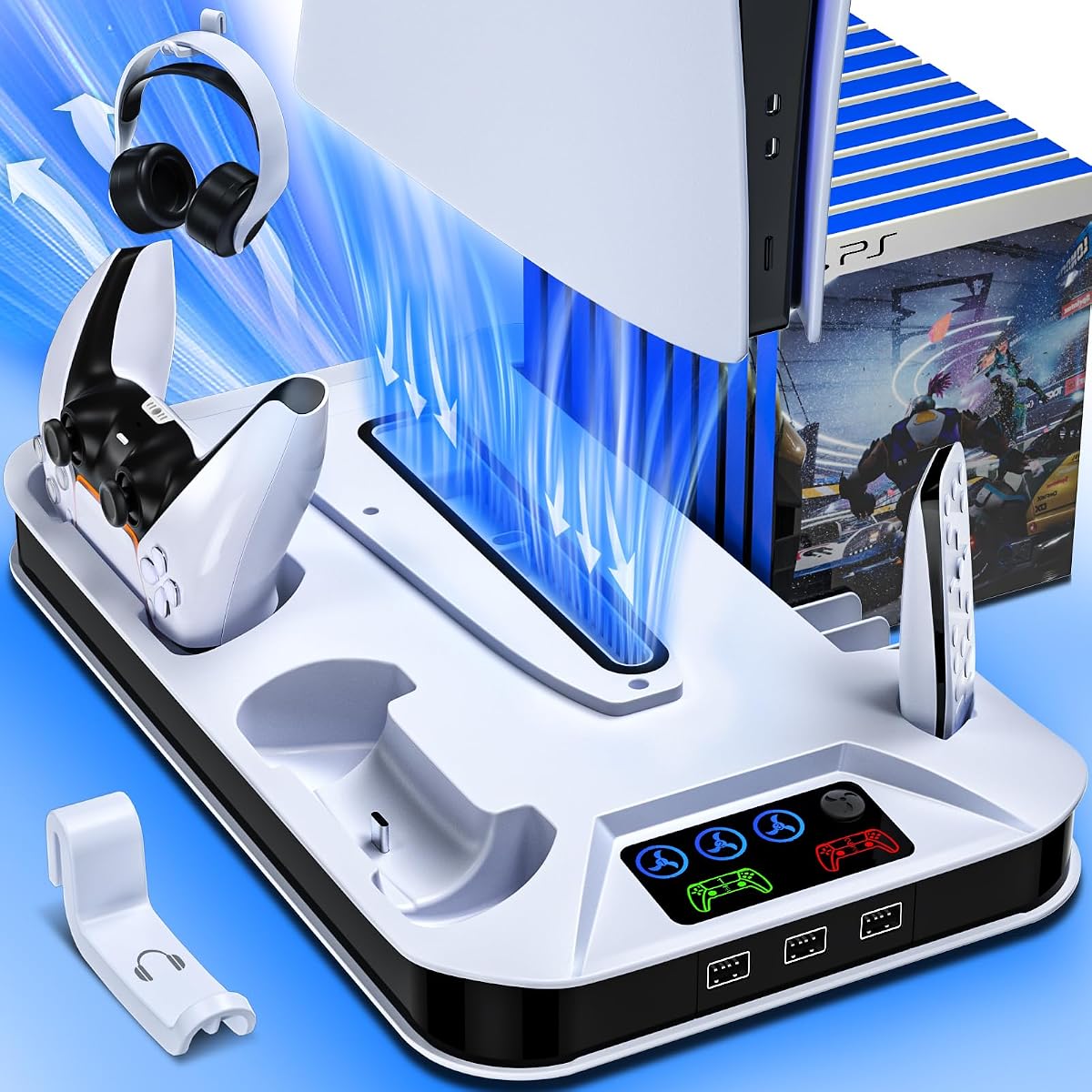
This cooling station stands out as the top pick for most users with its balanced feature set and strong user ratings. It offers reliable cooling through a three-speed turbo fan and includes dual controller charging docks that can fully charge your gamepads in just three hours.
We may earn a commission when you buy through this link, at no additional cost to you.
The unit is designed to fit the original Slim and Pro models securely with a safety screw mechanism to prevent tipping. Its base includes three extra USB hubs allowing you to power headsets cameras or other accessories without cabling clutter around your desk.
While it does not support Edge controllers directly without adapters and requires removing a panel adapter for Slim models this trade-off is acceptable for the value provided. The LED indicators clearly show charging status and fan speeds so you stay informed at a glance.
For gamers seeking a complete cooling and charging solution that keeps your console and accessories organized this stand delivers exceptional utility. Its smart protection chip prevents overcharging ensuring your controllers remain safe even when left plugged in overnight for convenience.
The high-efficiency turbo fan dissipates hot air from the console bottom maintaining safe temperatures during long play sessions and extending hardware life.
Dual charging docks with LED indicators ensure your controllers are always ready to play with fast charging speeds that minimize downtime between matches.
We may earn a commission when you buy through this link, at no additional cost to you.
This horizontal stand is ideal for users who prefer placing their console sideways and want a scalable design that fits all PS5 generations. It supports both original and Edge controllers with a push-in dock design that ensures a secure fit during charging sessions.
We may earn a commission when you buy through this link, at no additional cost to you.
The three-speed adjustable turbo fan allows you to customize cooling power depending on your gameplay intensity. Touch control makes switching between low medium and high speeds simple while the included EVA foam ensures a perfect fit for digital edition consoles.
Installation is straightforward with no complex tools required making it accessible for beginners. The clean white aesthetic blends well with modern setups and the horizontal orientation saves vertical space on shelves or desks where height is limited.
If you need a simple effective solution that supports Edge controllers and fits all PS5 versions this stand is a strong choice. While it lacks RGB lighting extra USB ports its core cooling and charging functions perform reliably for daily use.
The scalable design accommodates standard Slim and Pro models ensuring stability with EVA foam included for digital edition versions to prevent wobbling.
No-tool assembly means you can have your console secured and cooling within minutes thanks to the included screws and foam inserts.
We may earn a commission when you buy through this link, at no additional cost to you.
This premium station offers intelligent auto cooling that adjusts fan speed based on real-time temperature readings which is perfect for users who want hands-off protection. It supports original and Edge controllers while delivering fast charge times and stylish RGB lighting options.
We may earn a commission when you buy through this link, at no additional cost to you.
The temperature probe monitors console heat and automatically switches between high medium or low speeds without user input. This ensures consistent cooling while saving energy and noise during lighter sessions. The LED indicators show both fan speed and charging status clearly.
Nine RGB lighting modes add a vibrant aesthetic to your setup with adjustable brightness and memory functions that remember your last settings. However the lighting may be distracting in dark rooms so it can be turned off with a long press if needed.
For those who value smart features and customizable ambiance this stand is a top tier option. Its auto fan control combined with USB ports and Edge controller support makes it a versatile and future-proof choice for serious gamers.
The built-in temperature probe adjusts fan speed automatically ensuring optimal cooling performance without requiring manual adjustments during play.
Nine RGB lighting effects allow you to personalize your gaming setup with customizable colors and modes to match your style.
We may earn a commission when you buy through this link, at no additional cost to you.
This unit delivers exceptional value with a price that stands out while still providing essential cooling charging and storage features. It supports all Slim and Pro models and includes a headset holder and USB hubs for a fully organized setup.
We may earn a commission when you buy through this link, at no additional cost to you.
The dual charging dock can fully charge controllers in just two and a half hours which is faster than many competing models. Three-speed turbo fan control lets you balance noise and cooling performance to suit your environment and preference.
Safety is ensured by an intelligent protective chip that stops charging at 80% to prevent overcharging and extend battery life. The white aesthetic matches the console design well while the safety screw adds extra stability to prevent accidental tipping or falls.
If you want a reliable and affordable cooling station that covers all the basics this stand is an excellent choice. It avoids unnecessary features while focusing on performance and durability which explains its high user ratings and consistent positive feedback.
Controllers can be fully charged in just two and a half hours ensuring you never face a dead controller during your gaming session.
A included safety screw locks the console to the base providing stability and preventing accidental falls from shelves or desks.
We may earn a commission when you buy through this link, at no additional cost to you.
This stand is a great option for Edge controller owners since it supports both original and Edge DualSense gamepads. It features a memory function that remembers your last fan speed setting after a restart which adds convenience for consistent users.
We may earn a commission when you buy through this link, at no additional cost to you.
Three adjustable fan speed levels provide flexible cooling options and a touch button makes switching between modes quick and simple. The safety screw and built-in cable ensure the console stays stable and securely connected to the charging ports during use.
A dedicated slot for the PS5 Media Remote helps keep your setup organized and accessible without cluttering your desk or shelf space. This feature combined with three USB ports offers enough versatility to handle most gaming accessories without needing extra hubs.
For gamers who own Edge controllers or value smart memory features this stand is a solid investment. While it lacks RGB lighting its functional design and Edge compatibility make it a practical and reliable cooling solution for diverse needs.
The charging dock is fully compatible with Edge controllers which many standard stands do not support ensuring versatility for all users.
The fan speed setting is remembered after a restart so your preferred cooling mode remains active without needing manual adjustment each time.
We may earn a commission when you buy through this link, at no additional cost to you.
This stand stands out for its affordable price point while still offering intelligent auto temperature controlled cooling. The nine RGB honeycomb lighting modes provide a visually striking look that adds a personalized touch to your gaming environment.
We may earn a commission when you buy through this link, at no additional cost to you.
The temperature probe monitors console heat and switches fan speed between low medium and high automatically to maintain optimal performance. Charging two controllers simultaneously in two and a half hours ensures you have power ready whenever you need to jump back into a game.
The LED indicators show red during charging and blue when fully charged which is a distinct choice from the more common green indicators. While this unit lacks extra USB ports its core cooling and charging features deliver strong value for the price.
If you want a budget-friendly option with stylish lighting and reliable cooling this stand is a great fit. The auto fan control and Edge support make it a versatile choice for gamers seeking performance without overspending on unnecessary features.
The smart fan control system adjusts speed based on real-time temperature ensuring efficient cooling while keeping noise levels low.
Nine RGB lighting modes create an immersive aesthetic effect that enhances your gaming setup with customizable colors and modes.
We may earn a commission when you buy through this link, at no additional cost to you.
This horizontal stand offers a scalable design that fits all PS5 versions and supports both original and Edge controllers easily. The no-tool assembly process means you can set up your console quickly without needing extra screws or hardware kits.
We may earn a commission when you buy through this link, at no additional cost to you.
Three adjustable cooling fan levels let you tailor performance to your play style and the EVA foam ensures a snug fit for digital editions. The up-and-down push dock design ensures controllers stay secure during charging sessions and provide clear LED status indicators.
Its horizontal orientation is ideal for media centers or setups where vertical space is limited on shelves or cabinets. The consolidated design eliminates the need for separate charging docks keeping your area neat and organized with one compact unit.
If you prefer horizontal placement and want Edge controller support without complicated assembly this stand meets those needs well. While it lacks extra ports its core functionality is reliable and straightforward making it a practical choice for everyday use.
The stand includes all necessary screws and foam inserts so you can assemble it quickly and easily without additional tools.
Laying the console flat saves vertical space on shelves and desks which helps free up room for other accessories or decor.
We may earn a commission when you buy through this link, at no additional cost to you.
This cooling station features an upgraded AUTO adjustable fan that monitors console temperature to switch between low medium and high speeds automatically. The larger turbo fan provides stronger airflow for improved cooling efficiency during intense gaming sessions.
We may earn a commission when you buy through this link, at no additional cost to you.
It includes three charging ports allowing you to power headsets cameras and other devices simultaneously without extra adapters. The dual controller charger can fully charge two remotes within two hours which is one of the fastest rates available in this comparison.
The stand comes with a Type-C cable and supports both wall outlet and console power options. It also includes a safety screw to lock the console firmly in place and prevent tipping or accidental falls during daily use.
If you want a reliable and fully automatic cooling solution with fast charging this stand is a smart pick. Its balanced combination of fan control safety features and charging speed makes it a dependable option for any PS5 owner.
The built-in sensor adjusts fan speed automatically based on console temperature ensuring optimal cooling performance without manual input.
The dual controller dock can fully charge two controllers within two hours ensuring your gamepads are always ready for use.
We may earn a commission when you buy through this link, at no additional cost to you.
This stand offers a mix of functional cooling and vibrant RGB lighting to enhance your setup aesthetic. It supports Slim and Pro models and includes USB A hub ports to power extra devices easily and keep your desk tidy and organized.
We may earn a commission when you buy through this link, at no additional cost to you.
Three silent fan speeds reduce noise during gaming while still providing efficient cooling to prevent overheating. The dual controller charger can fully charge two DualSense controllers simultaneously in three hours and shows clear charging status indicators.
A ring of stunning LEDs with four light modes and eight vibrant colors creates a unique visual atmosphere for your gaming area. A safety screw is included to lock the console securely and prevent accidental knocks or instability during daily use.
If you love customizable lighting and need multiple USB ports this stand is a strong contender. Its high storage capacity for disks and headsets makes it an effective organizer while the silent fans ensure comfort during long gaming sessions.
The three silent fan speeds keep noise levels low so cooling performance does not distract from your gaming experience.
Built-in slots hold up to twelve game disks and a headset keeping your accessories neatly arranged and within easy reach.
We may earn a commission when you buy through this link, at no additional cost to you.
This stand focuses on multifunctional versatility with a powerful adjustable turbo fan that efficiently dissipates heat from the console bottom. It includes a headset holder and three USB hubs which allows you to charge phones laptops and other devices alongside controllers.
We may earn a commission when you buy through this link, at no additional cost to you.
The fan features three adjustable speed levels so you can balance performance and noise based on your environment. A sturdy security screw locks the console to the stand to maintain balance and prevent tipping during regular use.
The integrated smart chip protects against overcharging overheating and voltage issues ensuring your accessories remain safe when charging overnight. Charging both controllers in three hours ensures reliable power for your gaming sessions without frequent interruptions.
If you need a versatile charging and cooling hub that can handle multiple devices this stand is an ideal choice. Its solid build stable design and comprehensive warranty make it a dependable option for any PS5 user seeking convenience.
The three USB hubs and Type-C port allow you to charge phones laptops headphones and other accessories without extra cables.
A sturdy security screw keeps the console firmly locked to the stand to prevent tipping and ensure stability on any surface.
We may earn a commission when you buy through this link, at no additional cost to you.
Selecting the right cooling stand involves considering compatibility cooling performance and additional features that match your setup needs.
Ensure the stand supports your specific PS5 model whether it is the standard Slim or Pro version. Some units require removing an adapter for Slim models so check the specs to avoid installation issues.
Look for stands with adjustable fan speeds or automatic temperature control. These features help maintain optimal console temperatures during long sessions without making unnecessary noise.
Check if the dock supports Edge controllers if you own one. Also note the charging time as faster rates reduce wait periods between game sessions.
Multiple USB ports allow you to charge other devices like headsets cameras or phones simultaneously. This reduces cable clutter and keeps your gaming area organized and functional.
Some stands feature customizable RGB lighting that enhances your setup look. Choose based on your preference for visual style and whether you want lighting during play.
A stand with a safety screw and non-slip pads ensures your console stays secure on desks or shelves. This prevents accidental falls and protects your hardware from damage.
Select a stand that requires minimal tools for setup. EVA foam inserts and clear instructions make it easier for beginners to get started quickly without frustration.
Integrated smart chips prevent overcharging and overheating which extends the lifespan of your controllers. This feature is essential for overnight charging and safe daily use.
Install the stand by aligning your console base with the docking area and securing it with the provided safety screw. Ensure the cooling vent faces the right direction for optimal airflow during use.
Connect the stand to your console USB port or a wall adapter to power the charging ports and fan. Turn on the fan using the touch button or let it run in auto mode if available.
Clean the fan and vents regularly with compressed air to prevent dust buildup that can reduce cooling efficiency. Keep the surface dry and avoid placing liquids near the stand to ensure safe operation.
No a cooling stand is designed to protect your console by improving airflow and preventing overheating. Choose a high quality unit with a safety screw and built-in protective chips to ensure safe operation and avoid any potential hardware damage or issues.
Not all stands support the Edge controller so check the product specs carefully. Some models offer compatible charging docks specifically designed for both original and Edge controllers.
Most stands fully charge two controllers in two to three hours depending on the charging technology and power source used. Faster rates ensure you have ready to play gamepads for extended gaming sessions.
Many stands require the included cable for proper charging and cooling function. Some support console USB power while others need wall outlet connections so follow the manual for setup.
Yes many models support Slim digital editions but may require removing a panel adapter. Check compatibility notes to ensure a snug fit and stable placement for your console.
Most stands offer multiple fan speeds so you can choose a low or silent mode for quieter operation. The fan noise remains minimal and does not distract from your gaming experience.
The top picks offer a mix of cooling power charging speed and design features to suit different needs. The first model leads overall with balanced performance while the others provide budget or RGB lighting options.
Prioritize compatibility and safety features when choosing a stand to ensure your console and accessories stay protected. Auto fan control and multiple USB ports add value and convenience for any gaming setup.
Always verify current prices and availability before purchasing as details can change over time. This guide helps you compare specs and features so you can find the right cooling solution for your PS5 setup.