
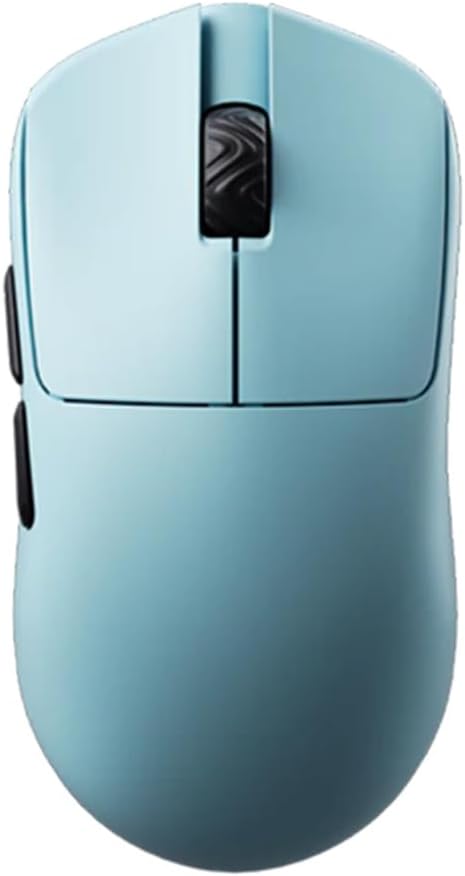
Gwolves Skoll Mini SK-S Black 50g Ultralight Weight Honeycomb Design
4.4Editor score
Lightweight honeycomb shell design
3389 sensor for precise tracking
Ergonomic shape for small hands
This guide compares the top claw grip gaming mice for small hands, evaluating weight, sensor precision, ergonomics, and wireless performance for competitive
Finding the right claw grip gaming mouse for small hands is crucial for precision and comfort. Gamers with smaller palms often struggle with bulky designs that cause fatigue. This guide highlights models engineered specifically to fit snugly while supporting aggressive claw positioning during intense sessions.
We evaluated ten top-rated options based on sensor quality, weight distribution, and ergonomic shape. Each product was assessed for its ability to reduce strain and enhance control. Our analysis focuses on how well these mice accommodate smaller hand sizes without compromising on performance or durability.
Each pick showcases unique features tailored to claw gamers seeking speed and accuracy. From ultra-lightweight builds to advanced optical switches, these models offer distinct advantages. Note that availability and pricing can vary over time, so verify current details before making a final purchasing decision.
4.4Editor score

4.6Editor score

4.3Editor score
This side-by-side comparison highlights the key specifications and strengths of each mouse. It helps you quickly identify which model aligns with your grip style and performance needs.



The Lamzu Atlantis Mini Champion Edition stands out as a top contender for small-handed claw gamers. It delivers professional-grade performance with an ultra-light wireless build that minimizes wrist strain. Its high-rated sensor ensures accurate tracking during fast-paced movements.
We may earn a commission when you buy through this link, at no additional cost to you.
This mouse features a symmetrical hourglass design that naturally supports claw grip positioning. The broad back and curved top prevent finger cramps during extended use. Optical switches provide quick response and tactile feedback without double-click issues.
While it is priced higher than budget options, the build quality and sensor technology justify the cost. The Nordic MCU ensures low latency and stable wireless performance. Some users may find the shape less suitable for palm grips.
Ideal for competitive players seeking precision and comfort in a compact form. Its advanced features make it a strong investment for serious gaming. We recommend checking current availability before purchasing.
Weighing only 51 grams, this mouse reduces hand fatigue significantly during long sessions. The light build allows for quicker flicks and less effort per movement.
The PAW3950 sensor supports up to 30000 DPI and 750 IPS. It ensures precise tracking with no acceleration or spin-outs across various surfaces.
We may earn a commission when you buy through this link, at no additional cost to you.
The Gwolves Skoll Mini offers excellent value for gamers seeking a lightweight claw mouse. It features a honeycomb shell that reduces weight to 50 grams while maintaining structural integrity. The ergonomic shape fits small hands comfortably.
We may earn a commission when you buy through this link, at no additional cost to you.
Equipped with the PixArt 3389 sensor, it delivers reliable tracking up to 16000 DPI. The included PTFE skates ensure smooth gliding on most surfaces. A detachable cable adds convenience for portability and setup.
Though it lacks wireless connectivity, the performance remains solid for competitive play. Some users might prefer a non-perforated shell for easier cleaning. Overall, it is a strong budget-friendly choice.
Best for those wanting high-end specs without a high price tag. Its combination of weight and sensor quality makes it a practical pick. Verify current stock levels before ordering.
This model brings top-tier sensor technology to a lower price range. Gamers can enjoy professional-grade accuracy without breaking the bank.
The compact size and curved back support natural claw positioning. It reduces the need to stretch fingers awkwardly during play.
We may earn a commission when you buy through this link, at no additional cost to you.
The Pulsar X3 LHD Crazylight redefines lightweight gaming with a mere 43 grams. Its hybrid ergonomic design blends palm and claw comfort for extended sessions. The XS-1 sensor provides exceptional accuracy for competitive play.
We may earn a commission when you buy through this link, at no additional cost to you.
Optical switches minimize double-click risks while ensuring swift response. The DOT skates offer low friction for smooth movement across any pad. The build quality is robust despite the ultra-light construction.
As a premium option, it comes with a higher price tag. It is designed specifically for left-handed users which may limit appeal. However, performance remains top-notch for those it fits.
Ideal for left-handed gamers prioritizing speed and precision. Its unique shape offers comfort that many standard mice lack. Check availability carefully as stock may vary.
At 43 grams, this mouse is lighter than an egg. It allows for effortless flicks and reduces strain during fast-paced gaming.
The relaxed claw shape supports both palm and claw grips. This versatility helps prevent fatigue during long gaming marathons.
We may earn a commission when you buy through this link, at no additional cost to you.
The Pulsar X2H mini Wireless features a higher hump that offers stability for claw grips. Its symmetrical shape works well for various hand sizes. Wireless connectivity ensures freedom of movement without drag.
We may earn a commission when you buy through this link, at no additional cost to you.
Powered by the PAW3395 sensor, it tracks accurately up to 26000 DPI. Optical switches provide consistent clicks with minimal latency. The battery lasts up to 100 hours on a single charge.
As a renewed product, conditions may differ slightly from new units. It is slightly heavier than some competitors which some might notice. Still, it delivers solid performance for most users.
Great for wireless seekers wanting a stable claw-friendly shape. The battery life supports long sessions without frequent charging. Verify product condition before final purchase.
The 2.4 GHz connection offers 1 ms response time. It minimizes lag for a seamless gaming experience comparable to wired options.
Optical switches use light to register clicks. This design reduces wear and prevents double-click issues over time.
We may earn a commission when you buy through this link, at no additional cost to you.
The V8 Gaming Mouse weighs around 36 grams which is among the lightest available. Its symmetrical shape supports both claw and fingertip grips well. The PAW3950 sensor ensures top-tier tracking performance.
We may earn a commission when you buy through this link, at no additional cost to you.
Kailh optical switches deliver instant actuation without debounce delay. A web-based driver allows quick setting adjustments without software installation. An 8K dongle is included for high-speed polling.
Some users may find the bright yellow case less subtle. The symmetrical design might not offer as much support as ergonomic shapes. Performance, however, remains excellent.
Perfect for gamers prioritizing weight and speed above all. The included dongle enhances connectivity for competitive scenarios. Check stock for availability details.
Settings can be changed directly in the browser. This avoids complex installations and simplifies customization for users.
The 8K dongle enables faster polling rates. This ensures even smoother cursor updates during intense gameplay.
We may earn a commission when you buy through this link, at no additional cost to you.
The V6 Gaming Mouse offers a hole-free shell that prevents dust entry. Weighing 40 grams, it maintains lightness while improving durability. Its symmetrical design accommodates multiple grip styles easily.
We may earn a commission when you buy through this link, at no additional cost to you.
Concave buttons provide better finger positioning for consistent clicks. The PAW3950 sensor delivers accurate tracking with no acceleration issues. Wireless performance is reliable with minimal lag during use.
Some gamers prefer ergonomic shapes for more support. The blue color might not match all setups. However, functionality and weight are standout features.
Ideal for users seeking a lightweight mouse without holes. The button design enhances control during precise moves. Verify availability as colors may vary.
The solid shell resists dust accumulation effectively. This makes maintenance easier and protects internal components.
Buttons curve to fit fingertips naturally. This improves click accuracy and reduces accidental presses.
We may earn a commission when you buy through this link, at no additional cost to you.
This Pulsar X2H model features a higher hump that aids palm support during claw use. Its narrow waist ensures stability for aggressive movements. The PAW3395 sensor delivers precise tracking consistently.
We may earn a commission when you buy through this link, at no additional cost to you.
Optical switches minimize double-clicks while maintaining quick response. Wireless performance remains stable with a 100-hour battery life. The white finish offers a clean look on any desk.
It is slightly heavier than some ultra-light options which may be felt during long sessions. Limited color choices might not suit everyone. Still, it delivers strong performance.
Well-suited for those needing a stable wireless mouse. The hump design offers extra comfort over standard symmetrical shapes. Check current stock before ordering.
The elevated rear hump supports the palm comfortably. This reduces finger strain during prolonged gaming sessions.
Wireless technology offers freedom of movement. It delivers consistent performance without physical tethering.
We may earn a commission when you buy through this link, at no additional cost to you.
The Bloody V7 emphasizes customization with eight programmable buttons. It supports macros and scripting for automated actions. Its rubberized coating offers a secure grip during intense play.
We may earn a commission when you buy through this link, at no additional cost to you.
Adjustable DPI and report rates allow users to tailor responsiveness. The optical sensor provides smooth tracking on many surfaces. It includes web browsing shortcuts for productivity.
It is heavier and lacks modern ultra-lightweight builds. The sensor is older but still functional for casual use. Best suited for those prioritizing macros over speed.
Great for players needing automation features in a compact mouse. The ergonomic shape suits claw grips well. Check compatibility before purchasing.
Eight buttons allow mapping multiple actions. This enhances efficiency in games and workflow tasks.
Software supports automation of complex tasks. It helps streamline repetitive actions during play.
We may earn a commission when you buy through this link, at no additional cost to you.
The BenQ Zowie S2-C is designed for simplicity with no driver software needed. It offers four DPI levels for quick adjustments during play. The small size fits small hands comfortably.
We may earn a commission when you buy through this link, at no additional cost to you.
Its symmetrical shape supports both claw and palm grips well. The paracord cable reduces drag for smooth movement. Build quality is robust with a matte black finish.
Limited DPI customization might restrict advanced users. Wired connectivity may not suit those seeking wireless freedom. Performance remains consistent for esports use.
Best for gamers valuing plug-and-play reliability. The lack of software simplifies setup significantly. Verify cable length before purchasing.
No software is needed for configuration. Settings are controlled via hardware buttons for ease.
The flexible cable minimizes resistance. It allows for fluid movement without snagging.
We may earn a commission when you buy through this link, at no additional cost to you.
The Corsair IRONCLAW Wireless SE offers extensive RGB lighting customization. It includes 10 programmable buttons for enhanced functionality. The MARKSMAN sensor provides accurate tracking across surfaces.
We may earn a commission when you buy through this link, at no additional cost to you.
Battery life is exceptional with hundreds of hours of usage. iCUE software allows detailed configuration of macros and profiles. The shape is asymmetric for right-handed users.
It is larger and heavier than options meant for small hands. Some may find the weight affects fast movements. RGB features may be unnecessary for pure performance seekers.
Ideal for users wanting lighting and extensive customization. It is versatile but check dimensions before purchase. Current stock levels may vary.
Multiple lighting zones allow personal design. You can match your setup colors easily.
Ten buttons offer maximum control options. Macros can be mapped for complex tasks.
We may earn a commission when you buy through this link, at no additional cost to you.
Selecting the right mouse involves evaluating multiple factors beyond aesthetics. Understanding these elements ensures a purchase that supports comfort and performance.
Claw grips require mice with raised humps and curved tops to support lifted fingers. Look for models with narrower waists to allow proper finger positioning. Ergonomic shapes help maintain comfort without cramping during sessions.
Choose a shape that fits your palm and finger length naturally. A well-matched design reduces strain and improves control.
Lighter mice reduce wrist fatigue and allow faster flicks. Aim for models under 60 grams for optimal speed. Heavy mice can cause discomfort during extended play.
Prioritize lightweight builds if speed and precision matter most to you. Every gram counts when performance is critical.
High-quality sensors ensure accurate tracking without acceleration. Look for options with DPI up to 20K and IPS ratings above 400. Top-tier chips prevent spin-outs during rapid movements.
Verify the sensor model supports your desired DPI settings. A reliable sensor is the foundation of precise gameplay.
Wireless mice offer freedom of movement but add slight weight. Modern wireless tech reduces latency significantly for seamless play. Wired options provide consistent power and zero lag.
Decide based on your tolerance for cable drag versus battery concerns. Both types perform well today.
Optical switches offer faster response and prevent double-clicks. Mechanical switches provide tactile feedback but may wear out. Long lifespan is key for heavy users.
Opt for optical switches if you click frequently. Durability matters over time.
Polycarbonate shells balance weight and rigidity. Hollow or honeycomb designs reduce weight but may collect dust. Solid shells are easier to clean and more durable.
Weigh the trade-off between weight reduction and maintenance needs. Choose based on your priorities.
Software enables DPI changes and macro customization. Some users prefer driverless hardware simplicity. Driver software helps if you need profile management.
Check if the brand offers reliable driver tools. Simplicity works for many players.
Paracord cables minimize drag for better glide. PTFE skates ensure smooth sliding on any surface. High-quality feet extend durability.
Ensure the mouse includes or supports good cable and skate options. Glide quality affects performance significantly.
Position your fingers with the fingertips resting on the main buttons and the palm lightly touching the back. This posture supports the claw style naturally. Keep your wrist straight to avoid unnecessary strain.
Clean the mouse shell regularly using a soft dry cloth. If your model has holes, use compressed air to remove dust from the interior. This prevents buildup that could affect performance.
Store the device in a cool dry place when not in use. If wireless, fully charge before extended sessions to ensure consistent battery life. Replace skates if gliding becomes rough over time.
A suitable mouse has a raised hump and curved top to support lifted fingers. It should offer a comfortable waist for finger access and provide lightweight builds to reduce fatigue during fast movements.
Modern wireless tech uses advanced chips to reduce latency to near zero. Most users cannot perceive the difference. High polling rates ensure consistent performance comparable to wired models.
Use compressed air to blow out dust from the holes gently. Follow with a soft cloth for the outer surface. Avoid liquids to prevent internal damage.
Most competitive players use between 400 and 1600 DPI. Higher settings may reduce control while lower settings require more physical movement. Find what matches your personal style.
Optical switches use light to trigger clicks and avoid metal contact wear. They often last over 70 million cycles. This reduces failure risks compared to traditional switches.
Most high-end sensors work well on various surfaces. However, performance is best on dedicated mousepads. Textured glass or cloth ensures consistent tracking.
Many models offer 50 to 100 hours of continuous usage. Some have power-saving modes extending this further. Fast charging features reduce downtime during use.
This guide highlights top models offering speed and comfort for claw gamers. Each pick brings unique strengths from lightweight builds to advanced sensors.
Prioritize ergonomics and sensor quality when selecting a new mouse. A well-suited model enhances performance without sacrificing comfort during long play.
Always verify current availability and features before purchasing to ensure satisfaction. Product details may change over time so stay informed.