
SANSUI 24 Inch Curved 160Hz Gaming Monitor
4.4Editor score
1500R Curved Immersive Screen
160Hz Refresh Rate with FreeSync
3000:1 High Contrast Ratio
Choosing the right curved 160Hz gaming monitor transforms your setup into a competitive edge. These displays offer smooth motion and immersive curves that wrap around your vision for better focus.
We evaluated ten top models based on refresh rates, response times, panel quality, and ergonomic features. Our list includes options for budget buyers and premium seekers alike.
Each pick highlights key specs and real-world performance traits. Prices and availability change frequently, so check current listings before making your final decision today.
4.4Editor score
4.5Editor score

4.6Editor score
As an Amazon Associate we earn from qualifying purchases.
This side-by-side comparison lists all ten models with their core specifications to help you find the best fit for your gaming needs and desk space.






This SANSUI monitor delivers solid performance for budget conscious buyers. It features a 24 inch 1500R curved VA panel with a 160Hz refresh rate and MPRT 1ms response time.
We may earn a commission when you buy through this link, at no additional cost to you.
Its 110% sRGB coverage and 3000:1 contrast ratio provide rich colors and deep blacks. Freesync compatibility ensures smooth gameplay without screen tearing on compatible systems.
The stand offers tilt adjustment but no height or swivel options. There are no speakers, so external audio is required for multimedia use beyond gaming.
Ideal for entry level gamers seeking high refresh rates without breaking the bank. This model balances cost and performance effectively for casual and competitive play.
The 1500R curvature wraps around your field of view to reduce eye strain during long sessions.
With 160Hz you get faster frame updates that make motion appear fluid and responsive.
We may earn a commission when you buy through this link, at no additional cost to you.
This SANSUI model expands the footprint to 27 inches while keeping the budget friendly appeal. It supports up to 160Hz with a 1500R curve for deeper immersion.
We may earn a commission when you buy through this link, at no additional cost to you.
The 4000:1 contrast ratio delivers impressive blacks and vibrant images. Multiple preset modes help optimize visuals for FPS RTS and movie watching scenarios easily.
It uses HDMI 2.0 and DP 1.4 for connectivity. The HDR feature works best on HDMI so check your cable setup for full effect.
Great for users wanting more screen real estate without overspending. Its balance of size refresh rate and contrast makes it a versatile choice.
Moving to 27 inches gives you more room for maps and UI elements during games.
Preset modes tailor settings for different genres to improve visibility and color accuracy.
We may earn a commission when you buy through this link, at no additional cost to you.
This SANSUI 24 inch model stands out with strong color performance. It features 160Hz refresh rate and 97% DCI-P3 coverage for vivid visuals in games and media.
We may earn a commission when you buy through this link, at no additional cost to you.
The 1500R curve helps reduce distortion and keeps focus on the screen center. VESA compatibility allows flexible mounting options for dual monitor setups or wall installs.
It includes a Kensington lock which is rare at this price. This adds security for public or shared workspaces where theft or tampering is a concern.
Recommended for users prioritizing color accuracy on a budget. The blend of refresh rate and color metrics supports both gaming and content creation tasks.
The high DCI-P3 coverage ensures games and videos appear with rich and accurate tones.
The built-in Kensington lock offers extra protection for laptops or shared environments.
We may earn a commission when you buy through this link, at no additional cost to you.
This CRUA monitor brings 4K clarity to curved gaming displays. The 32 inch screen delivers sharp visuals with 160Hz refresh rate and AMD FreeSync support.
We may earn a commission when you buy through this link, at no additional cost to you.
It boasts 120% sRGB coverage which helps content creators and gamers see rich colors. Built-in speakers save desk space and add audio without extra cables.
Connectivity includes HDMI 2.1 and DP 1.4 for next-gen consoles and PCs. The 1500R curve wraps around your view to enhance immersion in open world games.
Perfect for users wanting high resolution without leaving the curved form factor. Ensure your hardware can drive 4K at high refresh rates for best results.
4K resolution offers twice the pixel density of 1080p for incredibly sharp images.
Built-in speakers reduce clutter by handling sound without extra speakers or cables.
We may earn a commission when you buy through this link, at no additional cost to you.
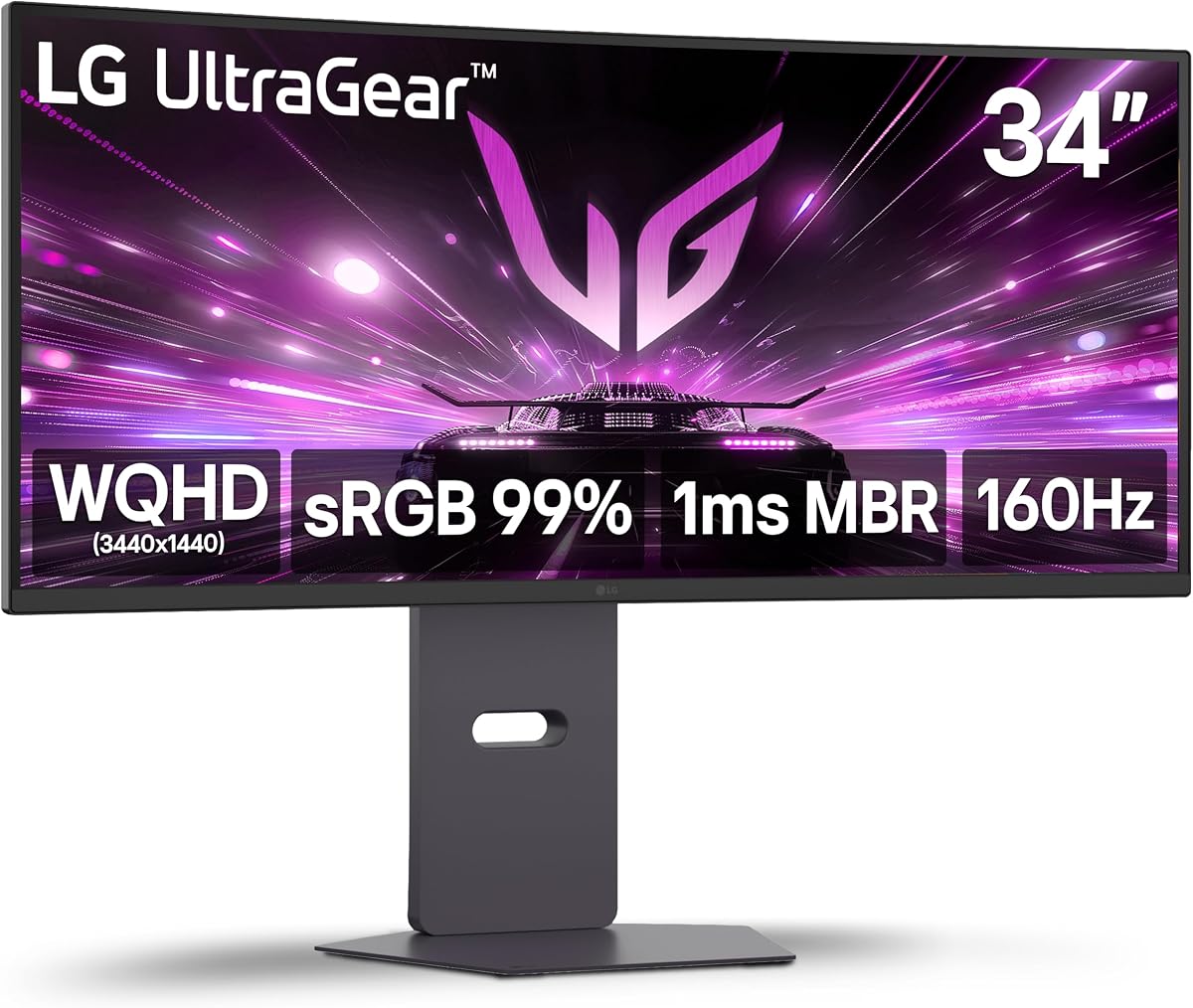
LG 34-inch model offers a wide ultrawide experience with WQHD resolution and 160Hz refresh. Its 1800R curve pulls you into the action for deeper immersion.
We may earn a commission when you buy through this link, at no additional cost to you.
HDR10 and 99% sRGB ensure colors stay vibrant and impactful. AMD FreeSync Premium reduces tearing and stuttering while 1ms MBR keeps motion crisp.
The stand supports height swivel and tilt adjustments for perfect positioning. Waves MaxxAudio speakers deliver bold sound without cluttering your desk space.
Ideal for multitaskers and gamers who want extra screen space and premium features. This is a top pick for those seeking quality and immersion.
The 21:9 ratio gives you more horizontal space for windows and game UI.
Features like Black Stabilizer help enemies stay visible in dark shadows.
We may earn a commission when you buy through this link, at no additional cost to you.
This renewed LG unit offers top tier specs at a reduced price. It keeps the 34 inch WQHD curved panel with 160Hz and 1ms MBR performance intact.
We may earn a commission when you buy through this link, at no additional cost to you.
HDR10 and 99% sRGB ensure visuals remain rich. FreeSync Premium helps maintain smooth gameplay. The stand still offers height swivel and tilt adjustments.
It saves cost while retaining the same core benefits as new. This is ideal for buyers looking to maximize performance per dollar.
Great for those wanting premium ultrawide features without paying full retail. Check seller ratings for renewed item conditions before purchase.
Renewed items often work like new but cost significantly less than retail.
Many renewed units are tested and certified to function within strict guidelines.
We may earn a commission when you buy through this link, at no additional cost to you.
Samsung offers a deeper 1000R curve for maximum wrap around effect. The 32 inch QHD panel provides sharp visuals with 165Hz refresh rate.
We may earn a commission when you buy through this link, at no additional cost to you.
FreeSync keeps scenes smooth and HDR10 adds contrast. Eye Saver Mode and Flicker Free tech reduce strain during extended sessions.
The 1ms response helps eliminate blur in fast games. The stand allows tilt but no height or swivel which may limit ergonomics.
Best for gamers who prioritize immersion and deep curves. If you prefer tighter wrapping visuals this model delivers well at a reasonable price.
The 1000R curve matches human eye curvature for more natural viewing.
Eye Saver Mode reduces blue light to help maintain comfort over time.
We may earn a commission when you buy through this link, at no additional cost to you.
Sceptre delivers ultrawide performance at a budget friendly price. It supports up to 180Hz with 1ms MPRT for fast competitive gameplay.
We may earn a commission when you buy through this link, at no additional cost to you.
The 34 inch WQHD panel offers 30 percent more space than standard screens. Built-in speakers and 99% sRGB help with multimedia tasks too.
Luminous backcover lights add a modern look but may be distracting in dark rooms. Connectivity includes dual DisplayPort and HDMI for multiple devices.
Ideal for gamers seeking wide screens and high refresh rates without spending much. Its value proposition is strong for budget builds.
Up to 180Hz ensures fluid motion in fast paced shooters and racing games.
The 21:9 ratio gives more room for maps and multitasking windows.
We may earn a commission when you buy through this link, at no additional cost to you.
Alienware delivers flagship quality with WQHD resolution and 180Hz refresh. Its 1500R curve supports fluid gameplay with low response times.
We may earn a commission when you buy through this link, at no additional cost to you.
DCI-P3 95% color coverage ensures stunning visuals for games and content. VESA DisplayHDR 400 certification adds contrast and brightness improvements.
Hardware based low blue light preserves color while reducing eye strain. This model balances performance and comfort for long gaming marathons.
Perfect for users who want top tier specs and brand prestige. Its design and performance justify the cost for serious gamers.
High DCI-P3 coverage ensures scenes match the creator's intent.
HDR 400 and high refresh rates work together for dynamic images.
We may earn a commission when you buy through this link, at no additional cost to you.
AOC pushes speeds with up to 200Hz and 0.3ms response time. The 34 inch UWQHD panel wraps you in 1500R curve for depth.
We may earn a commission when you buy through this link, at no additional cost to you.
Adaptive-Sync reduces tearing and HDR Ready boosts contrast. The stand offers height tilt and swivel adjustments for optimal ergonomics.
This model is built for competitive play where every millisecond counts. It requires a powerful GPU to drive the highest refresh rates.
Best for enthusiasts seeking the fastest refresh and response times. Its performance edge justifies the extra hardware requirements.
200Hz refresh delivers ultra smooth motion for competitive edge.
Full height tilt and swivel help find the ideal viewing posture.
We may earn a commission when you buy through this link, at no additional cost to you.
Selecting a curved gaming monitor involves balancing resolution refresh rate color accuracy and ergonomics. Use this guide to weigh factors that matter for your setup.
Refresh rate determines how many frames per second the monitor displays. 160Hz ensures smoother motion than 60Hz or 144Hz. Response time affects how fast pixels change to reduce blur. Look for 1ms or faster response to maintain clarity in fast scenes.
Higher refresh rates with low response times make motion clearer and more responsive.
VA panels offer high contrast and deep blacks which suit dark games. IPS panels have better viewing angles and color consistency. Curved VA is common for immersive gaming. Contrast ratios above 3000:1 deliver deeper images.
Choose VA for contrast or IPS for accuracy based on your priorities.
Curvature is measured in R values where lower means tighter wrap. 1000R is very tight while 1500R is moderate. Screen sizes range from 24 inch to 34 inch ultrawide. Larger screens give more space but need more desk depth.
Match curvature to your distance and size to comfort needs.
Resolution defines sharpness with 1080p FHD and WQHD 1440p options. Color gamut like sRGB and DCI-P3 affects richness. Aim for at least 99 percent sRGB for accuracy. Higher resolution needs stronger GPUs to keep frame rates high.
Prioritize resolution and color coverage based on usage types.
Adaptive Sync like FreeSync or G-Sync prevents screen tearing. AMD FreeSync is common at lower costs while G-Sync offers premium performance. Ensure the monitor supports your GPU brand. These features stabilize frame output for smoother play.
Enable adaptive sync in GPU settings for best results.
Look for tilt height and swivel adjustments to align the screen with your posture. Fixed stands limit comfort over time. VESA mounts allow alternative arms for better flexibility. Check cable management options to keep desks tidy.
Adjustability reduces neck strain during long sessions.
Modern monitors offer HDMI 2.0 or 2.1 and DisplayPort 1.4. DP 1.4 supports higher refresh and resolution better. HDMI 2.1 aids next-gen consoles. Audio out jacks help when built-in speakers are absent.
Match ports to your devices for full bandwidth support.
HDR adds contrast and brightness range. Look for HDR10 or DisplayHDR 400. Extra features like crosshair overlays or gaming timers help precision. Built-in speakers save space but external audio often sounds better.
Review feature sets to fit your workflow needs.
Set the correct refresh rate in your graphics settings for smooth motion. Use DisplayPort when possible to unlock maximum rates. Enable adaptive sync to reduce screen tearing.
Clean the screen with a soft microfiber cloth to avoid scratches. Use compressed air for dust around bezels. Avoid harsh cleaners that damage anti-glare coatings.
Adjust stand tilt and height to match eye level. Use VESA mounts if you need more flexibility. Enable eye comfort modes to reduce strain during long sessions.
Curved monitors wrap around your field of view for better immersion and reduced eye strain. They are ideal for large screens and single-player games. Flat panels may suit productivity or multi-monitor setups better.
Yes to reach 160Hz your GPU must output enough frames at your chosen resolution. Lower resolutions like 1080p are easier to drive than 1440p or 4K. Check your GPU benchmarks before buying.
1500R curvature means the screen radius is 1500 millimeters. This offers moderate wrap without extreme bending. It balances immersion and comfort for most desk distances.
DisplayPort 1.4 often supports 160Hz at higher resolutions. HDMI 2.0 may support it at lower resolutions. Check the monitor specs and use the recommended cable for full bandwidth.
Adaptive Sync is universal for many monitors via DisplayPort. AMD FreeSync works across both GPUs. NVIDIA also supports FreeSync on many models. Enable it in your GPU control panel.
Curved screens keep all areas at similar distance from eyes reducing refocusing. Eye care features like flicker free and low blue light help too. Proper ergonomics remain essential.
We highlighted ten models from budget SANSUI options to premium Alienware and LG. Each brings unique strengths in refresh rate color and immersion.
Prioritize response time and ergonomics if you play long sessions. Match resolution to your GPU power for smooth gameplay.
Prices change often so verify current specs and availability before buying. Choose what fits your budget and desk layout best today.