
TECKNET Compact Ambidextrous Wireless Mouse for Laptop Pink
4.6Editor score
Compact portable design for travel
Soft quiet click operation
Up to fifteen months battery life
Universal compatibility across systems
This guide compares the top cute laptop mouse options featuring unique designs and reliable performance to help you find the perfect stylish wireless accessory
Finding the perfect cute laptop mouse can transform your daily computing experience into something more enjoyable and visually appealing. Whether you are working from home or traveling for business, having a device that matches your personal style while delivering reliable performance is essential for productivity and comfort.
We evaluated ten standout options based on design aesthetics, connectivity reliability, battery life, and ergonomic comfort. Each product was selected for its unique visual appeal and functional capabilities to ensure you get a device that looks great and works efficiently with your preferred operating system and setup.
Each pick in this guide highlights specific strengths like silent clicks, rechargeable batteries, or themed designs to help you narrow down your choices. Please note that prices and availability can change frequently so check current listings before making your final purchase decision for the best deal available.
4.6Editor score

4.7Editor score

4.4Editor score
This side-by-side comparison helps you evaluate each model based on key specifications and features to find the ideal match for your needs and preferences.





This adorable pink donut-shaped mouse stands out with its unique visual appeal and reliable performance. It offers a high rating for users who prioritize both style and functionality in their daily computing setup.
We may earn a commission when you buy through this link, at no additional cost to you.
The dual device connection allows seamless switching between Bluetooth and 2.4G wireless modes. Its rechargeable battery ensures you never deal with disposable batteries while the silent clicks make it perfect for quiet environments.
Some users may find the compact size smaller than standard mice which might take adjustment for larger hands. The donut shape is visually fun but might not fit every ergonomic preference perfectly.
It is an ideal choice for students or remote workers who want a colorful travel-friendly accessory. This model combines performance with personality making it a strong contender for the best cute laptop mouse category.
The silent click feature ensures you can work without disturbing others around you during meetings or late night sessions.
A built-in battery lasts up to 20 days and supports use while charging eliminating the need for disposable power sources.
We may earn a commission when you buy through this link, at no additional cost to you.
This compact pink mouse delivers excellent value for those seeking affordability without sacrificing essential functionality. It is designed for small hands and travelers who need a portable solution on the go.
We may earn a commission when you buy through this link, at no additional cost to you.
The soft click mechanism reduces noise while the 15 months battery life ensures long-term usage without frequent replacements. Its ambidextrous shape makes it suitable for both left and right-handed users.
The requirement for a USB A port limits compatibility with modern laptops lacking traditional ports without an adapter. Basic aesthetics might appeal to minimalists but lacks unique visual flair.
It is perfect for students or professionals needing a reliable backup mouse. The lifetime support and warranty offer peace of mind making it a smart budget-friendly choice.
Its compact dimensions allow easy storage in bags making it a travel-friendly option for commuting professionals.
Smart sleep modes adjust based on usage to extend battery life significantly during periods of inactivity.
We may earn a commission when you buy through this link, at no additional cost to you.
This gaming mouse stands out with its adorable cat-shaped design and robust tri-mode connectivity. It brings a playful touch to your workspace while maintaining reliable performance for daily tasks.
We may earn a commission when you buy through this link, at no additional cost to you.
The tri-mode connection supports Bluetooth and 2.4G allowing flexibility across multiple devices. Its ergonomic fit ensures comfort during extended use and the anti-slip bottom provides stability.
The unique shape may take adjustment for users accustomed to traditional mouse designs. The higher price reflects the specialized design and connectivity features.
It is ideal for cat lovers or gamers wanting a stylish accessory. This model merges fun aesthetics with functional connectivity making it a standout premium pick.
Supports BT3.0 BT5.0 and 2.4G for seamless cable-free connection to multiple devices without hassle.
Designed to provide a comfortable fit for the palm of your hand reducing strain during long work sessions.
We may earn a commission when you buy through this link, at no additional cost to you.
This wireless mouse offers excellent precision with five DPI levels and six buttons for enhanced productivity. Its ergonomic design ensures comfort for all-day use while maintaining reliable wireless connectivity.
We may earn a commission when you buy through this link, at no additional cost to you.
The adjustable DPI allows quick switching between browsing and design tasks. Side buttons streamline navigation though they do not function on Mac systems. Battery life reaches up to 24 months on a single AA.
Mac users will miss out on side button functionality limiting workflow gains. The reliance on AA batteries means ongoing costs for power.
It suits users needing high precision and workflow efficiency. With its balance of performance and comfort it is a solid choice for general computing.
Switch between five DPI levels to adapt cursor speed for different tasks like design or web browsing.
Side buttons forward and backward streamline navigation through documents and web pages efficiently.
We may earn a commission when you buy through this link, at no additional cost to you.
This slim mouse features a unique gradient pink to purple design that shows your personal style. Its noiseless buttons and stable wireless connection make it perfect for quiet office environments.
We may earn a commission when you buy through this link, at no additional cost to you.
The ergonomic shape ensures a smooth user experience while the high DPI tracking works on nearly any surface. It stores the nano receiver internally for convenient portability and travel.
Laptops with only USB-C ports will need an adapter for the USB receiver. Battery usage requires occasional replacement of AA batteries.
It is a great option for professionals needing a stylish portable mouse. The gradient finish adds a touch of romance to your workspace.
The slim shape provides a sleek surface for comfortable use and easy transport in bags or pockets.
Automatically enters sleep mode after 8 minutes of inactivity to save energy and extend battery life.
We may earn a commission when you buy through this link, at no additional cost to you.
This playful car-shaped mouse adds a fun twist to your workspace with dazzling LED lights. It is designed for those who love unique accessories and want to spice up their tech life.
We may earn a commission when you buy through this link, at no additional cost to you.
The 2.4G wireless technology ensures lag-free browsing with a 10-meter range. It stores the receiver internally and offers reliable connectivity for various devices.
Using two AAA batteries means higher power consumption and ongoing costs. The LED lights might drain power faster than standard models.
It is a perfect gift for women and children looking for a fun tech accessory. Its value and unique style make it a standout choice.
Spice up your tech life with a fashionable playful twist that provides excellent value for its price.
Features a bottom-switch design to turn off the mouse when not in use to save power efficiently.
We may earn a commission when you buy through this link, at no additional cost to you.
This mouse is designed for quiet environments with soundless buttons that keep you focused. It offers stable connectivity and a portable form factor perfect for mobile workers.
We may earn a commission when you buy through this link, at no additional cost to you.
The auto sleep mode saves power after 8 minutes of inactivity and the nano receiver is hidden internally for convenience. It works well across PCs MacBooks and tablets.
The basic appearance might not appeal to those seeking decorative designs. Battery replacement is needed periodically for continued operation.
It is a great gift for women or anyone needing a silent reliable mouse. Its convenience and quiet operation make it a top pick for office use.
Special soundless design for buttons keeps you focused and never disturbs others during use.
No extra software needed and the hidden receiver allows immediate use once plugged into USB slot.
We may earn a commission when you buy through this link, at no additional cost to you.
This cute mouse features a silent flower design suitable for modern young people who want style. Its high performance optical sensor ensures excellent precision and control for daily tasks.
We may earn a commission when you buy through this link, at no additional cost to you.
The soundless buttons help keep you focused without disturbing others. Low power consumption allows 10 minutes of inactivity before sleep mode activates to save energy.
Sleep mode wake-up time might slightly delay initial clicks after periods of inactivity. Battery replacement is required for ongoing use.
It is ideal for users needing precision and aesthetic appeal. The colorful design and silent operation make it a charming and practical choice.
High performance optical sensor ensures excellent precision and control for all your daily tasks.
No need to install extra software and simply plug in the hidden receiver to start using immediately.
We may earn a commission when you buy through this link, at no additional cost to you.
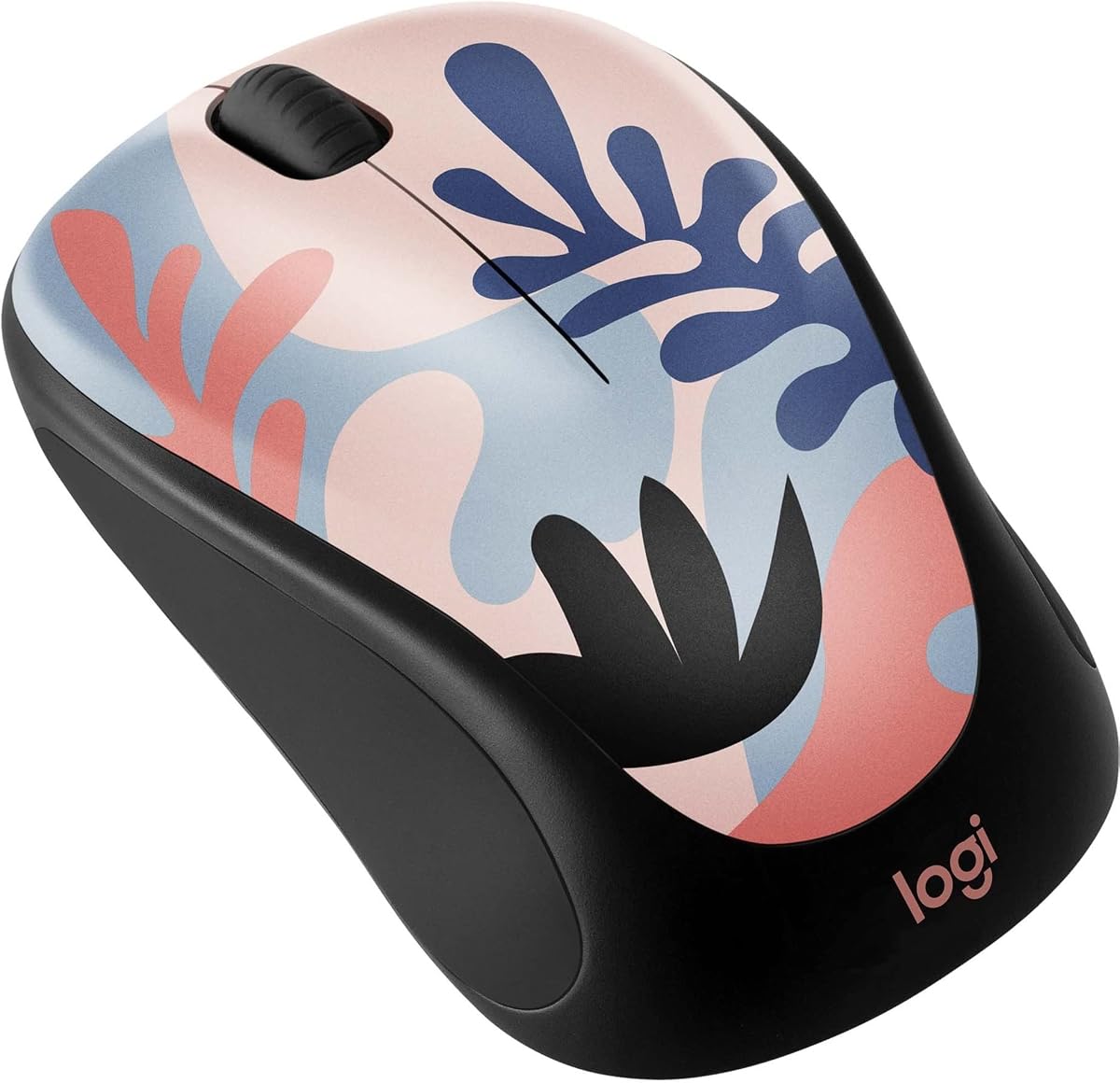
This limited edition mouse offers vibrant colorful designs to create a personal desk setup. Logitech quality ensures reliability with a long battery life and comfortable portable form factor.
We may earn a commission when you buy through this link, at no additional cost to you.
The unifying receiver allows up to six compatible devices to use one USB port. Soft rubber side grips add extra comfort during extended use sessions.
Basic functionality may lack advanced features found in specialized mice. The price reflects brand value and design effort.
It is perfect for users valuing brand reliability and style. The recycled plastic materials show an eco-friendly commitment making it a responsible choice.
Each colorful mouse from the Limited Edition gives you a vibrant look to create your personal desk setup.
Unify up to six compatible devices like keyboards or extra mice on one included USB receiver for tidy desk setup.
We may earn a commission when you buy through this link, at no additional cost to you.
This mouse features a kawaii workaholic cat design with soft blush pink finish and ergonomic shape. It offers up to 90% quieter clicks perfect for open offices and co-working spaces.
We may earn a commission when you buy through this link, at no additional cost to you.
The dual mode connectivity supports Bluetooth and USB for flexible use across laptops and slim devices. Stable auto-reconnection ensures seamless transitions when powered on.
The specific cat meme theme may not appeal to all users seeking neutral designs. Battery usage requires periodic replacement for continuous operation.
It is a great gift for coworkers and cat lovers. This model combines fun aesthetics with practical dual-mode convenience making it a popular pick.
Up to 90% quieter than standard mice allowing you to click freely without disturbing anyone around.
Bluetooth for MacBook iPad and USB for desktops offers versatile connectivity options for different devices.
We may earn a commission when you buy through this link, at no additional cost to you.
Choosing the right cute laptop mouse requires considering several key factors to ensure both style and performance meet your needs.
The visual appeal of your mouse is crucial if you want a device that reflects your personality. Look for designs like cat themes flower patterns or unique shapes that bring joy to your workspace. Aesthetics matter for motivation and daily satisfaction but ensure the design does not compromise ergonomic comfort.
Prioritize models with vibrant colors or unique shapes that stand out while maintaining a clean look on your desk.
Modern laptops often lack USB ports so consider mice that offer Bluetooth connectivity alongside traditional 2.4GHz wireless. Tri-mode options give you flexibility to switch between devices seamlessly without needing multiple receivers. This ensures compatibility with tablets ultrabooks and desktops.
Check if the mouse supports Bluetooth 5.0 for better stability and battery efficiency before purchasing.
Battery life can range from months on disposable AA batteries to days on rechargeable options. Rechargeable mice reduce waste but require charging cables which can limit portability. Consider your travel needs and how often you want to replace batteries or plug in for charging.
Choose rechargeable models for eco-friendliness or long-life AA options for uninterrupted work without downtime.
Comfort is essential for all-day use so look for contoured shapes that fit your hand naturally. Smaller mice are ideal for travel or smaller hands but may feel cramped during extended sessions. Test the weight and grip texture to ensure it supports your working posture effectively.
Select ambidextrous or palm-sized designs based on your dominant hand and hand size for optimal comfort.
Silent click technology is important for shared workspaces or quiet environments like libraries and offices. Reduced noise prevents distractions and maintains professionalism during calls or collaborative work sessions. Ensure the silent mechanism still provides tactile feedback so you know clicks are registered accurately.
Opt for silent models if you work in open offices or frequently share workspaces with others.
Confirm that the mouse works with your operating system whether Windows macOS Chrome OS or Linux. Some features like side buttons may not function on Mac systems so check specific notes before buying. Compatibility ensures all features work seamlessly without requiring extra drivers or configuration steps.
Always verify the product details for Mac or Linux support to avoid missing functionality after purchase.
Extra features like adjustable DPI levels or programmable buttons can boost productivity for design or gaming tasks. Look for indicators like battery status LEDs or auto-sleep modes that enhance convenience. These features add value if you need precise cursor control or frequent switching between devices.
Consider DPI adjustability if you work with high-resolution screens or detailed design projects regularly.
Durability ensures your investment lasts so check for ratings like 5 million click tests that confirm long-term resilience. Warranties and customer support options provide peace of mind in case of defects or issues. A reliable manufacturer often means better build quality and responsive service if problems arise.
Check for warranty terms and support availability to protect your purchase and ensure customer service access.
To ensure optimal performance insert the USB receiver into your port or enable Bluetooth in system settings before pairing. Allow the mouse to wake up from sleep mode with a single click to verify connectivity.
Keep the tracking surface clean by wiping the bottom sensor area with a soft cloth to prevent debris from affecting cursor movement. Avoid using the mouse on highly reflective or glass surfaces for best optical tracking.
Replace or recharge batteries before they are completely drained to avoid sudden power loss. Store the mouse in a cool dry place when not in use to maintain battery health and protect the plastic casing from damage.
Most models listed support macOS but verify compatibility before buying. Some side buttons may not function on Mac systems without specific software support. Bluetooth models generally work best with modern MacBooks lacking USB A ports.
Check product dimensions and weight specifications for a comfortable fit. Small hands benefit from compact mice while large hands need ergonomic palm supports. Reading customer reviews about comfort can help you gauge size suitability.
Silent click technology does not necessarily reduce durability. Many models are rated for 5 million clicks matching standard performance. Look for independent reviews confirming button longevity for best results.
Optical sensors generally struggle on reflective surfaces like glass. Use a mousepad or non-reflective surface for best tracking accuracy. Some advanced models may work better but testing is recommended.
Yes some models offer rechargeable built-in batteries while others use AA batteries. Rechargeable options reduce waste but require charging cables or ports. Check product details for specific power options before purchasing.
Most 2.4GHz wireless mice include a nano receiver stored inside the device. Bluetooth models do not require a separate USB receiver. Always check packaging details to confirm included accessories.
Most models offer up to 10 meters or 33 feet of wireless range. Obstacles and interference can reduce this distance slightly. Keep your receiver close for the most reliable connection.
We have highlighted ten standout options ranging from rechargeable donut mice to cat-themed designs to suit diverse preferences. Whether you prioritize silent clicks or long battery life there is a model for your unique needs.
Focus on ergonomics and compatibility to ensure comfort and functionality with your devices. Consider connectivity options like Bluetooth for modern laptops lacking USB ports.
Remember to check current prices and availability as these factors change frequently. Invest in a device that combines personality with performance to enhance your daily computing experience.