
Thermalright Assassin X120 Refined SE
4.7Editor score
Four heat pipes with AGHP tech
Low noise TL-C12C PWM fan
Wide socket compatibility support
This guide compares the top CPU Air Cooler Fan Heatsink models for performance, noise, and compatibility to help you choose the best cooling solution.
Finding the right CPU Air Cooler Fan Heatsink is essential for maintaining optimal system performance and longevity. A high-quality cooler ensures your processor runs at safe temperatures even under heavy workloads or gaming sessions.
We evaluated ten top-rated models based on thermal efficiency, build quality, noise levels, and compatibility with modern sockets. Our analysis focuses on real-world specifications and user feedback to provide reliable recommendations.
Each pick below highlights unique strengths and ideal use cases for different builders. Prices and availability may vary, so verify current details before making your final decision on a cooling upgrade.
4.7Editor score

4.8Editor score

4.8Editor score
The following table provides a side-by-side comparison of all ten selected models. It highlights key specifications such as dimensions, fan count, heat pipe count, and specific compatibility details to help you narrow down your choice quickly.


The Thermalright Assassin X120 Refined SE stands out as a top budget contender with its robust build and efficient cooling capabilities. It holds an impressive rating from users who appreciate its balance of performance and affordability.
We may earn a commission when you buy through this link, at no additional cost to you.
This cooler utilizes four heat pipes with AGHP technology to ensure heat is transferred efficiently regardless of orientation. The TL-C12C PWM fan provides adequate airflow while maintaining low noise levels during standard operation.
While it lacks the extra headroom of dual-tower models, it handles standard workloads and moderate gaming well. The single fan design means it is slightly less effective on extreme overclocking but perfectly sufficient for daily use.
Anyone building a budget-friendly system or upgrading an older PC should consider this model. It offers reliable cooling without breaking the bank, making it a smart choice for cost-conscious builders.
Users find this cooler delivers performance that rivals more expensive options at a fraction of the cost.
AGHP technology solves gravity issues allowing the cooler to work well even if installed horizontally.
We may earn a commission when you buy through this link, at no additional cost to you.
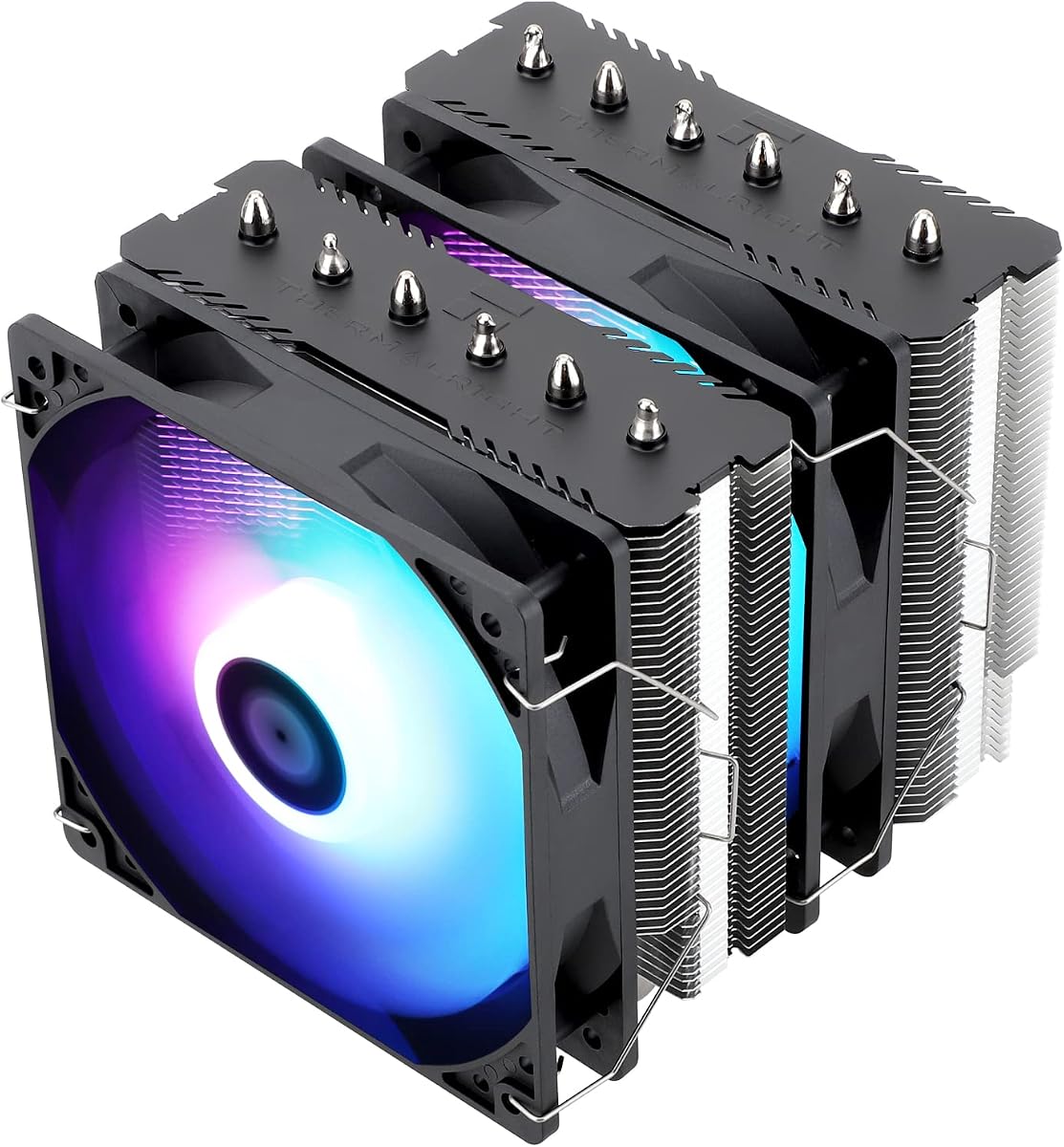
The Peerless Assassin 120 SE ARGB brings premium features like dual fans and six heat pipes to the mid-range market. It is highly rated for its ability to cool high TDP CPUs effectively while adding visual flair with ARGB lights.
We may earn a commission when you buy through this link, at no additional cost to you.
Its dual tower configuration significantly increases the surface area for heat dissipation compared to single-tower designs. The two TL-C12C-S fans provide ample airflow, and the AGHP technology ensures consistent performance in any case orientation.
The main consideration is the size; at 155mm height and dual tower width, it requires a spacious case. Some RAM modules might need careful placement if the cooler overhangs the slots, though it is generally compatible with most boards.
This model is ideal for users wanting high-end cooling performance and aesthetics without paying flagship prices. It suits gaming rigs and content creation workstations where thermal efficiency is a priority.
The ARGB fans allow users to synchronize lighting with their motherboard for a cohesive build look.
With six heat pipes and dual fans this cooler handles heat output from high performance processors easily.
We may earn a commission when you buy through this link, at no additional cost to you.
The Noctua NH-D15 chromax.Black is widely recognized as a benchmark in the air cooling sector. Its consistent high ratings reflect its reliability and ability to match or beat many liquid coolers in thermal performance.
We may earn a commission when you buy through this link, at no additional cost to you.
Equipped with two NF-A15 140mm fans, this cooler delivers exceptional airflow while keeping noise levels extremely low. The all-black design is aesthetically pleasing for builds that avoid the traditional brown and beige Noctua color scheme.
While the price point is higher than many competitors, the build quality and long-term reliability justify the investment. It requires a large footprint so users should ensure their case and RAM configuration are compatible before purchase.
For enthusiasts and professionals who prioritize silence and thermal headroom, this is an outstanding option. It remains a top choice for those who want a no-compromise air cooler that will serve them well for years.
The advanced fan design ensures the system remains virtually silent even under sustained heavy computational loads.
SecuFirm2 mounting system simplifies the setup process with clear instructions and secure fitting for all sockets.
We may earn a commission when you buy through this link, at no additional cost to you.
The NH-U12A chromax.Black offers a top-tier performance profile within a more compact 120mm tower profile. It inherits Noctua's reputation for quality and is favored by users needing great cooling without full dual-tower width.
We may earn a commission when you buy through this link, at no additional cost to you.
It uses two NF-A12x25 fans which are optimized for high pressure and quiet operation. This design ensures that air moves efficiently through the heatsink fins to maintain low CPU temperatures during intense tasks.
The primary trade-off is the cost; it is significantly more expensive than standard budget options. However, for those valuing silence and build quality in a smaller footprint, the performance per dollar remains competitive among high-end models.
This cooler is best suited for users who want high-end features but have limited case width. It is an excellent choice for systems that need strong cooling but also require space for other components like tall RAM sticks.
The dual fan setup on a single tower strikes a balance between airflow capacity and spatial efficiency.
Noctua products come with a six year warranty which provides long-term peace of mind for buyers.
We may earn a commission when you buy through this link, at no additional cost to you.
The Assassin X 120R Digital ARGB stands out due to its built-in digital screen that displays real-time CPU metrics. This feature offers immediate visibility into system health without relying on software overlays or motherboard monitoring tools.
We may earn a commission when you buy through this link, at no additional cost to you.
Despite the added visual element, the cooler maintains strong thermal performance with four heat pipes and a high-speed PWM fan. The air volume is robust ensuring that the CPU stays cool even when the system is under heavy computational stress.
Installation is straightforward though users need to manage the cable for the display screen. The ARGB lighting adds a modern touch to the build which appeals to those looking for a more dynamic aesthetic in their rig.
This cooler is perfect for enthusiasts who want monitoring functionality built directly into the hardware. It bridges the gap between functional cooling and system monitoring making it a great pick for visible and capable builds.
Users can instantly see CPU temperature and usage on the top cover without opening monitoring software.
The combination of effective cooling and visual feedback makes it a versatile choice for custom PC setups.
We may earn a commission when you buy through this link, at no additional cost to you.
The original NH-D15 remains a legendary name in the PC cooling world. It is widely cited as a standard for silence and cooling power, earning it high praise from hardware reviewers over many years.
We may earn a commission when you buy through this link, at no additional cost to you.
Its dual 140mm fans provide massive surface area for heat dissipation. The use of Low-Noise Adaptors allows users to fine-tune fan speed for absolute silence when maximum performance is not required.
While newer models exist the classic design continues to offer unbeatable value for those seeking top performance. The included mounting kit supports nearly all current sockets which ensures future compatibility for upgraders.
This cooler is an ideal choice for audiophiles and power users who prioritize quiet operation. It is a reliable investment for systems that run 24/7 or require consistent thermal stability under load.
Years of awards and recommendations confirm that this model delivers on its promises year after year.
The package includes high quality thermal paste and mounting hardware to get you started immediately.
We may earn a commission when you buy through this link, at no additional cost to you.
The NH-D15S chromax.Black adapts the legendary D15 design into a single-fan configuration. This change improves compatibility with high-profile RAM sticks and GPUs while retaining strong thermal capabilities for most users.
We may earn a commission when you buy through this link, at no additional cost to you.
It uses an asymmetrical design to offset the fan which creates more clearance for memory modules. This is a critical feature for modern motherboards where RAM placement is restricted by large air coolers.
While it may not handle extreme overclocking as well as the dual-fan version it is more than sufficient for daily gaming and productivity. The single fan also simplifies cable management and reduces noise sources slightly.
This model is perfect for builds where RAM clearance is a primary concern. It offers a practical compromise for those who want D15 level quality without sacrificing memory capacity or GPU clearance.
The asymmetrical design ensures that tall RAM modules do not interfere with the cooling fan operation.
The single fan profile looks sleek and reduces clutter inside the case while maintaining strong cooling.
We may earn a commission when you buy through this link, at no additional cost to you.
The NH-D9L is designed specifically for small form factor builds that require robust cooling in a compact space. Its low 110mm height allows it to fit in cases where standard coolers would simply not work.
We may earn a commission when you buy through this link, at no additional cost to you.
It utilizes a dual-tower design with high-density fins to maximize cooling potential within its smaller volume. The NF-A9 fans are optimized for quiet operation which is critical in smaller cases where noise can be more noticeable.
While it lacks the massive heat dissipation capacity of larger models it performs impressively for its size. It is a reliable choice for office PCs or mini gaming rigs that need to stay cool without fans noise.
This cooler is highly recommended for SFF enthusiasts who value quality and silence. It fills a niche for those needing premium cooling in a small chassis without resorting to water cooling.
Engineers managed to pack dual tower cooling into a height that fits even the smallest tower cases.
The specialized 92mm fans run quietly ensuring that the small case remains peaceful during use.
We may earn a commission when you buy through this link, at no additional cost to you.
The NH-U12S represents a classic slim tower design that has been refined over the years. It is a favorite for builders who need strong performance without the bulk of a dual-tower cooler.
We may earn a commission when you buy through this link, at no additional cost to you.
It features the NF-F12 fan which provides focused airflow directly through the heatsink fins. This design ensures efficient heat transfer and keeps the CPU temperatures low during standard gaming and productivity tasks.
Because it is a single fan design it avoids the width issues often associated with larger coolers. This makes it a safe choice for motherboards with dense connector layouts or specific RAM configurations.
This cooler is ideal for users seeking a balance of performance and compactness. It is a reliable workhorse that offers long-term durability and consistent performance for a wide range of processors.
The specialized fan blades push air more effectively through the fins for better cooling than standard fans.
The SecuFirm2 mounting system makes installation straightforward even for first-time builders.
We may earn a commission when you buy through this link, at no additional cost to you.
The Peerless Assassin 120 SE is a highly efficient dual-tower cooler that prioritizes thermal transfer. Its 4.8 rating reflects its ability to keep high-performance CPUs cool without excessive noise levels.
We may earn a commission when you buy through this link, at no additional cost to you.
It utilizes six heat pipes with a soldered base for rapid heat exchange. The dual fans push air through the aluminum fins effectively, making it suitable for modern high TDP processors that generate significant heat.
The offset asymmetric layout helps with compatibility with some motherboards and GPUs. While it is physically large, the design ensures that heat is moved away from the CPU efficiently during sustained loads.
This model is best for users who want dual tower performance at a reasonable price. It serves as an excellent middle ground between basic single tower models and more expensive flagship coolers.
The soldered base and nickel pipes ensure that heat moves quickly from the CPU to the fins.
The asymmetric design allows for better clearance and airflow routing within standard PC cases.
We may earn a commission when you buy through this link, at no additional cost to you.
Selecting the right CPU Air Cooler Fan Heatsink involves evaluating several key factors to ensure it meets your specific system needs and budget constraints.
The physical height and width of the cooler are critical to ensure it fits inside your case and does not interfere with memory or GPU components. Measure the available clearance in your PC case before purchasing to avoid compatibility issues.
Always check the cooler height against your case limit and check width against your RAM clearance.
Heat pipes are essential for transferring heat from the CPU base to the fins where it is dissipated. More heat pipes generally mean better thermal performance for high TDP processors or overclocking scenarios.
Look for at least four to six pipes depending on your CPU power output needs.
Fans drive air through the heatsink fins to cool the CPU. Dual fan configurations provide higher airflow and better cooling but may be wider. PWM support allows the fan speed to adjust automatically based on temperature for quiet operation.
Choose dual fans for maximum performance or single fan for space saving and lower noise.
Ensure the cooler supports your CPU socket type such as LGA1700 for Intel or AM5 for AMD. Most modern coolers support multiple sockets but it is essential to verify mounting hardware is included in the box.
Confirm that the mounting kit includes screws or brackets for your specific motherboard socket.
Noise can become a significant issue if the fan spins too fast. Look for coolers with low decibel ratings and high quality bearings like S-FDB or ball bearings to ensure the system remains quiet under load.
Prioritize coolers with low noise ratings if you work in a quiet environment.
High quality aluminum fins and copper base plates are standard for effective cooling. Copper bases conduct heat better than aluminum. Nickel plating on pipes can also improve longevity and heat transfer efficiency.
Check the material composition in the specifications to ensure durability and performance.
CPU coolers range from budget options to high end premium models. While expensive coolers often offer better performance the value proposition is usually higher in the mid range segment for most users.
Set a realistic budget based on your CPU requirements to find the best value.
Many quality coolers include a tube of high quality thermal paste to ensure good contact between the CPU and heatsink. This can save you a trip to the store and guarantee optimal application right out of the box.
Verify that thermal paste is included or plan to buy a quality tube separately.
When installing the cooler apply a pea sized amount of thermal paste to the center of the CPU die. Mount the cooler evenly and tighten the screws in a crisscross pattern to ensure consistent pressure across the surface.
Keep the fan free of dust by using compressed air regularly. Dust accumulation can restrict airflow and reduce cooling efficiency over time leading to higher operating temperatures.
Check fan connectors to ensure they are plugged into the correct CPU fan headers on the motherboard. Verify that the fan spins freely after installation to avoid vibrations that could cause noise.
Yes regular maintenance is recommended to keep it running efficiently. Dust the fins and fan blades with compressed air every few months to maintain airflow. Also ensure the mounting screws remain tight over time to prevent loosening.
Most of the listed models support moderate to high overclocking but extreme overclocking often requires liquid cooling. The dual tower models in this guide are excellent for high TDP processors but check the TDP rating carefully.
Yes all the models listed in this guide come with at least one fan included. Some high performance models include two fans. Always check the product specs to confirm fan count before purchase.
RGB fans are better for aesthetic builds while standard fans may have higher focus. Most coolers offer both options so choose based on your visual preference and airflow requirements.
Quality air coolers often last for years because they have few moving parts. The fans may eventually wear out but most brands offer a five to six year warranty to cover long term use and defects.
Thermal paste may dry out after several years leading to higher temperatures. If you notice your CPU running hot after three years try replacing the paste to restore cooling efficiency without buying a new cooler.
The Thermalright Assassin X120 Refined SE and Noctua NH-D15 chromax.Black stand out as top picks for budget and premium needs respectively. Each model offers distinct advantages depending on your system requirements and build preferences.
Prioritize cooling performance and compatibility when making your decision. A cooler that fits well and handles your CPU heat load effectively is more important than minor feature differences like RGB lighting or digital displays.
Verify current pricing and stock availability before purchasing. Market conditions can change so checking the latest details ensures you get the best deal on the cooler you need for your system.