
Power Strips with Surge Protection
4.8Editor score
16 in 1 charging station
12 AC outlets plus 4 USB
1080 Joules surge protection
This guide compares the top 10 desk mounted outlet towers for charging multiple devices safely and efficiently at home or office workspaces.
Desk mounted outlet towers are essential for modern workspaces needing organized power. They combine multiple AC outlets and USB ports in a vertical design to save space and reduce clutter on your desk surface effectively.
We compared ten leading models based on port count, safety features, build quality, and charging speed. Our analysis includes surge protection ratings, cord length, and overall usability for home offices and dorm rooms.
Each pick shows specific strengths like flat plugs or retractable cords. Prices change often so verify current offers before buying. These towers streamline your tech setup while protecting valuable electronics from power surges.
4.8Editor score

4.5Editor score

4.8Editor score
This side-by-side comparison highlights key specifications across all ten models to help you choose the right power solution for your specific setup needs.




The TenTrend Power Strip Tower stands out with its 230W capacity and 14 port configuration. It combines six AC outlets with eight USB ports including fast charging options for laptops and phones.
We may earn a commission when you buy through this link, at no additional cost to you.
Its 65W USB-C ports allow direct laptop charging without bulky bricks. The 0.31 inch flat plug sits flush against walls preventing obstruction of adjacent outlets effectively.
While the tower is compact at 3.15 inches wide it holds substantial power. The 5FT cord provides flexibility for desk placement without needing extension cords nearby.
This model suits users needing high wattage in minimal footprint. It balances capacity and safety with built-in overcurrent and overheat protection for daily use.
Two orange USB-C ports deliver up to 65W enabling quick laptop power delivery alongside phone charging needs.
The vertical stack organizes cables neatly while the flat plug ensures wall outlet access remains unobstructed for other appliances.
We may earn a commission when you buy through this link, at no additional cost to you.
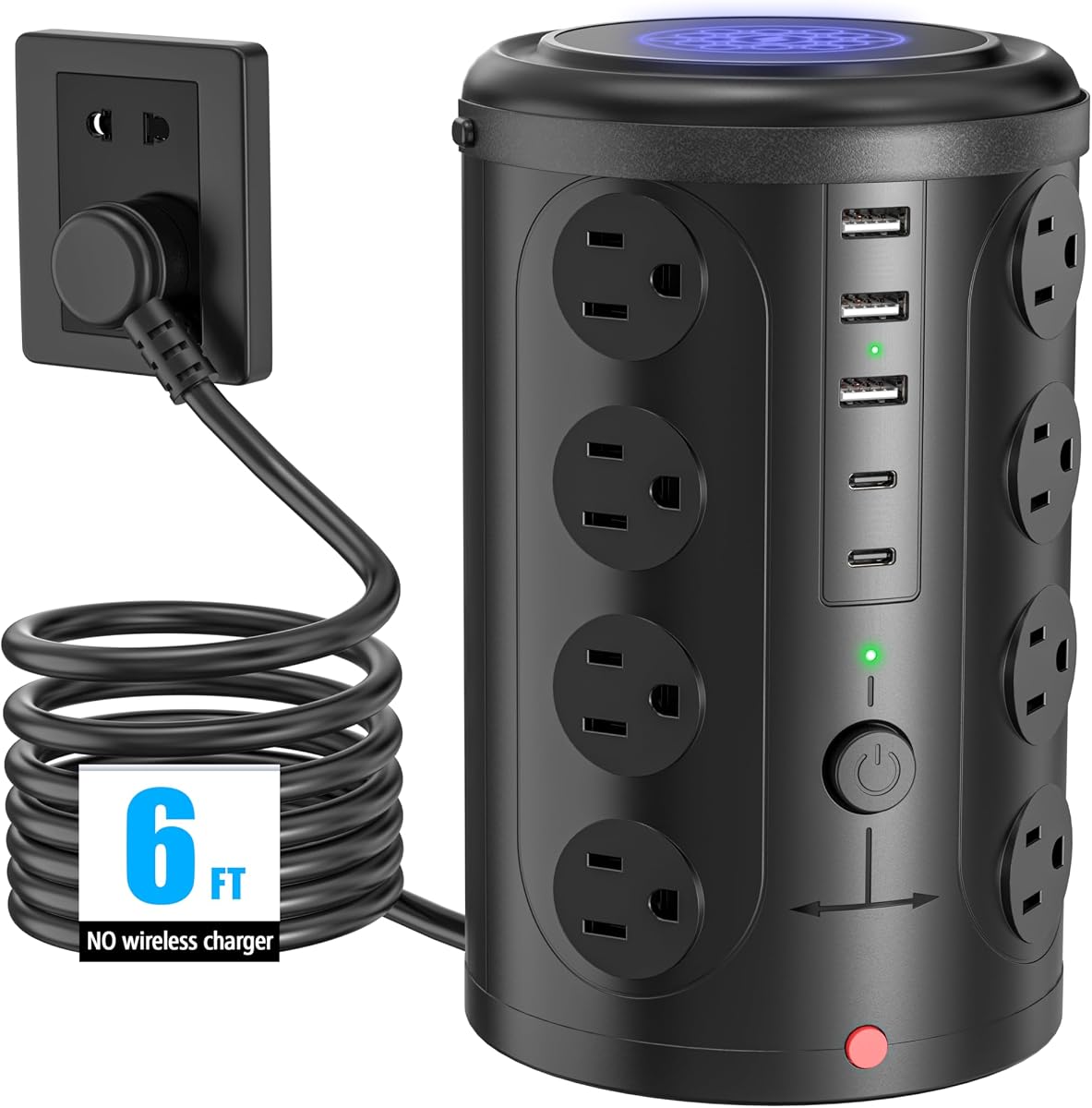
This Power Strips tower offers exceptional value with sixteen total ports for a competitive price. It features twelve AC outlets and four smart USB ports handling diverse device needs easily.
We may earn a commission when you buy through this link, at no additional cost to you.
The 1080 Joules surge protection ensures reliable safety against power fluctuations. Its braided fabric cord resists tangling and adds a subtle style to your setup.
Wide spacing between outlets accommodates large adapters without blocking neighbors. The flat plug design fits tight spaces behind furniture for discreet installation.
Ideal for budget conscious buyers needing maximum connectivity. It delivers solid performance and safety features at an accessible price point for dorms.
With twelve AC and four USB ports it powers up to sixteen devices simultaneously keeping your entire workspace fully charged.
The braided fabric outer layer prevents fraying and tangling ensuring long lasting use even with frequent handling.
We may earn a commission when you buy through this link, at no additional cost to you.
The Anker Nano Power Strip delivers premium performance with 70W USB-C charging and a unique desk clamp. It uses GaN technology to keep heat low while charging powerful laptops efficiently.
We may earn a commission when you buy through this link, at no additional cost to you.
The adjustable clamp holds the tower firmly enabling one handed operation without shifting. Its dual zone layout separates AC and USB ports to reduce cable clutter effectively.
At 1500 Joules the surge protection is robust for sensitive electronics. The design replaces bulky adapters saving desk surface space for work.
Best for professionals needing high power and stability. It justifies the cost with advanced tech and reliable mounting for busy workstations.
GaN technology allows smaller size and lower heat during high wattage charging making it safer for continuous use.
The adjustable clamp fits desk edges securely freeing up surface area while keeping the tower stable during plug in.
We may earn a commission when you buy through this link, at no additional cost to you.
This Uncaged Ergonomics tower solves cord clutter with a built-in retractable 6 ft cord. It rewinds automatically releasing tension and keeping floors clear of tripping hazards.
We may earn a commission when you buy through this link, at no additional cost to you.
The upright cube stays stable on surfaces and features mountable feet for under-desk installation. It includes four AC outlets and four USB ports for standard devices.
While 320 Joules protection is modest it covers basic needs. The clean design suits shared spaces where tidy cables matter more than high capacity.
Perfect for offices prioritizing aesthetics and safety. The auto rewind feature is unique and convenient for dynamic environments.
The retractable base stores excess length automatically so only needed cord extends reducing visual clutter effectively.
Mountable feet allow secure attachment to walls or workbenches reclaiming floor space under desks easily.
We may earn a commission when you buy through this link, at no additional cost to you.
This power strip features four separated switches controlling different outlet sections for energy saving convenience. It includes twelve AC outlets and four USB ports handling many devices at once.
We may earn a commission when you buy through this link, at no additional cost to you.
The 6.5 FT cord allows wide reach across rooms. Its solid construction handles heavy-duty extension needs safely with advanced internal protection components.
Switches let you power down unused electronics easily reducing waste. This vertical design fits large power supplies better than horizontal strips.
Great for home offices with many electronics. The switches provide control while the length offers placement flexibility near distant outlets.
Four independent switches allow targeted power management saving energy by turning off specific sections when not in use.
The 6.5 foot cord reaches further than standard strips allowing placement anywhere without additional extensions.
We may earn a commission when you buy through this link, at no additional cost to you.
This SMALLRT tower uses pure copper wire for efficient power delivery. It has twelve AC outlets and four smart USB ports detecting devices for optimal speed.
We may earn a commission when you buy through this link, at no additional cost to you.
Reinforced junctions protect terminals from wear. The flame retardant PC shell ensures safety against heat. The base includes an anti-slip mat to prevent movement.
The 6.5 FT length provides generous reach for setups. It balances quality materials with competitive pricing for everyday reliability.
Recommended for safety conscious users. The copper build and reinforced joints add durability to standard tower performance.
Pure copper wire ensures low resistance and stable power flow to connected devices improving efficiency.
Anti-slip mats on the bottom keep the tower steady on smooth surfaces preventing accidental slips.
We may earn a commission when you buy through this link, at no additional cost to you.
This tower offers sixteen wide spaced AC outlets preventing adapter blockage. It includes five USB ports and supports up to 3600W at 240V providing high power capacity.
We may earn a commission when you buy through this link, at no additional cost to you.
The vertical tower saves floor space despite the high count. Built-in fuses and lightning protection add security for shared or commercial environments.
Spacing ensures large adapters can plug in without overlap. It suits high-demand setups like server racks or busy studios.
Ideal for heavy users needing maximum ports. The design prioritizes functionality and safety for demanding power needs.
Wide spacing between sockets lets large power bricks fit without blocking adjacent outlets reducing waste.
High wattage support allows running multiple high draw devices simultaneously without tripping breakers.
We may earn a commission when you buy through this link, at no additional cost to you.
TESSAN tower features a 0.31 inch flat plug fitting tight spots behind furniture. The 45 degree angle preserves space for other plugs below it.
We may earn a commission when you buy through this link, at no additional cost to you.
It combines eleven AC outlets and three USB ports in a compact form. Overload and short-circuit protections ensure safety for daily electronics.
Rubber feet keep the tower steady on surfaces. The grey color blends well into office and home decor subtly.
Best for tight spaces where standard plugs fail. Its profile maximizes wall clearance and outlet access effectively.
The thin plug design allows placement near other outlets without interference saving space behind walls.
A 45 degree right angle plug opens adjacent outlets so you do not lose access to other sockets.
We may earn a commission when you buy through this link, at no additional cost to you.
This VILONG strip uses a dual layer layout for under-desk and desktop options. It includes ten AC outlets and three USB ports plus 20W USB-C charging for phones.
We may earn a commission when you buy through this link, at no additional cost to you.
Installation requires no tools just a clamp twist to secure. The 45 degree flat plug ensures easy wall access even in tight spots.
Two independent switches manage power sections efficiently. It suits small offices wanting flexible mounting without drilling holes.
Recommended for adjustable setups. The layer design provides versatile power access where traditional strips tip over.
The split layout accommodates different desk angles and under-shelf placements increasing versatility.
Simple clamp twist secures the strip without tools allowing quick changes to desk setups.
We may earn a commission when you buy through this link, at no additional cost to you.
This tower offers 1800 Joules surge protection with a 0.30 inch ultra-thin flat plug. It supports sixteen devices via twelve AC outlets and four smart USB ports.
We may earn a commission when you buy through this link, at no additional cost to you.
The reset/off switch helps save energy on the go. The tower remains rock-solid on surfaces thanks to four rubber feet preventing sliding.
USB-C provides faster charging than standard units. The vertical tower keeps the desktop neat compared to traditional strips.
Best for safety focused buyers needing compact form. The high joule rating adds confidence for expensive electronics protection.
1800 Joules absorb significant surges protecting sensitive computers and drives from voltage spikes.
Four rubber feet anchor the tower preventing slides on smooth wood or glass desks effectively.
We may earn a commission when you buy through this link, at no additional cost to you.
Choosing the right tower requires matching port needs with safety and design features. These factors help narrow the options to your workspace.
Count how many devices you need to charge simultaneously. Ensure the model includes enough AC outlets and USB ports to avoid daisy chaining which adds clutter.
Prioritize towers with USB-C ports for faster laptop charging.
Check the joule rating for surge protection. Higher numbers like 1500J or 1800J offer better defense against power spikes than basic models.
Look for overload and short-circuit protection for safety.
Consider the extension cord length. Towers with 6 ft or longer cords reach distant outlets without extra extension cords. Flat cords lay better under furniture.
Retractable cords reduce clutter but offer shorter range.
A flat plug design allows the tower to sit flush against the wall preventing obstruction of adjacent outlets. This is critical for dense power strips.
Thin plugs save space behind furniture.
Desk clamps free up surface space by attaching to the edge. Standalone towers suit floor or shelf placement. Mountable feet add under-desk options.
Choose clamps for stable setups.
Look for circuit breakers and reset switches. These auto-cut power during irregularities protecting expensive electronics from damage.
Ensure fire-retardant materials for reliability.
Check the casing material and wire composition. Pure copper wires and flame-retardant plastics extend lifespan and improve safety.
Rubber feet prevent sliding on desks.
Measure your available space. Compact towers fit smaller desks but may have fewer ports. Ensure height allows for comfortable cable access.
Choose widths that fit your monitor setup.
Plug the tower directly into a grounded wall outlet. Avoid using extension cords between the tower and the wall to prevent voltage drops and fire risks.
Distribute power evenly across outlets. Plug high-wattage devices like monitors into the top ports and lighter devices like phones into lower USB ports.
Regularly inspect the cord for fraying and ensure the plug stays clean and dry. Do not overload the unit beyond its wattage rating to maintain safety standards.
Yes, many models support high wattage devices like laptops and monitors. Look for ratings like 70W USB-C or 1250W total AC capacity. Check specific product details for maximum limits.
Ideally yes. Grounded outlets ensure proper surge protection and safety. Some towers work with ungrounded sockets but protection may be limited. Verify your wall outlet type.
Flat plugs sit flush against the wall preventing obstruction of adjacent sockets. This maximizes space for other plugs and is ideal for tight spots.
Many towers include USB-C fast charging ranging from 20W to 70W. Faster models deliver higher wattage for laptops. Check specs for PD support levels.
Yes, models with clamps or mountable feet allow under-desk installation. Clamp designs fit edges securely. Standalone towers can sit on shelves under desks.
The surge protector absorbs excess energy and cuts power if needed. This protects connected devices. High joule ratings provide stronger protection.
High-quality towers last several years with proper care. Look for fire-retardant plastics and copper wires for durability. Check warranty terms for support.
Yes, vertical towers reduce floor and desk clutter significantly. They replace multiple strips and adapters keeping cables organized.
The TenTrend, Anker Nano, and SMALLRT models lead in performance and value. Each serves different needs from budget setups to high-power workstations.
Prioritize surge protection and port count for long-term utility. Ensure cord length matches your room layout for convenience.
Prices vary so check current listings before purchasing. These towers provide organized power solutions for modern desks.