
USB Fast Charger Block 50% Smaller 100W Max 6-Port GaN USB Charging Station
4.3Editor score
6-in-1 Multi-Device Charging
100W Total Power Output
Compact Travel-Ready Design
Discover the top charging station for multiple devices ranked by power speed safety and design for home office and travel needs this guide compares ten models.
Keeping your gadgets powered up is essential in today connected world where phones laptops and tablets are used constantly throughout the day. A good charging station helps you manage all these devices from one central location without cluttering your desk with messy cables and adapters.
We compared ten highly rated charging stations based on their total output wattage number of ports types of connectors and safety features. Our analysis looks at real user feedback and technical specifications to find the most reliable options for different budgets and setups.
Each pick in this list shows what makes that model stand out whether it is fast charging speed compact design or extra features like retractable cables. Prices change often so please check the current listings before making your final purchase decision today.
4.3Editor score

4.5Editor score

4.6Editor score
This side-by-side comparison highlights the key differences between each model so you can quickly find the right fit for your specific device mix and space constraints.




The Zobirez 420W charging station ranks as our top pick because it handles a massive 10 devices with 5 USB-C and 5 USB-A ports. It delivers 420W total output which is enough to charge laptops and phones at the same time without slowing down. Users love the included cables that reduce desk clutter immediately.
We may earn a commission when you buy through this link, at no additional cost to you.
Key strengths include the dual 65W GaN ports that fast charge MacBooks and the sturdy one-piece slots that hold thick cases securely. The station has non-slip pads to stay put on any surface and includes safety features like overheat protection. It is trusted by over 5000 users for its reliability.
Trade-offs are that it takes up significant desk space and the power cord is fixed which limits placement flexibility. The slots are designed to be wide so it might look bulky on very small nightstands. However these are acceptable for the sheer number of devices it handles.
This model is best for families or offices with many gadgets needing power at once. The included cable kit saves money and time on setup. We recommend it if you want one solution that handles everything from phones to laptops efficiently.
The 420W total output ensures you can charge high-power laptops alongside small accessories like headphones simultaneously without throttling speeds.
Eight short mixed cables are included to connect most devices right away which helps keep your workspace neat and free of tangled wires.
We may earn a commission when you buy through this link, at no additional cost to you.
The Zobirez 750W station stands out with an incredible 750W total output and 120W per USB-C port for serious laptop charging needs. It supports 10 devices at once making it ideal for power users with multiple MacBooks or high-wattage gadgets. The included cable kit ensures you can start using it immediately.
We may earn a commission when you buy through this link, at no additional cost to you.
Key strengths include the 120W USB-C ports that can charge Pro models fast and the durable one-piece slot design that holds thick cases without wobbling. The unit has safety features like overcurrent and short circuit protection to keep your gear safe. It is built to handle daily heavy use.
Trade-offs include a higher price than standard stations and a heavier build which means it is not easy to carry for travel. The size is also quite large so measure your desk space first. These issues are minor for those who need maximum wattage.
This station is perfect for professionals or families with multiple high-power laptops needing simultaneous fast charging. It offers the most power per port in the list and the included cables add value. Choose this if speed and capacity are your top priorities.
Each of the five USB-C ports delivers 120W individually which allows you to charge high-performance laptops like MacBook Pros at full speed.
The durable flame-retardant ABS construction and wide slots provide stability and protection for expensive devices during long charging sessions.
We may earn a commission when you buy through this link, at no additional cost to you.
The Anker Prime 200W station offers a premium experience with GaN tech and 100W per USB-C port in a compact desktop shape. It charges up to six devices including two 14 inch MacBooks to 50 percent in under half an hour. The design is stable and looks professional on any desk.
We may earn a commission when you buy through this link, at no additional cost to you.
Key strengths include the proprietary safety system that monitors temperature continuously and the compact width which saves space. The unit is heavier than travel chargers so it sits securely while powering multiple laptops. It comes with a long power cord and a solid warranty for peace of mind.
Trade-offs are the limited six ports compared to ten port models and the lack of AC outlets which means it only charges via USB. It is also not intended for travel so you must leave it on your main desk. These limits fit a fixed desktop setup.
This model is ideal for professionals who value build quality and need fast charging for two laptops plus accessories. The active temp monitoring ensures safety during heavy loads. Pick this if you want a sleek reliable solution from a trusted brand.
Anker proprietary system checks temperature and adjusts power to protect your devices from overheating even when all ports are in use.
The compact width allows it to fit on crowded desks without blocking other items while still providing six high-speed charging ports.
We may earn a commission when you buy through this link, at no additional cost to you.
This USB Fast Charger block offers a budget friendly solution with 100W total output for six devices in a very small package. It is designed for phones and tablets rather than laptops so it is perfect for travelers or students with limited needs. The 5ft extension cord helps reach outlets behind furniture easily.
We may earn a commission when you buy through this link, at no additional cost to you.
Key strengths include the compact size that fits in a pocket and the universal compatibility with most modern smartphones and earbuds. The GaN tech keeps it small and efficient for daily use. It is a simple plug and play setup without complex cables.
Trade-offs are that it does not support laptop charging and the build is basic plastic not metal. It also has fewer ports than other models. For the price this is not a surprise and it meets basic needs well.
This charger is best for anyone who needs to charge phones and tablets without spending much. It is great for travel or as a secondary station. Choose this if you want a small affordable block to keep organized.
At just 3.27 by 2.36 inches this charger is small enough to toss in any bag for on the go power without extra bulk.
The included 5ft extension cord lets you plug in easily even if the outlet is behind a desk or nightstand without stretching the device.
We may earn a commission when you buy through this link, at no additional cost to you.
The Anker MagGo 3-in-1 is designed for iPhone users who want fast 15W wireless charging without cables on their nightstand. It can charge your phone watch and earbuds at once with certified fast speed for the Apple Watch. The adjustable angle helps you view the phone in StandBy mode easily.
We may earn a commission when you buy through this link, at no additional cost to you.
Key strengths include the official certification for fast watch charging and the MagSafe compatible magnetic alignment for your phone. The compact shape saves space and looks neat. It works best with Apple devices for a seamless experience.
Trade-offs are that it lacks USB ports so non-Apple devices cannot be charged directly. You need an external adapter for the stand itself. This limits flexibility but fits a pure Apple setup well.
This station is perfect for iPhone users who want a simple neat charging spot. The wireless convenience and watch fast charge save daily hassle. Pick this if you live in the Apple ecosystem.
Full 15W wireless charging ensures your iPhone charges as fast as possible without needing to plug in a cable every night.
The adjustable angle up to 45 degrees lets you set your phone to a comfortable viewing position while it charges on the stand.
We may earn a commission when you buy through this link, at no additional cost to you.
This Anker Desktop Charger combines AC outlets and USB ports to replace a standard power strip. It has 3 AC outlets plus 4 USB-C and 2 USB-A ports for nine charging spots. The 300J surge protection adds safety for your electronics during storms. The unit is stable and fits on any desk.
We may earn a commission when you buy through this link, at no additional cost to you.
Key strengths include the dual 100W USB-C ports that can charge laptops fast while still powering other devices through AC. The 8-point safety system protects against overvoltage and short circuits. It handles all device types from plugs to USB.
Trade-offs are that no USB cables are included so you must use your own. The length is also fixed. These are minor issues for such a versatile power hub.
This model is ideal for workstations with mixed devices needing plug-in or USB charging. It simplifies your setup by combining a strip and charger. Choose this for a central hub on your desk.
The mix of three AC outlets and multiple USB ports means you can charge old plugs and new USB devices all at once.
A 300 joule surge rating protects your connected gear from voltage spikes keeping them safe during electrical fluctuations.
We may earn a commission when you buy through this link, at no additional cost to you.
The MSTJRY 5-Port station is a basic solution for charging multiple phones and tablets using USB-A ports. It comes with seven short cables for iOS and Android to reduce clutter right away. The smart voltage detection adjusts power for safe charging. It is a great budget organizer.
We may earn a commission when you buy through this link, at no additional cost to you.
Key strengths include the included cables which match most phones and the power switch for easy on off control. The removable dividers help fit larger tablets with cases. It is simple to use for families.
Trade-offs are that USB-A ports are slower than USB-C for newer devices. It cannot fast charge laptops or some high-end phones. This is expected for a lower cost unit.
This station is best for basic needs like charging phones at a kitchen counter. The included cables make setup easy. Pick this if you want a simple plug and play option.
The included seven cables mean you can plug in most phones and tablets right away without buying extra accessories for each device.
Removable dividers let you adjust the slots to fit larger tablets or small phones depending on what you need to charge.
We may earn a commission when you buy through this link, at no additional cost to you.
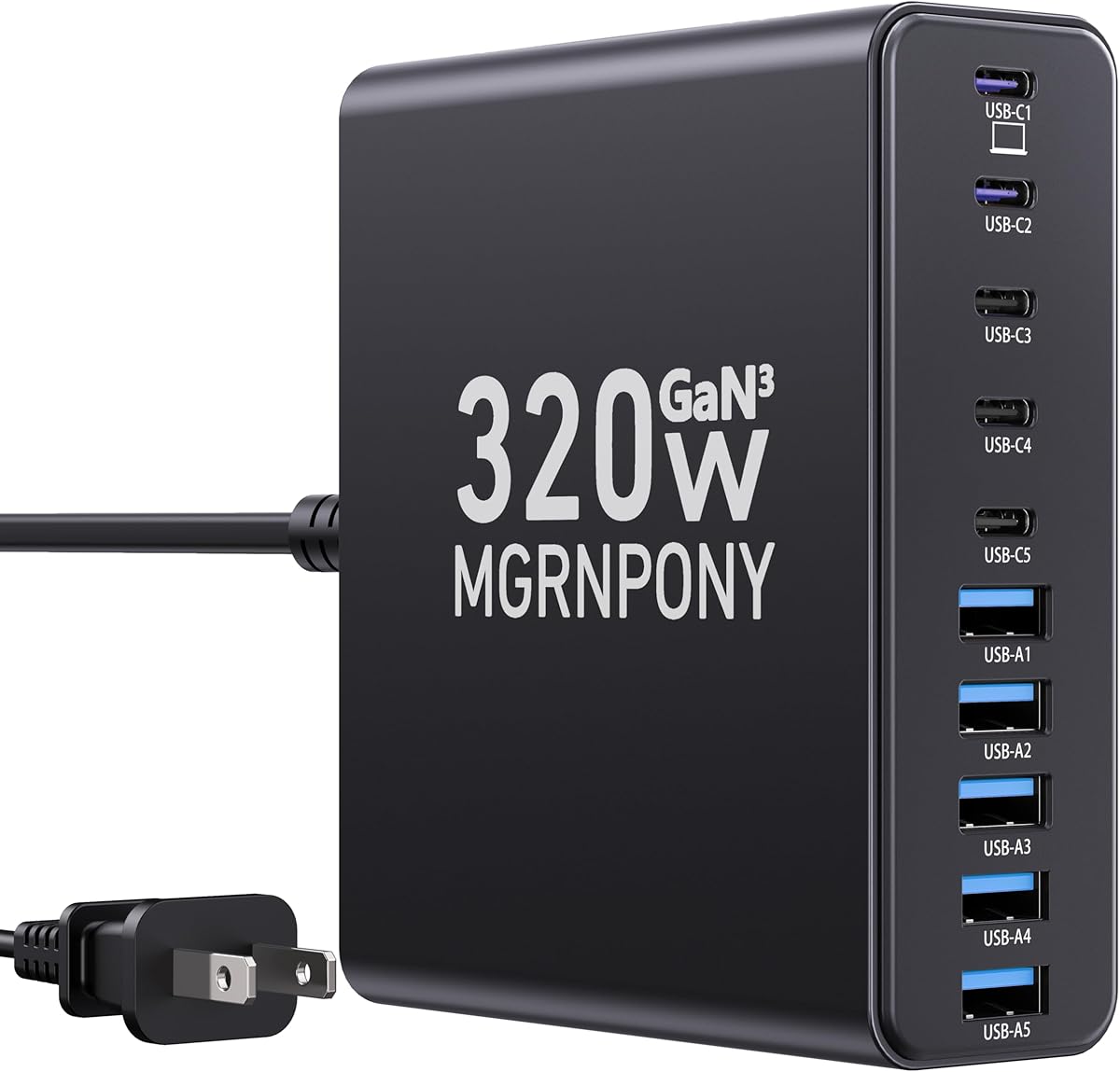
The MGRNPONY 320W station delivers 320W total power across ten ports with IceShield GaN tech for safety. It can charge laptops phones and tablets at once with real output speeds even when all ports are used. The compact design lets you place it vertically to save space.
We may earn a commission when you buy through this link, at no additional cost to you.
Key strengths include the IceShield 3.0 GaN system that monitors temperature millions of times daily for safety. It has PD outputs of 65W 30W and 20W for various device needs. It is portable enough for travel.
Trade-offs are that it is not the cheapest unit on the list and lacks extra features like AC outlets. It is standard for its power level. This is a good middle ground option.
This station is great for users who need 10 ports and fast charging but want to keep it portable. The GaN cooling is a bonus for safety. Pick this for a balance of power and size.
IceShield 3.0 GaN technology actively monitors temperature to prevent overheating even during long charging sessions with all ports used.
You can place the unit vertically or horizontally to fit better in tight spaces like corners or small desks without tipping.
We may earn a commission when you buy through this link, at no additional cost to you.
This retractable charger solves the mess of multiple cables by using four 80cm retractable cords. It supports up to eight devices at once with 105W total power using GaN tech. The system keeps cables stored inside the unit until needed making it very tidy on any desk.
We may earn a commission when you buy through this link, at no additional cost to you.
Key strengths include the retractable cords that eliminate tangles and the GaN tech for fast charging speeds. It comes with an adapter so it is ready to use. The max length of 80cm is enough for most setups.
Trade-offs are that retractable cables can wear out over time and the mechanism adds complexity. It may cost more than fixed cable models. These are accepted for the space saving benefit.
This model is best for users who hate cable clutter and want a neat look. It simplifies desktop charging with stored cords. Pick this if organization is your top priority.
Four retractable cords keep your desk clear when not in use and extend only as far as you need for each device.
The GaN technology inside allows the unit to charge devices quickly while staying small and cool during operation.
We may earn a commission when you buy through this link, at no additional cost to you.
The Lcssio 300W station uses a solid non-removable housing for extra durability compared to removable divider models. It has dual 65W ports for laptops plus six more ports for other devices totaling 300W. The anti-slip pads keep it secure on any surface and the wide slots fit thick cases.
We may earn a commission when you buy through this link, at no additional cost to you.
Key strengths include the sturdy build that does not wobble and the safety certifications for overcurrent and overheat protection. It includes a cable pack for daily use. It is a practical solution for families.
Trade-offs are that it lacks extra features like retractable cables or wireless charging. It is a straightforward charger with no fluff. This keeps costs down for solid performance.
This station is ideal for those who want a reliable long lasting unit without gimmicks. The dual 65W ports handle laptops well. Pick this for a safe practical family charger.
The solid one-piece housing means no removable parts to lose or break so the unit stays intact for years of daily use.
Two wider middle slots fit tablets with thick cases securely without risking damage to the device or the charger.
We may earn a commission when you buy through this link, at no additional cost to you.
Selecting the right charging station involves evaluating power output port types build quality and extra features to match your specific device collection.
Total power output determines how many devices can be charged at full speed without slowing down. Look for at least 200W if you have laptops plus phones and aim for 300W or higher for heavy multi device loads.
Ensure the sum of all ports meets your combined needs for fast charging without bottlenecks.
Check the mix of USB-C and USB-A ports since newer devices need USB-C for fast charging while older ones use USB-A. A balanced station offers both to support all your gadgets.
Choose a model with enough ports for your current devices plus one or two extra for future needs.
Safety features like overheat overcurrent and overvoltage protection are vital to prevent damage to your devices. Look for certifications and systems that monitor temperature during charging.
Always prioritize models with built-in safety systems to keep your expensive electronics safe.
A sturdy build with anti-slip pads and durable materials ensures stability on your desk. Solid housing or one-piece slots often last longer than removable parts.
Pick a design that fits your desk space and offers secure slots for tablets or laptops.
Many stations include short cables which can save money and time on setup. Check if the cables match your devices like USB-C or Lightning.
Units that provide a cable kit offer immediate value and reduce desk clutter right out of the box.
If you plan to travel with your station choose a compact model with a detachable cord. Desktop only models are larger but offer more power and stability.
Match the size to your use case whether it is a fixed home office or a travel setup.
Place the station on a stable flat surface with enough airflow around it to prevent heat buildup. Avoid placing it on soft materials like bed sheets that could block ventilation.
Connect devices to the ports that match their cables and ensure connections are secure before plugging in the power cord. Use the included cables if provided for best compatibility.
Clean the unit regularly with a dry cloth to remove dust from ports and surfaces. Do not use wet cleaners that could damage internal components.
Yes many models support charging laptops and phones simultaneously but ensure the station has enough total wattage. Look for USB-C ports rated 65W or higher for laptops while other ports handle phones.
Most stations with USB-C ports support MacBook charging. Check that at least one port offers 65W or 100W output for full speed charging of your MacBook model.
Yes safety certifications ensure the station prevents overheat and overcharge risks. Look for certifications like UL or clear safety features in the product description for peace of mind.
Use the cables that match your devices and the ports. USB-C cables for laptops and phones with USB-C and Lightning or Micro USB for older models to get the best speeds.
Some compact models are travel friendly but most high power units are for desktop use. Check dimensions and power requirements before packing for a trip.
Most stations are wired but some like the Anker MagGo support wireless charging. Look for a model with a Qi wireless pad if you want cable free charging.
The Zobirez 420W and Anker Prime 200W top our list for power and design while the USB Fast Charger 100W offers great value for budget buyers.
Focus on total power output and port types to match your devices. Safety features and build quality ensure your station lasts long and protects your gadgets.
Prices fluctuate so verify current listings and stock before purchase. Choose the model that fits your daily needs best.