
Alex Tech 10ft Cord Protector Wire Loom
4.7Editor score
Ten feet of split tubing
Protects against pet chewing
UL recognized safety rating
Creating a clean gaming setup starts with effective cable management. Proper organization hides messy wires, improves airflow, and protects your hardware from accidental damage. A good system keeps your desk looking professional while ensuring your components remain accessible and safe during intense gaming sessions.
We evaluated ten top-rated products based on durability, ease of installation, and versatility. Each item was assessed for its ability to handle various cable types and sizes without compromising aesthetics. Our goal is to provide you with reliable options that fit different budgets and desk configurations effectively.
Each pick highlights unique features tailored to specific needs like under-desk routing or individual wire protection. Note that product availability and pricing can change frequently due to market demand. Always verify current stock before purchasing to ensure you get the best value for your investment today.
4.7Editor score

4.6Editor score
4.6Editor score
As an Amazon Associate we earn from qualifying purchases.
This side-by-side comparison outlines the key specifications and capabilities of each selected product. It helps you quickly identify which solution matches your specific desk layout and cable volume requirements without needing to read every detailed review.




The NOROCME kit stands out as the most comprehensive option for organizing cables in a gaming PC setup. With 192 pieces including sleeves ties and clips it handles almost every routing challenge you might face. Its high rating reflects strong performance in real-world applications.
We may earn a commission when you buy through this link, at no additional cost to you.
The split design of the cable sleeves makes it easy to add wires without unplugging existing connections. This saves time during installation. The reusable ties allow for adjustments as you upgrade hardware or rearrange your desk layout frequently.
Some users note that adhesive pads may struggle on textured surfaces requiring a hairdryer for better contact. While manageable this limitation suggests checking your desk material before committing to permanent placement for the best results.
If you want a single box that solves most cabling needs without buying multiple items this kit is ideal. It offers the best balance of quantity quality and ease of use for gamers building a new station.
This kit provides everything needed to manage cables from bundling to securing them to furniture surfaces effectively.
Many components like ties and clips are reusable allowing for easy reconfiguration when your setup changes.
We may earn a commission when you buy through this link, at no additional cost to you.
This kit mirrors the top pick closely with a similar 192 piece count and focus on split sleeves. It is a solid alternative if the primary choice is out of stock or slightly higher in price. Users appreciate the ease of adding wires without disassembly.
We may earn a commission when you buy through this link, at no additional cost to you.
The inclusion of self adhesive cable tie rolls adds flexibility for securing groups of wires along walls or under desks. These rolls can be cut to any length making them suitable for both short and long routing paths.
One consideration is that some adhesive pads might not stick as well to certain finishes. Testing on a small area first helps ensure the mounts stay secure over time without peeling unexpectedly during use.
For gamers looking for a comprehensive bundle that covers most bases this option delivers strong value. It combines variety with practicality ensuring your cables stay organized and protected from daily wear and tear.
Rolls of ties can be customized to fit any length requirement for securing wire bundles effectively.
The design allows you to slide cables in without disconnecting them from your devices or power source.
We may earn a commission when you buy through this link, at no additional cost to you.
Alex Tech offers a specialized solution focusing on protecting individual cables rather than organizing a whole system. This ten-foot split sleeve is perfect for bundling specific wires like power cords or HDMI cables. Its high rating comes from reliable durability and safety features.
We may earn a commission when you buy through this link, at no additional cost to you.
The primary benefit is protecting cables from pets like cats who often chew on exposed wires. The material is sturdy enough to resist biting while remaining flexible for routing around tight corners in your PC case or desk.
Since it lacks adhesive or clips you will need to pair it with other ties for a complete solution. This makes it a supplement rather than a standalone organizer but essential for preventing costly cable damage from pets.
Buy this if your main concern is shielding vulnerable cables in a multi-pet household. It provides excellent protection at a very low cost ensuring your hardware remains safe without breaking your budget.
Designed specifically to stop pets from chewing on cables this tube offers a vital layer of safety.
The material meets recognized safety standards ensuring it is safe for use with electrical wiring in homes.
We may earn a commission when you buy through this link, at no additional cost to you.
J-channel organizers are designed to run under desks hiding power strips and bulk cables from view completely. This six-pack allows you to cover multiple areas of your workspace ensuring a clean look from the front. Users like the simple installation process.
We may earn a commission when you buy through this link, at no additional cost to you.
The outward-facing opening makes it easy to drop cables in without cutting or drilling holes. This feature simplifies updates when you add new hardware or replace older devices that require different cable lengths or types.
One limitation is that the adhesive works best on smooth surfaces. Powdered or uneven textures may require extra prep or heat to ensure the channels stay attached firmly. This demands careful surface checks before mounting.
For gamers who want to hide power strips and main power lines this is a strong choice. It keeps high-traffic areas clear while providing a safe flame-retardant enclosure for your electrical equipment.
Mounting these channels under your desk hides bulky power strips and main cables from everyday view.
The open top lets you drop cables in easily without struggling to thread them through closed sleeves.
We may earn a commission when you buy through this link, at no additional cost to you.
These reusable ties are perfect for bundling loose cables into neat bundles before securing them elsewhere. With 60 pieces you can organize every cable in your gaming setup without running out. The hook and loop design allows for repeated use.
We may earn a commission when you buy through this link, at no additional cost to you.
The adjustable nature means you can tighten or loosen them as needed. This flexibility is useful when switching out peripherals or adding new devices that require different cable thicknesses or lengths.
Because they lack adhesive they are meant to be combined with other organizers like sleeves or trays. However for simply reducing cable bulk they are highly effective and easy to manage in tight spaces.
Choose this if you want a large supply of ties that won t need frequent replacement. They help maintain a clean look by keeping cables grouped tightly without damaging them like plastic zip ties might.
Designed to be removed and reused many times these ties reduce waste and save money long term.
The strap can be wrapped to fit any cable thickness making it versatile for different types of gear.
We may earn a commission when you buy through this link, at no additional cost to you.
This tray is designed to hold power strips and heavy adapters under your desk keeping them off the floor. The 17-inch width fits standard power bars nicely. Users find that it greatly improves the visual cleanliness of their gaming area.
We may earn a commission when you buy through this link, at no additional cost to you.
Installation is straightforward with strong adhesive backing that requires no drilling. This makes it ideal for renters or anyone who wants to avoid damaging their furniture or wall surfaces with screws and holes.
The main trade-off is size. It may not accommodate very large surge protectors or multiple transformers. For standard setups it works well but check dimensions if you have bulky equipment that needs more space.
Buy this if you need a quick fix for power strip clutter. It provides a sturdy shelf that keeps your electrical gear safe from dust and pets while maintaining a clean aesthetic.
Specifically sized to hold standard power strips this tray keeps plugs and outlets organized under your desk.
Adhesive backing lets you mount the tray without any tools making setup quick and damage-free.
We may earn a commission when you buy through this link, at no additional cost to you.
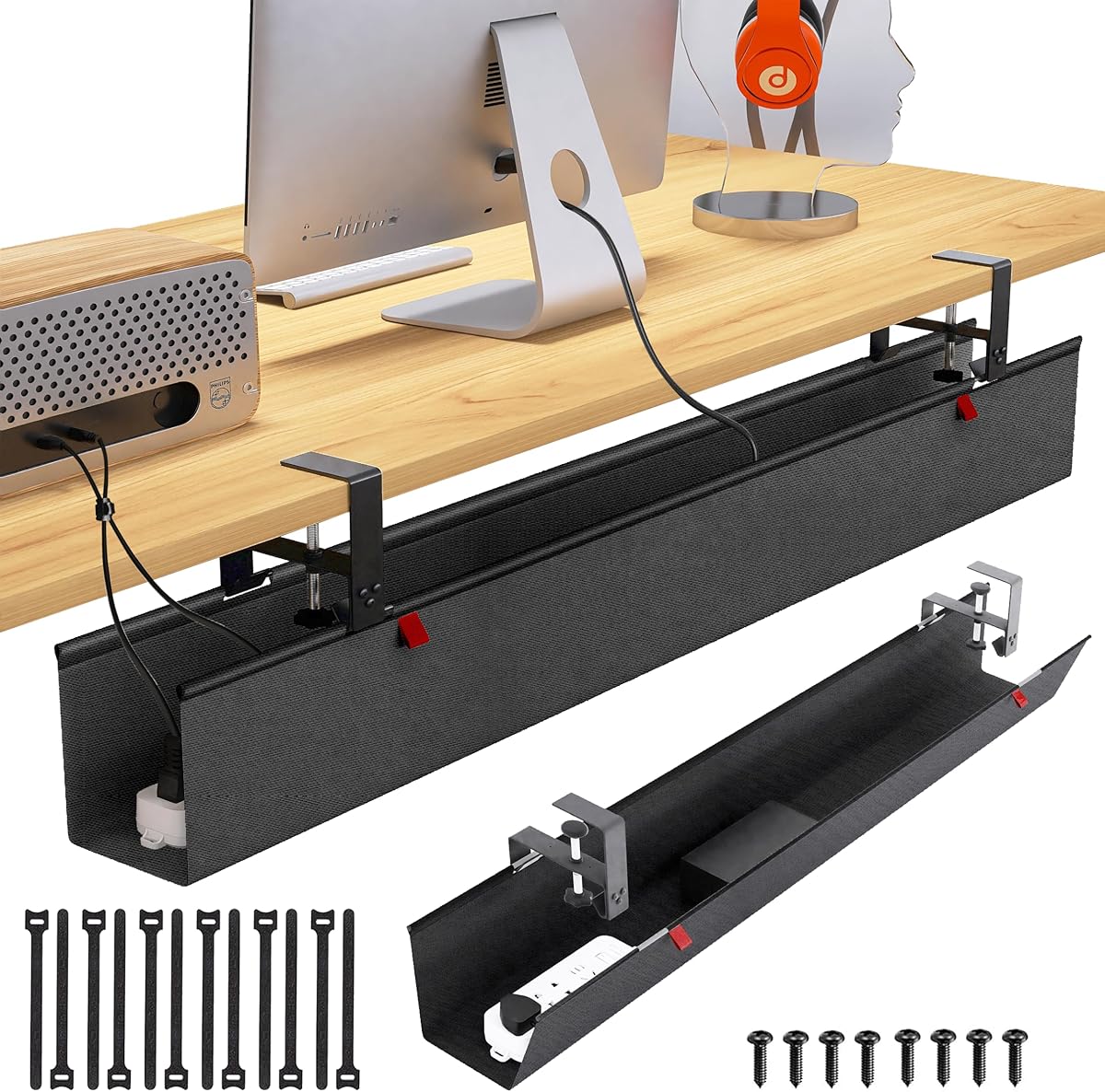
The 36-inch length of this tray provides ample space for multiple cables and large adapters. It is a robust solution for complex setups like dual or triple monitor stations. The combination of fabric and steel gives it a strong yet flexible structure.
We may earn a commission when you buy through this link, at no additional cost to you.
It supports both clamp and screw installation offering flexibility depending on your desk material. This versatility ensures you can secure it firmly without worrying about the specific type of table you own.
The fabric sides may attract dust or snag on rough edges over time. Also the clamping mechanism needs at least 5.3 inches of space on the table edge. Verify your desk dimensions before purchasing.
Choose this if you have a large desk and need to hide many cables. Its capacity makes it a great choice for power users who want to keep all electronics out of sight.
The extra length allows you to store multiple adapters and cables in one single organized location.
Clamp on installation offers a no-drill option that is easy to adjust if you change your desk later.
We may earn a commission when you buy through this link, at no additional cost to you.
This tray features a metal mesh design that helps dissipate heat from power strips and adapters. Good ventilation prevents overheating which is vital for maintaining the lifespan of your electrical gear. The metal build ensures it holds weight well.
We may earn a commission when you buy through this link, at no additional cost to you.
Installation involves using adjustable clamps that fit desk thicknesses up to two inches. This makes it stable on many desk types without needing to drill holes. The non-slip pads protect your desk from scratches during use.
You must assemble two parts of the tray using screws before mounting. While simple it adds a small step to installation. Ensure you have a screwdriver ready to complete the setup quickly.
Opt for this tray if heat dissipation is a priority for your setup. It balances storage with safety ensuring your cables and adapters stay cool and organized under the desk.
The mesh structure allows air to flow freely preventing overheating of power strips and adapters.
Constructed from sturdy metal this tray supports heavy loads without sagging or bending over time.
We may earn a commission when you buy through this link, at no additional cost to you.
These clips use an elastic loop to hold cables securely allowing for easy one-handed swapping. This is useful for frequently used cables like headphones or controller cords. The UK-made quality ensures they are built to last.
We may earn a commission when you buy through this link, at no additional cost to you.
The adhesive pads are tested on many surfaces to ensure a strong bond. Additionally the package includes screws and zip ties for more permanent mounting. This multi-option approach adds great value and versatility for any gamer.
They are designed for individual cables rather than large bundles. While effective for keeping specific cords close at hand they are not a full solution for hiding power strips or thick cable groups.
Buy these if you need quick access to specific peripherals. Their adjustable loop makes them convenient for daily use while keeping your workspace free of loose dangling wires.
The elastic loop allows you to quickly connect and disconnect cables without tools or effort.
Manufactured in the UK these clips use high-grade materials ensuring durability and reliability over time.
We may earn a commission when you buy through this link, at no additional cost to you.
This tray is designed for gamers who want a sleek stealth look. The high-density black fabric hides every wire inside completely creating a clean visual under your desk. It is the ideal choice for RGB setups where visible wires ruin the aesthetic.
We may earn a commission when you buy through this link, at no additional cost to you.
The reinforced anti-sag base ensures that even heavy adapters and power bricks do not bow the tray. This durability makes it suitable for high-end setups with substantial equipment. The breathable fabric prevents heat buildup effectively.
While the price is higher than plastic options the aesthetic value is unmatched for serious battlestations. If a clean look is your priority this tray offers a level of concealment that mesh or open trays cannot match.
Choose this if you want a premium upgrade that elevates your gaming space. It combines high capacity with superior visual concealment keeping your under-desk area perfectly hidden and organized.
The solid black fabric ensures all wires remain hidden giving your gaming desk a clean professional look.
The reinforced base prevents sagging ensuring heavy gear stays supported without damaging the tray shape.
We may earn a commission when you buy through this link, at no additional cost to you.
Selecting the right cable management solution depends on your specific setup needs and desk layout. This guide outlines the key factors to consider before making a purchase.
Assess the number and thickness of cables you need to manage. For a simple setup with few wires, basic clips or ties may suffice. For complex rigs with multiple monitors and external drives, trays or sleeves offer better capacity and organization.
Choose a solution that can handle the bulk of your cables without becoming overcrowded or difficult to access when changes are needed.
Decide whether you want to drill holes, use adhesive, or opt for clamp-on solutions. Adhesive is convenient but may damage surfaces over time. Drilling is permanent but very secure. Clamp-on trays are great for desks without damage but require specific edge thickness.
Match the installation method to your furniture type and whether you rent or own the space.
Look for durable materials like nylon, metal, or flame-retardant PVC. Cheap plastic can crack under stress or heat. Metal trays are sturdy but can conduct heat. Fabric options are flexible but may collect dust over time.
Invest in materials that will withstand daily wear and heat from power supplies to ensure long-term reliability.
Measure the clearance under your desk before buying trays. Some models require specific space for clamps or adhesive backing to function correctly. If space is tight, consider smaller sleeves or clips rather than large trays.
Ensure your chosen product fits within the physical constraints of your workspace to avoid installation issues.
If you have a setup with RGB lighting, open mesh trays might show messy wires. For a clean look, consider blackout fabric options or solid J-channels. Color matching the desk can also help maintain a cohesive style.
Prioritize aesthetics if your setup is meant for streaming or visual presentation alongside gameplay.
Consider how often you need to swap cables. Open sleeves and clips allow for quick access without removing the organizer. Closed trays might require lifting or unclipping to reach specific wires.
Choose a design that balances organization with your need for flexibility when upgrading equipment.
Prices vary from under $10 for basic sleeves to nearly $50 for premium trays. Determine if you need a single solution or a bundle. Often, combining a tray with ties offers the best value for money.
Set a budget that aligns with the quality needed for your specific hardware and usage habits.
Ensure the materials are flame-retardant and rated for electrical use. This is crucial when managing power strips and high-current cables. Avoid materials that might melt or catch fire during electrical faults.
Safety should be a top priority to prevent potential hazards in your gaming space.
Begin by unplugging all cables to safely route them through sleeves or clips. Bundle cables by length and type using reusable ties before placing them into sleeves or trays. This prevents tangling and keeps bundles organized from the start.
When installing adhesive mounts, clean the surface with alcohol and let it dry completely. Use a hairdryer to warm the adhesive before pressing it down firmly for 30 seconds. Allow 24 hours before hanging heavy cables to ensure maximum adhesion.
Inspect your setup monthly for dust buildup or loose ties. Clean sleeves and trays with a damp cloth to maintain airflow. Tighten any clips that seem loose and replace ties that show signs of wear or damage.
To prevent sagging, use strong adhesive clips spaced every few inches along the route. For long runs, consider under-desk trays that support the weight of the entire bundle. Always leave a little slack to avoid tension pulling the mounts loose over time.
Power strips are best hidden using under-desk trays or J-channels. These containers allow the strip to sit securely while routing cords out through the side. Ensure the tray supports the weight of the strip and all attached devices.
Most adhesive clips are safe for smooth surfaces. To remove them, use a hairdryer to soften the glue and peel slowly. If you are concerned about residue, test on a hidden spot or use screw mounts for a removable solution.
Cable sleeves and ties work well for managing power cords on gaming chairs. However, trays are designed for desks. Use flexible sleeves to route wires to the floor without tripping hazards near your chair base.
Reusable ties can last for years if not overstretched. Check them for wear or loss of elasticity every few months. Replace them if they snap or fail to hold cables tightly to maintain a clean and secure setup.
Most sleeves allow enough airflow as long as they are not wrapped too tightly around hot components. Keep sleeves near the PSU or case intake slightly loose to prevent overheating. Avoid covering vent areas completely.
Select sleeves that fit the bundled thickness of your cables. If you plan to add more cables later, choose a larger diameter. Ensure the sleeve length covers the full distance between your PC and the desk or wall.
Group HDMI cables by length and use a single sleeve for the bundle. Secure them near the monitor stand with clips to keep them straight. This prevents tangles and keeps the video signal path organized and tidy.
We reviewed ten excellent options ranging from basic ties to premium blackout trays. The NOROCME kit offers the most variety, while the 48 Gaming tray provides superior aesthetics. Each product meets different needs depending on your desk layout and gear.
Prioritize safety and durability when making your choice. Ensure materials are flame-retardant and capable of supporting your equipment weight. A well-managed setup not only looks better but also reduces tripping hazards and extends the life of your cables.
Remember that prices and availability may change as market conditions evolve. Always check the current listings and read recent user reviews before finalizing your purchase. Proper cable management is a small investment that pays off in cleanliness and safety.