This expert guide compares the top ten barcode scanner for iPad models for inventory retail and mobility featuring Bluetooth wireless connectivity and durable
As an Amazon Associate we earn from qualifying purchases. We may earn a commission when you buy through links on this page, at no additional cost to you. Read our affiliate disclosure.As an Amazon Associate we earn from qualifying purchases.Purchases through our links may earn us a commission, at no extra cost to you. Read our affiliate disclosure.
Finding the right barcode scanner for iPad can transform how you manage inventory and track sales in modern retail environments. You need a device that pairs easily with your tablet and handles various barcode types efficiently without constant connectivity issues.
We evaluated ten highly rated scanners based on compatibility connectivity range and build quality to help you choose the best option for your workflow. Each product offers unique strengths whether you prioritize portability long battery life or advanced 2D scanning capabilities.
Each review highlights key features pros and cons to give you a clear picture of how every scanner performs in real world scenarios. Please note that availability and pricing may change so check current listings before making your final purchase decision.
Top 3 Picks for Best Barcode Scanner for iPad
Best Budget
Bluetooth 1D&2D Barcode Scanner, 3-in-1 Bluetooth & USB Wired & 2.4G Wireless QR Barcode Reader, PDF417 Data Matrix Handheld Bar Code Scanner Work with Windows, Android, iOS (TM-10B)
Top 10 Best Barcode Scanner for iPad in 2026 Compared
The following table provides a quick side-by-side comparison of all ten barcode scanner for iPad models we reviewed to help you identify the right fit for your needs.
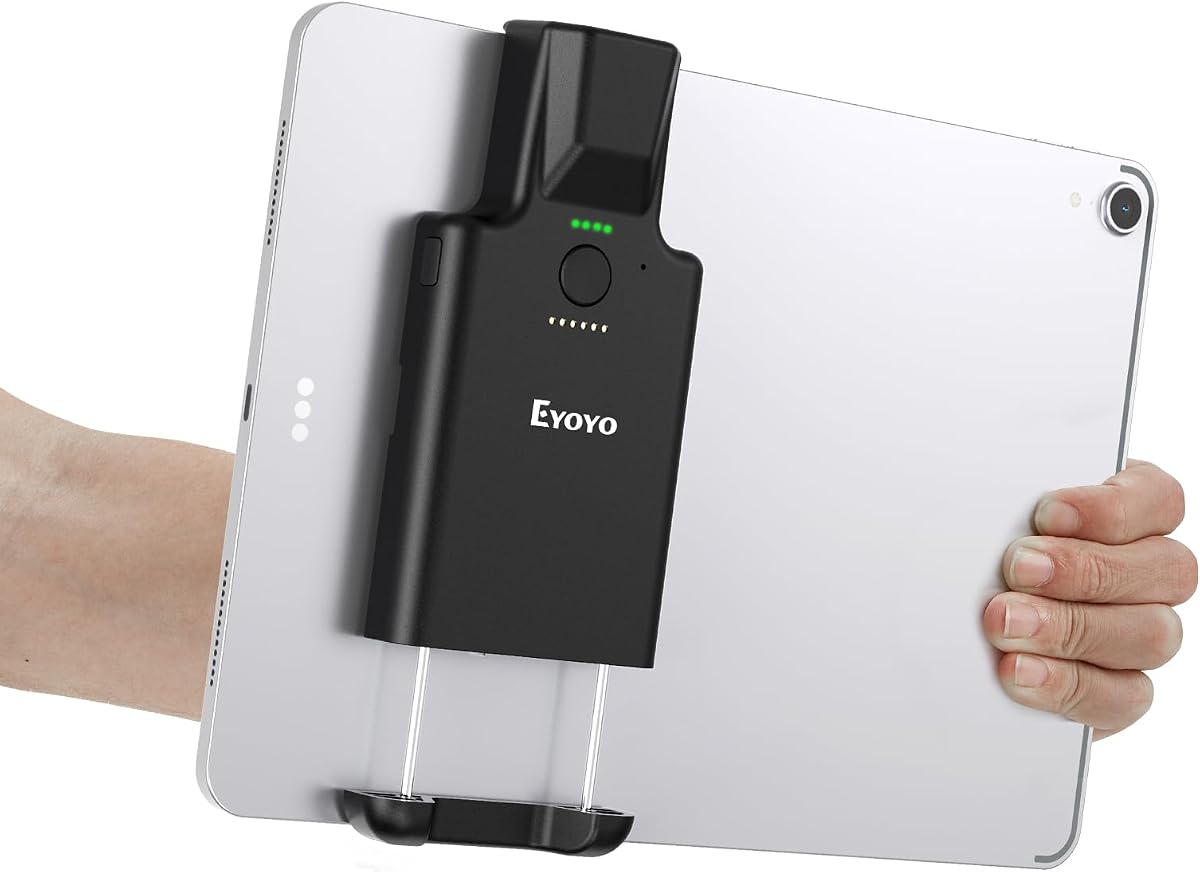
This Eyoyo model stands out as a top choice for iPad users needing a reliable and versatile barcode scanner. With a high rating from users it delivers consistent performance across various scanning tasks in retail or inventory settings.
Pros
Long lasting battery life
Fits tablets securely
Reads damaged codes well
Comfortable ergonomic design
Strong Bluetooth connection
Cons
No 2.4G wireless option
Slightly heavier than mini models
We may earn a commission when you buy through this link, at no additional cost to you.
Its advanced 2D CMOS imaging technology allows it to read both 1D and 2D barcodes including QR codes and PDF417 even when they are printed on screens or damaged surfaces. The retractable clip fits many iPad sizes ensuring a secure grip while scanning without dropping your device.
While it lacks a 2.4G wireless mode the Bluetooth and USB wired connections provide ample flexibility for most users. The battery life is exceptional offering up to thirty days of use on a single charge which minimizes downtime during busy shifts.
For anyone managing inventory with an iPad this scanner offers the best balance of features ease of use and durability. It is highly recommended for retail stores libraries or small businesses needing robust mobile scanning solutions.
Secure Tablet Compatibility
The retractable clip adjusts to fit various tablet sizes ensuring your iPad stays steady during fast scanning operations.
Superior Image Technology
Advanced CMOS sensors capture difficult barcodes on screens or low contrast labels with high accuracy.
This affordable scanner provides excellent value for iPad users who need to read both 1D and 2D barcodes without spending a premium. It supports a wide range of code types including QR and PDF417 which is rare in budget models.
Pros
Affordable price point
Reads QR and PDF417 codes
Three connection options
Long battery life
Offline storage capability
Cons
Average build quality
Range may vary by environment
We may earn a commission when you buy through this link, at no additional cost to you.
It offers three connection modes including Bluetooth USB and 2.4G wireless giving you flexibility to choose what works best with your setup. The internal offline storage can hold up to 130000 codes allowing you to scan and store data when disconnected.
Some users may find the build quality less robust compared to higher end options but it holds up well for light to moderate use. The battery life is strong enough for daily tasks without frequent charging interruptions.
Budget conscious buyers looking for versatile scanning capabilities will find this model meets their needs effectively. It is a great entry level option for small businesses or individuals testing mobile inventory workflows.
Wide Code Support
Supports both 1D barcodes and 2D QR codes including PDF417 and Data Matrix for diverse applications.
Offline Storage Feature
Stores thousands of codes internally so you can continue scanning even without immediate connection to your iPad.
For users who need maximum range and durability this Inateck scanner is a premium choice for iPad integration. It delivers a strong connection over long distances which is ideal for large warehouses or expansive retail spaces.
Pros
Exceptional wireless range
Very long standby time
Durable rugged design
Easy pairing process
Reliable performance
Cons
Higher price point
Only 1D barcode support
We may earn a commission when you buy through this link, at no additional cost to you.
The battery life is impressive offering up to 180 days of standby time after a full charge. This minimizes downtime and ensures the device is ready whenever you need it without frequent recharging cycles.
While it only supports 1D barcodes its reliability and build quality make up for this limitation. It can read blurry or broken barcodes effectively even in poor lighting conditions which ensures accuracy during inventory counts.
If you work in large environments or need a scanner that can withstand drops this model is worth the investment. It provides peace of mind and consistent performance for professional use cases.
Extended Wireless Range
Connects up to 115 feet away from your device allowing freedom of movement in large spaces.
Extreme Durability
Rugged design withstands repeated drops from 6 feet making it suitable for tough environments.
This NETUM scanner is designed for users who need flexibility and robust barcode recognition. It supports multiple connection types and can read codes from screens or paper which adds versatility to your workflow.
Pros
Works with worn barcodes
Storage mode for offline use
Three scanning modes available
Wide OS compatibility
Programmable configurations
Cons
Not compatible with some POS
Setup requires scanning config barcodes
We may earn a commission when you buy through this link, at no additional cost to you.
The high resolution CCD sensor handles worn or damaged barcodes effectively ensuring you can scan items that might otherwise be rejected. With storage mode you can save up to 100000 barcodes when out of range and upload them later.
Configuration options allow you to customize prefixes and suffixes or disable buzzers for quiet environments. However the setup process involves scanning specific barcodes in the manual which may be slightly complex for some users.
It is a solid choice for small businesses or personal use where adaptability is key. The balance of features and performance makes it a trustworthy option for daily inventory tasks.
Screen and Paper Scanning
Capable of reading barcodes from computer monitors or mobile screens without needing printed labels.
Offline Data Storage
Stores codes internally so you can continue working in remote areas without connectivity.
This mini scanner is perfect for users who prioritize portability and lightweight design. Weighing only 35 grams it fits easily in a pocket and reduces hand fatigue during extended scanning sessions.
Pros
Very light and portable
Long standby time
Vibration mode for quiet
Wide range support
Easy to carry
Cons
Only 1D codes supported
Battery life shorter than others
We may earn a commission when you buy through this link, at no additional cost to you.
It offers three connection modes and a wide transmission range making it adaptable for various environments. The vibration mode allows you to scan quietly in libraries or offices where noise could be disruptive.
It is important to note that it only supports printed 1D barcodes and cannot read QR codes or screen displays. The battery life is sufficient for daily use but may require more frequent charging compared to models with larger batteries.
Ideal for travelers or light retail use this device provides convenience and simplicity. It is a great option for those who need a secondary scanner or occasional scanning tool.
Pocket Size Portability
Small and light design fits in a pocket or purse for easy carrying anywhere.
Silent Vibration Mode
Switch to vibration to avoid disturbing others while still receiving scan confirmation.
This desktop model offers a hands free scanning experience that is perfect for checkout counters or fixed workstations. It reads barcodes from all directions which speeds up processing times for customers.
Pros
Hands free operation
Reads phone screens
Auto wake feature
Anti-slip stable base
Easy plug and play
Cons
Not portable
Requires desk space
We may earn a commission when you buy through this link, at no additional cost to you.
It supports 1D and 2D codes including QR codes from phone screens which is essential for modern retail transactions. The smart sensing mode detects items near the window and activates automatically reducing the need for triggers.
Because it is a desktop device it is not portable and requires a stable surface and USB connection. It works best in environments where items are placed on a counter rather than moved around frequently.
For businesses needing efficient checkout solutions this scanner simplifies the process significantly. It is easy to use and requires no training for staff which improves overall operational efficiency.
Hands Free Convenience
Place items on the scanner to read codes without holding a handheld device.
Screen Code Support
Reads digital barcodes from customer smartphones for contactless payment or entry.
This scanner comes with a dock that acts as both a charging station and data receiver simplifying your workflow. It reads 1D and 2D codes efficiently and is designed for comfortable all day use.
Pros
Dock for charging and data
Pocket sized design
Reads damaged codes
Silent operation mode
Comfortable ergonomic grip
Cons
Average battery life
Basic design materials
We may earn a commission when you buy through this link, at no additional cost to you.
The vibration mode ensures quiet operation which is helpful in libraries or retail stores where noise is a concern. Its compact size makes it easy to carry around while scanning inventory in different locations.
While the battery life is adequate for most shifts it may require daily charging during heavy use. The dock eliminates cable clutter making it convenient to store the device securely when not in use.
Ideal for mobile workers this model combines portability with practical features like the dock and vibration mode. It provides a balanced solution for small businesses needing reliable scanning capabilities.
Integrated Docking Station
Dock serves as both a fast charger and data receiver to keep your device organized.
Silent Vibration Alert
Use vibration instead of sound to avoid disturbing customers or colleagues while scanning.
This model features an upgraded wireless chip for stable Bluetooth pairing which ensures consistent performance during long shifts. The dual button design prevents accidental power off allowing you to focus on scanning without interruptions.
Pros
Stable Bluetooth connection
Avoids accidental power off
Drop protection design
Silent vibration mode
Ergonomic lightweight design
Cons
Average battery capacity
White accents show dirt
We may earn a commission when you buy through this link, at no additional cost to you.
It is built to withstand drops of up to two meters making it suitable for warehouse or retail environments where devices may be bumped. The CMOS sensor reads codes from paper or screens accurately even if they are damaged.
Battery life is sufficient for daily use but may require charging more often than models with larger batteries. The silent vibration mode is useful for quiet environments ensuring you can work without noise.
For users needing reliability and durability this scanner offers excellent performance. Its thoughtful design features make it a strong candidate for professional use cases requiring consistent operation.
Stable Connection Technology
Upgraded wireless chip ensures stable pairing with fewer dropouts during active use.
Accidental Power Protection
Dual button control prevents unintentional power offs during intense scanning work.
This scanner offers dual wireless options allowing you to choose between Bluetooth and 2.4G modes for flexibility. It supports a wide range of barcode types including PDF417 and Data Matrix which covers most inventory needs.
Pros
Dual wireless options
Supports QR codes
Offline storage included
Plug and play setup
Lightweight for daily use
Cons
Lower user rating
May need switch toggle
We may earn a commission when you buy through this link, at no additional cost to you.
With offline storage for up to 50000 codes you can continue working even without a direct connection to your iPad. The ergonomic design keeps it light at 110 grams reducing hand fatigue during extended sessions.
Users should note that it requires a switch to be turned on before scanning which can be an extra step. The rating suggests mixed experiences but many users find it reliable for basic scanning tasks.
It is a versatile tool for small businesses or personal inventory management. The combination of wireless options and code support makes it a useful accessory for iPad users.
Dual Wireless Modes
Switch between Bluetooth and 2.4G to find the most stable connection for your device.
Offline Storage Capacity
Store thousands of codes internally to keep scanning when out of wireless range.
This affordable scanner delivers solid performance with a high resolution CMOS sensor that reads codes accurately. The built-in auxiliary light helps you scan in low light environments which is useful for storage areas.
Pros
Affordable price
High resolution sensor
Waterproof rating
Good battery life
Works in dark areas
Cons
No 2.4G option
Basic build quality
We may earn a commission when you buy through this link, at no additional cost to you.
It supports 1D and 2D codes and connects via Bluetooth or USB wired modes for flexibility. The IP54 rating provides dust and water resistance making it durable for various conditions.
Battery life is strong allowing for extended use without frequent charging. While the build is basic it holds up well for regular scanning tasks and offers good value for the price.
For budget conscious buyers needing reliable scanning this model is a strong choice. It provides essential features and performance without compromising on essential functionality for daily tasks.
High Resolution Imaging
800×600 CMOS sensor captures detailed images of barcodes for accurate reading.
Low Light Capability
Built-in auxiliary light allows scanning in dark or poorly lit areas easily.
We may earn a commission when you buy through this link, at no additional cost to you.
Buying Guide – How to Choose the Best Barcode Scanner for iPad
Choosing the right barcode scanner involves considering connectivity scanning capabilities and build quality to match your workflow.
Connectivity Options
Most modern scanners offer Bluetooth which is essential for wireless iPad use. Some models also include 2.4G wireless or USB wired connections for added flexibility.
Look for Bluetooth compatibility to ensure easy pairing with your iPad without needing extra hubs or drivers.
Barcode Type Support
Determine if you need to scan 1D barcodes like UPC or 2D codes like QR and PDF417. 2D support is crucial for reading digital codes from screens.
Ensure the scanner supports the specific barcode types you encounter regularly to avoid compatibility issues.
Battery Life
Battery capacity varies significantly between models affecting how often you need to recharge. Look for at least 1200mAh for decent daily use.
Longer battery life reduces downtime and ensures you can complete full shifts without interruptions.
Portability and Design
Consider the weight and size especially if you carry the scanner throughout the day. Lightweight models reduce hand fatigue during extended use.
Ergonomic grips and pocket size designs make scanning more comfortable and convenient for mobile tasks.
Durability Features
For rugged environments check for drop protection and dust or water resistance ratings. These features ensure longevity in demanding settings.
A durable build protects your investment and reduces maintenance costs over time.
Offline Storage
Some scanners allow storing codes internally when connection is lost ensuring data is not lost. This is useful for large spaces with weak signals.
Look for models with offline storage if you work in areas with inconsistent connectivity.
Quiet Operation
In libraries or offices noise can be disruptive. Check if the scanner offers a silent or vibration mode instead of a buzzer.
Vibration alerts allow you to confirm scans without disturbing others around you.
Software and App Compatibility
Most scanners work as keyboards with any iPad app but verify compatibility with your specific inventory software. Plug and play support simplifies setup.
Ensure the device pairs easily with your apps to avoid configuration headaches.
How to Use and Care for Your Barcode Scanner for iPad
To begin pairing the scanner with your iPad ensure Bluetooth is enabled on both devices. Follow the manufacturer instructions to scan any setup barcodes required for configuration.
Keep the lens clean by wiping it gently with a soft dry cloth to maintain scanning accuracy. Avoid exposing the device to excessive moisture or dust beyond its rated protection.
Charge the scanner fully before first use and monitor battery levels to prevent unexpected shutdowns. Store it in a cool dry place when not in use to prolong battery life.
Frequently Asked Questions
Do barcode scanners for iPad work with all inventory apps?
Most barcode scanners act as HID keyboard inputs which means they work with any app that accepts text input. Verify that your specific software allows external input to ensure compatibility.
Can these scanners read barcodes from phone screens?
Yes modern imaging scanners can read codes from phone screens if they support 2D or QR scanning. CCD scanners may struggle with screen refresh rates so choose a scanner designed for screen reading.
Is a charging dock necessary for portable scanners?
A dock is optional but convenient as it provides a dedicated spot to charge and receive data. You can still charge via USB cable directly if a dock is not included.
How do I know if a scanner supports my iPad model?
Check the product description for iOS or iPad compatibility statements. Most Bluetooth scanners work with iPadOS versions that support external Bluetooth peripherals.
What is the typical battery life for these scanners?
Battery life ranges from 8 hours to 30 days depending on usage and model. Continuous scanning drains the battery faster so consider your daily volume when choosing capacity.
Are these scanners waterproof for outdoor use?
Some models have dust and water resistance ratings like IP54 but they are not fully waterproof. Avoid submerging them or using them in heavy rain to prevent damage.
How do I reset the scanner if connection fails?
Resetting typically involves scanning a reset barcode found in the manual. Re pair the scanner with your iPad after resetting to clear connection issues.
Can I use the scanner without Bluetooth enabled?
If the model supports USB wired mode you can use it without Bluetooth but you need a physical connection. 2.4G wireless models use a USB receiver instead of Bluetooth pairing.
Final Thoughts on Choosing the Best Barcode Scanner for iPad
Our top picks highlight the best overall value and features for most users including the Eyoyo Portable Bluetooth scanner with its robust design and long battery life.
Consider your specific needs such as 2D code support wireless range and budget when narrowing down choices to ensure the device fits your workflow perfectly.
Always check current listings and availability before purchasing since prices and models may change over time.