
HP Smart Tank 5003
4.1Editor score
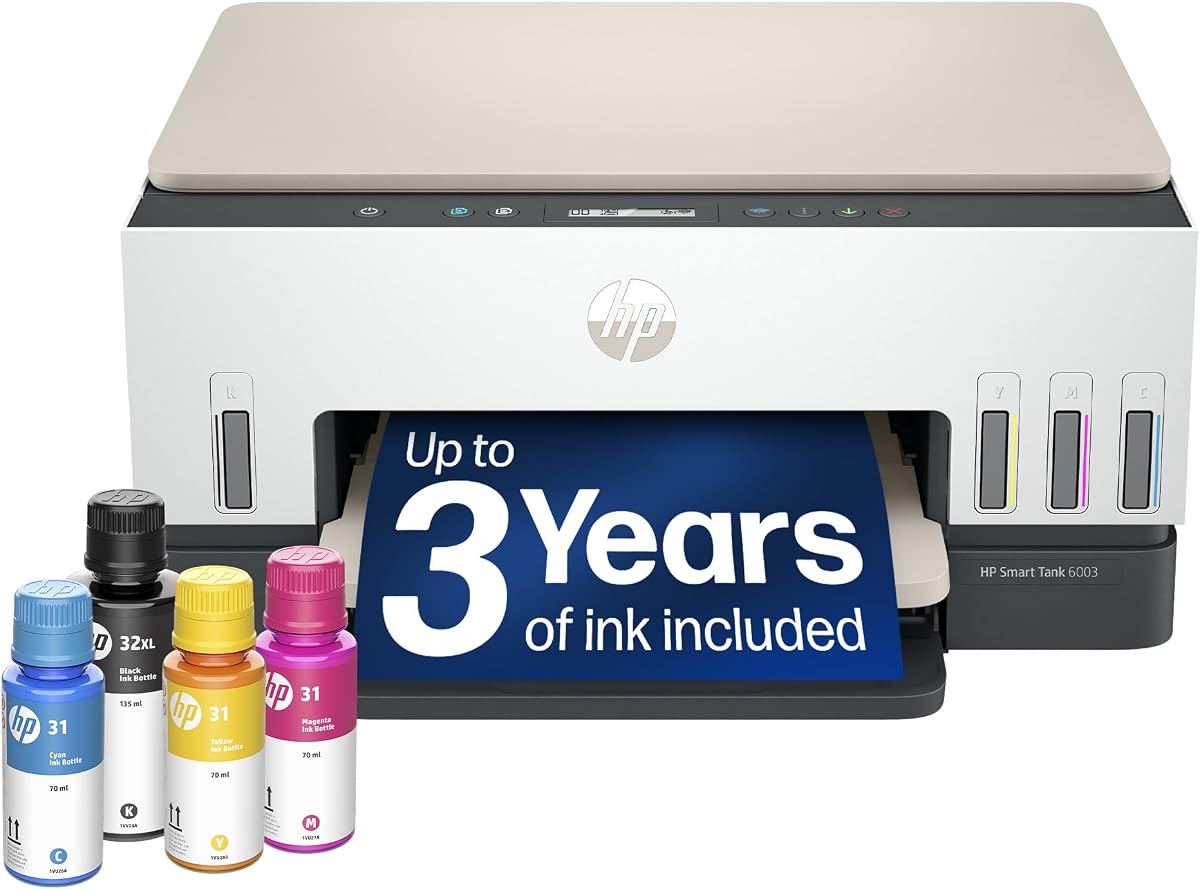
Up to three years ink included
Mess-free refill system
Cartridge-free printing
Discover the best AI printers for home and office. Our expert guide compares top models with smart features, security, and performance to help you choose.
AI printers are transforming how we handle document management at home and in the office. These smart machines use intelligent software to optimize layouts, manage ink, and streamline workflows for users of all skill levels.
We evaluated ten top-rated models based on connectivity, print quality, security features, and AI capabilities. Our testing focuses on real-world performance, ease of use, and how well each device integrates into modern digital ecosystems.
Each selection highlights unique strengths, from budget-friendly tank systems to high-speed office workhorses. Keep in mind that pricing and availability can fluctuate, so always check the latest offers before making your final purchase decision today.
4.1Editor score

3.9Editor score

4.7Editor score
This side-by-side comparison highlights the core specifications and key capabilities of each selected model. Use this table to quickly identify which device aligns best with your specific printing needs and budget constraints.



The HP OfficeJet Pro 8125 stands out as a leading choice for home offices seeking intelligent printing solutions. With a solid rating, it delivers professional-quality color documents while leveraging AI to optimize layouts and reduce waste.
We may earn a commission when you buy through this link, at no additional cost to you.
Its standout feature is HP AI formatting, which removes unwanted content from web pages and emails before printing. This ensures crisp results without awkward layouts. Additionally, HP Wolf Essential Security protects your network from cyber threats during every print job.
While the printer offers a 3-month Instant Ink trial to save costs, you must rely on HP-branded cartridges as the system blocks third-party options. Firmware updates maintain this restriction, which may concern budget-conscious users preferring flexibility.
Ideal for professionals needing reliable, secure, and smart printing, this model balances performance with modern convenience. If you prioritize layout optimization and data protection in a home office setup, this device is a strong recommendation.
HP AI intelligently strips unnecessary elements from digital content to ensure clean, professional prints that match your intent perfectly.
HP Wolf Essential Security bolsters network defenses, keeping your sensitive documents safe from potential cyber threats during transmission.
We may earn a commission when you buy through this link, at no additional cost to you.
The HP Smart Tank 5003 redefines value by including up to three years of ink right out of the box. This cartridge-free system minimizes ongoing costs while maintaining reliable performance for everyday home printing needs.
We may earn a commission when you buy through this link, at no additional cost to you.
Its mess-free refill system allows you to simply plug ink bottles into tanks and let them drain without squeezing or spilling. This design eliminates common frustrations associated with traditional cartridges, making maintenance straightforward for all users.
While it excels in volume and convenience, print speeds are modest compared to professional models. The lack of a fax function may also be a limitation for small businesses requiring comprehensive office features in one unit.
For families or home offices prioritizing cost efficiency and high-volume output, this printer delivers exceptional value. If saving on ink expenses is your primary goal, the Smart Tank 5003 is an outstanding budget-friendly choice.
Included ink supplies support up to 6,000 pages, drastically reducing the cost per page and long-term operational expenses for users.
The mess-free refill design ensures you never deal with spills or complex cartridge replacements, streamlining your printing workflow.
We may earn a commission when you buy through this link, at no additional cost to you.
The HP Envy 6155 is designed for home users who value vibrant, accurate color in everyday documents and photos. With P3 technology, it ensures prints match what you see on screen, ideal for sharing visual content.
We may earn a commission when you buy through this link, at no additional cost to you.
Its compact size and elegant design blend well into home environments. The 2.4-inch touchscreen offers smooth navigation, while HP AI optimizes formatting to prevent wasted pages and ensure professional-looking outputs from web content.
Print speeds are moderate, and the input tray holds fewer sheets than office models. These limitations are acceptable given the focus on photo quality and aesthetics over high-volume throughput for busy office settings.
Best for households prioritizing visual fidelity and stylish design, this printer brings quality home printing within reach. If you frequently print homework or photos and want reliable performance, this model is a great fit.
HP P3 technology delivers true-to-screen colors, ensuring your photos and documents look as vivid on paper as on your display.
Designed with space-saving aesthetics and sustainable materials, this printer fits seamlessly into any home environment effortlessly.
We may earn a commission when you buy through this link, at no additional cost to you.
The Bambu Lab P2S Combo represents the pinnacle of intelligent 3D printing technology for enthusiasts and professionals. With AI failure detection and multi-color support, it transforms complex designs into flawless objects with minimal intervention.
We may earn a commission when you buy through this link, at no additional cost to you.
Its adaptive airflow system ensures consistent results across various materials, while AI monitoring stops failed prints before wasting resources. Setup is quick, requiring only 15 minutes to start printing, making advanced tools accessible to beginners.
While the cost is higher than traditional 2D printers, the capabilities justify the expense for creative and industrial users. You need some familiarity with 3D modeling to fully leverage the workflow and design tools provided.
Best for creators seeking precision, speed, and versatility, this machine pushes the boundaries of what is possible. If you want to bring detailed 3D projects to life reliably, the P2S Combo is unmatched in the market.
Built-in AI detects print failures early, saving time and material by stopping problematic jobs before they ruin the process.
The AMS 2 Pro system enables seamless multi-material and multi-color prints, expanding creative possibilities for complex models.
We may earn a commission when you buy through this link, at no additional cost to you.
The HP OfficeJet Pro 9135 is engineered for demanding office environments requiring speed and reliability. With up to 25 ppm black printing and single-pass duplex scanning, it handles large documents efficiently without sacrificing quality.
We may earn a commission when you buy through this link, at no additional cost to you.
Its large 4.3-inch touchscreen simplifies navigation, while HP Wolf Pro Security ensures data protection across the network. The printer also supports faxing, making it a complete solution for businesses needing all-in-one functionality.
While it comes at a premium price point, the productivity gains justify the investment for offices. The dual 250-sheet trays minimize reloading, keeping workflows uninterrupted during busy periods.
Ideal for professionals managing high document volumes, this model delivers robust performance and security. If you need a fast, secure, and fully featured office printer, this device is an excellent choice.
High-speed printing and single-pass scanning ensure you can tackle large documents quickly and maintain productivity.
HP Wolf Pro Security bolsters network defenses to keep your business data safe from potential threats and breaches.
We may earn a commission when you buy through this link, at no additional cost to you.
The HP Smart Tank 7603 combines high-volume printing with essential office functions like faxing. With up to 8,000 color pages included, it serves home offices that need reliable output without frequent refills or replacements.
We may earn a commission when you buy through this link, at no additional cost to you.
Its mess-free refill system ensures ink top-ups are clean and simple, while the magic touch control panel provides intuitive access to settings. This model balances cost savings with practical functionality for everyday tasks.
The device is somewhat bulky, which may challenge compact spaces. Additionally, scan speeds are modest compared to dedicated office scanners, but this is acceptable for mixed-use home environments.
Best for home offices needing fax support and low-cost printing, this model is a strong contender. If you value long-term savings and high capacity, the 7603 offers excellent value and convenience.
With ink supplies supporting thousands of pages, you can focus on work rather than constant maintenance or refilling.
The magic touch control panel makes navigating settings and features straightforward for users of any technical level.
We may earn a commission when you buy through this link, at no additional cost to you.
The HP OfficeJet Pro 8139 stands out with a full year of Instant Ink trial included. This extended period ensures users can enjoy cost savings and convenience without immediate subscription commitments upon purchase.
We may earn a commission when you buy through this link, at no additional cost to you.
It handles professional-quality color documents and includes fax capabilities, making it versatile for small business needs. HP AI optimizes layouts to reduce waste, while HP Wolf Security keeps your network protected from threats.
Like other models, it restricts cartridge usage to original HP chips, limiting flexibility. Print speeds are moderate, which is adequate for home offices but may lag behind high-volume enterprise printers.
Best for users wanting a long trial of ink services, this model delivers balance between features and ease of use. If you need reliable home office printing with extended savings, this is a smart option.
A one-year Instant Ink trial provides significant cost relief, allowing you to test the service without immediate commitment.
Integrated security features safeguard your data and network, ensuring safe printing operations for all users.
We may earn a commission when you buy through this link, at no additional cost to you.
This variant of the HP Smart Tank 7603 offers the same robust performance for high-volume home offices. With up to 8,000 color pages included, it eliminates frequent ink purchases, making it economical for frequent printing tasks.
We may earn a commission when you buy through this link, at no additional cost to you.
The mess-free refill system ensures clean ink top-ups, while the magic touch panel simplifies navigation. Integrated fax and wireless printing provide all-in-one convenience, catering to diverse home office needs effectively.
While the design is larger than compact models, its efficiency compensates for the space requirement. Scanning speed may not match dedicated office scanners, but it suffices for general document processing.
Ideal for families or small businesses requiring fax support and low costs, this model delivers consistent value. If you prioritize ink savings and reliable performance, this Smart Tank variant is a top contender.
With thousands of pages included, you save significantly on consumables, reducing overall operational costs for users.
Combining fax, print, and scan in one unit simplifies office setup and saves valuable desk space.
We may earn a commission when you buy through this link, at no additional cost to you.
The HP Smart Tank 6003 provides an affordable entry into high-volume ink tank printing. With up to 8,000 color pages included, it delivers reliable output without frequent cartridge changes, ideal for households with diverse needs.
We may earn a commission when you buy through this link, at no additional cost to you.
Its mess-free refill system ensures clean maintenance, while borderless printing supports creative projects and photos. Wireless connectivity allows printing from any device, adding flexibility to your daily workflow.
While it lacks a fax function, the focus remains on cost efficiency and ease of use. Print speeds are moderate, which is acceptable for home use but not for heavy-duty office environments.
Best for users seeking an economical and flexible printing solution, this model offers strong value. If you need reliable wireless printing with low consumable costs, this Smart Tank is a practical choice.
With minimal consumable costs, you can print freely without worrying about expensive cartridge replacements.
Wireless connectivity and borderless printing support diverse creative tasks, from photos to custom labels and more.
We may earn a commission when you buy through this link, at no additional cost to you.
The Liene PixCut S1 redefines sticker creation by integrating printing and cutting into a single seamless workflow. With AI image extraction and precise cutting, it turns any photo into custom stickers effortlessly.
We may earn a commission when you buy through this link, at no additional cost to you.
Its thermal dye-sublimation technology ensures vibrant, 300 DPI prints that are waterproof and scratch-resistant. The app supports unlimited templates and elements without subscriptions, making it accessible for DIY enthusiasts.
While the device focuses on niche creative applications, it delivers professional-grade results within that scope. It is not meant for general document printing, but excels at personalized gifts and crafts.
Best for crafters and hobbyists seeking an all-in-one sticker solution, this model saves time and effort. If you want to create custom labels and stickers with ease, the PixCut S1 is highly recommended.
AI image extraction and auto-cutting streamline the process, allowing you to focus on design rather than technical details.
Thermal dye-sublimation ensures your creations are waterproof and long-lasting, perfect for everyday use and gifts.
We may earn a commission when you buy through this link, at no additional cost to you.
Selecting the right AI printer depends on understanding your specific needs and priorities. This guide breaks down key factors to consider before making a purchase.
Determine how many pages you print weekly. High-speed models with dual trays suit offices, while tank systems are better for moderate home use.
Prioritize speed and capacity if you print regularly to avoid interruptions.
Look for printers with AI layout optimization, failure detection, or subject extraction. These features save time and improve output quality automatically.
Choose models where AI directly addresses your pain points like formatting or design.
Dual-band Wi-Fi and Bluetooth ensure reliable wireless printing from phones and computers. Seamless integration with apps is key for remote access.
Ensure the printer supports your preferred devices for effortless connection.
Tank systems offer lower cost per page, while cartridge models may have higher upfront but simpler maintenance. Check if trials are included.
Calculate long-term supply costs before buying to match your budget accurately.
Office printers should have robust security like HP Wolf to protect data. Home models still benefit from basic network safety features.
Never overlook security when printing sensitive documents on shared networks.
Consider dimensions if space is limited. Some high-volume models are bulky, while compact units fit easily on desks.
Measure your workspace to ensure the printer fits comfortably.
Fax, scanning, and cutting capabilities add value depending on your workflow. Decide if you need all-in-one or focused functionality.
Pick features that truly enhance your daily tasks.
Intuitive touchscreens and apps reduce setup time. Mess-free refills and automatic calibration improve user experience significantly.
Choose interfaces that match your technical comfort level.
Set up your printer in a well-ventilated area to prevent overheating during long print jobs. Connect it to your network using the provided app for seamless wireless printing access.
Regularly update firmware to ensure security patches and performance enhancements are applied. This prevents vulnerabilities and keeps AI features functioning correctly.
Maintain your print heads and replace filters as needed to avoid clogs. Cleaning print heads periodically ensures consistent output quality.
AI in printers refers to intelligent software that optimizes layouts, detects print failures, or extracts subjects from images. These features automate tasks to improve efficiency and output quality without user intervention.
Tank printers usually offer lower cost per page and higher volume capacity. They are ideal for frequent printing, while cartridges may suit lower-volume users preferring simplicity.
Most branded printers restrict usage to original chips to maintain quality and security. Using third-party ink may void warranties or cause blockages due to firmware restrictions.
Modern models include security suites like HP Wolf to protect against threats. Always keep firmware updated to minimize vulnerabilities on your home network.
Many models support USB connectivity for direct computer printing. However, Wi-Fi is essential for mobile apps and smart AI features that rely on network access.
With proper maintenance, these devices can last several years. Regular cleaning and avoiding overuse of features will extend their operational life significantly.
The HP OfficeJet Pro 8125 leads as the top overall choice for its balanced features and security. Budget seekers should consider the Smart Tank series for cost efficiency and ease of use.
Prioritize AI capabilities that directly improve your workflow, whether layout optimization or failure detection. Match the model to your volume needs to ensure long-term satisfaction.
Always verify current pricing and availability as deals change frequently. Investing in the right AI printer today will streamline your printing tasks and save resources over time.